on board HONDA ODYSSEY 2016 RC1-RC2 / 5.G Quick Guide
[x] Cancel search | Manufacturer: HONDA, Model Year: 2016, Model line: ODYSSEY, Model: HONDA ODYSSEY 2016 RC1-RC2 / 5.GPages: 80, PDF Size: 16.28 MB
Page 43 of 80
78 || 79
INDEX
VOICE COMMAND
INDEX
CUSTOMER
INFORMATION
SPECIFICATIONS
MAINTENANCE
HANDLING THE UNEXPECTED
DRIVING
NAVIGATION
TABLE OF CONTENTS
VISUAL INDEX
SAFETY
INFORMATION
INSTRUMENT PANEL
VEHICLE
CONTROLS
AUDIO AND
CONNECTIVITY
BLUETOOTH®
HANDSFREELINK®
HONDALINK®
Learn how to operate the vehicle’s hands-free calling system.
Basic HFL Operation
Make and receive phone calls using the vehicle’s audio system, without handling
your phone. Visit handsfreelink.honda.com (U.S.) or www.handsfreelink.ca (Canada)
to check phone compatibility.
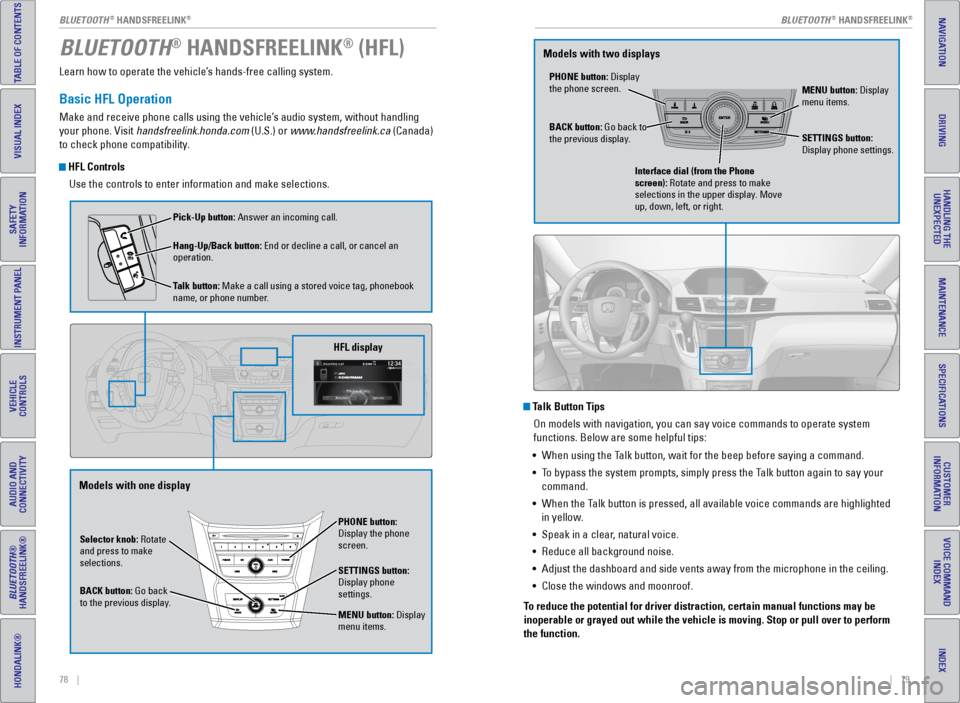
HFL Controls
Use the controls to enter information and make selections.
BLUETOOTH® HANDSFREELINK® (HFL)
Talk Button TipsOn models with navigation, you can say voice commands to operate system
functions. Below are some helpful tips:
• When using the Talk button, wait for the beep before saying a command.
• To bypass the system prompts, simply press the Talk button again to say your
command.
• When the Talk button is pressed, all available voice commands are highlighted
in yellow.
• Speak in a clear, natural voice.
• Reduce all background noise.
• Adjust the dashboard and side vents away from the microphone in the ceil\
ing.
• Close the windows and moonroof.
To reduce the potential for driver distraction, certain manual functions \
may be
inoperable or grayed out while the vehicle is moving. Stop or pull over \
to perform
the function.
Selector knob: Rotate
and press to make
selections.
BACK button: Go back
to the previous display. PHONE button:
Display the phone
screen.
SETTINGS button:
Display phone
settings.
MENU button: Display
menu items.
HFL display
Pick-Up button: Answer an incoming call.
Hang-Up/Back button: End or decline a call, or cancel an
operation.
Talk button: Make a call using a stored voice tag, phonebook
name, or phone number.
Models with one display
PHONE button: Display
the phone screen.
MENU button: Display
menu items.
BACK button: Go back to
the previous display. SETTINGS button:
Display phone settings.
Interface dial (from the Phone
screen): Rotate and press to make
selections in the upper display. Move
up, down, left, or right.
Models with two displays
BLUETOOTH® HANDSFREELINK®BLUETOOTH® HANDSFREELINK®
Page 46 of 80
84 || 85
NAVIGATION
NAVIGATION
INDEX
VOICE COMMAND
INDEX
CUSTOMER
INFORMATION
SPECIFICATIONS
MAINTENANCE
HANDLING THE UNEXPECTED
DRIVING
NAVIGATION
TABLE OF CONTENTS
VISUAL INDEX
SAFETY
INFORMATION
INSTRUMENT PANEL
VEHICLE
CONTROLS
AUDIO AND
CONNECTIVITY
BLUETOOTH®
HANDSFREELINK®
HONDALINK®
Learn how to enter a destination and operate the navigation system.
Basic Navigation Operation
A real-time navigation system uses GPS and a map database to show your current
location and help guide you to a desired destination. You can operate the system
using voice commands or the system controls.
To reduce the potential for driver distraction, certain manual functions \
may be
inoperable or grayed out while the vehicle is moving. Voice commands are always
available.
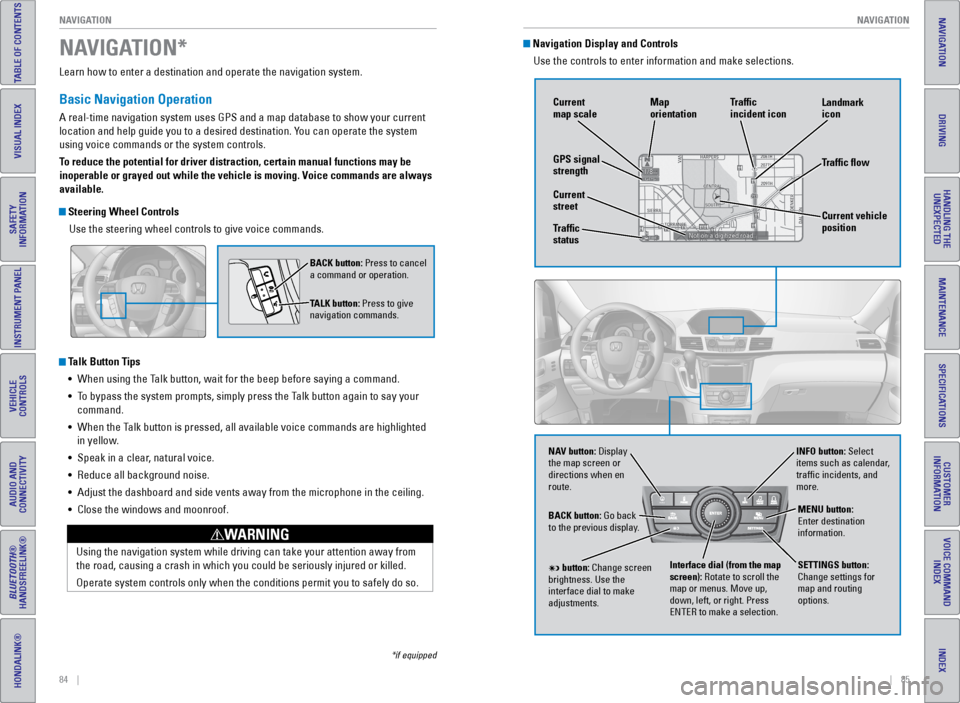
Steering Wheel Controls
Use the steering wheel controls to give voice commands.
Talk Button Tips• When using the Talk button, wait for the beep before saying a command.
• To bypass the system prompts, simply press the Talk button again to say your
command.
• When the Talk button is pressed, all available voice commands are highlighted
in yellow.
• Speak in a clear, natural voice.
• Reduce all background noise.
• Adjust the dashboard and side vents away from the microphone in the ceil\
ing.
• Close the windows and moonroof.
Using the navigation system while driving can take your attention away f\
rom
the road, causing a crash in which you could be seriously injured or kil\
led.
Operate system controls only when the conditions permit you to safely do\
so.
WARNING
NAVIGATION*
BACK button: Press to cancel
a command or operation.
TALK button: Press to give
navigation commands.
*if equipped
Navigation Display and Controls Use the controls to enter information and make selections.
NAV
NAV button: Display
the map screen or
directions when en
route. INFO button: Select
items such as calendar,
traffic incidents, and
more.
BACK button: Go back
to the previous display.
SETTINGS button:
Change settings for
map and routing
options.
MENU button:
Enter destination
information.
button: Change screen
brightness. Use the
interface dial to make
adjustments. Interface dial (from the map
screen): Rotate to scroll the
map or menus. Move up,
down, left, or right. Press
ENTER to make a selection.
GPS signal
strength Traffic
incident icon
Traffic flow
Current
map scale
Current vehicle
position
Map
orientation
Current
street
Traffic
status Landmark
icon
Page 49 of 80
90 || 91
DRIVING
DRIVING
INDEX
VOICE COMMAND
INDEX
CUSTOMER
INFORMATION
SPECIFICATIONS
MAINTENANCE
HANDLING THE UNEXPECTED
DRIVING
NAVIGATION
TABLE OF CONTENTS
VISUAL INDEX
SAFETY
INFORMATION
INSTRUMENT PANEL
VEHICLE
CONTROLS
AUDIO AND
CONNECTIVITY
BLUETOOTH®
HANDSFREELINK®
HONDALINK®
Learn about preparation for driving, as well as other features.
Before Driving
Check the following items before you begin driving.
Exterior Checks
• Make sure there are no obstructions on the windows, door mirrors, exterior
lights, or other parts of the vehicle.
• Remove any frost, snow, or ice.
• Make sure the hood is securely closed.
• Heat from the engine and exhaust can ignite flammable materials left u\
nder
the hood, causing a fire. If you’ve parked your vehicle for an exte\
nded period,
inspect and remove any debris that may have collected, such as dried grass
and leaves that have fallen or have been carried in for use as a nest by\
a small
animal. Also check under the hood for leftover flammable materials aft\
er you or
someone else has performed maintenance on your vehicle.
• Make sure the tires are in good condition.
• Make sure there are no people or objects behind or around the vehicle.
Interior Checks
• Store or secure all items on board properly.
• Do not pile items higher than the seat height.
• Do not place anything in the front seat footwells. Make sure to secure t\
he floor
mats.
• If you have any animals on board, do not let them move freely around in \
the
vehicle.
• Securely close and lock all doors and the tailgate.
• Adjust your seating position, mirrors, and steering wheel properly.
• Make sure items placed on the floor behind the front seats cannot roll\
under the
seats.
• Everyone in the vehicle must fasten their seat belt.
• Make sure that the indicators in the instrument panel come on when you s\
tart
the vehicle, and go off soon after.
DRIVING
If the doors are frozen shut, use warm water around the door edges to me\
lt any
ice. Do not try to force them open, as this can damage the rubber trim a\
round the
doors. When done, wipe dry to avoid further freezing.
NOTICE
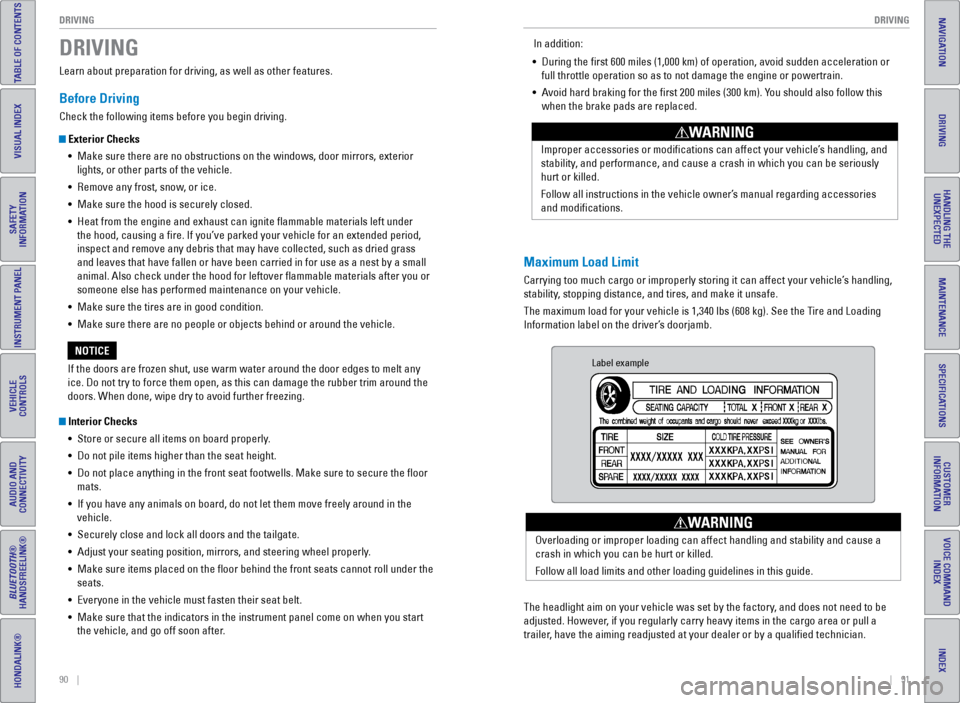
Maximum Load Limit
Carrying too much cargo or improperly storing it can affect your vehicle\
’s handling,
stability, stopping distance, and tires, and make it unsafe.
The maximum load for your vehicle is 1,340 lbs (608 kg). See the Tire and Loading
Information label on the driver’s doorjamb. Improper accessories or modifications can affect your vehicle’s handling, and
stability, and performance, and cause a crash in which you can be seriously
hurt or killed.
Follow all instructions in the vehicle owner’s manual regarding accessories
and modifications.
WARNING
In addition:
• During the first 600 miles (1,000 km) of operation, avoid sudden acc\
eleration or
full throttle operation so as to not damage the engine or powertrain.
• Avoid hard braking for the first 200 miles (300 km). You should also follow this
when the brake pads are replaced.
Label example
The headlight aim on your vehicle was set by the factory, and does not need to be
adjusted. However, if you regularly carry heavy items in the cargo area or pull a
trailer, have the aiming readjusted at your dealer or by a qualified technici\
an. Overloading or improper loading can affect handling and stability and ca\
use a
crash in which you can be hurt or killed.
Follow all load limits and other loading guidelines in this guide.
WARNING
Page 62 of 80
116 || 117
HANDLING THE UNEXPECTED
HANDLING THE UNEXPECTED
INDEX
VOICE COMMAND
INDEX
CUSTOMER
INFORMATION
SPECIFICATIONS
MAINTENANCE
HANDLING THE UNEXPECTED
DRIVING
NAVIGATION
TABLE OF CONTENTS
VISUAL INDEX
SAFETY
INFORMATION
INSTRUMENT PANEL
VEHICLE
CONTROLS
AUDIO AND
CONNECTIVITY
BLUETOOTH®
HANDSFREELINK®
HONDALINK®
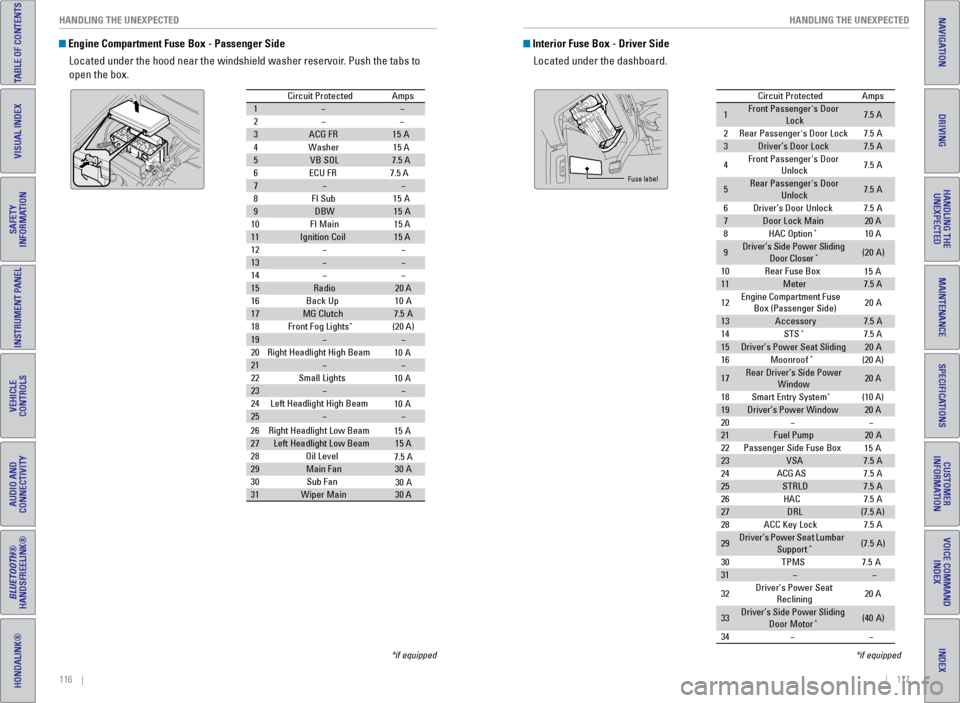
Engine Compartment Fuse Box - Passenger Side
Located under the hood near the windshield washer reservoir. Push the tabs to
open the box.
Circuit Protecte dAmps
1
2
3ACG FR15A
4W ashe
r15 A
5VB SO L7.5 A
6E CU FR 7.5 A
7
8F I Su
b15A
9DBW15A
10 FI Main 15 A
11Ignition Coil15 A
12
13
14
15Radio20 A
16 Back Up 10A
17MG Clutch7.5A
18 Front Fog Lights*(20 A)
19
20 Right Headlight High Beam
21
22 Small Lights
23
24 Left Headlight High Bea m
25
26Right Headlight Low Beam
27Left Headlight Low Beam15 A
28 Oil Level
29Main Fa n30A
30 Sub Fan
31Wiper Main30 A
10 A
10 A
10 A
15 A
7.5 A
30 A
*if equipped
Interior Fuse Box - Driver Side
Located under the dashboard.
Circuit Protecte dAmps
1Front Passenger's Door
Lock7.5 A
2Rear Passenger's Door Lock7.5A
3Driver’s Door Lock7.5A
4Front Passenger's Door
Unlock7. 5A
5Rear Passenger's Door
Unlock7. 5A
6Driver’s Door Unlock7.5A
7Door Lock Main20 A
8HAC Option*10 A
9Driver’s Side Power Sliding
Door Closer*(20A )
10 Rear Fuse Bo x
11Meter7.5 A
12 Engine
Compartment Fuse
Box (Passenger Side) 20
A
13Accessor y7.5A
14 STS*7.5 A
15Driver’s Power Seat Sliding20A
16 Moonroof*(20 A)
17Rear Driver’s Side Power
Window20 A
18 Smart Entry Syste m
*(10 A)
19Driver’s Power Windo w20 A
20
21Fuel Pump20 A
22 Passenger Side Fuse Bo x
23VSA7.5A
24 ACG AS
25STRLD7.5A
26 HAC
27DRL(7.5 A)
28 ACC Key Lock
29Driver’s Power Seat Lumbar
Suppor t*(7.5A)
30 TPM
S7.5A
31
32 Driver’s Power Seat
Reclining 20
A
33Driver’s Side Power Sliding
Door Moto r*(40A )
34
15 A
15 A
7. 5A
7. 5A
7. 5A
Fuse label
*if equipped
Page 66 of 80
124 || 125
MAINTENANCE
MAINTENANCE
INDEX
VOICE COMMAND
INDEX
CUSTOMER
INFORMATION
SPECIFICATIONS
MAINTENANCE
HANDLING THE UNEXPECTED
DRIVING
NAVIGATION
TABLE OF CONTENTS
VISUAL INDEX
SAFETY
INFORMATION
INSTRUMENT PANEL
VEHICLE
CONTROLS
AUDIO AND
CONNECTIVITY
BLUETOOTH®
HANDSFREELINK®
HONDALINK®
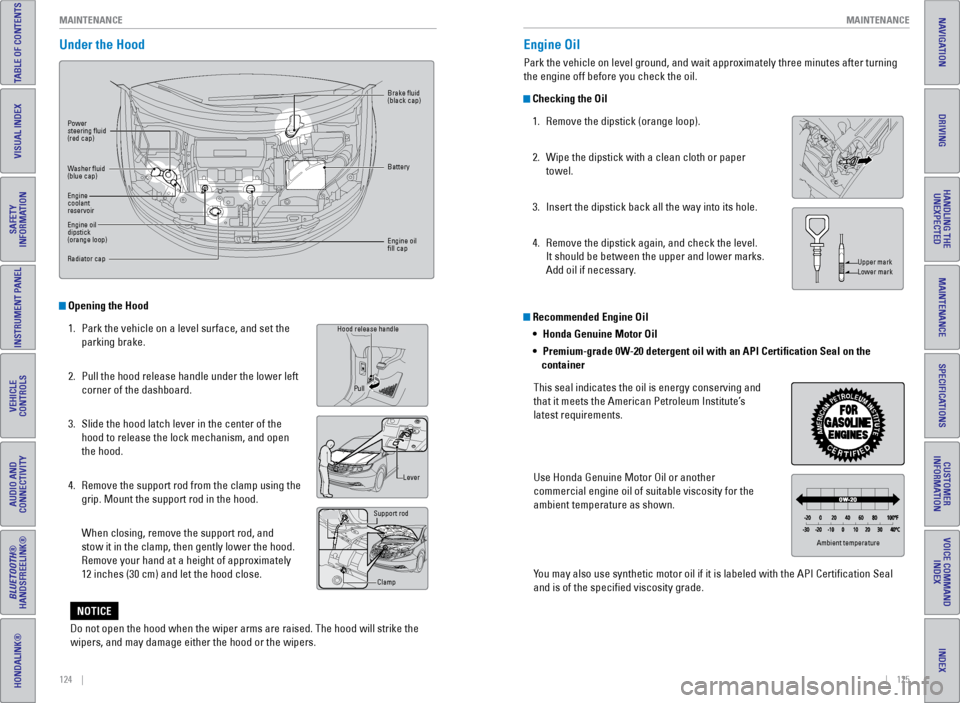
Under the Hood
Opening the Hood
1. Park the vehicle on a level surface, and set the
parking brake.
2. Pull the hood release handle under the lower left
corner of the dashboard.
3. Slide the hood latch lever in the center of the
hood to release the lock mechanism, and open
the hood.
4. Remove the support rod from the clamp using the
grip. Mount the support rod in the hood.
When closing, remove the support rod, and
stow it in the clamp, then gently lower the hood.
Remove your hand at a height of approximately
12 inches (30 cm) and let the hood close.
Grip
Hood release handle
Lever
Support rod
Clamp
Pull
Power
steering fluid
(red cap)
Brake fluid
(black cap)
Battery
Engine oil
fill cap
Washer fluid
(blue cap)
Engine
coolant
reservoir
Engine oil
dipstick
(orange loop)
Radiator cap
Recommended Engine Oil
•
Honda Genuine Motor Oil
• Premium-grade 0W-20 detergent oil with an API Certification Seal on the
container
This seal indicates the oil is energy conserving and
that it meets the American Petroleum Institute’s
latest requirements.
Use Honda Genuine Motor Oil or another
commercial engine oil of suitable viscosity for the
ambient temperature as shown.
You may also use synthetic motor oil if it is labeled with the API Certifi\
cation Seal
and is of the specified viscosity grade.
Engine Oil
Park the vehicle on level ground, and wait approximately three minutes after turning
the engine off before you check the oil.
Checking the Oil 1. Remove the dipstick (orange loop).
2. Wipe the dipstick with a clean cloth or paper
towel.
3. Insert the dipstick back all the way into its hole.
4. Remove the dipstick again, and check the level.
It should be between the upper and lower marks.
Add oil if necessary.
Upper mark
Lower mark
Ambient temperature
Do not open the hood when the wiper arms are raised. The hood will strik\
e the
wipers, and may damage either the hood or the wipers.
NOTICE
Page 73 of 80
138 || 139
SPECIFICATIONS
MAINTENANCE
INDEX
VOICE COMMAND
INDEX
CUSTOMER
INFORMATION
SPECIFICATIONS
MAINTENANCE
HANDLING THE UNEXPECTED
DRIVING
NAVIGATION
TABLE OF CONTENTS
VISUAL INDEX
SAFETY
INFORMATION
INSTRUMENT PANEL
VEHICLE
CONTROLS
AUDIO AND
CONNECTIVITY
BLUETOOTH®
HANDSFREELINK®
HONDALINK®
Testing of Readiness Codes
Your vehicle has “readiness codes” as part of the onboard self-diag\
nostic system.
Some states refer to these codes as a test to see if your vehicle’s emissions
components are working properly. The codes may not be read if you go through the
testing just after the battery has gone dead or been disconnected.
To check if they are set, turn the vehicle on without starting the engine\
. The
malfunction indicator lamp will come on for several seconds. If it goes \
off, the
readiness codes are set. If it blinks five times, the readiness codes \
are not set.
If you are required to have your vehicle tested before the readiness cod\
es are set,
prepare the vehicle for retesting by doing the following:
1. Fill the gas tank to approximately 3/4 full.
2. Park the vehicle and leave the engine off for 6 hours or more.
3. Make sure the ambient temperature is between 40°F and 95°F (4°\
C and 35°C).
4. Start the engine without touching the accelerator pedal, and let it idle\
for 20
seconds.
5. Keep the vehicle in Park (P). Increase the engine speed to 2,000 rpm, \
and hold it
there for about 3 minutes.
6. Let the engine idle with your foot off the accelerator for 20 seconds.
7. Select a nearby, lightly traveled major highway where you can maintain a speed
of 50 to 60 mph (80 to 97 km/h) for at least 20 minutes. Drive on the \
highway with
the vehicle in Drive. Do not use cruise control. When traffic allows, \
drive for 90
seconds without using the accelerator pedal. (Vehicle speed may vary slightly;
this is OK.) If you cannot do this for a continuous 90 seconds because \
of traffic
conditions, drive for at least 30 seconds, then repeat two more times (\
for a total of
90 seconds).
8. Drive in city/suburban traffic for at least 10 minutes. When traffic\
conditions
allow, let the vehicle coast for several seconds without using the accelerator
pedal or the brake pedal.
9. Park the vehicle and leave the engine off for 30 minutes.
The readiness codes are erased when the battery is disconnected, and set\
again
only after several days of driving under a variety of conditions.
If a testing facility determines that the readiness codes are not set, y\
ou may be
requested to return at a later date to complete the test, or see your de\
aler. Vehicle
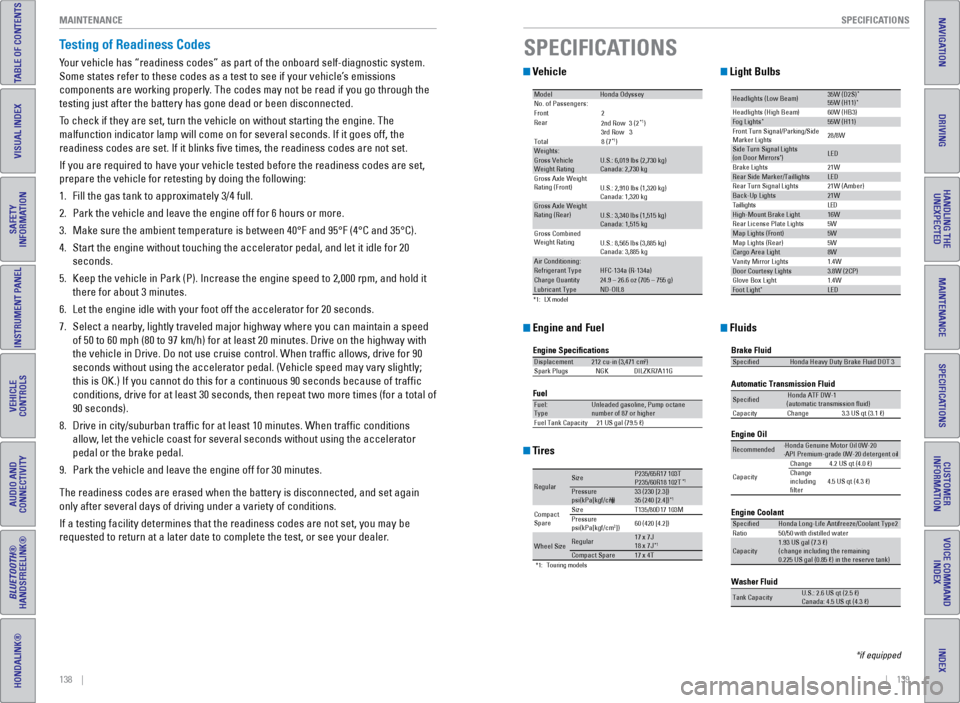
Engine and Fuel
Tires
Light Bulbs
Fluids
*1 :L X mode l
Mode lHonda Odysse yNo. of Passengers:
Front2
Rear
*1)
3rd Ro w3
Tota l8 (7
*1)Weights:Gross Vehicle
Weight Rating U.S.: 6,019 lbs (2,730 kg)
Canada: 2,730 kg
Gross Axle Weight
Rating (Front )U.S.: 2,910 lbs (1,320 kg)
Canada: 1,320 kg
Gross Axle Weight
Rating (R ear)U.S.: 3,340 lbs (1,515 kg)
Canada: 1,515 kg
Gross Combined
Weight Ratin g
U.S.: 8,565 lbs (3,885 kg)
Canada: 3,885 kg
Air Conditioning:Refrigerant Type HFC-134a (R-134a)Charge Quantity24.9 – 26.6 oz (705 – 755 g)Lubricant TypeND-OIL8
2nd Ro w3 (2
Engine Specication s
FuelDisplacement212 cu-in (3,471 cm3)
Spark Plug sN GKDILZKR7A11 G
Fuel:
TypeUnleaded gasoline, Pump octane
number of 87 or higher
Fuel Tank Capacit y21 US gal (79.5 )
*1:T ouring models
Regula rSizeP235/65R17 103TP235/60R18 102T*1Pressure
psi(kPa[kgf/cm2])33 (23 0 [2.3])
35 (24 0 [2.4])*1
Compact
Spar e Size
T135/80D17 103M
Pressure
ps i(kPa[kgf/cm2]) 60 (42
0 [4.2])
Wheel Siz eRegular17 x 7J
18 x 7J*1Compact Spar e17 x 4T
Headlights (Low Beam )35W (D2S)*55W (H11)
60W (HB3)
21W
5W 21W (Amber)*Head lights (High Beam )Fog Lights*55W (H11)
Front Turn Signal/Park ing/Side
Marker Lights 28/8W
Si
de Turn Si gnal Lights
(on Door Mirrors ) *LED
Brake Lights
Rear Side Marker/Taillight sLED
Rear Turn Signal Lights
Back-Up Lights21W D
E
L
s
t
h
g
i
l
l
i
a
T
High-Mount Brake Ligh t16W
Rear License Plate Lights
Map Lights (F ront)5W
5W
1.4W
1.4W
Map Lights (Rear)
Cargo Area Ligh
t8W
Vanity Mirror Lights
Door Courtesy Lights3.8W (2CP )
Glove Box Li ght
Foot Ligh t*LED
Brake Fluid
Automatic Transmission Flui
d
Specie dHonda Heavy Duty Brake Fluid DOT 3
SpeciedHonda ATF DW- 1
(automatic transmission uid )
Ca pacit yC hange3 .3 US qt (3.1)
Engine Oil
Engine Coolant
Recommended·Honda Genuine Motor Oil 0W-2 0
·API Premium-grade 0W-20 detergent oi l
Capacity Change
4.2 US qt (4.0 )
Change
including
lter 4.5 US qt (4.3 )
SpeciedHonda Long-Life Anti
freeze/Coolant Type2
Ratio 50/50 with distilled wate r
Capacity1.93 US gal (7.3 )
(change in cluding the remaining
0.225 US gal (0.85 ) in the reserve tank)
Washer Fluid
Tank CapacityU.S.: 2.6 US qt (2.5 )
Ca nada: 4.5 US qt (4.3 )
SPECIFICATIONS
*if equipped
Page 79 of 80
150 || 151
INDEX
INDEX
INDEX
VOICE COMMAND
INDEX
CUSTOMER
INFORMATION
SPECIFICATIONS
MAINTENANCE
HANDLING THE UNEXPECTED
DRIVING
NAVIGATION
TABLE OF CONTENTS
VISUAL INDEX
SAFETY
INFORMATION
INSTRUMENT PANEL
VEHICLE
CONTROLS
AUDIO AND
CONNECTIVITY
BLUETOOTH®
HANDSFREELINK®
HONDALINK®
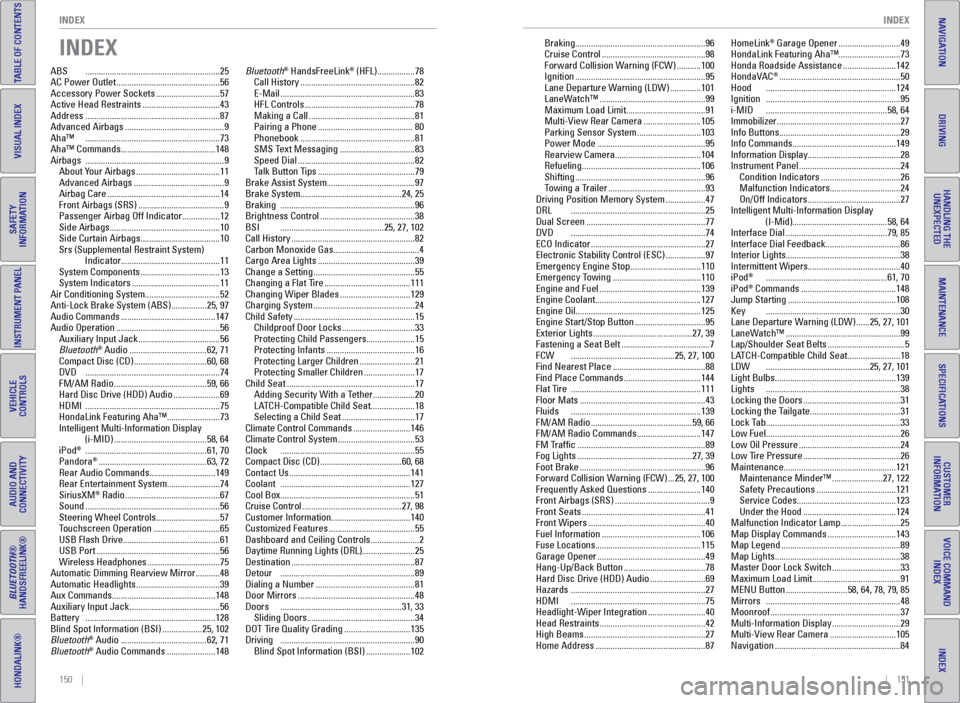
INDEX
ABS ............................................................. 25
AC Power Outlet ............................................... 56
Accessory Power Sockets ............................. 57
Active Head Restraints ................................... 43
Address ............................................................. 87
Advanced Airbags ............................................. 9
Aha™ ............................................................. 73
Aha™ Commands ........................................... 148
Airbags ............................................................... 9
About Your Airbags ...................................... 11
Advanced Airbags ......................................... 9
Airbag Care ................................................... 14
Front Airbags (SRS) ....................................... 9
Passenger Airbag Off Indicator ................. 12
Side Airbags .................................................. 10
Side Curtain Airbags ....................................10
Srs (Supplemental Restraint System) Indicator ............................................. 11
System Components ....................................13
System Indicators ........................................ 11
Air Conditioning System ..................................52
Anti-Lock Brake System (ABS) ................ 25, 97
Audio Commands ........................................... 147
Audio Operation ............................................... 56
Auxiliary Input Jack ..................................... 56
Bluetooth
® Audio ................................... 62, 71
Compact Disc (CD) .................................60, 68
DVD ............................................................. 74
FM/AM Radio .......................................... 59, 66
Hard Disc Drive (HDD) Audio ..................... 69
HDMI ............................................................. 75
HondaLink Featuring Aha™ ........................ 73
Intelligent Multi-Information Display (i-MID) .......................................... 58, 64
iPod
® ....................................................... 61, 70
Pandora® ................................................. 63, 72
Rear Audio Commands ..............................149
Rear Entertainment System ........................ 74
SiriusXM
® Radio ........................................... 67
Sound ............................................................. 56
Steering Wheel Controls ............................. 57
Touchscreen Operation .............................. 65
USB Flash Drive ............................................ 61
USB Port ........................................................ 56
Wireless Headphones .................................75
Automatic Dimming Rearview Mirror ........... 48
Automatic Headlights ......................................39
Aux Commands ............................................... 148
Auxiliary Input Jack ......................................... 56
Battery ........................................................... 128
Blind Spot Information (BSI) .................. 25, 102
Bluetooth
® Audio ....................................... 62, 71
Bluetooth® Audio Commands ...................... 148Bluetooth
® HandsFreeLink® (HFL)
................. 78
Call History .................................................... 82
E-Mail ............................................................. 83
HFL Controls .................................................. 78
Making a Call ................................................ 81
Pairing a Phone ........................................... 80
Phonebook .................................................... 81
SMS Text Messaging ..................................83
Speed Dial ..................................................... 82
Talk Button Tips ............................................ 79
Brake Assist System ........................................ 97
Brake System .............................................. 24, 25
Braking ............................................................. 96
Brightness Control ........................................... 38
BSI ............................................... 25, 27, 102
Call History ........................................................ 82
Carbon Monoxide Gas .......................................4
Cargo Area Lights ............................................ 39
Change a Setting .............................................. 55
Changing a Flat Tire ....................................... 111
Changing Wiper Blades ................................129
Charging System .............................................. 24
Child Safety ....................................................... 15
Childproof Door Locks .................................33
Protecting Child Passengers ...................... 15
Protecting Infants ........................................ 16
Protecting Larger Children ......................... 21
Protecting Smaller Children ....................... 17
Child Seat .......................................................... 17
Adding Security With a Tether ................... 20
LATCH-Compatible Child Seat .................... 18
Selecting a Child Seat .................................17
Climate Control Commands .......................... 146
Climate Control System ...................................53
Clock ............................................................. 55
Compact Disc (CD) ..................................... 60, 68
Contact Us ....................................................... 141
Coolant ........................................................... 127
Cool Box ............................................................. 51
Cruise Control ............................................. 27, 98
Customer Information ....................................140
Customized Features ....................................... 55
Dashboard and Ceiling Controls ...................... 2
Daytime Running Lights (DRL) ........................25
Destination ........................................................ 87
Detour ............................................................. 89
Dialing a Number ............................................. 81
Door Mirrors ..................................................... 48
Doors ....................................................... 31, 33
Sliding Doors ................................................. 34
DOT Tire Quality Grading ..............................135
Driving ............................................................. 90
Blind Spot Information (BSI) .................... 102Braking ...........................................................
96
Cruise Control ............................................... 98
Forward Collision Warning (FCW) ........... 100
Ignition ........................................................... 95
Lane Departure Warning (LDW) .............. 101
LaneWatch™ ................................................ 99
Maximum Load Limit .................................... 91
Multi-View Rear Camera .......................... 105
Parking Sensor System .............................103
Power Mode ................................................. 95
Rearview Camera ....................................... 104
Refueling ...................................................... 106
Shifting ........................................................... 96
Towing a Trailer ............................................ 93
Driving Position Memory System .................. 47
DRL ............................................................. 25
Dual Screen ...................................................... 77
DVD ............................................................. 74
ECO Indicator .................................................... 27
Electronic Stability Control (ESC) .................. 97
Emergency Engine Stop ................................ 110
Emergency Towing ........................................ 110
Engine and Fuel .............................................. 139
Engine Coolant................................................ 127
Engine Oil ......................................................... 125
Engine Start/Stop Button ................................ 95
Exterior Lights ............................................. 27, 39
Fastening a Seat Belt ........................................ 7
FCW ............................................... 25, 27, 100
Find Nearest Place .......................................... 88
Find Place Commands ...................................144
Flat Tire ........................................................... 111
Floor Mats ......................................................... 43
Fluids ........................................................... 139
FM/AM Radio .............................................. 59, 66
FM/AM Radio Commands ............................. 147
FM Traffic .......................................................... 89
Fog Lights .................................................... 27, 39
Foot Brake ......................................................... 96
Forward Collision Warning (FCW) ... 25, 27, 100
Frequently Asked Questions ........................ 140
Front Airbags (SRS) ........................................... 9
Front Seats ........................................................ 41
Front Wipers ..................................................... 40
Fuel Information ............................................. 106
Fuse Locations ................................................ 115
Garage Opener ................................................. 49
Hang-Up/Back Button .....................................78
Hard Disc Drive (HDD) Audio ......................... 69
Hazards ............................................................. 27
HDMI ............................................................. 75
Headlight-Wiper Integration .......................... 40
Head Restraints ................................................ 42
High Beams ....................................................... 27
Home Address .................................................. 87HomeLink
® Garage Opener ............................
49
HondaLink Featuring Aha™ ............................73
Honda Roadside Assistance ........................ 142
HondaVAC
® ....................................................... 50
Hood ........................................................... 124
Ignition ............................................................. 95
i-MID ....................................................... 58, 64
Immobilizer ........................................................ 27
Info Buttons ....................................................... 29
Info Commands ............................................... 149
Information Display .......................................... 28
Instrument Panel .............................................. 24
Condition Indicators ....................................26
Malfunction Indicators ................................ 24
On/Off Indicators .......................................... 27
Intelligent Multi-Information Display (I-Mid)........................................... 58, 64
Interface Dial .............................................. 79, 85
Interface Dial Feedback ..................................86
Interior Lights .................................................... 38
Intermittent Wipers .......................................... 40
iPod
® ....................................................... 61, 70
iPod® Commands ........................................... 148
Jump Starting ................................................. 108
Key ............................................................. 30
Lane Departure Warning (LDW) ...... 25, 27, 101
LaneWatch™ .................................................... 99
Lap/Shoulder Seat Belts ...................................5
LATCH-Compatible Child Seat ........................ 18
LDW ............................................... 25, 27, 101
Light Bulbs ....................................................... 139
Lights ............................................................. 38
Locking the Doors ............................................ 31
Locking the Tailgate ......................................... 31
Lock Tab ............................................................. 33
Low Fuel ............................................................. 26
Low Oil Pressure .............................................. 24
Low Tire Pressure ............................................ 26
Maintenance ................................................... 121
Maintenance Minder™ ....................... 27, 122
Safety Precautions .................................... 121
Service Codes ............................................. 123
Under the Hood .......................................... 124
Malfunction Indicator Lamp ........................... 25
Map Display Commands ...............................143
Map Legend ...................................................... 89
Map Lights ......................................................... 38
Master Door Lock Switch ...............................33
Maximum Load Limit ........................................ 91
MENU Button ............................ 58, 64, 78, 79, 85
Mirrors ............................................................. 48
Moonroof ........................................................... 37
Multi-Information Display ...............................29
Multi-View Rear Camera ..............................105
Navigation ......................................................... 84