child lock HONDA ODYSSEY 2016 RC1-RC2 / 5.G Quick Guide
[x] Cancel search | Manufacturer: HONDA, Model Year: 2016, Model line: ODYSSEY, Model: HONDA ODYSSEY 2016 RC1-RC2 / 5.GPages: 80, PDF Size: 16.28 MB
Page 3 of 80
TABLE OF CONTENTS
INDEX
VISUAL INDEX
VOICE COMMAND INDEX
SAFETY
INFORMATION
CUSTOMER
INFORMATION
INSTRUMENT PANEL
SPECIFICATIONS
VEHICLE
CONTROLS
MAINTENANCE
AUDIO AND
CONNECTIVITY
HANDLING THE UNEXPECTED
BLUETOOTH®
HANDSFREELINK®
DRIVING
HONDALINK®
NAVIGATION
Honda Automobile Customer Service
Your authorized Honda dealer should be able to answer any questions you h\
ave
about your vehicle. However, if you are dissatisfied with the information you receive,
you can call Honda Automobile Customer Service (see page 141).
Honda Roadside Assistance
24-hour emergency road service is available to you in the United States \
and Canada
throughout your 3-year/36,000-mile warranty term. Services include jump starting,
flat tire and lockout assistance, towing, and more (limitations apply\
). This Owner’s Guide is intended to help you quickly get acquainted with your
2016 Honda Odyssey. It provides basic information and instructions on technology and
convenience features, as well as emergency procedures and how to get ass\
istance.
This guide is for vehicles sold in the United States and Canada. It cove\
rs all Odyssey
models, so you may find descriptions of features and equipment that ar\
e not in your
vehicle. Images throughout this guide are from U.S. vehicles and represe\
nt features
and equipment that are available on some, but not all, models.
This guide is not intended to be a substitute for the Owner’s Manual. The Owner
Information CD enclosed in your glove box kit includes the Owner’s Manual,
Navigation Manual, and vehicle and tire warranties in electronic format.\
This
information can be viewed on a computer (PC or Mac platform) and saved or printed
for your reference. You can also visit owners.honda.com (U.S.) or myhonda.ca
(Canada) to view the complete and most current information.
If you are the first registered owner of your vehicle, you may request\
a complimentary
printed copy of the Owner’s Manual, Navigation Manual, or Vehicle Warranty within
the first six months of vehicle purchase. To request a copy, visit owners.honda.com
and create or log in to your account. In Canada, please request a copy f\
rom your
Honda dealer.
American Honda Motor Company strives to be proactive in protecting our
environment and natural resources. By using electronic delivery for a co\
nsiderable
portion of the information typically found in a vehicle owner’s manual, we are further
reducing our impact on the environment.
INTRODUCTION TABLE OF CONTENTS
Call (800) 999-1009 (U.S.) or (888) 946-6329 (Canada)
Call (866) 864-5211 (U.S.) or (800) 465-7587 (Canada)
*if equipped
VISUAL INDEX .......................................1
Steering Wheel and Nearby Controls ...1
Dashboard and Ceiling Controls ........ 2
SAFETY INFORMATION ........................ 3
Important Safety Information .............. 3
Seat Belts ............................................... 5
Airbags .................................................... 9
Child Safety .......................................... 15
Safety Label Locations ....................... 22
Reporting Safety Defects ................... 23
INSTRUMENT PANEL ......................... 24
Malfunction Indicators ...................... 24
Condition Indicators ........................... 26
On/Off Indicators ................................. 27
Information Display* ..........................28
Multi-Information Display* ............... 29
VEHICLE CONTROLS ...........................30
Using the Key or Remote Transmitter ... 30
Smart Entry System* ...........................31
Power Tailgate Operation* ............... 32
Door Operation .................................... 33
Power Window Operation ................ 36
Power Moonroof Operation* ........... 37
Interior and Exterior Lights ............... 38
One-Touch Turn Signal ....................... 39
Wiper Operation .................................. 40
Adjusting the Seats ............................41
Rear Seats ........................................... 44
Driving Position Memory System* ... 47
Adjusting the Steering Wheel .......... 47
Adjusting the Mirrors .........................48
HomeLink
® Garage Opener* ............. 49
HondaVAC
®* ........................................ 50
Cool Box* ............................................. 51Air Conditioning System* .................
52
Climate Control System* .................. 53
Seat Heaters* ...................................... 54
Customized Features ..........................55
AUDIO AND CONNECTIVITY ............. 56
Basic Audio Operation ....................... 56
Models with one display
Intelligent Multi-Information Display
(i-MID) ................................................... 58
FM/AM Radio ....................................... 59
Compact Disc (CD) ..............................60
iPod
® or USB Flash Drive ................... 61
Bluetooth
® Audio ................................ 62
Pandora
® .............................................. 63
Models with two displays
Intelligent Multi-Information Display
(i-MID) ................................................... 64
Touchscreen Operation ..................... 65
FM/AM Radio ...................................... 66
SiriusXM
® Radio ................................. 67
Compact Disc (CD) .............................68
Hard Disc Drive (HDD) Audio .......... 69
iPod
® or USB Flash Drive ................. 70
Bluetooth
® Audio ................................ 71
Pandora
® .............................................. 72
HondaLink featuring Aha™ ............... 73
Rear Entertainment System (RES)* ... 74
BLUETOOTH
® HANDSFREELINK®..... 78
Basic HFL Operation ...........................78
Pairing a Phone ................................... 80
Making a Call ...................................... 81
SMS Text Messaging and E-Mail* ... 83
NAVIGATION* ...................................... 84
Basic Navigation Operation ............. 84
Page 6 of 80
4 || 5
SAFETY
SAFETY
INDEX
VOICE COMMAND
INDEX
CUSTOMER
INFORMATION
SPECIFICATIONS
MAINTENANCE
HANDLING THE UNEXPECTED
DRIVING
NAVIGATION
TABLE OF CONTENTS
VISUAL INDEX
SAFETY
INFORMATION
INSTRUMENT PANEL
VEHICLE
CONTROLS
AUDIO AND
CONNECTIVITY
BLUETOOTH®
HANDSFREELINK®
HONDALINK®
Carbon Monoxide Gas
The engine exhaust from this vehicle contains carbon monoxide, a colorle\
ss,
odorless, and highly toxic gas. As long as you properly maintain your ve\
hicle and
follow the instructions set forth below, you will not accumulate dangerous levels
of carbon monoxide gas in the vehicle interior.
Have the exhaust system inspected for leaks whenever:
• The exhaust system is making an unusual noise.
• The exhaust system may have been damaged.
• The vehicle is raised for an oil change.
When you operate a vehicle with the tailgate open, airflow can pull ex\
haust gas
into the interior and create a hazardous condition. If you must drive wi\
th the
tailgate open, open all the windows and set the climate control system a\
s shown
below.
1. Select the fresh air mode.
2. Select the
mode.
3. Set the fan speed to high.
4. Set the temperature control to a comfortable setting.
Adjust the climate control system in the same manner if you sit in your \
parked
vehicle with the engine running.
Carbon monoxide gas is toxic. Breathing it can cause unconsciousness and\
even kill you.
Avoid any enclosed areas or activities that expose you to carbon monoxide\
.
WARNING
An enclosed area such as a garage can quickly fill up with carbon mono\
xide gas.
Do not run the engine with the garage door closed. Even when the garage \
door is
open, drive out of the garage immediately after starting the engine.
Seat Belts
A seat belt is your best protection in all types of collisions. Airbags \
are designed to
supplement seat belts, not replace them. So even though your vehicle is \
equipped
with airbags, make sure you and your passengers always wear your seat belts and
wear them properly.
Lap/Shoulder Seat BeltsAll seven or eight seating positions are equipped with lap/shoulder seat\
belts with
emergency locking retractors. In normal driving, the retractor lets you \
move freely
while keeping some tension on the belt. During a collision or sudden sto\
p, the
retractor locks to restrain your body. The second- and third-row passenger’s seat
belts also have a lockable retractor for use with child seats.
The front seats are equipped with automatic seat belt tensioners to enha\
nce
safety. The tensioners automatically tighten the front seat belts during a mod\
erate
to severe frontal collision, sometimes even if the collision is not seve\
re enough to
inflate the front airbags.
Proper Use of Seat BeltsFollow these guidelines for proper use:
• All occupants should sit upright, well back in the seat, and remain in t\
hat
position for the duration of the trip. Slouching and leaning reduce the \
effectiveness of the belt and can increase the chance of serious injury \
in a
crash.
• Never place the shoulder part of a lap/shoulder seat belt under your arm\
or
behind your back. This could cause very serious injuries in a crash.
• Two people should never use the same seat belt. If they do, they could be\
very
seriously injured in a crash.
• Do not put any accessories on the seat belts. Devices intended to improv\
e
comfort or reposition the shoulder part of a seat belt can reduce the pr\
otective
capability and increase the chance of serious injury in a crash.
• Regularly check the condition of your seat belts. Check for frays, cuts,\
burns,
and wear, and that the latches work smoothly and the belts retract easily.
• No one should sit in a seat with an inoperative seat belt or one that do\
es not
appear to be working correctly. Using a seat belt that is not working properly
may not protect the occupant in a crash. Have a dealer check the belt as\
soon
as possible.
Not wearing a seat belt properly increases the chance of a serious injur\
y or
death in a crash, even though your vehicle has airbags.
Be sure you and your passengers always wear seat belts and wear them
properly.
WARNING
Page 12 of 80
16 || 17
SAFETY
SAFETY
INDEX
VOICE COMMAND
INDEX
CUSTOMER
INFORMATION
SPECIFICATIONS
MAINTENANCE
HANDLING THE UNEXPECTED
DRIVING
NAVIGATION
TABLE OF CONTENTS
VISUAL INDEX
SAFETY
INFORMATION
INSTRUMENT PANEL
VEHICLE
CONTROLS
AUDIO AND
CONNECTIVITY
BLUETOOTH®
HANDSFREELINK®
HONDALINK®
Protecting Infants
An infant must be properly restrained in a rear-facing, reclining child seat until the
infant reaches the seat manufacturer’s weight or height limit for the seat, and the
infant is at least one year old. Many experts recommend use of a rear-facing seat
for a child up to two years old if the child’s height and weight are appropriate for a
rear-facing seat.
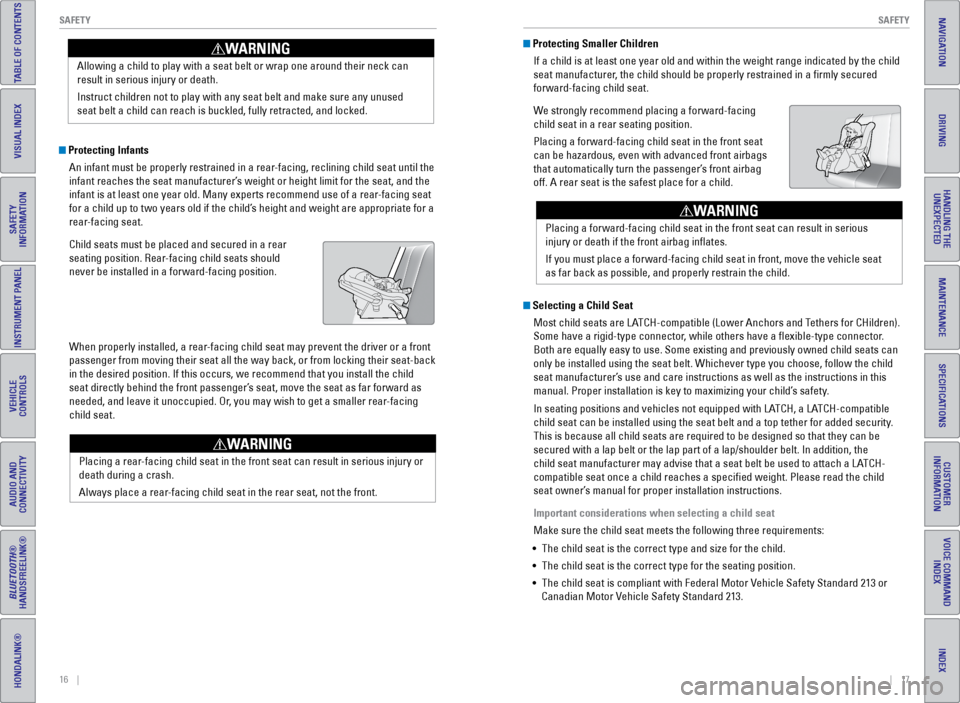
Child seats must be placed and secured in a rear
seating position. Rear-facing child seats should
never be installed in a forward-facing position.
When properly installed, a rear-facing child seat may prevent the driver or a front
passenger from moving their seat all the way back, or from locking their\
seat-back
in the desired position. If this occurs, we recommend that you install t\
he child
seat directly behind the front passenger’s seat, move the seat as far forward as
needed, and leave it unoccupied. Or, you may wish to get a smaller rear-facing
child seat. Allowing a child to play with a seat belt or wrap one around their neck \
can
result in serious injury or death.
Instruct children not to play with any seat belt and make sure any unuse\
d
seat belt a child can reach is buckled, fully retracted, and locked.
WARNING Protecting Smaller Children
If a child is at least one year old and within the weight range indicate\
d by the child
seat manufacturer, the child should be properly restrained in a firmly secured
forward-facing child seat.
We strongly recommend placing a forward-facing
child seat in a rear seating position.
Placing a forward-facing child seat in the front seat
can be hazardous, even with advanced front airbags
that automatically turn the passenger’s front airbag
off. A rear seat is the safest place for a child.
Selecting a Child SeatMost child seats are LATCH-compatible (Lower Anchors and Tethers for CHildren).
Some have a rigid-type connector, while others have a flexible-type connector.
Both are equally easy to use. Some existing and previously owned child s\
eats can
only be installed using the seat belt. Whichever type you choose, follow\
the child
seat manufacturer’s use and care instructions as well as the instructions in this
manual. Proper installation is key to maximizing your child’s safety.
In seating positions and vehicles not equipped with LATCH, a LATCH-compatible
child seat can be installed using the seat belt and a top tether for add\
ed security.
This is because all child seats are required to be designed so that they\
can be
secured with a lap belt or the lap part of a lap/shoulder belt. In addit\
ion, the
child seat manufacturer may advise that a seat belt be used to attach a \
LATCH-
compatible seat once a child reaches a specified weight. Please read t\
he child
seat owner’s manual for proper installation instructions.
Important considerations when selecting a child seat
Make sure the child seat meets the following three requirements:
• The child seat is the correct type and size for the child.
• The child seat is the correct type for the seating position.
• The child seat is compliant with Federal Motor Vehicle Safety Standard 213 or
Canadian Motor Vehicle Safety Standard 213.
Placing a rear-facing child seat in the front seat can result in serious injury or
death during a crash.
Always place a rear-facing child seat in the rear seat, not the front.
WARNING
Placing a forward-facing child seat in the front seat can result in seri\
ous
injury or death if the front airbag inflates.
If you must place a forward-facing child seat in front, move the vehicle\
seat
as far back as possible, and properly restrain the child.
WARNING
Page 13 of 80
18 || 19
SAFETY
SAFETY
INDEX
VOICE COMMAND
INDEX
CUSTOMER
INFORMATION
SPECIFICATIONS
MAINTENANCE
HANDLING THE UNEXPECTED
DRIVING
NAVIGATION
TABLE OF CONTENTS
VISUAL INDEX
SAFETY
INFORMATION
INSTRUMENT PANEL
VEHICLE
CONTROLS
AUDIO AND
CONNECTIVITY
BLUETOOTH®
HANDSFREELINK®
HONDALINK®
Installing a LATCH-Compatible Child Seat
A LATCH-compatible child seat can be installed in each of the second- and th\
ird-
row seats. A child seat is attached to the lower anchors with either the\
rigid or
flexible type of connectors.
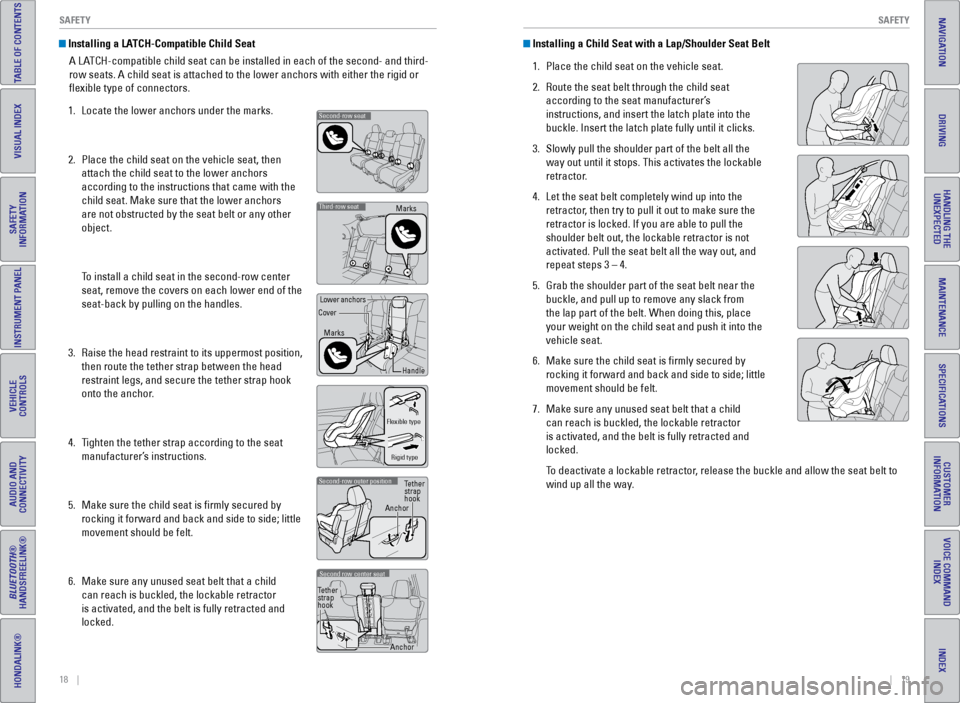
1. Locate the lower anchors under the marks.
2. Place the child seat on the vehicle seat, then
attach the child seat to the lower anchors
according to the instructions that came with the
child seat. Make sure that the lower anchors
are not obstructed by the seat belt or any other
object.
To install a child seat in the second-row center
seat, remove the covers on each lower end of the
seat-back by pulling on the handles.
3. Raise the head restraint to its uppermost position,
then route the tether strap between the head
restraint legs, and secure the tether strap hook
onto the anchor.
4. Tighten the tether strap according to the seat
manufacturer’s instructions.
5. Make sure the child seat is firmly secured by
rocking it forward and back and side to side; little
movement should be felt.
6. Make sure any unused seat belt that a child
can reach is buckled, the lockable retractor
is activated, and the belt is fully retracted and
locked.
Second-row seat
Third-row seatMarks
Marks
Handle
Lower anchors
Cover
Flexible type
Rigid type
Second-row outer position
Anchor Tether
strap
hook
Second row center seat
Anchor
Tether
strap
hook
Installing a Child Seat with a Lap/Shoulder Seat Belt
1. Place the child seat on the vehicle seat.
2. Route the seat belt through the child seat
according to the seat manufacturer’s
instructions, and insert the latch plate into the
buckle. Insert the latch plate fully until it clicks.
3. Slowly pull the shoulder part of the belt all the
way out until it stops. This activates the lockable
retractor.
4. Let the seat belt completely wind up into the
retractor, then try to pull it out to make sure the
retractor is locked. If you are able to pull the
shoulder belt out, the lockable retractor is not
activated. Pull the seat belt all the way out, and
repeat steps 3 – 4.
5. Grab the shoulder part of the seat belt near the
buckle, and pull up to remove any slack from
the lap part of the belt. When doing this, place
your weight on the child seat and push it into the
vehicle seat.
6. Make sure the child seat is firmly secured by
rocking it forward and back and side to side; little
movement should be felt.
7. Make sure any unused seat belt that a child
can reach is buckled, the lockable retractor
is activated, and the belt is fully retracted and
locked.
To deactivate a lockable retractor, release the buckle and allow the seat belt to
wind up all the way.
Page 20 of 80
32 || 33
VEHICLE CONTROLS
VEHICLE CONTROLS
INDEX
VOICE COMMAND
INDEX
CUSTOMER
INFORMATION
SPECIFICATIONS
MAINTENANCE
HANDLING THE UNEXPECTED
DRIVING
NAVIGATION
TABLE OF CONTENTS
VISUAL INDEX
SAFETY
INFORMATION
INSTRUMENT PANEL
VEHICLE
CONTROLS
AUDIO AND
CONNECTIVITY
BLUETOOTH®
HANDSFREELINK®
HONDALINK®
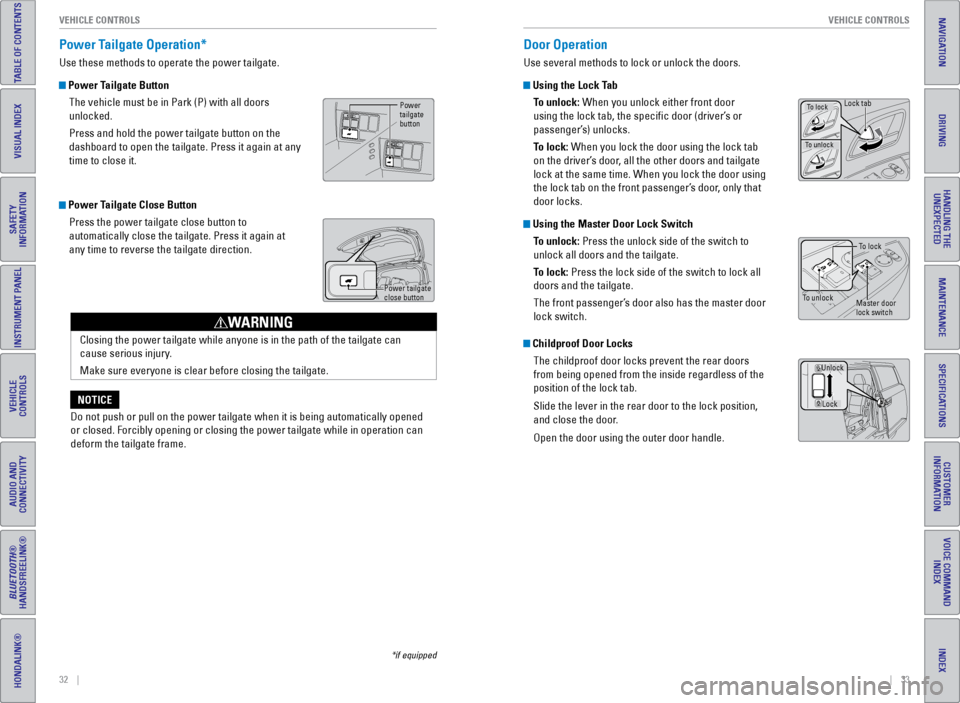
Power Tailgate Operation*
Use these methods to operate the power tailgate.
Power Tailgate Button
The vehicle must be in Park (P) with all doors
unlocked.
Press and hold the power tailgate button on the
dashboard to open the tailgate. Press it again at any
time to close it.
Power Tailgate Close ButtonPress the power tailgate close button to
automatically close the tailgate. Press it again at
any time to reverse the tailgate direction.
Power
tailgate
button
Closing the power tailgate while anyone is in the path of the tailgate c\
an
cause serious injury.
Make sure everyone is clear before closing the tailgate.
WARNING
*if equipped
Door Operation
Use several methods to lock or unlock the doors.
Using the Lock TabTo unlock: When you unlock either front door
using the lock tab, the specific door (driver’s or
passenger’s) unlocks.
To lock: When you lock the door using the lock tab
on the driver’s door, all the other doors and tailgate
lock at the same time. When you lock the door using
the lock tab on the front passenger’s door, only that
door locks.
Using the Master Door Lock SwitchTo unlock: Press the unlock side of the switch to
unlock all doors and the tailgate.
To lock: Press the lock side of the switch to lock all
doors and the tailgate.
The front passenger’s door also has the master door
lock switch.
Childproof Door LocksThe childproof door locks prevent the rear doors
from being opened from the inside regardless of the
position of the lock tab.
Slide the lever in the rear door to the lock position,
and close the door.
Open the door using the outer door handle.
To lock
To unlockMaster door
lock switch
Lock
Unlock
To lockLock tab
To unlock
Power tailgate
close button
Do not push or pull on the power tailgate when it is being automatically\
opened
or closed. Forcibly opening or closing the power tailgate while in opera\
tion can
deform the tailgate frame.
NOTICE
Page 26 of 80
44 || 45
VEHICLE CONTROLS
VEHICLE CONTROLS
INDEX
VOICE COMMAND
INDEX
CUSTOMER
INFORMATION
SPECIFICATIONS
MAINTENANCE
HANDLING THE UNEXPECTED
DRIVING
NAVIGATION
TABLE OF CONTENTS
VISUAL INDEX
SAFETY
INFORMATION
INSTRUMENT PANEL
VEHICLE
CONTROLS
AUDIO AND
CONNECTIVITY
BLUETOOTH®
HANDSFREELINK®
HONDALINK®
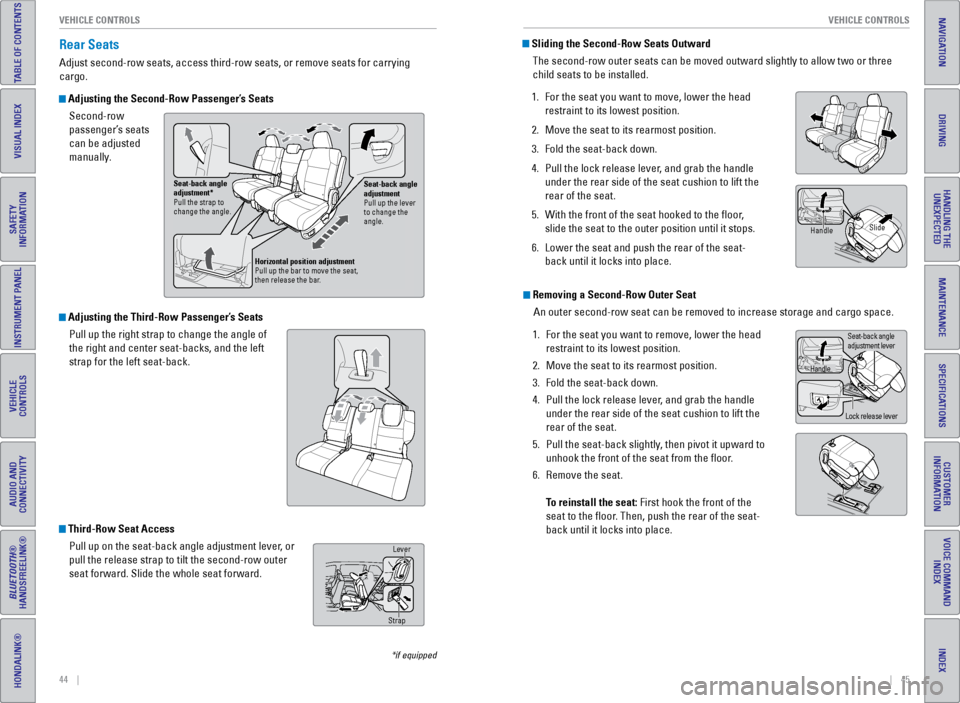
Adjusting the Third-Row Passenger’s Seats
Pull up the right strap to change the angle of
the right and center seat-backs, and the left
strap for the left seat-back.
Rear Seats
Adjust second-row seats, access third-row seats, or remove seats for carrying
cargo.
Adjusting the Second-Row Passenger’s SeatsSecond-row
passenger’s seats
can be adjusted
manually.
*if equipped
Sliding the Second-Row Seats OutwardThe second-row outer seats can be moved outward slightly to allow two or\
three
child seats to be installed.
1. For the seat you want to move, lower the head
restraint to its lowest position.
2. Move the seat to its rearmost position.
3. Fold the seat-back down.
4. Pull the lock release lever, and grab the handle
under the rear side of the seat cushion to lift the
rear of the seat.
5. With the front of the seat hooked to the floor,
slide the seat to the outer position until it stops.
6. Lower the seat and push the rear of the seat-
back until it locks into place.
Removing a Second-Row Outer Seat
An outer second-row seat can be removed to increase storage and cargo sp\
ace.
1. For the seat you want to remove, lower the head
restraint to its lowest position.
2. Move the seat to its rearmost position.
3. Fold the seat-back down.
4. Pull the lock release lever, and grab the handle
under the rear side of the seat cushion to lift the
rear of the seat.
5. Pull the seat-back slightly, then pivot it upward to
unhook the front of the seat from the floor.
6. Remove the seat.
To reinstall the seat: First hook the front of the
seat to the floor. Then, push the rear of the seat-
back until it locks into place.
Handle Slide
Handle
Lock release leverSeat-back angle
adjustment lever
Third-Row Seat Access
Pull up on the seat-back angle adjustment lever, or
pull the release strap to tilt the second-row outer
seat forward. Slide the whole seat forward.
Seat-back angle
adjustment
Pull up the lever
to change the
angle.
Seat-back angle
adjustment*
Pull the strap to
change the angle.
Horizontal position adjustment
Pull up the bar to move the seat,
then release the bar.
Lever
Strap
Page 79 of 80
150 || 151
INDEX
INDEX
INDEX
VOICE COMMAND
INDEX
CUSTOMER
INFORMATION
SPECIFICATIONS
MAINTENANCE
HANDLING THE UNEXPECTED
DRIVING
NAVIGATION
TABLE OF CONTENTS
VISUAL INDEX
SAFETY
INFORMATION
INSTRUMENT PANEL
VEHICLE
CONTROLS
AUDIO AND
CONNECTIVITY
BLUETOOTH®
HANDSFREELINK®
HONDALINK®
INDEX
ABS ............................................................. 25
AC Power Outlet ............................................... 56
Accessory Power Sockets ............................. 57
Active Head Restraints ................................... 43
Address ............................................................. 87
Advanced Airbags ............................................. 9
Aha™ ............................................................. 73
Aha™ Commands ........................................... 148
Airbags ............................................................... 9
About Your Airbags ...................................... 11
Advanced Airbags ......................................... 9
Airbag Care ................................................... 14
Front Airbags (SRS) ....................................... 9
Passenger Airbag Off Indicator ................. 12
Side Airbags .................................................. 10
Side Curtain Airbags ....................................10
Srs (Supplemental Restraint System) Indicator ............................................. 11
System Components ....................................13
System Indicators ........................................ 11
Air Conditioning System ..................................52
Anti-Lock Brake System (ABS) ................ 25, 97
Audio Commands ........................................... 147
Audio Operation ............................................... 56
Auxiliary Input Jack ..................................... 56
Bluetooth
® Audio ................................... 62, 71
Compact Disc (CD) .................................60, 68
DVD ............................................................. 74
FM/AM Radio .......................................... 59, 66
Hard Disc Drive (HDD) Audio ..................... 69
HDMI ............................................................. 75
HondaLink Featuring Aha™ ........................ 73
Intelligent Multi-Information Display (i-MID) .......................................... 58, 64
iPod
® ....................................................... 61, 70
Pandora® ................................................. 63, 72
Rear Audio Commands ..............................149
Rear Entertainment System ........................ 74
SiriusXM
® Radio ........................................... 67
Sound ............................................................. 56
Steering Wheel Controls ............................. 57
Touchscreen Operation .............................. 65
USB Flash Drive ............................................ 61
USB Port ........................................................ 56
Wireless Headphones .................................75
Automatic Dimming Rearview Mirror ........... 48
Automatic Headlights ......................................39
Aux Commands ............................................... 148
Auxiliary Input Jack ......................................... 56
Battery ........................................................... 128
Blind Spot Information (BSI) .................. 25, 102
Bluetooth
® Audio ....................................... 62, 71
Bluetooth® Audio Commands ...................... 148Bluetooth
® HandsFreeLink® (HFL)
................. 78
Call History .................................................... 82
E-Mail ............................................................. 83
HFL Controls .................................................. 78
Making a Call ................................................ 81
Pairing a Phone ........................................... 80
Phonebook .................................................... 81
SMS Text Messaging ..................................83
Speed Dial ..................................................... 82
Talk Button Tips ............................................ 79
Brake Assist System ........................................ 97
Brake System .............................................. 24, 25
Braking ............................................................. 96
Brightness Control ........................................... 38
BSI ............................................... 25, 27, 102
Call History ........................................................ 82
Carbon Monoxide Gas .......................................4
Cargo Area Lights ............................................ 39
Change a Setting .............................................. 55
Changing a Flat Tire ....................................... 111
Changing Wiper Blades ................................129
Charging System .............................................. 24
Child Safety ....................................................... 15
Childproof Door Locks .................................33
Protecting Child Passengers ...................... 15
Protecting Infants ........................................ 16
Protecting Larger Children ......................... 21
Protecting Smaller Children ....................... 17
Child Seat .......................................................... 17
Adding Security With a Tether ................... 20
LATCH-Compatible Child Seat .................... 18
Selecting a Child Seat .................................17
Climate Control Commands .......................... 146
Climate Control System ...................................53
Clock ............................................................. 55
Compact Disc (CD) ..................................... 60, 68
Contact Us ....................................................... 141
Coolant ........................................................... 127
Cool Box ............................................................. 51
Cruise Control ............................................. 27, 98
Customer Information ....................................140
Customized Features ....................................... 55
Dashboard and Ceiling Controls ...................... 2
Daytime Running Lights (DRL) ........................25
Destination ........................................................ 87
Detour ............................................................. 89
Dialing a Number ............................................. 81
Door Mirrors ..................................................... 48
Doors ....................................................... 31, 33
Sliding Doors ................................................. 34
DOT Tire Quality Grading ..............................135
Driving ............................................................. 90
Blind Spot Information (BSI) .................... 102Braking ...........................................................
96
Cruise Control ............................................... 98
Forward Collision Warning (FCW) ........... 100
Ignition ........................................................... 95
Lane Departure Warning (LDW) .............. 101
LaneWatch™ ................................................ 99
Maximum Load Limit .................................... 91
Multi-View Rear Camera .......................... 105
Parking Sensor System .............................103
Power Mode ................................................. 95
Rearview Camera ....................................... 104
Refueling ...................................................... 106
Shifting ........................................................... 96
Towing a Trailer ............................................ 93
Driving Position Memory System .................. 47
DRL ............................................................. 25
Dual Screen ...................................................... 77
DVD ............................................................. 74
ECO Indicator .................................................... 27
Electronic Stability Control (ESC) .................. 97
Emergency Engine Stop ................................ 110
Emergency Towing ........................................ 110
Engine and Fuel .............................................. 139
Engine Coolant................................................ 127
Engine Oil ......................................................... 125
Engine Start/Stop Button ................................ 95
Exterior Lights ............................................. 27, 39
Fastening a Seat Belt ........................................ 7
FCW ............................................... 25, 27, 100
Find Nearest Place .......................................... 88
Find Place Commands ...................................144
Flat Tire ........................................................... 111
Floor Mats ......................................................... 43
Fluids ........................................................... 139
FM/AM Radio .............................................. 59, 66
FM/AM Radio Commands ............................. 147
FM Traffic .......................................................... 89
Fog Lights .................................................... 27, 39
Foot Brake ......................................................... 96
Forward Collision Warning (FCW) ... 25, 27, 100
Frequently Asked Questions ........................ 140
Front Airbags (SRS) ........................................... 9
Front Seats ........................................................ 41
Front Wipers ..................................................... 40
Fuel Information ............................................. 106
Fuse Locations ................................................ 115
Garage Opener ................................................. 49
Hang-Up/Back Button .....................................78
Hard Disc Drive (HDD) Audio ......................... 69
Hazards ............................................................. 27
HDMI ............................................................. 75
Headlight-Wiper Integration .......................... 40
Head Restraints ................................................ 42
High Beams ....................................................... 27
Home Address .................................................. 87HomeLink
® Garage Opener ............................
49
HondaLink Featuring Aha™ ............................73
Honda Roadside Assistance ........................ 142
HondaVAC
® ....................................................... 50
Hood ........................................................... 124
Ignition ............................................................. 95
i-MID ....................................................... 58, 64
Immobilizer ........................................................ 27
Info Buttons ....................................................... 29
Info Commands ............................................... 149
Information Display .......................................... 28
Instrument Panel .............................................. 24
Condition Indicators ....................................26
Malfunction Indicators ................................ 24
On/Off Indicators .......................................... 27
Intelligent Multi-Information Display (I-Mid)........................................... 58, 64
Interface Dial .............................................. 79, 85
Interface Dial Feedback ..................................86
Interior Lights .................................................... 38
Intermittent Wipers .......................................... 40
iPod
® ....................................................... 61, 70
iPod® Commands ........................................... 148
Jump Starting ................................................. 108
Key ............................................................. 30
Lane Departure Warning (LDW) ...... 25, 27, 101
LaneWatch™ .................................................... 99
Lap/Shoulder Seat Belts ...................................5
LATCH-Compatible Child Seat ........................ 18
LDW ............................................... 25, 27, 101
Light Bulbs ....................................................... 139
Lights ............................................................. 38
Locking the Doors ............................................ 31
Locking the Tailgate ......................................... 31
Lock Tab ............................................................. 33
Low Fuel ............................................................. 26
Low Oil Pressure .............................................. 24
Low Tire Pressure ............................................ 26
Maintenance ................................................... 121
Maintenance Minder™ ....................... 27, 122
Safety Precautions .................................... 121
Service Codes ............................................. 123
Under the Hood .......................................... 124
Malfunction Indicator Lamp ........................... 25
Map Display Commands ...............................143
Map Legend ...................................................... 89
Map Lights ......................................................... 38
Master Door Lock Switch ...............................33
Maximum Load Limit ........................................ 91
MENU Button ............................ 58, 64, 78, 79, 85
Mirrors ............................................................. 48
Moonroof ........................................................... 37
Multi-Information Display ...............................29
Multi-View Rear Camera ..............................105
Navigation ......................................................... 84
Page 80 of 80
152 || 153
INDEX
INDEX
INDEX
VOICE COMMAND
INDEX
CUSTOMER
INFORMATION
SPECIFICATIONS
MAINTENANCE
HANDLING THE UNEXPECTED
DRIVING
NAVIGATION
TABLE OF CONTENTS
VISUAL INDEX
SAFETY
INFORMATION
INSTRUMENT PANEL
VEHICLE
CONTROLS
AUDIO AND
CONNECTIVITY
BLUETOOTH®
HANDSFREELINK®
HONDALINK®
Detour ............................................................ 89
Display and Controls ....................................85
Entering a Destination .................................87
Find Nearest Place ...................................... 88
Home Address .............................................. 87
Map Legend .................................................. 89
Place Category ............................................. 88
Routing ........................................................... 89
Steering Wheel Controls ............................. 84
Street Address .............................................. 87
Talk Button Tips ............................................ 84
Traffic ............................................................. 89
Navigation Commands ..................................143
One-Motion Third-Row Magic Seat ............. 46
One-Touch Turn Signal ....................................39
On-Screen Commands ..................................149
Overheating ..................................................... 109
Pairing a Phone ................................................ 80
Pandora
® ..................................................... 63, 72
Pandora® Commands .................................... 148
Parking Brake ............................................. 26, 96
Parking Sensor System .................................103
Passenger Airbag Off Indicator ..................... 12
Phone ............................................................. 80
Phonebook ........................................................ 81
Phone Button .............................................. 78, 79
Phone Commands .......................................... 149
Pick-Up Button ................................................. 78
Place Category ................................................. 88
Playing a DVD ................................................... 74
Power Door Mirrors ......................................... 48
Power Mode ..................................................... 95
Power Moonroof .............................................. 37
Power Sliding Doors ..................................25, 34
Power Tailgate ............................................ 25, 32
Power Windows ............................................... 36
Readiness Codes ............................................ 138
Rear Audio Commands ..................................149
Rear Entertainment System (RES) ................. 74
Dual Screen .................................................. 77
DVD ............................................................. 74
HDMI ............................................................. 75
Remote Control ............................................. 76
Wireless Headphones .................................75
Rear Seats ......................................................... 44
Rearview Camera ........................................... 104
Rearview Mirror ............................................... 48
Rear Wiper ........................................................ 40
Refueling .......................................................... 106
Remote Battery Strength .............................. 107
Remote Control ................................................. 76
Remote Transmitter ......................................... 30
Reporting Safety Defects ................................23
Reverse Tilt Door Mirrors ...............................48
Roadside Assistance .....................................142Route Commands ...........................................
145
Routing ............................................................. 89
Safety Information ............................................. 3
Carbon Monoxide Gas ...................................4
Childproof Door Locks .................................33
Child Safety ................................................... 15
Reporting Safety Defects ............................ 23
Safety Label Locations ................................22
Safety Messages ........................................... 3
Seat Belts ............................................................ 5
Fastening a Seat Belt ....................................7
Lap/Shoulder Seat Belts ............................... 5
Seat Belt Inspection ...................................... 6
Seat Belt Reminder ...................................... 26
Seat Belt With Detachable Anchor .............8
Shoulder Anchor ............................................ 7
Seat Heaters ..................................................... 54
Seats ............................................................. 41
Front Seats .................................................... 41
Second-Row Seats ..........................44, 45, 46
Third-Row Seats ..................................... 44, 46
Select/Reset Knob ........................................... 28
SEL/RESET Button ............................................ 29
Service Codes ................................................. 123
Settings ............................................................. 55
SETTINGS Button .....................58, 64, 78, 79, 85
Setting the Clock .............................................. 55
Shifting ............................................................. 96
Shift Lever Does Not Move .......................... 107
Shoulder Anchor ................................................ 7
Side Airbags ...................................................... 10
Side Curtain Airbags ........................................ 10
SiriusXM
® Radio ............................................... 67
SiriusXM® Radio Commands ........................ 147
Sliding Doors ..................................................... 34
Smart Entry System ................................... 24, 31
SMS Text Messaging ......................................83
Song By Voice™ Commands ........................ 149
Sound ............................................................. 56
Specifications ................................................. 139
Speed Dial ......................................................... 82
SRS (Supplemental Restraint System) Indicator ....................................... 11, 24
Starter System .................................................. 25
Steering Wheel ................................................. 47
Steering Wheel and Nearby Controls ............ 1
Steering Wheel Controls ...........................57, 84
Street Address .................................................. 87
System Guidance Volume ............................... 86
System Message .............................................. 26
Tailgate ............................................................. 31
Talk Button ........................................................ 78
Talk Button Tips .......................................... 79, 84
Text Messaging ................................................ 83
Third-Row Magic Seat ....................................46 Tire Chains .......................................................
133
Tire Information .............................................. 131
DOT Tire Quality Grading .......................... 135
Inflation Guidelines .................................... 131
Tire and Loading Information Label ........ 132
Tire and Wheel Replacement ................... 132
Tire Identification Number (TIN) .............. 134
Tire Labeling ................................................ 134
Tire Service Life .......................................... 133
Tire Terminology ......................................... 134
Wear Indicators ......................................... 131
Tire Pressure Monitoring System (TPMS) ............................... 25, 111, 136
Tires ........................................................... 139
Tongue Load ...................................................... 93
Touchscreen ..................................................... 65
Towing (Emergency) ...................................... 110
Towing a Trailer ................................................ 93
TPMS ............................................. 25, 111, 136
Traffic ............................................................. 89
Troubleshooting .............................................. 140
Turn Signal ..................................................
27, 39
Under the Hood .............................................. 124
Unlocking the Doors ........................................ 31
Unlocking the Tailgate .....................................31
USB Commands .............................................. 148
USB Flash Drive ................................................ 61
USB Port ............................................................ 56
Vacuum ............................................................. 50
Vehicle Controls ............................................... 30
Vehicle Stability Assist (VSA
®) .......... 25, 26, 97
Visual Index ......................................................... 1
Voice Command Index ..................................143
Voice Prompt .................................................... 86
Voice Prompt Volume ......................................86
VSA
® ........................................... 25, 26, 27, 97
Warranty Coverages .....................................142
Wear Indicators ............................................. 131
Window Washer Fluid ...................................128
Windows ............................................................ 36
Winter Tires ..................................................... 133
Wiper Blades .................................................. 129
Wiper Operation ............................................... 40
Wireless Headphones .....................................75