heater HONDA ODYSSEY 2016 RC1-RC2 / 5.G Quick Guide
[x] Cancel search | Manufacturer: HONDA, Model Year: 2016, Model line: ODYSSEY, Model: HONDA ODYSSEY 2016 RC1-RC2 / 5.GPages: 80, PDF Size: 16.28 MB
Page 3 of 80
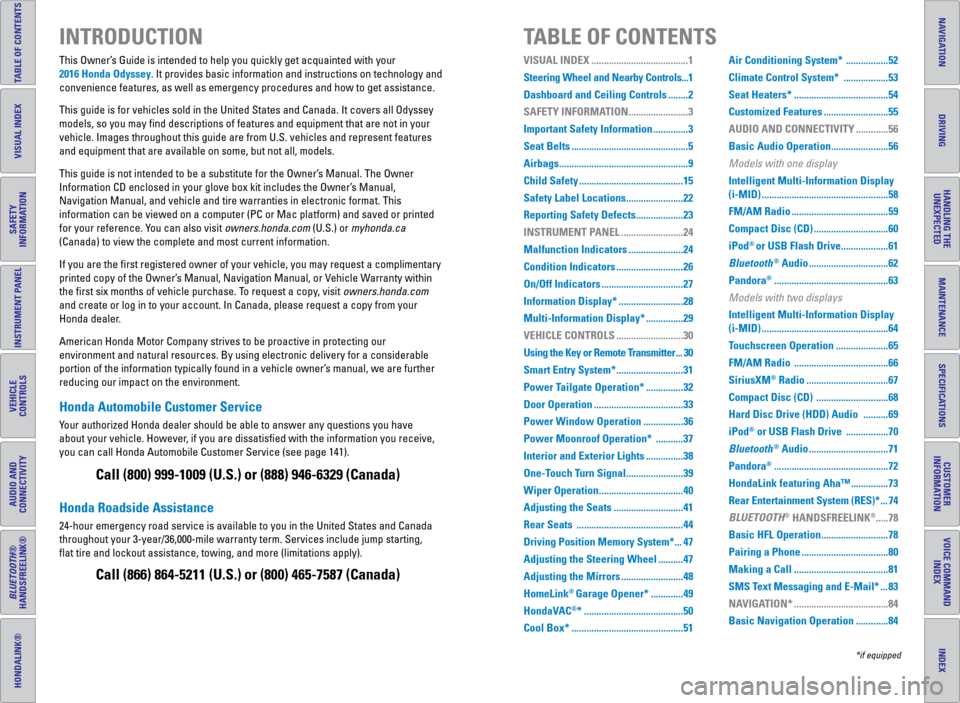
TABLE OF CONTENTS
INDEX
VISUAL INDEX
VOICE COMMAND INDEX
SAFETY
INFORMATION
CUSTOMER
INFORMATION
INSTRUMENT PANEL
SPECIFICATIONS
VEHICLE
CONTROLS
MAINTENANCE
AUDIO AND
CONNECTIVITY
HANDLING THE UNEXPECTED
BLUETOOTH®
HANDSFREELINK®
DRIVING
HONDALINK®
NAVIGATION
Honda Automobile Customer Service
Your authorized Honda dealer should be able to answer any questions you h\
ave
about your vehicle. However, if you are dissatisfied with the information you receive,
you can call Honda Automobile Customer Service (see page 141).
Honda Roadside Assistance
24-hour emergency road service is available to you in the United States \
and Canada
throughout your 3-year/36,000-mile warranty term. Services include jump starting,
flat tire and lockout assistance, towing, and more (limitations apply\
). This Owner’s Guide is intended to help you quickly get acquainted with your
2016 Honda Odyssey. It provides basic information and instructions on technology and
convenience features, as well as emergency procedures and how to get ass\
istance.
This guide is for vehicles sold in the United States and Canada. It cove\
rs all Odyssey
models, so you may find descriptions of features and equipment that ar\
e not in your
vehicle. Images throughout this guide are from U.S. vehicles and represe\
nt features
and equipment that are available on some, but not all, models.
This guide is not intended to be a substitute for the Owner’s Manual. The Owner
Information CD enclosed in your glove box kit includes the Owner’s Manual,
Navigation Manual, and vehicle and tire warranties in electronic format.\
This
information can be viewed on a computer (PC or Mac platform) and saved or printed
for your reference. You can also visit owners.honda.com (U.S.) or myhonda.ca
(Canada) to view the complete and most current information.
If you are the first registered owner of your vehicle, you may request\
a complimentary
printed copy of the Owner’s Manual, Navigation Manual, or Vehicle Warranty within
the first six months of vehicle purchase. To request a copy, visit owners.honda.com
and create or log in to your account. In Canada, please request a copy f\
rom your
Honda dealer.
American Honda Motor Company strives to be proactive in protecting our
environment and natural resources. By using electronic delivery for a co\
nsiderable
portion of the information typically found in a vehicle owner’s manual, we are further
reducing our impact on the environment.
INTRODUCTION TABLE OF CONTENTS
Call (800) 999-1009 (U.S.) or (888) 946-6329 (Canada)
Call (866) 864-5211 (U.S.) or (800) 465-7587 (Canada)
*if equipped
VISUAL INDEX .......................................1
Steering Wheel and Nearby Controls ...1
Dashboard and Ceiling Controls ........ 2
SAFETY INFORMATION ........................ 3
Important Safety Information .............. 3
Seat Belts ............................................... 5
Airbags .................................................... 9
Child Safety .......................................... 15
Safety Label Locations ....................... 22
Reporting Safety Defects ................... 23
INSTRUMENT PANEL ......................... 24
Malfunction Indicators ...................... 24
Condition Indicators ........................... 26
On/Off Indicators ................................. 27
Information Display* ..........................28
Multi-Information Display* ............... 29
VEHICLE CONTROLS ...........................30
Using the Key or Remote Transmitter ... 30
Smart Entry System* ...........................31
Power Tailgate Operation* ............... 32
Door Operation .................................... 33
Power Window Operation ................ 36
Power Moonroof Operation* ........... 37
Interior and Exterior Lights ............... 38
One-Touch Turn Signal ....................... 39
Wiper Operation .................................. 40
Adjusting the Seats ............................41
Rear Seats ........................................... 44
Driving Position Memory System* ... 47
Adjusting the Steering Wheel .......... 47
Adjusting the Mirrors .........................48
HomeLink
® Garage Opener* ............. 49
HondaVAC
®* ........................................ 50
Cool Box* ............................................. 51Air Conditioning System* .................
52
Climate Control System* .................. 53
Seat Heaters* ...................................... 54
Customized Features ..........................55
AUDIO AND CONNECTIVITY ............. 56
Basic Audio Operation ....................... 56
Models with one display
Intelligent Multi-Information Display
(i-MID) ................................................... 58
FM/AM Radio ....................................... 59
Compact Disc (CD) ..............................60
iPod
® or USB Flash Drive ................... 61
Bluetooth
® Audio ................................ 62
Pandora
® .............................................. 63
Models with two displays
Intelligent Multi-Information Display
(i-MID) ................................................... 64
Touchscreen Operation ..................... 65
FM/AM Radio ...................................... 66
SiriusXM
® Radio ................................. 67
Compact Disc (CD) .............................68
Hard Disc Drive (HDD) Audio .......... 69
iPod
® or USB Flash Drive ................. 70
Bluetooth
® Audio ................................ 71
Pandora
® .............................................. 72
HondaLink featuring Aha™ ............... 73
Rear Entertainment System (RES)* ... 74
BLUETOOTH
® HANDSFREELINK®..... 78
Basic HFL Operation ...........................78
Pairing a Phone ................................... 80
Making a Call ...................................... 81
SMS Text Messaging and E-Mail* ... 83
NAVIGATION* ...................................... 84
Basic Navigation Operation ............. 84
Page 5 of 80
2 || 3
SAFETY
VISUAL INDEX
INDEX
VOICE COMMAND
INDEX
CUSTOMER
INFORMATION
SPECIFICATIONS
MAINTENANCE
HANDLING THE UNEXPECTED
DRIVING
NAVIGATION
TABLE OF CONTENTS
VISUAL INDEX
SAFETY
INFORMATION
INSTRUMENT PANEL
VEHICLE
CONTROLS
AUDIO AND
CONNECTIVITY
BLUETOOTH®
HANDSFREELINK®
HONDALINK®
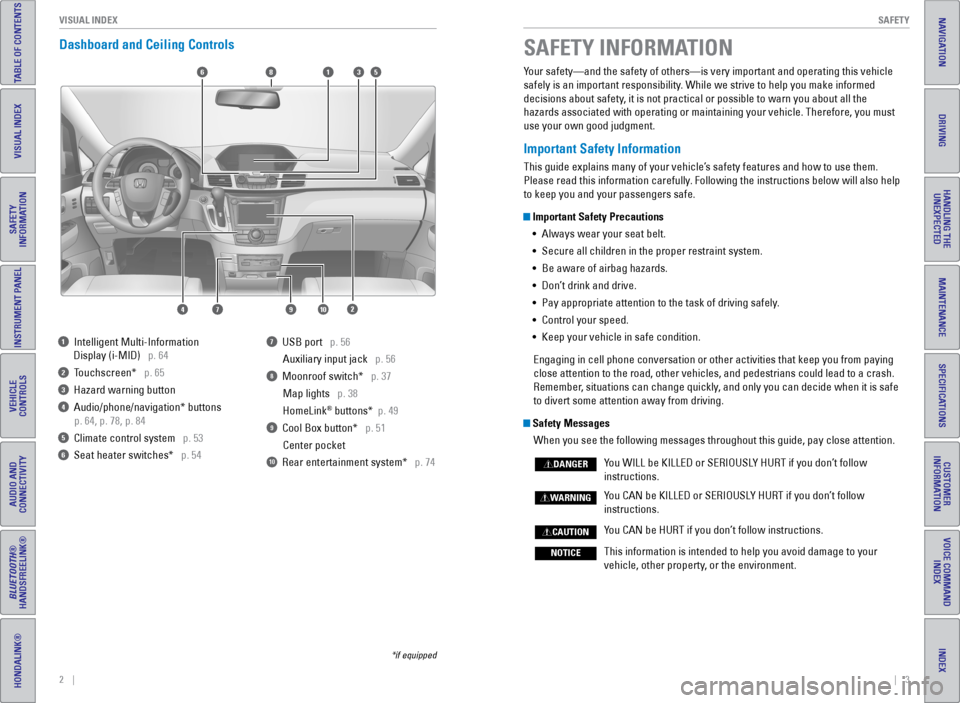
Dashboard and Ceiling Controls
*if equipped
Your safety—and the safety of others—is very important and operatin\
g this vehicle
safely is an important responsibility. While we strive to help you make informed
decisions about safety, it is not practical or possible to warn you about all the
hazards associated with operating or maintaining your vehicle. Therefore\
, you must
use your own good judgment.
Important Safety Information
This guide explains many of your vehicle’s safety features and how to use them.
Please read this information carefully. Following the instructions below will also help
to keep you and your passengers safe.
Important Safety Precautions
• Always wear your seat belt.
• Secure all children in the proper restraint system.
• Be aware of airbag hazards.
• Don’t drink and drive.
• Pay appropriate attention to the task of driving safely.
• Control your speed.
• Keep your vehicle in safe condition.
Engaging in cell phone conversation or other activities that keep you fr\
om paying
close attention to the road, other vehicles, and pedestrians could lead \
to a crash.
Remember, situations can change quickly, and only you can decide when it is safe
to divert some attention away from driving.
Safety Messages When you see the following messages throughout this guide, pay close att\
ention.
You WILL be KILLED or SERIOUSLY HURT if you don’t follow
instructions.
You CAN be KILLED or SERIOUSLY HURT if you don’t follow
instructions.
You CAN be HURT if you don’t follow instructions.
This information is intended to help you avoid damage to your
vehicle, other property, or the environment.
DANGER
WARNING
CAUTION
NOTICE
SAFETY INFORMATION
1 Intelligent Multi-Information
Display (i-MID) p. 64
2 Touchscreen* p. 65
3 Hazard warning button
4 Audio/phone/navigation* buttons
p. 64, p. 78, p. 84
5 Climate control system p. 53
6 Seat heater switches* p. 54
7 USB port p. 56
Auxiliary input jack p. 56
8 Moonroof switch* p. 37Map lights p. 38
HomeLink
® buttons* p. 49
9 Cool Box button* p. 51Center pocket
10 Rear entertainment system* p. 74
6
1097
351
2
8
4
Page 31 of 80
54 || 55
VEHICLE CONTROLS
VEHICLE CONTROLS
INDEX
VOICE COMMAND
INDEX
CUSTOMER
INFORMATION
SPECIFICATIONS
MAINTENANCE
HANDLING THE UNEXPECTED
DRIVING
NAVIGATION
TABLE OF CONTENTS
VISUAL INDEX
SAFETY
INFORMATION
INSTRUMENT PANEL
VEHICLE
CONTROLS
AUDIO AND
CONNECTIVITY
BLUETOOTH®
HANDSFREELINK®
HONDALINK®
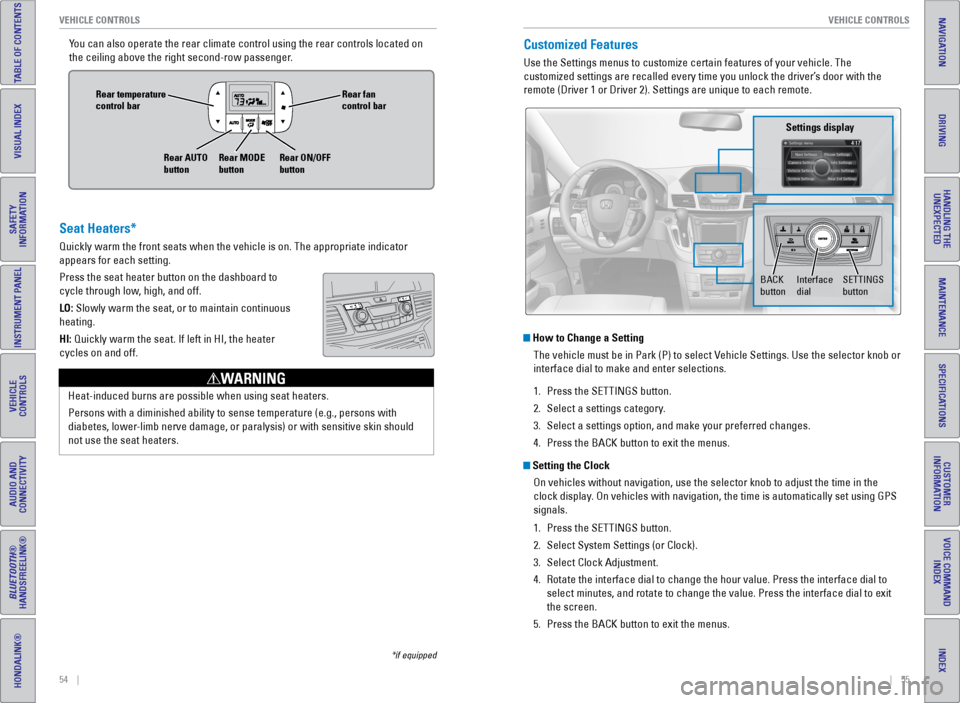
You can also operate the rear climate control using the rear controls loc\
ated on
the ceiling above the right second-row passenger.Customized Features
Use the Settings menus to customize certain features of your vehicle. Th\
e
customized settings are recalled every time you unlock the driver’s door with the
remote (Driver 1 or Driver 2). Settings are unique to each remote.
How to Change a Setting
The vehicle must be in Park (P) to select Vehicle Settings. Use the selector knob or
interface dial to make and enter selections.
1. Press the SETTINGS button.
2. Select a settings category.
3. Select a settings option, and make your preferred changes.
4. Press the BACK button to exit the menus.
Setting the Clock
On vehicles without navigation, use the selector knob to adjust the time\
in the
clock display. On vehicles with navigation, the time is automatically set using GPS
signals.
1. Press the SETTINGS button.
2. Select System Settings (or Clock).
3. Select Clock Adjustment.
4. Rotate the interface dial to change the hour value. Press the interface \
dial to
select minutes, and rotate to change the value. Press the interface dial\
to exit
the screen.
5. Press the BACK button to exit the menus.
SETTINGS
button
Settings display
BACK
buttonInterface
dial
Seat Heaters*
Quickly warm the front seats when the vehicle is on. The appropriate ind\
icator
appears for each setting.
Press the seat heater button on the dashboard to
cycle through low, high, and off.
LO: Slowly warm the seat, or to maintain continuous
heating.
HI: Quickly warm the seat. If left in HI, the heater
cycles on and off.
Heat-induced burns are possible when using seat heaters.
Persons with a diminished ability to sense temperature (e.g., persons w\
ith
diabetes, lower-limb nerve damage, or paralysis) or with sensitive skin should
not use the seat heaters.
WARNING
Rear fan
control bar
Rear ON/OFF
button
Rear temperature
control bar
Rear AUTO
buttonRear MODE
button
*if equipped
Page 63 of 80
118 || 119
HANDLING THE UNEXPECTED
HANDLING THE UNEXPECTED
INDEX
VOICE COMMAND
INDEX
CUSTOMER
INFORMATION
SPECIFICATIONS
MAINTENANCE
HANDLING THE UNEXPECTED
DRIVING
NAVIGATION
TABLE OF CONTENTS
VISUAL INDEX
SAFETY
INFORMATION
INSTRUMENT PANEL
VEHICLE
CONTROLS
AUDIO AND
CONNECTIVITY
BLUETOOTH®
HANDSFREELINK®
HONDALINK®
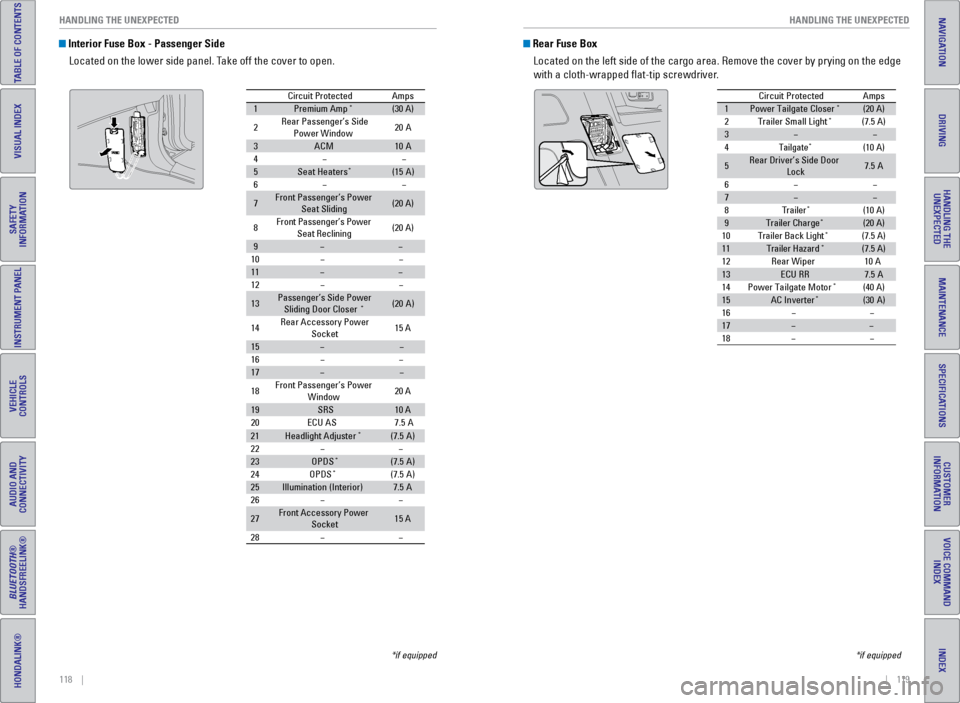
Interior Fuse Box - Passenger Side
Located on the lower side panel. Take off the cover to open.
Circuit ProtectedAmps
1Premium Amp*(30 A)
2Rear Passenger’s Side Power Window20A
3ACM10A
4
5Seat Heaters*(15A )
6
7Front Passenger’s Power
Seat Sliding(20 A)
8Front Passenger’s Power
Seat Reclining(20 A)
9
10
11
12
13Passenger’s Side Power
Sliding Door Closer*(2 0A )
14 Rear Accessory Power
Socket 15
A
15
16
17
18 Front Passenger’s Power
Window 20
A
19SRS10 A
20 ECU AS
21Headlight Adjuste r*(7.5A)
22
23OPDS*(7.5 A)
24 OPDS*(7.5A)
25Illumination (Interior )7.5A
26
27Front Accessory Power Socket15 A
28
7. 5A
*if equipped
Rear Fuse Box
Located on the left side of the cargo area. Remove the cover by prying o\
n the edge
with a cloth-wrapped flat-tip screwdriver.
Circuit Protecte dAmps
1Power Tailgate Closer*(20 A)
2Trailer Small Light*(7.5 A)
3
4Tailgate*(10 A)
5Rear Driver’s Side Door
Lock7. 5A
6
7
8Traile r*(10 A)
9Trailer Charg e*(20 A)
10 Trailer Back Ligh t*(7.5 A)
11Trailer Hazard*(7.5 A)
12 Rear Wiper
13ECU RR7.5A
14 Power Tailgate Motor*(40 A)
15AC Inverte r*(30A )
16
17
18
10 A
*if equipped
Page 76 of 80
144 || 145
VOICE COMMAND INDEX
VOICE COMMAND INDEX
INDEX
VOICE COMMAND
INDEX
CUSTOMER
INFORMATION
SPECIFICATIONS
MAINTENANCE
HANDLING THE UNEXPECTED
DRIVING
NAVIGATION
TABLE OF CONTENTS
VISUAL INDEX
SAFETY
INFORMATION
INSTRUMENT PANEL
VEHICLE
CONTROLS
AUDIO AND
CONNECTIVITY
BLUETOOTH®
HANDSFREELINK®
HONDALINK®
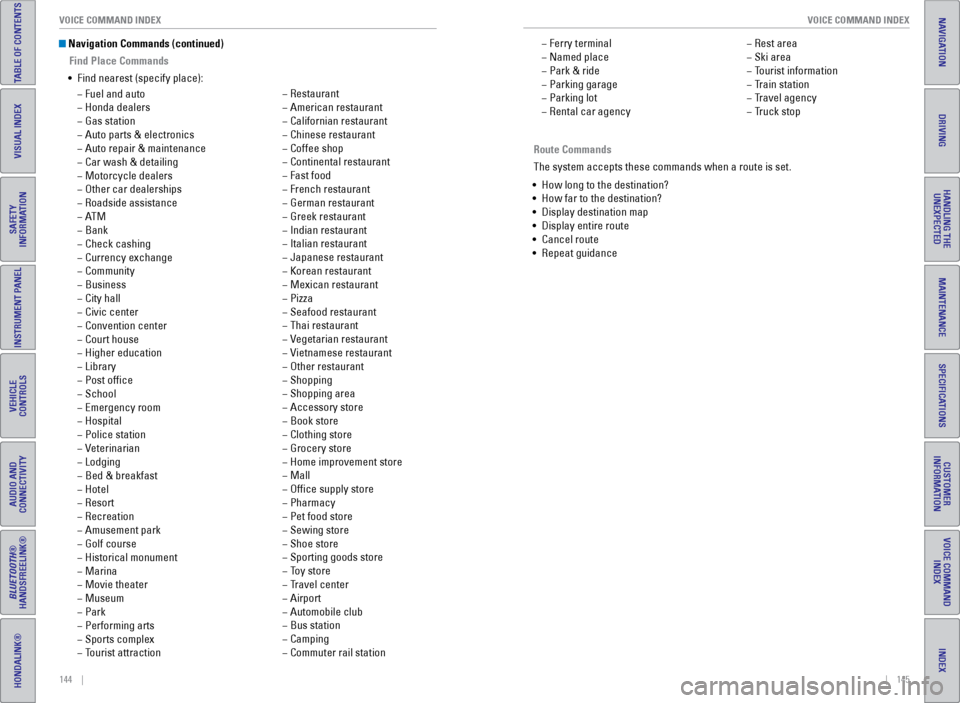
Navigation Commands (continued)
Find Place Commands
• Find nearest (specify place):
− Fuel and auto
− Honda dealers
− Gas station
− Auto parts & electronics
− Auto repair & maintenance
− Car wash & detailing
− Motorcycle dealers
− Other car dealerships
− Roadside assistance
− AT M
− Bank
− Check cashing
− Currency exchange
− Community
− Business
− City hall
− Civic center
− Convention center
− Court house
− Higher education
− Library
− Post office
− School
− Emergency room
− Hospital
− Police station
− Veterinarian
− Lodging
− Bed & breakfast
− Hotel
− Resort
− Recreation
− Amusement park
− Golf course
− Historical monument
− Marina
− Movie theater
− Museum
− Park
− Performing arts
− Sports complex
− Tourist attraction
− Restaurant
− American restaurant
− Californian restaurant
− Chinese restaurant
− Coffee shop
− Continental restaurant
− Fast food
− French restaurant
− German restaurant
− Greek restaurant
− Indian restaurant
− Italian restaurant
− Japanese restaurant
− Korean restaurant
− Mexican restaurant
− Pizza
− Seafood restaurant
− Thai restaurant
− Vegetarian restaurant
− Vietnamese restaurant
− Other restaurant
− Shopping
− Shopping area
− Accessory store
− Book store
− Clothing store
− Grocery store
− Home improvement store
− Mall
− Office supply store
− Pharmacy
− Pet food store
− Sewing store
− Shoe store
− Sporting goods store
− Toy store
− Travel center
− Airport
− Automobile club
− Bus station
− Camping
− Commuter rail station Route Commands
The system accepts these commands when a route is set.
• How long to the destination?
• How far to the destination?
• Display destination map
• Display entire route
• Cancel route
• Repeat guidance
− Ferry terminal
− Named place
− Park & ride
− Parking garage
− Parking lot
− Rental car agency
− Rest area
− Ski area
− Tourist information
− Train station
− Travel agency
− Truck stop
Page 80 of 80
152 || 153
INDEX
INDEX
INDEX
VOICE COMMAND
INDEX
CUSTOMER
INFORMATION
SPECIFICATIONS
MAINTENANCE
HANDLING THE UNEXPECTED
DRIVING
NAVIGATION
TABLE OF CONTENTS
VISUAL INDEX
SAFETY
INFORMATION
INSTRUMENT PANEL
VEHICLE
CONTROLS
AUDIO AND
CONNECTIVITY
BLUETOOTH®
HANDSFREELINK®
HONDALINK®
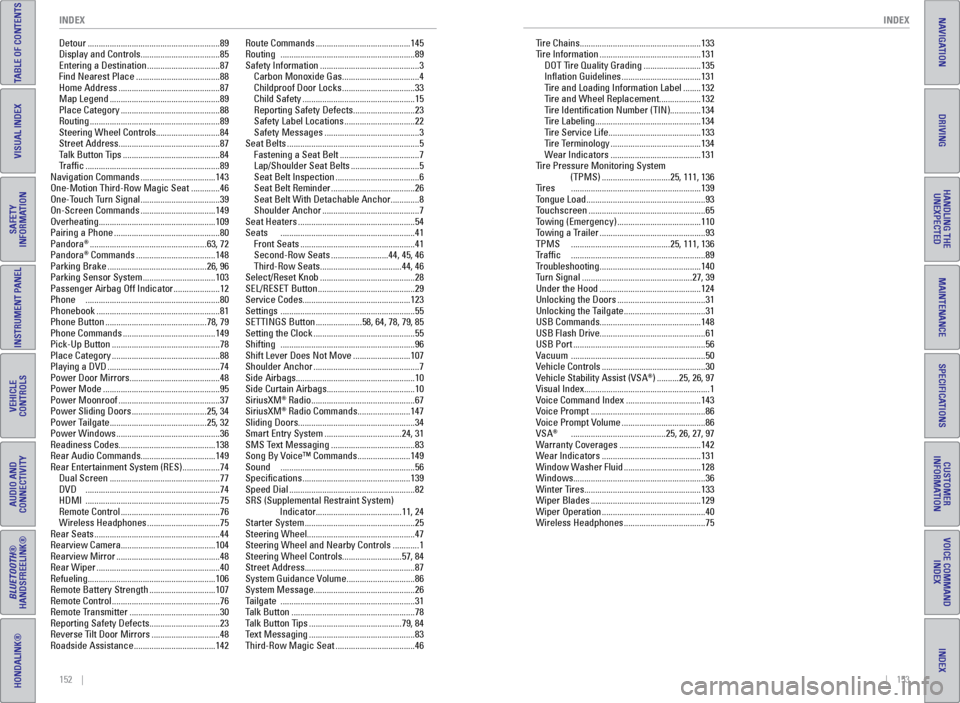
Detour ............................................................ 89
Display and Controls ....................................85
Entering a Destination .................................87
Find Nearest Place ...................................... 88
Home Address .............................................. 87
Map Legend .................................................. 89
Place Category ............................................. 88
Routing ........................................................... 89
Steering Wheel Controls ............................. 84
Street Address .............................................. 87
Talk Button Tips ............................................ 84
Traffic ............................................................. 89
Navigation Commands ..................................143
One-Motion Third-Row Magic Seat ............. 46
One-Touch Turn Signal ....................................39
On-Screen Commands ..................................149
Overheating ..................................................... 109
Pairing a Phone ................................................ 80
Pandora
® ..................................................... 63, 72
Pandora® Commands .................................... 148
Parking Brake ............................................. 26, 96
Parking Sensor System .................................103
Passenger Airbag Off Indicator ..................... 12
Phone ............................................................. 80
Phonebook ........................................................ 81
Phone Button .............................................. 78, 79
Phone Commands .......................................... 149
Pick-Up Button ................................................. 78
Place Category ................................................. 88
Playing a DVD ................................................... 74
Power Door Mirrors ......................................... 48
Power Mode ..................................................... 95
Power Moonroof .............................................. 37
Power Sliding Doors ..................................25, 34
Power Tailgate ............................................ 25, 32
Power Windows ............................................... 36
Readiness Codes ............................................ 138
Rear Audio Commands ..................................149
Rear Entertainment System (RES) ................. 74
Dual Screen .................................................. 77
DVD ............................................................. 74
HDMI ............................................................. 75
Remote Control ............................................. 76
Wireless Headphones .................................75
Rear Seats ......................................................... 44
Rearview Camera ........................................... 104
Rearview Mirror ............................................... 48
Rear Wiper ........................................................ 40
Refueling .......................................................... 106
Remote Battery Strength .............................. 107
Remote Control ................................................. 76
Remote Transmitter ......................................... 30
Reporting Safety Defects ................................23
Reverse Tilt Door Mirrors ...............................48
Roadside Assistance .....................................142Route Commands ...........................................
145
Routing ............................................................. 89
Safety Information ............................................. 3
Carbon Monoxide Gas ...................................4
Childproof Door Locks .................................33
Child Safety ................................................... 15
Reporting Safety Defects ............................ 23
Safety Label Locations ................................22
Safety Messages ........................................... 3
Seat Belts ............................................................ 5
Fastening a Seat Belt ....................................7
Lap/Shoulder Seat Belts ............................... 5
Seat Belt Inspection ...................................... 6
Seat Belt Reminder ...................................... 26
Seat Belt With Detachable Anchor .............8
Shoulder Anchor ............................................ 7
Seat Heaters ..................................................... 54
Seats ............................................................. 41
Front Seats .................................................... 41
Second-Row Seats ..........................44, 45, 46
Third-Row Seats ..................................... 44, 46
Select/Reset Knob ........................................... 28
SEL/RESET Button ............................................ 29
Service Codes ................................................. 123
Settings ............................................................. 55
SETTINGS Button .....................58, 64, 78, 79, 85
Setting the Clock .............................................. 55
Shifting ............................................................. 96
Shift Lever Does Not Move .......................... 107
Shoulder Anchor ................................................ 7
Side Airbags ...................................................... 10
Side Curtain Airbags ........................................ 10
SiriusXM
® Radio ............................................... 67
SiriusXM® Radio Commands ........................ 147
Sliding Doors ..................................................... 34
Smart Entry System ................................... 24, 31
SMS Text Messaging ......................................83
Song By Voice™ Commands ........................ 149
Sound ............................................................. 56
Specifications ................................................. 139
Speed Dial ......................................................... 82
SRS (Supplemental Restraint System) Indicator ....................................... 11, 24
Starter System .................................................. 25
Steering Wheel ................................................. 47
Steering Wheel and Nearby Controls ............ 1
Steering Wheel Controls ...........................57, 84
Street Address .................................................. 87
System Guidance Volume ............................... 86
System Message .............................................. 26
Tailgate ............................................................. 31
Talk Button ........................................................ 78
Talk Button Tips .......................................... 79, 84
Text Messaging ................................................ 83
Third-Row Magic Seat ....................................46 Tire Chains .......................................................
133
Tire Information .............................................. 131
DOT Tire Quality Grading .......................... 135
Inflation Guidelines .................................... 131
Tire and Loading Information Label ........ 132
Tire and Wheel Replacement ................... 132
Tire Identification Number (TIN) .............. 134
Tire Labeling ................................................ 134
Tire Service Life .......................................... 133
Tire Terminology ......................................... 134
Wear Indicators ......................................... 131
Tire Pressure Monitoring System (TPMS) ............................... 25, 111, 136
Tires ........................................................... 139
Tongue Load ...................................................... 93
Touchscreen ..................................................... 65
Towing (Emergency) ...................................... 110
Towing a Trailer ................................................ 93
TPMS ............................................. 25, 111, 136
Traffic ............................................................. 89
Troubleshooting .............................................. 140
Turn Signal ..................................................
27, 39
Under the Hood .............................................. 124
Unlocking the Doors ........................................ 31
Unlocking the Tailgate .....................................31
USB Commands .............................................. 148
USB Flash Drive ................................................ 61
USB Port ............................................................ 56
Vacuum ............................................................. 50
Vehicle Controls ............................................... 30
Vehicle Stability Assist (VSA
®) .......... 25, 26, 97
Visual Index ......................................................... 1
Voice Command Index ..................................143
Voice Prompt .................................................... 86
Voice Prompt Volume ......................................86
VSA
® ........................................... 25, 26, 27, 97
Warranty Coverages .....................................142
Wear Indicators ............................................. 131
Window Washer Fluid ...................................128
Windows ............................................................ 36
Winter Tires ..................................................... 133
Wiper Blades .................................................. 129
Wiper Operation ............................................... 40
Wireless Headphones .....................................75