key HONDA ODYSSEY 2016 RC1-RC2 / 5.G Quick Guide
[x] Cancel search | Manufacturer: HONDA, Model Year: 2016, Model line: ODYSSEY, Model: HONDA ODYSSEY 2016 RC1-RC2 / 5.GPages: 80, PDF Size: 16.28 MB
Page 3 of 80
TABLE OF CONTENTS
INDEX
VISUAL INDEX
VOICE COMMAND INDEX
SAFETY
INFORMATION
CUSTOMER
INFORMATION
INSTRUMENT PANEL
SPECIFICATIONS
VEHICLE
CONTROLS
MAINTENANCE
AUDIO AND
CONNECTIVITY
HANDLING THE UNEXPECTED
BLUETOOTH®
HANDSFREELINK®
DRIVING
HONDALINK®
NAVIGATION
Honda Automobile Customer Service
Your authorized Honda dealer should be able to answer any questions you h\
ave
about your vehicle. However, if you are dissatisfied with the information you receive,
you can call Honda Automobile Customer Service (see page 141).
Honda Roadside Assistance
24-hour emergency road service is available to you in the United States \
and Canada
throughout your 3-year/36,000-mile warranty term. Services include jump starting,
flat tire and lockout assistance, towing, and more (limitations apply\
). This Owner’s Guide is intended to help you quickly get acquainted with your
2016 Honda Odyssey. It provides basic information and instructions on technology and
convenience features, as well as emergency procedures and how to get ass\
istance.
This guide is for vehicles sold in the United States and Canada. It cove\
rs all Odyssey
models, so you may find descriptions of features and equipment that ar\
e not in your
vehicle. Images throughout this guide are from U.S. vehicles and represe\
nt features
and equipment that are available on some, but not all, models.
This guide is not intended to be a substitute for the Owner’s Manual. The Owner
Information CD enclosed in your glove box kit includes the Owner’s Manual,
Navigation Manual, and vehicle and tire warranties in electronic format.\
This
information can be viewed on a computer (PC or Mac platform) and saved or printed
for your reference. You can also visit owners.honda.com (U.S.) or myhonda.ca
(Canada) to view the complete and most current information.
If you are the first registered owner of your vehicle, you may request\
a complimentary
printed copy of the Owner’s Manual, Navigation Manual, or Vehicle Warranty within
the first six months of vehicle purchase. To request a copy, visit owners.honda.com
and create or log in to your account. In Canada, please request a copy f\
rom your
Honda dealer.
American Honda Motor Company strives to be proactive in protecting our
environment and natural resources. By using electronic delivery for a co\
nsiderable
portion of the information typically found in a vehicle owner’s manual, we are further
reducing our impact on the environment.
INTRODUCTION TABLE OF CONTENTS
Call (800) 999-1009 (U.S.) or (888) 946-6329 (Canada)
Call (866) 864-5211 (U.S.) or (800) 465-7587 (Canada)
*if equipped
VISUAL INDEX .......................................1
Steering Wheel and Nearby Controls ...1
Dashboard and Ceiling Controls ........ 2
SAFETY INFORMATION ........................ 3
Important Safety Information .............. 3
Seat Belts ............................................... 5
Airbags .................................................... 9
Child Safety .......................................... 15
Safety Label Locations ....................... 22
Reporting Safety Defects ................... 23
INSTRUMENT PANEL ......................... 24
Malfunction Indicators ...................... 24
Condition Indicators ........................... 26
On/Off Indicators ................................. 27
Information Display* ..........................28
Multi-Information Display* ............... 29
VEHICLE CONTROLS ...........................30
Using the Key or Remote Transmitter ... 30
Smart Entry System* ...........................31
Power Tailgate Operation* ............... 32
Door Operation .................................... 33
Power Window Operation ................ 36
Power Moonroof Operation* ........... 37
Interior and Exterior Lights ............... 38
One-Touch Turn Signal ....................... 39
Wiper Operation .................................. 40
Adjusting the Seats ............................41
Rear Seats ........................................... 44
Driving Position Memory System* ... 47
Adjusting the Steering Wheel .......... 47
Adjusting the Mirrors .........................48
HomeLink
® Garage Opener* ............. 49
HondaVAC
®* ........................................ 50
Cool Box* ............................................. 51Air Conditioning System* .................
52
Climate Control System* .................. 53
Seat Heaters* ...................................... 54
Customized Features ..........................55
AUDIO AND CONNECTIVITY ............. 56
Basic Audio Operation ....................... 56
Models with one display
Intelligent Multi-Information Display
(i-MID) ................................................... 58
FM/AM Radio ....................................... 59
Compact Disc (CD) ..............................60
iPod
® or USB Flash Drive ................... 61
Bluetooth
® Audio ................................ 62
Pandora
® .............................................. 63
Models with two displays
Intelligent Multi-Information Display
(i-MID) ................................................... 64
Touchscreen Operation ..................... 65
FM/AM Radio ...................................... 66
SiriusXM
® Radio ................................. 67
Compact Disc (CD) .............................68
Hard Disc Drive (HDD) Audio .......... 69
iPod
® or USB Flash Drive ................. 70
Bluetooth
® Audio ................................ 71
Pandora
® .............................................. 72
HondaLink featuring Aha™ ............... 73
Rear Entertainment System (RES)* ... 74
BLUETOOTH
® HANDSFREELINK®..... 78
Basic HFL Operation ...........................78
Pairing a Phone ................................... 80
Making a Call ...................................... 81
SMS Text Messaging and E-Mail* ... 83
NAVIGATION* ...................................... 84
Basic Navigation Operation ............. 84
Page 8 of 80
8 || 9
SAFETY
SAFETY
INDEX
VOICE COMMAND
INDEX
CUSTOMER
INFORMATION
SPECIFICATIONS
MAINTENANCE
HANDLING THE UNEXPECTED
DRIVING
NAVIGATION
TABLE OF CONTENTS
VISUAL INDEX
SAFETY
INFORMATION
INSTRUMENT PANEL
VEHICLE
CONTROLS
AUDIO AND
CONNECTIVITY
BLUETOOTH®
HANDSFREELINK®
HONDALINK®
Seat Belt with Detachable Anchor
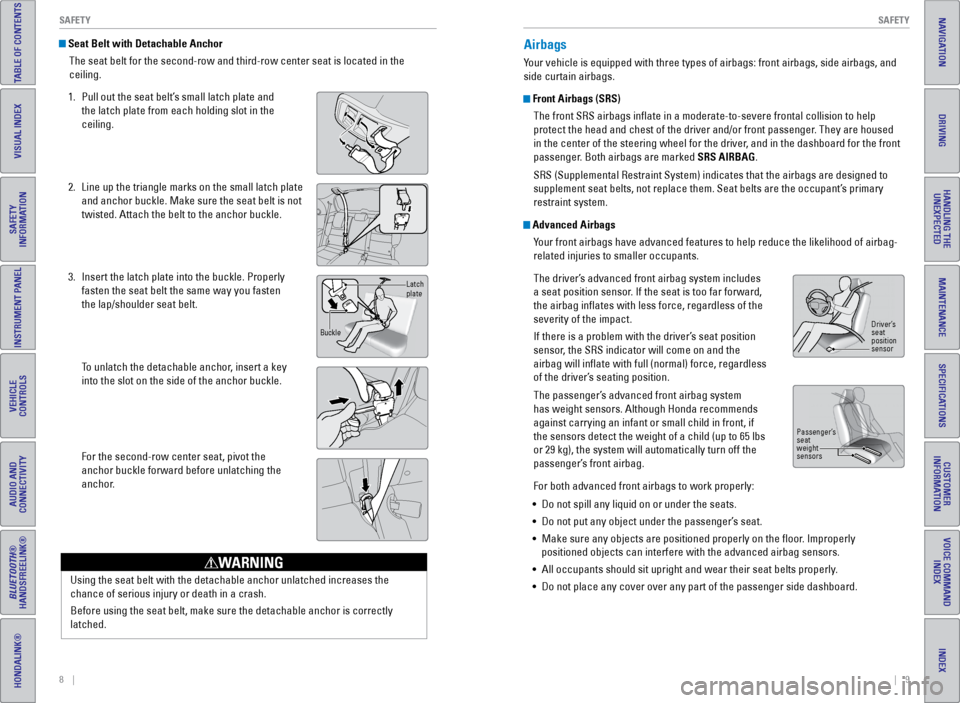
The seat belt for the second-row and third-row center seat is located in\
the
ceiling.
1. Pull out the seat belt’s small latch plate and
the latch plate from each holding slot in the
ceiling.
2. Line up the triangle marks on the small latch plate
and anchor buckle. Make sure the seat belt is not
twisted. Attach the belt to the anchor buckle.
3. Insert the latch plate into the buckle. Properly
fasten the seat belt the same way you fasten
the lap/shoulder seat belt.
To unlatch the detachable anchor, insert a key
into the slot on the side of the anchor buckle.
For the second-row center seat, pivot the
anchor buckle forward before unlatching the
anchor.
Latch
plate
Buckle
Airbags
Your vehicle is equipped with three types of airbags: front airbags, side\
airbags, and
side curtain airbags.
Front Airbags (SRS) The front SRS airbags inflate in a moderate-to-severe frontal collisio\
n to help
protect the head and chest of the driver and/or front passenger. They are housed
in the center of the steering wheel for the driver, and in the dashboard for the front
passenger. Both airbags are marked SRS AIRBAG.
SRS (Supplemental Restraint System) indicates that the airbags are des\
igned to
supplement seat belts, not replace them. Seat belts are the occupant’\
s primary
restraint system.
Advanced Airbags Your front airbags have advanced features to help reduce the likelihood o\
f airbag-
related injuries to smaller occupants.
The driver’s advanced front airbag system includes
a seat position sensor. If the seat is too far forward,
the airbag inflates with less force, regardless of the
severity of the impact.
If there is a problem with the driver’s seat position
sensor, the SRS indicator will come on and the
airbag will inflate with full (normal) force, regardless
of the driver’s seating position.
The passenger’s advanced front airbag system
has weight sensors. Although Honda recommends
against carrying an infant or small child in front, if
the sensors detect the weight of a child (up to 65 lbs
or 29 kg), the system will automatically turn off the
passenger’s front airbag.
For both advanced front airbags to work properly:
• Do not spill any liquid on or under the seats.
• Do not put any object under the passenger’s seat.
• Make sure any objects are positioned properly on the floor. Improperly
positioned objects can interfere with the advanced airbag sensors.
• All occupants should sit upright and wear their seat belts properly.
• Do not place any cover over any part of the passenger side dashboard.
Driver’s
seat
position
sensor
Passenger’s
seat
weight
sensors
Using the seat belt with the detachable anchor unlatched increases the
chance of serious injury or death in a crash.
Before using the seat belt, make sure the detachable anchor is correctly\
latched.
WARNING
Page 12 of 80
16 || 17
SAFETY
SAFETY
INDEX
VOICE COMMAND
INDEX
CUSTOMER
INFORMATION
SPECIFICATIONS
MAINTENANCE
HANDLING THE UNEXPECTED
DRIVING
NAVIGATION
TABLE OF CONTENTS
VISUAL INDEX
SAFETY
INFORMATION
INSTRUMENT PANEL
VEHICLE
CONTROLS
AUDIO AND
CONNECTIVITY
BLUETOOTH®
HANDSFREELINK®
HONDALINK®
Protecting Infants
An infant must be properly restrained in a rear-facing, reclining child seat until the
infant reaches the seat manufacturer’s weight or height limit for the seat, and the
infant is at least one year old. Many experts recommend use of a rear-facing seat
for a child up to two years old if the child’s height and weight are appropriate for a
rear-facing seat.
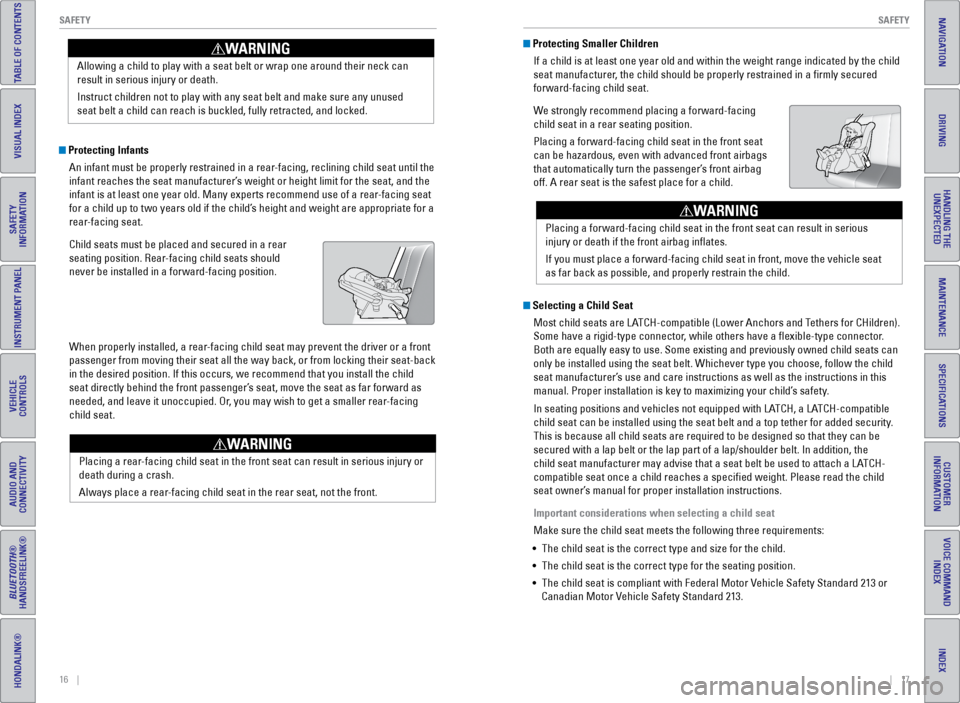
Child seats must be placed and secured in a rear
seating position. Rear-facing child seats should
never be installed in a forward-facing position.
When properly installed, a rear-facing child seat may prevent the driver or a front
passenger from moving their seat all the way back, or from locking their\
seat-back
in the desired position. If this occurs, we recommend that you install t\
he child
seat directly behind the front passenger’s seat, move the seat as far forward as
needed, and leave it unoccupied. Or, you may wish to get a smaller rear-facing
child seat. Allowing a child to play with a seat belt or wrap one around their neck \
can
result in serious injury or death.
Instruct children not to play with any seat belt and make sure any unuse\
d
seat belt a child can reach is buckled, fully retracted, and locked.
WARNING Protecting Smaller Children
If a child is at least one year old and within the weight range indicate\
d by the child
seat manufacturer, the child should be properly restrained in a firmly secured
forward-facing child seat.
We strongly recommend placing a forward-facing
child seat in a rear seating position.
Placing a forward-facing child seat in the front seat
can be hazardous, even with advanced front airbags
that automatically turn the passenger’s front airbag
off. A rear seat is the safest place for a child.
Selecting a Child SeatMost child seats are LATCH-compatible (Lower Anchors and Tethers for CHildren).
Some have a rigid-type connector, while others have a flexible-type connector.
Both are equally easy to use. Some existing and previously owned child s\
eats can
only be installed using the seat belt. Whichever type you choose, follow\
the child
seat manufacturer’s use and care instructions as well as the instructions in this
manual. Proper installation is key to maximizing your child’s safety.
In seating positions and vehicles not equipped with LATCH, a LATCH-compatible
child seat can be installed using the seat belt and a top tether for add\
ed security.
This is because all child seats are required to be designed so that they\
can be
secured with a lap belt or the lap part of a lap/shoulder belt. In addit\
ion, the
child seat manufacturer may advise that a seat belt be used to attach a \
LATCH-
compatible seat once a child reaches a specified weight. Please read t\
he child
seat owner’s manual for proper installation instructions.
Important considerations when selecting a child seat
Make sure the child seat meets the following three requirements:
• The child seat is the correct type and size for the child.
• The child seat is the correct type for the seating position.
• The child seat is compliant with Federal Motor Vehicle Safety Standard 213 or
Canadian Motor Vehicle Safety Standard 213.
Placing a rear-facing child seat in the front seat can result in serious injury or
death during a crash.
Always place a rear-facing child seat in the rear seat, not the front.
WARNING
Placing a forward-facing child seat in the front seat can result in seri\
ous
injury or death if the front airbag inflates.
If you must place a forward-facing child seat in front, move the vehicle\
seat
as far back as possible, and properly restrain the child.
WARNING
Page 17 of 80
26 || 27
INSTRUMENT P
ANEL
INSTRUMENT P ANEL
INDEX
VOICE COMMAND
INDEX
CUSTOMER
INFORMATION
SPECIFICATIONS
MAINTENANCE
HANDLING THE UNEXPECTED
DRIVING
NAVIGATION
TABLE OF CONTENTS
VISUAL INDEX
SAFETY
INFORMATION
INSTRUMENT PANEL
VEHICLE
CONTROLS
AUDIO AND
CONNECTIVITY
BLUETOOTH®
HANDSFREELINK®
HONDALINK®
Condition Indicators
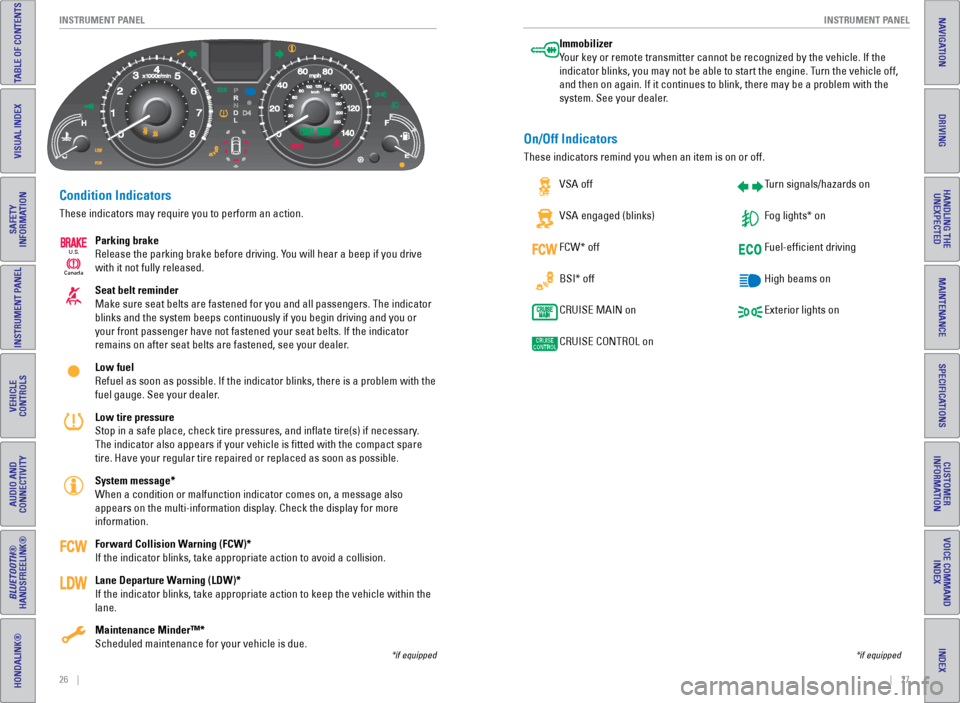
These indicators may require you to perform an action.
Parking brake
Release the parking brake before driving. You will hear a beep if you drive
with it not fully released.
Seat belt reminder
Make sure seat belts are fastened for you and all passengers. The indica\
tor
blinks and the system beeps continuously if you begin driving and you or\
your front passenger have not fastened your seat belts. If the indicator\
remains on after seat belts are fastened, see your dealer.
Low fuel
Refuel as soon as possible. If the indicator blinks, there is a problem \
with the
fuel gauge. See your dealer.
Low tire pressure
Stop in a safe place, check tire pressures, and inflate tire(s) if n\
ecessary.
The indicator also appears if your vehicle is fitted with the compact \
spare
tire. Have your regular tire repaired or replaced as soon as possible.
System message*
When a condition or malfunction indicator comes on, a message also
appears on the multi-information display. Check the display for more
information.
Forward Collision Warning (FCW)*
If the indicator blinks, take appropriate action to avoid a collision.
Lane Departure Warning (LDW)*
If the indicator blinks, take appropriate action to keep the vehicle wit\
hin the
lane.
Maintenance Minder™*
Scheduled maintenance for your vehicle is due.
*if equipped
Immobilizer
Your key or remote transmitter cannot be recognized by the vehicle. If th\
e
indicator blinks, you may not be able to start the engine. Turn the vehicle off,
and then on again. If it continues to blink, there may be a problem with\
the
system. See your dealer.
On/Off Indicators
These indicators remind you when an item is on or off. VSA off
VSA engaged (blinks)
FCW* off
BSI* off
CRUISE MAIN on
CRUISE CONTROL on Turn signals/hazards on
Fog lights* on
Fuel-efficient driving
High beams on
Exterior lights on
*if equipped
Ca
nada
U.S.
Page 19 of 80
30 || 31
VEHICLE CONTROLS
VEHICLE CONTROLS
INDEX
VOICE COMMAND
INDEX
CUSTOMER
INFORMATION
SPECIFICATIONS
MAINTENANCE
HANDLING THE UNEXPECTED
DRIVING
NAVIGATION
TABLE OF CONTENTS
VISUAL INDEX
SAFETY
INFORMATION
INSTRUMENT PANEL
VEHICLE
CONTROLS
AUDIO AND
CONNECTIVITY
BLUETOOTH®
HANDSFREELINK®
HONDALINK®
Learn about the various controls necessary for operating and driving the\
vehicle.
Using the Key or Remote Transmitter
Lock or unlock the doors and tailgate.
VEHICLE CONTROLS
*if equipped
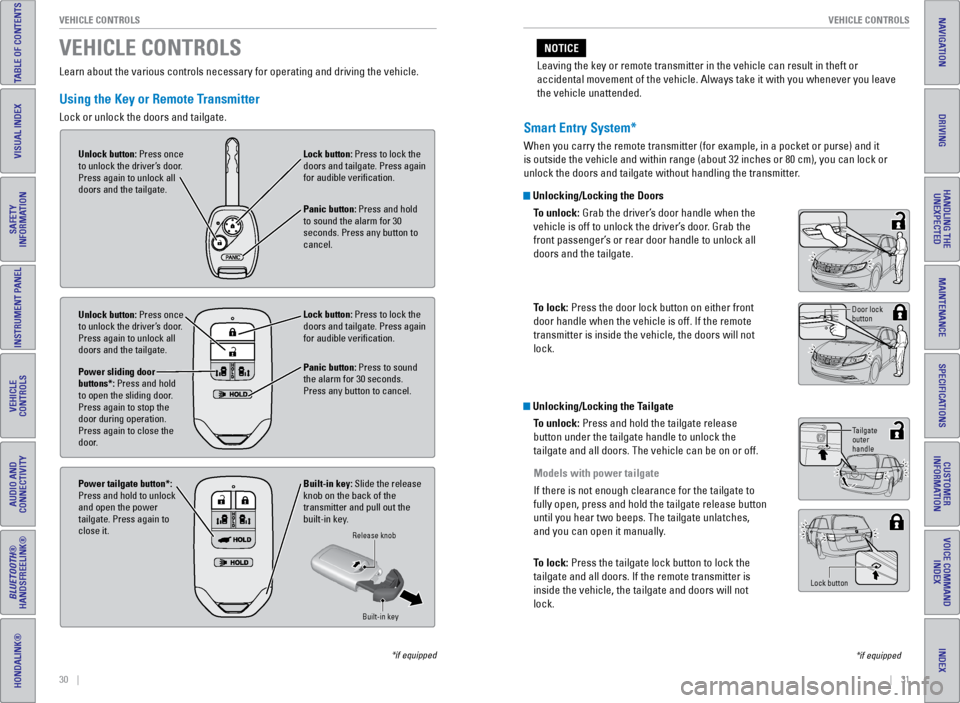
Unlock button: Press once
to unlock the driver’s door.
Press again to unlock all
doors and the tailgate. Lock button: Press to lock the
doors and tailgate. Press again
for audible verification.
Panic button: Press and hold
to sound the alarm for 30
seconds. Press any button to
cancel.
Unlock button: Press once
to unlock the driver’s door.
Press again to unlock all
doors and the tailgate.
Power sliding door
buttons*: Press and hold
to open the sliding door.
Press again to stop the
door during operation.
Press again to close the
door. Lock button: Press to lock the
doors and tailgate. Press again
for audible verification.
Panic button: Press to sound
the alarm for 30 seconds.
Press any button to cancel.
Built-in key: Slide the release
knob on the back of the
transmitter and pull out the
built-in key.
Power tailgate button*:
Press and hold to unlock
and open the power
tailgate. Press again to
close it.
Release knob
Built-in key
Smart Entry System*
When you carry the remote transmitter (for example, in a pocket or purs\
e) and it
is outside the vehicle and within range (about 32 inches or 80 cm), yo\
u can lock or
unlock the doors and tailgate without handling the transmitter.
Unlocking/Locking the DoorsTo unlock: Grab the driver’s door handle when the
vehicle is off to unlock the driver’s door. Grab the
front passenger’s or rear door handle to unlock all
doors and the tailgate.
To lock: Press the door lock button on either front
door handle when the vehicle is off. If the remote
transmitter is inside the vehicle, the doors will not
lock.
Unlocking/Locking the TailgateTo unlock: Press and hold the tailgate release
button under the tailgate handle to unlock the
tailgate and all doors. The vehicle can be on or off.
Models with power tailgate
If there is not enough clearance for the tailgate to
fully open, press and hold the tailgate release button
until you hear two beeps. The tailgate unlatches,
and you can open it manually.
To lock: Press the tailgate lock button to lock the
tailgate and all doors. If the remote transmitter is
inside the vehicle, the tailgate and doors will not
lock.
Door lock
button
Tailgate
outer
handle
Lock button
*if equipped
Leaving the key or remote transmitter in the vehicle can result in theft\
or
accidental movement of the vehicle. Always take it with you whenever you\
leave
the vehicle unattended.
NOTICE
Page 51 of 80
94 || 95
DRIVING
DRIVING
INDEX
VOICE COMMAND
INDEX
CUSTOMER
INFORMATION
SPECIFICATIONS
MAINTENANCE
HANDLING THE UNEXPECTED
DRIVING
NAVIGATION
TABLE OF CONTENTS
VISUAL INDEX
SAFETY
INFORMATION
INSTRUMENT PANEL
VEHICLE
CONTROLS
AUDIO AND
CONNECTIVITY
BLUETOOTH®
HANDSFREELINK®
HONDALINK®
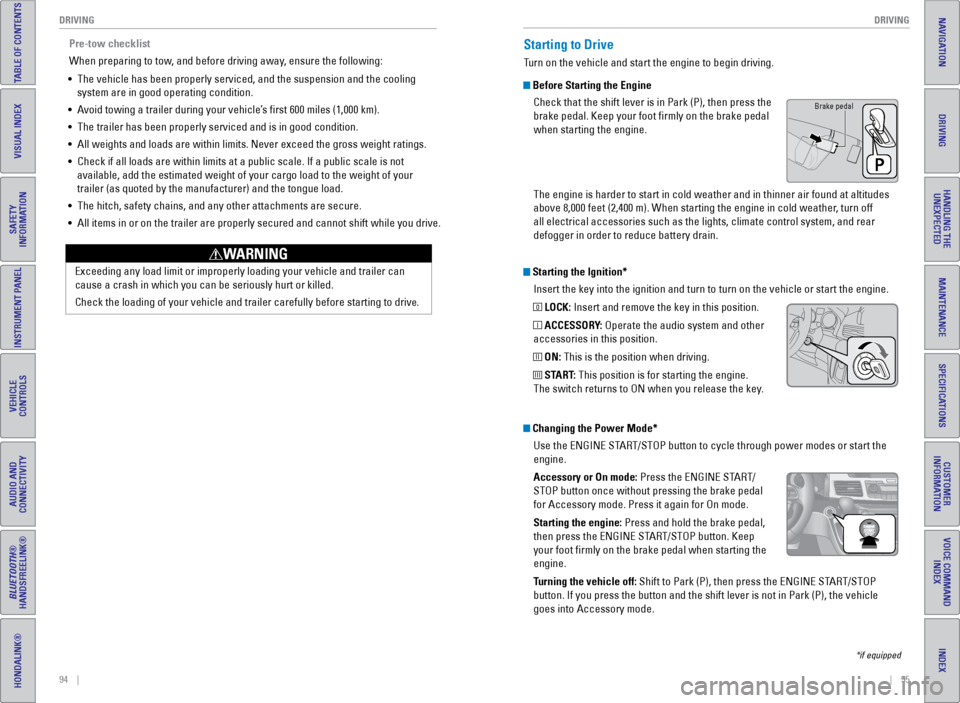
Starting the Ignition*
Insert the key into the ignition and turn to turn on the vehicle or star\
t the engine.
0 LOCK: Insert and remove the key in this position.
I ACCESSORY: Operate the audio system and other
accessories in this position.
II ON: This is the position when driving.
III START: This position is for starting the engine.
The switch returns to ON when you release the key.
Starting to Drive
Turn on the vehicle and start the engine to begin driving.
Before Starting the Engine
Check that the shift lever is in Park (P), then press the
brake pedal. Keep your foot firmly on the brake pedal
when starting the engine.
The engine is harder to start in cold weather and in thinner air found a\
t altitudes
above 8,000 feet (2,400 m). When starting the engine in cold weather, turn off
all electrical accessories such as the lights, climate control system, a\
nd rear
defogger in order to reduce battery drain.
*if equipped
Changing the Power Mode*Use the ENGINE START/STOP button to cycle through power modes or start the
engine.
Accessory or On mode: Press the ENGINE START/
STOP button once without pressing the brake pedal
for Accessory mode. Press it again for On mode.
Starting the engine: Press and hold the brake pedal,
then press the ENGINE START/STOP button. Keep
your foot firmly on the brake pedal when starting the
engine.
Turning the vehicle off: Shift to Park (P), then press the ENGINE START/STOP
button. If you press the button and the shift lever is not in Park (P)\
, the vehicle
goes into Accessory mode.
Brake pedal
Pre-tow checklist
When preparing to tow, and before driving away, ensure the following:
• The vehicle has been properly serviced, and the suspension and the cooli\
ng
system are in good operating condition.
• Avoid towing a trailer during your vehicle’s first 600 miles (1,000 km).
• The trailer has been properly serviced and is in good condition.
• All weights and loads are within limits. Never exceed the gross weight r\
atings.
• Check if all loads are within limits at a public scale. If a public scal\
e is not
available, add the estimated weight of your cargo load to the weight of \
your
trailer (as quoted by the manufacturer) and the tongue load.
• The hitch, safety chains, and any other attachments are secure.
• All items in or on the trailer are properly secured and cannot shift whi\
le you drive.
Exceeding any load limit or improperly loading your vehicle and trailer \
can
cause a crash in which you can be seriously hurt or killed.
Check the loading of your vehicle and trailer carefully before starting \
to driv
e.
WARNING
Page 57 of 80
106 || 107
HANDLING THE UNEXPECTED
DRIVING
INDEX
VOICE COMMAND
INDEX
CUSTOMER
INFORMATION
SPECIFICATIONS
MAINTENANCE
HANDLING THE UNEXPECTED
DRIVING
NAVIGATION
TABLE OF CONTENTS
VISUAL INDEX
SAFETY
INFORMATION
INSTRUMENT PANEL
VEHICLE
CONTROLS
AUDIO AND
CONNECTIVITY
BLUETOOTH®
HANDSFREELINK®
HONDALINK®
Refueling
Use the proper fuel and refueling procedure to ensure the best performan\
ce and
safety of your vehicle.
Fuel Information
Use of unleaded gasoline of 87 octane or higher is recommended.
• Honda recommends TOP TIER Detergent Gasoline where available.
• Do NOT use gasoline containing more than 15% ethanol.
• Do NOT use gasoline containing methanol.
• Do NOT use gasoline containing MMT.
We recommend quality gasoline containing detergent additives that help
prevent fuel system and engine deposits. In addition, in order to mainta\
in good
performance, fuel economy, and emissions control, we strongly recommend the
use of gasoline that does NOT contain harmful manganese-based fuel addit\
ives
such as MMT, if such gasoline is available.
NOTICE
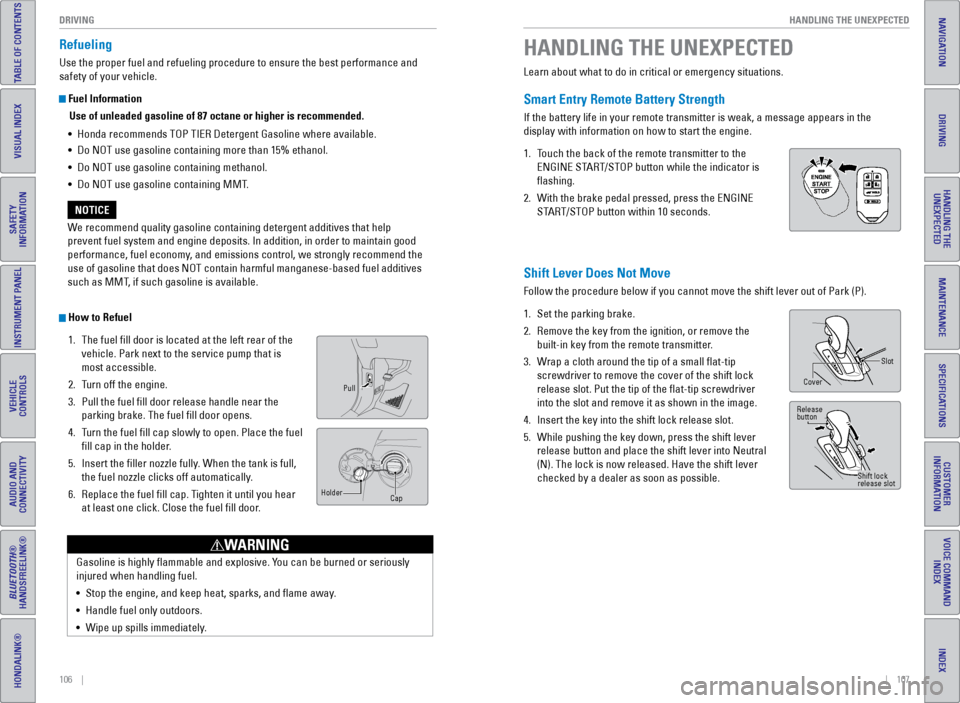
How to Refuel 1. The fuel fill door is located at the left rear of the
vehicle. Park next to the service pump that is
most accessible.
2. Turn off the engine.
3. Pull the fuel fill door release handle near the
parking brake. The fuel fill door opens.
4. Turn the fuel fill cap slowly to open. Place the fuel
fill cap in the holder.
5. Insert the filler nozzle fully. When the tank is full,
the fuel nozzle clicks off automatically.
6. Replace the fuel fill cap. Tighten it until you hear
at least one click. Close the fuel fill door.
Pull
Cap
Holder
Gasoline is highly flammable and explosive. You can be burned or seriously
injured when handling fuel.
•
Stop the engine, and keep heat, sparks, and flame away.
• Handle fuel only outdoors.
• Wipe up spills immediately.
WARNING
Learn about what to do in critical or emergency situations.
Smart Entry Remote Battery Strength
If the battery life in your remote transmitter is weak, a message appear\
s in the
display with information on how to start the engine.
1. Touch the back of the remote transmitter to the
ENGINE START/STOP button while the indicator is
flashing.
2. With the brake pedal pressed, press the ENGINE
START/STOP button within 10 seconds.
HANDLING THE UNEXPECTED
Shift Lever Does Not Move
Follow the procedure below if you cannot move the shift lever out of Par\
k (P).
1. Set the parking brake.
2. Remove the key from the ignition, or remove the
built-in key from the remote transmitter.
3. Wrap a cloth around the tip of a small flat-tip
screwdriver to remove the cover of the shift lock
release slot. Put the tip of the flat-tip screwdriver
into the slot and remove it as shown in the image.
4. Insert the key into the shift lock release slot.
5. While pushing the key down, press the shift lever
release button and place the shift lever into Neutral
(N). The lock is now released. Have the shift lever
checked by a dealer as soon as possible.
Slot
Cover
Release
button
Shift lock
release slot
Page 62 of 80
116 || 117
HANDLING THE UNEXPECTED
HANDLING THE UNEXPECTED
INDEX
VOICE COMMAND
INDEX
CUSTOMER
INFORMATION
SPECIFICATIONS
MAINTENANCE
HANDLING THE UNEXPECTED
DRIVING
NAVIGATION
TABLE OF CONTENTS
VISUAL INDEX
SAFETY
INFORMATION
INSTRUMENT PANEL
VEHICLE
CONTROLS
AUDIO AND
CONNECTIVITY
BLUETOOTH®
HANDSFREELINK®
HONDALINK®
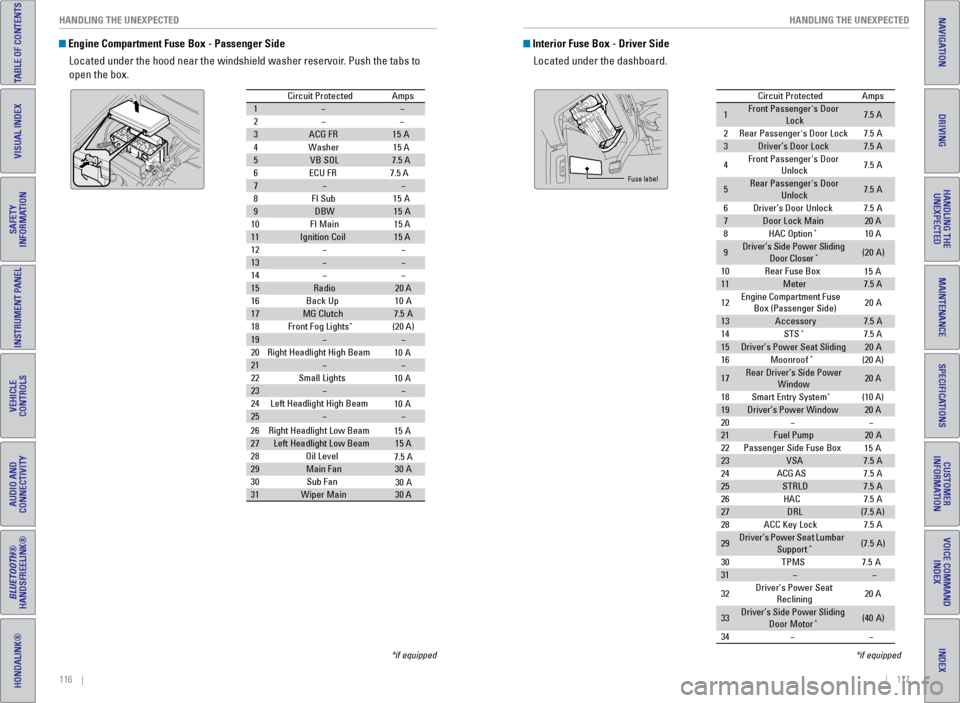
Engine Compartment Fuse Box - Passenger Side
Located under the hood near the windshield washer reservoir. Push the tabs to
open the box.
Circuit Protecte dAmps
1
2
3ACG FR15A
4W ashe
r15 A
5VB SO L7.5 A
6E CU FR 7.5 A
7
8F I Su
b15A
9DBW15A
10 FI Main 15 A
11Ignition Coil15 A
12
13
14
15Radio20 A
16 Back Up 10A
17MG Clutch7.5A
18 Front Fog Lights*(20 A)
19
20 Right Headlight High Beam
21
22 Small Lights
23
24 Left Headlight High Bea m
25
26Right Headlight Low Beam
27Left Headlight Low Beam15 A
28 Oil Level
29Main Fa n30A
30 Sub Fan
31Wiper Main30 A
10 A
10 A
10 A
15 A
7.5 A
30 A
*if equipped
Interior Fuse Box - Driver Side
Located under the dashboard.
Circuit Protecte dAmps
1Front Passenger's Door
Lock7.5 A
2Rear Passenger's Door Lock7.5A
3Driver’s Door Lock7.5A
4Front Passenger's Door
Unlock7. 5A
5Rear Passenger's Door
Unlock7. 5A
6Driver’s Door Unlock7.5A
7Door Lock Main20 A
8HAC Option*10 A
9Driver’s Side Power Sliding
Door Closer*(20A )
10 Rear Fuse Bo x
11Meter7.5 A
12 Engine
Compartment Fuse
Box (Passenger Side) 20
A
13Accessor y7.5A
14 STS*7.5 A
15Driver’s Power Seat Sliding20A
16 Moonroof*(20 A)
17Rear Driver’s Side Power
Window20 A
18 Smart Entry Syste m
*(10 A)
19Driver’s Power Windo w20 A
20
21Fuel Pump20 A
22 Passenger Side Fuse Bo x
23VSA7.5A
24 ACG AS
25STRLD7.5A
26 HAC
27DRL(7.5 A)
28 ACC Key Lock
29Driver’s Power Seat Lumbar
Suppor t*(7.5A)
30 TPM
S7.5A
31
32 Driver’s Power Seat
Reclining 20
A
33Driver’s Side Power Sliding
Door Moto r*(40A )
34
15 A
15 A
7. 5A
7. 5A
7. 5A
Fuse label
*if equipped
Page 74 of 80
140 || 141
CUSTOMER INFORMATION
CUSTOMER INFORMATION
INDEX
VOICE COMMAND
INDEX
CUSTOMER
INFORMATION
SPECIFICATIONS
MAINTENANCE
HANDLING THE UNEXPECTED
DRIVING
NAVIGATION
TABLE OF CONTENTS
VISUAL INDEX
SAFETY
INFORMATION
INSTRUMENT PANEL
VEHICLE
CONTROLS
AUDIO AND
CONNECTIVITY
BLUETOOTH®
HANDSFREELINK®
HONDALINK®
Learn about information specific to you as a Honda customer and how to\
get help.
Frequently Asked Questions/Troubleshooting
Below are some frequently asked questions and troubleshooting items that\
you may
have about the vehicle.
Q: How do I set the vehicle clock?
A: For vehicles without navigation, see page 55. For vehicles with navigati\
on, the
time is automatically set using GPS signals.
Q: Why doesn’t the vehicle start when I press the ENGINE START/STOP button?
A: The brake pedal must be pressed to start the engine.
Q: What is the AUTO setting on my headlight lever?
A: When in the AUTO position, the vehicle’s exterior lights will automatically turn
on or off depending on the ambient lighting.
Q: Why won’t the driver’s door unlock when I grab the door handle, even though
the keyless access remote is within range?
A: If you pull the handle too quickly, the system may not have time to confirm the
door is unlocked. Wait to hear a beep to confirm the door is unlocked. If you are
wearing gloves, the system may be slow to respond.
Q: After my battery was disconnected or went dead, the audio system is aski\
ng for
a code. Where do I find this?
A: In most cases, you do not need to enter a code. Turn on the vehicle and the
audio system, and press and hold the power button until the system react\
ivates.
Q: Why can’t I operate Pandora
® through the audio system?
A: Audio may be streaming through Bluetooth® Audio. Make sure Pandora mode
is selected and the phone cable is properly connected to the USB adapter\
.
Some phones may prompt you to “Allow” a connection.
Q: Is my phone compatible with Bluetooth features?
A: Visit handsfreelink.honda.com (U.S.) or www.handsfreelink.ca (Canada) to
check phone compatibility for Bluetooth
® Audio, Bluetooth® HandsFreeLink®,
and SMS text messaging.
Q: Every time I press the Talk button, the system gives me voice prompts. Can I turn
these off?*
A: Press the SETTINGS button. Use the interface dial to select System Setti\
ngs
then Voice Rec. For the Voice Prompt option, select Off.
CUSTOMER INFORMATION
*if equipped
Contact Us
Honda dealer personnel are trained professionals. They should be able to\
answer
all your questions. If you encounter a problem that your dealership does\
not solve
to your satisfaction, please discuss it with the dealership’s service manager or
general manager. If you are dissatisfied with the decision made by the dealership’\
s
management, contact Honda Automobile Customer Service.
U.S. owners
American Honda Motor Co., Inc.
Honda Automobile Customer Service
1919 Torrance Blvd.
Mail Stop 500-2N-7A
Torrance, CA 90501-2746
Tel: (800) 999-1009
In Puerto Rico and
the U.S. Virgin Islands
Bella International
P.O. Box 190816
San Juan, PR 00919-0816
Tel: (787) 620-7546
When you call or write, please give us the following information:
• Vehicle identification number
• Date of purchase
• Odometer reading of your vehicle
• Your name, address, and telephone number
• A detailed description of the problem
• Name of the dealer who sold the vehicle to you Canadian owners
Honda Canada, Inc.
Customer Relations
180 Honda Blvd.
Markham, ON
L6C 0H9
Tel: (888) 946-6329
Fax: (877) 939-0909
e-mail: [email protected]
Q:
Why can’t I select an item using the interface dial?*
A: To prevent driver distraction, certain items are limited or inoperable wh\
ile the
vehicle is moving. Use voice commands or pull over to select the items.
Q: Where can I find the vehicle identification number (VIN)?
A: Check the label on the driver’s doorjamb.
*if equipped
Page 79 of 80
150 || 151
INDEX
INDEX
INDEX
VOICE COMMAND
INDEX
CUSTOMER
INFORMATION
SPECIFICATIONS
MAINTENANCE
HANDLING THE UNEXPECTED
DRIVING
NAVIGATION
TABLE OF CONTENTS
VISUAL INDEX
SAFETY
INFORMATION
INSTRUMENT PANEL
VEHICLE
CONTROLS
AUDIO AND
CONNECTIVITY
BLUETOOTH®
HANDSFREELINK®
HONDALINK®
INDEX
ABS ............................................................. 25
AC Power Outlet ............................................... 56
Accessory Power Sockets ............................. 57
Active Head Restraints ................................... 43
Address ............................................................. 87
Advanced Airbags ............................................. 9
Aha™ ............................................................. 73
Aha™ Commands ........................................... 148
Airbags ............................................................... 9
About Your Airbags ...................................... 11
Advanced Airbags ......................................... 9
Airbag Care ................................................... 14
Front Airbags (SRS) ....................................... 9
Passenger Airbag Off Indicator ................. 12
Side Airbags .................................................. 10
Side Curtain Airbags ....................................10
Srs (Supplemental Restraint System) Indicator ............................................. 11
System Components ....................................13
System Indicators ........................................ 11
Air Conditioning System ..................................52
Anti-Lock Brake System (ABS) ................ 25, 97
Audio Commands ........................................... 147
Audio Operation ............................................... 56
Auxiliary Input Jack ..................................... 56
Bluetooth
® Audio ................................... 62, 71
Compact Disc (CD) .................................60, 68
DVD ............................................................. 74
FM/AM Radio .......................................... 59, 66
Hard Disc Drive (HDD) Audio ..................... 69
HDMI ............................................................. 75
HondaLink Featuring Aha™ ........................ 73
Intelligent Multi-Information Display (i-MID) .......................................... 58, 64
iPod
® ....................................................... 61, 70
Pandora® ................................................. 63, 72
Rear Audio Commands ..............................149
Rear Entertainment System ........................ 74
SiriusXM
® Radio ........................................... 67
Sound ............................................................. 56
Steering Wheel Controls ............................. 57
Touchscreen Operation .............................. 65
USB Flash Drive ............................................ 61
USB Port ........................................................ 56
Wireless Headphones .................................75
Automatic Dimming Rearview Mirror ........... 48
Automatic Headlights ......................................39
Aux Commands ............................................... 148
Auxiliary Input Jack ......................................... 56
Battery ........................................................... 128
Blind Spot Information (BSI) .................. 25, 102
Bluetooth
® Audio ....................................... 62, 71
Bluetooth® Audio Commands ...................... 148Bluetooth
® HandsFreeLink® (HFL)
................. 78
Call History .................................................... 82
E-Mail ............................................................. 83
HFL Controls .................................................. 78
Making a Call ................................................ 81
Pairing a Phone ........................................... 80
Phonebook .................................................... 81
SMS Text Messaging ..................................83
Speed Dial ..................................................... 82
Talk Button Tips ............................................ 79
Brake Assist System ........................................ 97
Brake System .............................................. 24, 25
Braking ............................................................. 96
Brightness Control ........................................... 38
BSI ............................................... 25, 27, 102
Call History ........................................................ 82
Carbon Monoxide Gas .......................................4
Cargo Area Lights ............................................ 39
Change a Setting .............................................. 55
Changing a Flat Tire ....................................... 111
Changing Wiper Blades ................................129
Charging System .............................................. 24
Child Safety ....................................................... 15
Childproof Door Locks .................................33
Protecting Child Passengers ...................... 15
Protecting Infants ........................................ 16
Protecting Larger Children ......................... 21
Protecting Smaller Children ....................... 17
Child Seat .......................................................... 17
Adding Security With a Tether ................... 20
LATCH-Compatible Child Seat .................... 18
Selecting a Child Seat .................................17
Climate Control Commands .......................... 146
Climate Control System ...................................53
Clock ............................................................. 55
Compact Disc (CD) ..................................... 60, 68
Contact Us ....................................................... 141
Coolant ........................................................... 127
Cool Box ............................................................. 51
Cruise Control ............................................. 27, 98
Customer Information ....................................140
Customized Features ....................................... 55
Dashboard and Ceiling Controls ...................... 2
Daytime Running Lights (DRL) ........................25
Destination ........................................................ 87
Detour ............................................................. 89
Dialing a Number ............................................. 81
Door Mirrors ..................................................... 48
Doors ....................................................... 31, 33
Sliding Doors ................................................. 34
DOT Tire Quality Grading ..............................135
Driving ............................................................. 90
Blind Spot Information (BSI) .................... 102Braking ...........................................................
96
Cruise Control ............................................... 98
Forward Collision Warning (FCW) ........... 100
Ignition ........................................................... 95
Lane Departure Warning (LDW) .............. 101
LaneWatch™ ................................................ 99
Maximum Load Limit .................................... 91
Multi-View Rear Camera .......................... 105
Parking Sensor System .............................103
Power Mode ................................................. 95
Rearview Camera ....................................... 104
Refueling ...................................................... 106
Shifting ........................................................... 96
Towing a Trailer ............................................ 93
Driving Position Memory System .................. 47
DRL ............................................................. 25
Dual Screen ...................................................... 77
DVD ............................................................. 74
ECO Indicator .................................................... 27
Electronic Stability Control (ESC) .................. 97
Emergency Engine Stop ................................ 110
Emergency Towing ........................................ 110
Engine and Fuel .............................................. 139
Engine Coolant................................................ 127
Engine Oil ......................................................... 125
Engine Start/Stop Button ................................ 95
Exterior Lights ............................................. 27, 39
Fastening a Seat Belt ........................................ 7
FCW ............................................... 25, 27, 100
Find Nearest Place .......................................... 88
Find Place Commands ...................................144
Flat Tire ........................................................... 111
Floor Mats ......................................................... 43
Fluids ........................................................... 139
FM/AM Radio .............................................. 59, 66
FM/AM Radio Commands ............................. 147
FM Traffic .......................................................... 89
Fog Lights .................................................... 27, 39
Foot Brake ......................................................... 96
Forward Collision Warning (FCW) ... 25, 27, 100
Frequently Asked Questions ........................ 140
Front Airbags (SRS) ........................................... 9
Front Seats ........................................................ 41
Front Wipers ..................................................... 40
Fuel Information ............................................. 106
Fuse Locations ................................................ 115
Garage Opener ................................................. 49
Hang-Up/Back Button .....................................78
Hard Disc Drive (HDD) Audio ......................... 69
Hazards ............................................................. 27
HDMI ............................................................. 75
Headlight-Wiper Integration .......................... 40
Head Restraints ................................................ 42
High Beams ....................................................... 27
Home Address .................................................. 87HomeLink
® Garage Opener ............................
49
HondaLink Featuring Aha™ ............................73
Honda Roadside Assistance ........................ 142
HondaVAC
® ....................................................... 50
Hood ........................................................... 124
Ignition ............................................................. 95
i-MID ....................................................... 58, 64
Immobilizer ........................................................ 27
Info Buttons ....................................................... 29
Info Commands ............................................... 149
Information Display .......................................... 28
Instrument Panel .............................................. 24
Condition Indicators ....................................26
Malfunction Indicators ................................ 24
On/Off Indicators .......................................... 27
Intelligent Multi-Information Display (I-Mid)........................................... 58, 64
Interface Dial .............................................. 79, 85
Interface Dial Feedback ..................................86
Interior Lights .................................................... 38
Intermittent Wipers .......................................... 40
iPod
® ....................................................... 61, 70
iPod® Commands ........................................... 148
Jump Starting ................................................. 108
Key ............................................................. 30
Lane Departure Warning (LDW) ...... 25, 27, 101
LaneWatch™ .................................................... 99
Lap/Shoulder Seat Belts ...................................5
LATCH-Compatible Child Seat ........................ 18
LDW ............................................... 25, 27, 101
Light Bulbs ....................................................... 139
Lights ............................................................. 38
Locking the Doors ............................................ 31
Locking the Tailgate ......................................... 31
Lock Tab ............................................................. 33
Low Fuel ............................................................. 26
Low Oil Pressure .............................................. 24
Low Tire Pressure ............................................ 26
Maintenance ................................................... 121
Maintenance Minder™ ....................... 27, 122
Safety Precautions .................................... 121
Service Codes ............................................. 123
Under the Hood .......................................... 124
Malfunction Indicator Lamp ........................... 25
Map Display Commands ...............................143
Map Legend ...................................................... 89
Map Lights ......................................................... 38
Master Door Lock Switch ...............................33
Maximum Load Limit ........................................ 91
MENU Button ............................ 58, 64, 78, 79, 85
Mirrors ............................................................. 48
Moonroof ........................................................... 37
Multi-Information Display ...............................29
Multi-View Rear Camera ..............................105
Navigation ......................................................... 84