Button HONDA ODYSSEY 2017 RC1-RC2 / 5.G Owners Manual
[x] Cancel search | Manufacturer: HONDA, Model Year: 2017, Model line: ODYSSEY, Model: HONDA ODYSSEY 2017 RC1-RC2 / 5.GPages: 565, PDF Size: 33.13 MB
Page 304 of 565
303
uuCustomized Features u
Continued
Features
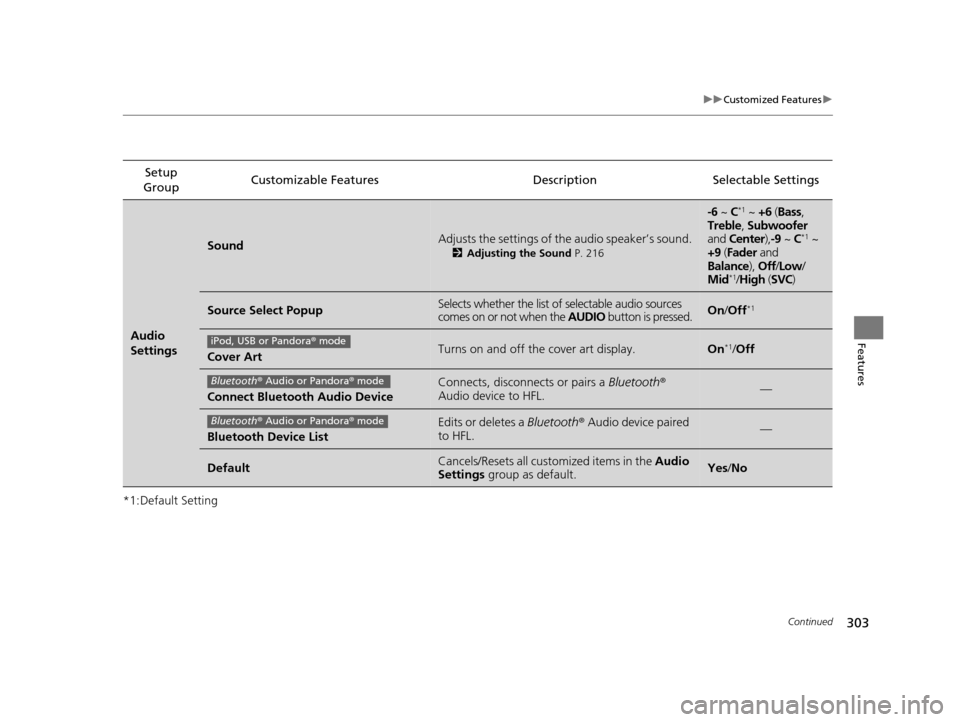
*1:Default SettingSetup
Group Customizable Features Description Selectable Settings
Audio
Settings
SoundAdjusts the settings of th
e audio speaker’s sound.
2Adjusting the Sound P. 216
-6 ~ C*1 ~ +6 (Bass,
Treble , Subwoofer
and Center ),-9 ~ C
*1 ~
+9 (Fader and
Balance ), Off/Low /
Mid
*1/ High (SVC)
Source Select PopupSelects whether the list of selectable audio sources
comes on or not when the AUDIO button is pressed.On/Off*1
Cover ArtTurns on and off the cover art display.On*1/Off
Connect Bluetooth Audio Device
Connects, disconnects or pairs a Bluetooth®
Audio device to HFL.—
Bluetooth Device List
Edits or deletes a Bluetooth® Audio device paired
to HFL.—
DefaultCancels/Resets all customized items in the Audio
Settings group as default.Yes/No
iPod, USB or Pandora ® mode
Bluetooth ® Audio or Pandora ® mode
Bluetooth ® Audio or Pandora ® mode
17 US ODYSSEY (KA KC)-31TK86600.book 303 ページ 2016年10月24日 月曜日 午後4時2分
Page 308 of 565
Continued307
uuCustomized Features u
Features
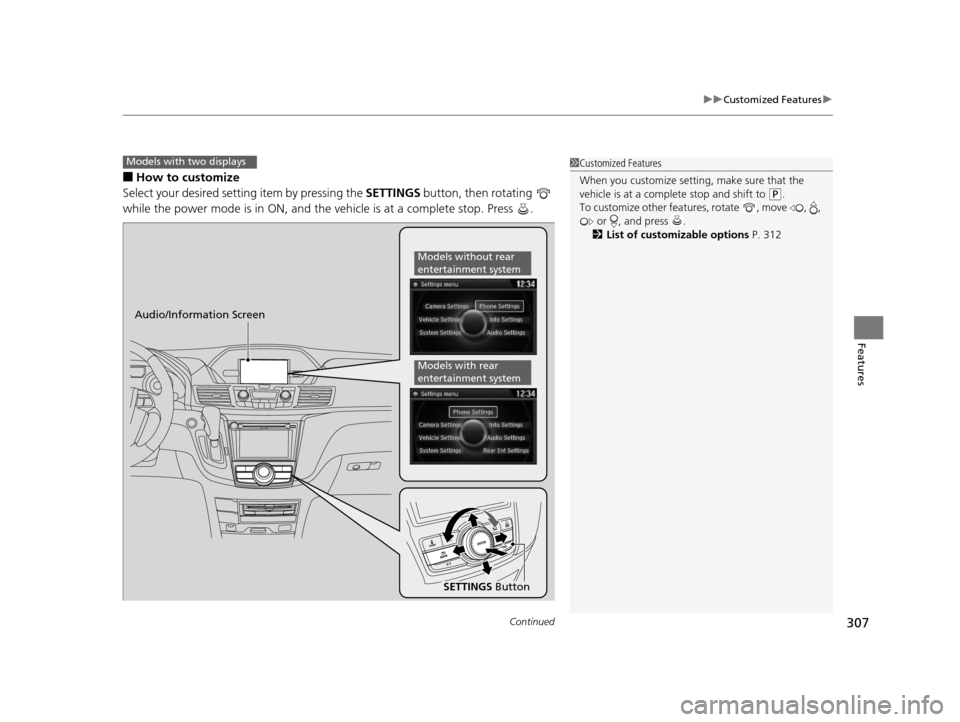
■How to customize
Select your desired setting item by pressing the SETTINGS button, then rotating
while the power mode is in ON, and the vehicle is at a complete stop. Press .
Models with two displays1 Customized Features
When you customize setting, make sure that the
vehicle is at a complete stop and shift to
(P.
To customize other featur es, rotate , move , ,
or , and press .
2 List of customizable options P. 312
Audio/Information Screen
SETTINGS Button
Models without rear
entertainment system
Models with rear
entertainment system
17 US ODYSSEY (KA KC)-31TK86600.book 307 ページ 2016年10月24日 月曜日 午後4時2分
Page 309 of 565
308
uuCustomized Features u
Features
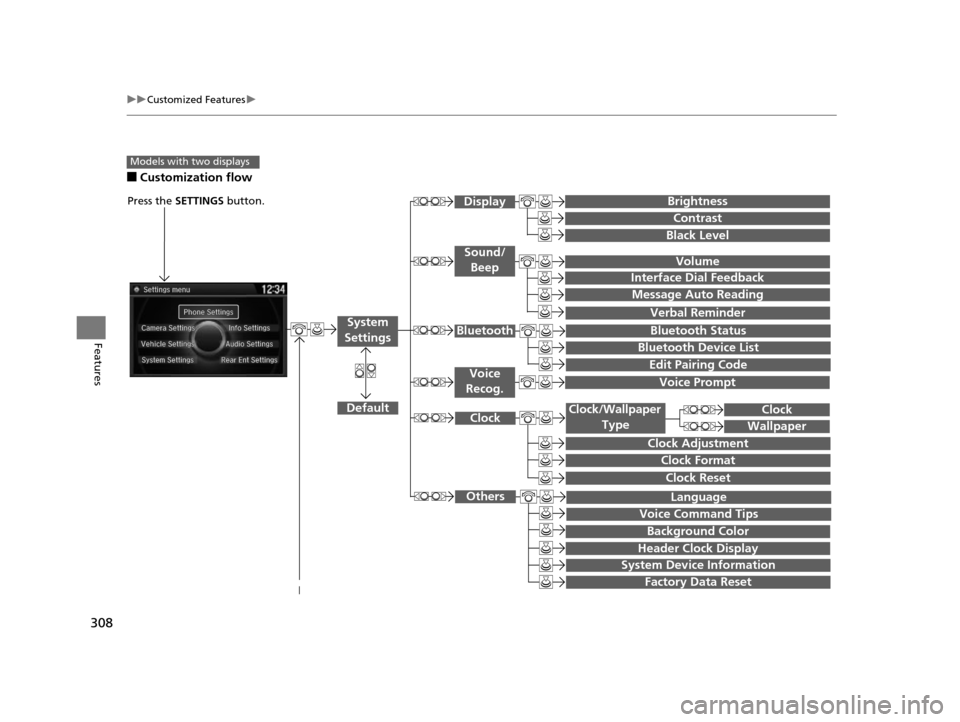
■Customization flow
Models with two displays
Press the SETTINGS button.
Voice Prompt
Message Auto Reading
Volume
Interface Dial Feedback
Verbal Reminder
Brightness
Contrast
Black Level
Bluetooth Status
Bluetooth Device List
Edit Pairing Code
Default
Sound/Beep
Display
System
SettingsBluetooth
Voice
Recog.
System Device Information
Factory Data Reset
Background Color
Header Clock Display
Clock Reset
Clock
Clock Adjustment
Clock Format
Clock
Language
Voice Command Tips
Others
Wallpaper
Clock/Wallpaper
Type
17 US ODYSSEY (KA KC)-31TK86600.book 308 ページ 2016年10月24日 月曜日 午後4時2分
Page 316 of 565
315
uuCustomized Features u
Continued
Features
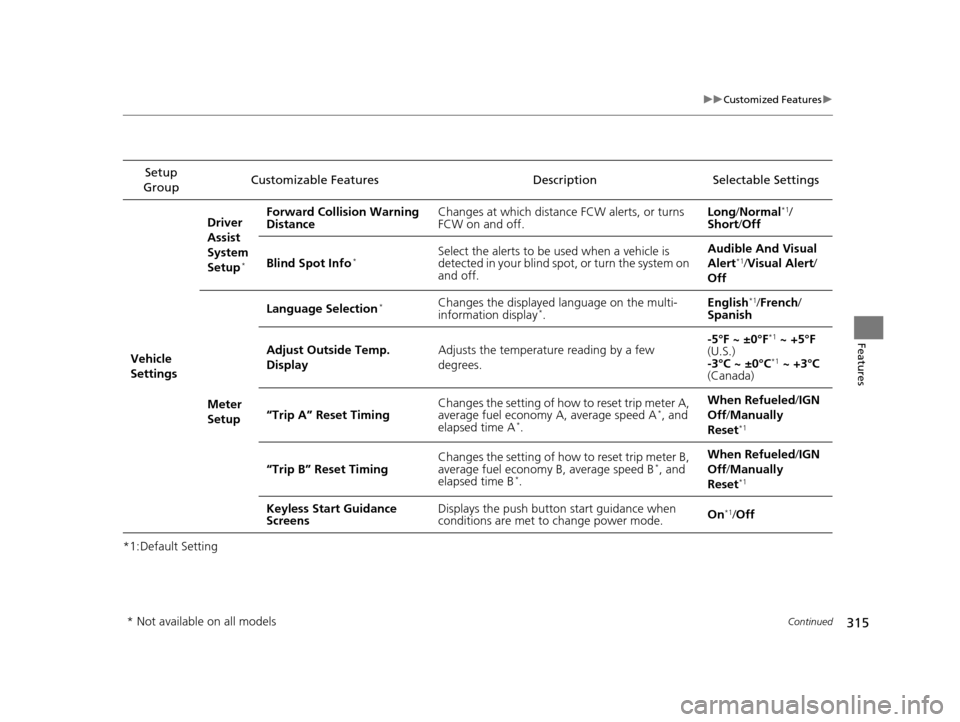
*1:Default SettingSetup
Group Customizable Features Description Selectable Settings
Vehicle
Settings Driver
Assist
System
Setup
*
Forward Collision Warning
Distance
Changes at which distance FCW alerts, or turns
FCW on and off. Long
/Normal*1/
Short/ Off
Blind Spot Info
*Select the alerts to be used when a vehicle is
detected in your blind spot, or turn the system on
and off. Audible And Visual
Alert*1/
Visual Alert /
Off
Meter
Setup Language Selection
*Changes the displayed language on the multi-
information display*.
English
*1/
French /
Spanish
Adjust Outside Temp.
Display Adjusts the temperature reading by a few
degrees. -5°F ~ ±0°F
*1
~ +5°F
(U.S.)
-3°C ~ ±0°C
*1 ~ +3°C
(Canada)
“Trip A” Reset Timing Changes the setting of how to reset trip meter A,
average fuel economy A, average speed A
*, and
elapsed time A*. When Refueled
/IGN
Off /Manually
Reset*1
“Trip B” Reset Timing Changes the setting of how to reset trip meter B,
average fuel economy B, average speed B*, and
elapsed time B*. When Refueled
/IGN
Off /Manually
Reset*1
Keyless Start Guidance
Screens Displays the push button
start guidance when
conditions are met to change power mode. On*1/
Off
* Not available on all models
17 US ODYSSEY (KA KC)-31TK86600.book 315 ページ 2016年10月24日 月曜日 午後4時2分
Page 321 of 565
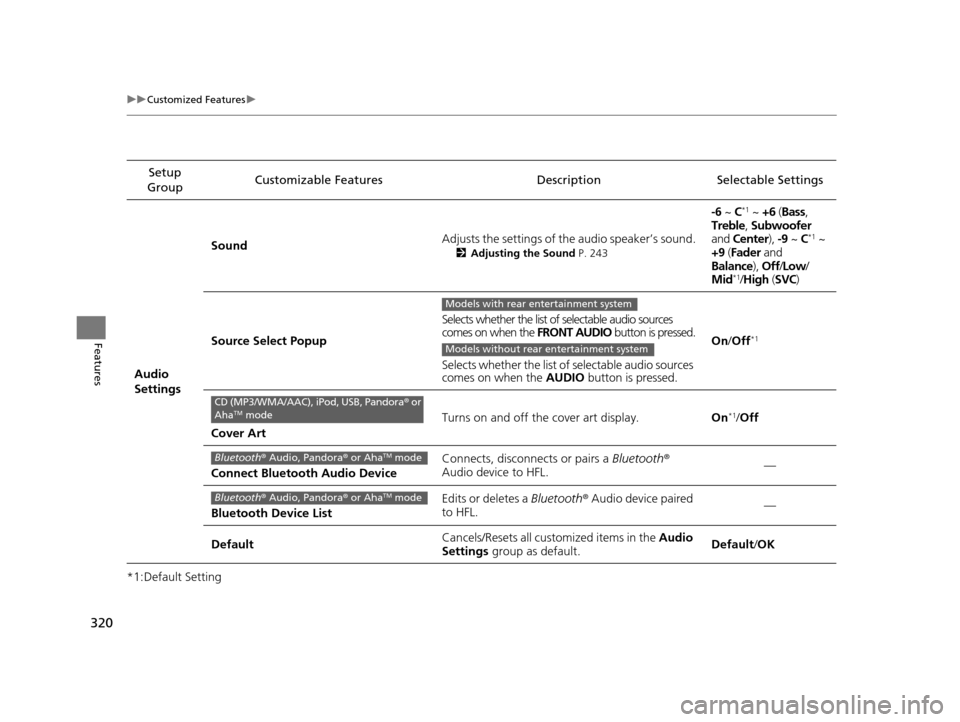
320
uuCustomized Features u
Features
*1:Default SettingSetup
Group Customizable Features Descri
ption Selectable Settings
Audio
Settings Sound
Adjusts the settings of th
e audio speaker’s sound.
2Adjusting the Sound P. 243
-6 ~ C*1 ~ +6 (Bass ,
Treble , Subwoofer
and Center ), -9 ~ C
*1 ~
+9 (Fader and
Balance ), Off/Low /
Mid
*1/ High (SVC)
Source Select Popup Selects whether the list of selectable audio sources
comes on when the
FRONT AUDIO button is pressed.
Selects whether the list of selectable audio sources
comes on when the AUDIO button is pressed. On
/Off
*1
Cover Art Turns on and off the cover art display.
On
*1/Off
Connect Bluetooth Audio Device Connects, disconnects or pairs a
Bluetooth®
Audio device to HFL. —
Bluetooth Device List Edits or deletes a
Bluetooth® Audio device paired
to HFL. —
Default Cancels/Resets all cust
omized items in the Audio
Settings group as default. Default
/OK
Models with rear entertainment system
Models without rear entertainment system
CD (MP3/WMA/AAC), iPod, USB, Pandora ® or
AhaTM mode
Bluetooth ® Audio, Pandora ® or AhaTM mode
Bluetooth ® Audio, Pandora ® or AhaTM mode
17 US ODYSSEY (KA KC)-31TK86600.book 320 ページ 2016年10月24日 月曜日 午後4時2分
Page 322 of 565
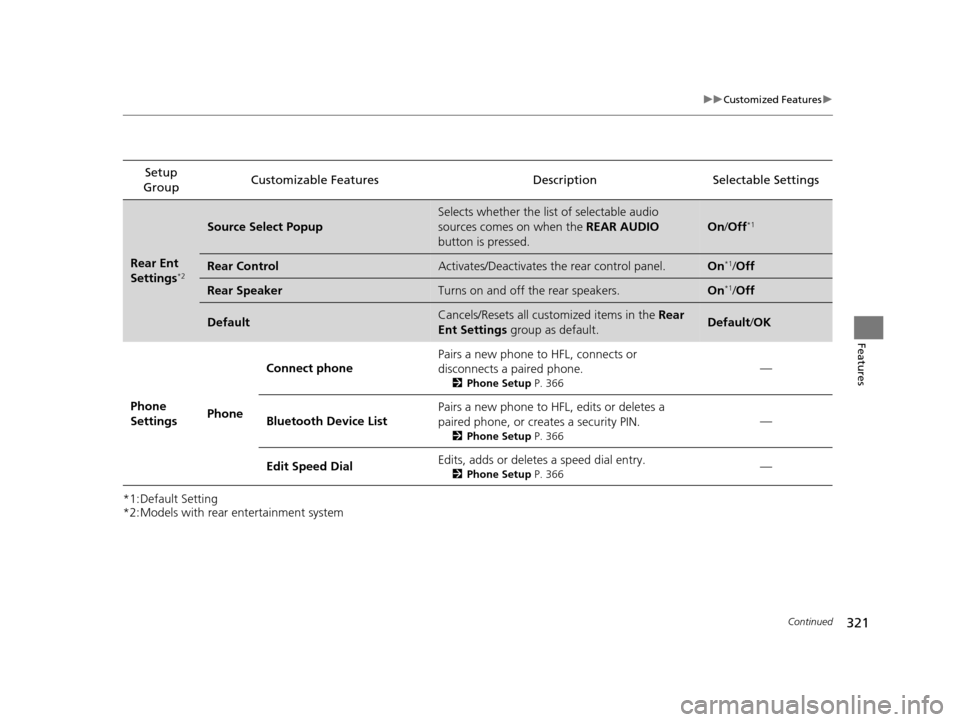
321
uuCustomized Features u
Continued
Features
*1:Default Setting
*2:Models with rear entertainment systemSetup
Group Customizable Features Description Selectable Settings
Rear Ent
Settings*2
Source Select Popup
Selects whether the list of selectable audio
sources comes on when the
REAR AUDIO
button is pressed.
On /Off*1
Rear ControlActivates/Deactivates the rear control panel.On*1/Off
Rear SpeakerTurns on and off the rear speakers.On*1/Off
DefaultCancels/Resets all customized items in the Rear
Ent Settings group as default.Default/OK
Phone
Settings PhoneConnect phone
Pairs a new phone to HFL, connects or
disconnects a paired phone.
2
Phone Setup P. 366
—
Bluetooth Device List Pairs a new phone to HFL, edits or deletes a
paired phone, or creates a security PIN.
2
Phone Setup P. 366
—
Edit Speed Dial Edits, adds or deletes a speed dial entry.
2
Phone Setup P. 366—
17 US ODYSSEY (KA KC)-31TK86600.book 321 ページ 2016年10月24日 月曜日 午後4時2分
Page 324 of 565
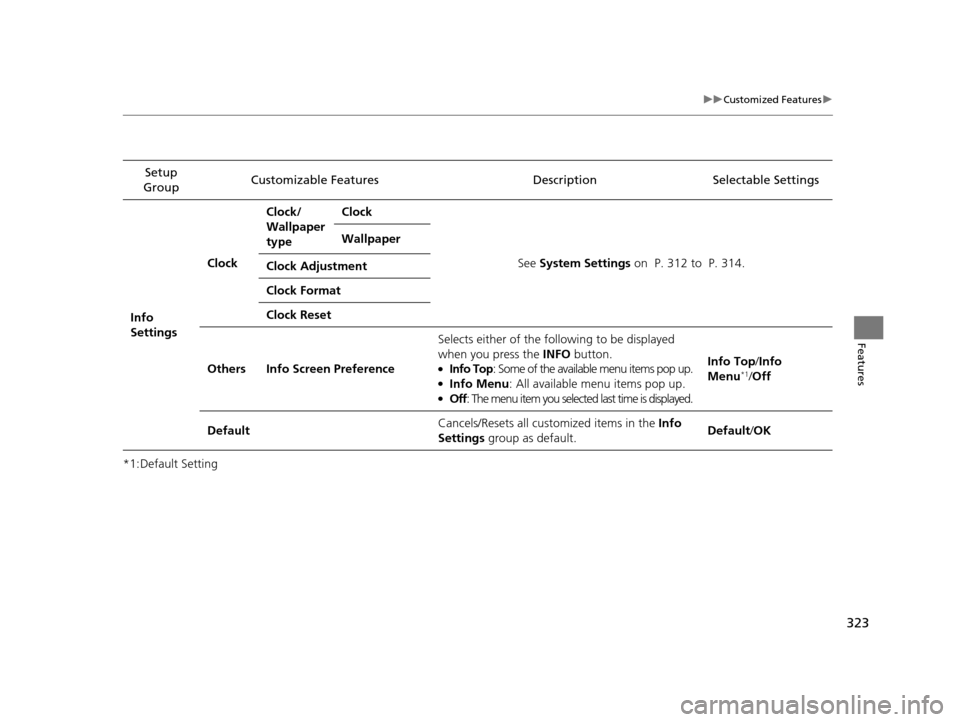
323
uuCustomized Features u
Features
*1:Default SettingSetup
Group Customizable Features Description Selectable Settings
Info
Settings Clock
Clock/
Wallpaper
type
Clock
See System Settings on P. 312 to P. 314.
Wallpaper
Clock Adjustment
Clock Format
Clock Reset
Others Info Screen Preference Selects either of the following to be displayed
when you press the INFO
button.
●Info Top: Some of the available menu items pop up.●Info Menu : All available menu items pop up.●Off: The menu item you selected last time is displayed. Info Top/
Info
Menu
*1/ Off
Default Cancels/Resets all customized items in the
Info
Settings group as default. Default/
OK
17 US ODYSSEY (KA KC)-31TK86600.book 323 ページ 2016年10月24日 月曜日 午後4時2分
Page 325 of 565
324
uuCustomized Features uDefaulting All the Settings
Features
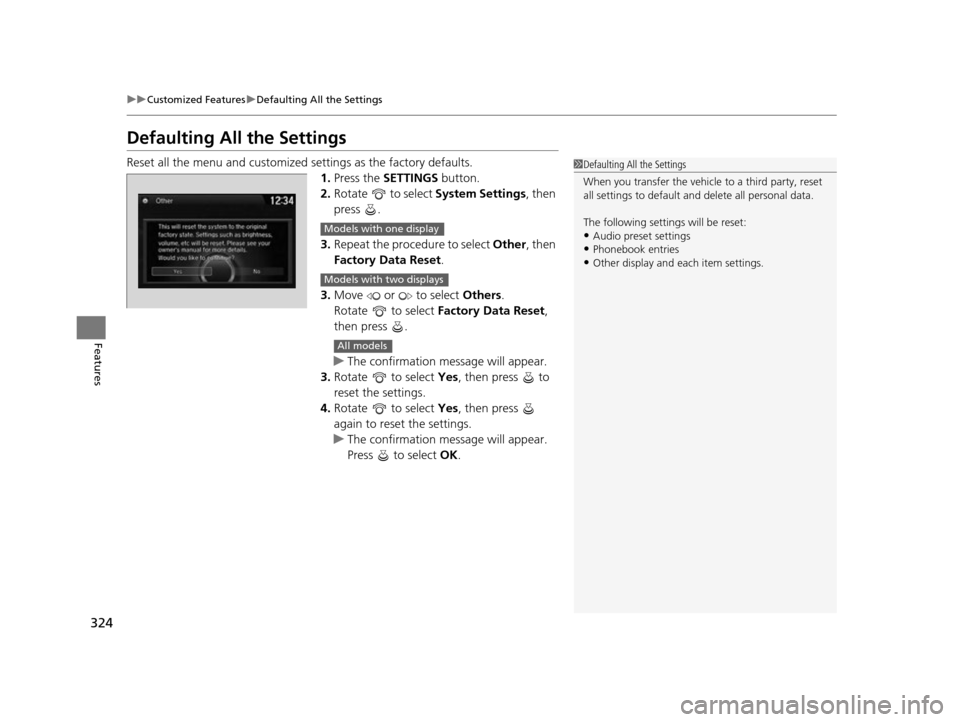
Defaulting All the Settings
Reset all the menu and customized settings as the factory defaults.
1. Press the SETTINGS button.
2. Rotate to select System Settings, then
press .
3. Repeat the procedure to select Other, then
Factory Data Reset .
3. Move or to select Others.
Rotate to select Factory Data Reset ,
then press .
u The confirmation message will appear.
3. Rotate to select Yes, then press to
reset the settings.
4. Rotate to select Yes, then press
again to reset the settings.
u The confirmation message will appear.
Press to select OK.1Defaulting All the Settings
When you transfer the vehicle to a third party, reset
all settings to default a nd delete all personal data.
The following settin gs will be reset:
•Audio preset settings•Phonebook entries
•Other display and each item settings.
Models with one display
Models with two displays
All models
17 US ODYSSEY (KA KC)-31TK86600.book 324 ページ 2016年10月24日 月曜日 午後4時2分
Page 326 of 565
325Continued
Features
HomeLink® Universal Transceiver*
The HomeLink ® Universal Transceiver can be programmed to operate up to three
remote controlled devices around your home, such as garage doors, lighting, or
home security systems.
Refer to the safety information that came wi th your garage door opener to test that
the safety features are functioning properly. If you do not have the safety
information, contact the manufacturer.
Before programming HomeLink, make sure that people and objects are out of the
way of the garage or gate to prevent potential injury or damage.
When programming a garage door opener, park just outside the garage door’s
path.
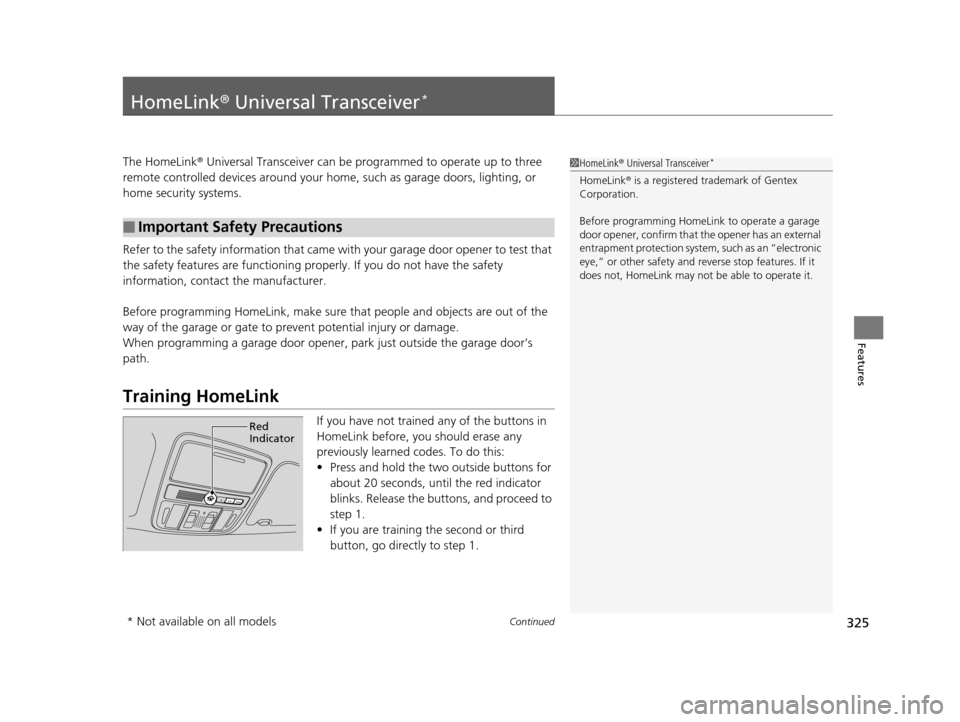
Training HomeLink
If you have not trained any of the buttons in
HomeLink before, you should erase any
previously learned codes. To do this:
• Press and hold the two outside buttons for
about 20 seconds, until the red indicator
blinks. Release the bu ttons, and proceed to
step 1.
• If you are training the second or third
button, go directly to step 1.
■Important Safety Precautions
1HomeLink ® Universal Transceiver*
HomeLink® is a registered tra demark of Gentex
Corporation.
Before programming HomeLi nk to operate a garage
door opener, confirm that the opener has an external
entrapment protection system, such as an “electronic
eye,” or other safety and re verse stop features. If it
does not, HomeLink may not be able to operate it.
Red
Indicator
* Not available on all models
17 US ODYSSEY (KA KC)-31TK86600.book 325 ページ 2016年10月24日 月曜日 午後4時2分
Page 327 of 565
uuHomeLink ® Universal Transceiver*u Training HomeLink
326
Features
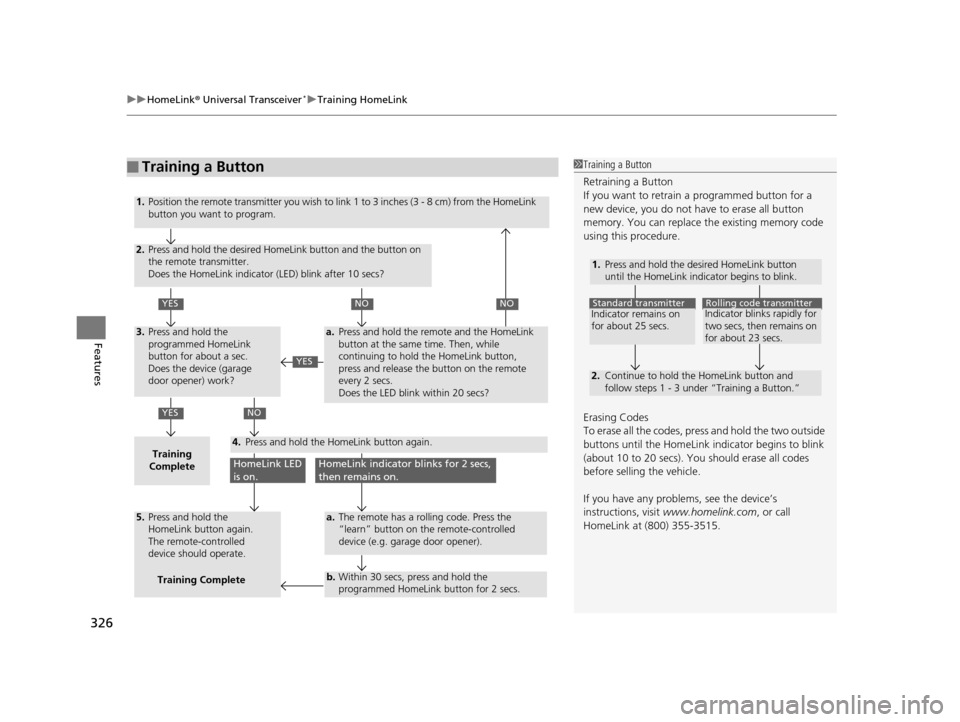
■Training a Button1Training a Button
Retraining a Button
If you want to retrain a programmed button for a
new device, you do not ha ve to erase all button
memory. You can replace the existing memory code
using this procedure.
Erasing Codes
To erase all the codes, press and hold the two outside
buttons until the HomeLink i ndicator begins to blink
(about 10 to 20 secs). You should erase all codes
before selling the vehicle.
If you have any problems, see the device’s
instructions, visit www.homelink.com , or call
HomeLink at (800) 355-3515.
1.
2.
Standard transmitterIndicator remains on
for about 25 secs.Rolling code transmitterIndicator blinks rapidly for
two secs, then remains on
for about 23 secs.
Press and hold the desired HomeLink button
until the HomeLink indicator begins to blink.
Continue to hold the HomeLink button and
follow steps 1 - 3 under “Training a Button.”
1.
2.
YES
YES
YES
NONO
NO
HomeLink LED
is on.HomeLink indicator blinks for 2 secs,
then remains on.
3.
Training
Complete4.
5.
a.
a.
b.
Position the remote transmitter you wish to link 1 to 3 inches (3 - 8 cm) from the HomeLink
button you want to program.
Press and hold the desired HomeLink button and the button on
the remote transmitter.
Does the HomeLink indicator (LED) blink after 10 secs?
Press and hold the
programmed HomeLink
button for about a sec.
Does the device (garage
door opener) work?
Press and hold the remote and the HomeLink
button at the same time. Then, while
continuing to hold the HomeLink button,
press and release the button on the remote
every 2 secs.
Does the LED blink within 20 secs?
The remote has a rolling code. Press the
“learn” button on the remote-controlled
device (e.g. garage door opener).
Within 30 secs, press and hold the
programmed HomeLink button for 2 secs.
Press and hold the HomeLink button again.
Press and hold the
HomeLink button again.
The remote-controlled
device should operate.Training Complete
17 US ODYSSEY (KA KC)-31TK86600.book 326 ページ 2016年10月24日 月曜日 午後4時2分