Setting panel HONDA ODYSSEY 2017 RC1-RC2 / 5.G User Guide
[x] Cancel search | Manufacturer: HONDA, Model Year: 2017, Model line: ODYSSEY, Model: HONDA ODYSSEY 2017 RC1-RC2 / 5.GPages: 565, PDF Size: 33.13 MB
Page 106 of 565
105
uuGauges and Displays uMulti-Information Display*
Continued
Instrument Panel
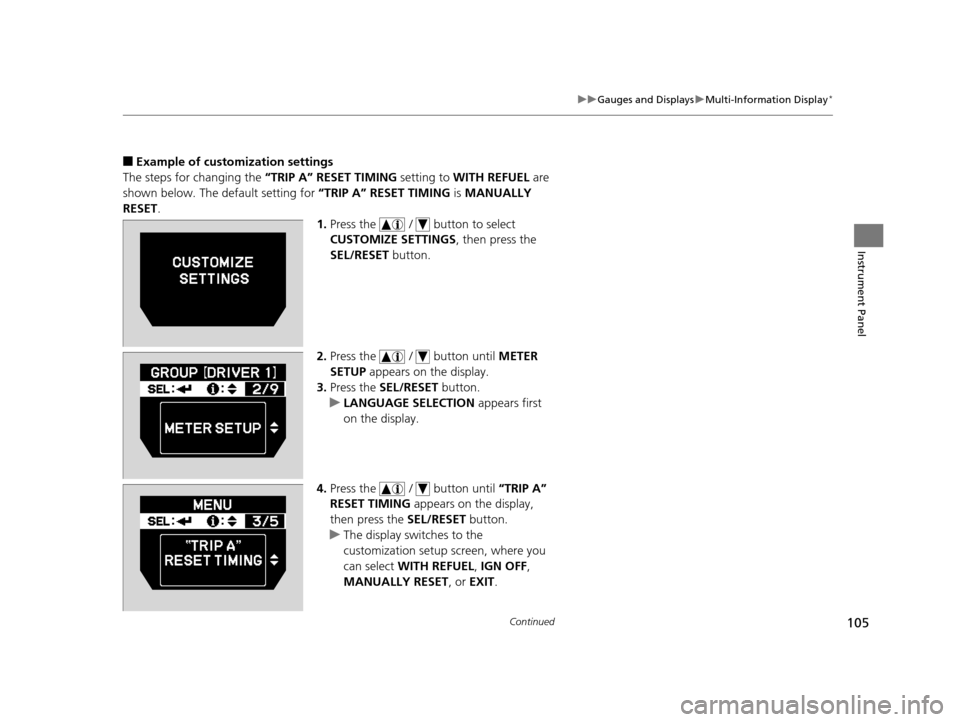
■Example of customization settings
The steps for changing the “TRIP A” RESET TIMING setting to WITH REFUEL are
shown below. The default setting for “TRIP A” RESET TIMING is MANUALLY
RESET .
1.Press the / button to select
CUSTOMIZE SETTINGS , then press the
SEL/RESET button.
2. Press the / button until METER
SETUP appears on the display.
3. Press the SEL/RESET button.
u LANGUAGE SELECTION appears first
on the display.
4. Press the / button until “TRIP A”
RESET TIMING appears on the display,
then press the SEL/RESET button.
u The display swit ches to the
customization setup screen, where you
can select WITH REFUEL , IGN OFF ,
MANUALLY RESET, or EXIT.
17 US ODYSSEY (KA KC)-31TK86600.book 105 ページ 2016年10月24日 月曜日 午後4時2分
Page 124 of 565
123
uuOpening and Closing the Tailgate uOpening/Closing the Power Tailgate*
Continued
Controls
Opening/Closing the Power Tailgate*
The power tailgate can be operated by pr essing the power tailgate button on the
smart entry remote or instrument panel, or pressing the handle or button on the
tailgate.
■The power tailgate can be opened when:
• The tailgate is fully closed.
• The shift lever is in
(P.
• Press and hold the tailgate button on the smart entry remote for about one
second when the power mode is in VEHICLE OFF (LOCK).
u If you have changed the Power Tailgate Keyless Open Mode setting to
When Unlocked , you need to unlock the tailgate before you press the tailgate
button to open it.
2 Customized Features P. 99, 295
■The power tailgate ca n be closed when:
• The tailgate is fully open.
• The shift lever is in
(P.
• Press and hold the tailgate button on the smart entry remote for about one
second when the power mode is in VEHICLE OFF (LOCK).
1Opening/Closing the Power Tailgate*
NOTICE
Do not push or pull on the power tailgate when it is
being automatically opened or closed.
Forcibly opening or closing the power tailgate while
in operation can deform the tailgate frame.
The power tailgate may not open or close under the
following conditions:
•The vehicle is park ed on a steep hill.
•The vehicle is swayed in a strong wind.•The tailgate or the roof is covered with snow or ice.
If you close the power tail gate when all the doors are
locked, the power tailgate locks automatically.
If you replace the battery or the power tailgate fuse
while the tailgate is open, the power tailgate may be
disabled. The power tail gate resumes once you
manually close the tailgate.
Installing aftermarket components other than
genuine Honda a ccessories on the power tailgate
may prevent it from fully opening or closing.
Make sure the power tailgate is fully open before you
get your luggage in and out.
Make sure the power tailgat e is fully closed before
you start the vehicle.
* Not available on all models
17 US ODYSSEY (KA KC)-31TK86600.book 123 ページ 2016年10月24日 月曜日 午後4時2分
Page 137 of 565
uuSecurity System uSecurity System Alarm*
136
Controls
■Setting the security system alarm
The security system alarm automatically sets when the following conditions have
been met:
• The ignition switch is in LOCK
(0*1, and the key has been removed from the
ignition switch.
• The hood is closed.
• All doors and the tailgate are locked with the key, the remote transmitter or smart
entry system.
■When the security system alarm sets
The security system alarm indicator in the instrument panel blinks. When the
blinking interval changes after about 15 seconds, the security system alarm is set.
■To cancel the security system alarm
The security system alarm is canceled when the vehicle is unlocked using the key,
remote transmitter, or smart entry system, or the ignition switch is turned to ON
(w*1. The security system alarm indica tor goes off at the same time.
*1: Models with the smart entry system have an ENGINE START/STOP button instead of an
ignition switch.
1 Security System Alarm*
Do not set the security system alarm when someone
is in the vehicle or a window is open. The system can
accidentally activate when:
•Unlocking the door with the lock tab.
•Opening the tailgate with the power tailgate
button on the dashboard.
If the battery goes dead after you have set the
security system alarm, the security alarm may go off
once the battery is re charged or replaced.
If this occurs, deactivate the security system alarm by
unlocking a door using the ke y or remote transmitter.
Do not attempt to alter th is system or add another
device to it.
Models with power tailgate
* Not available on all models
17 US ODYSSEY (KA KC)-31TK86600.book 136 ページ 2016年10月24日 月曜日 午後4時2分
Page 150 of 565
149
uuOperating the Switches Around the Steering Wheel uLight Switches
Controls
The headlights automatically come on when the wipers are used several times within
a certain intervals with the headlight switch in AUTO.
The headlights automatically go off a few minutes later if the wipers are stopped.
The headlights, all other exterior lights, a nd the instrument panel lights turn off 15
seconds after you remove the key or set the power mode to VEHICLE OFF (LOCK),
take the remote with you, and close the driver's door.
u You can change the headlight auto off timer setting.
2Customized Features P. 99, 295
If you turn the igniti on switch to LOCK (0*1 with the headlight switch on, but do
not open the door, the lights turn off afte r 10 minutes (three minutes, if the switch
is in the AUTO position).
The lights turn on again when you unlock or open the driver's door. If you unlock
the door, but do not open it within 15 seconds, the lights go off. If you open the
driver's door, you will hear a lights on reminder chime.
*1: Models with the smart entry system have an ENGINE START/STOP button instead of an
ignition switch.
■Headlight Integration with Wiper*
■Automatic Lighting Off Feature
1 Headlight Integration with Wiper*
This feature activates during the headlights are off in
AUTO .
The instrument panel br ightness does not change
when the headlights come on.
At dark ambient light levels, the automatic lighting
control feature turns on the headlights, regardless of
the number of wiper sweeps.
* Not available on all models
17 US ODYSSEY (KA KC)-31TK86600.book 149 ページ 2016年10月24日 月曜日 午後4時2分
Page 202 of 565
201
uuClimate Control System*uRear Climate Control System
Continued
Controls
Rear Climate Control System
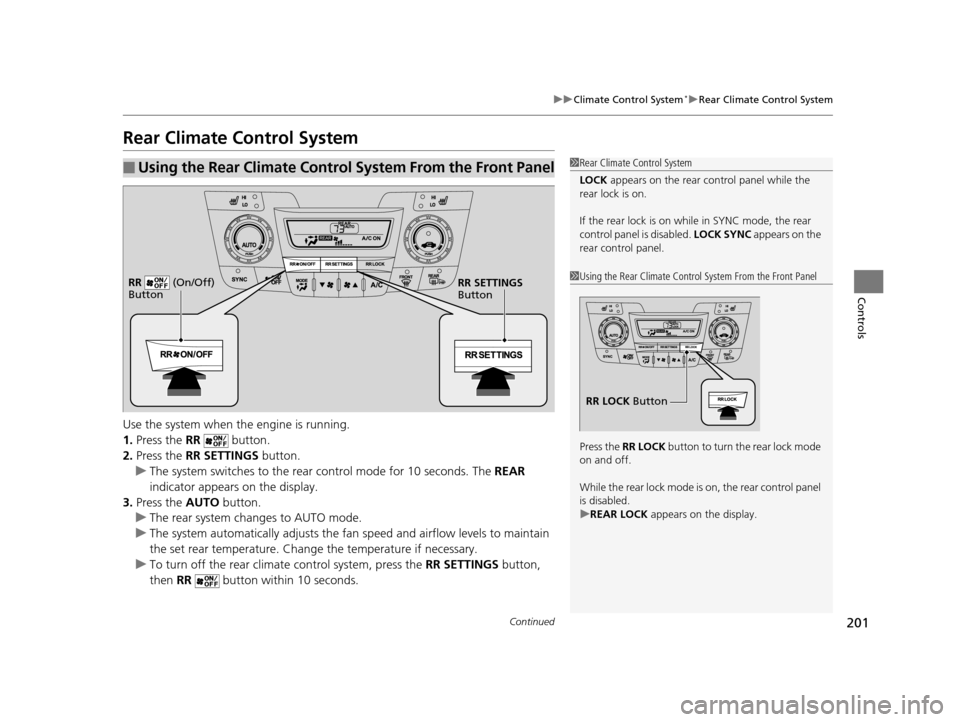
Use the system when the engine is running.
1. Press the RR button.
2. Press the RR SETTINGS button.
u The system switches to the rear control mode for 10 seconds. The REAR
indicator appears on the display.
3. Press the AUTO button.
u The rear system changes to AUTO mode.
u The system automatically adjusts the fan speed and airfl ow levels to maintain
the set rear temperature. Change the temperature if necessary.
u To turn off the rear climat e control system, press the RR SETTINGS button,
then RR button within 10 seconds.
■Using the Rear Climate Control System From the Front Panel1Rear Climate Control System
LOCK appears on the rear control panel while the
rear lock is on.
If the rear lock is on while in SYNC mode, the rear
control panel is disabled. LOCK SYNC appears on the
rear control panel.
1 Using the Rear Climate Control System From the Front Panel
Press the RR LOCK button to turn the rear lock mode
on and off.
While the rear lock mode is on, the rear control panel
is disabled.
u REAR LOCK appears on the display.
RR LOCK Button
RR SETTINGS
Button
RR (On/Off)
Button
17 US ODYSSEY (KA KC)-31TK86600.book 201 ページ 2016年10月24日 月曜日
午後4時2分
Page 322 of 565
321
uuCustomized Features u
Continued
Features
*1:Default Setting
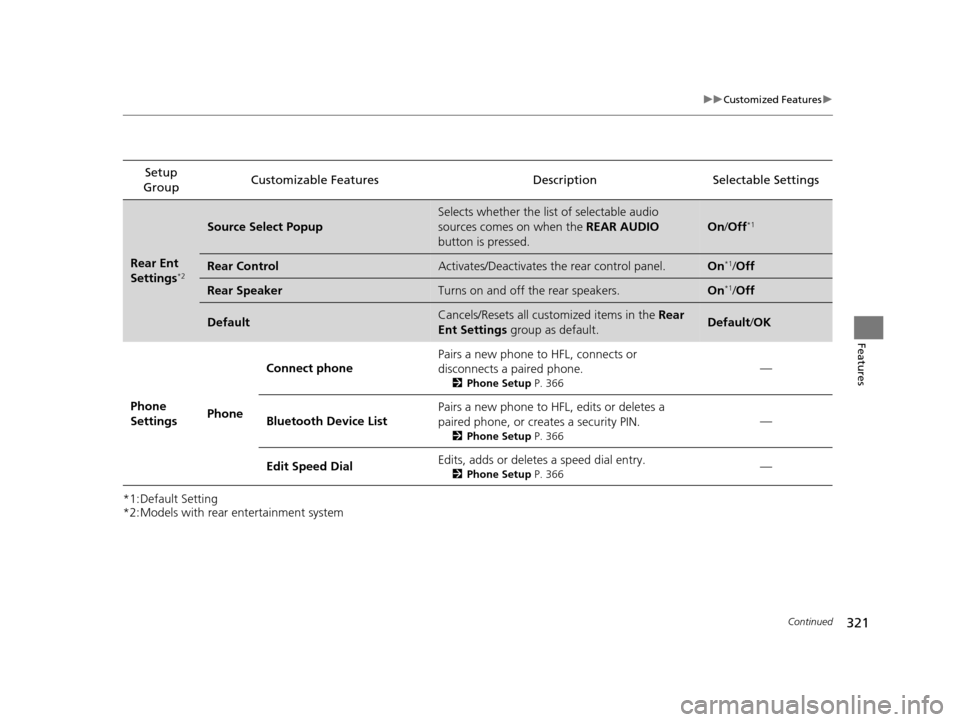
*2:Models with rear entertainment systemSetup
Group Customizable Features Description Selectable Settings
Rear Ent
Settings*2
Source Select Popup
Selects whether the list of selectable audio
sources comes on when the
REAR AUDIO
button is pressed.
On /Off*1
Rear ControlActivates/Deactivates the rear control panel.On*1/Off
Rear SpeakerTurns on and off the rear speakers.On*1/Off
DefaultCancels/Resets all customized items in the Rear
Ent Settings group as default.Default/OK
Phone
Settings PhoneConnect phone
Pairs a new phone to HFL, connects or
disconnects a paired phone.
2
Phone Setup P. 366
—
Bluetooth Device List Pairs a new phone to HFL, edits or deletes a
paired phone, or creates a security PIN.
2
Phone Setup P. 366
—
Edit Speed Dial Edits, adds or deletes a speed dial entry.
2
Phone Setup P. 366—
17 US ODYSSEY (KA KC)-31TK86600.book 321 ページ 2016年10月24日 月曜日 午後4時2分