climate control HONDA ODYSSEY 2017 RC1-RC2 / 5.G User Guide
[x] Cancel search | Manufacturer: HONDA, Model Year: 2017, Model line: ODYSSEY, Model: HONDA ODYSSEY 2017 RC1-RC2 / 5.GPages: 565, PDF Size: 33.13 MB
Page 201 of 565
200
uuClimate Control System*uSynchronized Mode
Controls
Synchronized Mode
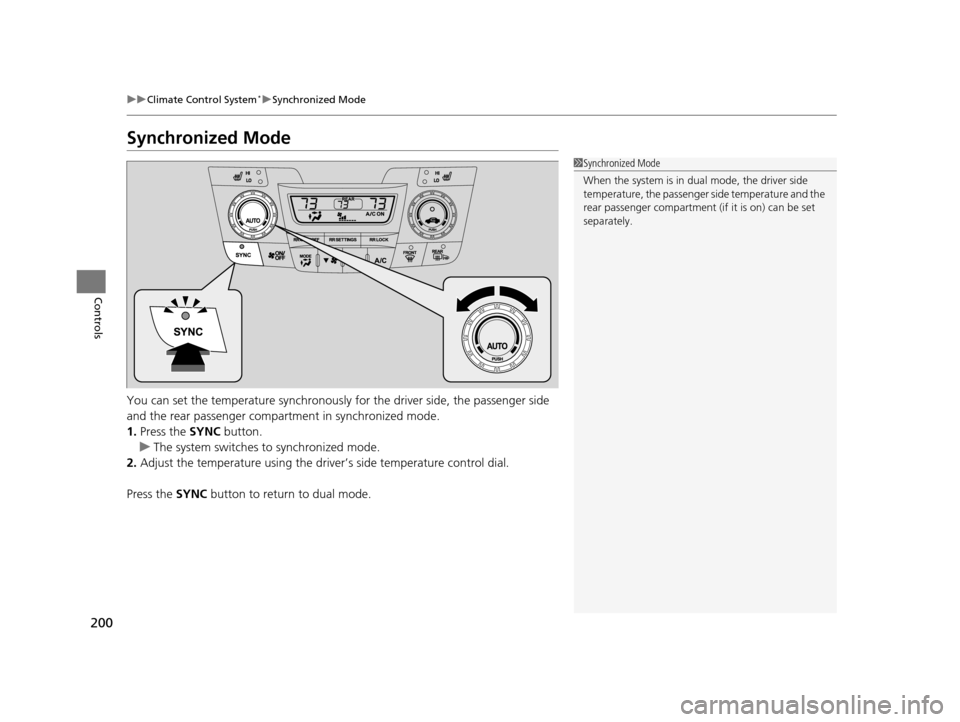
You can set the temperature synchronously for the driver side, the passenger side
and the rear passenger compartment in synchronized mode.
1. Press the SYNC button.
u The system switches to synchronized mode.
2. Adjust the temperature using the driv er’s side temperature control dial.
Press the SYNC button to return to dual mode.
1Synchronized Mode
When the system is in dua l mode, the driver side
temperature, the passenger side temperature and the
rear passenger compartment (if it is on) can be set
separately.
17 US ODYSSEY (KA KC)-31TK86600.book 200 ページ 2016年10月24日 月曜日 午後4時2分
Page 202 of 565
201
uuClimate Control System*uRear Climate Control System
Continued
Controls
Rear Climate Control System
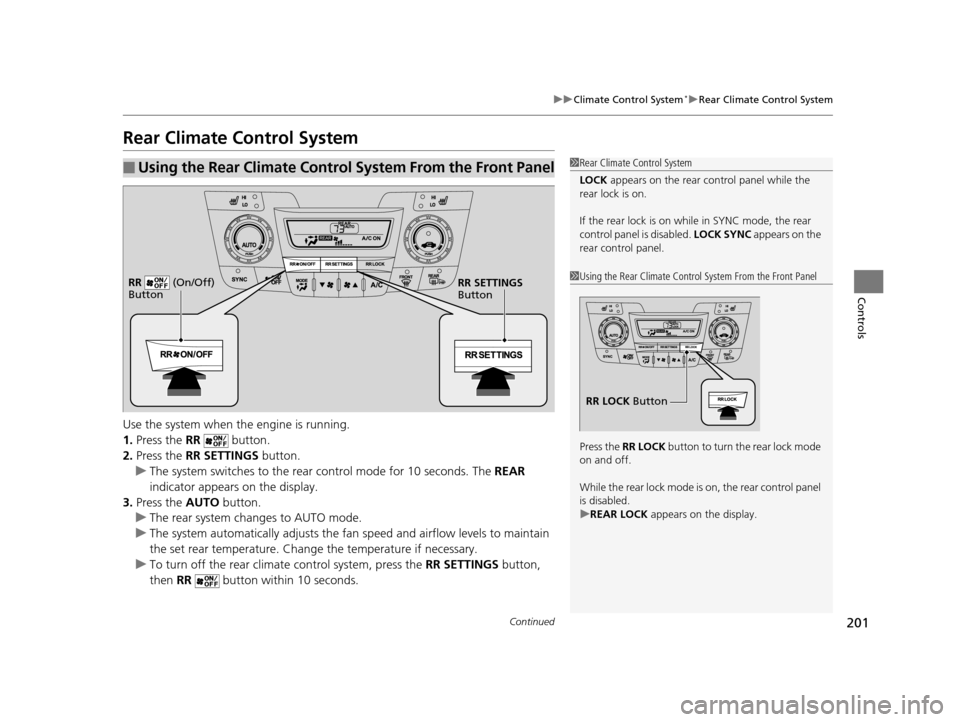
Use the system when the engine is running.
1. Press the RR button.
2. Press the RR SETTINGS button.
u The system switches to the rear control mode for 10 seconds. The REAR
indicator appears on the display.
3. Press the AUTO button.
u The rear system changes to AUTO mode.
u The system automatically adjusts the fan speed and airfl ow levels to maintain
the set rear temperature. Change the temperature if necessary.
u To turn off the rear climat e control system, press the RR SETTINGS button,
then RR button within 10 seconds.
■Using the Rear Climate Control System From the Front Panel1Rear Climate Control System
LOCK appears on the rear control panel while the
rear lock is on.
If the rear lock is on while in SYNC mode, the rear
control panel is disabled. LOCK SYNC appears on the
rear control panel.
1 Using the Rear Climate Control System From the Front Panel
Press the RR LOCK button to turn the rear lock mode
on and off.
While the rear lock mode is on, the rear control panel
is disabled.
u REAR LOCK appears on the display.
RR LOCK Button
RR SETTINGS
Button
RR (On/Off)
Button
17 US ODYSSEY (KA KC)-31TK86600.book 201 ページ 2016年10月24日 月曜日
午後4時2分
Page 203 of 565
uuClimate Control System*uRear Climate Control System
202
Controls
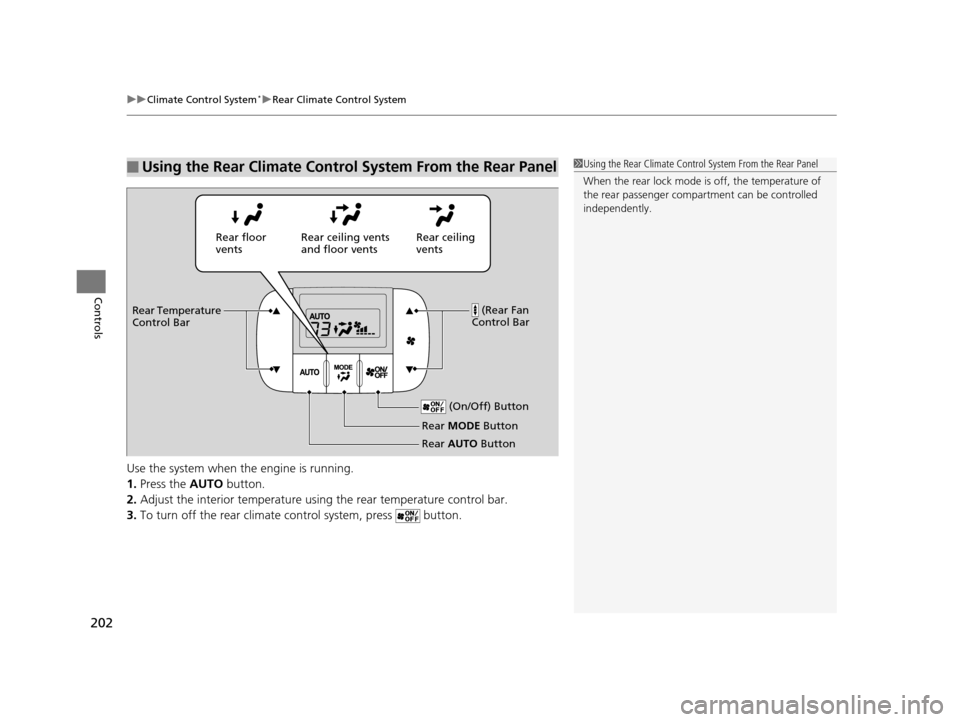
Use the system when the engine is running.
1. Press the AUTO button.
2. Adjust the interior temperature usi ng the rear temperature control bar.
3. To turn off the rear climate control system, press button.
■Using the Rear Climate Control System From the Rear Panel1Using the Rear Climate Control System From the Rear Panel
When the rear lock mode is off, the temperature of
the rear passenger compar tment can be controlled
independently.
Rear ceiling
vents
Rear floor
vents
Rear ceiling vents
and floor vents
(Rear Fan
Control Bar
Rear Temperature
Control Bar
(On/Off) Button
Rear MODE Button
Rear AUTO Button
17 US ODYSSEY (KA KC)-31TK86600.book 202 ページ 2016年10月24日 月曜日 午後4時2分
Page 204 of 565
203
uuClimate Control System*uAutomatic Climate Control Sensors
Controls
Automatic Climate Control Sensors
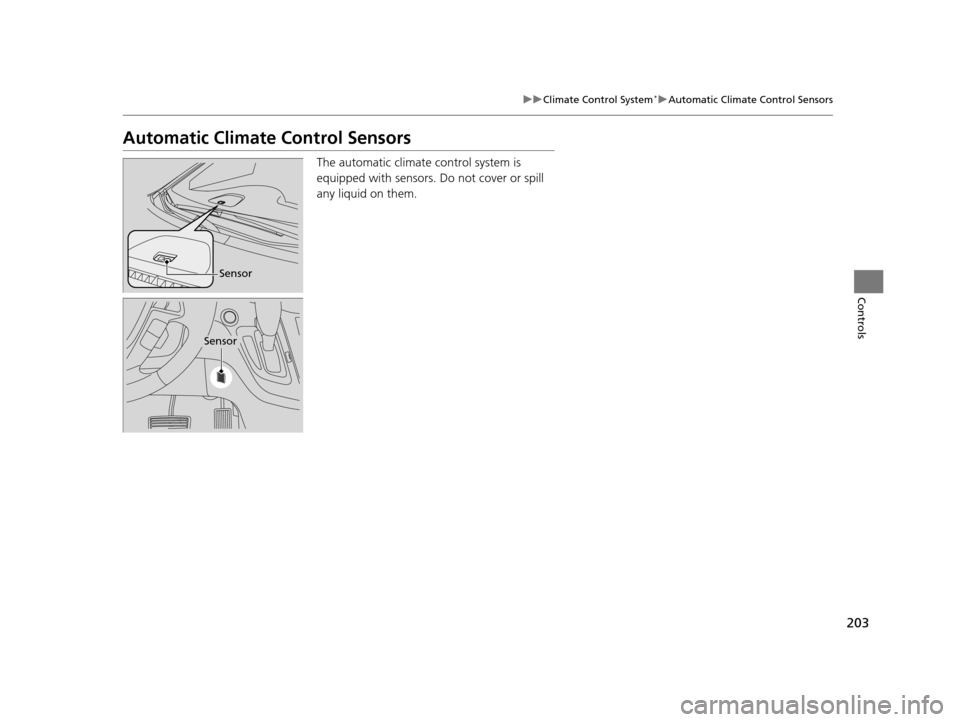
The automatic climate control system is
equipped with sensors. Do not cover or spill
any liquid on them.
Sensor
Sensor
17 US ODYSSEY (KA KC)-31TK86600.book 203 ページ 2016年10月24日 月曜日 午後4時2分
Page 407 of 565
406
uuTowing a Trailer uTowing Your Vehicle
Driving
• Monitor your temperature gauge. If it nears the red (Hot) mark, turn off the
heating and cooling system*/climate control system* and reduce speed. Pull to the
side of the road safely to cool down the engine if necessary.
• Shift to the position if th e transmission shifts frequently.
Towing Your Vehicle
Your vehicle is not designed to be towed behind a motor home. If your vehicle needs
to be towed in an emergency, refe r to the emergency towing information.
2Emergency Towing P. 539
■Driving in Hilly Terrain
D4
* Not available on all models
17 US ODYSSEY (KA KC)-31TK86600.book 406 ページ 2016年10月24日 月曜日 午後4時2分
Page 408 of 565
407Continued
Driving
When Driving
Starting the Engine
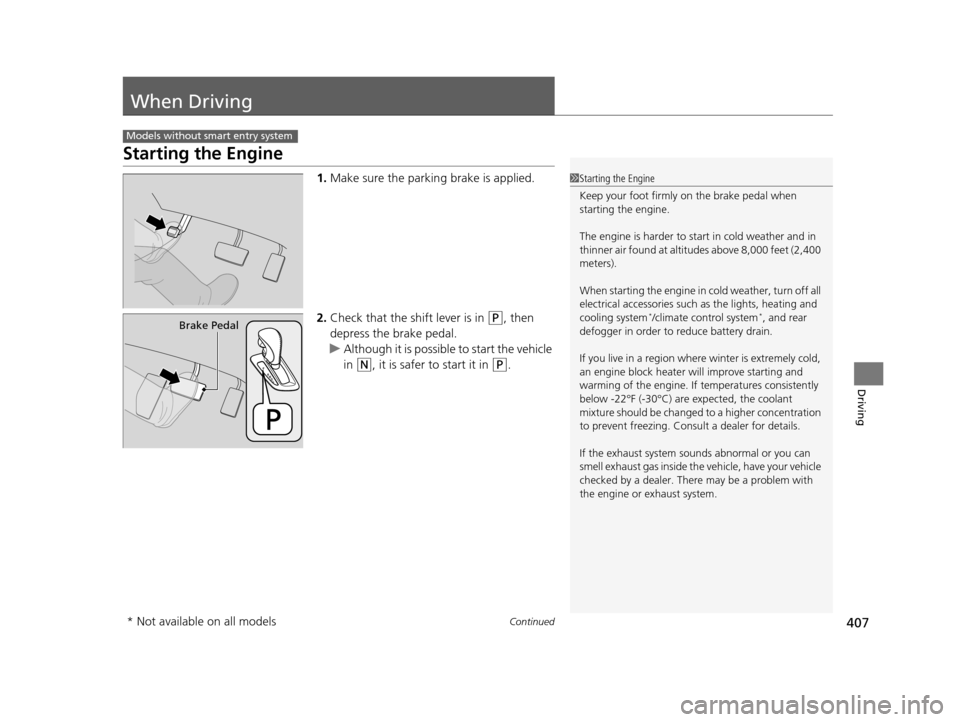
1.Make sure the parkin g brake is applied.
2. Check that the shift lever is in
(P, then
depress the brake pedal.
u Although it is possible to start the vehicle
in
(N, it is safer to start it in (P.
Models without smart entry system
1Starting the Engine
Keep your foot firmly on the brake pedal when
starting the engine.
The engine is harder to st art in cold weather and in
thinner air found at altitudes above 8,000 feet (2,400
meters).
When starting the engine in cold weather, turn off all
electrical accessories such as the lights, heating and
cooling system
*/climate control system*, and rear
defogger in order to reduce battery drain.
If you live in a region where winter is extremely cold,
an engine block heater will improve starting and
warming of the engine. If temperatures consistently
below -22°F (-30°C) are expected, the coolant
mixture should be changed to a higher concentration
to prevent freezing. Cons ult a dealer for details.
If the exhaust system sounds abnormal or you can
smell exhaust gas inside the vehicle, have your vehicle
checked by a dealer. There may be a problem with
the engine or exhaust system.Brake Pedal
* Not available on all models
17 US ODYSSEY (KA KC)-31TK86600.book 407 ページ 2016年10月24日 月曜日 午後4時2分
Page 410 of 565
409
uuWhen Driving uStarting the Engine
Continued
Driving
Starting the Engine
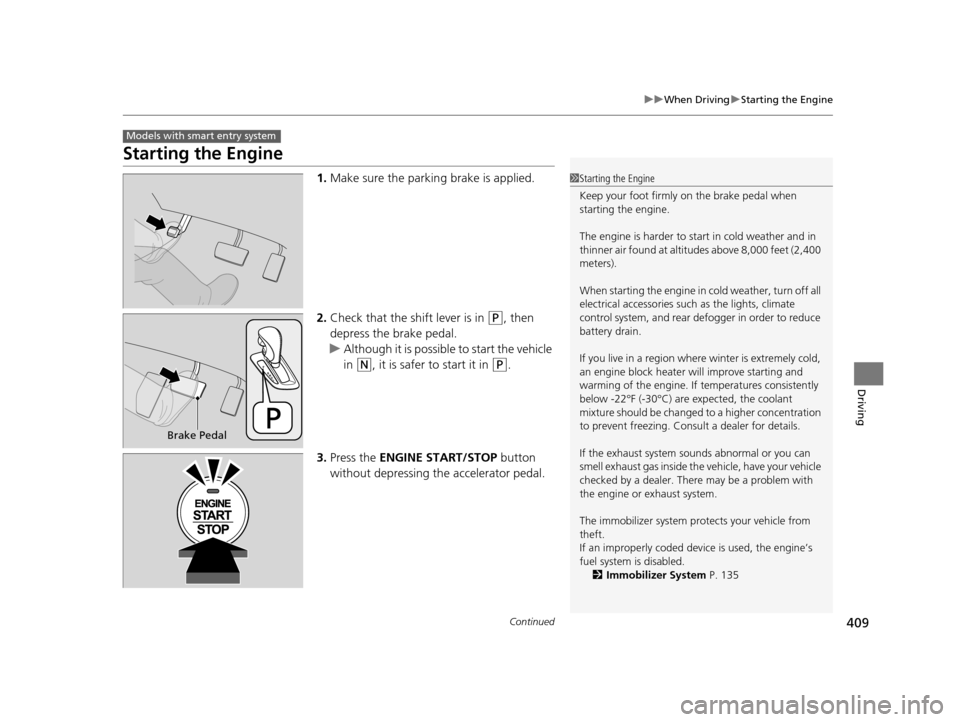
1. Make sure the parkin g brake is applied.
2. Check that the shift lever is in
(P, then
depress the brake pedal.
u Although it is possible to start the vehicle
in
(N, it is safer to start it in (P.
3. Press the ENGINE START/STOP button
without depressing the accelerator pedal.
Models with smart entry system
1 Starting the Engine
Keep your foot firmly on the brake pedal when
starting the engine.
The engine is harder to st art in cold weather and in
thinner air found at altitudes above 8,000 feet (2,400
meters).
When starting the engine in cold weather, turn off all
electrical accessories such as the lights, climate
control system, and rear de fogger in order to reduce
battery drain.
If you live in a region where winter is extremely cold,
an engine block heater will improve starting and
warming of the engine. If temperatures consistently
below -22°F (-30°C) are expected, the coolant
mixture should be changed to a higher concentration
to prevent freezing. Cons ult a dealer for details.
If the exhaust system sounds abnormal or you can
smell exhaust gas inside the vehicle, have your vehicle
checked by a dealer. There may be a problem with
the engine or exhaust system.
The immobilizer system pr otects your vehicle from
theft.
If an improperly c oded device is used, the engine’s
fuel system is disabled. 2 Immobilizer System P. 135
Brake Pedal
17 US ODYSSEY (KA KC)-31TK86600.book 409 ページ 2016年10月24日 月曜日 午後4時2分
Page 421 of 565
uuWhen Driving uForward Collision Warning (FCW)*
420
Driving
■Automatic shutoff
FCW may automatically shut itself off and the FCW indicator comes and stays on when:
• The temperature inside the system is high.
• The windshield is blocked by di rt, mud, leaves, wet snow, etc.
Once the conditions that caused FCW to shut off improve or are addressed (e.g.,
cleaning), the system comes back on.1 Automatic shutoff
To help reduce the likel ihood that high interior
temperatures will cause the camera system to shut
off, when parking, find a sh ady area or face the front
of the vehicle away from the sun. If you use a
reflective sun shade, do not allow it to cover the
camera housing. Covering the camera can
concentrate heat on the camera.
If the CAMERA HOT message appears:
If the symbol appears:
•Use the climate control system to cool down the
interior and, if necessary , the defroster mode when
windows are fogged.
•Start driving the vehicle to lower the windshield
temperature, which cool s down the area around
the FCW system.
Models with information display
Models with multi-information display
17 US ODYSSEY (KA KC)-31TK86600.book 420 ページ 2016年10月24日 月曜日 午後4時2分
Page 425 of 565
uuWhen Driving uLane Departure Warning (LDW)*
424
Driving
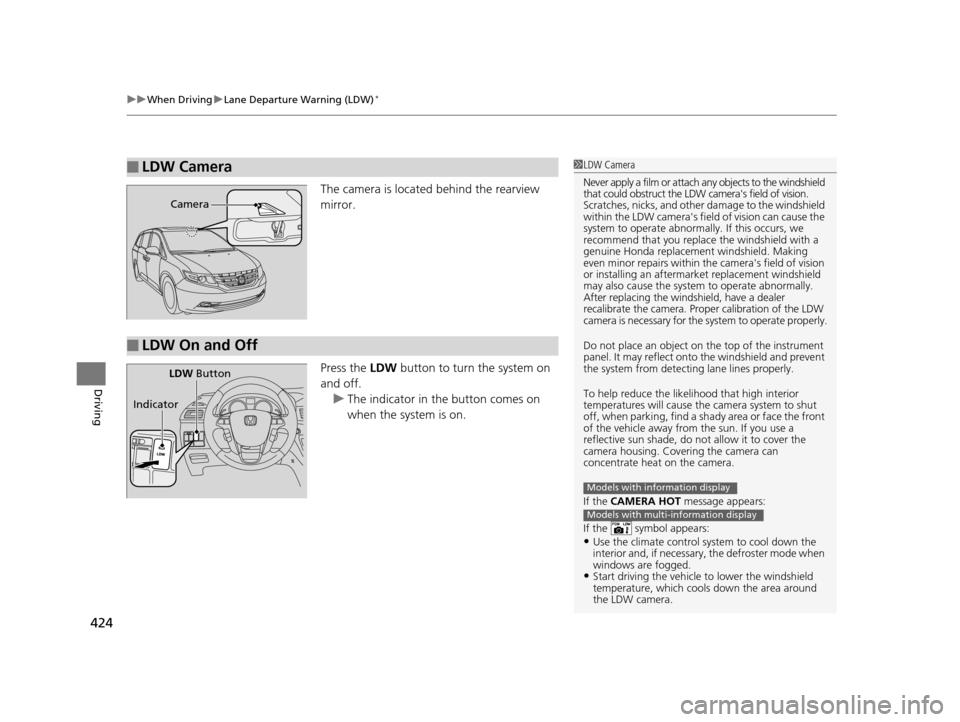
The camera is located behind the rearview
mirror.
Press the LDW button to turn the system on
and off. u The indicator in the button comes on
when the system is on.
■LDW Camera1LDW Camera
Never apply a film or attach any objects to the windshield
that could obstruct the LDW camera's field of vision.
Scratches, nicks, and othe r damage to the windshield
within the LDW camera's fi eld of vision can cause the
system to operate abnormall y. If this occurs, we
recommend that you replac e the windshield with a
genuine Honda replacem ent windshield. Making
even minor repairs within th e camera's field of vision
or installing an aftermarket replacement windshield
may also cause the system to operate abnormally.
After replacing the winds hield, have a dealer
recalibrate the camera. Proper calibration of the LDW
camera is necessary for the system to operate properly.
Do not place an object on the top of the instrument
panel. It may reflect onto the windshield and prevent
the system from detecting lane lines properly.
To help reduce the likel ihood that high interior
temperatures will cause the camera system to shut
off, when parking, find a sh ady area or face the front
of the vehicle away from the sun. If you use a
reflective sun shade, do not allow it to cover the
camera housing. Covering the camera can
concentrate heat on the camera.
If the CAMERA HOT message appears:
If the symbol appears:
•Use the climate control system to cool down the
interior and, if necessary , the defroster mode when
windows are fogged.
•Start driving the vehicle to lower the windshield
temperature, which cool s down the area around
the LDW camera.
Models with information display
Models with multi-information display
Camera
■LDW On and Off
LDW Button
Indicator
17 US ODYSSEY (KA KC)-31TK86600.book 424 ページ 2016年10月24日 月曜日 午後4時2分
Page 452 of 565
451
Maintenance
This chapter discusses basic maintenance.
Before Performing MaintenanceInspection and Maintenance ............ 452
Safety When Performing Maintenance..... 453Parts and Fluids Used in Maintenance Service ........................................... 454
Maintenance Minder
TM..................... 455
Maintenance Under the Hood
Maintenance Items Under the Hood ..... 463Opening the Hood ........................... 464
Recommended Engine Oil ................ 465
Oil Check ......................................... 466
Adding Engine Oil ............................ 467
Changing the Engine Oil and Oil Filter ..... 468
Engine Coolant ................................ 470
Transmission Fluid ............................ 472
Brake Fluid ....................................... 473
Power Steering Fluid Check.............. 474
Refilling Window Washer Fluid......... 474
Replacing Light Bulbs ....................... 475
Checking and Maintaining Wiper Blades.... 486Checking and Maintaining Tires
Checking Tires ................................. 490
Tire and Loading Information Label ...... 491Tire Labeling .................................... 491DOT Tire Quality Grading (U.S. Vehicles)....... 493Wear Indicators................................ 495 Tire Service Life ................................ 495
Tire and Wheel Replacement ........... 496
Tire Rotation .................................... 497
Winter Tires ..................................... 498
Battery ............................................... 499
Remote Transmitter Care ................. 500
Remote Control and Wireless Headphone Care
*........................... 502
Heating and Cooling System*/Climate
Control System* Maintenance ....... 504
Cleaning Interior Care .................................... 505
Exterior Care.................................... 507
* Not available on all models
17 US ODYSSEY (KA KC)-31TK86600.book 451 ページ 2016年10月24日 月曜日 午後4時2分