cooling HONDA ODYSSEY 2017 RC1-RC2 / 5.G User Guide
[x] Cancel search | Manufacturer: HONDA, Model Year: 2017, Model line: ODYSSEY, Model: HONDA ODYSSEY 2017 RC1-RC2 / 5.GPages: 565, PDF Size: 33.13 MB
Page 197 of 565
uuHeating and Cooling*uUsing Vents, Heating and A/C
196
Controls
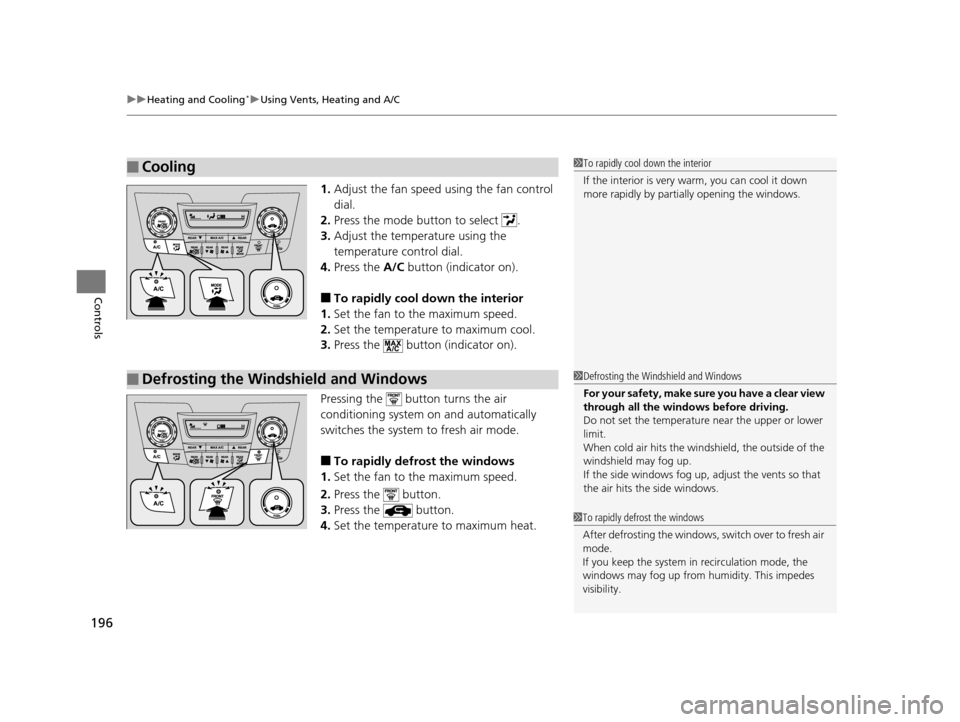
1. Adjust the fan speed using the fan control
dial.
2. Press the mode button to select .
3. Adjust the temperature using the
temperature control dial.
4. Press the A/C button (indicator on).
■To rapidly cool down the interior
1. Set the fan to the maximum speed.
2. Set the temperature to maximum cool.
3. Press the button (indicator on).
Pressing the button turns the air
conditioning system on and automatically
switches the system to fresh air mode.
■To rapidly defrost the windows
1. Set the fan to the maximum speed.
2. Press the button.
3. Press the button.
4. Set the temperature to maximum heat.
■Cooling1To rapidly cool down the interior
If the interior is very warm, you can cool it down
more rapidly by parti ally opening the windows.
■Defrosting the Windshield and Windows1Defrosting the Windshield and Windows
For your safety, make sure you have a clear view
through all the windows before driving.
Do not set the temperatur e near the upper or lower
limit.
When cold air hits the windshield, the outside of the
windshield may fog up.
If the side windows fog up, adjust the vents so that
the air hits th e side windows.
1To rapidly defrost the windows
After defrosting the windows, switch over to fresh air
mode.
If you keep the system in recirculation mode, the
windows may fog up from humidity. This impedes
visibility.
17 US ODYSSEY (KA KC)-31TK86600.book 196 ページ 2016年10月24日 月曜日 午後4時2分
Page 198 of 565
197
uuHeating and Cooling*uRear A/C Controls
Controls
Rear A/C Controls
Use the system when the engine is running.
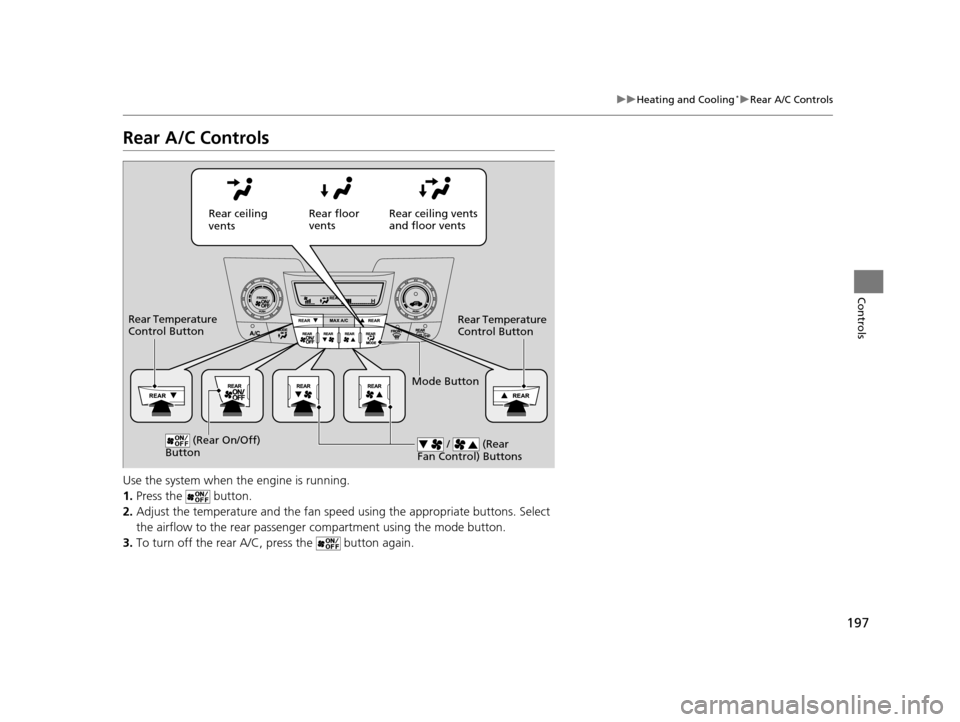
1. Press the button.
2. Adjust the temperature and the fan spee d using the appropriate buttons. Select
the airflow to the rear passenger compartment using the mode button.
3. To turn off the rear A/C, press the button again.
Rear ceiling
vents Rear floor
vents
Rear ceiling vents
and floor vents
Rear Temperature
Control Button
Rear Temperature
Control Button
(Rear On/Off)
Button / (Rear
Fan Control) Buttons
Mode Button
17 US ODYSSEY (KA KC)-31TK86600.book 197 ページ 2016年10月24日 月曜日 午後4時2分
Page 407 of 565
406
uuTowing a Trailer uTowing Your Vehicle
Driving
• Monitor your temperature gauge. If it nears the red (Hot) mark, turn off the
heating and cooling system*/climate control system* and reduce speed. Pull to the
side of the road safely to cool down the engine if necessary.
• Shift to the position if th e transmission shifts frequently.
Towing Your Vehicle
Your vehicle is not designed to be towed behind a motor home. If your vehicle needs
to be towed in an emergency, refe r to the emergency towing information.
2Emergency Towing P. 539
■Driving in Hilly Terrain
D4
* Not available on all models
17 US ODYSSEY (KA KC)-31TK86600.book 406 ページ 2016年10月24日 月曜日 午後4時2分
Page 408 of 565
407Continued
Driving
When Driving
Starting the Engine
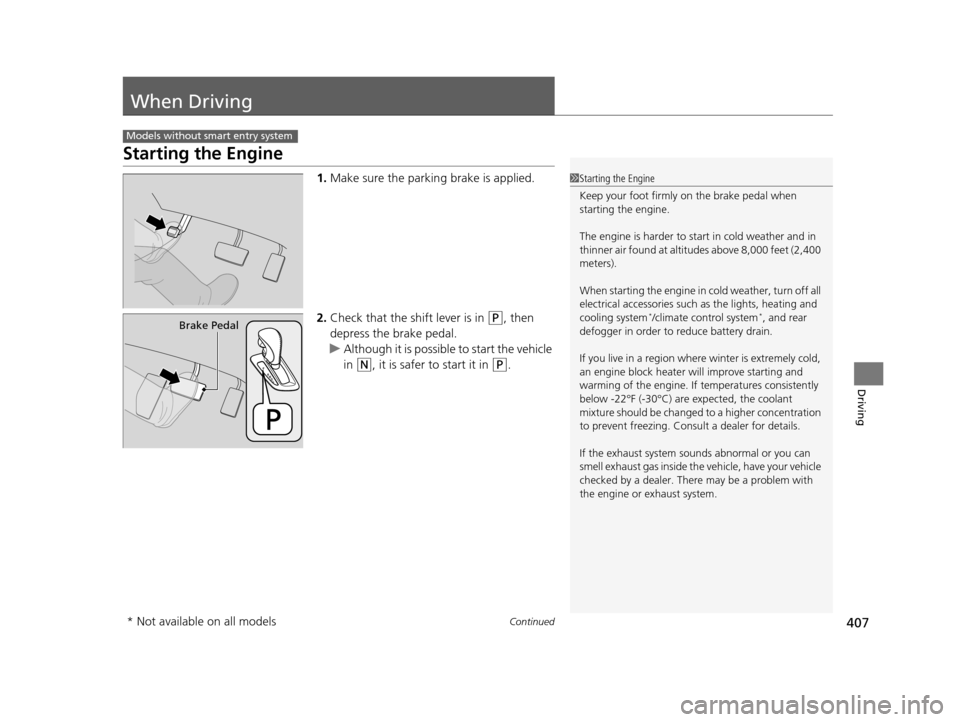
1.Make sure the parkin g brake is applied.
2. Check that the shift lever is in
(P, then
depress the brake pedal.
u Although it is possible to start the vehicle
in
(N, it is safer to start it in (P.
Models without smart entry system
1Starting the Engine
Keep your foot firmly on the brake pedal when
starting the engine.
The engine is harder to st art in cold weather and in
thinner air found at altitudes above 8,000 feet (2,400
meters).
When starting the engine in cold weather, turn off all
electrical accessories such as the lights, heating and
cooling system
*/climate control system*, and rear
defogger in order to reduce battery drain.
If you live in a region where winter is extremely cold,
an engine block heater will improve starting and
warming of the engine. If temperatures consistently
below -22°F (-30°C) are expected, the coolant
mixture should be changed to a higher concentration
to prevent freezing. Cons ult a dealer for details.
If the exhaust system sounds abnormal or you can
smell exhaust gas inside the vehicle, have your vehicle
checked by a dealer. There may be a problem with
the engine or exhaust system.Brake Pedal
* Not available on all models
17 US ODYSSEY (KA KC)-31TK86600.book 407 ページ 2016年10月24日 月曜日 午後4時2分
Page 452 of 565
451
Maintenance
This chapter discusses basic maintenance.
Before Performing MaintenanceInspection and Maintenance ............ 452
Safety When Performing Maintenance..... 453Parts and Fluids Used in Maintenance Service ........................................... 454
Maintenance Minder
TM..................... 455
Maintenance Under the Hood
Maintenance Items Under the Hood ..... 463Opening the Hood ........................... 464
Recommended Engine Oil ................ 465
Oil Check ......................................... 466
Adding Engine Oil ............................ 467
Changing the Engine Oil and Oil Filter ..... 468
Engine Coolant ................................ 470
Transmission Fluid ............................ 472
Brake Fluid ....................................... 473
Power Steering Fluid Check.............. 474
Refilling Window Washer Fluid......... 474
Replacing Light Bulbs ....................... 475
Checking and Maintaining Wiper Blades.... 486Checking and Maintaining Tires
Checking Tires ................................. 490
Tire and Loading Information Label ...... 491Tire Labeling .................................... 491DOT Tire Quality Grading (U.S. Vehicles)....... 493Wear Indicators................................ 495 Tire Service Life ................................ 495
Tire and Wheel Replacement ........... 496
Tire Rotation .................................... 497
Winter Tires ..................................... 498
Battery ............................................... 499
Remote Transmitter Care ................. 500
Remote Control and Wireless Headphone Care
*........................... 502
Heating and Cooling System*/Climate
Control System* Maintenance ....... 504
Cleaning Interior Care .................................... 505
Exterior Care.................................... 507
* Not available on all models
17 US ODYSSEY (KA KC)-31TK86600.book 451 ページ 2016年10月24日 月曜日 午後4時2分
Page 471 of 565
470
uuMaintenance Under the Hood uEngine Coolant
Maintenance
Engine Coolant
This coolant is premixed with 50% antifreeze and 50% water. Do not add any
straight antifreeze or water.
We recommend you check the engine coolant level every time you refuel. Check the
reserve tank first. If it is completely empty, also check the coolant level in the
radiator. Add the engine coolant accordingly.
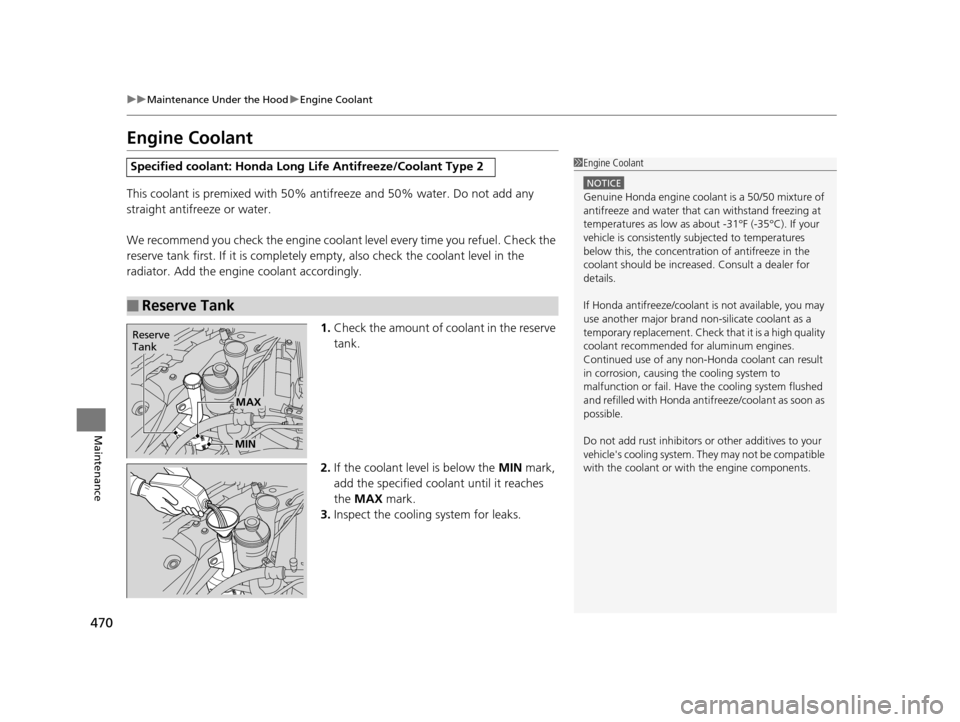
1.Check the amount of coolant in the reserve
tank.
2. If the coolant level is below the MIN mark,
add the specified coolant until it reaches
the MAX mark.
3. Inspect the cooling system for leaks.
Specified coolant: Honda Long Life Antifreeze/Coolant Type 2
■Reserve Tank
1Engine Coolant
NOTICE
Genuine Honda engine coolan t is a 50/50 mixture of
antifreeze and water that can withstand freezing at
temperatures as low as a bout -31°F (-35°C). If your
vehicle is consistently subjected to temperatures
below this, the concentration of antifreeze in the
coolant should be increased. Consult a dealer for
details.
If Honda antifreeze /coolant is not available, you may
use another major brand non- silicate coolant as a
temporary replacement. Check that it is a high quality
coolant recommended for aluminum engines.
Continued use of any non-Honda coolant can result
in corrosion, causing the cooling system to
malfunction or fail. Have the cooling system flushed
and refilled with Honda anti freeze/coolant as soon as
possible.
Do not add rust inhibitors or other additives to your
vehicle's cooling system. They may not be compatible
with the coolant or with the engine components.
Reserve
Tank
MAX
MIN
17 US ODYSSEY (KA KC)-31TK86600.book 470 ページ 2016年10月24日 月曜日 午後4時2分
Page 505 of 565
504
Maintenance
Heating and Cooling System*/Climate Control System* Maintenance
Dust and Pollen Filter
The heating and cooling system/climate control system is equipped with a dust and
pollen filter that collects pollen, dust, and other debris in the air. The Maintenance
Minder
TM messages will let you know when to replace the filter.
We recommend that you replace the dust and pollen filter sooner when using your
vehicle in areas with high concentrations of dust.
1Dust and Pollen Filter
If the airflow from the heating and cooling system/
climate control system dete riorates noticeably, and
the windows fog up easily, the filter may need to be
replaced. Please contact a dealer for replacement.
* Not available on all models
17 US ODYSSEY (KA KC)-31TK86600.book 504 ページ 2016年10月24日 月曜日 午後4時2分
Page 528 of 565
527
uuOverheating uHow to Handle Overheating
Handling the Unexpected
■Next thing to do
1.Check that the cooling fan is operating and
stop the engine once the temperature
gauge needle comes down.
u If the cooling fan is not operating,
immediately stop the engine.
2. Once the engine has cooled down, inspect
the coolant level and check the cooling
system components for leaks.
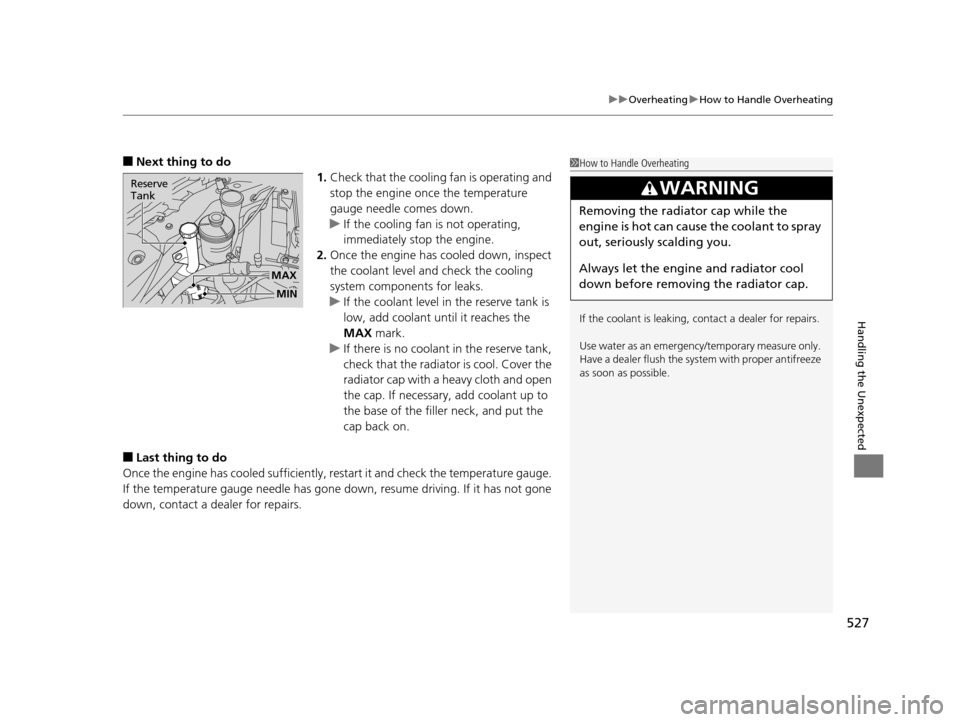
u If the coolant level in the reserve tank is
low, add coolant until it reaches the
MAX mark.
u If there is no coolant in the reserve tank,
check that the radiator is cool. Cover the
radiator cap with a heavy cloth and open
the cap. If necessary, add coolant up to
the base of the filler neck, and put the
cap back on.
■Last thing to do
Once the engine has cooled sufficiently, re start it and check the temperature gauge.
If the temperature gauge needle has gone dow n, resume driving. If it has not gone
down, contact a dealer for repairs.
1 How to Handle Overheating
If the coolant is leaking, contact a dealer for repairs.
Use water as an emergency/temporary measure only.
Have a dealer flush the system with proper antifreeze
as soon as possible.
3WARNING
Removing the radiator cap while the
engine is hot can cause the coolant to spray
out, seriously scalding you.
Always let the engine and radiator cool
down before removing the radiator cap.
MAX
Reserve
Tank
MIN
17 US ODYSSEY (KA KC)-31TK86600.book 527 ページ 2016年10月24日 月曜日 午後4時2分
Page 529 of 565
528
Handling the Unexpected
Indicator, Coming On/Blinking
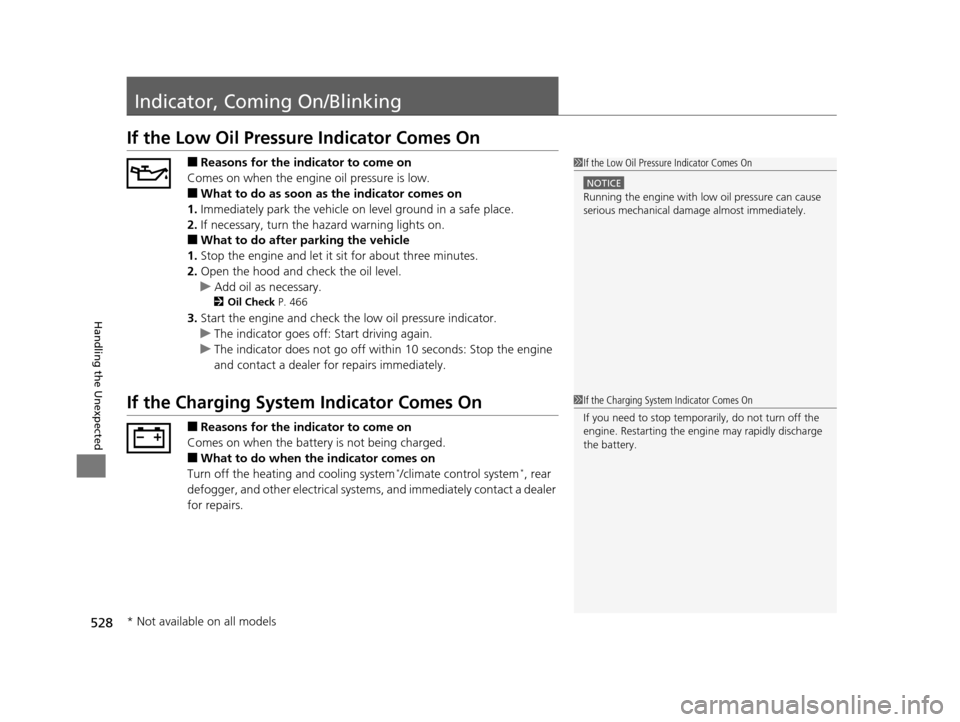
If the Low Oil Pressure Indicator Comes On
■Reasons for the indicator to come on
Comes on when the engine oil pressure is low.
■What to do as soon as the indicator comes on
1. Immediately park the vehicle on level ground in a safe place.
2. If necessary, turn the ha zard warning lights on.
■What to do after parking the vehicle
1. Stop the engine and let it sit for about three minutes.
2. Open the hood and check the oil level.
u Add oil as necessary.
2 Oil Check P. 466
3.Start the engine and check the low oil pressure indicator.
u The indicator goes off: Start driving again.
u The indicator does not go off within 10 seconds: Stop the engine
and contact a dealer for repairs immediately.
If the Charging System Indicator Comes On
■Reasons for the indicator to come on
Comes on when the battery is not being charged.
■What to do when the indicator comes on
Turn off the heating and cooling system*/climate control system*, rear
defogger, and other electrical systems, and immediately contact a dealer
for repairs.
1 If the Low Oil Pressure Indicator Comes On
NOTICE
Running the engine with low oil pressure can cause
serious mechanical damage almost immediately.
1If the Charging System Indicator Comes On
If you need to stop temporarily, do not turn off the
engine. Restarting the engi ne may rapidly discharge
the battery.
* Not available on all models
17 US ODYSSEY (KA KC)-31TK86600.book 528 ページ 2016年10月24日 月曜日 午後4時2分
Page 554 of 565
Index
553
Index
Index
A
AAC................................... 221, 229, 252, 262
ABS (Anti-lock Brake System) .................. 438
AC Power Outlet ...................................... 185
Accessories and Modifications ................ 450
Accessory Power Sockets ......................... 183
Additives Coolant .................................................. 470
Engine Oil ............................................... 465
Washer ................................................... 474
Additives, Engine Oil ............................... 465
Adjusting Armrest .................................................. 175
Front Seats.............................................. 161
Head Restraints ....................................... 164
Mirrors.................................................... 158
Rear Seats ....................................... 162, 169
Steering Wheel ....................................... 157
Temperature ....................................... 95, 98
Aha
TM Menu ............................................. 261
AhaTM Radio .............................................. 271
Air Conditioning System (Climate Control
System) .................................................... 198
Changing the Mode................................ 198
Defrosting the Windshield and
Windows .............................................. 199
Dust and Pollen Filter .............................. 504
Recirculation/Fresh Air Mode................... 198
Sensors ................................................... 203
Using Automatic Climate Control............ 198 Air Conditioning System (Heating and
Cooling System) ...................................... 194
Cooling ................................................... 196
Defrosting the Windshield and Windows ............................................... 196
Dust and Pollen Filter ............................... 504
Heating ................................................... 195
Air Pressure ....................................... 491, 543
Airbags ........................................................ 39
Advanced Airbags ..................................... 45
Airbag Care ............................................... 51
Event Data Recorder .................................... 0
Front Airbags (SRS) .................................... 42
Indicator .............................................. 49, 74
Passenger Airbag Off Indicator .................. 50
Sensors ...................................................... 39
Side Airbags .............................................. 46
Side Curtain Airbags .................................. 48
AM/FM Radio .................................... 218, 245
Anti-lock Brake System (ABS) .................. 438
Indicator .................................................... 73
Armrest ..................................................... 175
Audio Remote Controls ............................ 210
Audio System ............................................ 206
Adjusting the Sound ................ 216, 237, 243
Auxiliary Input Jack .................................. 207
Error Messages ........................................ 267
General Information ................................ 272
Internet Radio .................................. 227, 259
iPod ................................................. 224, 255
MP3/WMA/AAC .............. 221, 229, 252, 262 Reactivating ............................................ 208
Recommended CDs ................................. 273
Recommended Devices............................ 275
Remote Controls ..................................... 210
Security Code .......................................... 208
Shortcuts................................................. 236
Theft Protection ...................................... 208
Touch Screen .......................................... 235
USB Flash Drives ...................................... 275
USB Port.................................................. 207
Audio with Touch Screen ......................... 235
Authorized Manuals ................................ 551
Auto Door Locking/Unlocking ................. 120
Customize ............................... 103, 302, 317
Automatic Lighting .................................. 148
Automatic Transmission ........................... 412
Creeping ................................................. 412
Fluid ........................................................ 472
Kickdown ................................................ 412
Operating the Shift Lever................... 18, 414
Shift Lever Does Not Move ...................... 525
Shifting ................................................... 413
Auxiliary Input Jack .................................. 207
Average Fuel Economy ........................ 94, 97
Average Speed ........................................... 98
B
Battery...................................................... 499
Charging System Indicator................. 72, 528
Jump Starting .......................................... 523
17 US ODYSSEY (KA KC)-31TK86600.book 553 ページ 2016年10月24日 月曜日 午後4時2分