error HONDA ODYSSEY 2017 RC1-RC2 / 5.G User Guide
[x] Cancel search | Manufacturer: HONDA, Model Year: 2017, Model line: ODYSSEY, Model: HONDA ODYSSEY 2017 RC1-RC2 / 5.GPages: 565, PDF Size: 33.13 MB
Page 268 of 565
267
Features
Audio Error Messages
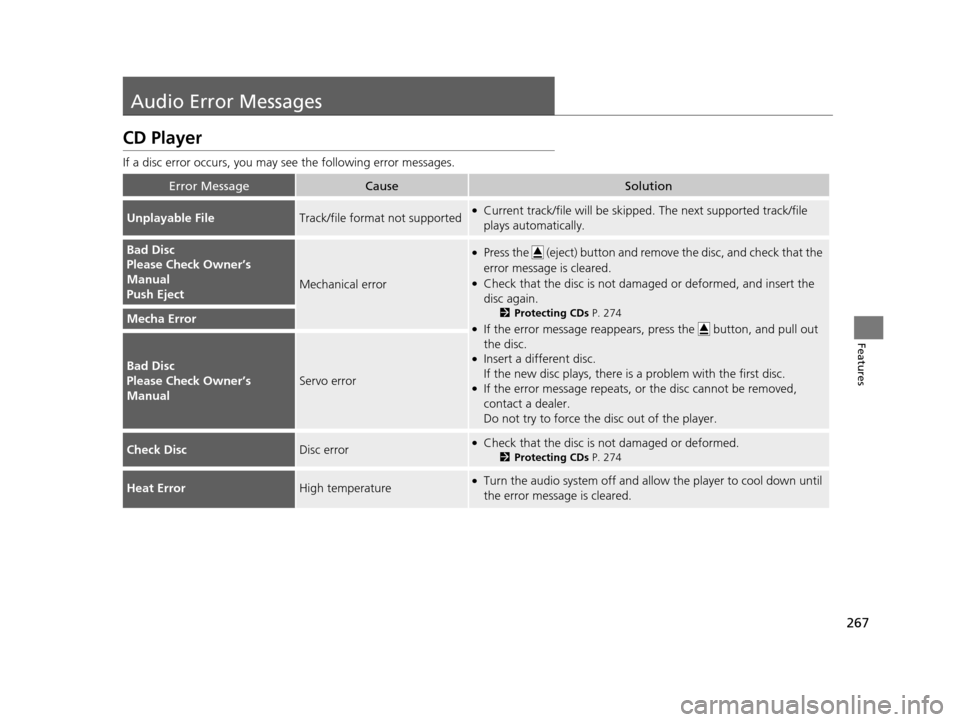
CD Player
If a disc error occurs, you may see the following error messages.
Error MessageCauseSolution
Unplayable FileTrack/file format not supported●Current track/file will be skipped. The next supported track/file
plays automatically.
Bad Disc
Please Check Owner’s
Manual
Push Eject
Mechanical error
●Press the (eject) button and remo ve the disc, and check that the
error message is cleared.
●Check that the disc is not dama ged or deformed, and insert the
disc again.
2 Protecting CDs P. 274
●If the error message reappears, press the button, and pull out
the disc.
●Insert a different disc.
If the new disc plays, there is a problem with the first disc.
●If the error message repeats, or the disc cannot be removed,
contact a dealer.
Do not try to force the disc out of the player.
Mecha Error
Bad Disc
Please Check Owner’s
Manual
Servo error
Check DiscDisc error●Check that the disc is not damaged or deformed.
2Protecting CDs P. 274
Heat ErrorHigh temperature●Turn the audio system off and allo w the player to cool down until
the error message is cleared.
17 US ODYSSEY (KA KC)-31TK86600.book 267 ページ 2016年10月24日 月曜日 午後4時2分
Page 269 of 565
268
uuAudio Error Messages uiPod/USB Flash Drive
Features
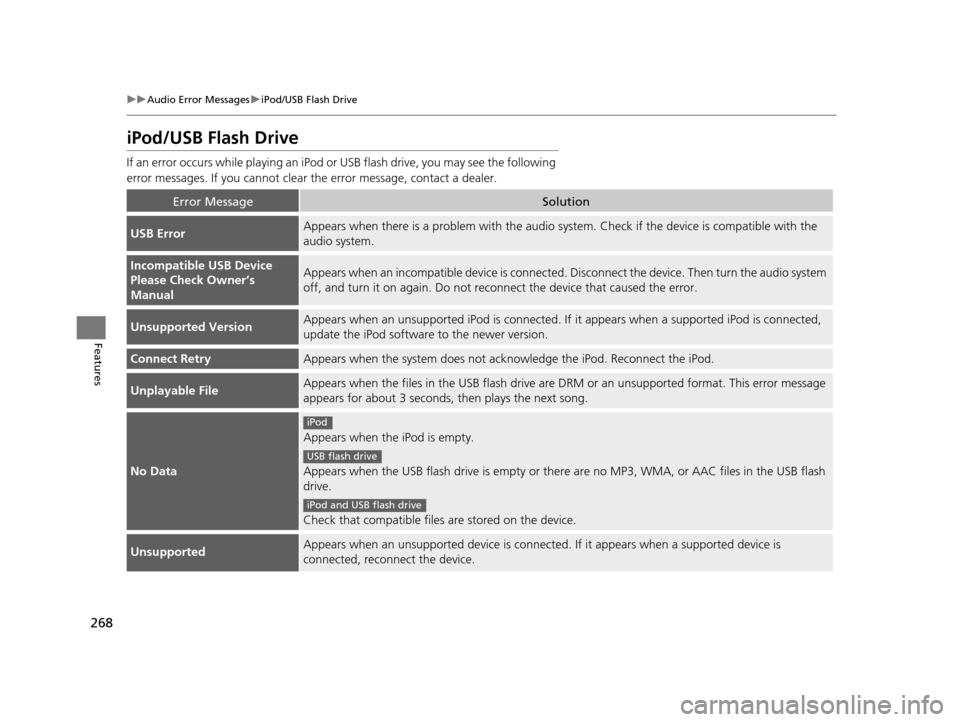
iPod/USB Flash Drive
If an error occurs while play ing an iPod or USB flash driv e, you may see the following
error messages. If you cannot clear the error message, contact a dealer.
Error MessageSolution
USB ErrorAppears when there is a problem with the audio system. Check if the device is compatible with the
audio system.
Incompatible USB Device
Please Check Owner’s
ManualAppears when an incompatible device is connected. Disconnect the device. Then turn the audio system
off, and turn it on again. Do not reco nnect the device that caused the error.
Unsupported VersionAppears when an unsupported iPod is connected. If it appears when a supported iPod is connected,
update the iPod software to the newer version.
Connect RetryAppears when the system does not acknowledge the iPod. Reconnect the iPod.
Unplayable FileAppears when the files in the USB flash drive are DRM or an unsupported format. This error message
appears for about 3 seconds, then plays the next song.
No Data
Appears when the iPod is empty.
Appears when the USB flash drive is empty or ther e are no MP3, WMA, or AAC files in the USB flash
drive.
Check that compatible files are stored on the device.
UnsupportedAppears when an unsupported device is connect ed. If it appears when a supported device is
connected, reconnect the device.
iPod
USB flash drive
iPod and USB flash drive
17 US ODYSSEY (KA KC)-31TK86600.book 268 ページ 2016年10月24日 月曜日 午後4時2分
Page 270 of 565
269
uuAudio Error Messages uPandora ®
Continued
Features
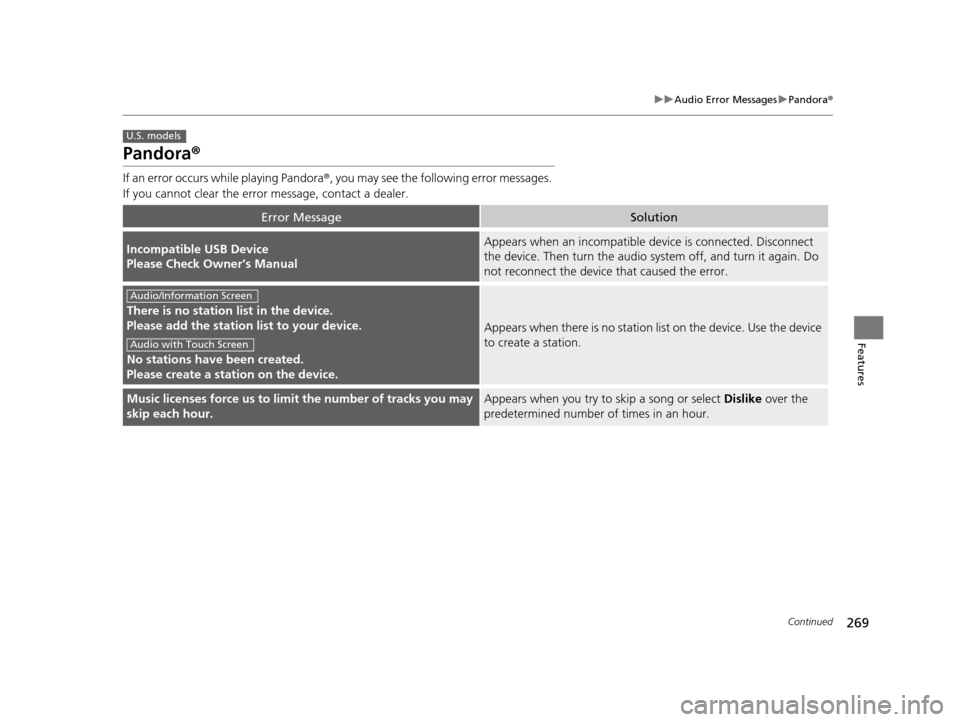
Pandora ®
If an error occurs while playing Pandora ®, you may see the following error messages.
If you cannot clear the error message, contact a dealer.
Error MessageSolution
Incompatible USB Device
Please Check Owner’s ManualAppears when an incompatible de vice is connected. Disconnect
the device. Then turn th e audio system off, and turn it again. Do
not reconnect the device that caused the error.
There is no station list in the device.
Please add the station list to your device.
No stations have been created.
Please create a station on the device.
Appears when there is no station list on the device. Use the device
to create a station.
Music licenses force us to limit the number of tracks you may
skip each hour.Appears when you try to skip a song or select Dislike over the
predetermined number of times in an hour.
U.S. models
Audio/Information Screen
Audio with Touch Screen
17 US ODYSSEY (KA KC)-31TK86600.book 269 ページ 2016年10月24日 月曜日 午後4時2分
Page 271 of 565
270
uuAudio Error Messages uPandora®
Features
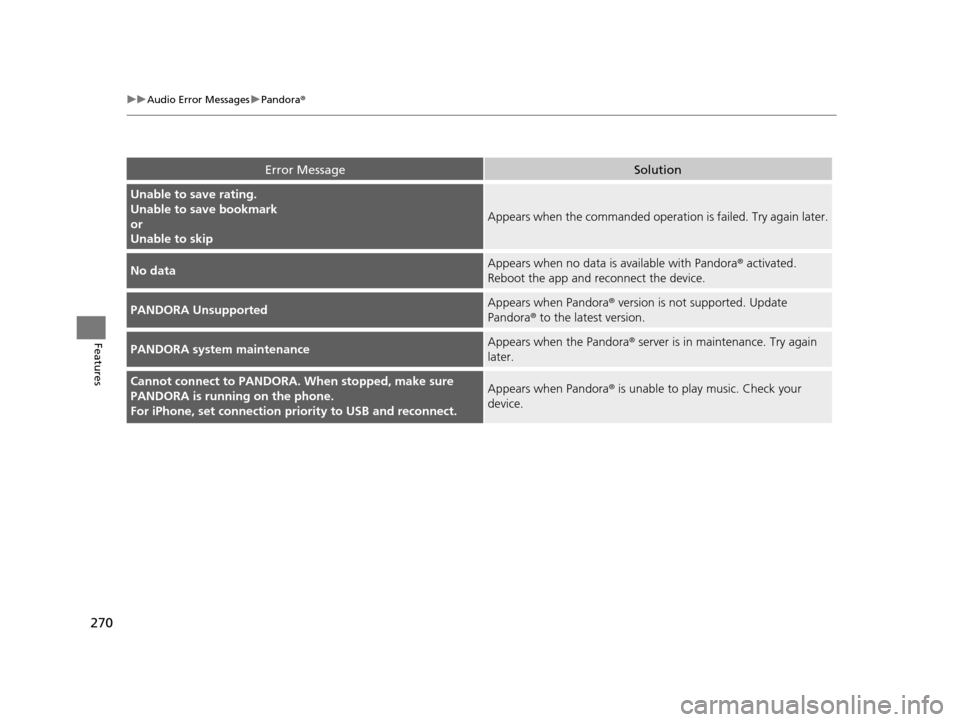
Error MessageSolution
Unable to save rating.
Unable to save bookmark
or
Unable to skip
Appears when the commanded operation is failed. Try again later.
No dataAppears when no data is available with Pandora® activated.
Reboot the app and reconnect the device.
PANDORA UnsupportedAppears when Pandora ® version is not supported. Update
Pandora® to the latest version.
PANDORA system maintenanceAppears when the Pandora ® server is in maintenance. Try again
later.
Cannot connect to PANDORA. When stopped, make sure
PANDORA is running on the phone.
For iPhone, set connection pr iority to USB and reconnect.Appears when Pandora ® is unable to play music. Check your
device.
17 US ODYSSEY (KA KC)-31TK86600.book 270 ページ 2016年10月24日 月曜日 午後4時2分
Page 272 of 565
271
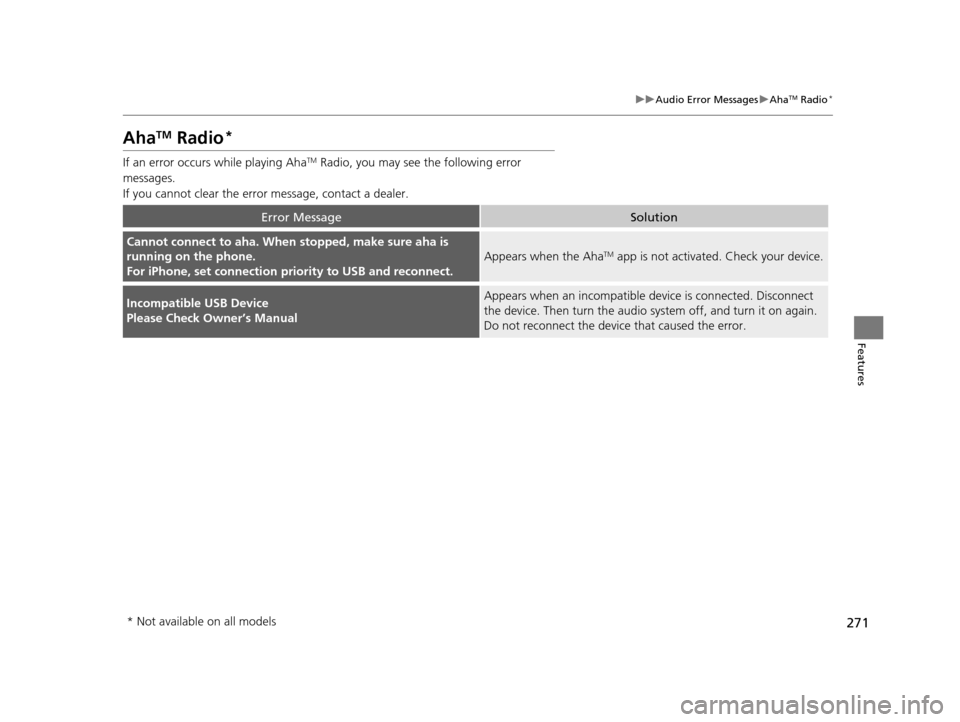
uuAudio Error Messages uAhaTM Radio*
Features
AhaTM Radio*
If an error occurs while playing AhaTM Radio, you may see the following error
messages.
If you cannot clear the error message, contact a dealer.
Error MessageSolution
Cannot connect to aha. When stopped, make sure aha is
running on the phone.
For iPhone, set connection pr iority to USB and reconnect.
Appears when the AhaTM app is not activated. Check your device.
Incompatible USB Device
Please Check Owner’s ManualAppears when an incompatible de vice is connected. Disconnect
the device. Then turn th e audio system off, and turn it on again.
Do not reconnect the device that caused the error.
* Not available on all models
17 US ODYSSEY (KA KC)-31TK86600.book 271 ページ 2016年10月24日 月曜日 午後4時2分
Page 295 of 565
294
uuRear Entertainment System*uDVD Player Error Messages
Features
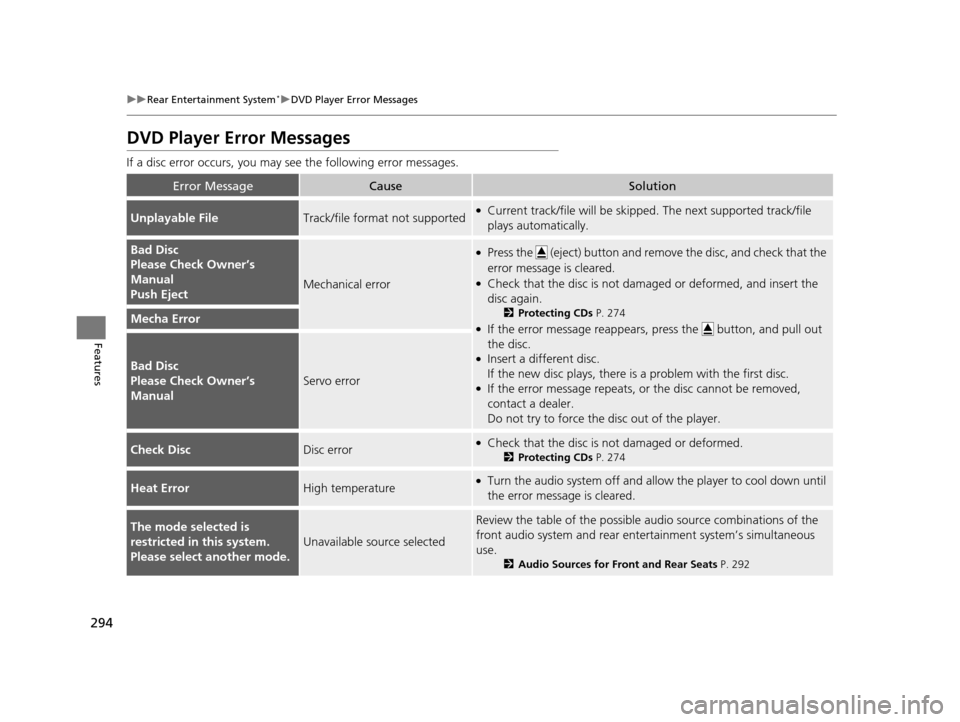
DVD Player Error Messages
If a disc error occurs, you may see the following error messages.
Error MessageCauseSolution
Unplayable FileTrack/file format not supported●Current track/file will be skippe d. The next supported track/file
plays automatically.
Bad Disc
Please Check Owner’s
Manual
Push Eject
Mechanical error
●Press the (eject) button and remove the disc, and check that the
error message is cleared.
●Check that the disc is not damaged or deformed, and insert the
disc again.
2 Protecting CDs P. 274
●If the error message reappears, press the button, and pull out
the disc.
●Insert a different disc.
If the new disc plays, there is a problem with the first disc.
●If the error message repeats, or the disc cannot be removed,
contact a dealer.
Do not try to force the disc out of the player.
Mecha Error
Bad Disc
Please Check Owner’s
Manual
Servo error
Check DiscDisc error●Check that the disc is not damaged or deformed.
2Protecting CDs P. 274
Heat ErrorHigh temperature●Turn the audio system off and allo w the player to cool down until
the error message is cleared.
The mode selected is
restricted in this system.
Please select another mode.
Unavailable source selected
Review the table of the possible audio source combinations of the
front audio system and rear ente rtainment system’s simultaneous
use.
2 Audio Sources for Front and Rear Seats P. 292
17 US ODYSSEY (KA KC)-31TK86600.book 294 ページ 2016年10月24日 月曜日 午後4時2分
Page 554 of 565
Index
553
Index
Index
A
AAC................................... 221, 229, 252, 262
ABS (Anti-lock Brake System) .................. 438
AC Power Outlet ...................................... 185
Accessories and Modifications ................ 450
Accessory Power Sockets ......................... 183
Additives Coolant .................................................. 470
Engine Oil ............................................... 465
Washer ................................................... 474
Additives, Engine Oil ............................... 465
Adjusting Armrest .................................................. 175
Front Seats.............................................. 161
Head Restraints ....................................... 164
Mirrors.................................................... 158
Rear Seats ....................................... 162, 169
Steering Wheel ....................................... 157
Temperature ....................................... 95, 98
Aha
TM Menu ............................................. 261
AhaTM Radio .............................................. 271
Air Conditioning System (Climate Control
System) .................................................... 198
Changing the Mode................................ 198
Defrosting the Windshield and
Windows .............................................. 199
Dust and Pollen Filter .............................. 504
Recirculation/Fresh Air Mode................... 198
Sensors ................................................... 203
Using Automatic Climate Control............ 198 Air Conditioning System (Heating and
Cooling System) ...................................... 194
Cooling ................................................... 196
Defrosting the Windshield and Windows ............................................... 196
Dust and Pollen Filter ............................... 504
Heating ................................................... 195
Air Pressure ....................................... 491, 543
Airbags ........................................................ 39
Advanced Airbags ..................................... 45
Airbag Care ............................................... 51
Event Data Recorder .................................... 0
Front Airbags (SRS) .................................... 42
Indicator .............................................. 49, 74
Passenger Airbag Off Indicator .................. 50
Sensors ...................................................... 39
Side Airbags .............................................. 46
Side Curtain Airbags .................................. 48
AM/FM Radio .................................... 218, 245
Anti-lock Brake System (ABS) .................. 438
Indicator .................................................... 73
Armrest ..................................................... 175
Audio Remote Controls ............................ 210
Audio System ............................................ 206
Adjusting the Sound ................ 216, 237, 243
Auxiliary Input Jack .................................. 207
Error Messages ........................................ 267
General Information ................................ 272
Internet Radio .................................. 227, 259
iPod ................................................. 224, 255
MP3/WMA/AAC .............. 221, 229, 252, 262 Reactivating ............................................ 208
Recommended CDs ................................. 273
Recommended Devices............................ 275
Remote Controls ..................................... 210
Security Code .......................................... 208
Shortcuts................................................. 236
Theft Protection ...................................... 208
Touch Screen .......................................... 235
USB Flash Drives ...................................... 275
USB Port.................................................. 207
Audio with Touch Screen ......................... 235
Authorized Manuals ................................ 551
Auto Door Locking/Unlocking ................. 120
Customize ............................... 103, 302, 317
Automatic Lighting .................................. 148
Automatic Transmission ........................... 412
Creeping ................................................. 412
Fluid ........................................................ 472
Kickdown ................................................ 412
Operating the Shift Lever................... 18, 414
Shift Lever Does Not Move ...................... 525
Shifting ................................................... 413
Auxiliary Input Jack .................................. 207
Average Fuel Economy ........................ 94, 97
Average Speed ........................................... 98
B
Battery...................................................... 499
Charging System Indicator................. 72, 528
Jump Starting .......................................... 523
17 US ODYSSEY (KA KC)-31TK86600.book 553 ページ 2016年10月24日 月曜日 午後4時2分