light HONDA ODYSSEY 2017 RC1-RC2 / 5.G User Guide
[x] Cancel search | Manufacturer: HONDA, Model Year: 2017, Model line: ODYSSEY, Model: HONDA ODYSSEY 2017 RC1-RC2 / 5.GPages: 565, PDF Size: 33.13 MB
Page 78 of 565
77
uuIndicators u
Continued
Instrument Panel
*1:Models with the smart entry system have an ENGINE START/STOP button instead of an ignition switch.
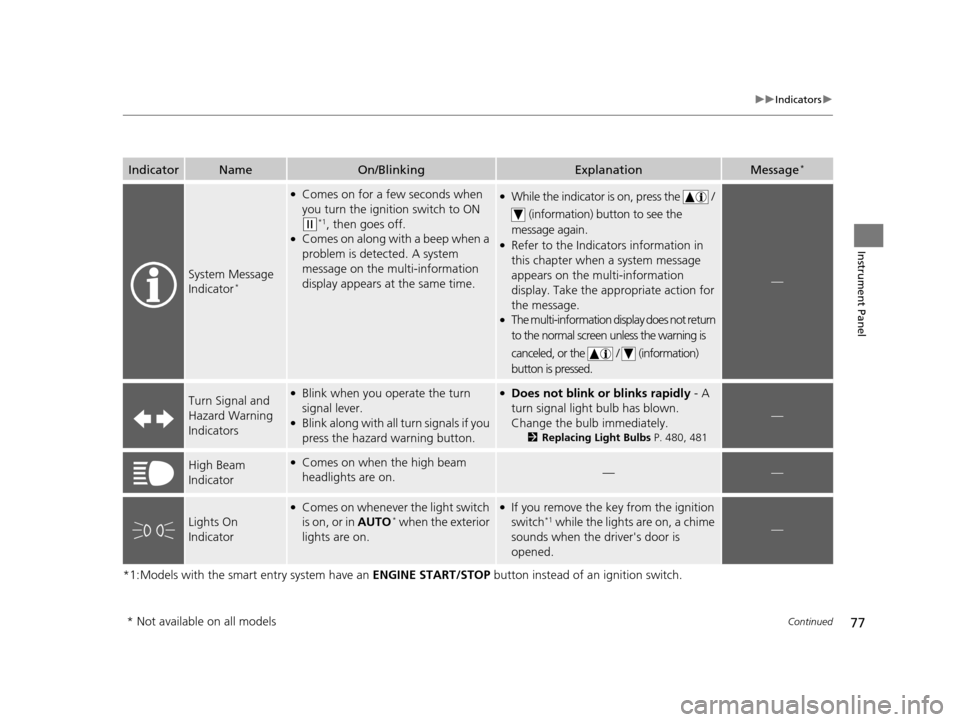
IndicatorNameOn/BlinkingExplanationMessage*
System Message
Indicator*
●Comes on for a few seconds when
you turn the ignition switch to ON
(w*1, then goes off.●Comes on along with a beep when a
problem is detected. A system
message on the multi-information
display appears at the same time.
●While the indicator is on, press the /
(information) button to see the
message again.
●Refer to the Indicators information in
this chapter when a system message
appears on the multi-information
display. Take the ap propriate action for
the message.
●The multi-information display does not return
to the normal screen unless the warning is
canceled, or the / (information)
button is pressed.
—
Turn Signal and
Hazard Warning
Indicators●Blink when you operate the turn
signal lever.
●Blink along with all turn signals if you
press the hazard warning button.
●Does not blink or blinks rapidly - A
turn signal light bulb has blown.
Change the bulb immediately.
2 Replacing Light Bulbs P. 480, 481
—
High Beam
Indicator●Comes on when the high beam
headlights are on.——
Lights On
Indicator
●Comes on whenever the light switch
is on, or in AUTO* when the exterior
lights are on.
●If you remove the key from the ignition
switch*1 while the lights are on, a chime
sounds when the driver's door is
opened.—
* Not available on all models
17 US ODYSSEY (KA KC)-31TK86600.book 77 ページ 2016年10月24日 月曜日 午後4時2分
Page 79 of 565
78
uuIndicators u
Instrument Panel
*1:Models with the smart entry system have an ENGINE START/STOP button instead of an ignition switch.
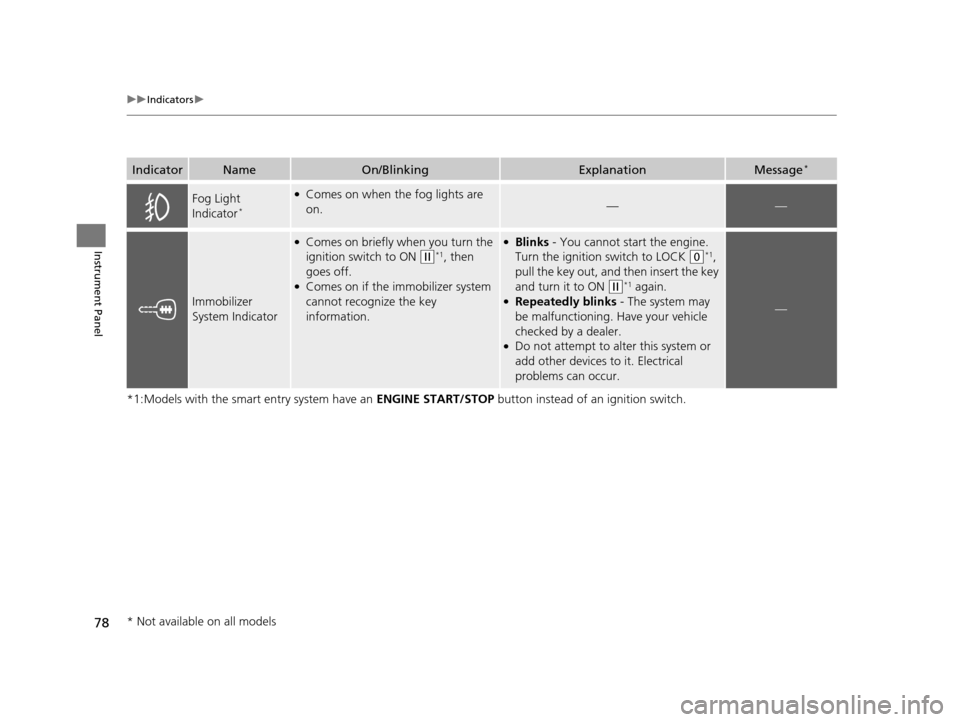
IndicatorNameOn/BlinkingExplanationMessage*
Fog Light
Indicator*
●Comes on when the fog lights are
on.——
Immobilizer
System Indicator
●Comes on briefly when you turn the
ignition switch to ON
(w*1, then
goes off.
●Comes on if the immobilizer system
cannot recognize the key
information.
●Blinks - You cannot start the engine.
Turn the ignition switch to LOCK
(0*1,
pull the key out, and then insert the key
and turn it to ON
(w*1 again.●Repeatedly blinks - The system may
be malfunctioning. Have your vehicle
checked by a dealer.
●Do not attempt to alter this system or
add other devices to it. Electrical
problems can occur.
—
* Not available on all models
17 US ODYSSEY (KA KC)-31TK86600.book 78 ページ 2016年10月24日 月曜日 午後4時2分
Page 88 of 565
87
uuIndicators uMulti-Information Display Warn ing and Information Messages*
Continued
Instrument Panel
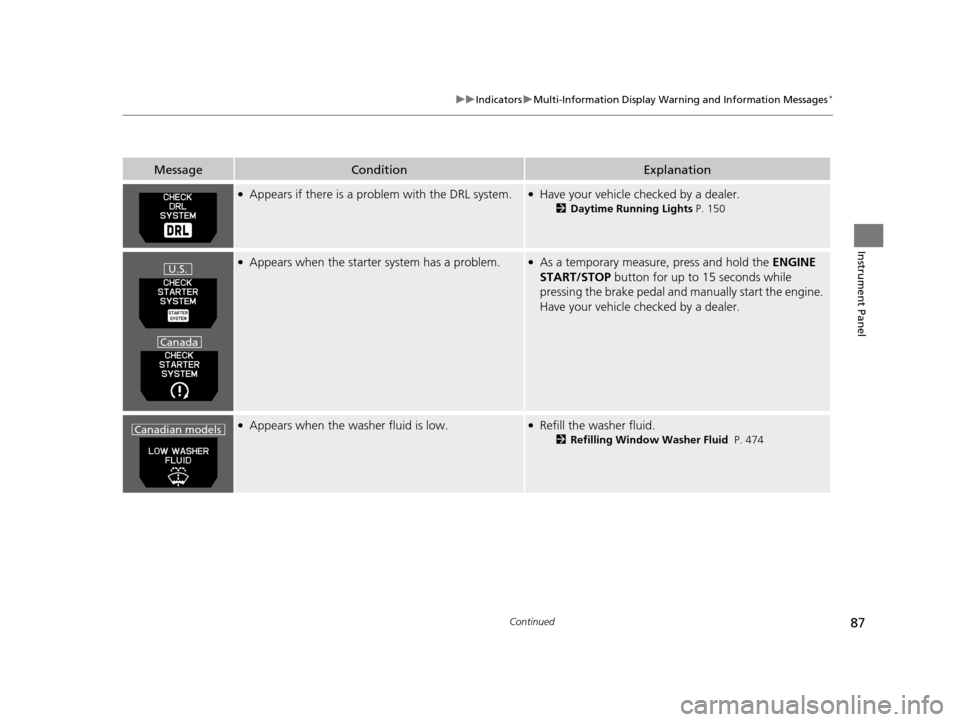
●Appears if there is a problem with the DRL system.●Have your vehicle checked by a dealer.
2Daytime Running Lights P. 150
●Appears when the starter system has a problem.●As a temporary measure, press and hold the ENGINE
START/STOP button for up to 15 seconds while
pressing the brake pedal and ma nually start the engine.
Have your vehicle checked by a dealer.
●Appears when the washer fluid is low.●Refill the washer fluid.
2 Refilling Window Washer Fluid P. 474
MessageConditionExplanation
U.S.
Canada
Canadian models
17 US ODYSSEY (KA KC)-31TK86600.book 87 ページ 2016年10月24日 月曜日 午後4時2分
Page 101 of 565
100
uuGauges and Displays uMulti-Information Display*
Instrument Panel
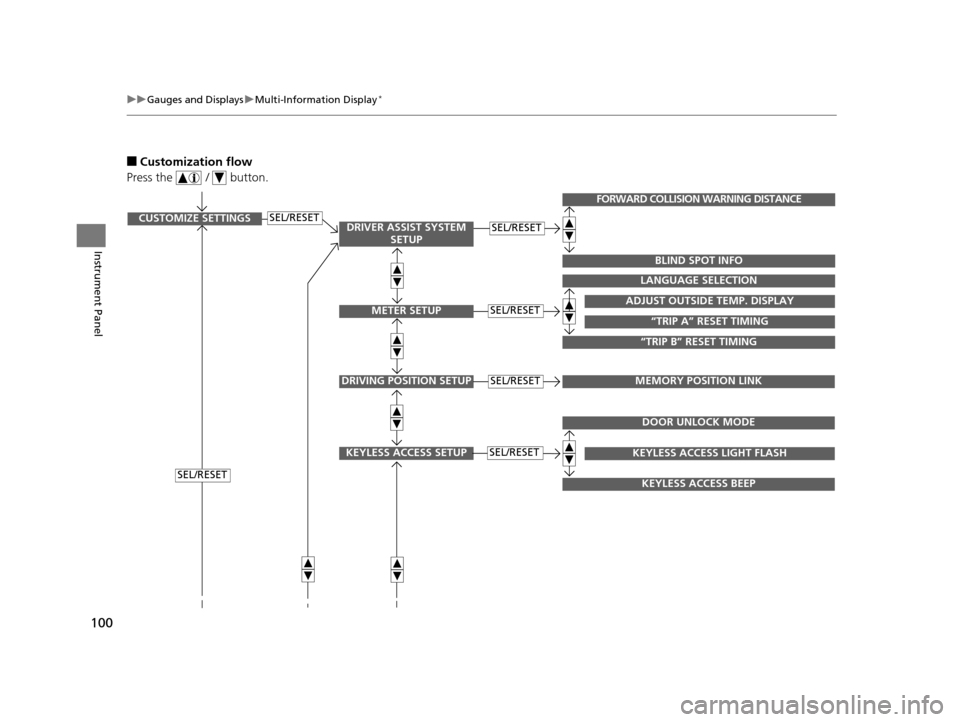
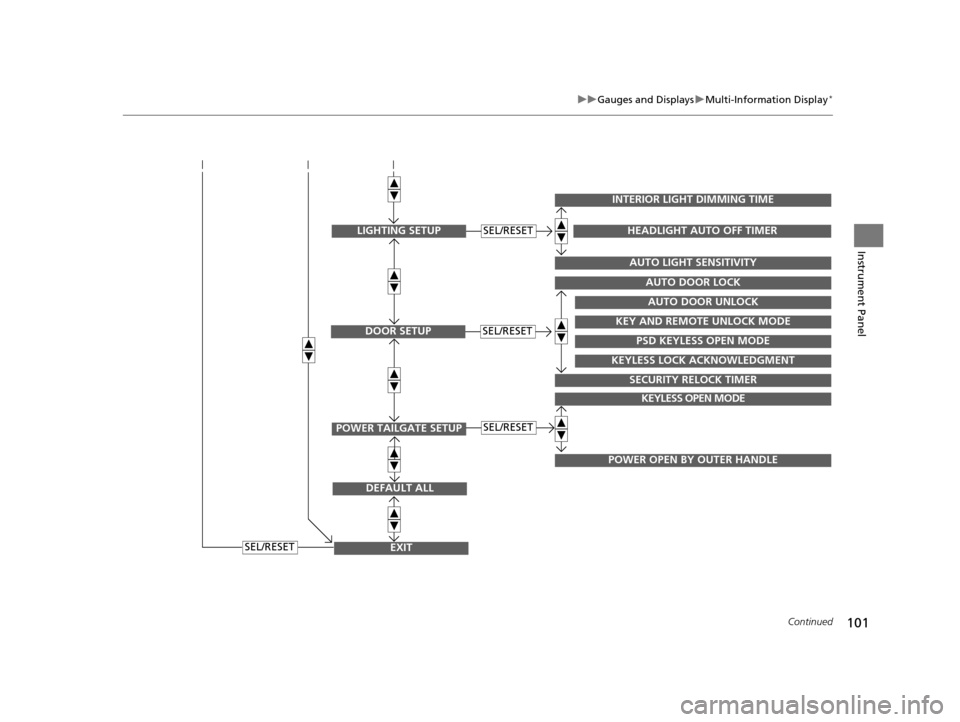
■Customization flow
Press the / button.
SEL/RESETCUSTOMIZE SETTINGSSEL/RESET
SEL/RESET
SEL/RESETADJUST OUTSIDE TEMP. DISPLAY
LANGUAGE SELECTION
“TRIP B” RESET TIMING
“TRIP A” RESET TIMING
FORWARD COLLISION WARNING DISTANCE
BLIND SPOT INFO
DRIVING POSITION SETUPMEMORY POSITION LINKSEL/RESET
KEYLESS ACCESS SETUPSEL/RESET
DOOR UNLOCK MODE
KEYLESS ACCESS BEEP
KEYLESS ACCESS LIGHT FLASH
DRIVER ASSIST SYSTEM SETUP
METER SETUP
17 US ODYSSEY (KA KC)-31TK86600.book 100 ページ 2016年10月24日 月曜日 午後4時2分
Page 102 of 565
101
uuGauges and Displays uMulti-Information Display*
Continued
Instrument Panel
EXIT
DEFAULT ALL
SEL/RESET
POWER TAILGATE SETUP
KEYLESS OPEN MODE
POWER OPEN BY OUTER HANDLE
SEL/RESET
DOOR SETUPSEL/RESET
AUTO DOOR LOCK
SECURITY RELOCK TIMER
AUTO DOOR UNLOCK
KEY AND REMOTE UNLOCK MODE
PSD KEYLESS OPEN MODE
KEYLESS LOCK ACKNOWLEDGMENT
LIGHTING SETUP
INTERIOR LIGHT DIMMING TIME
AUTO LIGHT SENSITIVITY
HEADLIGHT AUTO OFF TIMERSEL/RESET
17 US ODYSSEY (KA KC)-31TK86600.book 101 ページ 2016年10月24日 月曜日 午後4時2分
Page 103 of 565
102
uuGauges and Displays uMulti-Information Display*
Instrument Panel
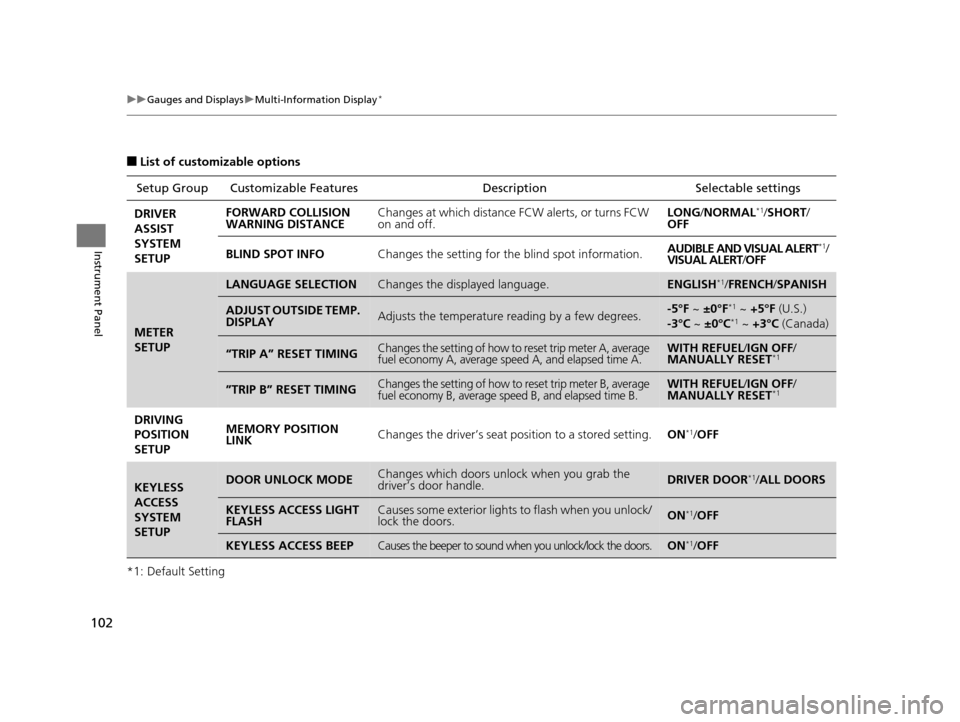
■List of customizable options
*1: Default Setting Setup Group Customizabl
e Features Description Selectable settings
DRIVER
ASSIST
SYSTEM
SETUP FORWARD COLLISION
WARNING DISTANCE
Changes at which distance FCW alerts, or turns FCW
on and off. LONG
/NORMAL
*1/SHORT /
OFF
BLIND SPOT INFO Changes the setting for the blind spot information. AUDIBLE AND VISUAL ALERT
*1/
VISUAL ALERT /OFF
METER
SETUP
LANGUAGE SELECTIONChanges the displayed language.ENGLISH*1/ FRENCH /SPANISH
ADJUST OUTSIDE TEMP.
DISPLAYAdjusts the temperature reading by a few degrees.-5°F ~ ±0°F*1 ~ +5°F (U.S.)
-3°C ~ ±0°C*1 ~ +3°C (Canada)
“TRIP A” RESET TIMINGChanges the setting of how to reset trip meter A, average
fuel economy A, average speed A, and elapsed time A.WITH REFUEL /IGN OFF /
MANUALLY RESET*1
”TRIP B” RESET TIMINGChanges the setting of how to reset trip meter B, average
fuel economy B, average speed B, and elapsed time B.WITH REFUEL /IGN OFF /
MANUALLY RESET*1
DRIVING
POSITION
SETUP MEMORY POSITION
LINK
Changes the driver’s seat po
sition to a stored setting.ON*1/OFF
KEYLESS
ACCESS
SYSTEM
SETUPDOOR UNLOCK MODEChanges which doors unlock when you grab the
driver’s door handle.DRIVER DOOR*1/ALL DOORS
KEYLESS ACCESS LIGHT
FLASHCauses some exterior lights to flash when you unlock/
lock the doors.ON*1/OFF
KEYLESS ACCESS BEEPCauses the beeper to sound when you unlock/lock the doors.ON*1/OFF
17 US ODYSSEY (KA KC)-31TK86600.book 102 ページ 2016年10月24日 月曜日 午後4時2分
Page 104 of 565
103
uuGauges and Displays uMulti-Information Display*
Continued
Instrument Panel
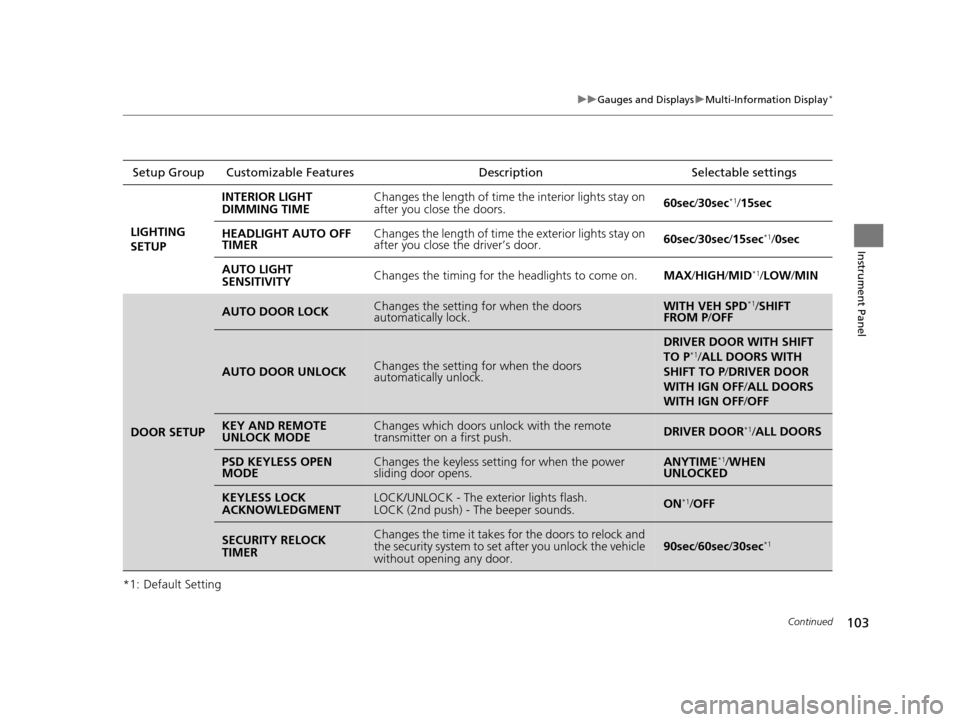
*1: Default SettingSetup Group Customizable Features
Description Selectable settings
LIGHTING
SETUP INTERIOR LIGHT
DIMMING TIME
Changes the length of time the interior lights stay on
after you close the doors.
60sec
/30sec
*1/15sec
HEADLIGHT AUTO OFF
TIMER Changes the length of time the exterior lights stay on
after you close the driver’s door.
60sec
/30sec/ 15sec
*1/0sec
AUTO LIGHT
SENSITIVITY Changes the timing for the headlights to come on.
MAX/HIGH/ MID
*1/LOW /MIN
DOOR SETUP
AUTO DOOR LOCKChanges the setting for when the doors
automatically lock.WITH VEH SPD*1/SHIFT
FROM P /OFF
AUTO DOOR UNLOCKChanges the setting for when the doors
automatically unlock.
DRIVER DOOR WITH SHIFT
TO P*1/ALL DOORS WITH
SHIFT TO P /DRIVER DOOR
WITH IGN OFF /ALL DOORS
WITH IGN OFF /OFF
KEY AND REMOTE
UNLOCK MODEChanges which doors unlock with the remote
transmitter on a first push.DRIVER DOOR*1/ALL DOORS
PSD KEYLESS OPEN
MODEChanges the keyless setting for when the power
sliding door opens.ANYTIME*1/ WHEN
UNLOCKED
KEYLESS LOCK
ACKNOWLEDGMENTLOCK/UNLOCK - The exterior lights flash.
LOCK (2nd push) - The beeper sounds.ON*1/OFF
SECURITY RELOCK
TIMERChanges the time it takes for the doors to relock and
the security system to set after you unlock the vehicle
without opening any door.90sec /60sec/ 30sec*1
17 US ODYSSEY (KA KC)-31TK86600.book 103 ページ 2016年10月24日 月曜日 午後4時2分
Page 108 of 565
107
Controls
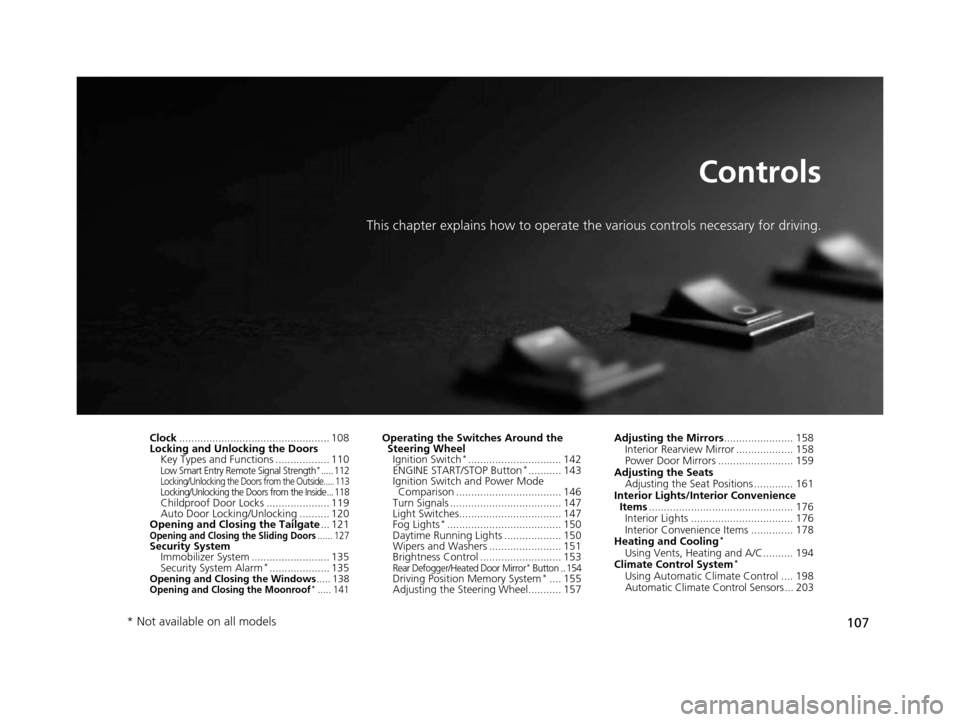
This chapter explains how to operate the various controls necessary for driving.
Clock.................................................. 108
Locking and Unlocking the Doors Key Types and Functions .................. 110
Low Smart Entry Remote Signal Strength*..... 112Locking/Unlocking the Doors from the Outside..... 113Locking/Unlocking the Doors from the Inside... 118Childproof Door Locks ..................... 119
Auto Door Locking/Unlocking .......... 120
Opening and Closing the Tailgate ... 121
Opening and Closing the Sliding Doors...... 127Security System
Immobilizer System .......................... 135
Security System Alarm
*.................... 135Opening and Closing the Windows ..... 138Opening and Closing the Moonroof*..... 141
Operating the Switches Around the
Steering Wheel Ignition Switch
*............................... 142
ENGINE START/STOP Button*........... 143
Ignition Switch and Power Mode Comparison ................................... 146
Turn Signals ..................................... 147
Light Switches.................................. 147
Fog Lights
*...................................... 150
Daytime Running Lights ................... 150
Wipers and Washers ........................ 151
Brightness Control ........................... 153
Rear Defogger/Heated Door Mirror* Button .. 154Driving Position Memory System*.... 155
Adjusting the Steering Wheel........... 157 Adjusting the Mirrors
....................... 158
Interior Rearview Mirror ................... 158
Power Door Mirrors ......................... 159
Adjusting the Seats Adjusting the Seat Positions ............. 161
Interior Lights/Interior Convenience Items ................................................ 176
Interior Lights .................................. 176
Interior Convenience Items .............. 178
Heating and Cooling
*
Using Vents, Heating and A/C.......... 194
Climate Control System*
Using Automatic Climate Control .... 198
Automatic Climate Control Sensors ... 203
* Not available on all models
17 US ODYSSEY (KA KC)-31TK86600.book 107 ページ 2016年10月24日 月曜日 午後4時2分
Page 111 of 565
110
Controls
Locking and Unlocking the Doors
Key Types and Functions
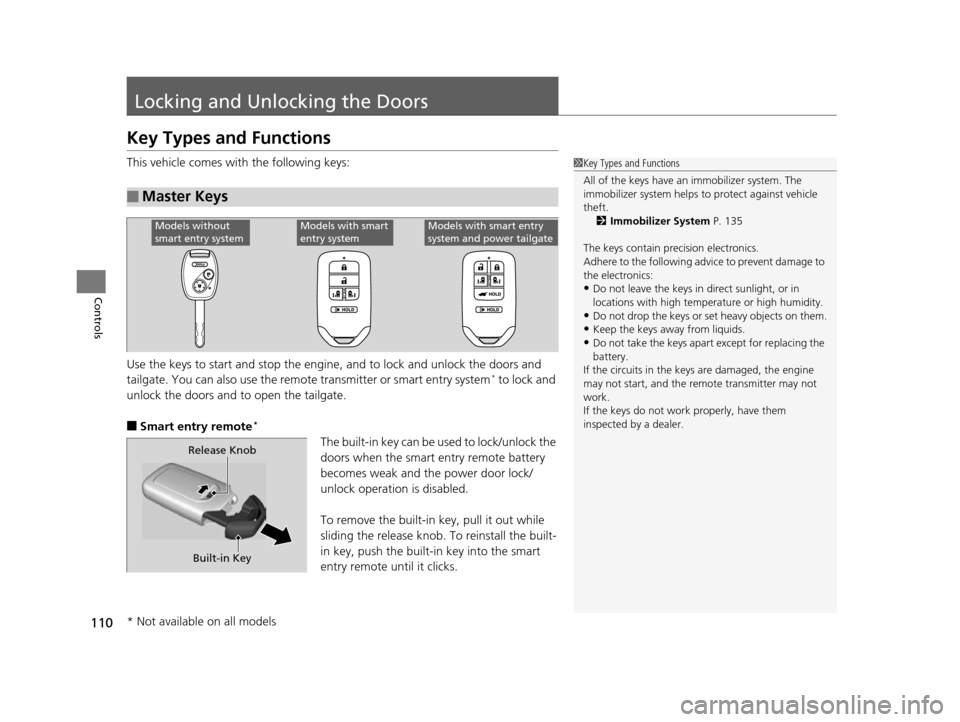
This vehicle comes with the following keys:
Use the keys to start and stop the engine, and to lock and unlock the doors and
tailgate. You can also use the remo te transmitter or smart entry system
* to lock and
unlock the doors and to open the tailgate.
■Smart entry remote*
The built-in key can be us ed to lock/unlock the
doors when the smart entry remote battery
becomes weak and th e power door lock/
unlock operation is disabled.
To remove the built-in key, pull it out while
sliding the release knob. To reinstall the built-
in key, push the built-in key into the smart
entry remote until it clicks.
■Master Keys
1 Key Types and Functions
All of the keys have an immobilizer system. The
immobilizer system helps to protect against vehicle
theft. 2 Immobilizer System P. 135
The keys contain precision electronics.
Adhere to the following advi ce to prevent damage to
the electronics:
•Do not leave the keys in direct sunlight, or in
locations with high temperature or high humidity.
•Do not drop the keys or set heavy objects on them.
•Keep the keys away from liquids.
•Do not take the keys apart except for replacing the
battery.
If the circuits in the keys are damaged, the engine
may not start, and the remote transmitter may not
work.
If the keys do not work properly, have them
inspected by a dealer.
Models without
smart entry systemModels with smart
entry systemModels with smart entry
system and power tailgate
Release Knob
Built-in Key
* Not available on all models
17 US ODYSSEY (KA KC)-31TK86600.book 110 ページ 2016年10月24日 月曜日 午後4時2分
Page 114 of 565
113
uuLocking and Unlocking the Doors uLocking/Unlocking the Doors from the Outside
Continued
Controls
Locking/Unlocking the Doors from the Outside
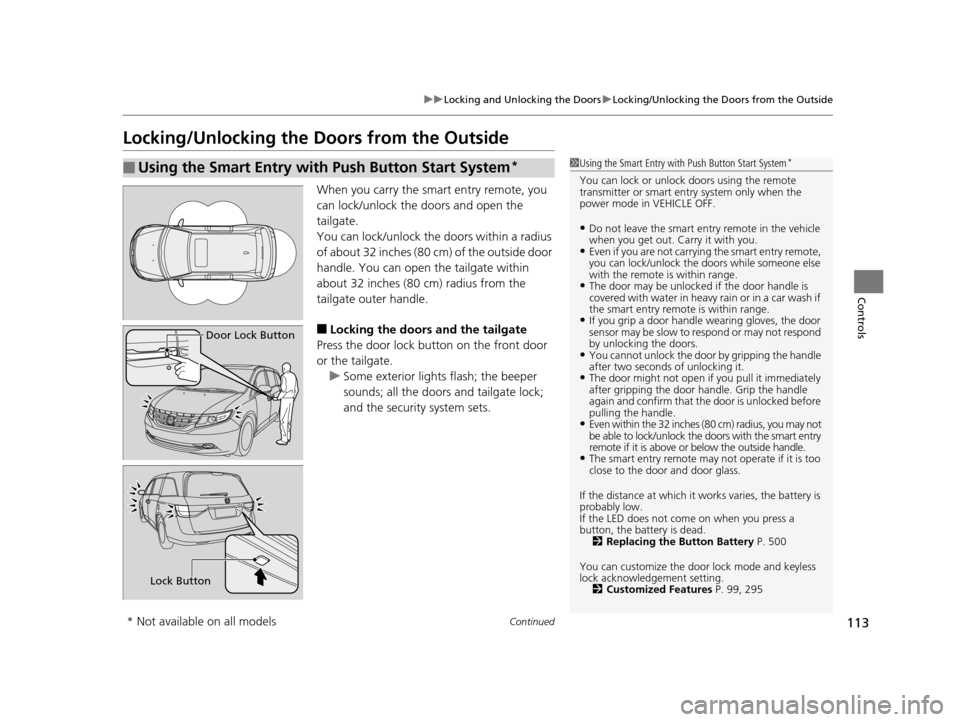
When you carry the smart entry remote, you
can lock/unlock the doors and open the
tailgate.
You can lock/unlock the doors within a radius
of about 32 inches (80 cm) of the outside door
handle. You can open the tailgate within
about 32 inches (80 cm) radius from the
tailgate outer handle.
■Locking the doors and the tailgate
Press the door lock button on the front door
or the tailgate.
u Some exterior lights flash; the beeper
sounds; all the doors and tailgate lock;
and the security system sets.
■Using the Smart Entry with Push Button Start System*
Door Lock Button
Lock Button
1Using the Smart Entry with Push Button Start System*
You can lock or unlock doors using the remote
transmitter or smart entry system only when the
power mode in VEHICLE OFF.
•Do not leave the smart entry remote in the vehicle
when you get out. Carry it with you.
•Even if you are not carrying the smart entry remote,
you can lock/unlock the doors while someone else
with the remote is within range.
•The door may be unlocked if the door handle is
covered with water in heavy rain or in a car wash if
the smart entry remote is within range.
•If you grip a door handle wearing gloves, the door
sensor may be slow to respond or may not respond
by unlocking the doors.
•You cannot unlock the door by gripping the handle
after two seconds of unlocking it.
•The door might not open if you pull it immediately
after gripping the door handle. Grip the handle
again and confirm that th e door is unlocked before
pulling the handle.
•Even within the 32 inches (80 cm) radius, you may not
be able to lock/unlock the doors with the smart entry
remote if it is above or below the outside handle.
•The smart entry remote may not operate if it is too
close to the door and door glass.
If the distance at which it works varies, the battery is
probably low.
If the LED does not come on when you press a
button, the battery is dead. 2 Replacing the Button Battery P. 500
You can customize the door lock mode and keyless
lock acknowledge ment setting.
2 Customized Features P. 99, 295
* Not available on all models
17 US ODYSSEY (KA KC)-31TK86600.book 113 ページ 2016年10月24日 月曜日 午後4時2分