ECO mode HONDA ODYSSEY 2017 RC1-RC2 / 5.G Owner's Manual
[x] Cancel search | Manufacturer: HONDA, Model Year: 2017, Model line: ODYSSEY, Model: HONDA ODYSSEY 2017 RC1-RC2 / 5.GPages: 565, PDF Size: 33.13 MB
Page 83 of 565
82
uuIndicators u
Instrument Panel
*1:Models with the smart entry system have an ENGINE START/STOP button instead of an ignition switch.
IndicatorNameOn/BlinkingExplanationMessage*
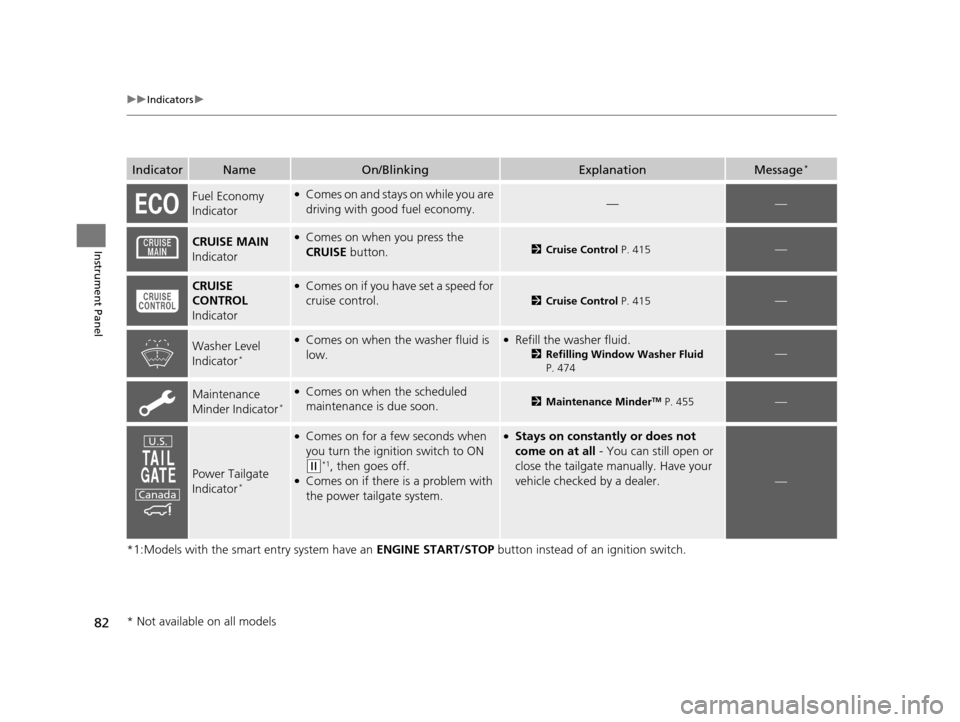
Fuel Economy
Indicator●Comes on and stays on while you are
driving with good fuel economy.——
CRUISE MAIN
Indicator●Comes on when you press the
CRUISE button.2Cruise Control P. 415—
CRUISE
CONTROL
Indicator●Comes on if you have set a speed for
cruise control.
2 Cruise Control P. 415—
Washer Level
Indicator*
●Comes on when the washer fluid is
low.●Refill the washer fluid.
2Refilling Window Washer Fluid
P. 474—
Maintenance
Minder Indicator*
●Comes on when the scheduled
maintenance is due soon.2 Maintenance MinderTM P. 455—
Power Tailgate
Indicator*
●Comes on for a few seconds when
you turn the igniti on switch to ON
(w*1, then goes off.●Comes on if there is a problem with
the power tailgate system.
●Stays on constantly or does not
come on at all - You can still open or
close the tailgate manually. Have your
vehicle checked by a dealer.
—
U.S.
Canada
* Not available on all models
17 US ODYSSEY (KA KC)-31TK86600.book 82 ページ 2016年10月24日 月曜日 午後4時2分
Page 84 of 565
83
uuIndicators u
Instrument Panel
*1:Models with the smart entry system have an ENGINE START/STOP button instead of an ignition switch.
IndicatorNameOn/BlinkingExplanationMessage*
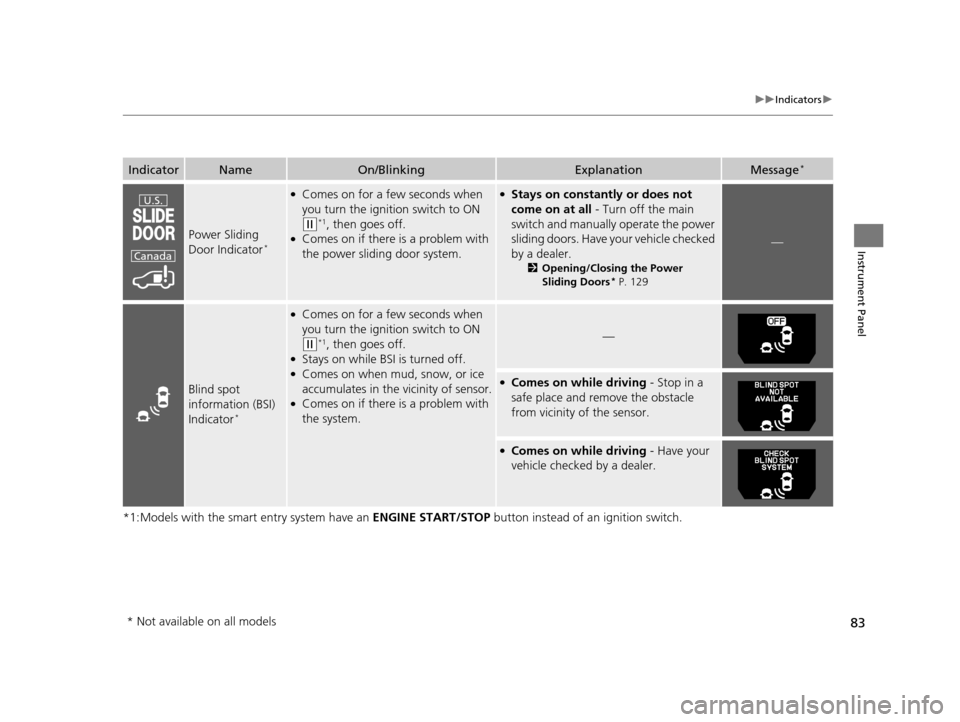
Power Sliding
Door Indicator*
●Comes on for a few seconds when
you turn the ignition switch to ON
(w*1, then goes off.●Comes on if there is a problem with
the power sliding door system.
●Stays on constantly or does not
come on at all - Turn off the main
switch and manually operate the power
sliding doors. Have your vehicle checked
by a dealer.
2 Opening/Closing the Power
Sliding Doors* P. 129
—
Blind spot
information (BSI)
Indicator
*
●Comes on for a few seconds when
you turn the igniti on switch to ON
(w*1, then goes off.●Stays on while BSI is turned off.●Comes on when mud, snow, or ice
accumulates in the vicinity of sensor.
●Comes on if there is a problem with
the system.
—
●Comes on while driving - Stop in a
safe place and remove the obstacle
from vicinity of the sensor.
●Comes on while driving - Have your
vehicle checked by a dealer.
U.S.
Canada
* Not available on all models
17 US ODYSSEY (KA KC)-31TK86600.book 83 ページ 2016年10月24日 月曜日 午後4時2分
Page 85 of 565
84
uuIndicators uInformation Display Warning and Information Messages*
Instrument Panel
Information Display Warning and Information Messages*
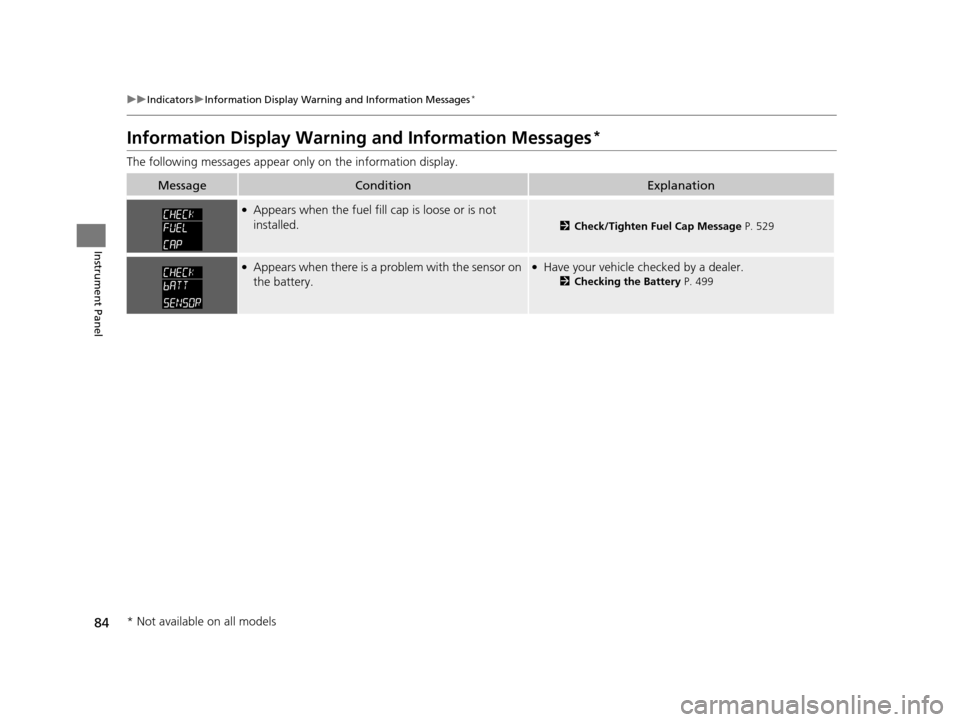
The following messages appear on ly on the information display.
MessageConditionExplanation
●Appears when the fuel fill cap is loose or is not
installed.
2Check/Tighten Fuel Cap Message P. 529
●Appears when there is a problem with the sensor on
the battery.●Have your vehicle ch ecked by a dealer.
2Checking the Battery P. 499
* Not available on all models
17 US ODYSSEY (KA KC)-31TK86600.book 84 ページ 2016年10月24日 月曜日 午後4時2分
Page 86 of 565
85
uuIndicators uInformation Display Warning and Information Messages*
Instrument Panel
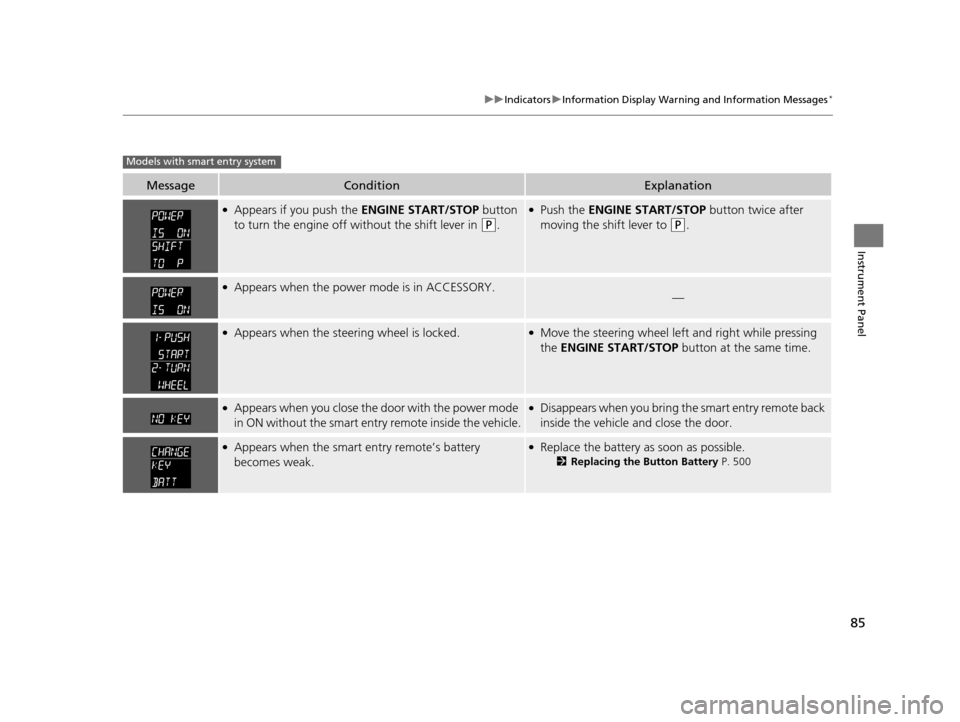
MessageConditionExplanation
●Appears if you push the ENGINE START/STOP button
to turn the engine off wi thout the shift lever in
(P.
●Push the ENGINE START/STOP button twice after
moving the shift lever to
(P.
●Appears when the power mode is in ACCESSORY.—
●Appears when the steering wheel is locked.●Move the steering wheel left and right while pressing
the ENGINE START/STOP button at the same time.
●Appears when you close the door with the power mode
in ON without the smart entry remote inside the vehicle.●Disappears when you bring the smart entry remote back
inside the vehicle and close the door.
●Appears when the smart entry remote’s battery
becomes weak.●Replace the battery as soon as possible.
2Replacing the Button Battery P. 500
Models with smart entry system
17 US ODYSSEY (KA KC)-31TK86600.book 85 ページ 2016年10月24日 月曜日 午後4時2分
Page 87 of 565
86
uuIndicators uMulti-Information Display Warn ing and Information Messages*
Instrument Panel
Multi-Information Display Warn ing and Information Messages*
The following messages appear only on the multi-information display. Press the / (information) button to see the message agai n
with the system me ssage indicator on.
MessageConditionExplanation
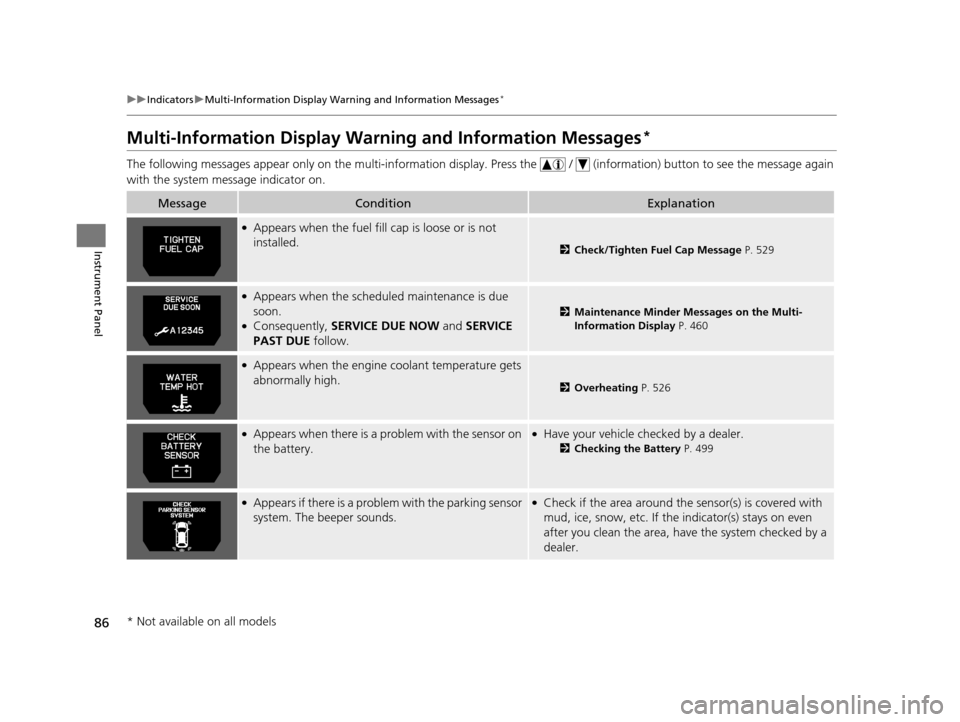
●Appears when the fuel fill cap is loose or is not
installed.
2Check/Tighten Fuel Cap Message P. 529
●Appears when the scheduled maintenance is due
soon.
●Consequently, SERVICE DUE NOW and SERVICE
PAST DUE follow.
2Maintenance Minder Messages on the Multi-
Information Display P. 460
●Appears when the engine coolant temperature gets
abnormally high.
2 Overheating P. 526
●Appears when there is a pr oblem with the sensor on
the battery.●Have your vehicle ch ecked by a dealer.
2Checking the Battery P. 499
●Appears if there is a problem with the parking sensor
system. The beeper sounds.●Check if the area around the sensor(s) is covered with
mud, ice, snow, etc. If the indicator(s) stays on even
after you clean the area, have the system checked by a
dealer.
* Not available on all models
17 US ODYSSEY (KA KC)-31TK86600.book 86 ページ 2016年10月24日 月曜日 午後4時2分
Page 88 of 565
87
uuIndicators uMulti-Information Display Warn ing and Information Messages*
Continued
Instrument Panel
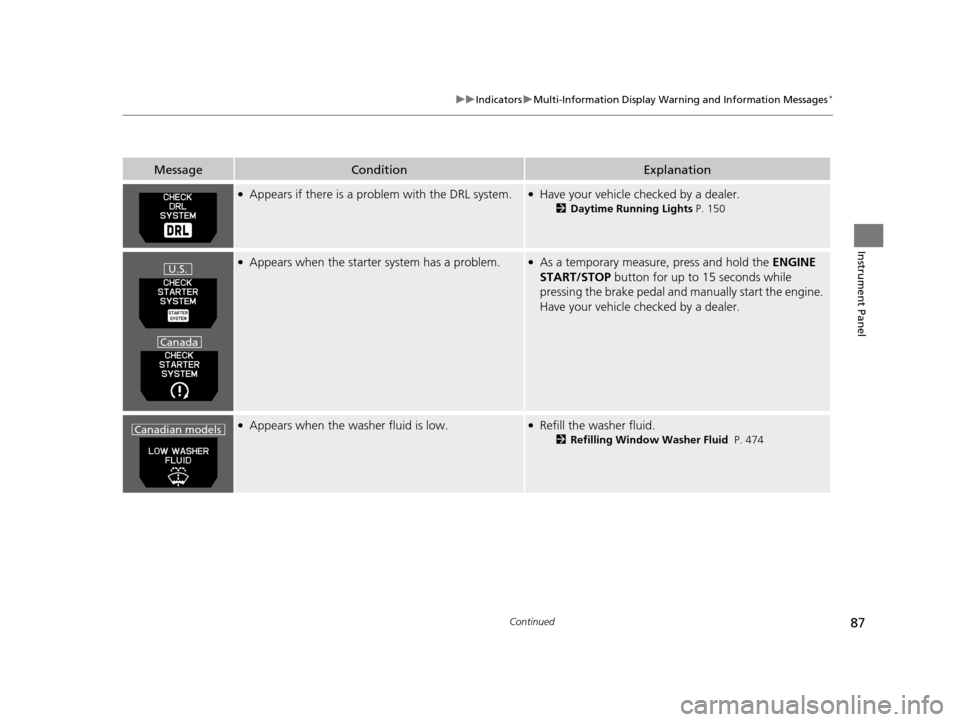
●Appears if there is a problem with the DRL system.●Have your vehicle checked by a dealer.
2Daytime Running Lights P. 150
●Appears when the starter system has a problem.●As a temporary measure, press and hold the ENGINE
START/STOP button for up to 15 seconds while
pressing the brake pedal and ma nually start the engine.
Have your vehicle checked by a dealer.
●Appears when the washer fluid is low.●Refill the washer fluid.
2 Refilling Window Washer Fluid P. 474
MessageConditionExplanation
U.S.
Canada
Canadian models
17 US ODYSSEY (KA KC)-31TK86600.book 87 ページ 2016年10月24日 月曜日 午後4時2分
Page 89 of 565
88
uuIndicators uMulti-Information Display Warn ing and Information Messages*
Instrument Panel
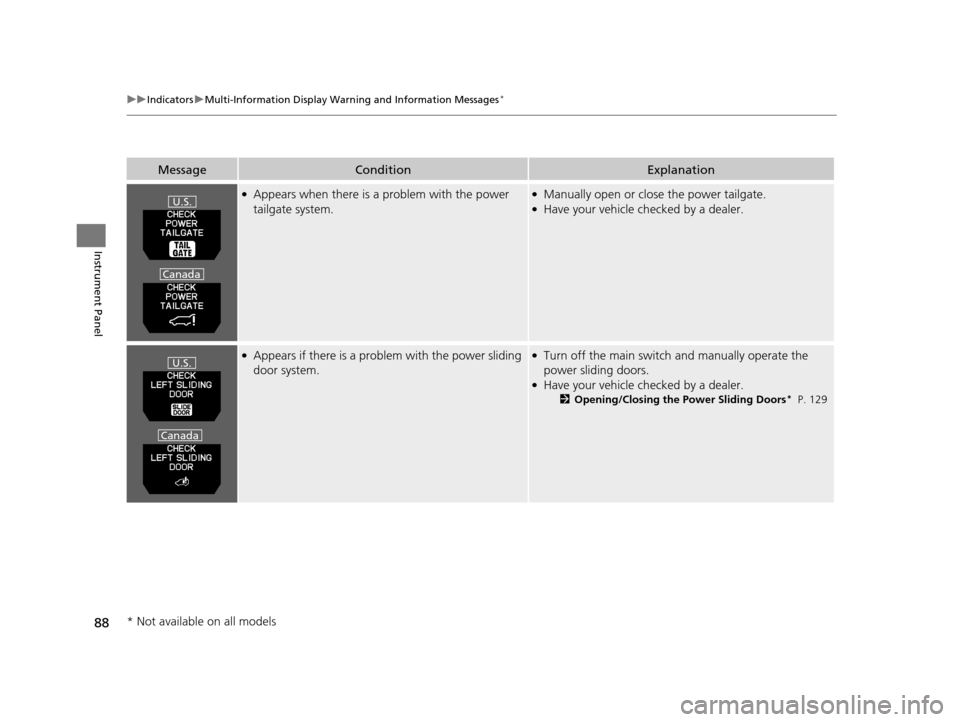
●Appears when there is a problem with the power
tailgate system.●Manually open or close the power tailgate.●Have your vehicle checked by a dealer.
●Appears if there is a prob lem with the power sliding
door system.●Turn off the main switch and manually operate the
power sliding doors.
●Have your vehicle ch ecked by a dealer.
2Opening/Closing the Power Sliding Doors* P. 129
MessageConditionExplanation
U.S.
Canada
U.S.
Canada
* Not available on all models
17 US ODYSSEY (KA KC)-31TK86600.book 88 ページ 2016年10月24日 月曜日 午後4時2分
Page 90 of 565
89
uuIndicators uMulti-Information Display Warn ing and Information Messages*
Continued
Instrument Panel
MessageConditionExplanation
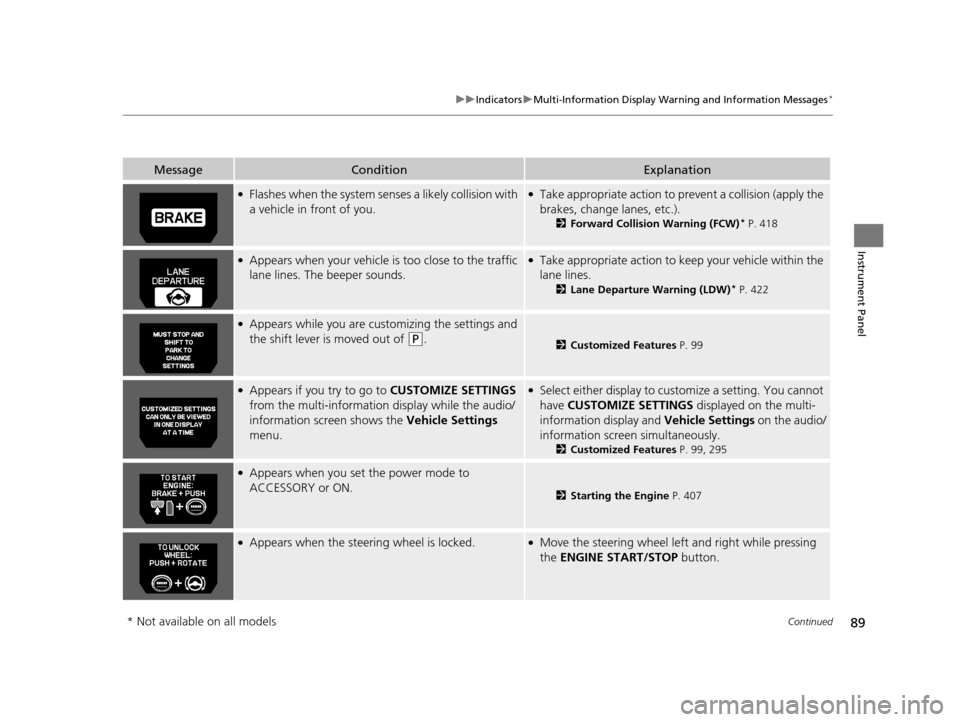
●Flashes when the system senses a likely collision with
a vehicle in front of you.●Take appropriate action to prev ent a collision (apply the
brakes, change lanes, etc.).
2 Forward Collision Warning (FCW)* P. 418
●Appears when your vehicle is too close to the traffic
lane lines. The beeper sounds.●Take appropriate action to keep your vehicle within the
lane lines.
2 Lane Departure Warning (LDW)* P. 422
●Appears while you are customizing the settings and
the shift lever is moved out of
(P.2Customized Features P. 99
●Appears if you try to go to CUSTOMIZE SETTINGS
from the multi-information display while the audio/
information screen shows the Vehicle Settings
menu.●Select either display to customize a setting. You cannot
have CUSTOMIZE SETTINGS displayed on the multi-
information display and Vehicle Settings on the audio/
information screen simultaneously.
2 Customized Features P. 99, 295
●Appears when you set the power mode to
ACCESSORY or ON.
2Starting the Engine P. 407
●Appears when the steering wheel is locked.●Move the steering wheel left and right while pressing
the ENGINE START/STOP button.
* Not available on all models
17 US ODYSSEY (KA KC)-31TK86600.book 89 ページ 2016年10月24日 月曜日 午後4時2分
Page 91 of 565
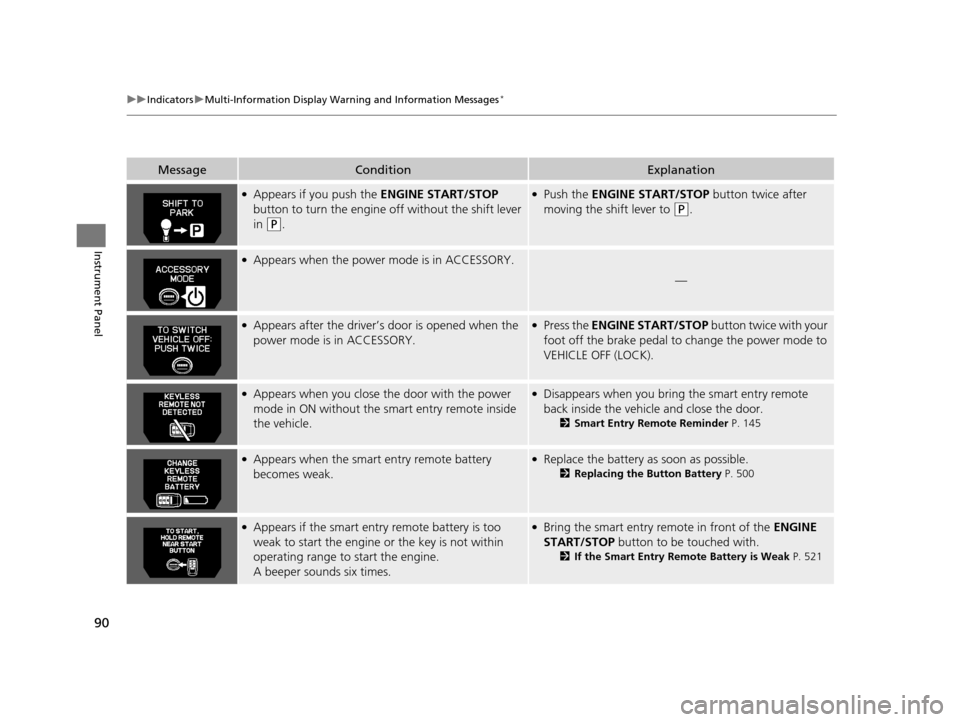
90
uuIndicators uMulti-Information Display Warn ing and Information Messages*
Instrument Panel
MessageConditionExplanation
●Appears if you push the ENGINE START/STOP
button to turn the engine off without the shift lever
in
(P.
●Push the ENGINE START/STOP button twice after
moving the shift lever to
(P.
●Appears when the power mode is in ACCESSORY.
—
●Appears after the driver’s door is opened when the
power mode is in ACCESSORY.●Press the ENGINE START/STOP button twice with your
foot off the brake pedal to change the power mode to
VEHICLE OFF (LOCK).
●Appears when you close th e door with the power
mode in ON without the smart entry remote inside
the vehicle.●Disappears when you bring the smart entry remote
back inside the vehicle and close the door.
2 Smart Entry Remote Reminder P. 145
●Appears when the smart entry remote battery
becomes weak.●Replace the battery as soon as possible.
2Replacing the Button Battery P. 500
●Appears if the smart entry remote battery is too
weak to start the engine or the key is not within
operating range to start the engine.
A beeper sounds six times.●Bring the smart entry remote in front of the ENGINE
START/STOP button to be touched with.
2If the Smart Entry Remote Battery is Weak P. 521
17 US ODYSSEY (KA KC)-31TK86600.book 90 ページ 2016年10月24日 月曜日 午後4時2分
Page 94 of 565
93
uuGauges and Displays uInformation Display*
Continued
Instrument Panel
Information Display*
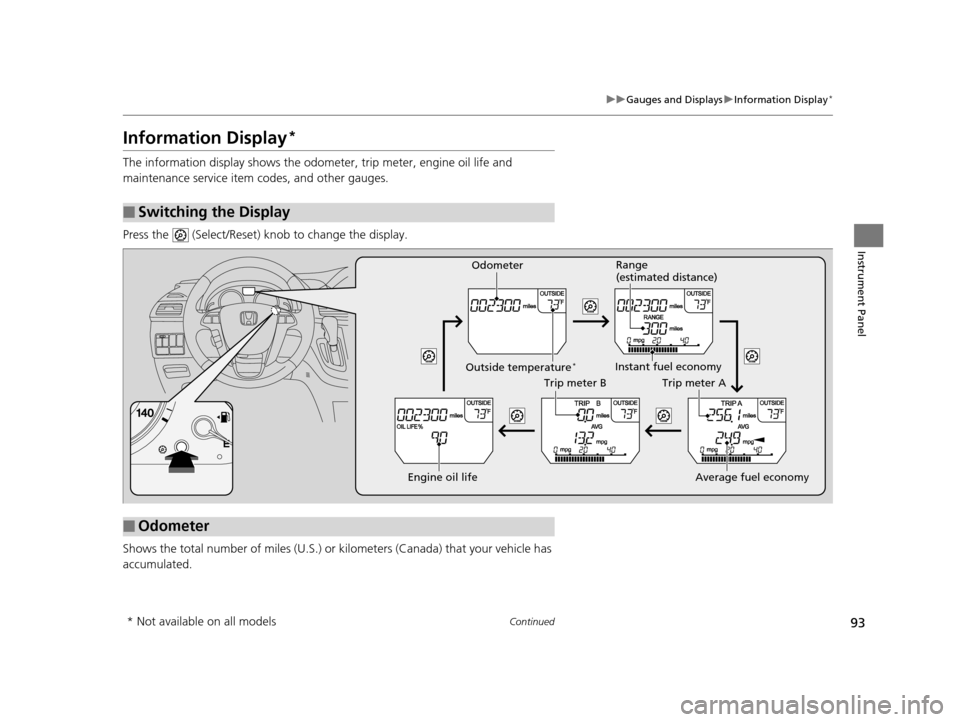
The information display shows the odom eter, trip meter, engine oil life and
maintenance service item codes, and other gauges.
Press the (Select/Reset) knob to change the display.
Shows the total number of miles (U.S.) or kilometers (Canada) that your vehicle has
accumulated.
■Switching the Display
■Odometer
Engine oil life
Trip meter B
Average fuel economy
Trip meter A
Instant fuel economy
Range
(estimated distance)
Outside temperature*
Odometer
* Not available on all models
17 US ODYSSEY (KA KC)-31TK86600.book 93 ページ 2016年10月24日 月曜日 午後4時2分