rear entertainment HONDA ODYSSEY 2017 RC1-RC2 / 5.G Owner's Manual
[x] Cancel search | Manufacturer: HONDA, Model Year: 2017, Model line: ODYSSEY, Model: HONDA ODYSSEY 2017 RC1-RC2 / 5.GPages: 565, PDF Size: 33.13 MB
Page 291 of 565
uuRear Entertainment System*uOperating the System
290
Features
■Playing AM/FM radio in the rear
Press the AM/FM button.
When you press the MENU button while the radio is playing, the audio menu
appears on the overhead screen. The availa ble functions are the same as those of
the front audio system. The TUNE/SKIP bar on the control panel works the same as
the Skip/Seek icons ( / ) on the front touchscreen for AM/FM radio operation.
2Playing AM/FM Radio P. 245
■Playing SiriusXM radio in the rear
Press the XM button.
When you press the MENU button while the radio is playing, the audio menu
appears on the overhead screen. The availa ble functions are the same as those of
the front audio system. The TUNE/SKIP bar on the control panel works the same as
the Skip/Seek icons ( / ) on the front touc hscreen for SiriusXM radio operation.
2Playing SiriusXM ® Radio* P. 249
To change the mode between category and channel, press and hold the TITLE/
SCROLL button for five seconds.
1 System Controls and Menus for Audio
If you press the REAR AUDIO button on the front
panel, you can opera te the rear entertainment system
from the front display. 2 REAR AUDIO button on the front panel
P. 277
* Not available on all models
17 US ODYSSEY (KA KC)-31TK86600.book 290 ページ 2016年10月24日 月曜日 午後4時2分
Page 292 of 565
291
uuRear Entertainment System*uOperating the System
Features
■Playing a CD
Press the CD button.
The available options appear on the overh ead screen are Repeat, Random, and Scan.
These functions are the same as those of the front audio system.
2 Playing a CD P. 252
To scroll your audio data title, press the TITLE/SCROLL button for five seconds.
■Playing iPod and a USB flash drive
Press the DVD/AUX button.
Press the AUX button.
The available options appear on the overh ead screen are Repeat, Random, and Scan.
These functions are the same as those of the front audio system.
2 Playing an iPod P. 255
2 Playing a USB Flash Drive P. 262
To scroll your audio data title, press the TITLE/SCROLL button for five seconds.
1System Controls and Menus for Audio
You can also insert an audio CD compatible with the
system, or recorded in MP3/WMA/AAC formats into
the lower slot and play. The front passengers can
listen to the same CD, or select another audio source.
2 Playable Discs P. 293
2 Audio Sources for Front and Rear Seats
P. 292
Remote with XM button
Remote without XM button
17 US ODYSSEY (KA KC)-31TK86600.book 291 ページ 2016年10月24日 月曜日 午後4時2分
Page 293 of 565
292
uuRear Entertainment System*uAudio Sources for Front and Rear Seats
Features
Audio Sources for Front and Rear Seats
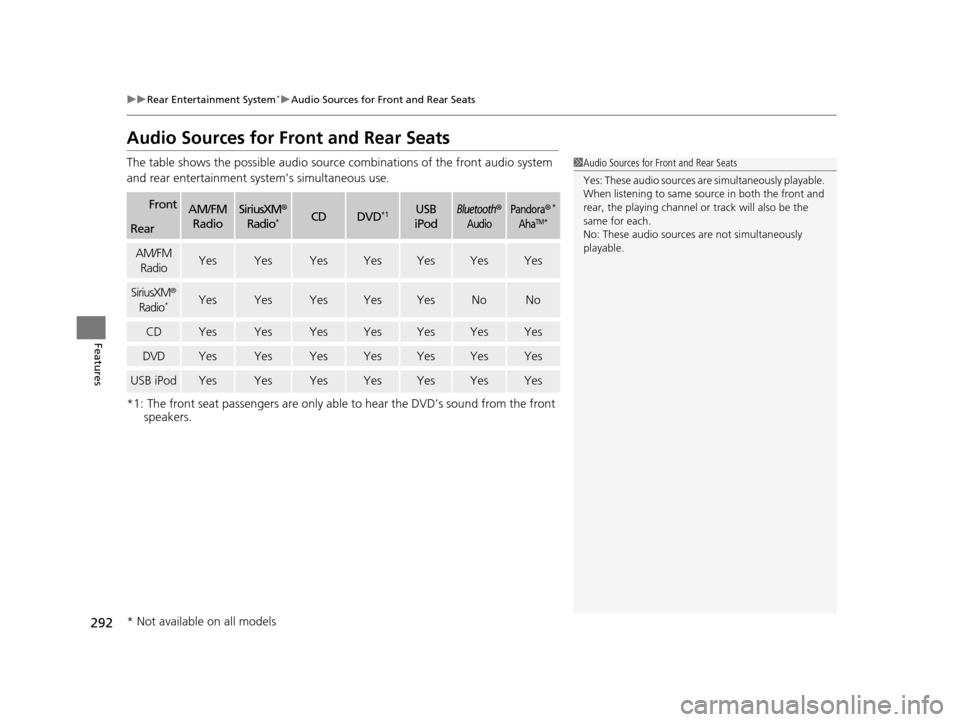
The table shows the possible audio source combinations of the front audio system
and rear entertainment sy stem’s simultaneous use.
*1: The front seat passengers are only able to hear the DVD’s sound from the front speakers.
FrontAM/FM
RadioSiriusXM ®
Radio*CDDVD*1USB
iPodBluetooth®
AudioPandora®*
AhaTM*Rear
AM/FM RadioYesYesYesYesYesYesYes
SiriusXM ®
Radio*YesYesYesYesYesNoNo
CDYesYesYesYesYesYesYes
DVDYesYesYesYesYesYesYes
USB iPodYesYesYesYesYesYesYes
1 Audio Sources for Front and Rear Seats
Yes: These audio sources ar e simultaneously playable.
When listening to same source in both the front and
rear, the playing channel or track will also be the
same for each.
No: These audio sources are not simultaneously
playable.
* Not available on all models
17 US ODYSSEY (KA KC)-31TK86600.book 292 ページ 2016年10月24日 月曜日 午後4時2分
Page 294 of 565
293
uuRear Entertainment System*uPlayable Discs
Features
Playable Discs
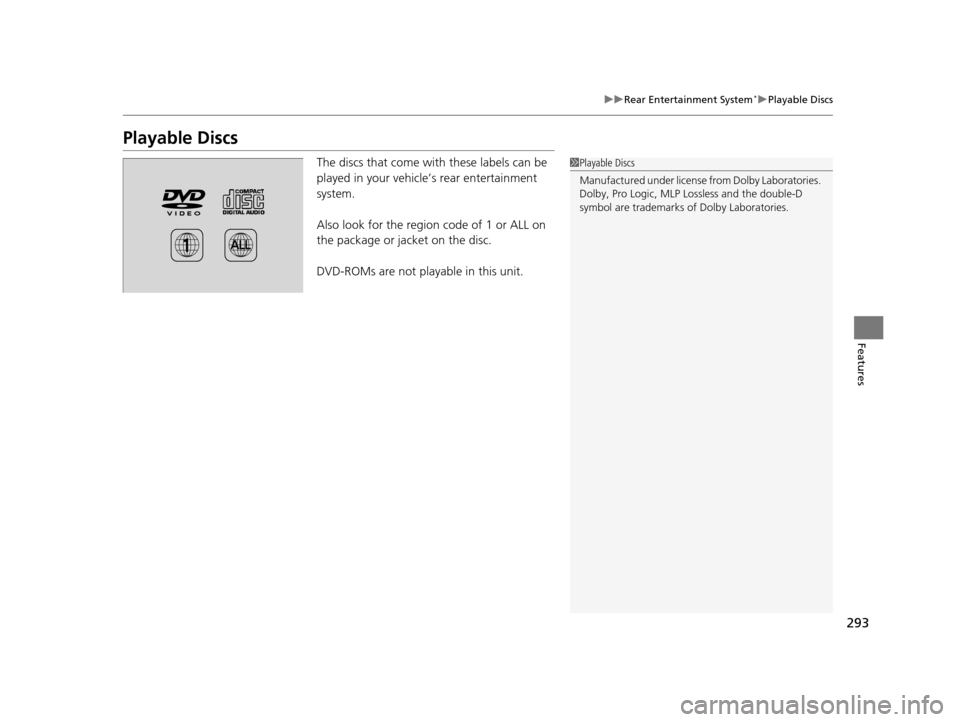
The discs that come with these labels can be
played in your vehicle’s rear entertainment
system.
Also look for the region code of 1 or ALL on
the package or jacket on the disc.
DVD-ROMs are not playable in this unit.1Playable Discs
Manufactured under license from Dolby Laboratories.
Dolby, Pro Logic, MLP Lossless and the double-D
symbol are trademarks of Dolby Laboratories.
17 US ODYSSEY (KA KC)-31TK86600.book 293 ページ 2016年10月24日 月曜日 午後4時2分
Page 295 of 565
294
uuRear Entertainment System*uDVD Player Error Messages
Features
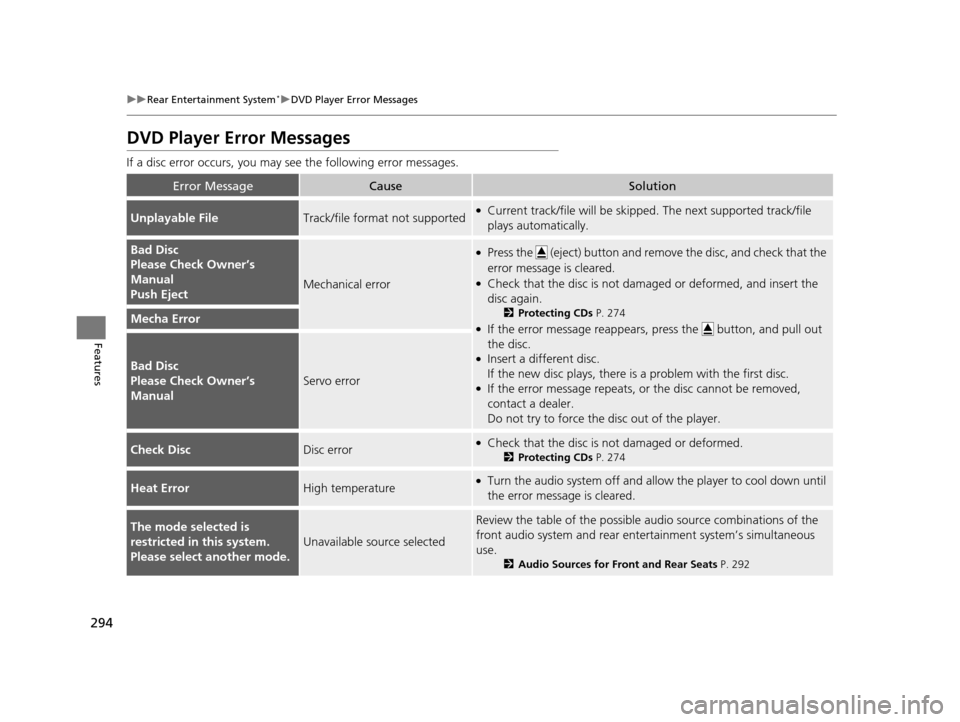
DVD Player Error Messages
If a disc error occurs, you may see the following error messages.
Error MessageCauseSolution
Unplayable FileTrack/file format not supported●Current track/file will be skippe d. The next supported track/file
plays automatically.
Bad Disc
Please Check Owner’s
Manual
Push Eject
Mechanical error
●Press the (eject) button and remove the disc, and check that the
error message is cleared.
●Check that the disc is not damaged or deformed, and insert the
disc again.
2 Protecting CDs P. 274
●If the error message reappears, press the button, and pull out
the disc.
●Insert a different disc.
If the new disc plays, there is a problem with the first disc.
●If the error message repeats, or the disc cannot be removed,
contact a dealer.
Do not try to force the disc out of the player.
Mecha Error
Bad Disc
Please Check Owner’s
Manual
Servo error
Check DiscDisc error●Check that the disc is not damaged or deformed.
2Protecting CDs P. 274
Heat ErrorHigh temperature●Turn the audio system off and allo w the player to cool down until
the error message is cleared.
The mode selected is
restricted in this system.
Please select another mode.
Unavailable source selected
Review the table of the possible audio source combinations of the
front audio system and rear ente rtainment system’s simultaneous
use.
2 Audio Sources for Front and Rear Seats P. 292
17 US ODYSSEY (KA KC)-31TK86600.book 294 ページ 2016年10月24日 月曜日 午後4時2分
Page 308 of 565
Continued307
uuCustomized Features u
Features
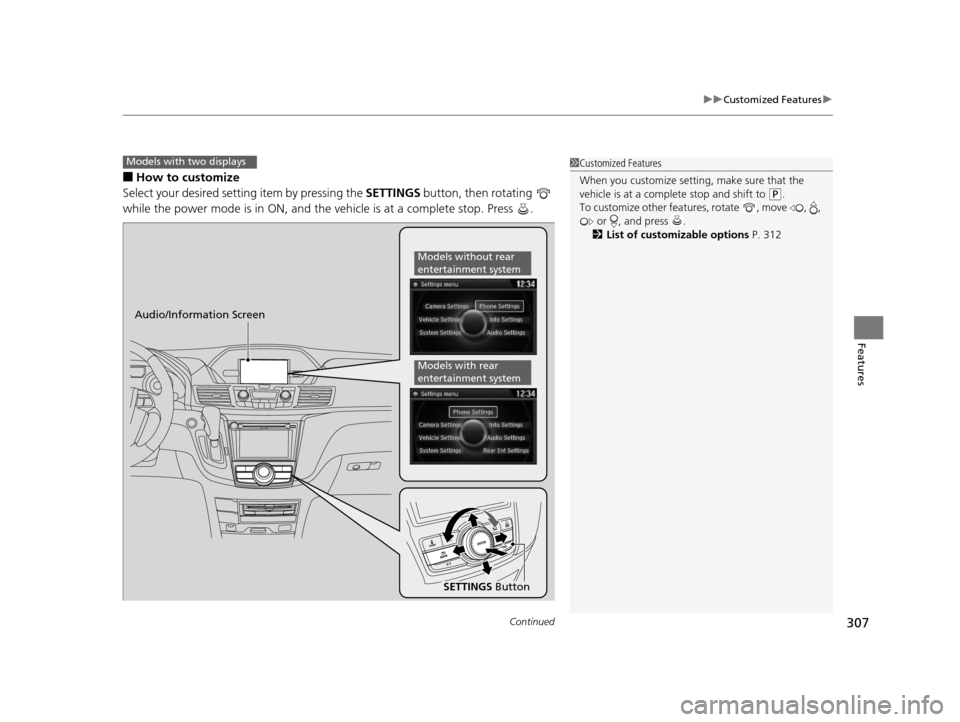
■How to customize
Select your desired setting item by pressing the SETTINGS button, then rotating
while the power mode is in ON, and the vehicle is at a complete stop. Press .
Models with two displays1 Customized Features
When you customize setting, make sure that the
vehicle is at a complete stop and shift to
(P.
To customize other featur es, rotate , move , ,
or , and press .
2 List of customizable options P. 312
Audio/Information Screen
SETTINGS Button
Models without rear
entertainment system
Models with rear
entertainment system
17 US ODYSSEY (KA KC)-31TK86600.book 307 ページ 2016年10月24日 月曜日 午後4時2分
Page 311 of 565
310
uuCustomized Features u
Features
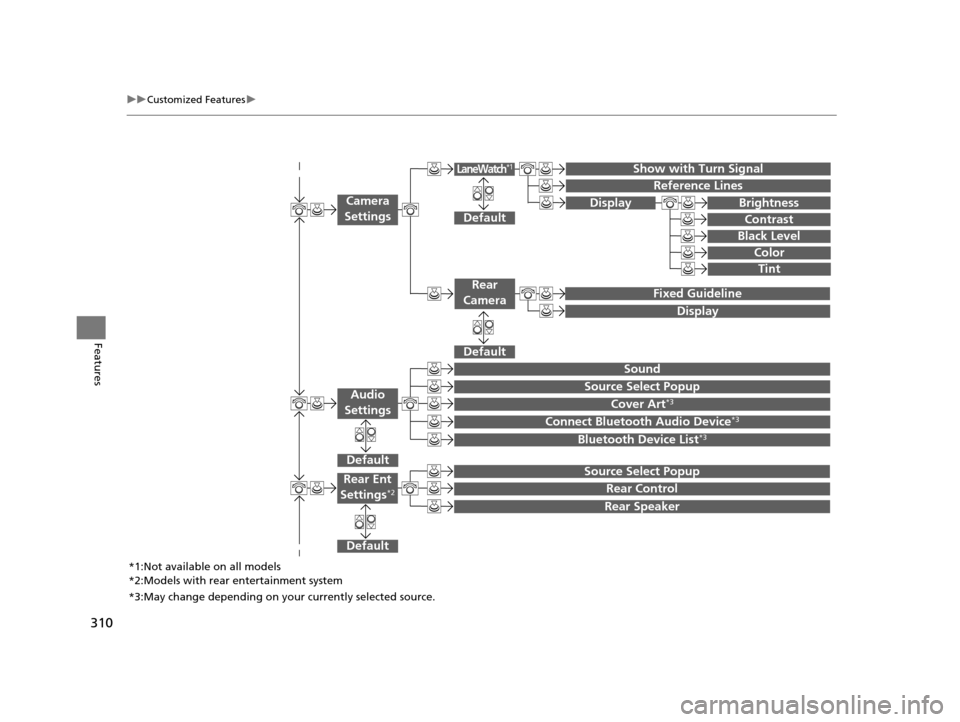
Show with Turn Signal
Reference Lines
Default
Fixed Guideline
Default
Default
Sound
Source Select Popup
Cover Art*3
Connect Bluetooth Audio Device*3
Bluetooth Device List*3
Camera
Settings
Rear
Camera
LaneWatch*1
Audio
Settings
Display Brightness
Contrast
Black Level
Color
Tint
Display
Default
Source Select Popup
Rear Control
Rear Speaker
Rear Ent
Settings*2
*1:Not available on all models
*2:Models with rear entertainment system
*3:May change depending on your currently selected source.
17 US ODYSSEY (KA KC)-31TK86600.book 310 ページ 2016年10月24日 月曜日 午後4時2分
Page 321 of 565
320
uuCustomized Features u
Features
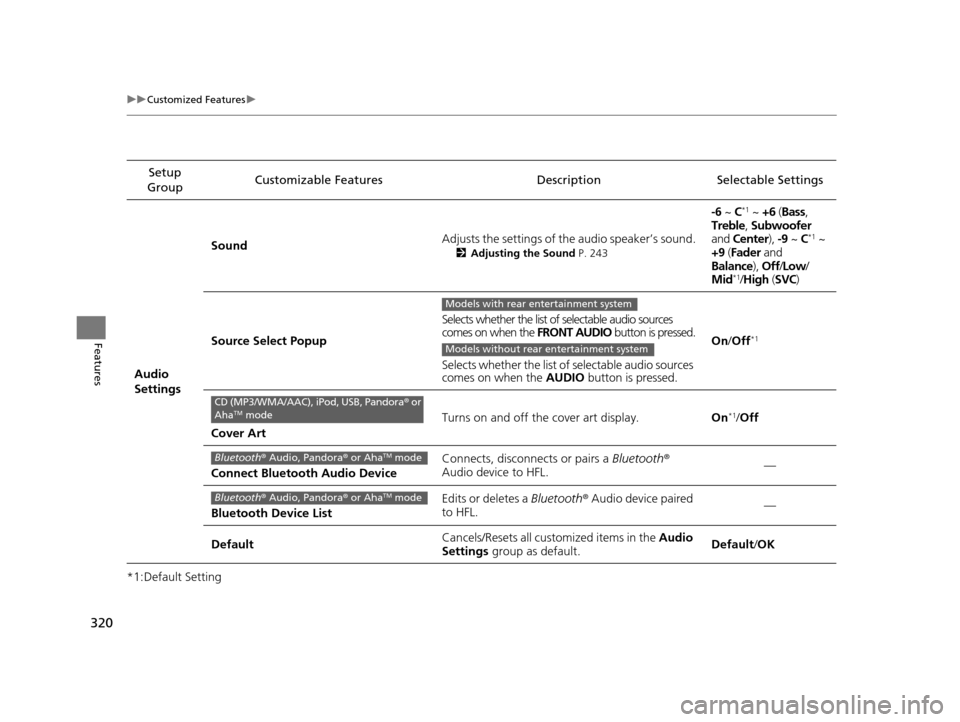
*1:Default SettingSetup
Group Customizable Features Descri
ption Selectable Settings
Audio
Settings Sound
Adjusts the settings of th
e audio speaker’s sound.
2Adjusting the Sound P. 243
-6 ~ C*1 ~ +6 (Bass ,
Treble , Subwoofer
and Center ), -9 ~ C
*1 ~
+9 (Fader and
Balance ), Off/Low /
Mid
*1/ High (SVC)
Source Select Popup Selects whether the list of selectable audio sources
comes on when the
FRONT AUDIO button is pressed.
Selects whether the list of selectable audio sources
comes on when the AUDIO button is pressed. On
/Off
*1
Cover Art Turns on and off the cover art display.
On
*1/Off
Connect Bluetooth Audio Device Connects, disconnects or pairs a
Bluetooth®
Audio device to HFL. —
Bluetooth Device List Edits or deletes a
Bluetooth® Audio device paired
to HFL. —
Default Cancels/Resets all cust
omized items in the Audio
Settings group as default. Default
/OK
Models with rear entertainment system
Models without rear entertainment system
CD (MP3/WMA/AAC), iPod, USB, Pandora ® or
AhaTM mode
Bluetooth ® Audio, Pandora ® or AhaTM mode
Bluetooth ® Audio, Pandora ® or AhaTM mode
17 US ODYSSEY (KA KC)-31TK86600.book 320 ページ 2016年10月24日 月曜日 午後4時2分
Page 322 of 565
321
uuCustomized Features u
Continued
Features
*1:Default Setting
*2:Models with rear entertainment systemSetup
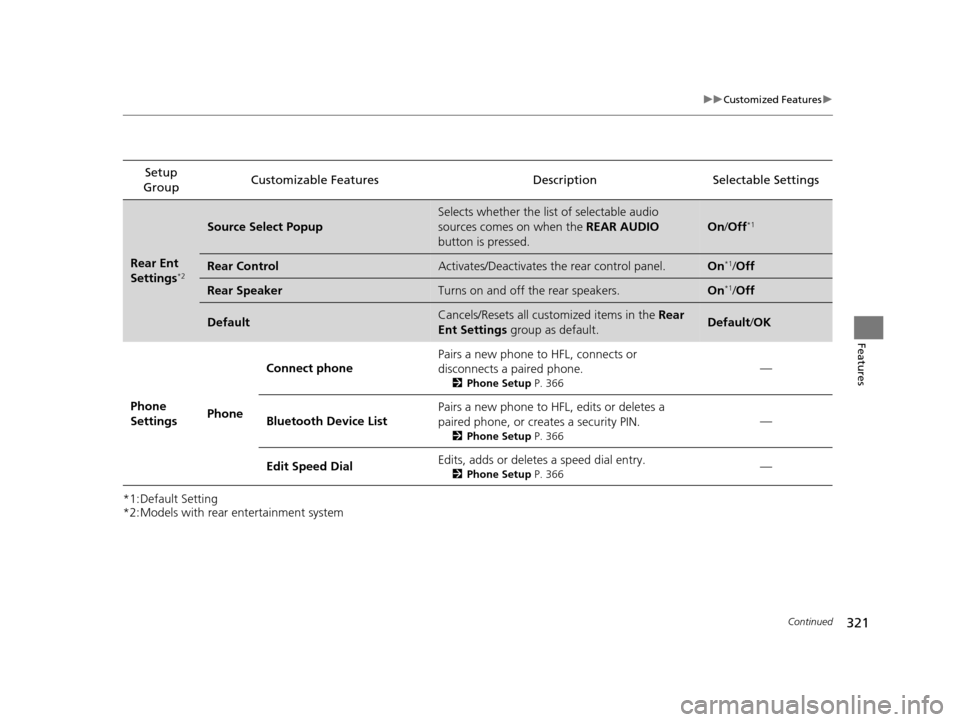
Group Customizable Features Description Selectable Settings
Rear Ent
Settings*2
Source Select Popup
Selects whether the list of selectable audio
sources comes on when the
REAR AUDIO
button is pressed.
On /Off*1
Rear ControlActivates/Deactivates the rear control panel.On*1/Off
Rear SpeakerTurns on and off the rear speakers.On*1/Off
DefaultCancels/Resets all customized items in the Rear
Ent Settings group as default.Default/OK
Phone
Settings PhoneConnect phone
Pairs a new phone to HFL, connects or
disconnects a paired phone.
2
Phone Setup P. 366
—
Bluetooth Device List Pairs a new phone to HFL, edits or deletes a
paired phone, or creates a security PIN.
2
Phone Setup P. 366
—
Edit Speed Dial Edits, adds or deletes a speed dial entry.
2
Phone Setup P. 366—
17 US ODYSSEY (KA KC)-31TK86600.book 321 ページ 2016年10月24日 月曜日 午後4時2分
Page 503 of 565
502
Maintenance
Remote Control and Wireless Headphone Care*
Replacing the Battery
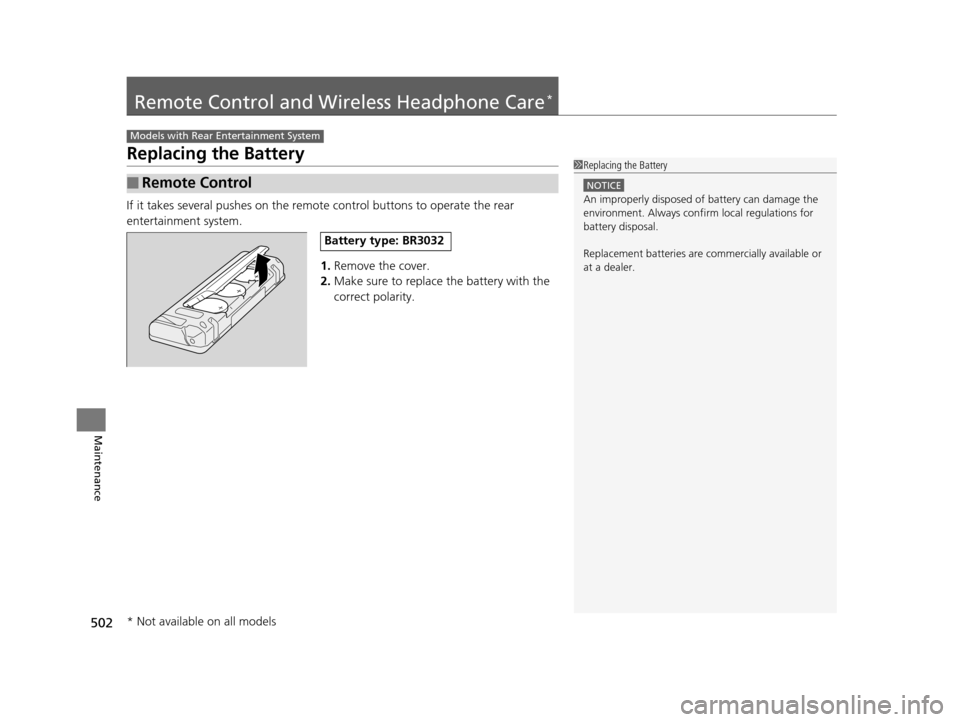
If it takes several pushes on the remo te control buttons to operate the rear
entertainment system.
1.Remove the cover.
2. Make sure to replace the battery with the
correct polarity.
■Remote Control
Models with Rear Entertainment System
1 Replacing the Battery
NOTICE
An improperly disposed of battery can damage the
environment. Always conf irm local regulations for
battery disposal.
Replacement batteries are commercially available or
at a dealer.
Battery type: BR3032
* Not available on all models
17 US ODYSSEY (KA KC)-31TK86600.book 502 ページ 2016年10月24日 月曜日 午後4時2分