display HONDA ODYSSEY 2017 RC1-RC2 / 5.G Service Manual
[x] Cancel search | Manufacturer: HONDA, Model Year: 2017, Model line: ODYSSEY, Model: HONDA ODYSSEY 2017 RC1-RC2 / 5.GPages: 565, PDF Size: 33.13 MB
Page 146 of 565
145
uuOperating the Switches Around the Steering Wheel uENGINE START/STOP Button*
Controls
If you open the driver’s door when the power mode is set to ACCESSORY, a warning
buzzer sounds.
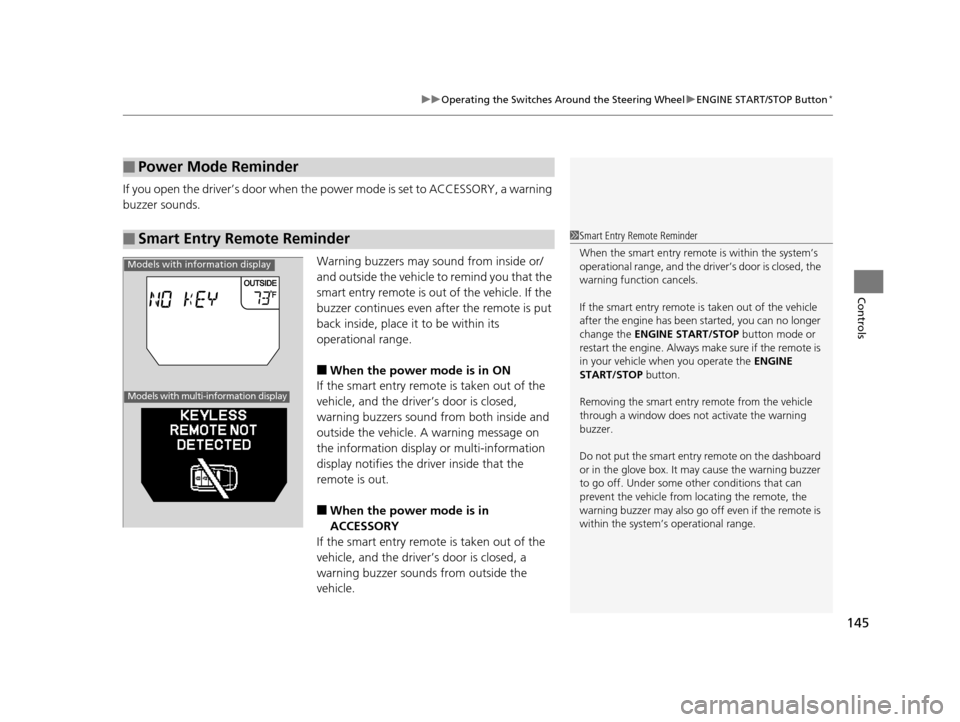
Warning buzzers may sound from inside or/
and outside the vehicle to remind you that the
smart entry remote is out of the vehicle. If the
buzzer continues even after the remote is put
back inside, place it to be within its
operational range.
■When the power mode is in ON
If the smart entry remote is taken out of the
vehicle, and the driver’s door is closed,
warning buzzers sound from both inside and
outside the vehicle. A warning message on
the information display or multi-information
display notifies the driver inside that the
remote is out.
■When the power mode is in
ACCESSORY
If the smart entry remote is taken out of the
vehicle, and the driver’s door is closed, a
warning buzzer sounds from outside the
vehicle.
■Power Mode Reminder
■Smart Entry Remote Reminder1 Smart Entry Remote Reminder
When the smart entry remote is within the system’s
operational range, and the driv er’s door is closed, the
warning function cancels.
If the smart entry remote is taken out of the vehicle
after the engine has been started, you can no longer
change the ENGINE START/STOP button mode or
restart the engine. Always make sure if the remote is
in your vehicle when you operate the ENGINE
START/STOP button.
Removing the smart entry remote from the vehicle
through a window does not activate the warning
buzzer.
Do not put the smart entr y remote on the dashboard
or in the glove box. It may cause the warning buzzer
to go off. Under some other conditions that can
prevent the vehicle from locating the remote, the
warning buzzer may al so go off even if the remote is
within the system’s operational range.
Models with information display
Models with multi-information display
17 US ODYSSEY (KA KC)-31TK86600.book 145 ページ 2016年10月24日 月曜日 午後4時2分
Page 154 of 565
153
uuOperating the Switches Around the Steering Wheel uBrightness Control
Controls
Brightness Control
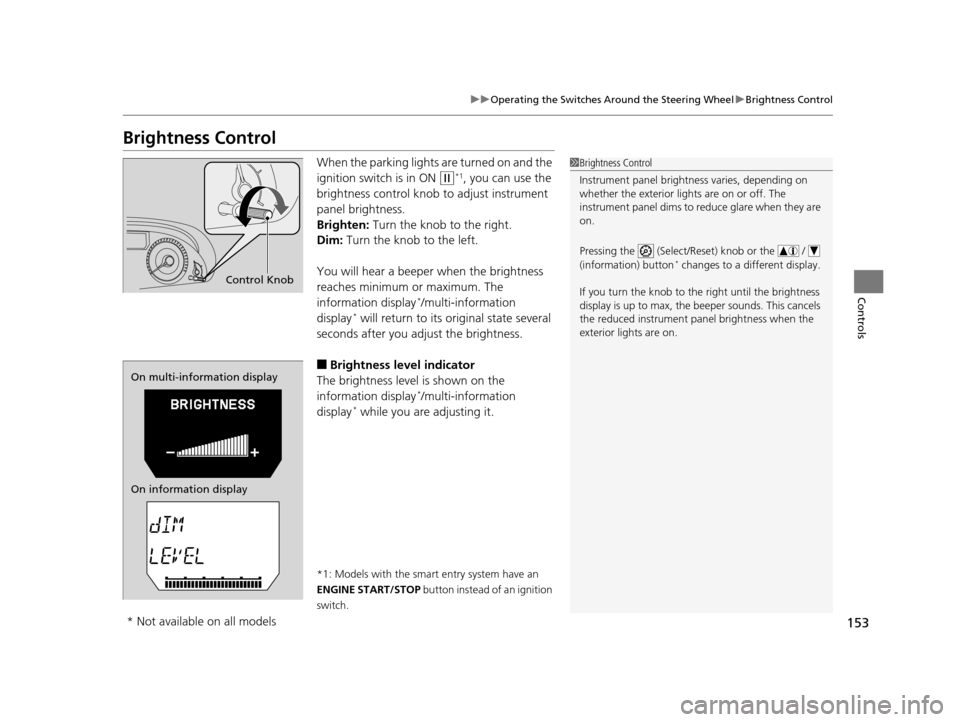
When the parking lights are turned on and the
ignition switch is in ON
(w*1, you can use the
brightness control knob to adjust instrument
panel brightness.
Brighten: Turn the knob to the right.
Dim: Turn the knob to the left.
You will hear a beeper when the brightness
reaches minimum or maximum. The
information display
*/multi-information
display* will return to its original state several
seconds after you adjust the brightness.
■Brightness level indicator
The brightness level is shown on the
information display
*/multi-information
display* while you are adjusting it.
*1: Models with the smart entry system have an
ENGINE START/STOP button instead of an ignition
switch.
1 Brightness Control
Instrument panel brightne ss varies, depending on
whether the exterior lights are on or off. The
instrument panel dims to reduce glare when they are
on.
Pressing the (Select/Reset) knob or the /
(information) button
* changes to a different display.
If you turn the knob to the right until the brightness
display is up to max, the beeper sounds. This cancels
the reduced instrument panel brightness when the
exterior lights are on.
Control Knob
On multi-information display
On information display
* Not available on all models
17 US ODYSSEY (KA KC)-31TK86600.book 153 ページ 2016年10月24日 月曜日 午後4時2分
Page 156 of 565
155
uuOperating the Switches Around the Steering Wheel uDriving Position Memory System*
Continued
Controls
Driving Position Memory System*
You can store two driver’s seat and outside mirrors position with the driving position
memory system.
When you unlock and open the driver’s door with a remote, the seat and outside
mirrors adjust automatically to on e of the two preset positions.
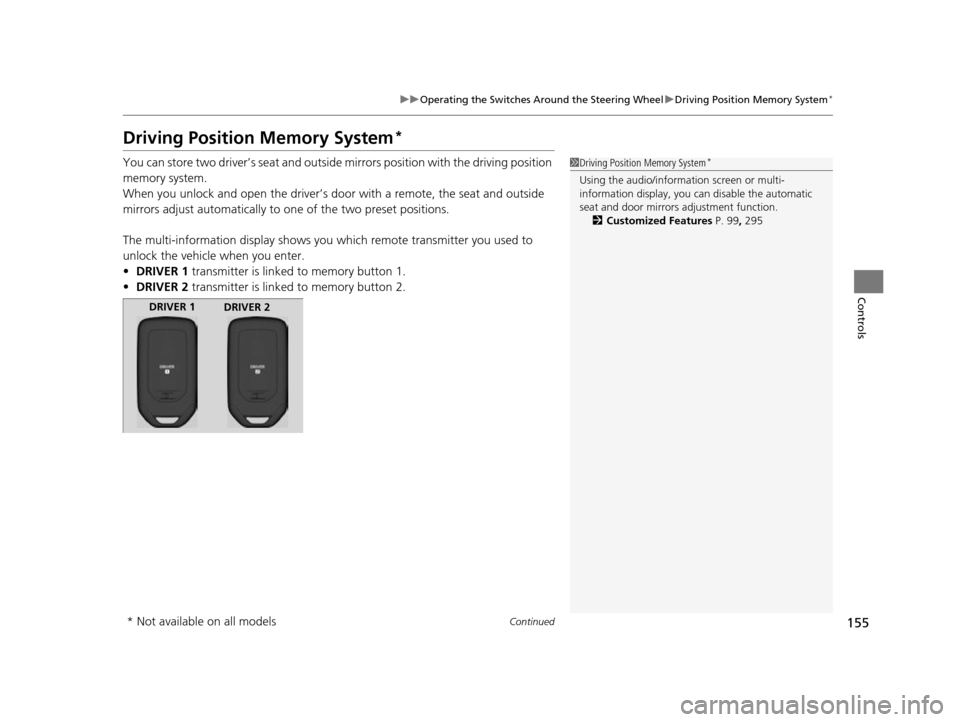
The multi-information display shows you which remote transmitter you used to
unlock the vehicle when you enter.
• DRIVER 1 transmitter is linked to memory button 1.
• DRIVER 2 transmitter is linked to memory button 2.1Driving Position Memory System*
Using the audio/information screen or multi-
information display, you can disable the automatic
seat and door mirrors adjustment function. 2 Customized Features P. 99, 295
DRIVER 1
DRIVER 2
* Not available on all models
17 US ODYSSEY (KA KC)-31TK86600.book 155 ページ 2016年10月24日 月曜日 午後4時2分
Page 199 of 565
198
Controls
Climate Control System*
Using Automatic Climate Control
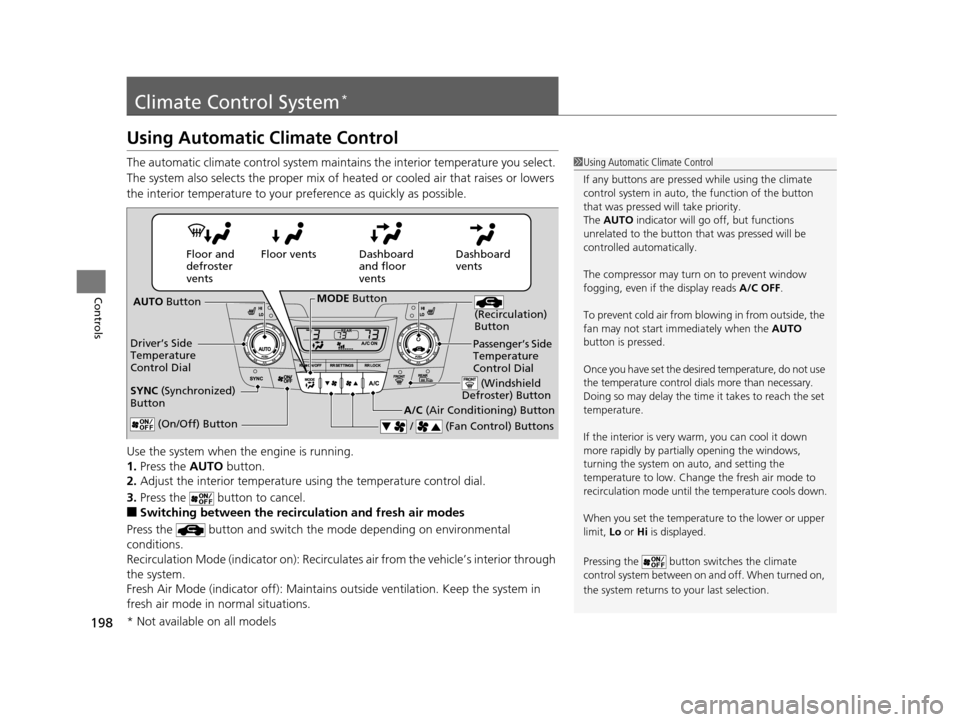
The automatic climate control system maintains the interior temperature you select.
The system also selects the proper mix of heated or cooled air that raises or lowers
the interior temperature to your pr eference as quickly as possible.
Use the system when the engine is running.
1. Press the AUTO button.
2. Adjust the interior temperature us ing the temperature control dial.
3. Press the button to cancel.
■Switching between the recirculation and fresh air modes
Press the button and switch the mode depending on environmental
conditions.
Recirculation Mode (indicator on): Recirculates air from the vehicle’s interior through
the system.
Fresh Air Mode (indicator off): Maintains outside ventilation. Keep the system in
fresh air mode in normal situations.
1 Using Automatic Climate Control
If any buttons are presse d while using the climate
control system in auto, the function of the button
that was pressed will take priority.
The AUTO indicator will go off, but functions
unrelated to the button th at was pressed will be
controlled automatically.
The compressor may turn on to prevent window
fogging, even if the display reads A/C OFF.
To prevent cold air from bl owing in from outside, the
fan may not start i mmediately when the AUTO
button is pressed.
Once you have set the desi red temperature, do not use
the temperature control di als more than necessary.
Doing so may delay the time it takes to reach the set
temperature.
If the interior is very warm, you can cool it down
more rapidly by partial ly opening the windows,
turning the system on auto, and setting the
temperature to low. Change the fresh air mode to
recirculation mode until the temperature cools down.
When you set the temperat ure to the lower or upper
limit, Lo or Hi is displayed.
Pressing the button sw itches the climate
control system between on and off. When turned on,
the system returns to your last selection.
Dashboard
vents
Dashboard
and floor
vents
Floor vents
Floor and
defroster
vents
AUTO Button
Driver’s Side
Temperature
Control Dial
A/C (Air Conditioning) Button
/ (Fan Control) Buttons
(Recirculation)
Button
(On/Off) Button
SYNC (Synchronized)
Button
Passenger’s Side
Temperature
Control Dial
(Windshield
Defroster) Button
MODE Button
* Not available on all models
17 US ODYSSEY (KA KC)-31TK86600.book 198 ページ 2016年10月24日 月曜日 午後4時2分
Page 202 of 565
201
uuClimate Control System*uRear Climate Control System
Continued
Controls
Rear Climate Control System
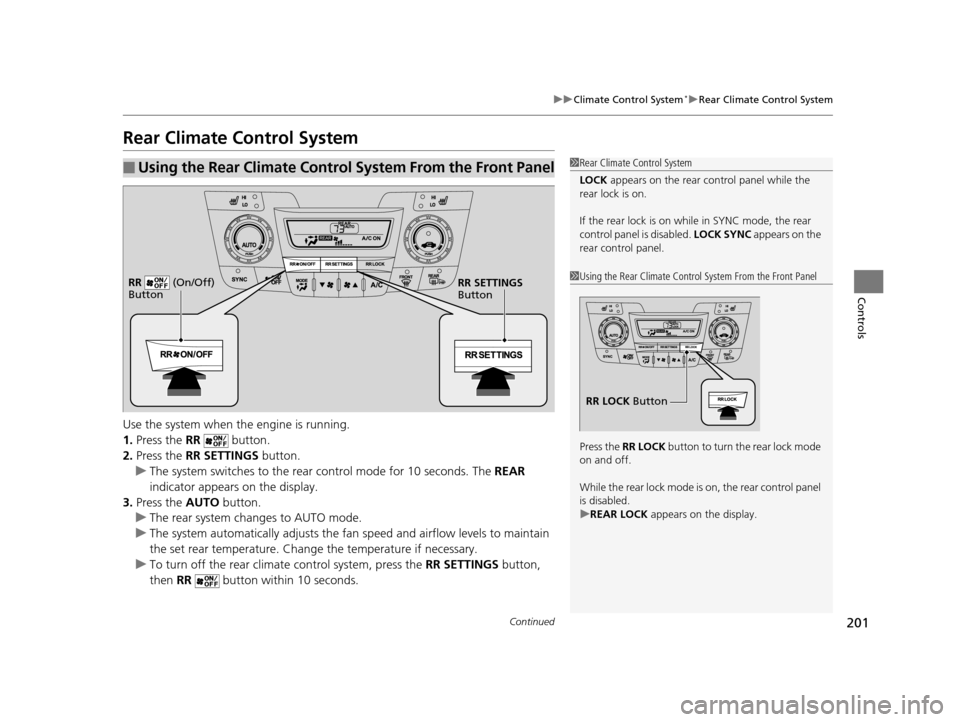
Use the system when the engine is running.
1. Press the RR button.
2. Press the RR SETTINGS button.
u The system switches to the rear control mode for 10 seconds. The REAR
indicator appears on the display.
3. Press the AUTO button.
u The rear system changes to AUTO mode.
u The system automatically adjusts the fan speed and airfl ow levels to maintain
the set rear temperature. Change the temperature if necessary.
u To turn off the rear climat e control system, press the RR SETTINGS button,
then RR button within 10 seconds.
■Using the Rear Climate Control System From the Front Panel1Rear Climate Control System
LOCK appears on the rear control panel while the
rear lock is on.
If the rear lock is on while in SYNC mode, the rear
control panel is disabled. LOCK SYNC appears on the
rear control panel.
1 Using the Rear Climate Control System From the Front Panel
Press the RR LOCK button to turn the rear lock mode
on and off.
While the rear lock mode is on, the rear control panel
is disabled.
u REAR LOCK appears on the display.
RR LOCK Button
RR SETTINGS
Button
RR (On/Off)
Button
17 US ODYSSEY (KA KC)-31TK86600.book 201 ページ 2016年10月24日 月曜日
午後4時2分
Page 206 of 565
205
Features
This chapter describes how to operate technology features.
Audio SystemAbout Your Audio System ................ 206
USB Port .......................................... 207
Auxiliary Input Jack .......................... 207
Audio System Theft Protection
*....... 208
Region Setting ................................. 209
Audio Remote Controls .................... 210
Audio System Basic Operation ........ 211
Audio/Information Screen ................ 212
Display Setup ................................... 217
Adjusting the Sound ........................ 216
Playing AM/FM Radio ....................... 218
Models with one display
Playing a CD .................................... 221
Playing an iPod ................................ 224
Playing Internet Radio ...................... 227
Playing a USB Flash Drive ................. 229
Playing Bluetooth ® Audio................. 232
Audio System Basic Operation ........ 234
Audio with Touch Screen ................. 235
Audio/Information Screen ................ 238
Display Setup ................................... 244
Adjusting the Sound ........................ 243
Playing AM/FM Radio ....................... 245
Playing SiriusXM ® Radio
*................. 249
Models with two displays
Playing a CD .................................... 252
Playing an iPod ................................ 255
Playing Internet Radio ...................... 259
Playing a USB Flash Drive ................. 262
Playing Bluetooth ® Audio ................ 265
Audio Error Messages ...................... 267
General Information on the Audio System ............................................. 272
Rear Entertainment System
*........... 276
Customized Features ........................ 295
HomeLink ® Universal Transceiver
*.. 325
Bluetooth ® HandsFreeLink® ..... 327, 360
Compass
*.......................................... 392
* Not available on all models
17 US ODYSSEY (KA KC)-31TK86600.book 205 ページ 2016年10月24日 月曜日 午後4時2分
Page 208 of 565
207
uuAudio System uUSB Port
Features
USB Port
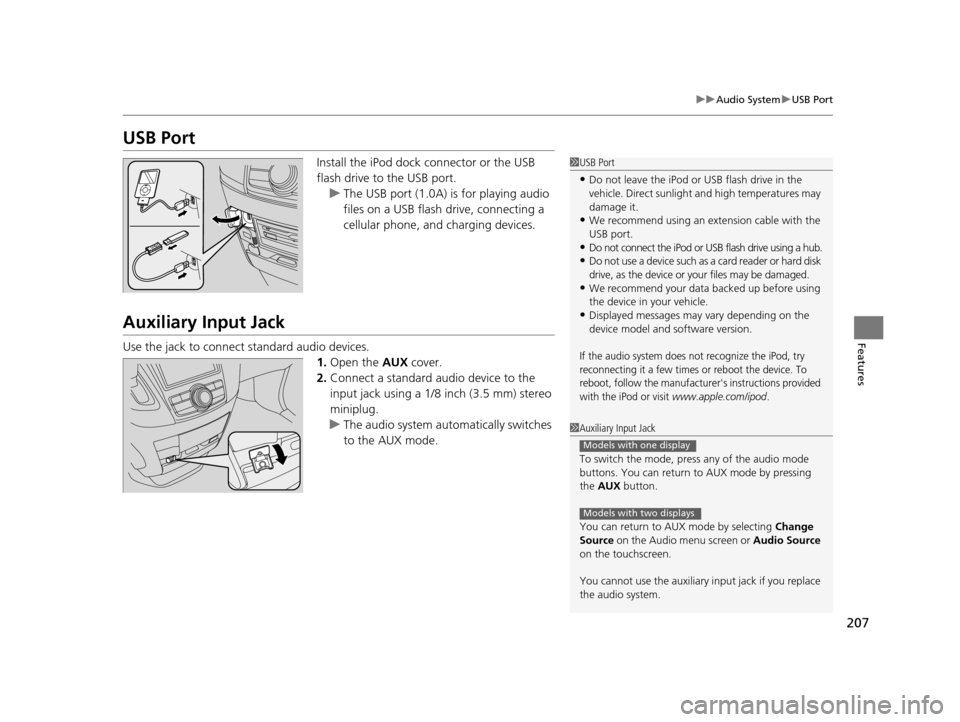
Install the iPod dock connector or the USB
flash drive to the USB port.
u The USB port (1.0A) is for playing audio
files on a USB flash drive, connecting a
cellular phone, and charging devices.
Auxiliary Input Jack
Use the jack to connect standard audio devices.
1.Open the AUX cover.
2. Connect a standard audio device to the
input jack using a 1/8 inch (3.5 mm) stereo
miniplug.
u The audio system auto matically switches
to the AUX mode.
1 USB Port
•Do not leave the iPod or USB flash drive in the
vehicle. Direct sunlight and high temperatures may
damage it.
•We recommend using an extension cable with the
USB port.
•Do not connect the iPod or USB flash drive using a hub.
•Do not use a device such as a card reader or hard disk
drive, as the device or your files may be damaged.
•We recommend your data backed up before using
the device in your vehicle.
•Displayed messages may vary depending on the
device model and software version.
If the audio system does not recognize the iPod, try
reconnecting it a few times or reboot the device. To
reboot, follow the manufacturer's instructions provided
with the iPod or visit
www.apple.com/ipod.
1 Auxiliary Input Jack
To switch the mode, pres s any of the audio mode
buttons. You can return to AUX mode by pressing
the AUX button.
You can return to AUX mode by selecting Change
Source on the Audio menu screen or Audio Source
on the touchscreen.
You cannot use the auxiliary input jack if you replace
the audio system.
Models with one display
Models with two displays
17 US ODYSSEY (KA KC)-31TK86600.book 207 ページ 2016年10月24日 月曜日 午後4時2分
Page 209 of 565
208
uuAudio System uAudio System Theft Protection*
Features
Audio System Theft Protection*
The audio system is disabled when it is di sconnected from the power source, such as
when the battery is disconnected or goes dead. In certain conditions, the system
may display Enter code. If this occurs, reactivate the audio system.
■Reactivating the audio system
1. Set the power mode to ON.
2. Turn on the audio system.
3. Press and hold the audio system power button for more than two seconds.
u The audio system is reac tivated when the audio co ntrol unit establishes a
connection with the vehicle control unit. If the control unit fails to recognize
the audio unit, you must go to a dealer and have the audio unit checked.
* Not available on all models
17 US ODYSSEY (KA KC)-31TK86600.book 208 ページ 2016年10月24日 月曜日 午後4時2分
Page 210 of 565
209
uuAudio System uRegion Setting
Features
Region Setting
The audio system’s region setting will be lo st when the battery is disconnected or
goes dead.
If the Region Select screen appears, you need to set the region for the audio
system. Follow the steps below:
1. Press to select OK.
2. Rotate to select the region you live in, then press .
3. You will receive a confirmation message on the screen. Rotate to select Yes,
then press .
Models with two displays
1 Region Setting
The region setting is require d only when the battery
power is tem porarily disconnected. It is set to your
vehicle’s region type by the factory.
You cannot change the setting once you have
completed the setting proced ure. Contact a dealer if
you selected an incorrect region.
17 US ODYSSEY (KA KC)-31TK86600.book 209 ページ 2016年10月24日 月曜日 午後4時2分
Page 212 of 565
211
Features
Audio System Basic Operation
To use the audio system function, the ignition swit ch must be in ACCESSORY (q or
ON
(w.
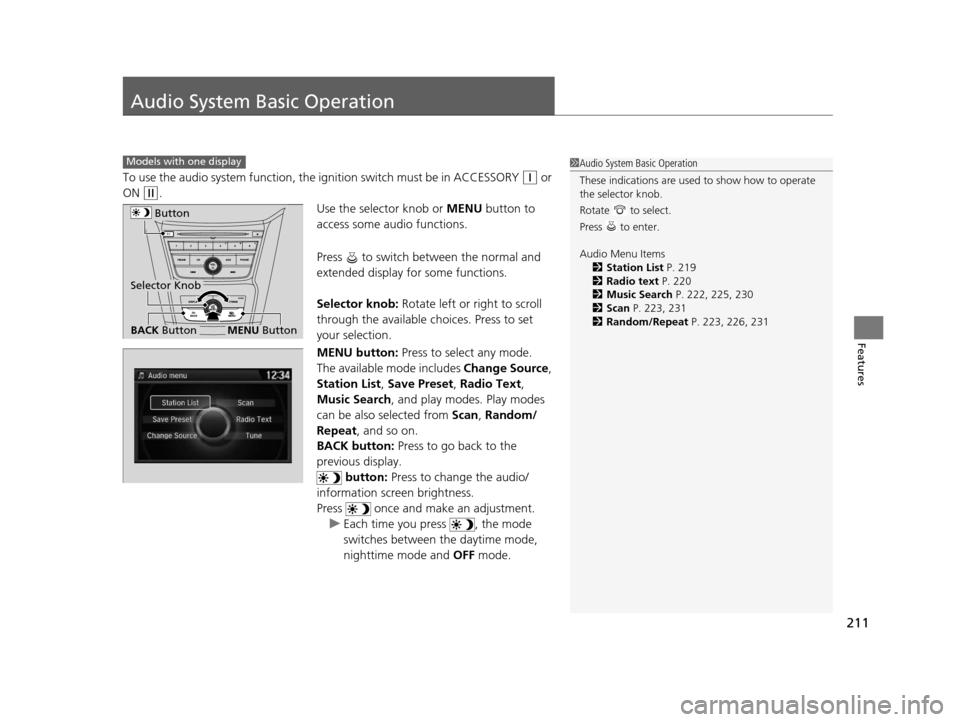
Use the selector knob or MENU button to
access some audio functions.
Press to switch between the normal and
extended display fo r some functions.
Selector knob: Rotate left or right to scroll
through the available ch oices. Press to set
your selection.
MENU button: Press to select any mode.
The available mode includes Change Source,
Station List , Save Preset , Radio Text,
Music Search , and play mode s. Play modes
can be also selected from Scan, Random/
Repeat , and so on.
BACK button: Press to go back to the
previous display. button: Press to change the audio/
information screen brightness.
Press once and make an adjustment. u Each time you press , the mode
switches between the daytime mode,
nighttime mode and OFF mode.
Models with one display1Audio System Basic Operation
These indications are used to show how to operate
the selector knob.
Rotate to select.
Press to enter.
Audio Menu Items
2 Station List P. 219
2 Radio text P. 220
2 Music Search P. 222, 225, 230
2 Scan P. 223, 231
2 Random/Repeat P. 223, 226, 231
Button
BACK ButtonMENU Button
Selector Knob
17 US ODYSSEY (KA KC)-31TK86600.book 211 ページ 2016年10月24日 月曜日 午後4時2分