engine start HONDA ODYSSEY 2017 RC1-RC2 / 5.G Manual Online
[x] Cancel search | Manufacturer: HONDA, Model Year: 2017, Model line: ODYSSEY, Model: HONDA ODYSSEY 2017 RC1-RC2 / 5.GPages: 565, PDF Size: 33.13 MB
Page 459 of 565
uuMaintenance MinderTMuTo Use Maintenance MinderTM
458
Maintenance
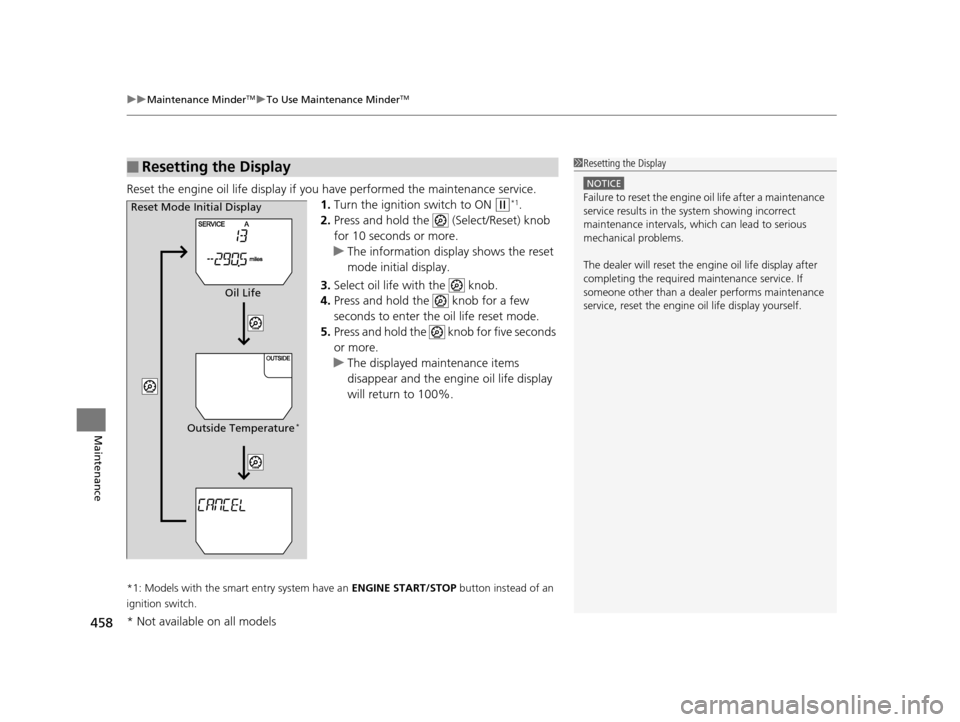
Reset the engine oil life display if you have performed the maintenance service.
1. Turn the ignition switch to ON
(w*1.
2. Press and hold the (Select/Reset) knob
for 10 seconds or more.
u The information display shows the reset
mode initial display.
3. Select oil life with the knob.
4. Press and hold the knob for a few
seconds to enter the oil life reset mode.
5. Press and hold the knob for five seconds
or more.
u The displayed maintenance items
disappear and the engine oil life display
will return to 100%.
*1: Models with the smart entry system have an ENGINE START/STOP button instead of an
ignition switch.
■Resetting the Display1 Resetting the Display
NOTICE
Failure to reset the engine oil life after a maintenance
service results in the sy stem showing incorrect
maintenance intervals, which can lead to serious
mechanical problems.
The dealer will reset the en gine oil life display after
completing the required ma intenance service. If
someone other than a deal er performs maintenance
service, reset the engine oil life display yourself.Reset Mode Initial Display
Oil Life
Outside Temperature
*
* Not available on all models
17 US ODYSSEY (KA KC)-31TK86600.book 458 ページ 2016年10月24日 月曜日 午後4時2分
Page 470 of 565
469
uuMaintenance Under the Hood uChanging the Engine Oil and Oil Filter
Maintenance
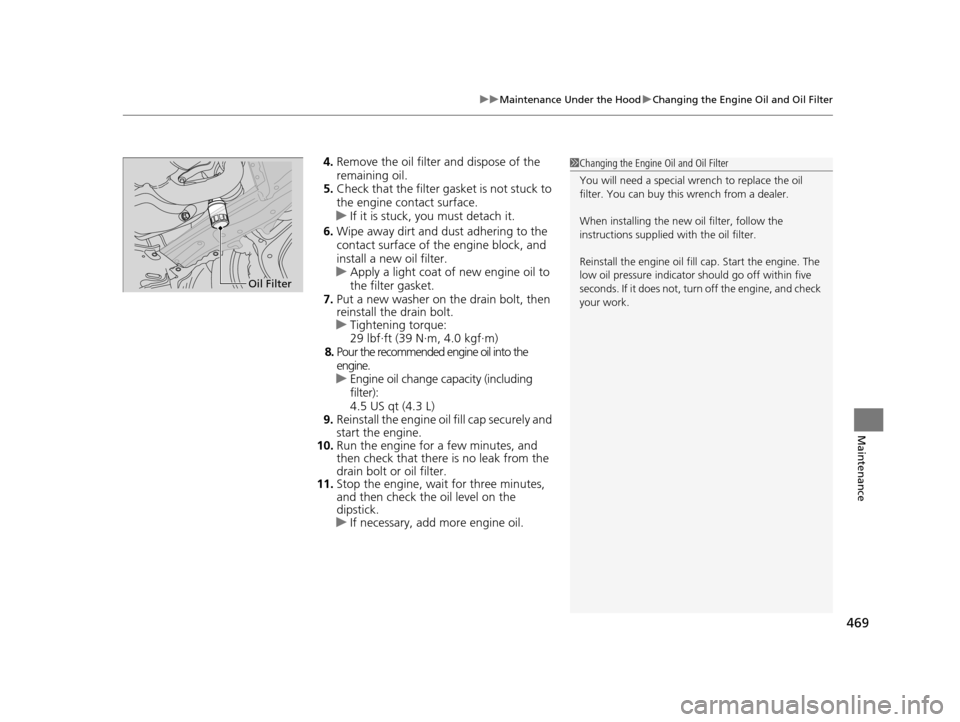
4. Remove the oil filter and dispose of the
remaining oil.
5. Check that the filter gasket is not stuck to
the engine contact surface.
u If it is stuck, you must detach it.
6. Wipe away dirt and dust adhering to the
contact surface of the engine block, and
install a new oil filter.
u Apply a light coat of new engine oil to
the filter gasket.
7. Put a new washer on the drain bolt, then
reinstall the drain bolt.
u Tightening torque:
29 lbf∙ft (39 N∙m, 4.0 kgf∙m)
8. Pour the recommended engine oil into the
engine.
u Engine oil change capacity (including
filter):
4.5 US qt (4.3 L)
9. Reinstall the engine oil fill cap securely and
start the engine.
10. Run the engine for a few minutes, and
then check that there is no leak from the
drain bolt or oil filter.
11. Stop the engine, wait for three minutes,
and then check the oil level on the
dipstick.
u If necessary, add more engine oil.1Changing the Engine Oil and Oil Filter
You will need a special wrench to replace the oil
filter. You can buy this wrench from a dealer.
When installing the new oil filter, follow the
instructions supplied with the oil filter.
Reinstall the engine oil fill cap. Start the engine. The
low oil pressure indicator should go off within five
seconds. If it does not, turn off the engine, and check
your work.
Oil Filter
17 US ODYSSEY (KA KC)-31TK86600.book 469 ページ 2016年10月24日 月曜日 午後4時2分
Page 510 of 565
509
Handling the Unexpected
This chapter explains how to handle unexpected troubles.
ToolsTypes of Tools .................................. 510
If a Tire Goes Flat Changing a Flat Tire ......................... 511
Engine Does Not Start Checking the Engine ........................ 520
If the Smart Entry Remote Battery is Weak...521
Emergency Engine Stop ................... 522
Jump Starting .................................... 523
Shift Lever Does Not Move .............. 525
Overheating How to Handle Overheating ............. 526 Indicator, Coming On/Blinking
If the Low Oil Pressure Indicator Comes
On ............................................. 528
If the Charging System Indicator Comes
On ................................................. 528
If the Malfunction Indicator Lamp Comes On or Blinks ................................... 529
If the Brake System Indicator (Red) Comes On ................................................. 530
If the Low Tire Pressure Indicator Comes On ................................................. 531 If the TPMS Indicator Comes On ...... 531
If the Low Tire Pressure/TPMS Indicator
Comes On or Blinks ....................... 532
Fuses Fuse Locations ................................. 533
Inspecting and Changing Fuses ........ 538
Emergency Towing ........................... 539
When You Cannot Open or Close the Tailgate ............................................ 540
17 US ODYSSEY (KA KC)-31TK86600.book 509 ページ 2016年10月24日 月曜日 午後4時2分
Page 512 of 565
511Continued
Handling the Unexpected
If a Tire Goes Flat
Changing a Flat Tire
If a tire goes flat while driving, grasp the steering wheel firmly, and brake gradually
to reduce speed. Then, stop in a safe plac e. Replace the flat tire with a compact
spare tire. Go to a dealer as soon as possib le to have the full-size tire repaired or
replaced.
1. Park the vehicle on firm, level, non-slip pery surface and apply the parking brake.
2. Move the shift lever to
(P.
3. Turn on the hazard warning lights an d turn the ignition switch to LOCK
(0*1.
*1: Models with the smart entry system have an ENGINE START/STOP button instead of an
ignition switch.
1 Changing a Flat Tire
Periodically check the tire pressure of the compact
spare. It should be set to the specified pressure.
Specified Pressure: 60 psi (420 kPa, 4.2 kgf/cm
2)
When driving with the compact spare tire, keep the
vehicle speed under 50 mph (80 km/h). Replace with
a full-size tire as soon as possible.
The compact spare tire and wheel in your vehicle are
specifically for this model. Do not use them with
another vehicle. Do not us e another type of compact
spare tire or wheel with your vehicle.
Do not mount tire chains on a compact spare tire.
If a chain-mounted front tire goes flat, remove one of
the full-size rear tires and replace it with the compact
spare tire. Remove the flat front tire and replace it
with the full-size tire that was removed from the rear.
Mount the tire chains on the front tire.
Do not use a puncture-repairi ng agent on a flat tire,
as it can damage the tire pressure sensor.
17 US ODYSSEY (KA KC)-31TK86600.book 511 ページ 2016年10月24日 月曜日 午後4時2分
Page 521 of 565
520
Handling the Unexpected
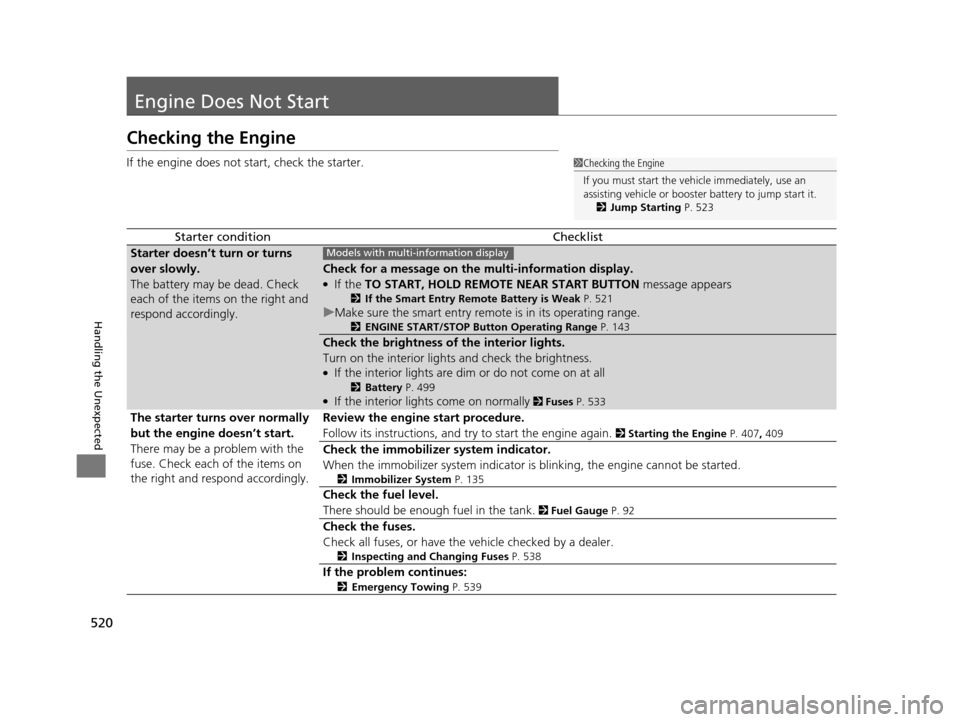
Engine Does Not Start
Checking the Engine
If the engine does not start, check the starter.
Starter conditionChecklist
Starter doesn’t turn or turns
over slowly.
The battery may be dead. Check
each of the items on the right and
respond accordingly.
Check for a message on the multi-information display.
●If the TO START, HOLD REMOTE NEAR START BUTTON message appears
2If the Smart Entry Remote Battery is Weak P. 521
uMake sure the smart entry remote is in its operating range.
2 ENGINE START/STOP Button Operating Range P. 143
Check the brightness of the interior lights.
Turn on the interior lights and check the brightness.
●If the interior lights are dim or do not come on at all
2Battery P. 499●If the interior lights come on normally 2 Fuses P. 533
The starter turns over normally
but the engine doesn’t start.
There may be a problem with the
fuse. Check each of the items on
the right and resp ond accordingly. Review the engine start procedure.
Follow its instructions, and try to start the engine again.
2
Starting the Engine P. 407, 409
Check the immobilizer system indicator.
When the immobilizer system indicator is blinking, the engine cannot be started.
2Immobilizer System P. 135
Check the fuel level.
There should be enough fuel in the tank.
2 Fuel Gauge P. 92
Check the fuses.
Check all fuses, or have the vehicle checked by a dealer.
2Inspecting and Changing Fuses P. 538
If the problem continues:
2Emergency Towing P. 539
1Checking the Engine
If you must start the vehi cle immediately, use an
assisting vehicle or booster battery to jump start it.
2 Jump Starting P. 523
Models with multi- information display
17 US ODYSSEY (KA KC)-31TK86600.book 520 ページ 2016年10月24日 月曜日 午後4時2分
Page 522 of 565
521
uuEngine Does Not Start uIf the Smart Entry Remote Battery is Weak
Handling the Unexpected
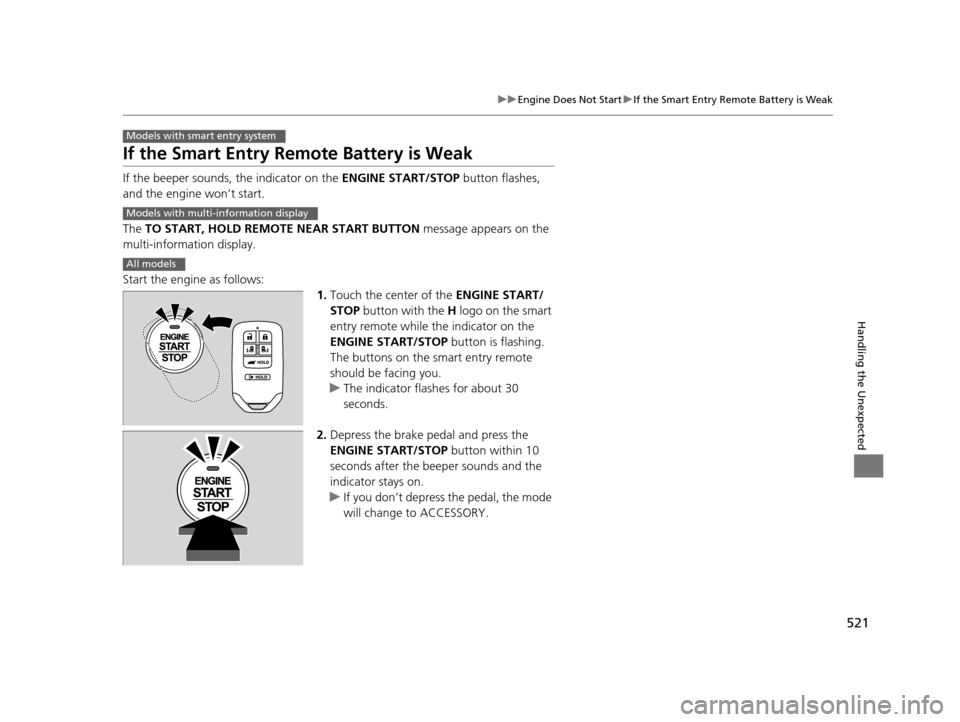
If the Smart Entry Remote Battery is Weak
If the beeper sounds, the indicator on the ENGINE START/STOP button flashes,
and the engine won’t start.
The TO START, HOLD REMOTE NEAR START BUTTON message appears on the
multi-information display.
Start the engine as follows: 1.Touch the center of the ENGINE START/
STOP button with the H logo on the smart
entry remote while the indicator on the
ENGINE START/STOP button is flashing.
The buttons on the smart entry remote
should be facing you.
u The indicator flashes for about 30
seconds.
2. Depress the brake pedal and press the
ENGINE START/STOP button within 10
seconds after the beeper sounds and the
indicator stays on.
u If you don’t depress the pedal, the mode
will change to ACCESSORY.
Models with smart entry system
Models with multi- information display
All models
17 US ODYSSEY (KA KC)-31TK86600.book 521 ページ 2016年10月24日 月曜日 午後4時2分
Page 523 of 565
522
uuEngine Does Not Start uEmergency Engine Stop
Handling the Unexpected
Emergency Engine Stop
The ENGINE START/STOP button may be used to st op the engine due to an
emergency situation even while driving. If you must stop the engine, do either of the
following operations:
• Press and hold the ENGINE START/STOP button for about two seconds.
• Firmly press the ENGINE START/STOP button twice.
The steering wheel will not lock. However, because turning off the engine disables
the power assist the engine provides to the steering and braking systems, it will
require significantly more physical effort an d time to steer and slow the vehicle. Use
both feet on the brake pedal to slow down the vehicle and stop immediately in a
safe place.
The power mode is in ACCESSORY when the engine is stopped.
To change the mode to VEHICLE OFF, move the shift lever to
(P after the vehicle
comes to a complete stop.
Then press the ENGINE START/STOP button twice without depressing the brake
pedal.
Models with smart entry system
1 Emergency Engine Stop
Do not press the button while driving unless it is
absolutely necessary for th e engine to be switched
off.
17 US ODYSSEY (KA KC)-31TK86600.book 522 ページ 2016年10月24日 月曜日 午後4時2分
Page 524 of 565
523Continued
Handling the Unexpected
Jump Starting
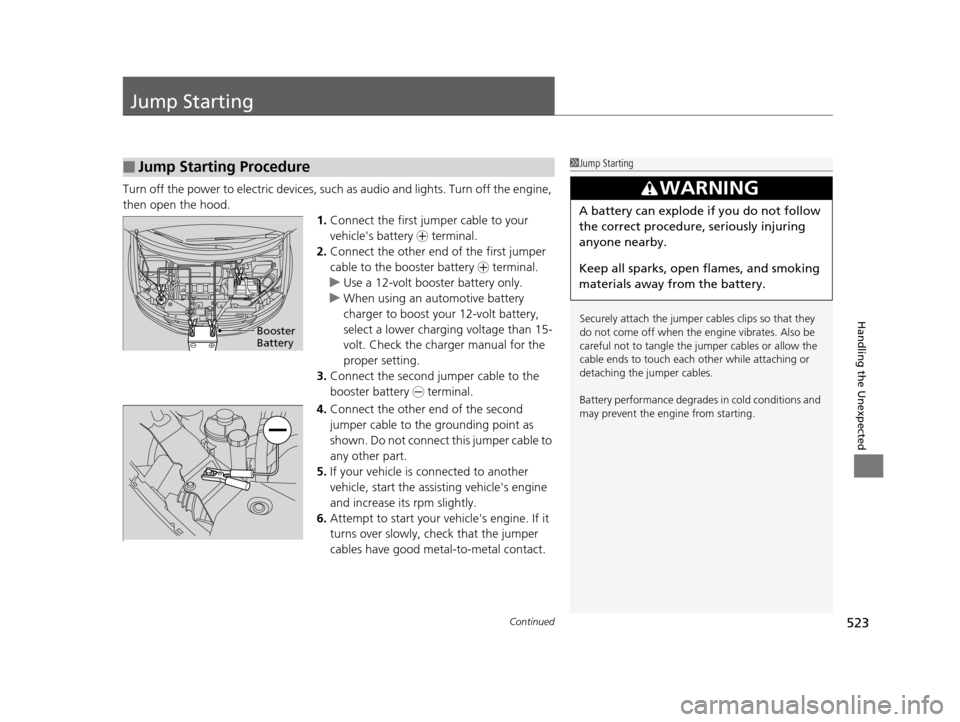
Turn off the power to electric devices, such as audio and lights. Turn off the engine,
then open the hood. 1.Connect the first jumper cable to your
vehicle's battery + terminal.
2. Connect the other end of the first jumper
cable to the booster battery + terminal.
u Use a 12-volt booster battery only.
u When using an automotive battery
charger to boost your 12-volt battery,
select a lower charging voltage than 15-
volt. Check the charger manual for the
proper setting.
3. Connect the second jumper cable to the
booster battery - terminal.
4. Connect the other end of the second
jumper cable to the grounding point as
shown. Do not connect this jumper cable to
any other part.
5. If your vehicle is connected to another
vehicle, start the assisting vehicle's engine
and increase its rpm slightly.
6. Attempt to start your ve hicle's engine. If it
turns over slowly, check that the jumper
cables have good metal-to-metal contact.
■Jump Starting Procedure1 Jump Starting
Securely attach the jumper cables clips so that they
do not come off when the e ngine vibrates. Also be
careful not to tangle the ju mper cables or allow the
cable ends to touch each other while attaching or
detaching the jumper cables.
Battery performance degrades in cold conditions and
may prevent the engi ne from starting.
3WARNING
A battery can explode if you do not follow
the correct procedure, seriously injuring
anyone nearby.
Keep all sparks, open flames, and smoking
materials away from the battery.
Booster
Battery
17 US ODYSSEY (KA KC)-31TK86600.book 523 ページ 2016年10月24日 月曜日 午後4時2分
Page 525 of 565
524
uuJump Starting u
Handling the Unexpected
Once your vehicle's engine has started, remove the jumper cabl es in the following
order.
1. Disconnect the jumper cable from your vehicle's ground.
2. Disconnect the other end of the jumper cable from the booster battery -
terminal.
3. Disconnect the jumper cable from your vehicle's battery + terminal.
4. Disconnect the other end of the jumper cable from the booster battery +
terminal.
Have your vehicle inspected by a n earby service station or a dealer.
■What to Do After the Engine Starts
17 US ODYSSEY (KA KC)-31TK86600.book 524 ページ 2016年10月24日 月曜日 午後4時2分
Page 528 of 565
527
uuOverheating uHow to Handle Overheating
Handling the Unexpected
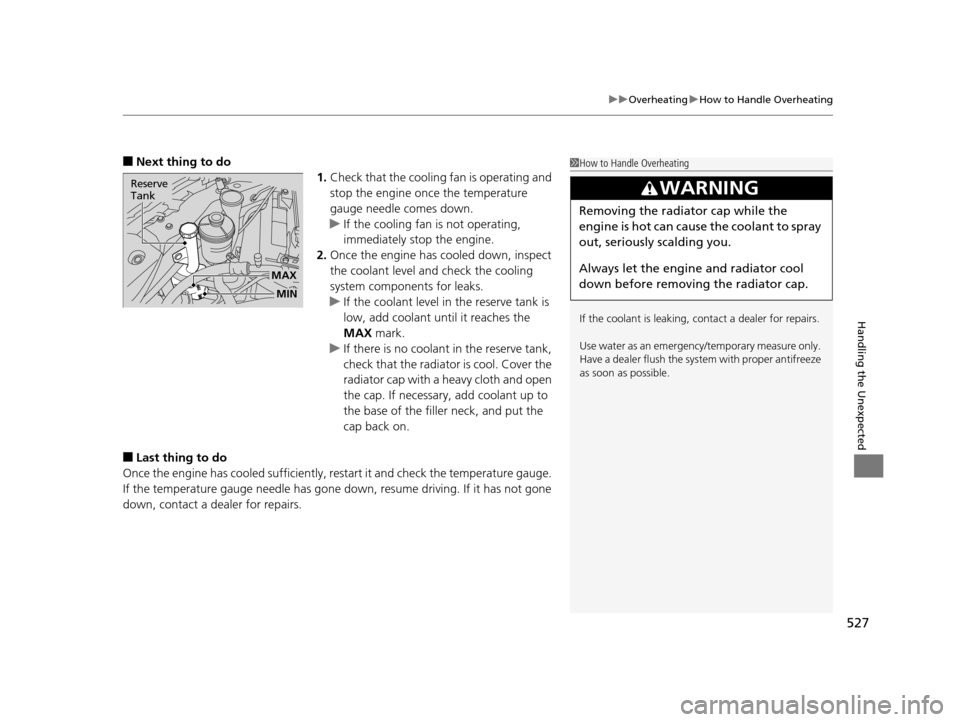
■Next thing to do
1.Check that the cooling fan is operating and
stop the engine once the temperature
gauge needle comes down.
u If the cooling fan is not operating,
immediately stop the engine.
2. Once the engine has cooled down, inspect
the coolant level and check the cooling
system components for leaks.
u If the coolant level in the reserve tank is
low, add coolant until it reaches the
MAX mark.
u If there is no coolant in the reserve tank,
check that the radiator is cool. Cover the
radiator cap with a heavy cloth and open
the cap. If necessary, add coolant up to
the base of the filler neck, and put the
cap back on.
■Last thing to do
Once the engine has cooled sufficiently, re start it and check the temperature gauge.
If the temperature gauge needle has gone dow n, resume driving. If it has not gone
down, contact a dealer for repairs.
1 How to Handle Overheating
If the coolant is leaking, contact a dealer for repairs.
Use water as an emergency/temporary measure only.
Have a dealer flush the system with proper antifreeze
as soon as possible.
3WARNING
Removing the radiator cap while the
engine is hot can cause the coolant to spray
out, seriously scalding you.
Always let the engine and radiator cool
down before removing the radiator cap.
MAX
Reserve
Tank
MIN
17 US ODYSSEY (KA KC)-31TK86600.book 527 ページ 2016年10月24日 月曜日 午後4時2分