Vehicle menu HONDA ODYSSEY 2017 RC1-RC2 / 5.G Owners Manual
[x] Cancel search | Manufacturer: HONDA, Model Year: 2017, Model line: ODYSSEY, Model: HONDA ODYSSEY 2017 RC1-RC2 / 5.GPages: 565, PDF Size: 33.13 MB
Page 90 of 565
89
uuIndicators uMulti-Information Display Warn ing and Information Messages*
Continued
Instrument Panel
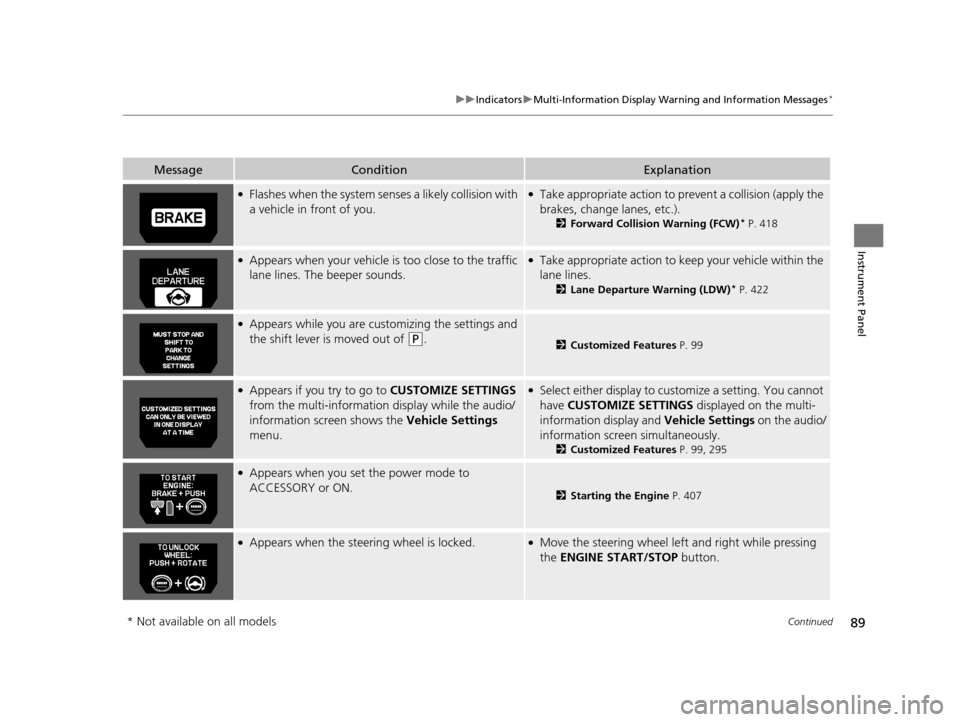
MessageConditionExplanation
●Flashes when the system senses a likely collision with
a vehicle in front of you.●Take appropriate action to prev ent a collision (apply the
brakes, change lanes, etc.).
2 Forward Collision Warning (FCW)* P. 418
●Appears when your vehicle is too close to the traffic
lane lines. The beeper sounds.●Take appropriate action to keep your vehicle within the
lane lines.
2 Lane Departure Warning (LDW)* P. 422
●Appears while you are customizing the settings and
the shift lever is moved out of
(P.2Customized Features P. 99
●Appears if you try to go to CUSTOMIZE SETTINGS
from the multi-information display while the audio/
information screen shows the Vehicle Settings
menu.●Select either display to customize a setting. You cannot
have CUSTOMIZE SETTINGS displayed on the multi-
information display and Vehicle Settings on the audio/
information screen simultaneously.
2 Customized Features P. 99, 295
●Appears when you set the power mode to
ACCESSORY or ON.
2Starting the Engine P. 407
●Appears when the steering wheel is locked.●Move the steering wheel left and right while pressing
the ENGINE START/STOP button.
* Not available on all models
17 US ODYSSEY (KA KC)-31TK86600.book 89 ページ 2016年10月24日 月曜日 午後4時2分
Page 100 of 565
Continued99
uuGauges and Displays uMulti-Information Display*
Instrument Panel
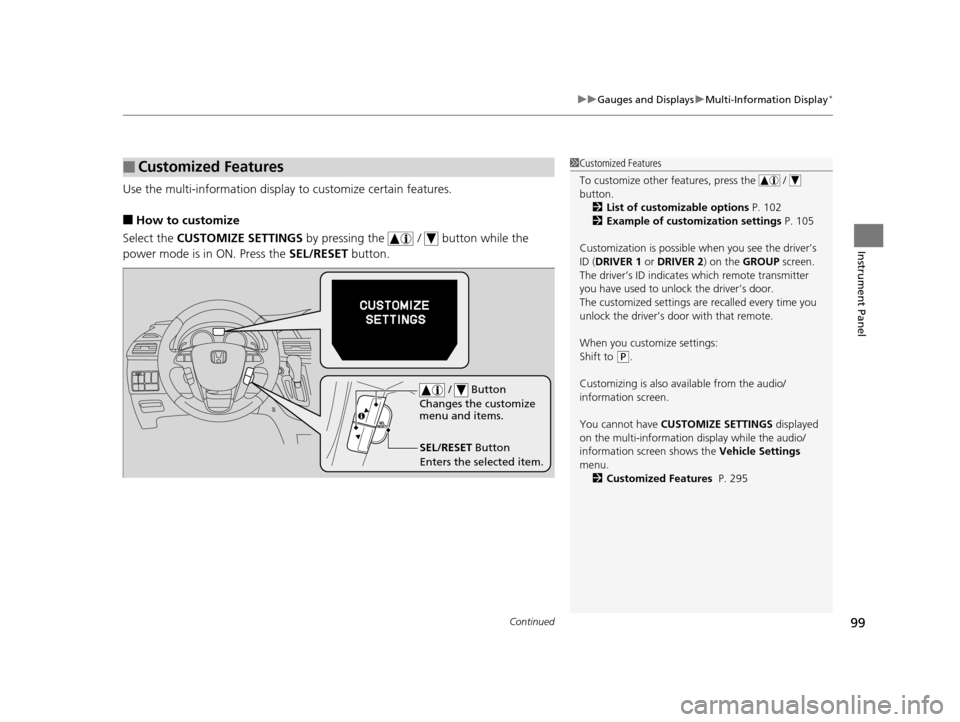
Use the multi-information display to customize certain features.
■How to customize
Select the CUSTOMIZE SETTINGS by pressing the / button while the
power mode is in ON. Press the SEL/RESET button.
■Customized Features1Customized Features
To customize other features, press the /
button.
2 List of customizable options P. 102
2 Example of customization settings P. 105
Customization is possible when you see the driver’s
ID ( DRIVER 1 or DRIVER 2) on the GROUP screen.
The driver’s ID indicates which remote transmitter
you have used to unlock the driver’s door.
The customized settings are recalled every time you
unlock the driver’s door with that remote.
When you customize settings:
Shift to
( P.
Customizing is also av ailable from the audio/
information screen.
You cannot have CUSTOMIZE SETTINGS displayed
on the multi-information display while the audio/
information screen shows the Vehicle Settings
menu. 2 Customized Features P. 295
SEL/RESET Button
Enters the selected item. / Button
Changes the customize
menu and items.
17 US ODYSSEY (KA KC)-31TK86600.book 99 ページ 2016年10月24日 月曜日 午後4時2分
Page 208 of 565
207
uuAudio System uUSB Port
Features
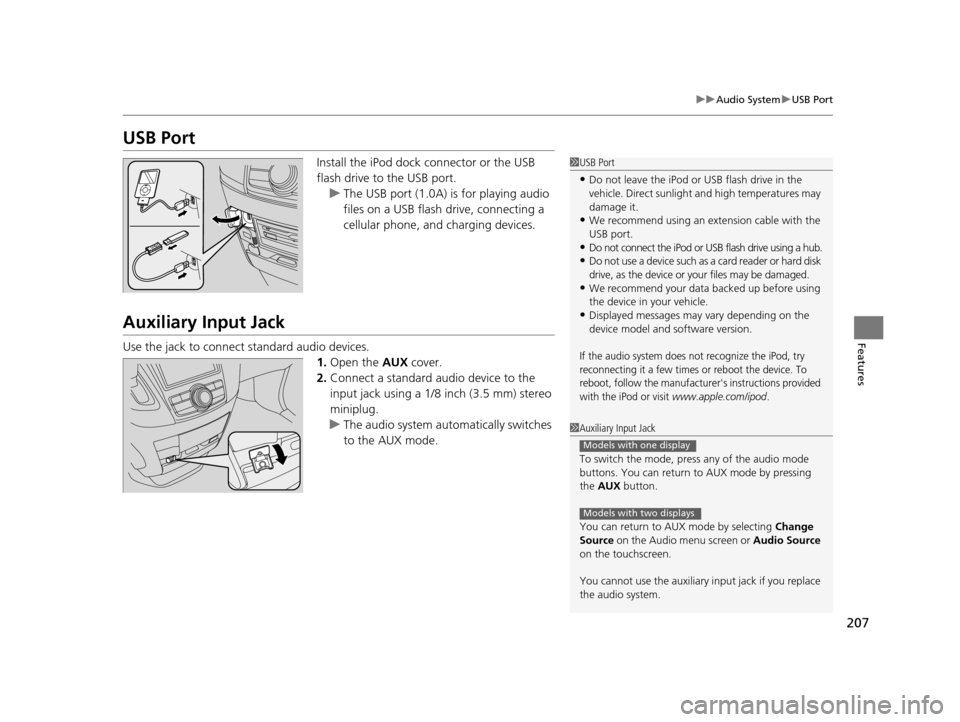
USB Port
Install the iPod dock connector or the USB
flash drive to the USB port.
u The USB port (1.0A) is for playing audio
files on a USB flash drive, connecting a
cellular phone, and charging devices.
Auxiliary Input Jack
Use the jack to connect standard audio devices.
1.Open the AUX cover.
2. Connect a standard audio device to the
input jack using a 1/8 inch (3.5 mm) stereo
miniplug.
u The audio system auto matically switches
to the AUX mode.
1 USB Port
•Do not leave the iPod or USB flash drive in the
vehicle. Direct sunlight and high temperatures may
damage it.
•We recommend using an extension cable with the
USB port.
•Do not connect the iPod or USB flash drive using a hub.
•Do not use a device such as a card reader or hard disk
drive, as the device or your files may be damaged.
•We recommend your data backed up before using
the device in your vehicle.
•Displayed messages may vary depending on the
device model and software version.
If the audio system does not recognize the iPod, try
reconnecting it a few times or reboot the device. To
reboot, follow the manufacturer's instructions provided
with the iPod or visit
www.apple.com/ipod.
1 Auxiliary Input Jack
To switch the mode, pres s any of the audio mode
buttons. You can return to AUX mode by pressing
the AUX button.
You can return to AUX mode by selecting Change
Source on the Audio menu screen or Audio Source
on the touchscreen.
You cannot use the auxiliary input jack if you replace
the audio system.
Models with one display
Models with two displays
17 US ODYSSEY (KA KC)-31TK86600.book 207 ページ 2016年10月24日 月曜日 午後4時2分
Page 226 of 565
Continued225
uuAudio System Basic Operation uPlaying an iPod
Features
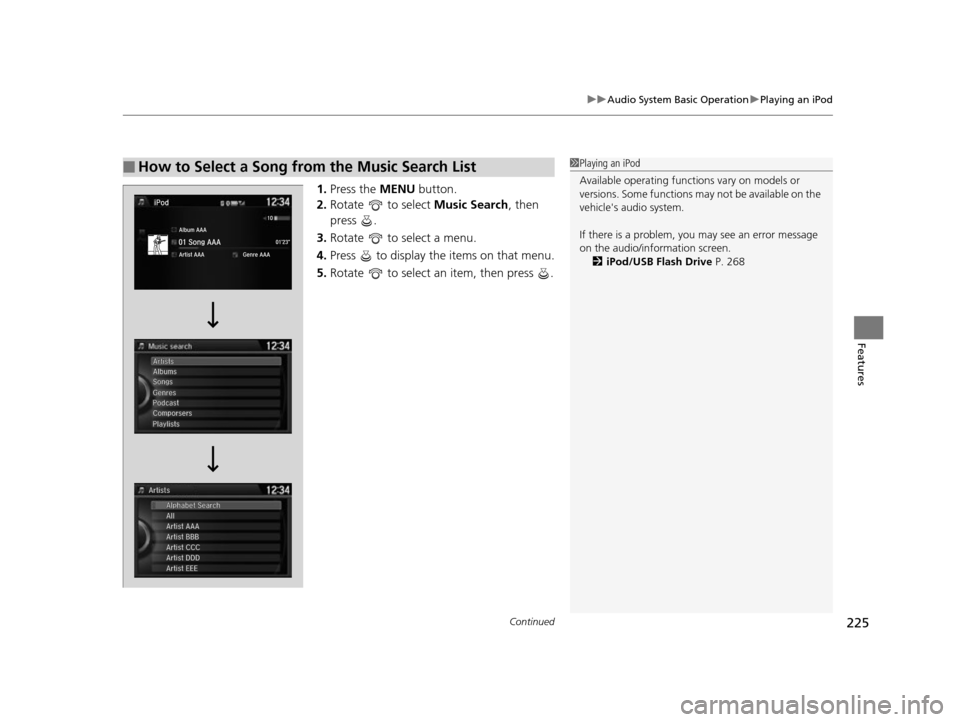
1. Press the MENU button.
2. Rotate to select Music Search, then
press .
3. Rotate to select a menu.
4. Press to display the items on that menu.
5. Rotate to select an item, then press .
■How to Select a Song from the Music Search List1Playing an iPod
Available operating functi ons vary on models or
versions. Some functions ma y not be available on the
vehicle's audio system.
If there is a problem, you may see an error message
on the audio/information screen. 2 iPod/USB Flash Drive P. 268
17 US ODYSSEY (KA KC)-31TK86600.book 225 ページ 2016年10月24日 月曜日 午後4時2分
Page 229 of 565
uuAudio System Basic Operation uPlaying Internet Radio
228
Features
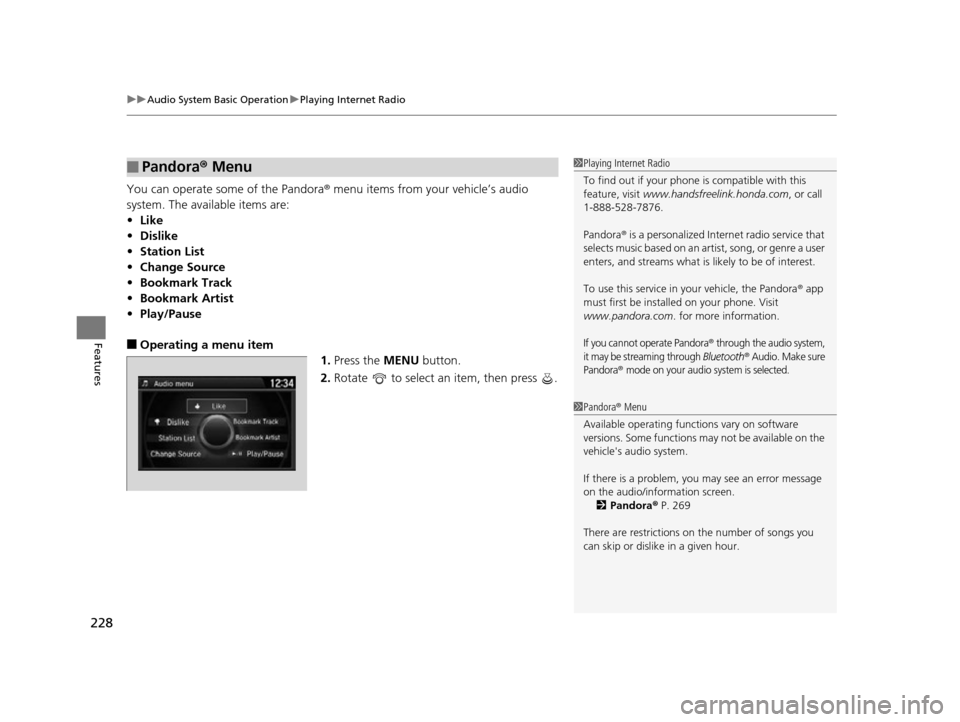
You can operate some of the Pandora® menu items from your vehicle’s audio
system. The available items are:
• Like
• Dislike
• Station List
• Change Source
• Bookmark Track
• Bookmark Artist
• Play/Pause
■Operating a menu item
1.Press the MENU button.
2. Rotate to select an item, then press .
■Pandora® Menu1Playing Internet Radio
To find out if your phone is compatible with this
feature, visit www.handsfreelink.honda.com , or call
1-888-528-7876.
Pandora ® is a personalized Internet radio service that
selects music based on an artist, song, or genre a user
enters, and streams what is likely to be of interest.
To use this service in your vehicle, the Pandora ® app
must first be installed on your phone. Visit
www.pandora.com . for more information.
If you cannot operate Pandora® through the audio system,
it may be streaming through Bluetooth® Audio. Make sure
Pandora
® mode on your audio system is selected.
1 Pandora ® Menu
Available operating functi ons vary on software
versions. Some functions ma y not be available on the
vehicle's audio system.
If there is a problem, you may see an error message
on the audio/information screen.
2 Pandora ® P. 269
There are restrictions on the number of songs you
can skip or dislike in a given hour.
17 US ODYSSEY (KA KC)-31TK86600.book 228 ページ 2016年10月24日 月曜日 午後4時2分
Page 233 of 565
232
uuAudio System Basic Operation uPlaying Bluetooth ® Audio
Features
Playing Bluetooth® Audio
Your audio system allows you to listen to music from your Bluetooth-compatible
phone.
This function is available when the phone is paired and connected to the vehicle's
Bluetooth ® HandsFreeLink ® (HFL) system.
2 Phone Setup P. 334
1Playing Bluetooth ® Audio
Not all Bluetooth -enabled phones with streaming
audio capabilities are compatible with the system.
For a list of compatible phones:
•U.S.: Visit www.handsfreelink.honda.com , or call
1-888-528-7876.
•Canada: Visit www.handsfreelink.ca , or call 1-888-
528-7876.
In some states, it may be il legal to perform some data
device functions while driving.
If more than one phone is paired to the HFL system,
there will be a delay before the system begins to play.
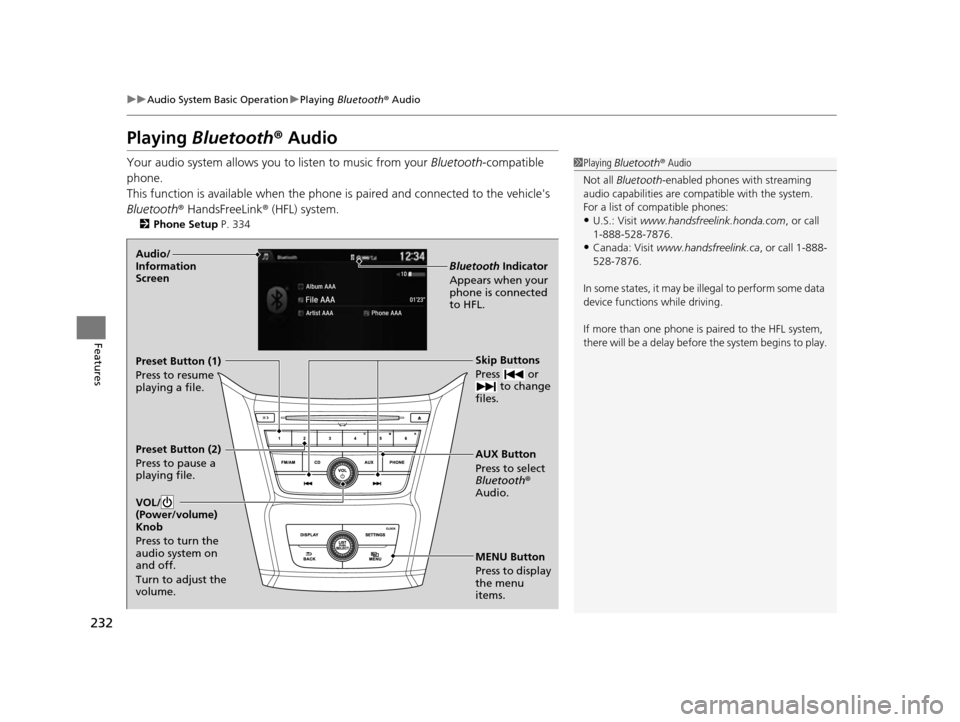
MENU Button
Press to display
the menu
items. AUX Button
Press to select
Bluetooth®
Audio. Skip Buttons
Press or to change
files.
Bluetooth Indicator
Appears when your
phone is connected
to HFL.
VOL/
(Power/volume)
Knob
Press to turn the
audio system on
and off.
Turn to adjust the
volume.Audio/
Information
Screen
Preset Button (1)
Press to resume
playing a file.
Preset Button (2)
Press to pause a
playing file.
17 US ODYSSEY (KA KC)-31TK86600.book 232 ページ 2016年10月24日 月曜日 午後4時2分
Page 258 of 565
Continued257
uuAudio System Basic Operation uPlaying an iPod
Features
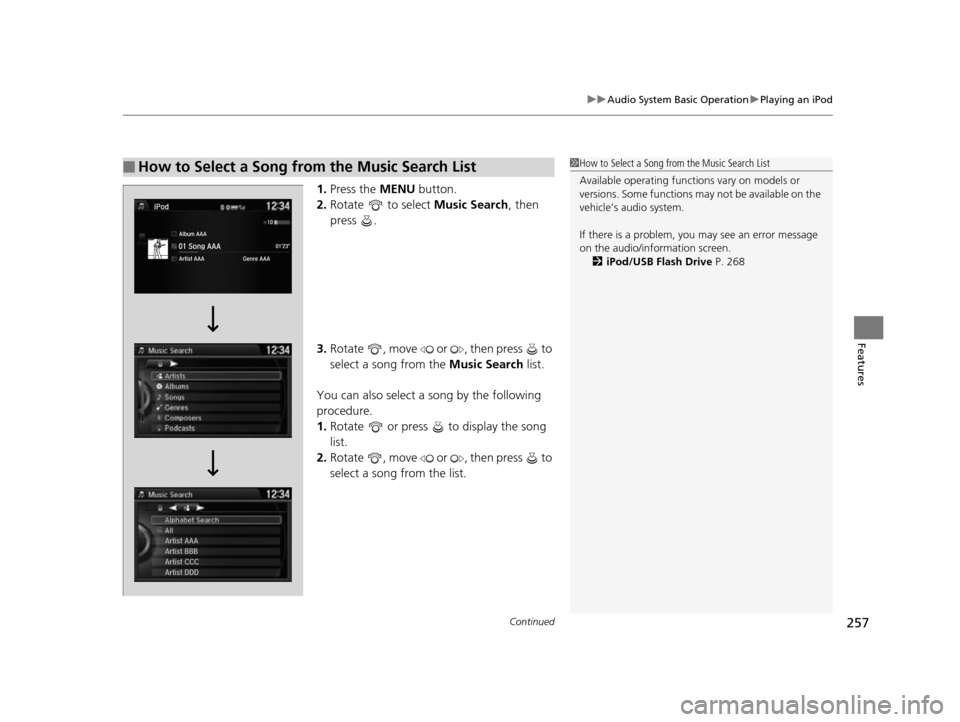
1. Press the MENU button.
2. Rotate to select Music Search, then
press .
3. Rotate , move or , then press to
select a song from the Music Search list.
You can also select a song by the following
procedure.
1. Rotate or press to display the song
list.
2. Rotate , move or , then press to
select a song from the list.
■How to Select a Song from the Music Search List1How to Select a Song from the Music Search List
Available operating functi ons vary on models or
versions. Some functions ma y not be available on the
vehicle’s audio system.
If there is a problem, you may see an error message
on the audio/information screen. 2 iPod/USB Flash Drive P. 268
17 US ODYSSEY (KA KC)-31TK86600.book 257 ページ 2016年10月24日 月曜日 午後4時2分
Page 261 of 565
uuAudio System Basic Operation uPlaying Internet Radio
260
Features
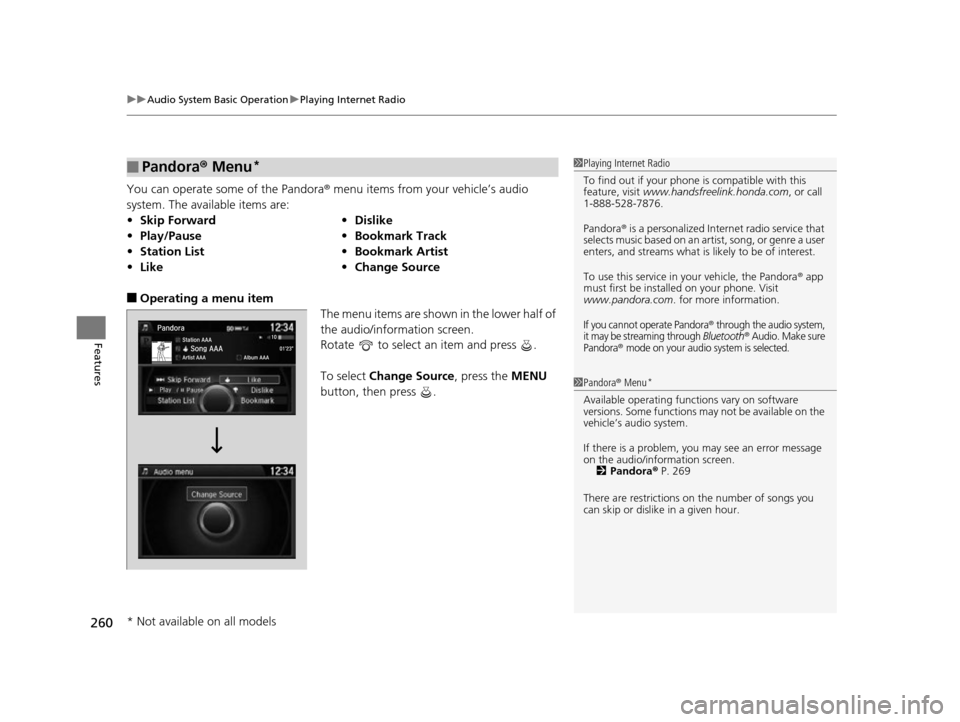
You can operate some of the Pandora® menu items from your vehicle’s audio
system. The available items are:
■Operating a menu item The menu items are shown in the lower half of
the audio/information screen.
Rotate to select an item and press .
To select Change Source, press the MENU
button, then press .
■Pandora® Menu*
•Skip Forward •Dislike
• Play/Pause •Bookmark Track
• Station List •Bookmark Artist
• Like •Change Source
1Playing Internet Radio
To find out if your phone is compatible with this
feature, visit www.handsfreelink.honda.com , or call
1-888-528-7876.
Pandora ® is a personalized Internet radio service that
selects music based on an artist, song, or genre a user
enters, and streams what is likely to be of interest.
To use this service in your vehicle, the Pandora ® app
must first be installed on your phone. Visit
www.pandora.com . for more information.
If you cannot operate Pandora® through the audio system,
it may be streaming through Bluetooth® Audio. Make sure
Pandora® mode on your audio system is selected.
1 Pandora ® Menu*
Available operating functi ons vary on software
versions. Some functions ma y not be available on the
vehicle’s audio system.
If there is a problem, you may see an error message
on the audio/information screen.
2 Pandora ® P. 269
There are restrictions on the number of songs you
can skip or dislike in a given hour.
* Not available on all models
17 US ODYSSEY (KA KC)-31TK86600.book 260 ページ 2016年10月24日 月曜日 午後4時2分
Page 262 of 565
261
uuAudio System Basic Operation uPlaying Internet Radio
Features
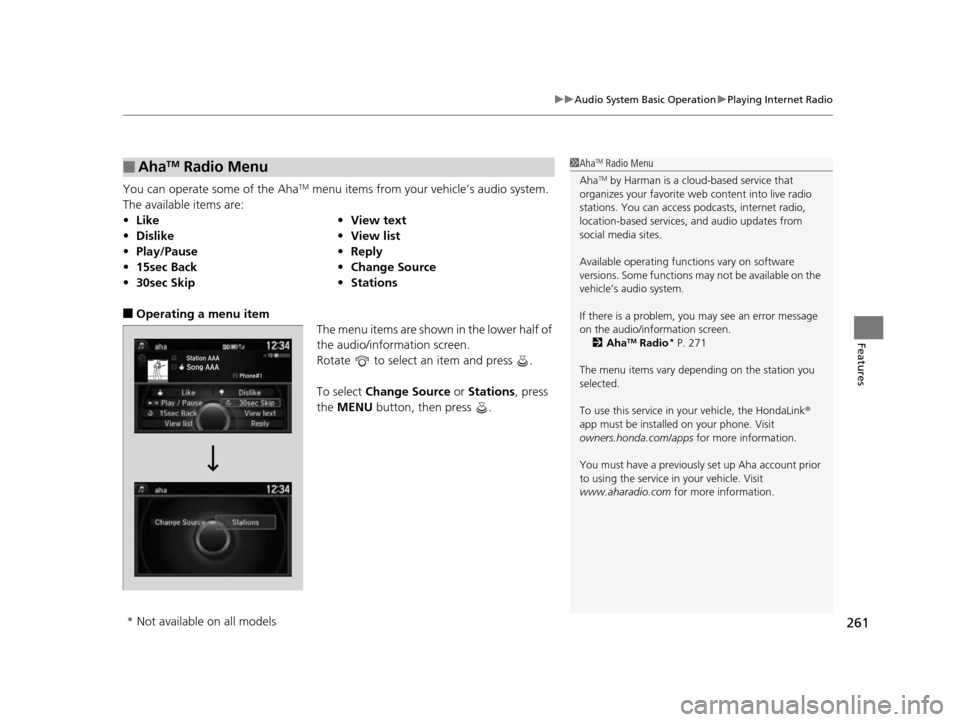
You can operate some of the AhaTM menu items from your vehicle’s audio system.
The available items are:
■Operating a menu item The menu items are shown in the lower half of
the audio/information screen.
Rotate to select an item and press .
To select Change Source or Stations , press
the MENU button, then press .
■AhaTM Radio Menu
•Like •View text
• Dislike •View list
• Play/Pause •Reply
• 15sec Back •Change Source
• 30sec Skip •Stations
1AhaTM Radio Menu
Aha
TM by Harman is a clou d-based service that
organizes your favorite we b content into live radio
stations. You can access podcasts, internet radio,
location-based services , and audio updates from
social media sites.
Available operating functi ons vary on software
versions. Some functions ma y not be available on the
vehicle’s audio system.
If there is a problem, you may see an error message
on the audio/information screen. 2 Aha
TM Radio* P. 271
The menu items vary depending on the station you
selected.
To use this service in y our vehicle, the HondaLink ®
app must be installed on your phone. Visit
owners.honda.com/apps for more information.
You must have a previously set up Aha account prior
to using the service in your vehicle. Visit
www.aharadio.com for more information.
* Not available on all models
17 US ODYSSEY (KA KC)-31TK86600.book 261 ページ 2016年10月24日 月曜日 午後4時2分
Page 266 of 565
265
uuAudio System Basic Operation uPlaying Bluetooth ® Audio
Continued
Features
Playing Bluetooth ® Audio
Your audio system allows you to listen to music from your Bluetooth-compatible
phone.
This function is available when the phone is paired an d connected to the vehicle’s
Bluetooth ® HandsFreeLink ® (HFL) system.
2Phone Setup P. 366
1Playing Bluetooth ® Audio
Not all Bluetooth -enabled phones with streaming
audio capabilities are compatible with the system.
For a list of compatible phones:
•U.S.: Visit www.handsfreelink.honda.com , or call
1-888-528-7876.
•Canada: Visit www.handsfreelink.ca , or call 1-888-
528-7876.
In some states, it may be il legal to perform some data
device functions while driving.
If more than one phone is paired to the HFL system,
there will be a delay before the system begins to play.
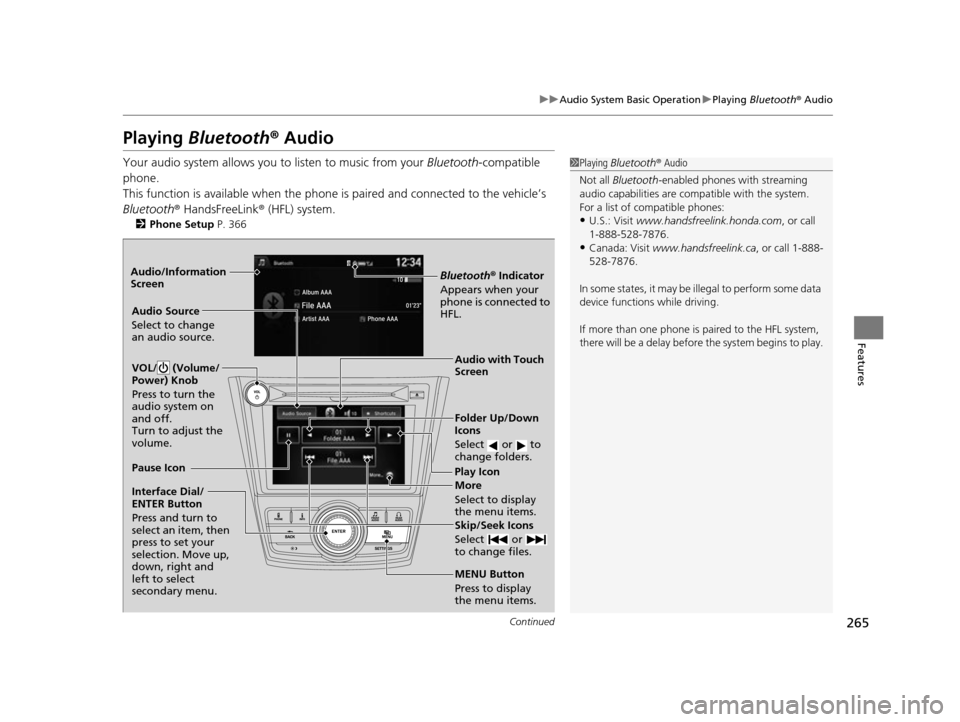
Bluetooth® Indicator
Appears when your
phone is connected to
HFL.
Play Icon
Pause Icon
More
Select to display
the menu items.
Audio Source
Select to change
an audio source.
VOL/ (Volume/
Power) Knob
Press to turn the
audio system on
and off.
Turn to adjust the
volume.
Interface Dial/
ENTER Button
Press and turn to
select an item, then
press to set your
selection. Move up,
down, right and
left to select
secondary menu.
Skip/Seek Icons
Select or
to change files.
MENU Button
Press to display
the menu items. Folder Up/Down
Icons
Select or to
change folders.
Audio with Touch
Screen
Audio/Information
Screen
17 US ODYSSEY (KA KC)-31TK86600.book 265 ページ 2016年10月24日 月曜日
午後4時2分