clock setting HONDA ODYSSEY 2017 RC1-RC2 / 5.G Owners Manual
[x] Cancel search | Manufacturer: HONDA, Model Year: 2017, Model line: ODYSSEY, Model: HONDA ODYSSEY 2017 RC1-RC2 / 5.GPages: 565, PDF Size: 33.13 MB
Page 109 of 565
108
Controls
Clock
Adjusting the Clock
You can adjust the time in the clock display with the ignition switch is in ON (w *1.
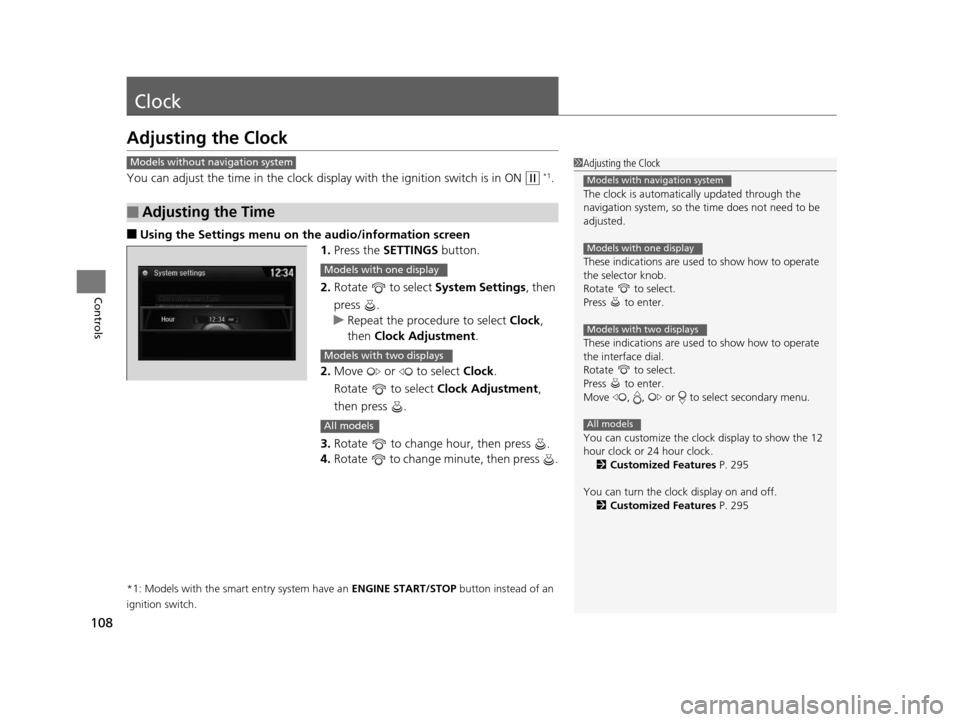
■Using the Settings menu on the audio/information screen
1. Press the SETTINGS button.
2. Rotate to select System Settings, then
press .
u Repeat the procedure to select Clock,
then Clock Adjustment .
2. Move or to select Clock.
Rotate to select Clock Adjustment,
then press .
3. Rotate to change hour, then press .
4. Rotate to change minute, then press .
*1: Models with the smart entry system have an ENGINE START/STOP button instead of an
ignition switch.
■Adjusting the Time
1 Adjusting the Clock
The clock is automatica lly updated through the
navigation system, so the ti me does not need to be
adjusted.
These indications are used to show how to operate
the selector knob.
Rotate to select.
Press to enter.
These indications are used to show how to operate
the interface dial.
Rotate to select.
Press to enter.
Move , , or to select secondary menu.
You can customize the clock display to show the 12
hour clock or 24 hour clock.
2 Customized Features P. 295
You can turn the clock display on and off. 2 Customized Features P. 295
Models with navigation system
Models with one display
Models with two displays
All models
Models without navigation system
Models with one display
Models with two displays
All models
17 US ODYSSEY (KA KC)-31TK86600.book 108 ページ 2016年10月24日 月曜日 午後4時2分
Page 110 of 565
109
uuClock uAdjusting the Clock
Controls
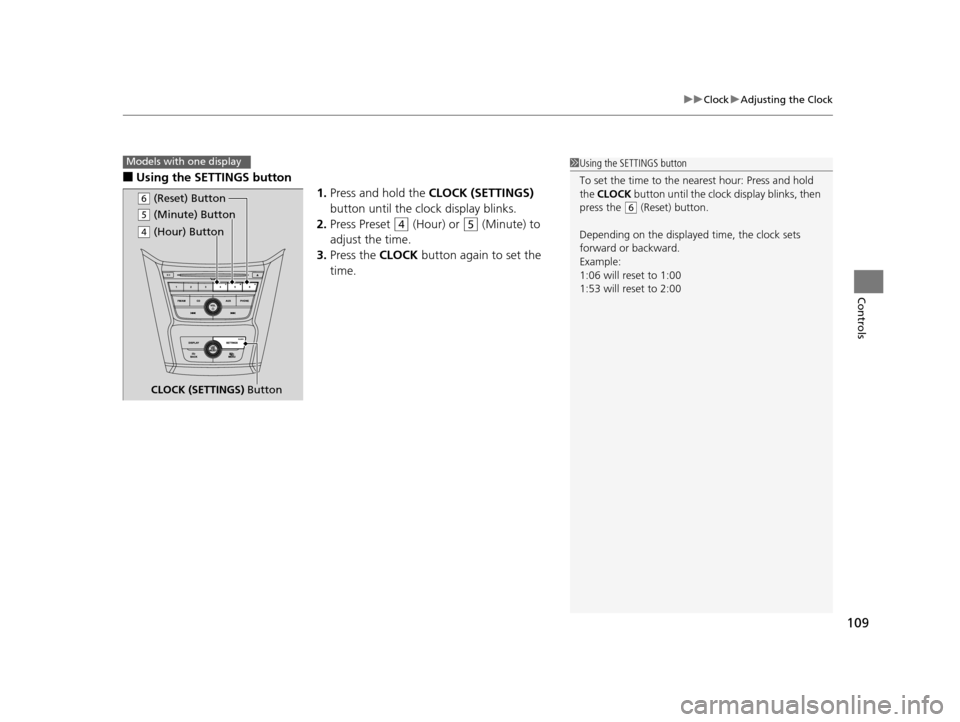
■Using the SETTINGS button
1.Press and hold the CLOCK (SETTINGS)
button until the clock display blinks.
2. Press Preset
(4 (Hour) or (5 (Minute) to
adjust the time.
3. Press the CLOCK button again to set the
time.
1 Using the SETTINGS button
To set the time to the nearest hour: Press and hold
the CLOCK button until the clock display blinks, then
press the
( 6 (Reset) button.
Depending on the displayed time, the clock sets
forward or backward.
Example:
1:06 will reset to 1:00
1:53 will reset to 2:00
Models with one display
( 5 (Minute) Button
CLOCK (SETTINGS) Button
(6 (Reset) Button
(4 (Hour) Button
17 US ODYSSEY (KA KC)-31TK86600.book 109 ページ 2016年10月24日 月曜日 午後4時2分
Page 215 of 565
uuAudio System Basic Operation uAudio/Information Screen
214
Features
You can change, store, and delete the wa llpaper on the audio/information screen.
■Import wallpaper
You can import up to three images, one at a time, for wallpaper from a USB flash
drive.
1.Connect the USB flash drive to the USB
port.
2 USB Port P. 207
2.Press the SETTINGS button.
3. Rotate to select System Settings, then
press .
u Repeat the procedure to select Clock,
Clock/Wallpaper Type , then
Wallpaper .
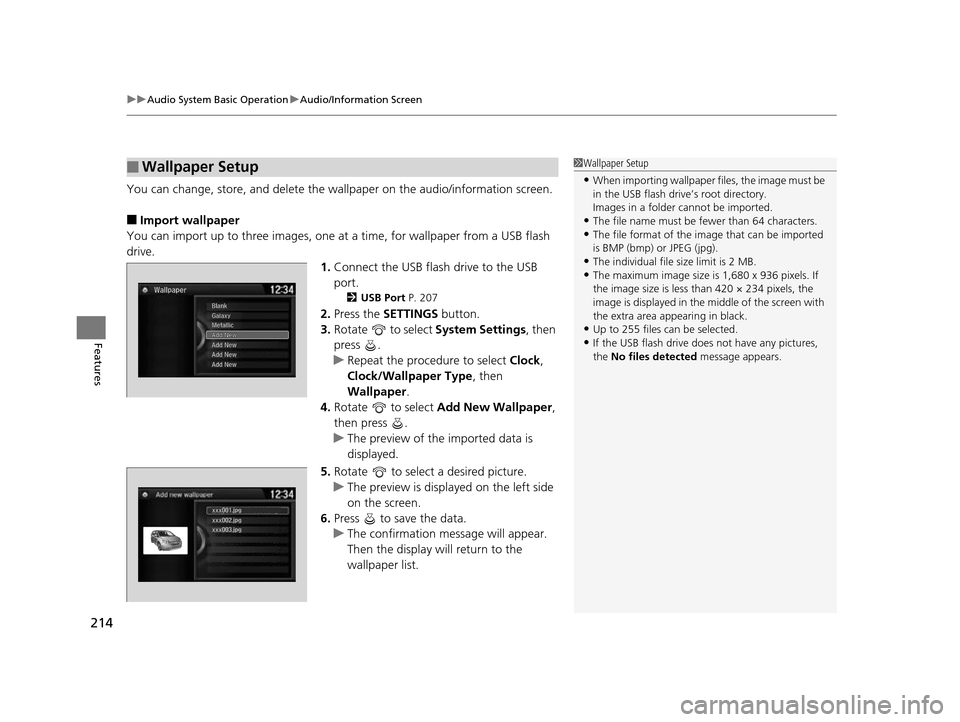
4. Rotate to select Add New Wallpaper ,
then press .
u The preview of the imported data is
displayed.
5. Rotate to select a desired picture.
u The preview is displayed on the left side
on the screen.
6. Press to save the data.
u The confirmation message will appear.
Then the display will return to the
wallpaper list.
■Wallpaper Setup1Wallpaper Setup
•When importing wallpaper files, the image must be
in the USB flash drive’s root directory.
Images in a folder cannot be imported.
•The file name must be fewer than 64 characters.•The file format of the im age that can be imported
is BMP (bmp) or JPEG (jpg).
•The individual file size limit is 2 MB.•The maximum image size is 1,680 x 936 pixels. If
the image size is less than 420 × 234 pixels, the
image is displayed in the middle of the screen with
the extra area appearing in black.
•Up to 255 files can be selected.
•If the USB flash drive doe s not have any pictures,
the No files detected message appears.
xxx001.jpg
xxx002.jpg
xxx003.jpg
17 US ODYSSEY (KA KC)-31TK86600.book 214 ページ 2016年10月24日 月曜日 午後4時2分
Page 216 of 565
215
uuAudio System Basic Operation uAudio/Information Screen
Features
■Select wallpaper
1. Press the SETTINGS button.
2. Rotate to select System Settings, then press .
u Repeat the procedure to select Clock , Clock/Wallpaper Type, then
Wallpaper .
u The screen changes to the wallpaper list.
3. Rotate to select a desired wallpaper, then press .
u The pop-up menu appears on the screen.
4. Rotate to select Set, then press .
■Delete wallpaper
1. Press the SETTINGS button.
2. Rotate to select System Settings, then press .
u Repeat the procedure to select Clock , Clock/Wallpaper Type, then
Wallpaper .
u The screen changes to the wallpaper list.
3. Rotate to select a wallpaper that you want to delete, then press .
u The pop-up menu appears on the screen.
4. Rotate to select Delete, then press .
u The confirmation me ssage will appear.
5. Rotate to select OK, then press to delete completely.
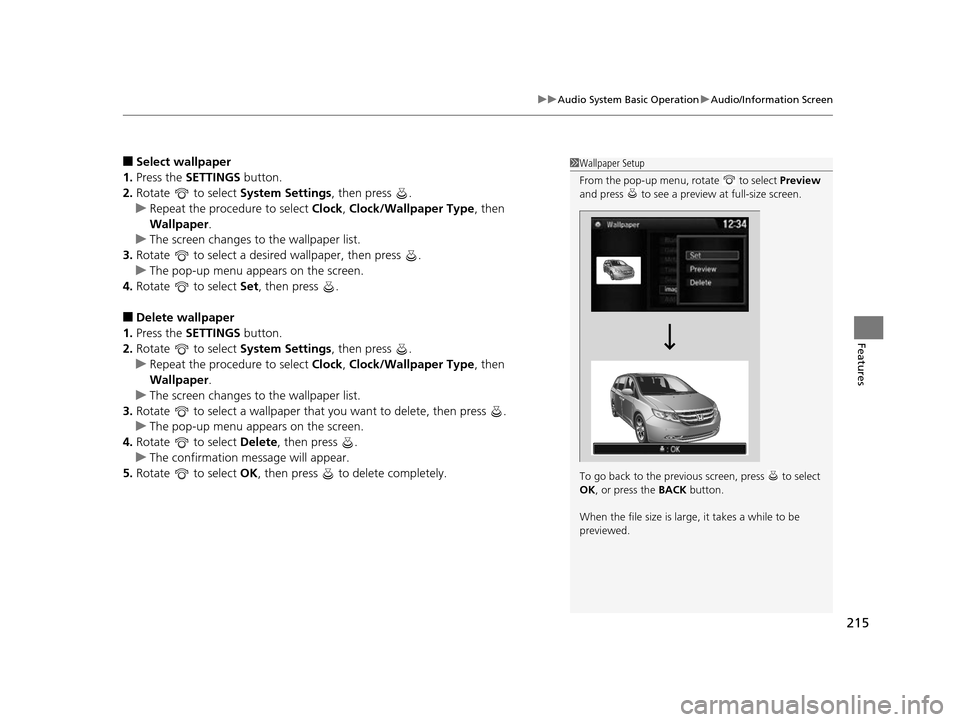
1Wallpaper Setup
From the pop-up menu, rotate to select Preview
and press to see a preview at full-size screen.
To go back to the previous screen, press to select
OK , or press the BACK button.
When the file size is large, it takes a while to be
previewed.
17 US ODYSSEY (KA KC)-31TK86600.book 215 ページ 2016年10月24日 月曜日 午後4時2分
Page 242 of 565
Continued241
uuAudio System Basic Operation uAudio/Information Screen
Features
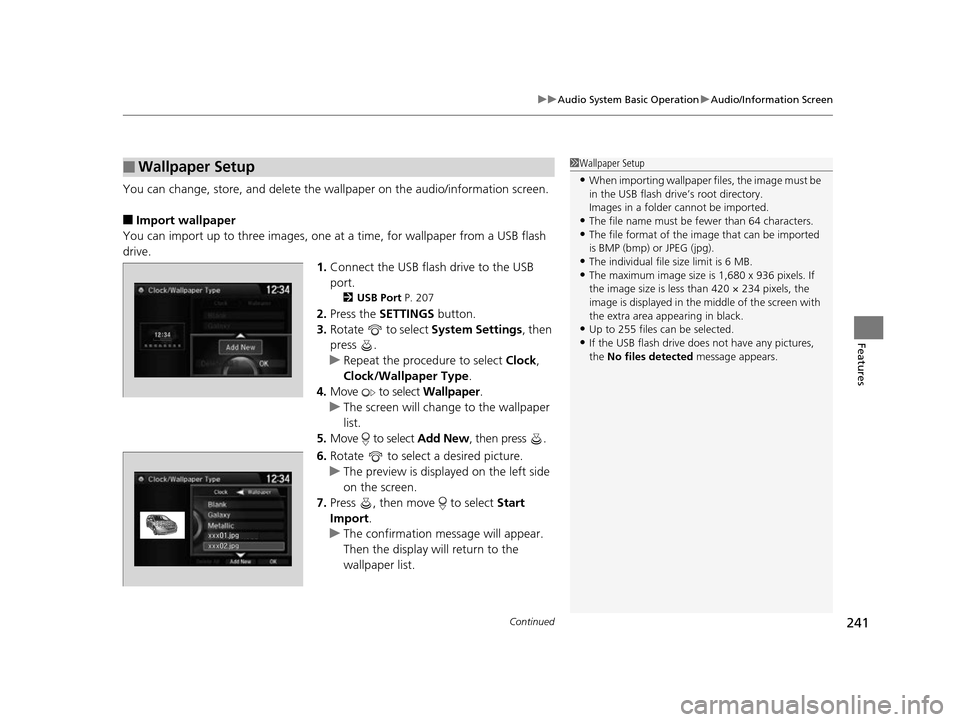
You can change, store, and delete the wa llpaper on the audio/information screen.
■Import wallpaper
You can import up to three images, one at a time, for wallpaper from a USB flash
drive.
1.Connect the USB flash drive to the USB
port.
2 USB Port P. 207
2.Press the SETTINGS button.
3. Rotate to select System Settings, then
press .
u Repeat the procedure to select Clock,
Clock/Wallpaper Type .
4. Move to select Wallpaper.
u The screen will change to the wallpaper
list.
5. Move to select Add New, then press .
6. Rotate to select a desired picture.
u The preview is displayed on the left side
on the screen.
7. Press , then move to select Start
Import.
u The confirmation message will appear.
Then the display will return to the
wallpaper list.
■Wallpaper Setup1Wallpaper Setup
•When importing wallpaper files, the image must be
in the USB flash drive’s root directory.
Images in a folder cannot be imported.
•The file name must be fewer than 64 characters.•The file format of the im age that can be imported
is BMP (bmp) or JPEG (jpg).
•The individual file size limit is 6 MB.•The maximum image size is 1,680 x 936 pixels. If
the image size is less than 420 × 234 pixels, the
image is displayed in the middle of the screen with
the extra area appearing in black.
•Up to 255 files can be selected.
•If the USB flash drive doe s not have any pictures,
the No files detected message appears.
17 US ODYSSEY (KA KC)-31TK86600.book 241 ページ 2016年10月24日 月曜日 午後4時2分
Page 243 of 565
uuAudio System Basic Operation uAudio/Information Screen
242
Features
■Select wallpaper
1. Press the SETTINGS button.
2. Rotate to select System Settings, then press .
u Repeat the procedure to select Clock/Wallpaper Type.
3. Move to select Wallpaper.
u The screen changes to the wallpaper list.
4. Rotate to select a desired wallpaper.
u The preview is displayed on the left side on the screen.
5. Press .
u The pop-up menu appears on the screen.
6. Rotate to select Set, then press .
u The display will return to the wallpaper list.
■Delete wallpaper
1. Press the SETTINGS button.
2. Rotate to select System Settings, then press .
u Repeat the procedure to select Clock/Wallpaper Type.
3. Move to select Wallpaper.
u The screen changes to the wallpaper list.
4. Rotate to select a wallpaper that you want to delete, then press .
u The preview is displayed on the left side on the screen.
5. Press .
u The pop-up menu appears on the screen.
6. Rotate to select Delete, then press .
u The confirmation message will appear.
7. Rotate to select Yes, then press to delete completely.
u The display will return to the wallpaper list.
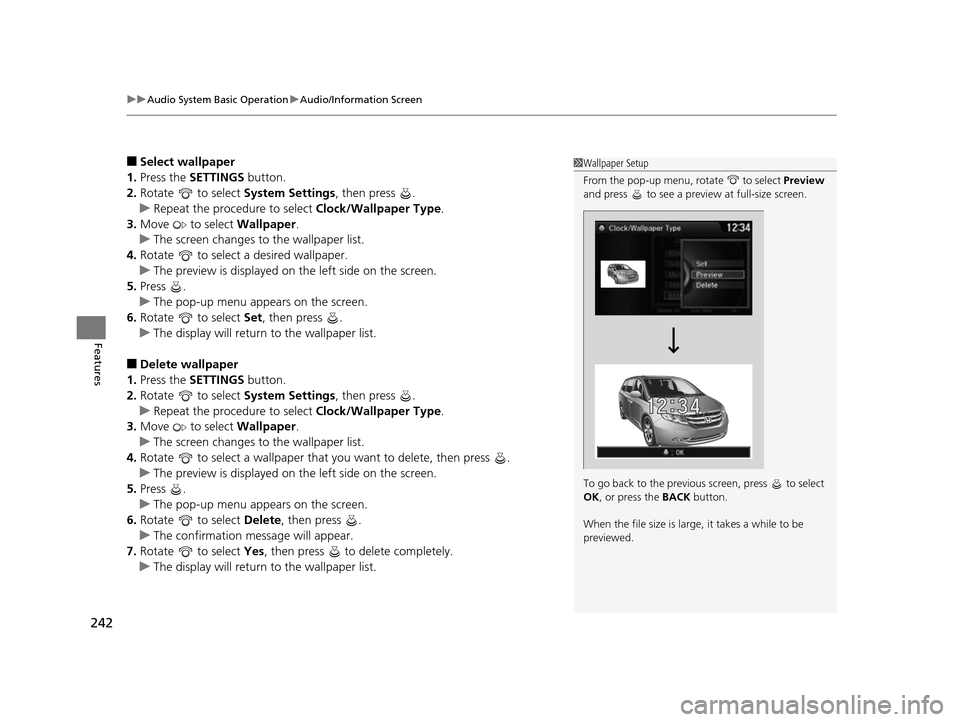
1Wallpaper Setup
From the pop-up menu, rotate to select Preview
and press to see a preview at full-size screen.
To go back to the previous screen, press to select
OK , or press the BACK button.
When the file size is large, it takes a while to be
previewed.
17 US ODYSSEY (KA KC)-31TK86600.book 242 ページ 2016年10月24日 月曜日 午後4時2分
Page 297 of 565
296
uuCustomized Features u
Features
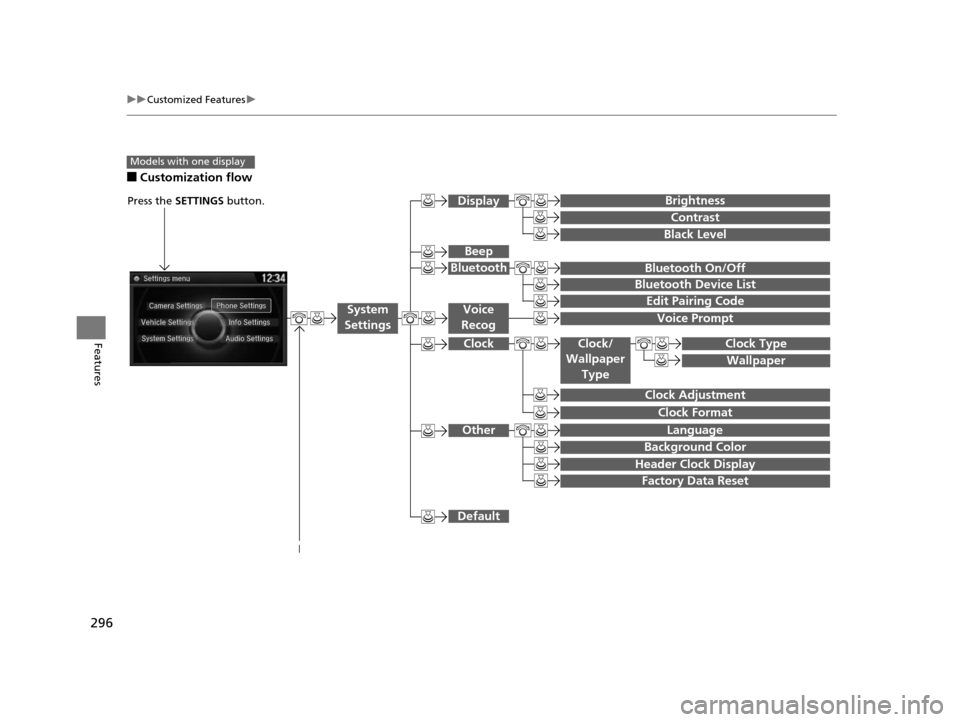
■Customization flow
Models with one display
Clock Format
Background Color
Header Clock Display
Factory Data Reset
Clock Adjustment
Press the SETTINGS button.
Language
Default
Edit Pairing Code
Bluetooth On/Off
Bluetooth Device List
Voice Prompt
Brightness
Contrast
Black Level
Beep
Clock/
Wallpaper
TypeClock Type
Wallpaper
System
SettingsVoice
Recog
Bluetooth
Display
Clock
Other
17 US ODYSSEY (KA KC)-31TK86600.book 296 ページ 2016年10月24日 月曜日 午後4時2分
Page 299 of 565
298
uuCustomized Features u
Features
Add Bluetooth Device
Disconnect
Edit Speed Dial
Auto Transfer
Auto Answer
Ring Tone
Automatic Phone Sync
Default
Enable Text Message
Message Auto Reading
New Text Message Alert
Phone
Settings
Connect
Phone
Text
Message
Bluetooth Device List
Phone
Default
Fixed GuidelineCamera
Settings
Wallpaper
Clock Type
Default
Clock Adjustment
Clock Format
Clock/
Wallpaper Type
Info
Settings
Rear
Camera
17 US ODYSSEY (KA KC)-31TK86600.book 298 ページ 2016年10月24日 月曜日 午後4時2分
Page 301 of 565
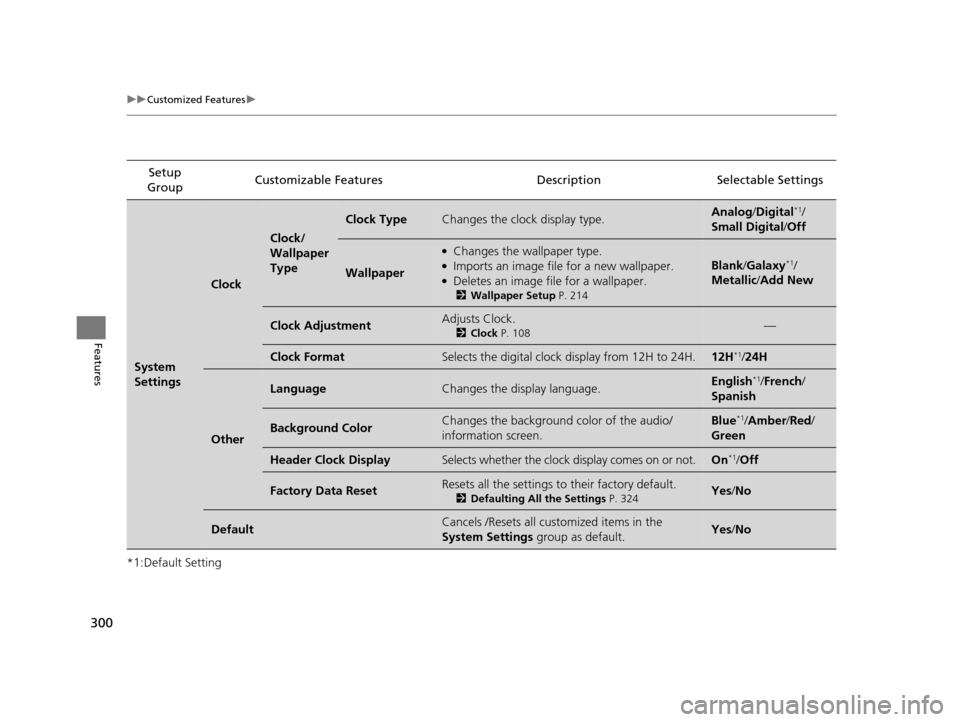
300
uuCustomized Features u
Features
*1:Default SettingSetup
Group Customizable Features Descri
ption Selectable Settings
System
Settings
Clock
Clock/
Wallpaper
Type
Clock TypeChanges the clock display type.Analog/Digital*1/
Small Digital /Off
Wallpaper
●Changes the wallpaper type.●Imports an image file for a new wallpaper.●Deletes an image file for a wallpaper.
2 Wallpaper Setup P. 214
Blank/Galaxy*1/
Metallic /Add New
Clock AdjustmentAdjusts Clock.
2 Clock P. 108—
Clock FormatSelects the digital clock display from 12H to 24H.12H*1/24H
Other
LanguageChanges the display language.English*1/French /
Spanish
Background ColorChanges the background color of the audio/
information screen.Blue*1/ Amber /Red/
Green
Header Clock DisplaySelects whether the clock display comes on or not.On*1/ Off
Factory Data ResetResets all the settings to their factory default.
2 Defaulting All the Settings P. 324Yes/No
DefaultCancels /Resets all customized items in the
System Settings group as default.Yes/No
17 US ODYSSEY (KA KC)-31TK86600.book 300 ページ 2016年10月24日 月曜日 午後4時2分
Page 305 of 565
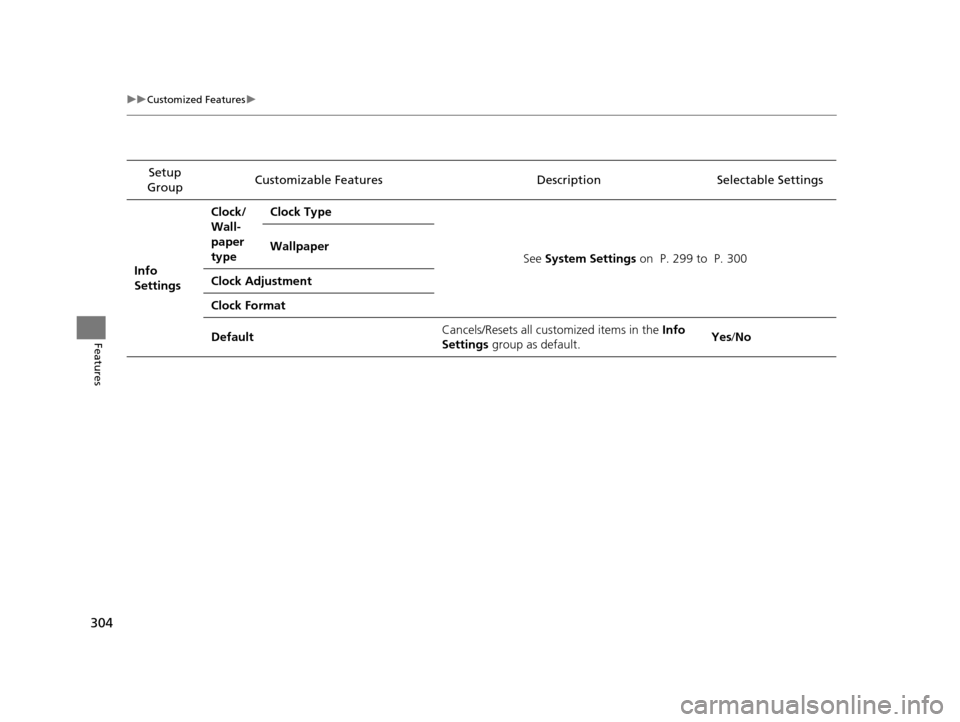
304
uuCustomized Features u
Features
Setup
Group Customizable Features
Description Selectable Settings
Info
Settings Clock/
Wall-
paper
type
Clock Type
See System Settings on P. 299 to P. 300
Wallpaper
Clock Adjustment
Clock Format
Default Cancels/Resets all cust
omized items in the Info
Settings group as default. Yes
/No
17 US ODYSSEY (KA KC)-31TK86600.book 304 ページ 2016年10月24日 月曜日 午後4時2分