memory HONDA ODYSSEY 2017 RC1-RC2 / 5.G Owners Manual
[x] Cancel search | Manufacturer: HONDA, Model Year: 2017, Model line: ODYSSEY, Model: HONDA ODYSSEY 2017 RC1-RC2 / 5.GPages: 565, PDF Size: 33.13 MB
Page 5 of 565
4
Quick Reference Guide
Quick Reference Guide
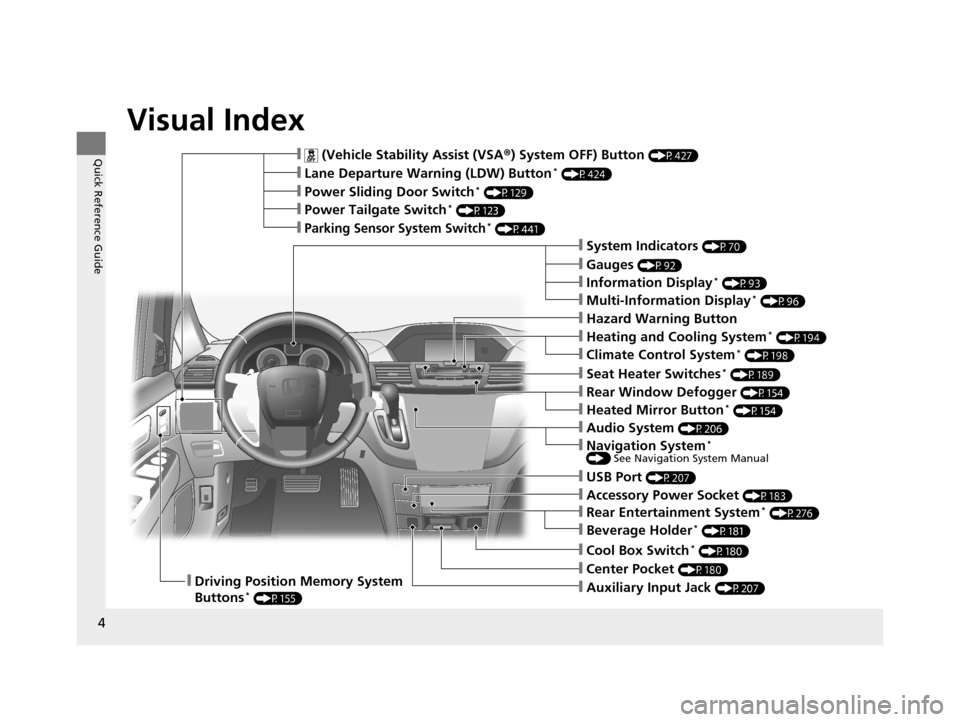
Visual Index
❙ (Vehicle Stability Assist (VSA®) System OFF) Button (P427)
❙Lane Departure Warning (LDW) Button* (P424)
❙Power Sliding Door Switch* (P129)
❙Power Tailgate Switch* (P123)
❙Parking Sensor System Switch* (P441)
❙System Indicators (P70)
❙Gauges (P92)
❙Information Display* (P93)
❙Multi-Information Display* (P96)
❙Rear Window Defogger (P154)
❙Heated Mirror Button* (P154)
❙Hazard Warning Button
❙Heating and Cooling System* (P194)
❙Climate Control System* (P198)
❙Seat Heater Switches* (P189)
❙Cool Box Switch* (P180)
❙Center Pocket (P180)❙Driving Position Memory System
Buttons* (P155)❙Auxiliary Input Jack (P207)
❙USB Port (P207)
❙Audio System (P206)
❙Accessory Power Socket (P183)
❙Rear Entertainment System* (P276)
❙Beverage Holder* (P181)
❙Navigation System* () See Navigation System Manual
17 US ODYSSEY (KA KC)-31TK86600.book 4 ページ 2016年10月24日 月曜日 午後4時2分
Page 13 of 565
12
Quick Reference Guide
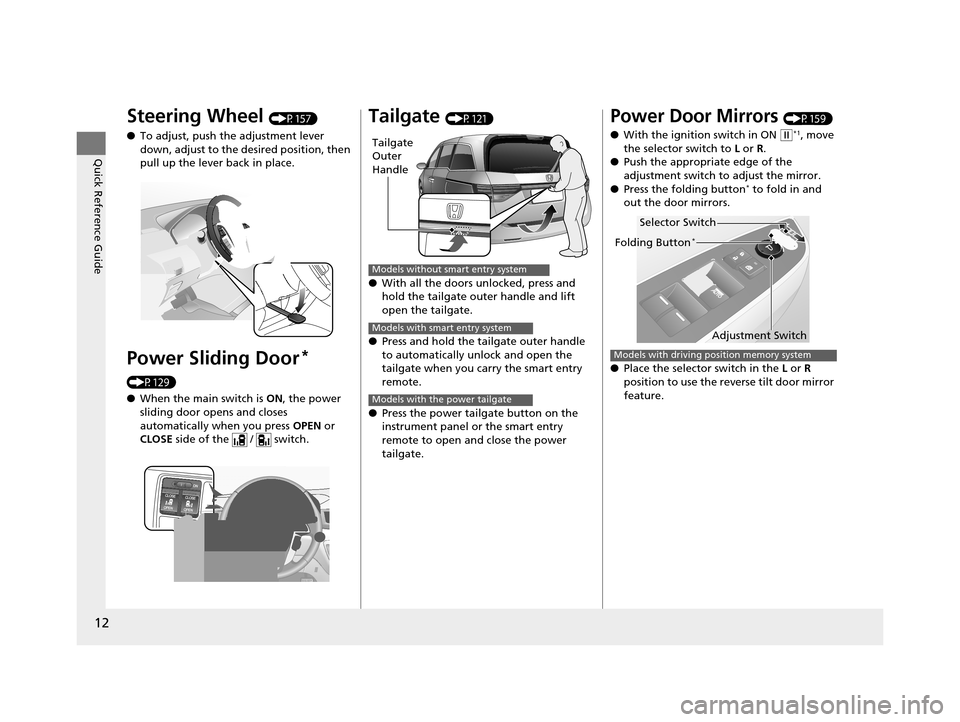
Steering Wheel (P157)
● To adjust, push the adjustment lever
down, adjust to the de sired position, then
pull up the lever back in place.
Power Sliding Door*
(P129)
● When the main switch is ON, the power
sliding door opens and closes
automatically when you press OPEN or
CLOSE side of the / switch.
Tailgate (P121)
● With all the doors unlocked, press and
hold the tailgate outer handle and lift
open the tailgate.
● Press and hold the tailgate outer handle
to automatically unlock and open the
tailgate when you carry the smart entry
remote.
● Press the power tailgate button on the
instrument panel or the smart entry
remote to open and close the power
tailgate.
Tailgate
Outer
Handle
Models without smart entry system
Models with smart entry system
Models with the power tailgate
Power Door Mirrors (P159)
● With the ignition switch in ON
(w*1, move
the selector switch to L or R .
● Push the appropriate edge of the
adjustment switch to adjust the mirror.
● Press the folding button
* to fold in and
out the door mirrors.
● Place the selector switch in the L or R
position to use the reverse tilt door mirror
feature.
Selector Switch
Adjustment Switch
Folding Button*
Models with driving position memory system
17 US ODYSSEY (KA KC)-31TK86600.book 12 ページ 2016年10月24日 月曜日 午後4時2分
Page 101 of 565
100
uuGauges and Displays uMulti-Information Display*
Instrument Panel
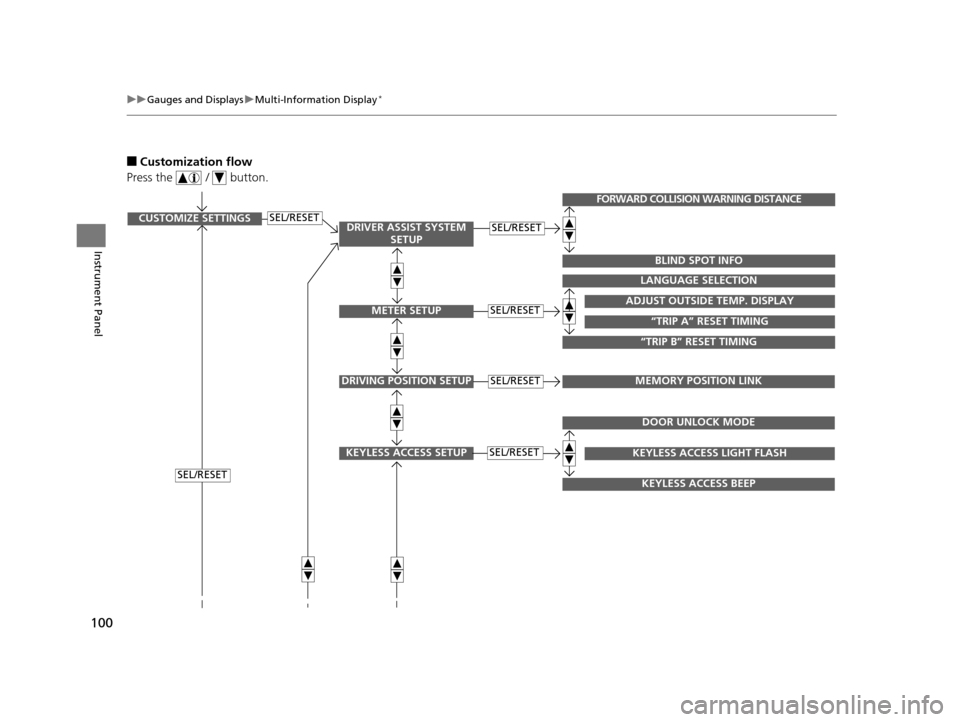
■Customization flow
Press the / button.
SEL/RESETCUSTOMIZE SETTINGSSEL/RESET
SEL/RESET
SEL/RESETADJUST OUTSIDE TEMP. DISPLAY
LANGUAGE SELECTION
“TRIP B” RESET TIMING
“TRIP A” RESET TIMING
FORWARD COLLISION WARNING DISTANCE
BLIND SPOT INFO
DRIVING POSITION SETUPMEMORY POSITION LINKSEL/RESET
KEYLESS ACCESS SETUPSEL/RESET
DOOR UNLOCK MODE
KEYLESS ACCESS BEEP
KEYLESS ACCESS LIGHT FLASH
DRIVER ASSIST SYSTEM SETUP
METER SETUP
17 US ODYSSEY (KA KC)-31TK86600.book 100 ページ 2016年10月24日 月曜日 午後4時2分
Page 103 of 565
102
uuGauges and Displays uMulti-Information Display*
Instrument Panel
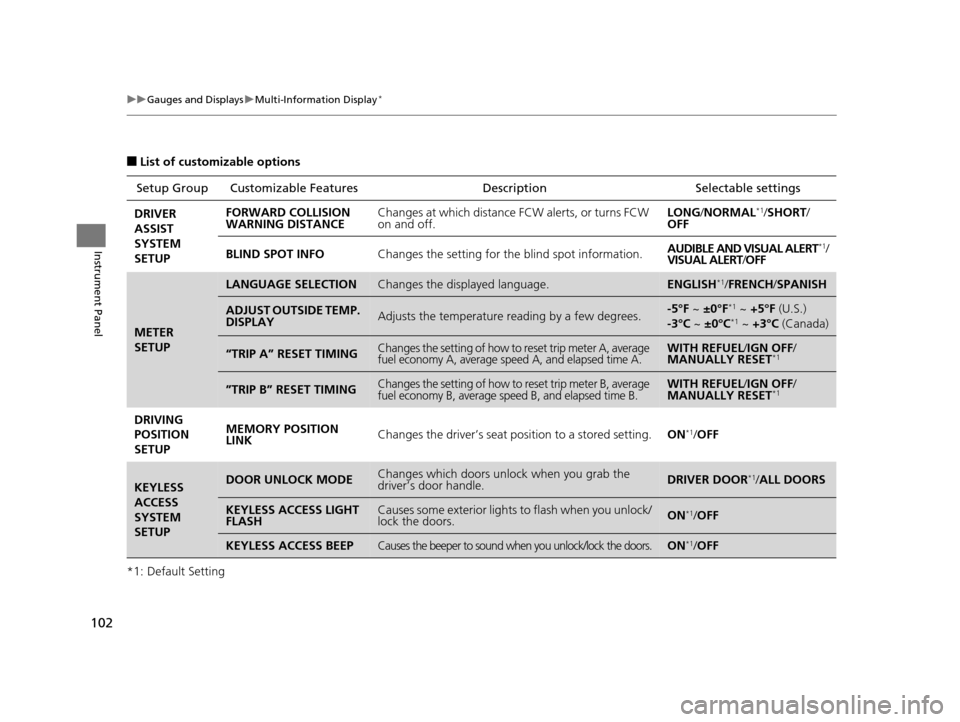
■List of customizable options
*1: Default Setting Setup Group Customizabl
e Features Description Selectable settings
DRIVER
ASSIST
SYSTEM
SETUP FORWARD COLLISION
WARNING DISTANCE
Changes at which distance FCW alerts, or turns FCW
on and off. LONG
/NORMAL
*1/SHORT /
OFF
BLIND SPOT INFO Changes the setting for the blind spot information. AUDIBLE AND VISUAL ALERT
*1/
VISUAL ALERT /OFF
METER
SETUP
LANGUAGE SELECTIONChanges the displayed language.ENGLISH*1/ FRENCH /SPANISH
ADJUST OUTSIDE TEMP.
DISPLAYAdjusts the temperature reading by a few degrees.-5°F ~ ±0°F*1 ~ +5°F (U.S.)
-3°C ~ ±0°C*1 ~ +3°C (Canada)
“TRIP A” RESET TIMINGChanges the setting of how to reset trip meter A, average
fuel economy A, average speed A, and elapsed time A.WITH REFUEL /IGN OFF /
MANUALLY RESET*1
”TRIP B” RESET TIMINGChanges the setting of how to reset trip meter B, average
fuel economy B, average speed B, and elapsed time B.WITH REFUEL /IGN OFF /
MANUALLY RESET*1
DRIVING
POSITION
SETUP MEMORY POSITION
LINK
Changes the driver’s seat po
sition to a stored setting.ON*1/OFF
KEYLESS
ACCESS
SYSTEM
SETUPDOOR UNLOCK MODEChanges which doors unlock when you grab the
driver’s door handle.DRIVER DOOR*1/ALL DOORS
KEYLESS ACCESS LIGHT
FLASHCauses some exterior lights to flash when you unlock/
lock the doors.ON*1/OFF
KEYLESS ACCESS BEEPCauses the beeper to sound when you unlock/lock the doors.ON*1/OFF
17 US ODYSSEY (KA KC)-31TK86600.book 102 ページ 2016年10月24日 月曜日 午後4時2分
Page 108 of 565
107
Controls
This chapter explains how to operate the various controls necessary for driving.
Clock.................................................. 108
Locking and Unlocking the Doors Key Types and Functions .................. 110
Low Smart Entry Remote Signal Strength*..... 112Locking/Unlocking the Doors from the Outside..... 113Locking/Unlocking the Doors from the Inside... 118Childproof Door Locks ..................... 119
Auto Door Locking/Unlocking .......... 120
Opening and Closing the Tailgate ... 121
Opening and Closing the Sliding Doors...... 127Security System
Immobilizer System .......................... 135
Security System Alarm
*.................... 135Opening and Closing the Windows ..... 138Opening and Closing the Moonroof*..... 141
Operating the Switches Around the
Steering Wheel Ignition Switch
*............................... 142
ENGINE START/STOP Button*........... 143
Ignition Switch and Power Mode Comparison ................................... 146
Turn Signals ..................................... 147
Light Switches.................................. 147
Fog Lights
*...................................... 150
Daytime Running Lights ................... 150
Wipers and Washers ........................ 151
Brightness Control ........................... 153
Rear Defogger/Heated Door Mirror* Button .. 154Driving Position Memory System*.... 155
Adjusting the Steering Wheel........... 157 Adjusting the Mirrors
....................... 158
Interior Rearview Mirror ................... 158
Power Door Mirrors ......................... 159
Adjusting the Seats Adjusting the Seat Positions ............. 161
Interior Lights/Interior Convenience Items ................................................ 176
Interior Lights .................................. 176
Interior Convenience Items .............. 178
Heating and Cooling
*
Using Vents, Heating and A/C.......... 194
Climate Control System*
Using Automatic Climate Control .... 198
Automatic Climate Control Sensors ... 203
* Not available on all models
17 US ODYSSEY (KA KC)-31TK86600.book 107 ページ 2016年10月24日 月曜日 午後4時2分
Page 156 of 565
155
uuOperating the Switches Around the Steering Wheel uDriving Position Memory System*
Continued
Controls
Driving Position Memory System*
You can store two driver’s seat and outside mirrors position with the driving position
memory system.
When you unlock and open the driver’s door with a remote, the seat and outside
mirrors adjust automatically to on e of the two preset positions.
The multi-information display shows you which remote transmitter you used to
unlock the vehicle when you enter.
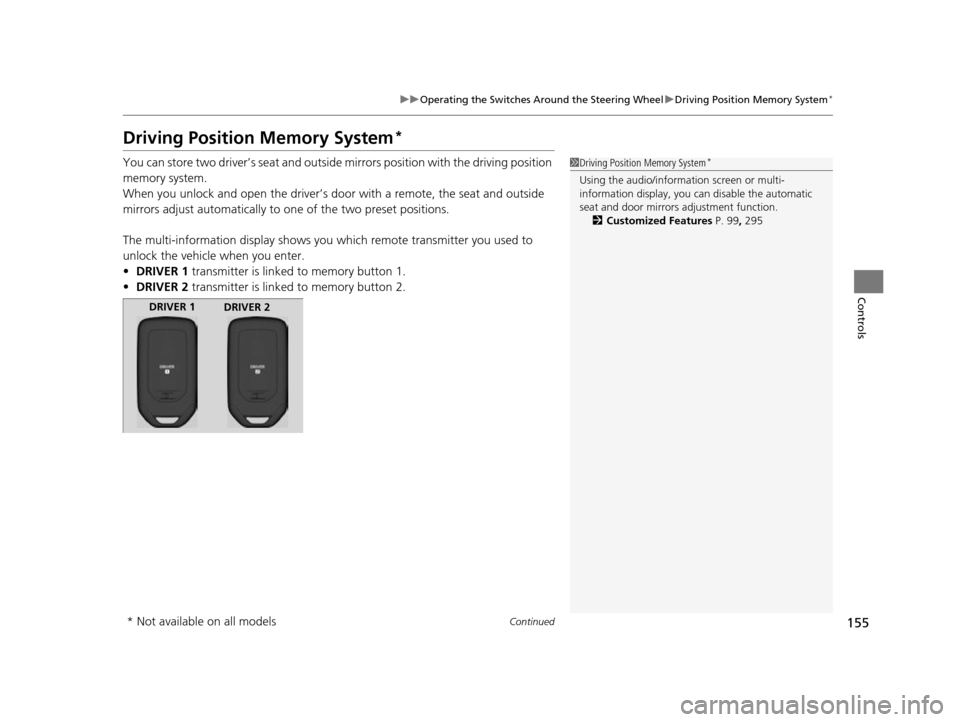
• DRIVER 1 transmitter is linked to memory button 1.
• DRIVER 2 transmitter is linked to memory button 2.1Driving Position Memory System*
Using the audio/information screen or multi-
information display, you can disable the automatic
seat and door mirrors adjustment function. 2 Customized Features P. 99, 295
DRIVER 1
DRIVER 2
* Not available on all models
17 US ODYSSEY (KA KC)-31TK86600.book 155 ページ 2016年10月24日 月曜日 午後4時2分
Page 157 of 565
uuOperating the Switches Around the Steering Wheel uDriving Position Memory System*
156
Controls
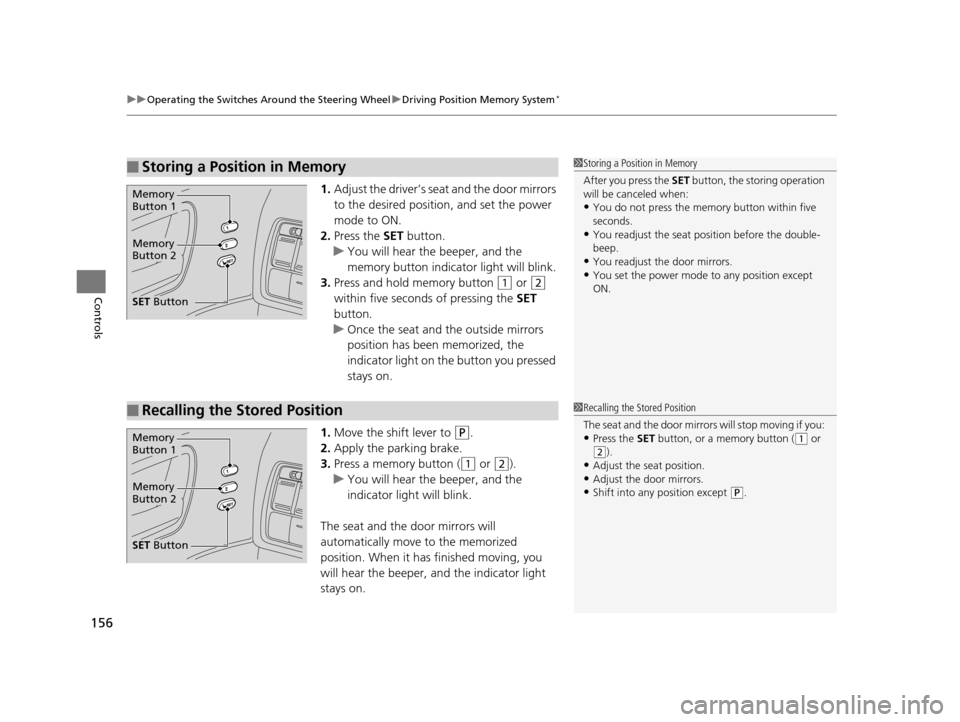
1. Adjust the driver’s seat and the door mirrors
to the desired positi on, and set the power
mode to ON.
2. Press the SET button.
u You will hear the beeper, and the
memory button indicator light will blink.
3. Press and hold memory button
(1 or (2
within five seconds of pressing the SET
button.
u Once the seat and the outside mirrors
position has been memorized, the
indicator light on the button you pressed
stays on.
1. Move the shift lever to
(P.
2. Apply the parking brake.
3. Press a memory button (
(1 or (2).
u You will hear the beeper, and the
indicator light will blink.
The seat and the door mirrors will
automatically move to the memorized
position. When it has finished moving, you
will hear the beeper, and the indicator light
stays on.
■Storing a Position in Memory1 Storing a Position in Memory
After you press the SET button, the storing operation
will be canceled when:
•You do not press the memory button within five
seconds.
•You readjust the seat position before the double-
beep.
•You readjust the door mirrors.
•You set the power mode to any position except
ON.
Memory
Button 1
Memory
Button 2
SET Button
■Recalling the Stored Position1Recalling the Stored Position
The seat and the door mirror s will stop moving if you:
•Press the SET button, or a memory button ((1 or (2).
•Adjust the seat position.
•Adjust the door mirrors.•Shift into any position except ( P.
Memory
Button 1
Memory
Button 2
SET Button
17 US ODYSSEY (KA KC)-31TK86600.book 156 ページ 2016年10月24日 月曜日 午後4時2分
Page 220 of 565
Continued219
uuAudio System Basic Operation uPlaying AM/FM Radio
Features
Provides text data information related to your selected RDS-capable FM station.
■To find an RDS station from Station List
1. Press while listening to an FM station.
2. Rotate to select the station, then press .
■Manual update
Updates your available st ation list at any time.
1. Press while listening to an FM station.
2. Rotate to select Refresh, then press .
■Radio Data System (RDS)1Playing AM/FM Radio
The ST indicator appears on the display indicating
stereo FM broadcasts.
Stereo reproduction in AM is not available.
Switching the Audio Mode
Press the SOURCE button on the steering wheel.
2 Audio Remote Controls P. 210
You can also switch the mode by pressing the MENU
button and selecting Change Source on the MENU
screen.
You can store 6 AM stations and 12 FM stations into
the preset button memory. FM1 and FM2 let you
store 6 stations each.
1 Radio Data System (RDS)
When you select an RDS-capable FM station, the RDS
automatically turns on, and the frequency display
changes to the station name. However, when the
signals of that station become weak, the display
changes from the statio n name to the frequency.
17 US ODYSSEY (KA KC)-31TK86600.book 219 ページ 2016年10月24日 月曜日 午後4時2分
Page 237 of 565
uuAudio System Basic Operation uAudio with Touch Screen
236
Features
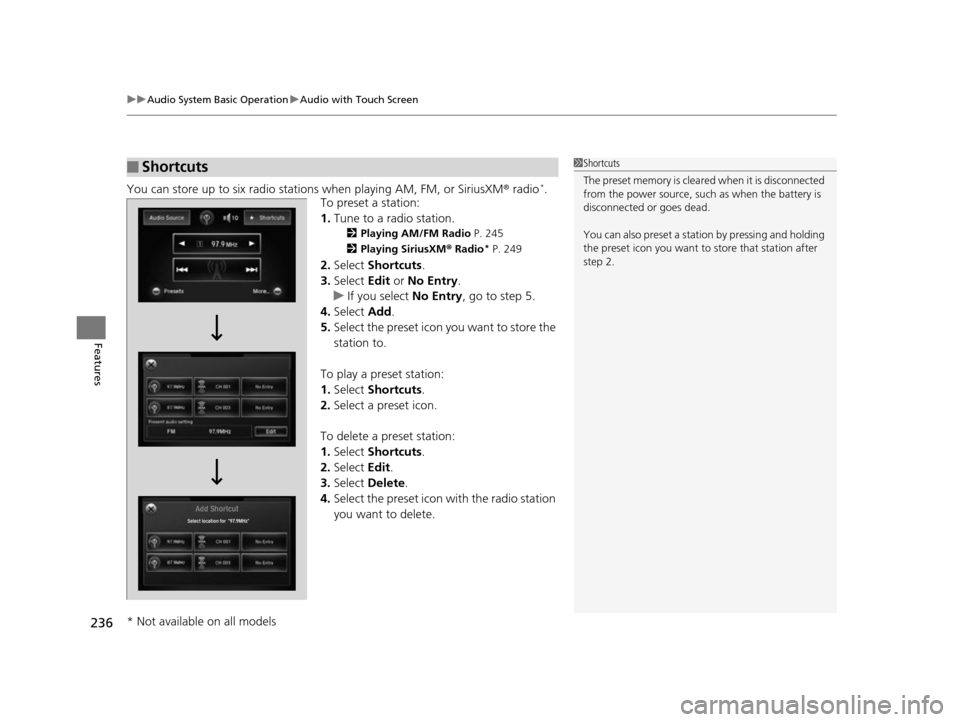
You can store up to six radio stations when playing AM, FM, or SiriusXM ® radio*.
To preset a station:
1. Tune to a radio station.
2 Playing AM/FM Radio P. 245
2 Playing SiriusXM ® Radio
* P. 249
2. Select Shortcuts .
3. Select Edit or No Entry .
u If you select No Entry, go to step 5.
4. Select Add.
5. Select the preset icon you want to store the
station to.
To play a preset station:
1. Select Shortcuts .
2. Select a preset icon.
To delete a preset station:
1. Select Shortcuts .
2. Select Edit.
3. Select Delete.
4. Select the preset icon with the radio station
you want to delete.
■Shortcuts1Shortcuts
The preset memory is cleare d when it is disconnected
from the power source, such as when the battery is
disconnected or goes dead.
You can also preset a stat ion by pressing and holding
the preset icon you want to store that station after
step 2.
* Not available on all models
17 US ODYSSEY (KA KC)-31TK86600.book 236 ページ 2016年10月24日 月曜日 午後4時2分
Page 247 of 565
uuAudio System Basic Operation uPlaying AM/FM Radio
246
Features
To store a station:
1. Tune to the selected station.
2. Press the MENU button.
3. Rotate to select Save Preset, then press .
4. Rotate to select the preset number you want to store that station, then press
.
You can also store that statio n by the following procedure.
1. Tune to the selected station.
2. Rotate to select the preset number you want to store the station.
3. Press and hold for a few seconds.
1. Tune to the selected station.
2. Select More.
3. Select Save Preset .
4. Select the preset number you wa nt to store that station.
You can also store that statio n by the following procedure.
1. Tune to the selected station.
2. Change the display to the preset screen.
3. Select and hold the preset number you want to store that station.
■Preset Memory1Playing AM/FM Radio
The ST indicator appears on the display indicating
stereo FM broadcasts.
Stereo reproduction in AM is not available.
Switching the Audio Mode
Press the MODE button on the steering wheel.
2 Audio Remote Controls P. 210
You can also switch the mode by pressing the MENU
button and selecting Change Source on the Audio
menu screen.
You can store 6 AM stations and 12 FM stations into
the preset memory.
Interface Dial
Audio with Touch Screen
17 US ODYSSEY (KA KC)-31TK86600.book 246 ページ 2016年10月24日 月曜日 午後4時2分