display HONDA ODYSSEY 2018 Owner's Manual (in English)
[x] Cancel search | Manufacturer: HONDA, Model Year: 2018, Model line: ODYSSEY, Model: HONDA ODYSSEY 2018Pages: 763, PDF Size: 47.02 MB
Page 497 of 763
495Continued
Features
Bluetooth® HandsFreeLink ®
Bluetooth® HandsFreeLink ® (HFL) allows you to place and receive phone calls using
your vehicle’s audio system, without handling your cell phone.
Using HFL
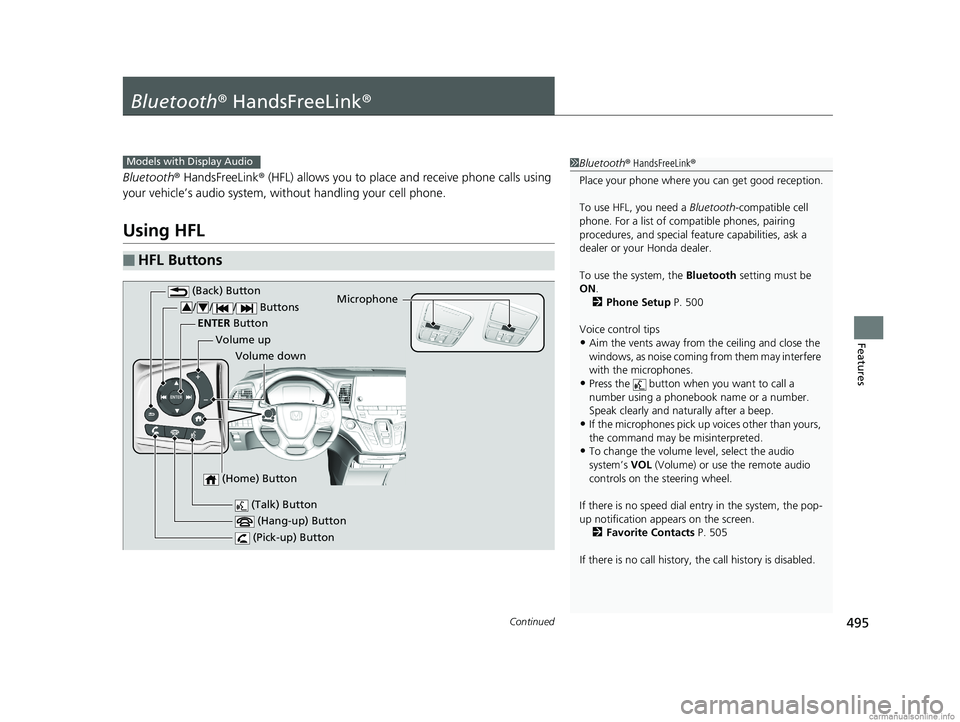
■HFL Buttons
1 Bluetooth ® HandsFreeLink ®
Place your phone where you can get good reception.
To use HFL, you need a Bluetooth-compatible cell
phone. For a list of compatible phones, pairing
procedures, and special fe ature capabilities, ask a
dealer or your Honda dealer.
To use the system, the Bluetooth setting must be
ON .
2 Phone Setup P. 500
Voice control tips
•Aim the vents away from the ceiling and close the
windows, as noise coming fr om them may interfere
with the microphones.
•Press the button when you want to call a
number using a phonebook name or a number.
Speak clearly and naturally after a beep.
•If the microphones pick up vo ices other than yours,
the command may be misinterpreted.
•To change the volume level, select the audio
system’s VOL (Volume) or use the remote audio
controls on the steering wheel.
If there is no speed dial entry in the system, the pop-
up notification appe ars on the screen.
2 Favorite Contacts P. 505
If there is no call history, the call history is disabled.
Models with Display Audio
(Talk) Button
Volume up Microphone
(Hang-up) Button
(Pick-up) Button
Volume down
ENTER
Button
(Back) Button
/// Buttons34
(Home) Button
18 US ODYSSEY-31THR6010.book 495 ページ 2018年12月6日 木曜日 午後4時18分
Page 498 of 763
uuBluetooth ® HandsFreeLink ®u Using HFL
496
Features
(Pick-up) button: Press to go directly to the phone screen of the driver
information interface, or to answer an incoming call.
(Hang-up) button: Press to end a call.
(Back) button: Press to go back to the previo us screen, or cancel a command.
(Talk) button: Press to access Voice Portal.
/// buttons: Press to select an item displayed on the phone screen
of the driver information interface.
ENTER button: Press to call a number listed in the selected item on the phone
screen of the driver information interface.
(Home) button: Press to go back to the home sc reen of the driver information
interface.
To go to the phone screen of the driver information interface:
1. Press the (home) button on the steering wheel.
2. Select Phone .
u You can select Favorite Contacts or Recent Calls .1Bluetooth ® HandsFreeLink ®
Bluetooth ® Wireless Technology
The Bluetooth ® word mark and logos are registered
trademarks owned by Bluetooth SIG, Inc., and any
use of such marks by Honda Motor Co., Ltd., is under
license. Other trademarks and trade names are those
of their respective owners.
HFL Limitations
An incoming call on HFL will interrupt the audio
s y s te m wh e n it is p la y i n g . It wi ll re s u m e w h en t h e c a l l
is ended.
34
18 US ODYSSEY-31THR6010.book 496 ページ 2018年12月6日 木曜日 午後4時18分
Page 499 of 763
497
uuBluetooth ® HandsFreeLink ®u Using HFL
Features
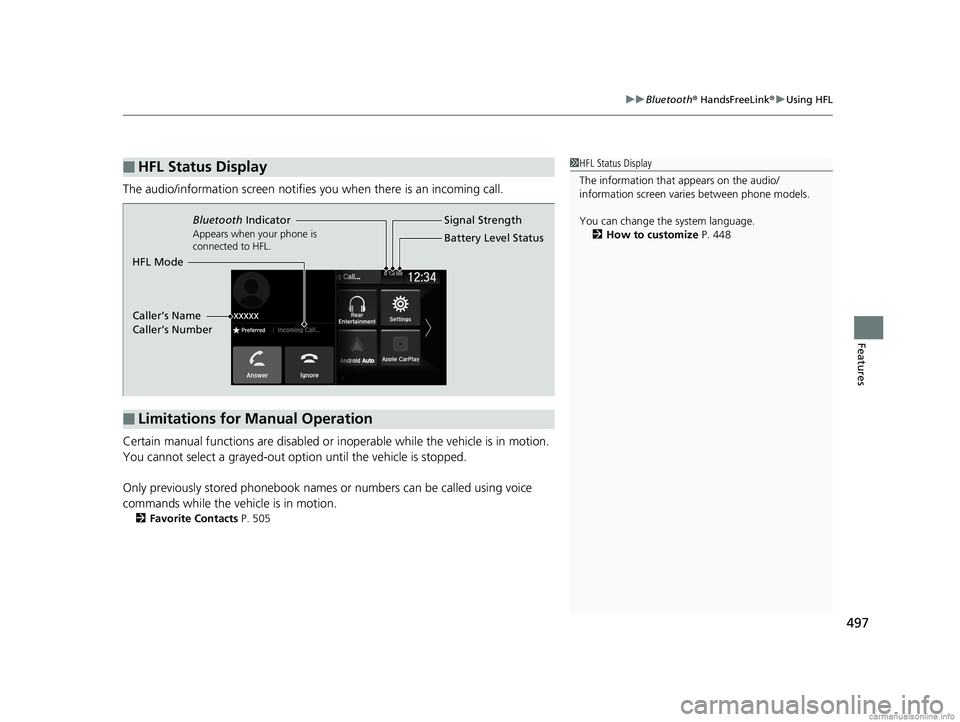
The audio/information scr een notifies you when there is an incoming call.
Certain manual functions are disabled or inoperable while the vehicle is in motion.
You cannot select a grayed-out option until the vehicle is stopped.
Only previously stored phonebook names or numbers can be called using voice
commands while the vehicle is in motion.
2 Favorite Contacts P. 505
■HFL Status Display1HFL Status Display
The information that appears on the audio/
information screen vari es between phone models.
You can change the system language. 2 How to customize P. 448
■Limitations for Manual Operation
Bluetooth Indicator
Appears when your phone is
connected to HFL.
Signal Strength
HFL Mode Battery Level Status
Caller’s Name
Caller’s Number
18 US ODYSSEY-31THR6010.book 497 ページ 2018年12月6日 木曜日 午後4時18分
Page 501 of 763
499
uuBluetooth ® HandsFreeLink ®u HFL Menus
Continued
Features
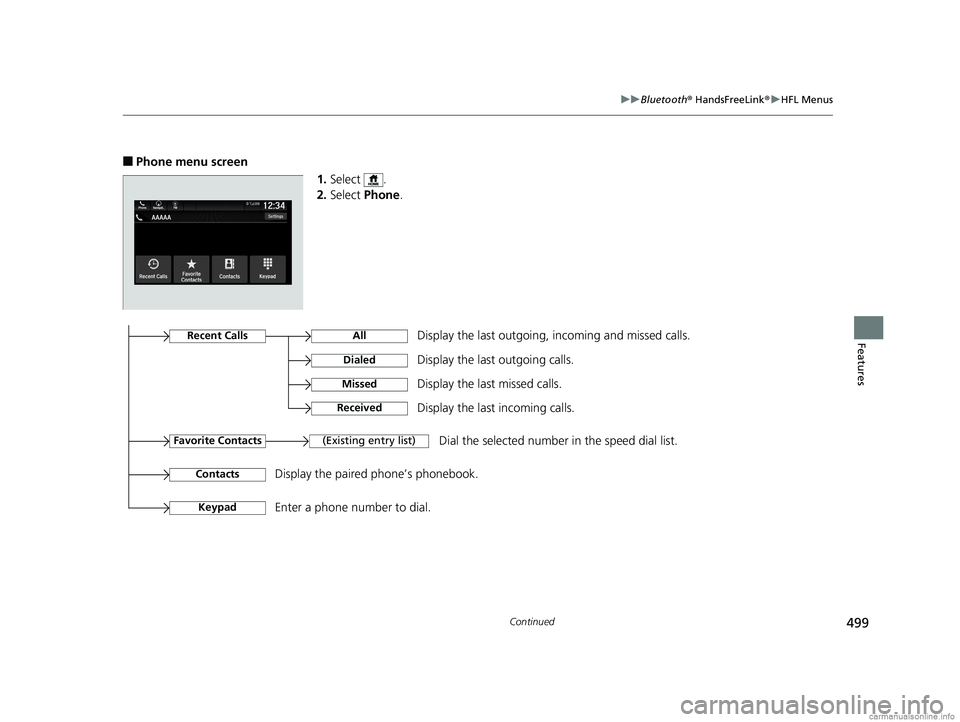
■Phone menu screen
1.Select .
2. Select Phone.
Display the last outgoing, incoming and missed calls.Recent Calls
Favorite Contacts
All
Dialed
Received
Display the last outgoing calls.
Display the last incoming calls.
MissedDisplay the last missed calls.
KeypadEnter a phone number to dial.
(Existing entry list)Dial the selected number in the speed dial list.
ContactsDisplay the paired phone’s phonebook.
18 US ODYSSEY-31THR6010.book 499 ページ 2018年12月6日 木曜日 午後4時18分
Page 503 of 763
Continued501
uuBluetooth ® HandsFreeLink ®u HFL Menus
Features
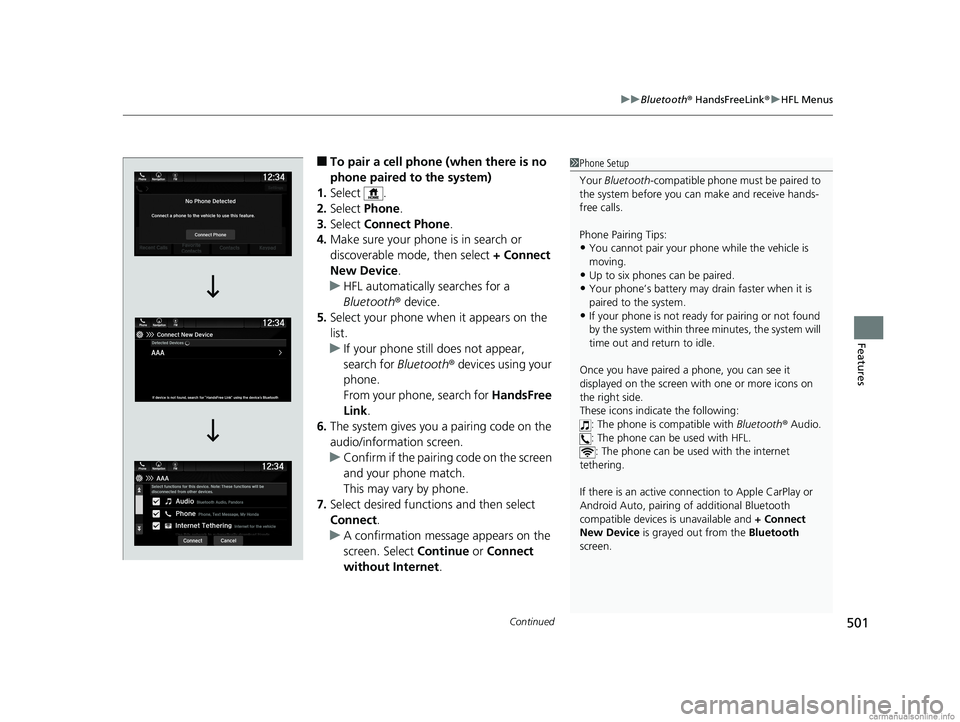
■To pair a cell phone (when there is no
phone paired to the system)
1. Select .
2. Select Phone.
3. Select Connect Phone .
4. Make sure your phone is in search or
discoverable mode, then select + Connect
New Device .
u HFL automatically searches for a
Bluetooth ® device.
5. Select your phone when it appears on the
list.
u If your phone still does not appear,
search for Bluetooth® devices using your
phone.
From your phone, search for HandsFree
Link .
6. The system gives you a pairing code on the
audio/information screen.
u Confirm if the pairing code on the screen
and your phone match.
This may vary by phone.
7. Select desired functions and then select
Connect .
u A confirmation message appears on the
screen. Select Continue or Connect
without Internet .1Phone Setup
Your Bluetooth -compatible phone must be paired to
the system before you ca n make and receive hands-
free calls.
Phone Pairing Tips:
•You cannot pair your phone while the vehicle is
moving.
•Up to six phones can be paired.
•Your phone’s battery may dr ain faster when it is
paired to the system.
•If your phone is not ready for pairing or not found
by the system within three minutes, the system will
time out and return to idle.
Once you have paired a phone, you can see it
displayed on the screen wi th one or more icons on
the right side.
These icons indicate the following:
: The phone is compatible with Bluetooth ® Audio.
: The phone can be used with HFL. : The phone can be used with the internet
tethering.
If there is an active connection to Appl e CarPlay or
Android Auto, pairing of additional Bluetooth
compatible devices is unavailable and + Connect
New Device is grayed out from the Bluetooth
screen.
18 US ODYSSEY-31THR6010.book 501 ページ 2018年12月6日 木曜日 午後4時18分
Page 514 of 763
uuBluetooth ® HandsFreeLink ®u HFL Menus
512
Features
HFL can display newly received text messa ges as well as the last 20 messages
received on a linked cell phone. Each received message can be read aloud and
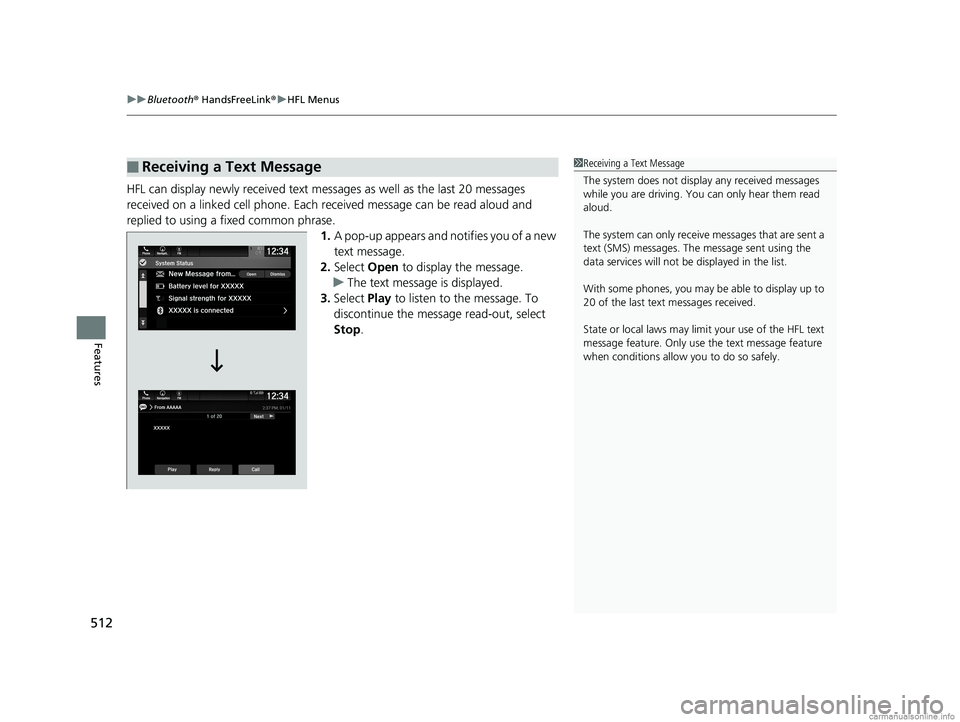
replied to using a fixed common phrase. 1.A pop-up appears and notifies you of a new
text message.
2. Select Open to display the message.
u The text message is displayed.
3. Select Play to listen to the message. To
discontinue the message read-out, select
Stop .
■Receiving a Text Message1Receiving a Text Message
The system does not display any received messages
while you are driving. You can only hear them read
aloud.
The system can only receive messages that are sent a
text (SMS) messages. The message sent using the
data services will not be displayed in the list.
With some phones, you may be able to display up to
20 of the last text messages received.
State or local laws may limit your use of the HFL text
message feature. Only use the text message feature
when conditions allow you to do so safely.
18 US ODYSSEY-31THR6010.book 512 ページ 2018年12月6日 木曜日 午後4時18分
Page 516 of 763
uuBluetooth ® HandsFreeLink ®u HFL Menus
514
Features
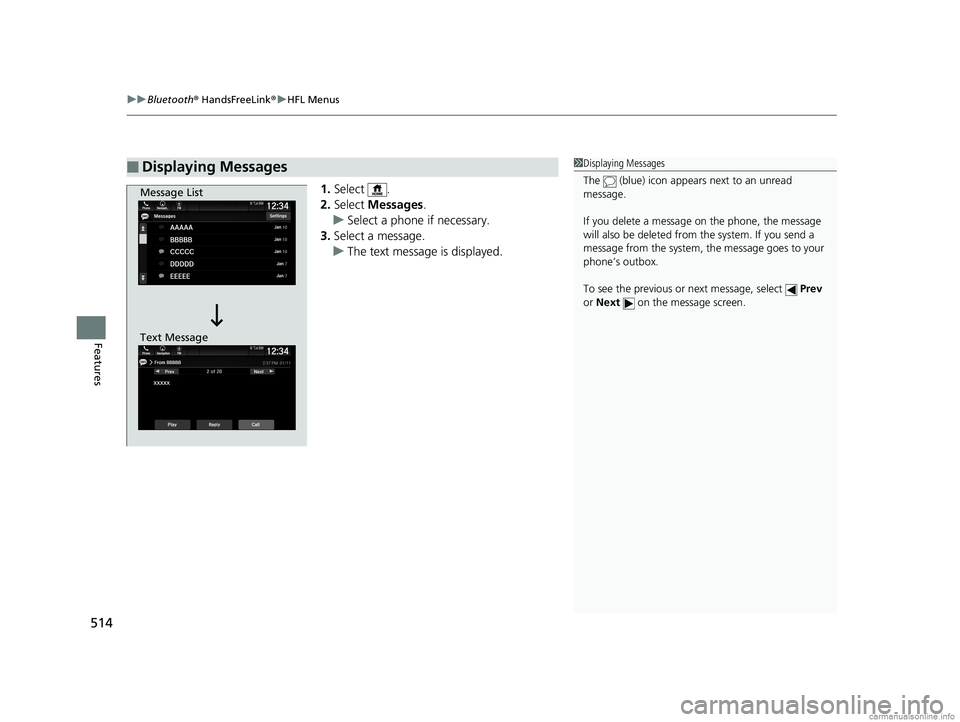
1. Select .
2. Select Messages .
u Select a phone if necessary.
3. Select a message.
u The text message is displayed.
■Displaying Messages1Displaying Messages
The (blue) icon appears next to an unread
message.
If you delete a message on the phone, the message
will also be dele ted from the system. If you send a
message from the system, the message goes to your
phone’s outbox.
To see the previous or next message, select Prev
or Next on the message screen.
Message List
Text Message
18 US ODYSSEY-31THR6010.book 514 ページ 2018年12月6日 木曜日 午後4時18分
Page 518 of 763
uuBluetooth ® HandsFreeLink ®u HFL Menus
516
Features
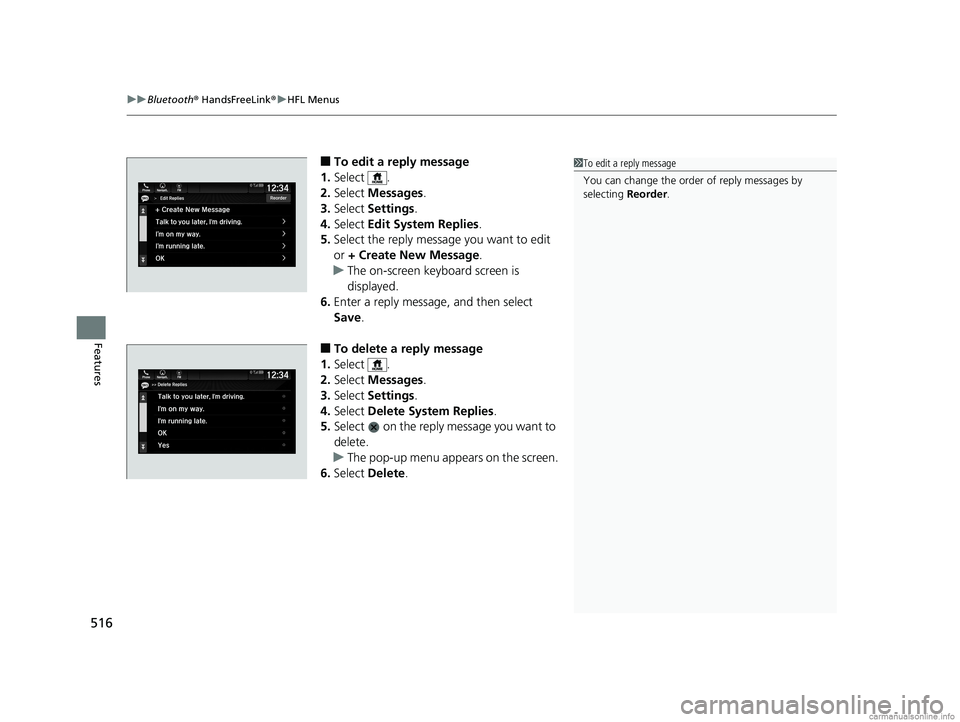
■To edit a reply message
1. Select .
2. Select Messages .
3. Select Settings .
4. Select Edit System Replies .
5. Select the reply message you want to edit
or + Create New Message .
u The on-screen keyboard screen is
displayed.
6. Enter a reply message, and then select
Save.
■To delete a reply message
1. Select .
2. Select Messages .
3. Select Settings .
4. Select Delete System Replies .
5. Select on the reply message you want to
delete.
u The pop-up menu appears on the screen.
6. Select Delete.
1To edit a reply message
You can change the order of reply messages by
selecting Reorder.
18 US ODYSSEY-31THR6010.book 516 ページ 2018年12月6日 木曜日 午後4時18分
Page 523 of 763
521
Features
CabinWatchTM *
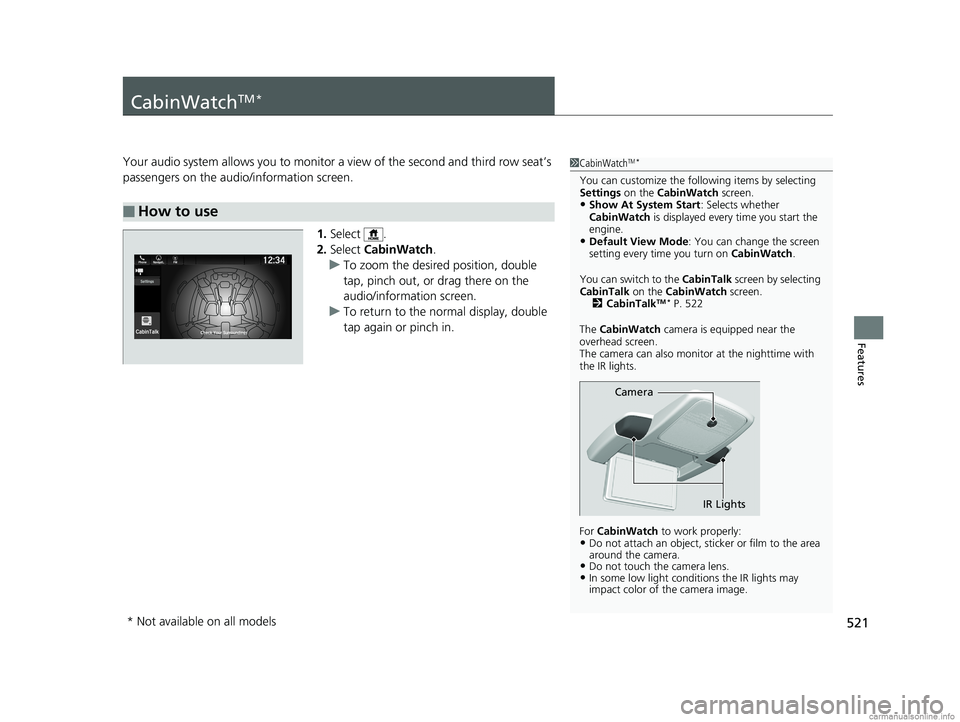
Your audio system allows you to monitor a view of the second and third row seat’s
passengers on the audio/information screen.
1.Select .
2. Select CabinWatch .
u To zoom the desired position, double
tap, pinch out, or drag there on the
audio/information screen.
u To return to the normal display, double
tap again or pinch in.
■How to use
1CabinWatchTM *
You can customize the foll owing items by selecting
Settings on the CabinWatch screen.
•Show At System Start : Selects whether
CabinWatch is displayed every time you start the
engine.
•Default View Mode : You can change the screen
setting every time you turn on CabinWatch.
You can switch to the CabinTalk screen by selecting
CabinTalk on the CabinWatch screen.
2 CabinTalk
TM * P. 522
The CabinWatch camera is equipped near the
overhead screen.
The camera can also monitor at the nighttime with
the IR lights.
For CabinWatch to work properly:
•Do not attach an object, sticker or film to the area
around the camera.
•Do not touch the camera lens.•In some low light conditions the IR lights may
impact color of the camera image.
Camera
IR Lights
* Not available on all models
18 US ODYSSEY-31THR6010.book 521 ページ 2018年12月6日 木曜日 午後4時18分
Page 548 of 763
uuWhen Driving uShifting
546
Driving
■Shift Operation1Shift Operation
NOTICE
When you change (D to (R and visa versa, depress
the brake pedal to come to a complete stop, then
select the intended gear position while maintaining
brake pressure.
Use the gear position indicator and the shift button
indicator to check the gear position before selecting
a shift button.
If the indicator of the curren tly selected gear position,
or all the gear position indicators are blinking
simultaneously, there is a problem with the
transmission.
Avoid sudden acceleration and have the transmission
checked by a dealer as soon as possible.
The fuel supply may be cut of f if you drive at engine
speeds in or over the tac hometer’s red zone (engine
speed limit). If this happe ns, you may experience a
slight jolt.
When the engine speed is increased while the
transmission is in
( N, (P or (R, the fuel supply may
be cut off even without the engine speed entering
the tachometer’s red zone.
The beeper sounds once when you change to
( R.
2 Vehicle Customization P. 133
2 Customized Features P. 442Models with color audio system
Models with Display Audio
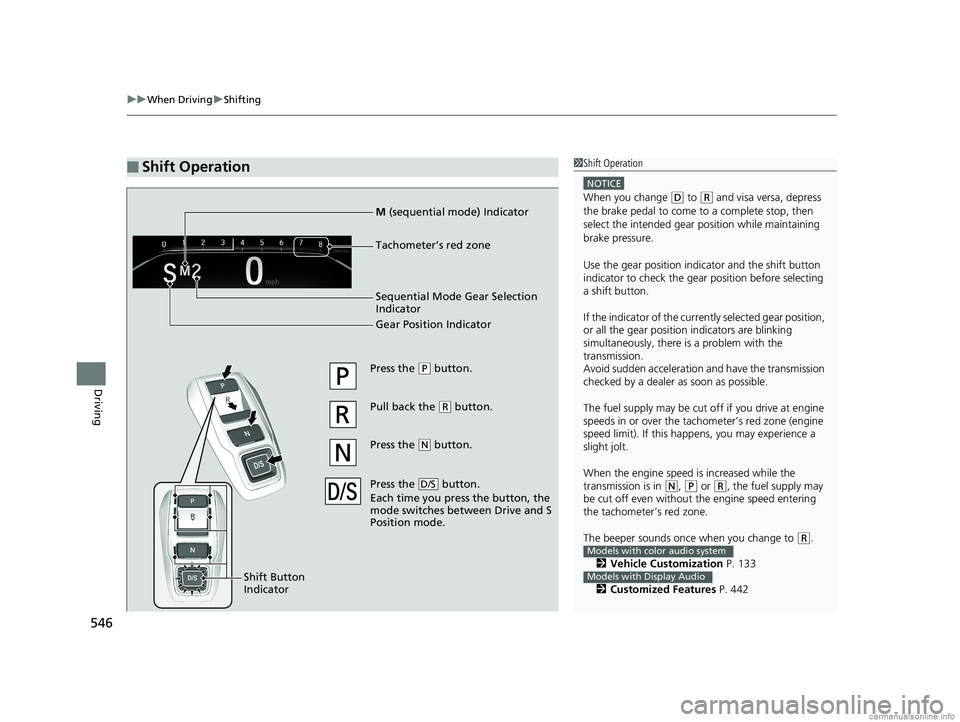
Press the (P button.
Pull back the
( R button.
Press the
( N button.
Press the button.
Each time you pre ss the button, the
mode switches between Drive and S
Position mode.
D/S
Shift Button
Indicator
M (sequential mode) Indicator
Tachometer’s red zone
Sequential Mode Gear Selection
Indicator
Gear Position Indicator
18 US ODYSSEY-31THR6010.book 546 ページ 2018年12月6日 木曜日 午後4時18分