brake sensor HONDA ODYSSEY 2019 (in English) User Guide
[x] Cancel search | Manufacturer: HONDA, Model Year: 2019, Model line: ODYSSEY, Model: HONDA ODYSSEY 2019Pages: 767, PDF Size: 47.46 MB
Page 587 of 767
Continued585
uuWhen Driving uLane Keeping Assist System (LKAS)*
Driving
The system can be used when th e following conditions are met.
• The lane in which you are driving has detectable lane markers on both sides, and
your vehicle is in the center of the lane.
• The vehicle speed is between 45 and 90 mph (72 and 145 km/h).
• You are driving on a straight or slightly curved road.
• The turn signals are off.
• The brake pedal is not depressed.
• The wipers are not in continuous operation.
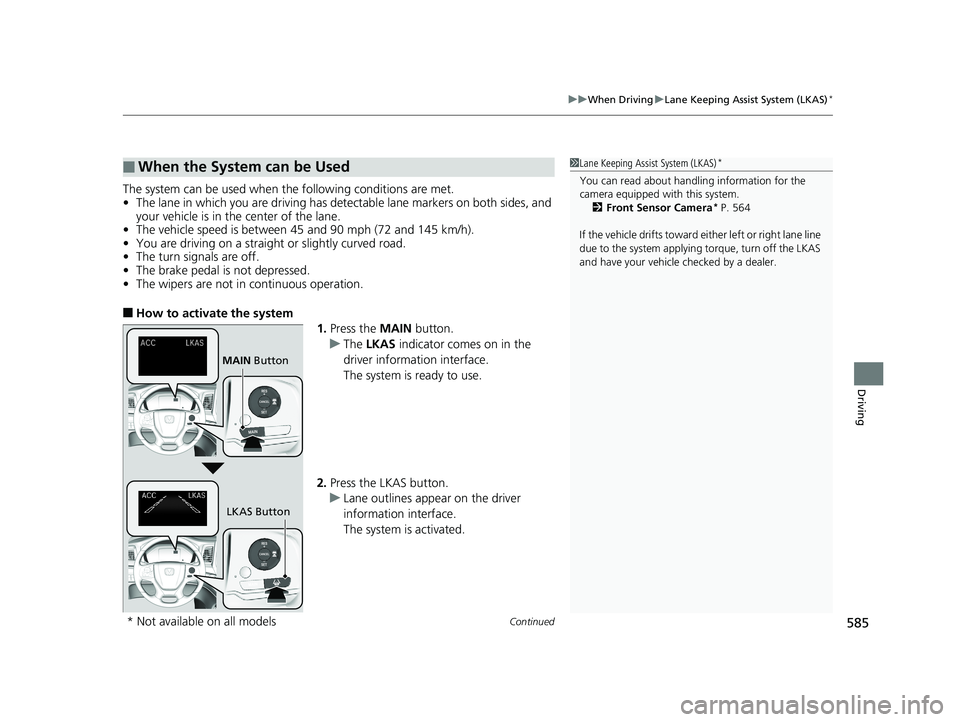
■How to activate the system
1.Press the MAIN button.
u The LKAS indicator comes on in the
driver information interface.
The system is ready to use.
2. Press the LKAS button.
u Lane outlines appear on the driver
information interface.
The system is activated.
■When the System can be Used1Lane Keeping Assist System (LKAS)*
You can read about handling information for the
camera equipped with this system.
2 Front Sensor Camera
* P. 564
If the vehicle drifts toward ei ther left or right lane line
due to the system applying torque, turn off the LKAS
and have your vehicle checked by a dealer.
MAIN Button
LKAS Button
* Not available on all models
19 ODYSSEY-31THR6120.book 585 ページ 2018年12月6日 木曜日 午後4時35分
Page 612 of 767
610
uuBraking uCollision Mitigation Braking SystemTM (CMBSTM)*
Driving
Collision Mitigati on Braking SystemTM (CMBSTM)*
Can assist you when there is a possibility of your vehicle colliding with a vehicle or a
pedestrian detected in front of yours. The CMBSTM is designed to alert you when a
potential collision is determined, as well as to reduce your vehicle speed to help
minimize collision severity when a collision is deemed unavoidable.
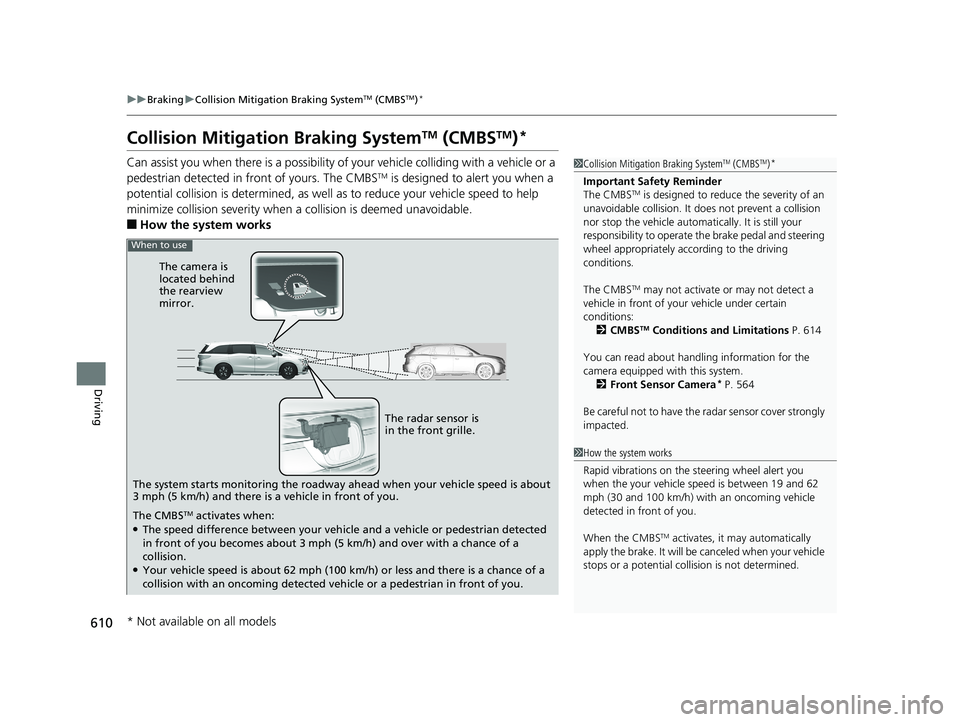
■How the system works
1 Collision Mitigation Braking SystemTM (CMBSTM)*
Important Safety Reminder
The CMBSTM is designed to reduce the severity of an
unavoidable collision. It do es not prevent a collision
nor stop the vehicle automati cally. It is still your
responsibility to operate the brake pedal and steering
wheel appropriately acco rding to the driving
conditions.
The CMBS
TM may not activate or may not detect a
vehicle in front of y our vehicle under certain
conditions:
2 CMBS
TM Conditions and Limitations P. 614
You can read about handling information for the
camera equipped with this system. 2 Front Sensor Camera
* P. 564
Be careful not to have the radar sensor cover strongly
impacted.
1 How the system works
Rapid vibrations on the steering wheel alert you
when the your vehicle speed is between 19 and 62
mph (30 and 100 km/h) with an oncoming vehicle
detected in front of you.
When the CMBS
TM activates, it may automatically
apply the brake. It will be canceled when your vehicle
stops or a potential coll ision is not determined.
When to use
The camera is
located behind
the rearview
mirror.
The radar sensor is
in the front grille.
The system starts monitoring the roadway ahead when your vehicle speed is about
3 mph (5 km/h) and there is a vehicle in front of you.
The CMBS
TM activates when:●The speed difference between your vehicl e and a vehicle or pedestrian detected
in front of you becomes about 3 mph (5 km/h) and over with a chance of a
collision.
●Your vehicle speed is about 62 mph (100 km/h) or less and there is a chance of a
collision with an oncoming detected ve hicle or a pedestrian in front of you.
* Not available on all models
19 ODYSSEY-31THR6120.book 610 ページ 2018年12月6日 木曜日 午後4時35分
Page 617 of 767
615
uuBraking uCollision Mitigation Braking SystemTM (CMBSTM)*
Continued
Driving
■Vehicle conditions
• Headlight lenses are dirty or the h eadlights are not properly adjusted.
• The outside of the windshield is blocked by dirt, mud, leaves, wet snow, etc.
• The inside of the windshield is fogged.
• An abnormal tire or wheel condition (wro ng sized, varied size or construction,
improperly inflated, co mpact spare tire, etc.).
• When tire chains are installed.
• The vehicle is tilted due to a heavy load or suspension modifications.
• The camera temperature gets too high.
• Driving with the parking brake applied.
• When the radar sensor in the front grille gets dirty.
19 ODYSSEY-31THR6120.book 615 ページ 2018年12月6日 木曜日 午後4時35分
Page 618 of 767
616
uuBraking uCollision Mitigation Braking SystemTM (CMBSTM)*
Driving
■Detection limitations
• A vehicle or pedestrian suddenly crosses in front of you.
• The distance between your vehicle and the vehicle or pedestrian ahead of you is
too short.
• A vehicle cuts in front of you at a slow speed, and it brakes suddenly.
• When you accelerate rapidly and approach the vehicle or pedestrian ahead of you
at high speed.
• The vehicle ahead of you is a motorcycle, bicycle, mobility scooter or other small
vehicle.
• When there are animals in front of your vehicle.
• When you drive on a cu rved, winding or undulating road that makes it difficult for
the sensor to properly detect a vehicle in front of you.
• The speed difference between your vehicle an d a vehicle or pedestrian in front of
you is significantly large.
• An oncoming vehicle suddenly comes in front of you.
• Another vehicle suddenly comes in front of you at an intersection, etc.
• Your vehicle abruptly crosses over in front of an oncoming vehicle.
• When driving through a narrow iron bridge.
• When the lead vehicle suddenly slows down.
• When there is a group of people in front of your vehicle walking together side by
side.
• Surrounding conditions or belongings of the pedestrian alter the pedestrian’s
shape, preventing the system from recogn izing that the person is a pedestrian.
• When the pedestrian is shorter than about 3.3 feet (1 meter) or taller than about
6.6 feet (2 meters) in height.
• When a pedestrian blends in with the background.
• When a pedestrian is bent over or squa tting, or when their hands are raised or
they are running.
• When several pedestrians are walking ahead in a group.
• When the camera cannot correctly identify that a pedestrian is present due to an
unusual shape (holding luggage, body position, size).
Limitations applicable to pedestrian detection only
19 ODYSSEY-31THR6120.book 616 ページ 2018年12月6日 木曜日 午後4時35分
Page 703 of 767
701Continued
Handling the Unexpected
If a Tire Goes Flat
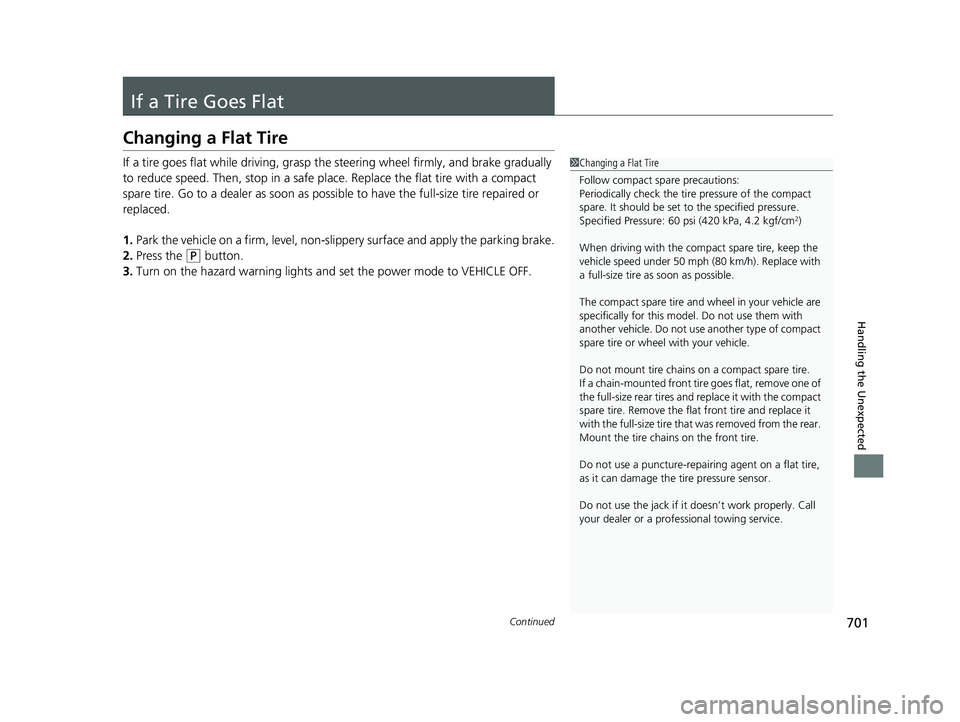
Changing a Flat Tire
If a tire goes flat while driving, grasp the steering wheel firmly, and brake gradually
to reduce speed. Then, stop in a safe plac e. Replace the flat tire with a compact
spare tire. Go to a dealer as soon as possib le to have the full-size tire repaired or
replaced.
1. Park the vehicle on a firm, level, non-slippery surface and apply the parking brake.
2. Press the
(P button.
3. Turn on the hazard warning lights an d set the power mode to VEHICLE OFF.
1Changing a Flat Tire
Follow compact spare precautions:
Periodically check the tire pressure of the compact
spare. It should be set to the specified pressure.
Specified Pressure: 60 psi (420 kPa, 4.2 kgf/cm
2)
When driving with the compact spare tire, keep the
vehicle speed under 50 mph (80 km/h). Replace with
a full-size tire as soon as possible.
The compact spare tire and wheel in your vehicle are
specifically for this model. Do not use them with
another vehicle. Do not us e another type of compact
spare tire or wheel with your vehicle.
Do not mount tire chains on a compact spare tire.
If a chain-mounted front tire goes flat, remove one of
the full-size rear tires and replace it with the compact
spare tire. Remove the flat front tire and replace it
with the full-size tire that was removed from the rear.
Mount the tire chains on the front tire.
Do not use a puncture-repairi ng agent on a flat tire,
as it can damage the tire pressure sensor.
Do not use the jack if it doesn’t work properly. Call
your dealer or a prof essional towing service.
19 ODYSSEY-31THR6120.book 701 ページ 2018年12月6日 木曜日 午後4時35分
Page 754 of 767
Index
752
Index
Index
A
ABS (Anti-lock Brake System)................... 608
AC Power Outlet ....................................... 235
Accessories and Modifications ................. 696
Accessory Power Sockets .......................... 233
Adaptive Cruise Control (ACC) Indicator (Amber) ..................................................... 98
Adaptive Cruise Control (ACC) Indicator
(Green) ................................................. 98, 99
Additives Coolant ................................................... 655
Engine Oil ................................................ 650
Washer .................................................... 659
Additives, Engine Oil ................................ 650
Adjusting Armrest ................................................... 224
Front and Second Row Outer and Third Row
Outer Head Restraints Positions.............. 212
Front Seats .............................................. 209
Mirrors .................................................... 206
Second Row Seats ................................... 216
Steering Wheel ........................................ 205
Third Row Seats ....................................... 221
Agile Handling Assist ................................ 593
Air Conditioning System (Climate Control
System) ............................................ 248, 252
Changing the Mode ........................ 248, 252
Defrosting the Windshield and
Windows ....................................... 249, 253
Dust and Pollen Filter ............................... 689
Recirculation/Fresh Air Mode ................... 248 Sensors ................................................... 257
Using Automatic Climate Control .... 248, 252
Air Pressure ....................................... 676, 741
Airbags ........................................................ 47
Advanced Airbags ..................................... 53
Airbag Care............................................... 61
Event Data Recorder .................................... 0
Front Airbags (SRS) .................................... 50
Front Knee Airbags.................................... 54
Indicator.............................................. 59, 90
Passenger Front Airbag Off Indicator ......... 60
Sensors ..................................................... 47
Side Airbags .............................................. 56
Side Curtain Airbags.................................. 58
AM/FM Radio .................................... 274, 318
Android Auto ........................................... 363
Anti-lock Brake System (ABS) .................. 608
Indicator.................................................... 90
Apple CarPlay ........................................... 360
Armrest ..................................................... 224
Audio Remote Controls ........................... 264
Audio System ............................................ 260
Adjusting the Sound........................ 272, 312
Audio/Information Screen................ 268, 286
Auxiliary Input Jack.................................. 262
Display Setup .................................. 273, 313
Error Messages ........................................ 367
File Manager ........................................... 306
General Information ................................ 372
Home Screen........................................... 292
How to Delete a File ................................ 309 How to Transfer a File ............................. 306
How to Update Wirelessly ....................... 300
How to Update with a USB Device .......... 304
Limitations for Manual Operation ............ 314
MP3/WMA/AAC ............. 279, 332, 338, 341
My Honda Music..................................... 341
Near Field Communication (NFC) ............ 356
Playing a CD ........................................... 332
Playing Social Playlist ............................... 347
Reactivating ............................................ 263
Recommended CDs ................................ 373
Remote Controls ..................................... 264
Security Code ......................................... 263
Selecting an Audio Source ...................... 314
Status Area ............................................. 297
System Updates ...................................... 300
Theft Protection ...................................... 263
USB Flash Drives...................................... 375
USB Ports ................................................ 261
Wallpaper Setup ............................. 270, 290
Audio/Information Screen ............... 268, 286
Authorized Manuals ................................ 750
Auto Door Locking/Unlocking ................ 158
Customize ...................................... 137, 465
Auto High-Beam ...................................... 194
Indicator ................................................... 90
Auto Idle Stop Indicator (Amber) ............. 95
Auto Idle Stop Indicator (Green) .............. 95
Automatic Brake Hold Indicator ................................................... 86
19 ODYSSEY-31THR6120.book 752 ページ 2018年12月6日 木曜日 午後4時35分
Page 760 of 767
758
Index
N
Navigation................................................. 126
Near Field Communication (NFC) ............ 356
Now Playing .............................................. 129
Numbers (Identification) .......................... 742
O
Odometer.................................................. 121
Oil (Engine) ............................................... 650
Adding .................................................... 652
Checking ................................................. 651
Displaying Mainte nance Minder
Information............................................ 642
Low Oil Pressure Symbol .......................... 718
Oil Life ..................................................... 127
Recommended Engine Oil ........................ 650
Viscosity .................................................. 650
Open Source Licenses ............................... 390
Opening/Closing Hood ....................................................... 648
Moonroof ................................................ 185
Power Windows ...................................... 182
Sliding Doors ........................................... 170
Tailgate ................................................... 159
Outside Temperature Display .................. 121
Overheating .............................................. 715
P
Panic Mode............................................... 181
Parking ...................................................... 619
Parking Brake ........................................... 602
Parking Brake and Brake System Indicator
(Amber) ............................................. 85, 721
Parking Brake and Brake System Indicator (Red) .......................................... 84, 720, 721
Parking Sensor System ............................. 621
Passenger Front Airbag Off Indicator ....... 60
Passing Indicators ..................................... 189
Phone ........................................................ 128
Playing Bluetooth ® Audio ................ 282, 345
Power Sliding Doors ................................. 172
Unable to Close....................................... 735
Power Tailgate ......................................... 161
Unable to Open....................................... 733
Power Windows ....................................... 182
Precautions While Driving
Rain ........................................................ 544
Pregnant Women ....................................... 45
Puncture (Tire) .......................................... 701
R
Radiator.................................................... 656
Radio (FM/AM) ................................. 274, 318
Radio (SiriusXM ®) ..................................... 322
Radio Data System (RDS) ................. 275, 320
Range ........................................................ 125
RDS (Radio Data System) ................. 275, 320Readiness Codes (Emissions Testing)
...... 746
Rear Defogger/Heated Door Mirror
Button ..................................................... 201
Rear Entertainment System ..................... 396
Rear Seats (Folding Down) ...................... 222
Rearview Mirror ....................................... 206
Refueling .................................................. 632
Fuel Gauge ............................................. 119
Gasoline ......................................... 632, 740
Low Fuel Indicator..................................... 89
Regulations .............................. 596, 678, 743
Remote Transmitter ................................. 151
Removing a Second Row Outer Seat ...... 219
Removing the Second Row Center
Seat ......................................................... 218
Replacement Battery ............................................ 686, 687
Bulbs ...................................................... 660
Front Wiper Blade Rubber ....................... 671
Fuses ...................................... 724, 726, 729
Tires........................................................ 681
Reporting Safety Defects ......................... 745
Road Departure Mitigation (RDM) Indicator ................................................... 97S
Safe Driving ................................................ 33
Safety Check ............................................... 37
Safety Labels .............................................. 81
Safety Message ............................................ 1
19 ODYSSEY-31THR6120.book 758 ページ 2018年12月6日 木曜日 午後4時35分