cruise control HONDA ODYSSEY 2019 (in English) User Guide
[x] Cancel search | Manufacturer: HONDA, Model Year: 2019, Model line: ODYSSEY, Model: HONDA ODYSSEY 2019Pages: 767, PDF Size: 47.46 MB
Page 563 of 767
561
uuWhen Driving uCruise Control*
Continued
Driving
Cruise Control*
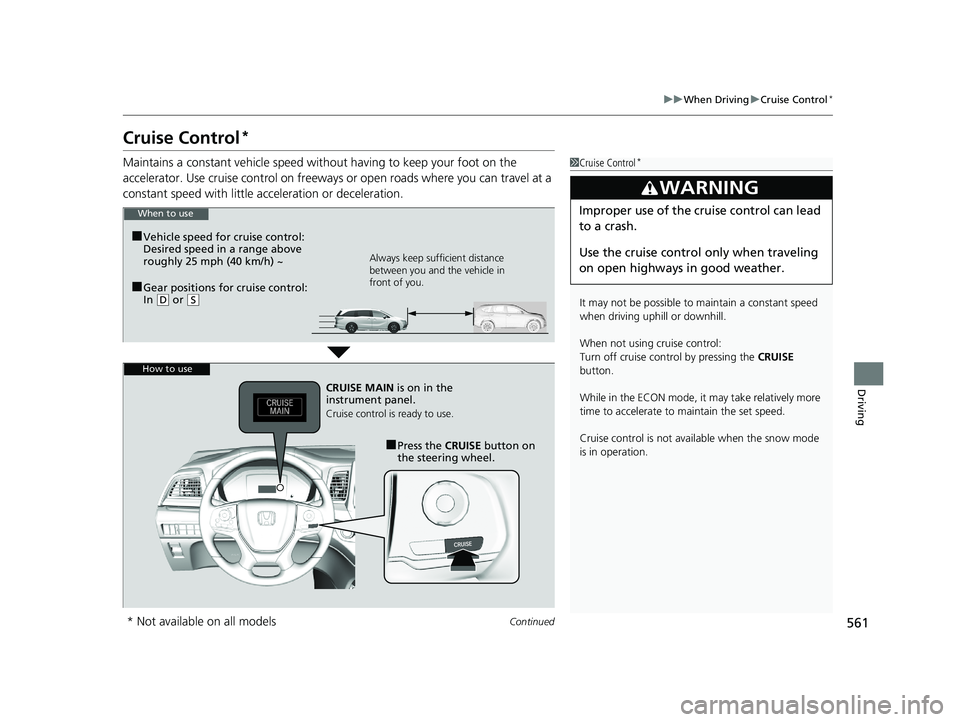
Maintains a constant vehicle speed without having to keep your foot on the
accelerator. Use cruise control on freeways or open road s where you can travel at a
constant speed with little ac celeration or deceleration.1Cruise Control*
It may not be possible to maintain a constant speed
when driving uphill or downhill.
When not using cruise control:
Turn off cruise control by pressing the CRUISE
button.
While in the ECON mode, it may take relatively more
time to accelerate to maintain the set speed.
Cruise control is not avai lable when the snow mode
is in operation.
3WARNING
Improper use of the cruise control can lead
to a crash.
Use the cruise control only when traveling
on open highways in good weather.When to use
■Gear positions for cruise control:
In ( D or (S Always keep sufficient distance
between you and the vehicle in
front of you.
■Vehicle speed for cruise control:
Desired speed in a range above
roughly 25 mph (40 km/h) ~
How to use
CRUISE MAIN
is on in the
instrument panel.
Cruise control is ready to use.
■Press the CRUISE button on
the steering wheel.
* Not available on all models
19 ODYSSEY-31THR6120.book 561 ページ 2018年12月6日 木曜日 午後4時35分
Page 564 of 767
562
uuWhen Driving uCruise Control*
Driving
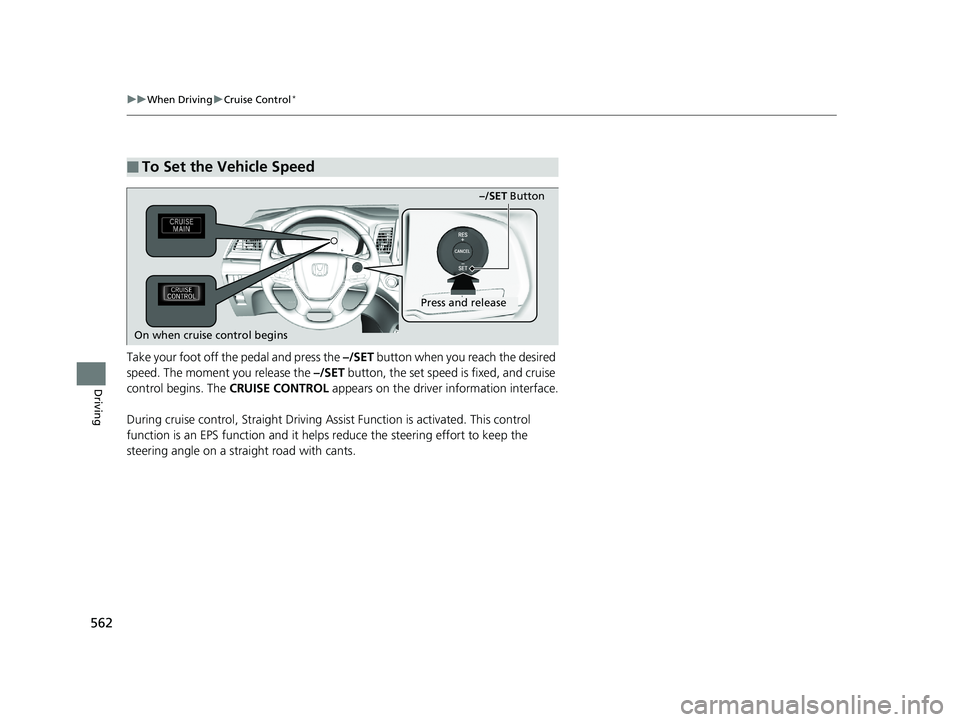
Take your foot off the pedal and press the –/SET button when you reach the desired
speed. The moment you release the –/SET button, the set speed is fixed, and cruise
control begins. The CRUISE CONTROL appears on the driver information interface.
During cruise control, Straight Driving A ssist Function is activated. This control
function is an EPS function and it helps reduce the steering effort to keep the
steering angle on a straight road with cants.
■To Set the Vehicle Speed
–/SET Button
On when cruise control begins
Press and release
19 ODYSSEY-31THR6120.book 562 ページ 2018年12月6日 木曜日 午後4時35分
Page 565 of 767
563
uuWhen Driving uCruise Control*
Driving
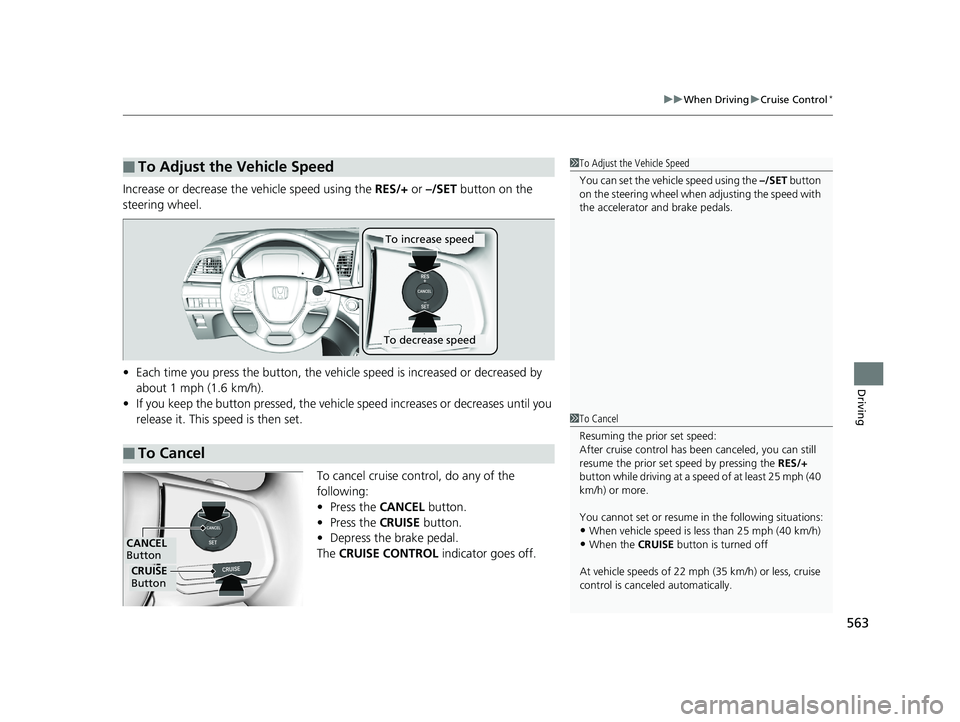
Increase or decrease the vehicle speed using the RES/+ or –/SET button on the
steering wheel.
• Each time you press the button, the vehicl e speed is increased or decreased by
about 1 mph (1.6 km/h).
• If you keep the button pressed, the vehicl e speed increases or decreases until you
release it. This speed is then set.
To cancel cruise control, do any of the
following:
• Press the CANCEL button.
• Press the CRUISE button.
• Depress the brake pedal.
The CRUISE CONTROL indicator goes off.
■To Adjust the Vehicle Speed1To Adjust the Vehicle Speed
You can set the vehicle speed using the –/SET button
on the steering wheel when adjusting the speed with
the accelerator and brake pedals.
■To Cancel
To decrease speed
To increase speed
1 To Cancel
Resuming the prior set speed:
After cruise control has be en canceled, you can still
resume the prior set speed by pressing the RES/+
button while driving at a speed of at least 25 mph (40
km/h) or more.
You cannot set or resume in the following situations:
•When vehicle speed is less than 25 mph (40 km/h)
•When the CRUISE button is turned off
At vehicle speeds of 22 m ph (35 km/h) or less, cruise
control is canceled automatically.
CRUISE
Button
CANCEL
Button
19 ODYSSEY-31THR6120.book 563 ページ 2018年12月6日 木曜日 午後4時35分
Page 568 of 767
566
uuWhen Driving uAdaptive Cruise Control (ACC)*
Driving
Adaptive Cruise Control (ACC)*
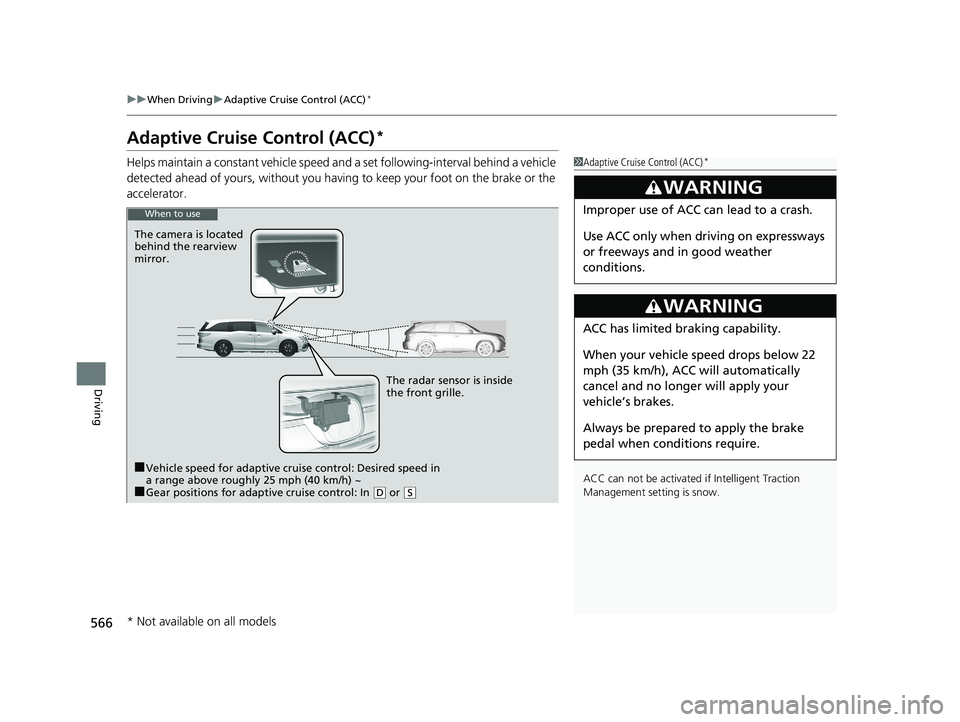
Helps maintain a constant vehicle speed an d a set following-interval behind a vehicle
detected ahead of yours, without you havi ng to keep your foot on the brake or the
accelerator.1 Adaptive Cruise Control (ACC)*
ACC can not be activated if Intelligent Traction
Management sett ing is snow.
3WARNING
Improper use of ACC can lead to a crash.
Use ACC only when driving on expressways
or freeways and in good weather
conditions.
3WARNING
ACC has limited braking capability.
When your vehicle speed drops below 22
mph (35 km/h), ACC will automatically
cancel and no longer will apply your
vehicle’s brakes.
Always be prepared to apply the brake
pedal when conditions require.
When to use
The camera is located
behind the rearview
mirror.
The radar sensor is inside
the front grille.
■Vehicle speed for adaptive cruise control: Desired speed in
a range above roughly 25 mph (40 km/h) ~
■Gear positions for adaptive cruise control: In ( D or (S
* Not available on all models
19 ODYSSEY-31THR6120.book 566 ページ 2018年12月6日 木曜日 午後4時35分
Page 569 of 767
Continued567
uuWhen Driving uAdaptive Cruise Control (ACC)*
Driving
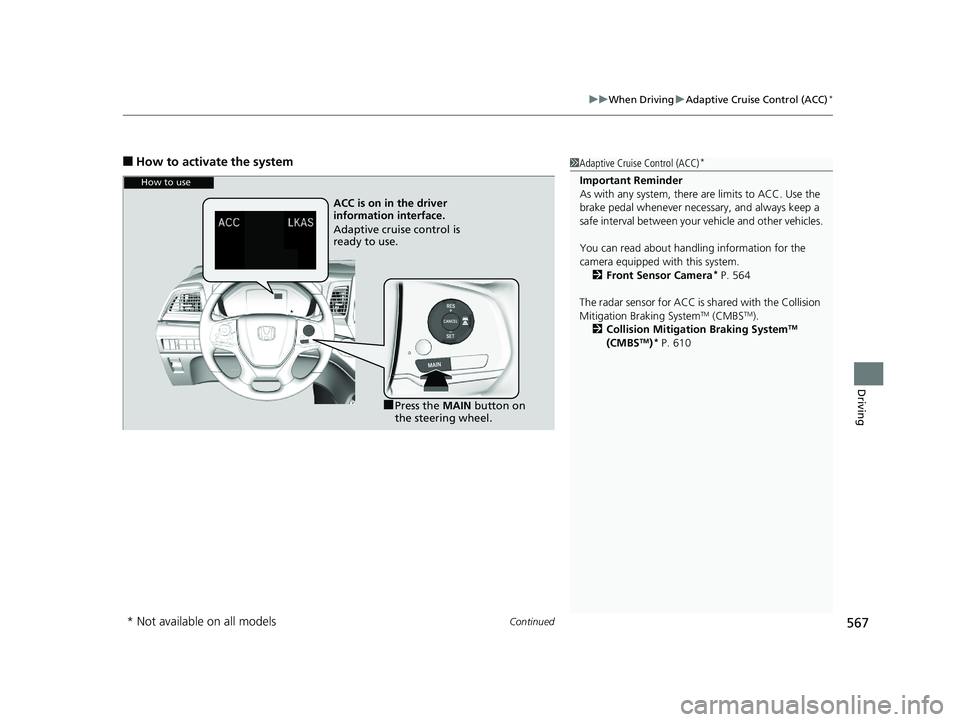
■How to activate the system1Adaptive Cruise Control (ACC)*
Important Reminder
As with any system, there are limits to ACC. Use the
brake pedal whenever necessary, and always keep a
safe interval betw een your vehicle and other vehicles.
You can read about handling information for the
camera equipped with this system. 2 Front Sensor Camera
* P. 564
The radar sensor for ACC is shared with the Collision
Mitigation Braking System
TM (CMBSTM).
2 Collision Mitigation Braking SystemTM
(CMBSTM)* P. 610
How to use
ACC is on in the driver
information interface.
Adaptive cruise control is
ready to use.
■Press the MAIN button on
the steering wheel.
* Not available on all models
19 ODYSSEY-31THR6120.book 567 ページ 2018年12月6日 木曜日 午後4時35分
Page 570 of 767
uuWhen Driving uAdaptive Cruise Control (ACC)*
568
Driving
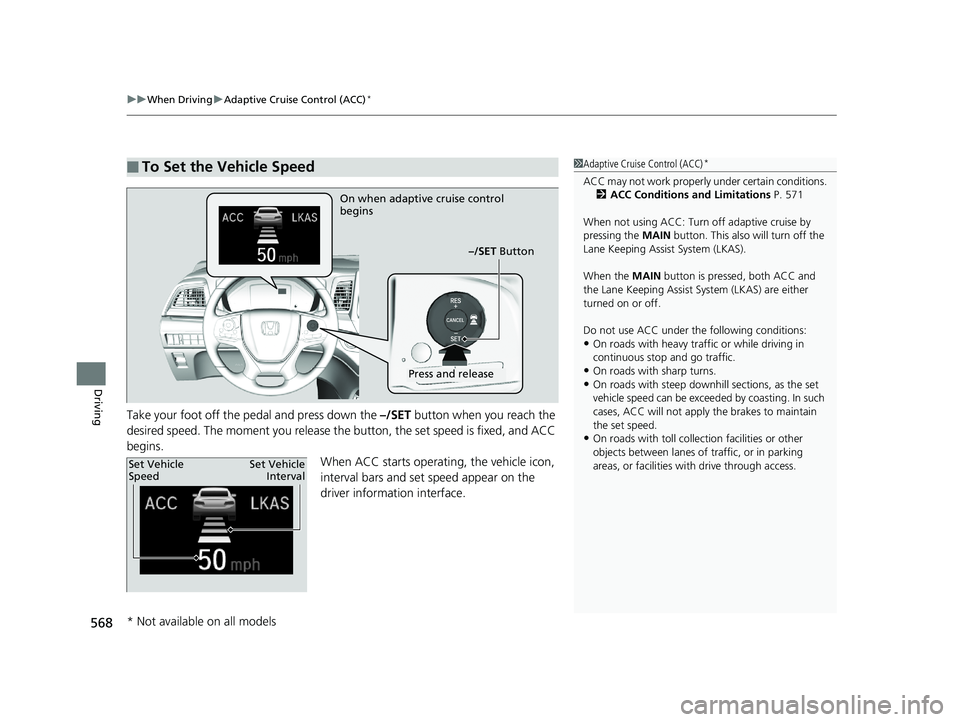
Take your foot off the pedal and press down the –/SET button when you reach the
desired speed. The moment you release the button, the set speed is fixed, and ACC
begins. When ACC starts operating, the vehicle icon,
interval bars and set speed appear on the
driver information interface.
■To Set the Vehicle Speed1 Adaptive Cruise Control (ACC)*
ACC may not work properly under certai n conditions.
2 ACC Conditions and Limitations P. 571
When not using ACC: Turn off adaptive cruise by
pressing the MAIN button. This also will turn off the
Lane Keeping Assist System (LKAS).
When the MAIN button is pressed, both ACC and
the Lane Keeping Assist System (LKAS) are either
turned on or off.
Do not use ACC under the following conditions:
•On roads with heavy traf fic or while driving in
continuous stop and go traffic.
•On roads with sharp turns.•On roads with steep downhill sections, as the set
vehicle speed can be exceeded by coasting. In such
cases, ACC will not apply the brakes to maintain
the set speed.
•On roads with toll collection facilities or other
objects between lanes of traffic, or in parking
areas, or faci lities with driv e through access.
On when adaptive cruise control
begins
–/SET Button
Press and release
Set Vehicle
SpeedSet Vehicle
Interval
* Not available on all models
19 ODYSSEY-31THR6120.book 568 ページ 2018年12月6日 木曜日 午後4時35分
Page 571 of 767
Continued569
uuWhen Driving uAdaptive Cruise Control (ACC)*
Driving
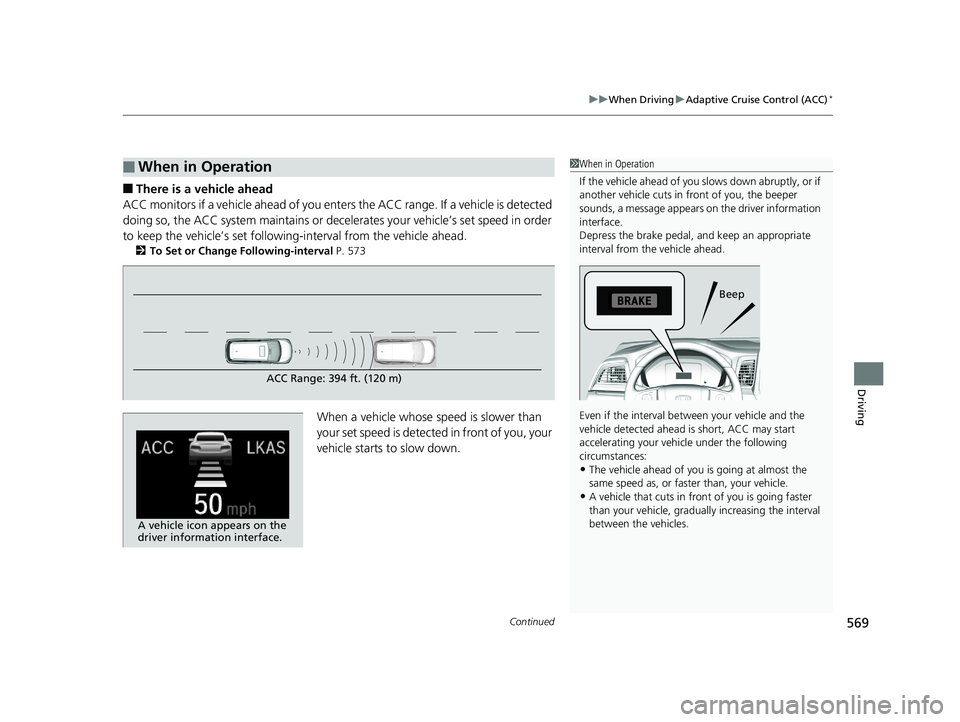
■There is a vehicle ahead
ACC monitors if a vehicle ahead of you enters the ACC range. If a vehicle is detected
doing so, the ACC system maintains or decele rates your vehicle’s set speed in order
to keep the vehicle’s set followi ng-interval from the vehicle ahead.
2To Set or Change Following-interval P. 573
When a vehicle whose speed is slower than
your set speed is detected in front of you, your
vehicle starts to slow down.
■When in Operation1When in Operation
If the vehicle ahead of you slows down abruptly, or if
another vehicle cuts in front of you, the beeper
sounds, a message appears on the driver information
interface.
Depress the brake pedal, and keep an appropriate
interval from the vehicle ahead.
Even if the interval betw een your vehicle and the
vehicle detected ahead is short, ACC may start
accelerating your vehi cle under the following
circumstances:
•The vehicle ahead of you is going at almost the
same speed as, or faster than, your vehicle.
•A vehicle that cuts in front of you is going faster
than your vehicle, gradua lly increasing the interval
between the vehicles.
Beep
ACC Range: 394 ft. (120 m)
A vehicle icon appears on the
driver information interface.
19 ODYSSEY-31THR6120.book 569 ページ 2018年12月6日 木曜日 午後4時35分
Page 572 of 767
uuWhen Driving uAdaptive Cruise Control (ACC)*
570
Driving
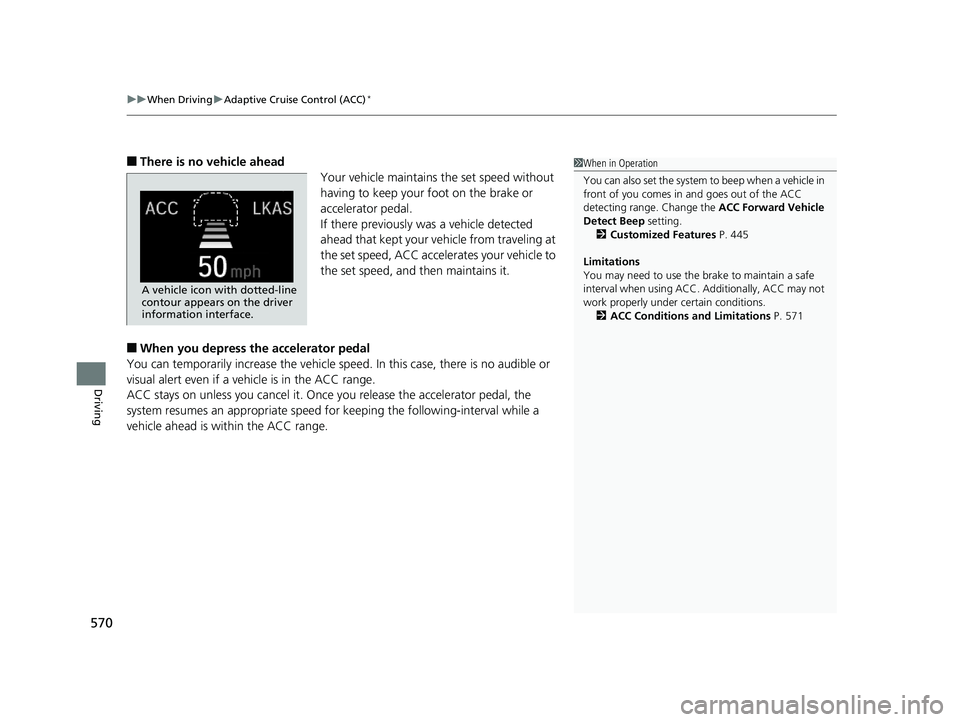
■There is no vehicle ahead
Your vehicle maintains the set speed without
having to keep your foot on the brake or
accelerator pedal.
If there previously was a vehicle detected
ahead that kept your vehicle from traveling at
the set speed, ACC accelerates your vehicle to
the set speed, and then maintains it.
■When you depress the accelerator pedal
You can temporarily increase th e vehicle speed. In this case, there is no audible or
visual alert even if a ve hicle is in the ACC range.
ACC stays on unless you cancel it. Once you release the accelerator pedal, the
system resumes an appropriate speed for keeping the following-interval while a
vehicle ahead is within the ACC range.
1 When in Operation
You can also set the system to beep when a vehicle in
front of you comes in and goes out of the ACC
detecting range. Change the ACC Forward Vehicle
Detect Beep setting.
2 Customized Features P. 445
Limitations
You may need to use the brake to maintain a safe
interval when using ACC. Additionally, ACC may not
work properly under certain conditions.
2 ACC Conditions and Limitations P. 571
A vehicle icon with dotted-line
contour appears on the driver
information interface.
19 ODYSSEY-31THR6120.book 570 ページ 2018年12月6日 木曜日 午後4時35分
Page 573 of 767
Continued571
uuWhen Driving uAdaptive Cruise Control (ACC)*
Driving
The system may automatically shut off and the ACC indicator will come on under
certain conditions. Some examples of thes e conditions are listed below. Other
conditions may reduce some of the ACC functions.
2 Front Sensor Camera* P. 564
■Environmental conditions
Driving in bad weather (r ain, fog, snow, etc.).
■Roadway conditions
Driving on a snowy or wet roadway (obscure d lane marking, vehicle tracks, reflected
lights, road spra y, high contrast).
■Vehicle conditions
• The outside of the windshield is blocked by dirt, mud, leaves, wet snow, etc.
• An abnormal tire or wheel condition (wro ng sized, varied size or construction,
improperly inflated, co mpact spare tire, etc.).
• The camera temperature gets too high.
• The parking brake is applied.
• When the front grille is dirty.
• The vehicle is tilted due to a heavy load or suspension modifications.
• When tire chains are installed.
■ACC Conditions and Limitations1ACC Conditions and Limitations
Always keep the radar sensor cover clean.
Never use chemical solvents or polishing powder for
cleaning the sensor cover. Clean it with water or a
mild detergent.
Do not put a sticker on the radar sensor cover or
replace the radar sensor cover.
If you need the radar sensor to be repaired, or
removed, or the radar se nsor cover is strongly
impacted, turn off the system by pressing the MAIN
button and take your vehicle to a dealer.
Have your vehicle checked by a dealer if you find any
unusual behavior of the system (e.g., the warning
message appears too frequently).
If the front of the vehicle is impacted in any of the
following situations, the ra dar sensor may not work
properly. Have your vehi cle checked by a dealer:
•The vehicle mounted onto a bump, curb, chock,
embankment, etc.
•You drive the vehicle where the water is deep.
•Your vehicle has a frontal collision.
* Not available on all models
19 ODYSSEY-31THR6120.book 571 ページ 2018年12月6日 木曜日 午後4時35分
Page 574 of 767
572
uuWhen Driving uAdaptive Cruise Control (ACC)*
Driving
■Detection limitations
• A vehicle suddenly crosses in front of you.
• The interval between your vehicle and the vehicle ahead of you is too short.
• A vehicle cuts in front of you at a slow speed, and it brakes suddenly.
• When you accelerate rapidly and approach the vehicle ahead of you at high
speed.
• The vehicle ahead of you is a motorcycle, bicycle, mobility scooter, or other small
vehicle.
• When there are animals in front of your vehicle.
• When you drive on a curved or winding or undulating road that makes it difficult
for the sensor to properly dete ct a vehicle in front of you.
• The speed difference between your vehicl e and a vehicle in front of you is
significantly large.
• An oncoming vehicle suddenly comes in front of you.
• Your vehicle abruptly crosses over in front of an oncoming vehicle.
• When driving through a narrow iron bridge.
• When the vehicle ahead of you brakes suddenly.
• When the vehicle ahead of you has a unique shape.
• When your vehicle or the vehicle ahead of you is driving on one edge of the lane.
19 ODYSSEY-31THR6120.book 572 ページ 2018年12月6日 木曜日 午後4時35分