transmission HONDA ODYSSEY 2019 (in English) Owner's Guide
[x] Cancel search | Manufacturer: HONDA, Model Year: 2019, Model line: ODYSSEY, Model: HONDA ODYSSEY 2019Pages: 767, PDF Size: 47.46 MB
Page 210 of 767
208
uuAdjusting the Mirrors uPower Door Mirrors
Controls
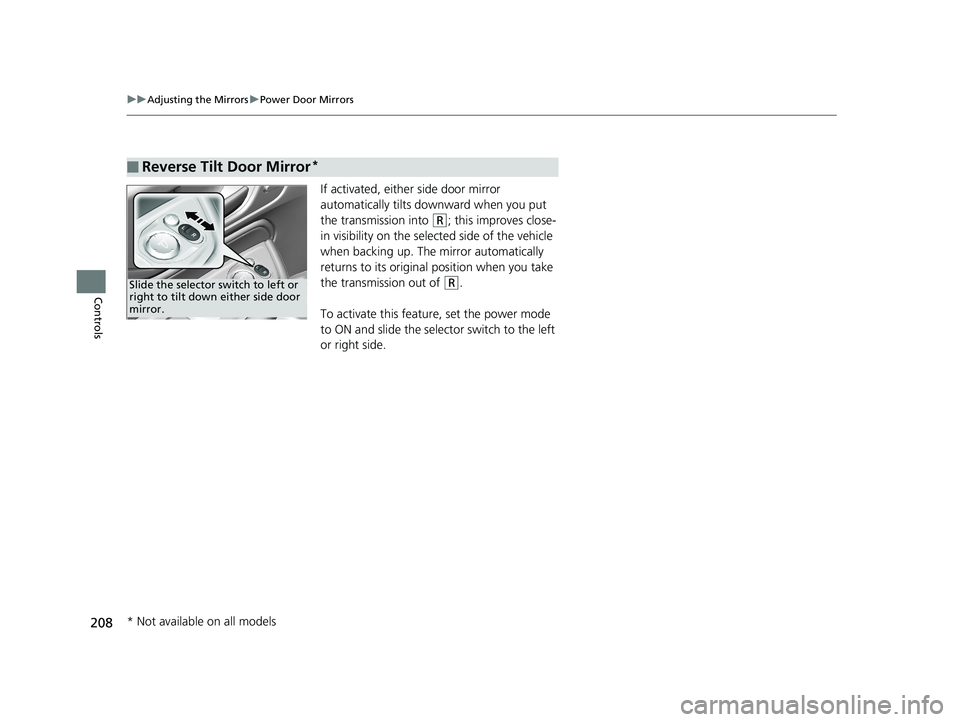
If activated, either side door mirror
automatically tilts do wnward when you put
the transmission into
(R; this improves close-
in visibility on the selected side of the vehicle
when backing up. The mirror automatically
returns to its original position when you take
the transmission out of
(R.
To activate this feature, set the power mode
to ON and slide the selector switch to the left
or right side.
■Reverse Tilt Door Mirror*
Slide the selector switch to left or
right to tilt down either side door
mirror.
* Not available on all models
19 ODYSSEY-31THR6120.book 208 ページ 2018年12月6日 木曜日 午後4時35分
Page 356 of 767
354
uuAudio System Basic Operation uWi-Fi Connection
Features
Wi-Fi Connection
You can connect the audio system to the Internet using Wi-Fi and browse websites
or use online services on the audio/information screen. If your phone has cell
hotspot capabilities, the system can be te thered to the phone. Use the following
steps to setup.
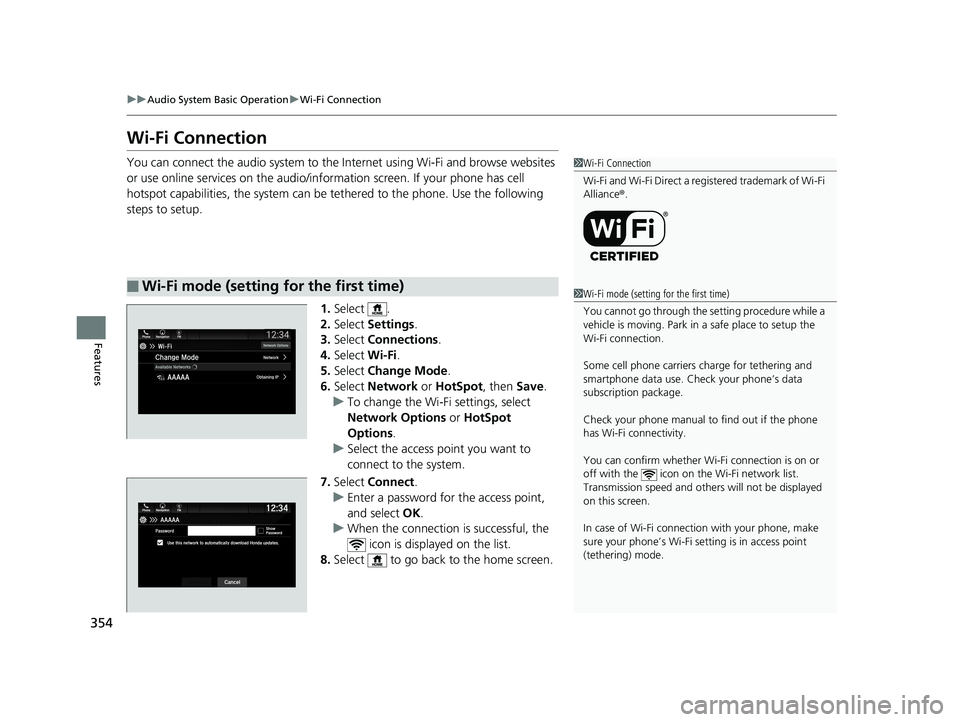
1.Select .
2. Select Settings .
3. Select Connections .
4. Select Wi-Fi.
5. Select Change Mode .
6. Select Network or HotSpot, then Save.
u To change the Wi-Fi settings, select
Network Options or HotSpot
Options .
u Select the access point you want to
connect to the system.
7. Select Connect .
u Enter a password for the access point,
and select OK .
u When the connection is successful, the
icon is displayed on the list.
8. Select to go back to the home screen.
■Wi-Fi mode (setting for the first time)
1Wi-Fi Connection
Wi-Fi and Wi-Fi Direct a registered trademark of Wi-Fi
Alliance® .
1Wi-Fi mode (setting for the first time)
You cannot go through the setting procedure while a
vehicle is moving. Park in a safe place to setup the
Wi-Fi connection.
Some cell phone carriers charge for tethering and
smartphone data use. Check your phone’s data
subscription package.
Check your phone manual to find out if the phone
has Wi-Fi connectivity.
You can confirm whether Wi -Fi connection is on or
off with the icon on the Wi-Fi network list.
Transmission speed and others will not be displayed
on this screen.
In case of Wi-Fi connect ion with your phone, make
sure your phone’s Wi-Fi se tting is in access point
(tethering) mode.
19 ODYSSEY-31THR6120.book 354 ページ 2018年12月6日 木曜日 午後4時35分
Page 363 of 767
Continued361
uuAudio System Basic Operation uApple CarPlay
Features
■Maps
Display Apple Maps and use the navigation function just as you would on your
iPhone.
Only one navigation system (pre-installed navigation or Apple CarPlay) can give
directions at a time. When you are using one system, directions to any prior
destination set on the other system will be canceled, and the system you are
currently using will direct you to your destination.
After you have connected your iPhone to the system via the front USB port, use the
following procedure to set up Apple CarPlay. Use of Apple CarPlay will result in the
transmission of certain user and vehicle information (such as vehicle location, speed,
and status) to your iPhone to enhance the Apple CarPlay experience. You will need
to consent to the sharing of this info rmation on the audio/information screen.
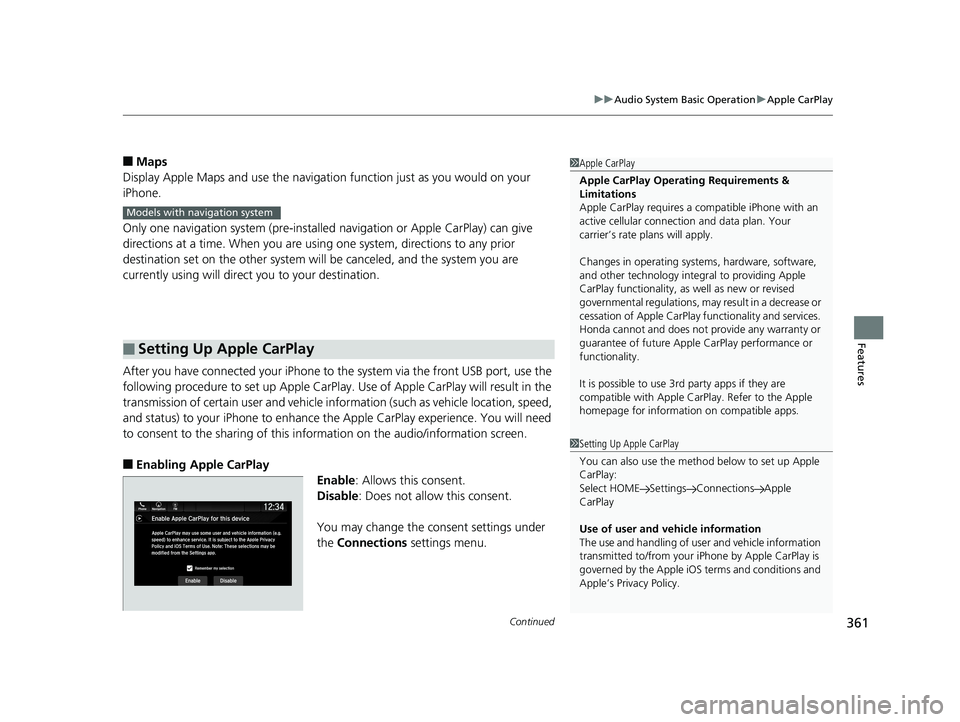
■Enabling Apple CarPlay
Enable: Allows this consent.
Disable : Does not allow this consent.
You may change the consent settings under
the Connections settings menu.
■Setting Up Apple CarPlay
1Apple CarPlay
Apple CarPlay Operating Requirements &
Limitations
Apple CarPlay requi res a compatible iPhone with an
active cellular connecti on and data plan. Your
carrier’s rate plans will apply.
Changes in operating system s, hardware, software,
and other technology integral to providing Apple
CarPlay functionality, as well as new or revised
governmental regulations, may result in a decrease or
cessation of Apple CarPlay functionality and services.
Honda cannot and does not pr ovide any warranty or
guarantee of future Appl e CarPlay performance or
functionality.
It is possible to use 3r d party apps if they are
compatible with Apple CarPlay. Refer to the Apple
homepage for information on compatible apps.
Models with navigation system
1 Setting Up Apple CarPlay
You can also use the method below to set up Apple
CarPlay:
Select HOME Settings Connections Apple
CarPlay
Use of user and vehicle information
The use and handling of user and vehicle information
transmitted to/from your iP hone by Apple CarPlay is
governed by the Apple iOS terms and conditions and
Apple’s Privacy Policy.
19 ODYSSEY-31THR6120.book 361 ページ 2018年12月6日 木曜日 午後4時35分
Page 384 of 767
382
uuGeneral Information on the Audio System uHonda App License Agreement
Features
E. Information Collection and Storage
1. Information Collecti on, Use, Transmission and Storage of Data. Consent to Use of Data: You agree that HONDA and PROVIDERS may
collect and use your information gathered in any manner as part of product support services related to the SOFTWARE or related services.
HONDA may share such information with third parties, including, without limitation, PROV IDERS, third party software and service s
suppliers, their affiliates and/or their design ated agents, solely to improve their products or to provide services or technologies to you.
HONDA, third party software and systems supp liers, their affiliates and/or their designated agent may disclose this information to others,
but not in a form that pe rsonally identifies you.
2. Information Storage. Depending on the type of multimedia system you have in your VEHICLE, certain information may be stored fo r ease
of use of the SOFTWARE including, without limitation, search hi story, location history in certain applications, previous and saved
destinations, map locations within certain applications, and device numbers and contact information.
(a) Vehicle Health Information. Your VEHICL E may remotely transmit information regardin g the status and health of your VEHICLE
(“VEHICLE INFORMATION”) to HONDA without notification to you. VEHICLE INFORMATION may contain VEHICLE maintenance and
malfunction status that is derived from VEHICLE diagnostic data and includes, but is not limited to, status of powered doors and windows,
battery life data, battery charging data, VEHICLE speed, coolant temperat ure, air compressor revolution, output power, warning codes,
diagnostic trouble codes, fuel injection volume, and engine rotati ons per minute. VEHICLE HEALTH INFORMATION may be used by HONDA
for research and development, to deliver HO NDA SERVICES and information to you, and to contact you, and is retained only for a period
of time necessary to fulfill these goals.
(b) VEHICLE Geolocation Data (non-navigation/map based). If you opt-in to geolocation-based SERVICES, your vehicle’s geolocation data
(latitude and longitude) will be automatically sent from your VEHICLE to HONDA and PROVIDERS.
(c) You understand that the inputting or uploading of information to your VEHICLE’s multimedia system or the SOFTWARE or SERVICES is
at your own risk and that HONDA is not resp onsible for unauthorized access to or use of any personal or other information. All information
uploaded to the SOFTWARE and SERVICES may be stored on your VEHI CLES’s multimedia system and you understand that the security and
safety of your VEHICLE’s multimedia system is your sole responsibility.
19 ODYSSEY-31THR6120.book 382 ページ 2018年12月6日 木曜日 午後4時35分
Page 387 of 767
385
uuGeneral Information on the Audio System uHonda App License Agreement
Continued
Features
I. Availability/Interruption. The SOFTWARE and certain SERVICES are made availa ble through your VEHICLE’s compatible multimedia
system when the VEHICLE is turned on. Certain SERVICES may be available only through your compatible mobile device when it is within
the operating range of the VEHICLE and a wireless carrier. The av ailability of the SOFTWARE and SERVICES may be subject to transmission
limitation or interruption, including but not limited to technical obsolesce or sunsetting of the hardware, software or firmware, inside of
or external to the Vehicle, required for data transmission or receipt. HONDA does not guarantee that the SOFTWARE, SERVICES, or any
portion thereof will be available at all times or in all areas. You acknowledge and agree that HONDA is not responsible for per formance
degradation, interruption or dela ys. You acknowledge that HONDA shall not be liable to you if the SOFTWARE or SERVICES in a given
location are not available. If the SOFTWARE or SERVICES are not available within your intended location, you agree that your so le remedy
shall be to cease using the SOFTWARE and SERVICES.
J. PRODUCT SUPPORT: Product support for the SOFTWARE is provided by HONDA. For product support, please refer to HONDA
instructions provided in the DOCUMENTATION. Should you have any questions concerning this AGREEMENT, or if you desire to contact
HONDA for any other reason, please refer to the HONDA contact information provided in the DOCUMENTATION.
K. Termination and Transfer.
1. Termination. This AGREEMENT is effective until term inated by you or US. WE may terminate this AGREEMENT for any or no reason,
and with or without notice to you. Your rights under this AGR EEMENT will terminate automatically without notice from US if you fail to
comply with any term of this AGREEMENT. Upon termination of this AGREEMENT, you sh all cease all use of the SOFTWARE and SERVICE S.
2. Transfer: You may permanently transfer your rights under this AGREEMENT only as part of a sale or transfer of the VEHICLE, provided
you retain no copies, y ou transfer all of the SOFTWARE and HONDA SERVICES (inc luding all component parts, the media and printed
materials, and any upgrades), and the recipi ent agrees to the terms of this AGREEMENT. You agree to notify HONDA upon the sale or
transfer of the VEHICLE. To contact HO NDA, please refer to the HONDA contact info rmation provided in the DOCUMENTATION.
19 ODYSSEY-31THR6120.book 385 ページ 2018年12月6日 木曜日 午後4時35分
Page 527 of 767
525
Driving
This chapter discusses driving and refueling.
Before DrivingDriving Preparation .......................... 526
Maximum Load Limit........................ 529
Towing a Trailer Towing Preparation .......................... 532
Driving Safely with a Trailer .............. 536
Towing Your Vehicle ........................ 537
When Driving Starting the Engine .......................... 538
Precautions While Driving................. 544
Automatic Transmission ................... 545
Shifting ............................................ 546
Auto Idle Stop
*................................ 554
ECON Button ................................... 559 Intelligent Traction Management ..... 560
Cruise Control
*............................... 561
Front Sensor Camera*..................... 564
Adaptive Cruise Control (ACC)*....... 566Road Departure Mitigation (RDM) System*... 578Lane Keeping Assist System (LKAS)*.... 583
Vehicle Stability Assist® (VSA®), aka Electronic
Stability Control (ESC), System............. 591
Agile Handling Assist ....................... 593
Tire Pressure Monitoring System (TPMS) with Tire Fill Assist .......................... 594
Tire Pressure Monitoring System (TPMS) -
Required Federal Explanation ......... 596
Blind spot information System*........... 598LaneWatchTM*.................................. 600 Braking
Brake System ................................... 602
Anti-lock Brake System (ABS) ........... 608
Brake Assist System ......................... 609
Collision Mitigation Braking System
TM
(CMBSTM)*..................................... 610
Parking Your Vehicle When Stopped ................................ 619
Parking Sensor System
*................... 621
Cross Traffic Monitor*..................... 626
Multi-View Rear Camera .................. 630
Refueling
Fuel Information .............................. 632
How to Refuel ................................. 633
Fuel Economy and CO
2 Emissions .... 635
* Not available on all models
19 ODYSSEY-31THR6120.book 525 ページ 2018年12月6日 木曜日 午後4時35分
Page 539 of 767
537
uuTowing a Trailer uTowing Your Vehicle
Driving
• Monitor your temperature gauge. If it nears the red (Hot) mark, turn off the
climate control system and redu ce speed. Pull to the side of the road safely to cool
down the engine if necessary.
• Shift to the
(S position if the transmission shifts frequently.
Towing Your Vehicle
Your vehicle is not designed to be towed behind a motor home. If your vehicle needs
to be towed in an emergency, refer to the emergency towing information.
2Emergency Towing P. 731
■Driving in Hilly Terrain
19 ODYSSEY-31THR6120.book 537 ページ 2018年12月6日 木曜日 午後4時35分
Page 541 of 767
Continued539
uuWhen Driving uStarting the Engine
Driving
You can turn the engine off when the vehicle is completely stopped.
1. Put the transmission into
(P.
2. Press the ENGINE START/STOP button.
■Stopping the Engine1Starting the Engine
The immobilizer system pr otects your vehicle from
theft.
If an improperly c oded device is used, the engine’s
fuel system is disabled. 2 Immobilizer System P. 179
19 ODYSSEY-31THR6120.book 539 ページ 2018年12月6日 木曜日 午後4時35分
Page 542 of 767
uuWhen Driving uStarting the Engine
540
Driving
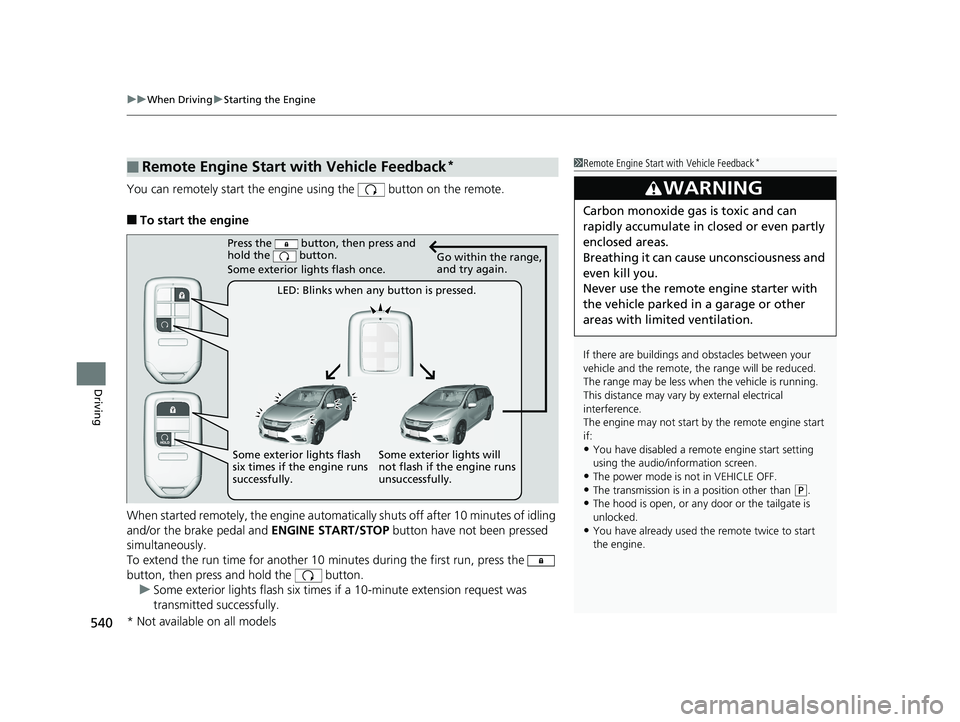
You can remotely start the engine using the button on the remote.
■To start the engine
When started remotely, the engine automati cally shuts off after 10 minutes of idling
and/or the brake pedal and ENGINE START/STOP button have not been pressed
simultaneously.
To extend the run time for another 10 minutes during the first run, press the
button, then press and hold the button. u Some exterior lights flash six times if a 10-minute extension request was
transmitted successfully.
■Remote Engine Start with Vehicle Feedback*1Remote Engine Start with Vehicle Feedback*
If there are buildings an d obstacles between your
vehicle and the remote, th e range will be reduced.
The range may be less when the vehicle is running.
This distance may vary by external electrical
interference.
The engine may not start by the remote engine start
if:
•You have disabled a remo te engine start setting
using the audio/information screen.
•The power mode is not in VEHICLE OFF.
•The transmission is in a position other than ( P.•The hood is open, or any door or the tailgate is
unlocked.
•You have already used the remote twice to start
the engine.
3WARNING
Carbon monoxide ga s is toxic and can
rapidly accumulate in closed or even partly
enclosed areas.
Breathing it can cause unconsciousness and
even kill you.
Never use the remote engine starter with
the vehicle parked in a garage or other
areas with limited ventilation.
Press the button, then press and
hold the button.
Some exterior lights flash once.
LED: Blinks when any button is pressed. Go within the range,
and try again.
Some exterior lights will
not flash if the engine runs
unsuccessfully.
Some exterior lights flash
six times if the engine runs
successfully.
* Not available on all models
19 ODYSSEY-31THR6120.book 540 ページ 2018年12月6日 木曜日 午後4時35分
Page 543 of 767
Continued541
uuWhen Driving uStarting the Engine
Driving
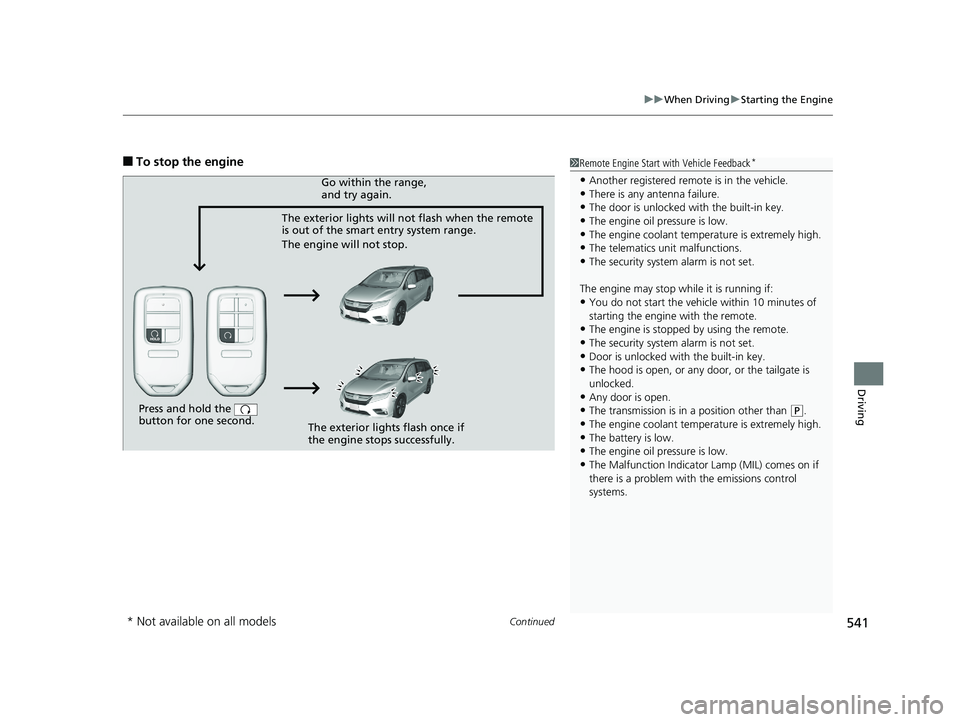
■To stop the engine1Remote Engine Start with Vehicle Feedback*
•Another registered remo te is in the vehicle.•There is any antenna failure.
•The door is unlocked with the built-in key.
•The engine oil pressure is low.•The engine coolant temper ature is extremely high.
•The telematics unit malfunctions.
•The security system alarm is not set.
The engine may stop whil e it is running if:
•You do not start the vehicl e within 10 minutes of
starting the engine with the remote.
•The engine is stopped by using the remote.
•The security system alarm is not set.•Door is unlocked with the built-in key.
•The hood is open, or any door, or the tailgate is
unlocked.
•Any door is open.
•The transmission is in a position other than ( P.
•The engine coolant temper ature is extremely high.
•The battery is low.•The engine oil pressure is low.
•The Malfunction Indicator Lamp (MIL) comes on if
there is a problem with the emissions control
systems.
Press and hold the
button for one second.
The exterior lights will not flash when the remote
is out of the smart entry system range.
The engine will not stop.Go within the range,
and try again.
The exterior lights flash once if
the engine stops successfully.
* Not available on all models
19 ODYSSEY-31THR6120.book 541 ページ 2018年12月6日 木曜日 午後4時35分