turn signal HONDA ODYSSEY 2019 (in English) Owner's Guide
[x] Cancel search | Manufacturer: HONDA, Model Year: 2019, Model line: ODYSSEY, Model: HONDA ODYSSEY 2019Pages: 767, PDF Size: 47.46 MB
Page 585 of 767
583
uuWhen Driving uLane Keeping Assist System (LKAS)*
Continued
Driving
Lane Keeping Assist System (LKAS)*
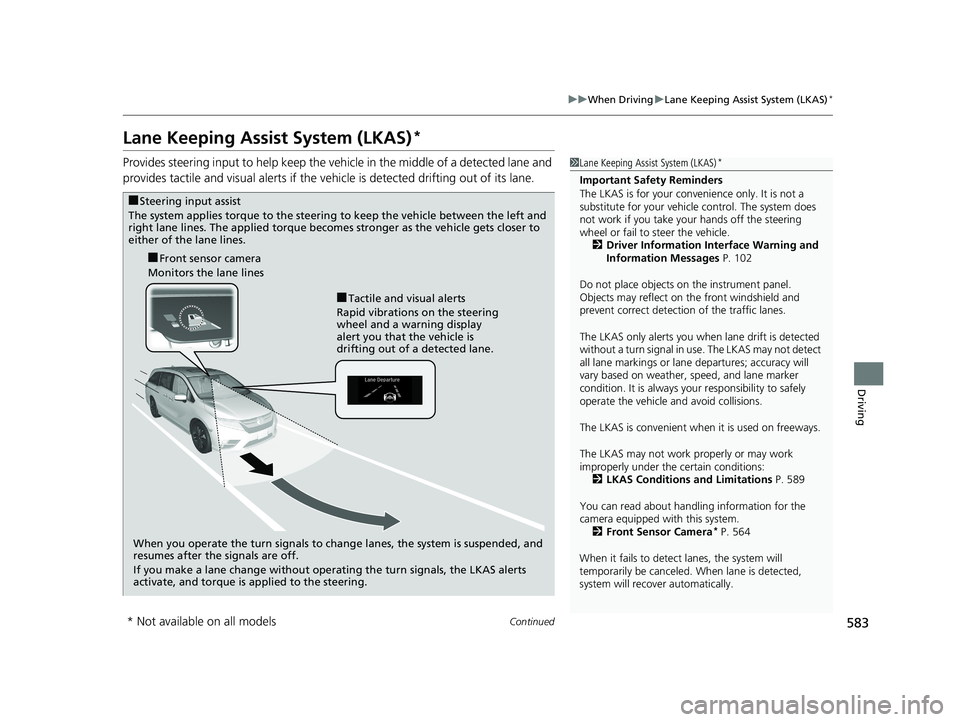
Provides steering input to help keep the vehicle in the middle of a detected lane and
provides tactile and visual al erts if the vehicle is detected drifting out of its lane.1Lane Keeping Assist System (LKAS)*
Important Safety Reminders
The LKAS is for your convenience only. It is not a
substitute for your vehicl e control. The system does
not work if you take y our hands off the steering
wheel or fail to steer the vehicle. 2 Driver Information Interface Warning and
Information Messages P. 102
Do not place objects on the instrument panel.
Objects may reflect on th e front windshield and
prevent correct detectio n of the traffic lanes.
The LKAS only alerts you when lane drift is detected
without a turn signal in us e. The LKAS may not detect
all lane markings or lane departures; accuracy will
vary based on weather, speed, and lane marker
condition. It is always your responsibility to safely
operate the vehicle an d avoid collisions.
The LKAS is convenient when it is used on freeways.
The LKAS may not work properly or may work
improperly under the certain conditions:
2 LKAS Conditions and Limitations P. 589
You can read about handling information for the
camera equipped with this system. 2 Front Sensor Camera
* P. 564
When it fails to detect lanes, the system will
temporarily be canceled. When lane is detected,
system will recover automatically.
■Tactile and visual alerts
Rapid vibrations on the steering
wheel and a warning display
alert you that the vehicle is
drifting out of a detected lane.
■Front sensor camera
Monitors the lane lines
■Steering input assist
The system applies torque to the steering to keep the vehicle between the left and
right lane lines. The applied torque become s stronger as the vehicle gets closer to
either of the lane lines.
When you operate the turn signals to change lanes, the system is suspended, and
resumes after the signals are off.
If you make a lane change without operating the turn signals, the LKAS alerts
activate, and torque is applied to the steering.
* Not available on all models
19 ODYSSEY-31THR6120.book 583 ページ 2018年12月6日 木曜日 午後4時35分
Page 587 of 767
Continued585
uuWhen Driving uLane Keeping Assist System (LKAS)*
Driving
The system can be used when th e following conditions are met.
• The lane in which you are driving has detectable lane markers on both sides, and
your vehicle is in the center of the lane.
• The vehicle speed is between 45 and 90 mph (72 and 145 km/h).
• You are driving on a straight or slightly curved road.
• The turn signals are off.
• The brake pedal is not depressed.
• The wipers are not in continuous operation.
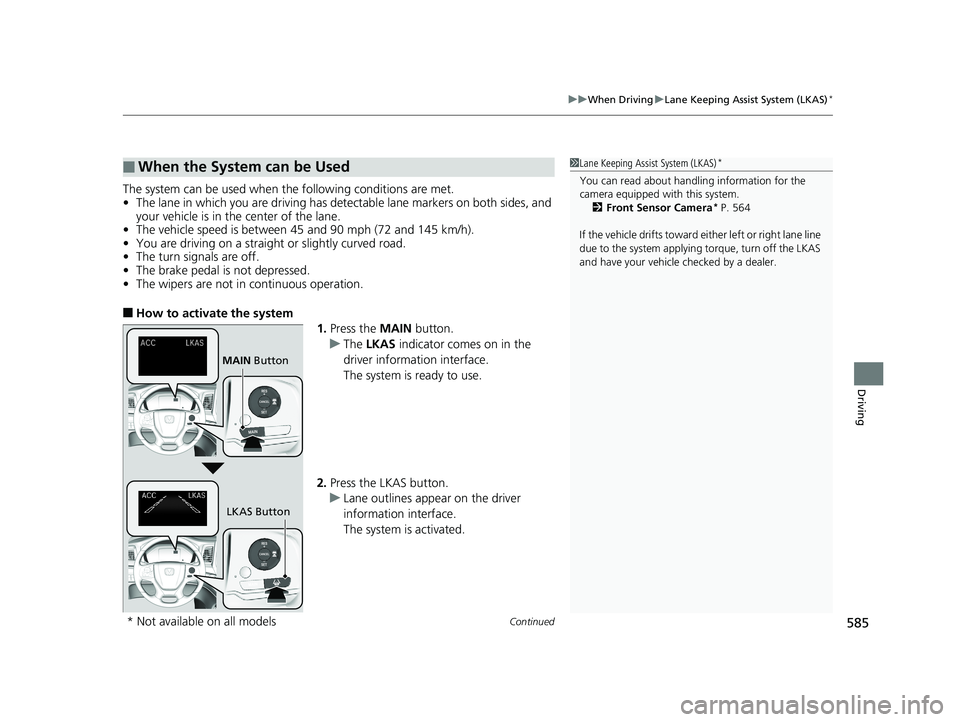
■How to activate the system
1.Press the MAIN button.
u The LKAS indicator comes on in the
driver information interface.
The system is ready to use.
2. Press the LKAS button.
u Lane outlines appear on the driver
information interface.
The system is activated.
■When the System can be Used1Lane Keeping Assist System (LKAS)*
You can read about handling information for the
camera equipped with this system.
2 Front Sensor Camera
* P. 564
If the vehicle drifts toward ei ther left or right lane line
due to the system applying torque, turn off the LKAS
and have your vehicle checked by a dealer.
MAIN Button
LKAS Button
* Not available on all models
19 ODYSSEY-31THR6120.book 585 ページ 2018年12月6日 木曜日 午後4時35分
Page 601 of 767
599
uuWhen Driving uBlind spot information System*
Driving
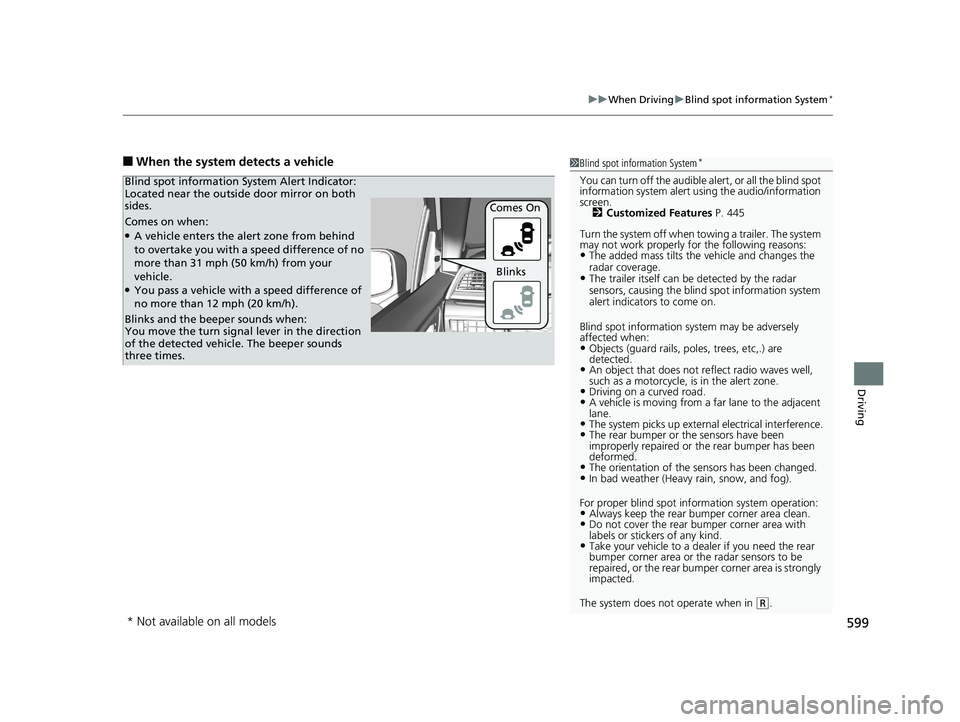
■When the system detects a vehicle1Blind spot information System*
You can turn off the audible al ert, or all the blind spot
information system alert using the audio/information
screen.
2 Customized Features P. 445
Turn the system off when towing a trailer. The system
may not work properly fo r the following reasons:
•The added mass tilts the vehicle and changes the
radar coverage.
•The trailer itself can be detected by the radar
sensors, causing the blind spot information system
alert indicators to come on.
Blind spot information sy stem may be adversely
affected when:
•Objects (guard rails, poles, trees, etc,.) are
detected.
•An object that does not re flect radio waves well,
such as a motorcycle, is in the alert zone.
•Driving on a curved road.•A vehicle is moving from a far lane to the adjacent
lane.
•The system picks up external electrical interference.•The rear bumper or the sensors have been
improperly repaired or the rear bumper has been
deformed.
•The orientation of the sensors has been changed.•In bad weather (Heavy rain, snow, and fog).
For proper blind spot information system operation:
•Always keep the rear bumper corner area clean.•Do not cover the rear bumper corner area with
labels or sticke rs of any kind.
•Take your vehicle to a dealer if you need the rear
bumper corner area or th e radar sensors to be
repaired, or the rear bumper corner area is strongly
impacted.
The system does not operate when in
( R.
Comes on when:●A vehicle enters the alert zone from behind
to overtake you with a speed difference of no
more than 31 mph (50 km/h) from your
vehicle.
●You pass a vehicle with a speed difference of
no more than 12 mph (20 km/h). Comes On
Blind spot information System Alert Indicator:
Located near the outside door mirror on both
sides.
Blinks and the beeper sounds when:
You move the turn signal
lever in the direction
of the detected vehicle. The beeper sounds
three times. Blinks
* Not available on all models
19 ODYSSEY-31THR6120.book 599 ページ 2018年12月6日 木曜日 午後4時35分
Page 602 of 767
600
uuWhen Driving uLaneWatchTM*
Driving
LaneWatchTM*
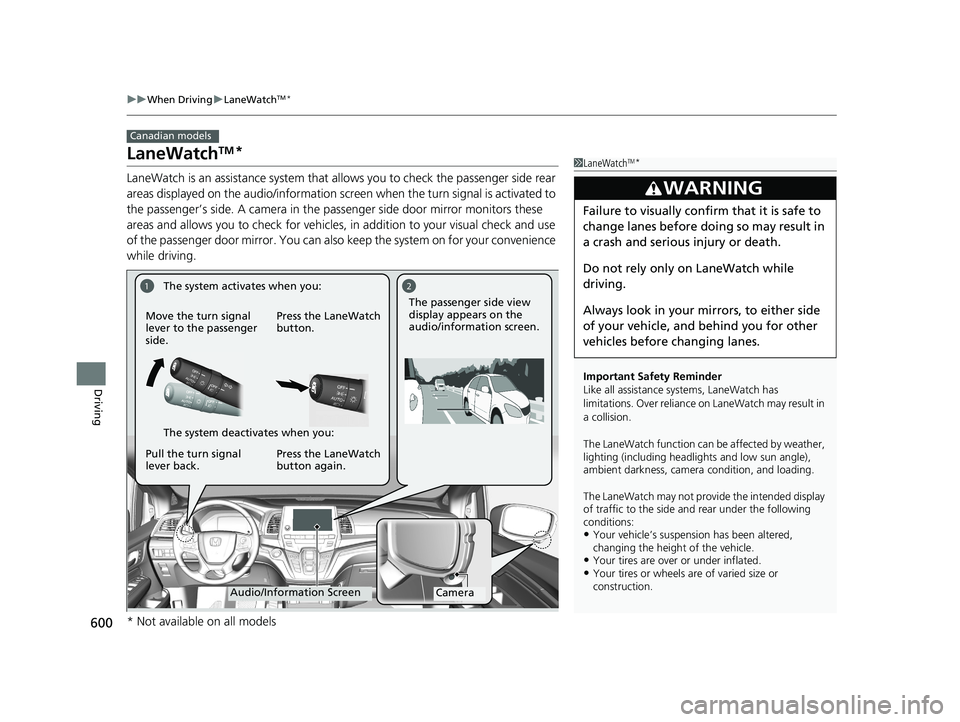
LaneWatch is an assistance system that allows you to check the passenger side rear
areas displayed on the audio/in formation screen when the turn signal is activated to
the passenger’s side. A camera in the passenger side door mirror monitors these
areas and allows you to check for vehicles, in addition to your visual check and use
of the passenger door mirror. You can also keep the system on for your convenience
while driving.
Canadian models
1 LaneWatchTM*
Important Safety Reminder
Like all assistance systems, LaneWatch has
limitations. Over reliance on LaneWatch may result in
a collision.
The LaneWatch func tion can be affected by weather,
lighting (including headli ghts and low sun angle),
ambient darkness, camera condition, and loading.
The LaneWatch may not prov ide the intended display
of traffic to the side and rear under the following
conditions:
•Your vehicle’s suspension has been altered,
changing the height of the vehicle.
•Your tires are over or under inflated.•Your tires or wheels are of varied size or
construction.
3WARNING
Failure to visually confirm that it is safe to
change lanes before doing so may result in
a crash and serious injury or death.
Do not rely only on LaneWatch while
driving.
Always look in your mi rrors, to either side
of your vehicle, and behind you for other
vehicles before changing lanes.
12
CameraAudio/Information Screen
Move the turn signal
lever to the passenger
side.
Press the LaneWatch
button.
Pull the turn signal
lever back. Press the LaneWatch
button again. The passenger side view
display appears on the
audio/information screen.
The system activates when you:
The system deactivates when you:
* Not available on all models
19 ODYSSEY-31THR6120.book 600 ページ 2018年12月6日 木曜日 午後4時35分
Page 603 of 767

601
uuWhen Driving uLaneWatchTM*
Driving
■Customizing the La neWatch settings
You can customize the following items using the audio/information screen.
• Show with Turn Signal : Selects whether LaneWatch monitor comes on when
you operate the turn signal light lever.
• Show Reference Line : Selects whether the reference lines appear on the
LaneWatch monitor.
2 Customized Features P. 445
■Reference Lines
Three lines that appear on the screen can give
an idea of how far the vehicles or objects on
the screen are from your vehicle, respectively.
If an object is near line 1 (in red), it indicates
that it is close to your vehicle whereas an
object near line 3 farther away.
1LaneWatchTM*
The LaneWatch camera view is restricted. Its unique
lens makes objects on the screen slightly look
different from what they are.
LaneWatch display does not come on when the
transmission is in
( R.
For proper LaneWatch operation:
•The camera is located in the passenger side door
mirror. Always keep this ar ea clean. If the camera
lens is covered with dirt or moisture, use a soft,
moist cloth to keep the lens clean and free of
debris.
•Do not cover the camera lens with labels or stickers
of any kind.
•Do not touch the camera lens.
1 Reference Lines
The area around the reference line 1 (red) is very close
to your vehicle. As always, make sure to visually
confirm the safety of a la ne change before changing
lanes.
The distance betwee n your vehicle and lines 1, 2 and
3 on the screen vary depending on road conditions
and vehicle loading. For ex ample, the reference lines
on the screen may seem to appear closer than the
actual distances when the rear of your vehicle is more
heavily loaded.
Consult a dealer if:
•The passenger side door mirr or, or area around it is
severely impacted, resulting in changing the
camera angle.
•The LaneWatch display doe s not come on at all.
23
1
* Not available on all models
19 ODYSSEY-31THR6120.book 601 ページ 2018年12月6日 木曜日 午後4時35分
Page 667 of 767
665
uuReplacing Light Bulbs uFront Turn Signal/Parking* Light Bulbs
Maintenance
Front Turn Signal/Parking* Light Bulbs
When replacing, use the following bulbs.
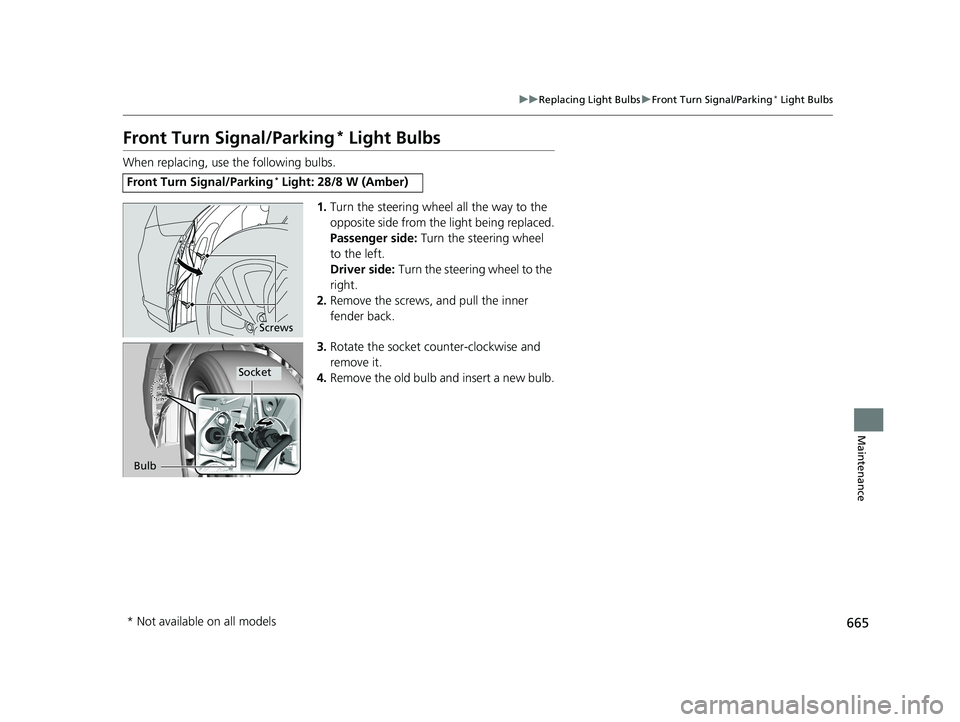
1.Turn the steering wheel all the way to the
opposite side from the light being replaced.
Passenger side: Turn the steering wheel
to the left.
Driver side: Turn the steering wheel to the
right.
2. Remove the screws, and pull the inner
fender back.
3. Rotate the socket counter-clockwise and
remove it.
4. Remove the old bulb and insert a new bulb.
Front Turn Signal/Parking* Light: 28/8 W (Amber)
Screws
Bulb
Socket
* Not available on all models
19 ODYSSEY-31THR6120.book 665 ページ 2018年12月6日 木曜日 午後4時35分
Page 668 of 767
666
uuReplacing Light Bulbs uFront Side Marker Light Bulbs
Maintenance
Front Side Marker Light Bulbs
When replacing, use the following bulb.
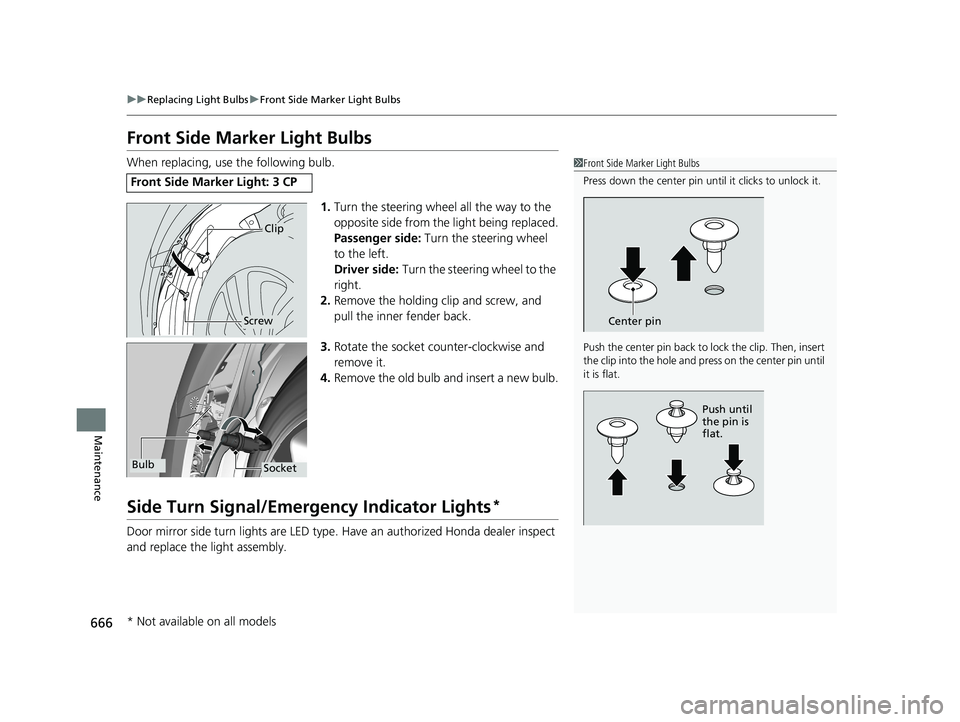
1.Turn the steering wheel all the way to the
opposite side from the light being replaced.
Passenger side: Turn the steering wheel
to the left.
Driver side: Turn the steering wheel to the
right.
2. Remove the holding clip and screw, and
pull the inner fender back.
3. Rotate the socket co unter-clockwise and
remove it.
4. Remove the old bulb and insert a new bulb.
Side Turn Signal/Emergency Indicator Lights*
Door mirror side turn lights are LED type. Have an authorized Honda dealer inspect
and replace the light assembly.
Front Side Marker Light: 3 CP
1 Front Side Marker Light Bulbs
Press down the center pin until it clicks to unlock it.
Push the center pin back to lock the clip. Then, insert
the clip into the hole and press on the center pin until
it is flat.
Center pin
Push until
the pin is
flat.
Clip
Screw
SocketBulb
* Not available on all models
19 ODYSSEY-31THR6120.book 666 ページ 2018年12月6日 木曜日 午後4時35分
Page 669 of 767
667
uuReplacing Light Bulbs uBrake, Rear Turn Signal Light Bulb s, and Rear Side Marker/Taillights
Continued
Maintenance
Brake, Rear Turn Signal Light Bulbs, and Rear Side
Marker/Taillights
When replacing, use the following bulbs.
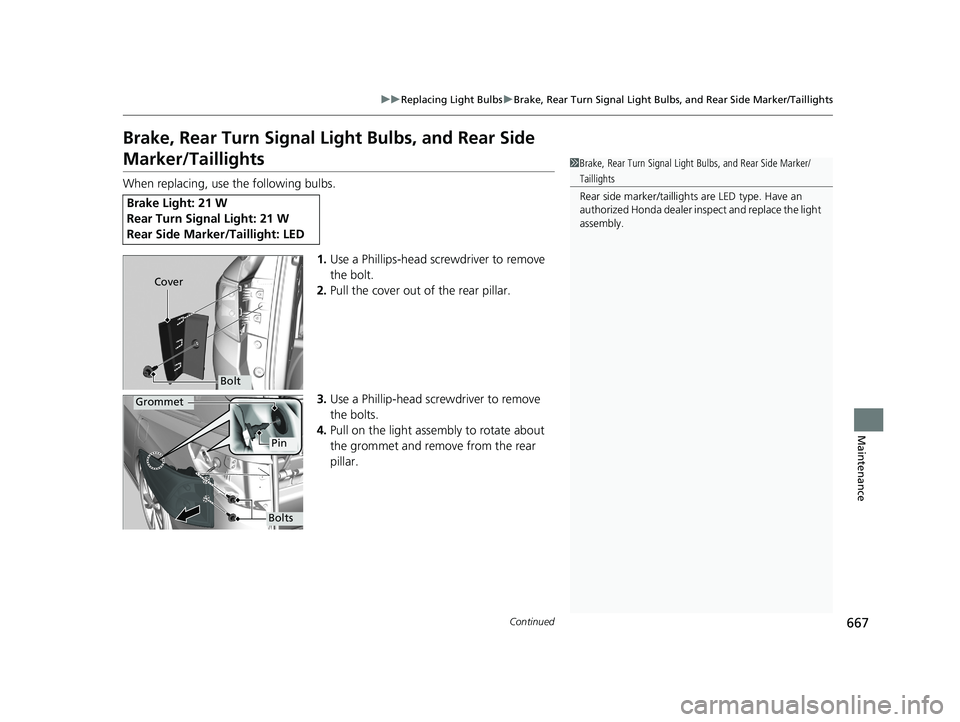
1.Use a Phillips-head sc rewdriver to remove
the bolt.
2. Pull the cover out of the rear pillar.
3. Use a Phillip-head screwdriver to remove
the bolts.
4. Pull on the light assembly to rotate about
the grommet and remove from the rear
pillar.
Brake Light: 21 W
Rear Turn Signal Light: 21 W
Rear Side Marker/Taillight: LED
1Brake, Rear Turn Signal Light Bulbs, and Rear Side Marker/
Taillights
Rear side marker /taillights are LED type. Have an
authorized Honda dealer in spect and replace the light
assembly.
Bolt
Cover
Grommet
Pin
Bolts
19 ODYSSEY-31THR6120.book 667 ページ 2018年12月6日 木曜日 午後4時35分
Page 670 of 767
668
uuReplacing Light Bulbs uBrake, Rear Turn Signal Light Bulbs, and Rear Side Marker/Taillights
Maintenance
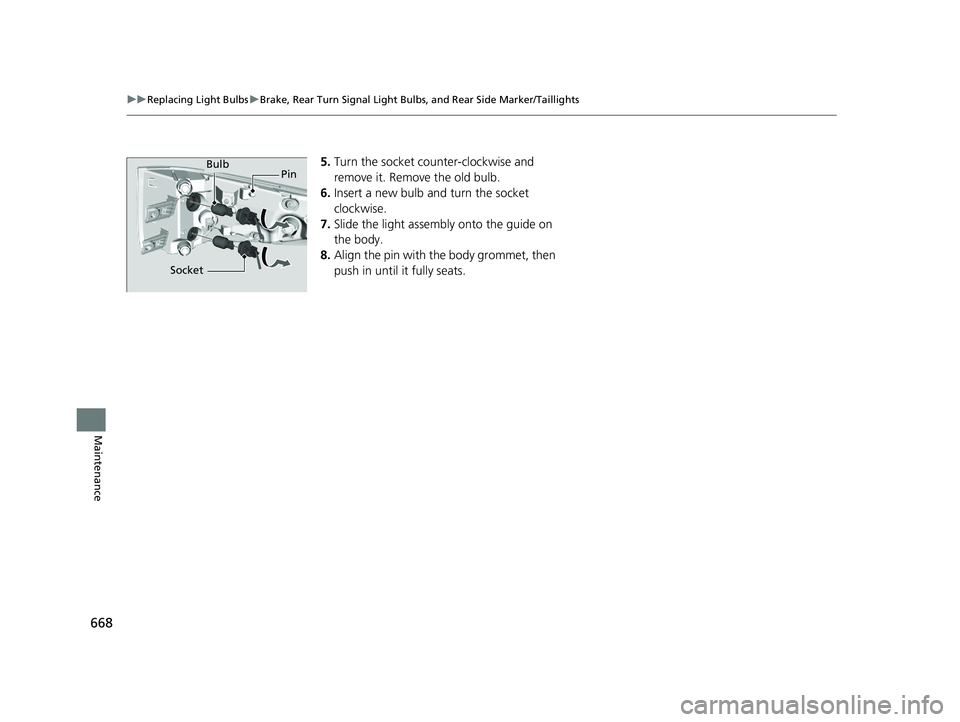
5. Turn the socket counter-clockwise and
remove it. Remove the old bulb.
6. Insert a new bulb and turn the socket
clockwise.
7. Slide the light assembly onto the guide on
the body.
8. Align the pin with the body grommet, then
push in until it fully seats.Bulb
Socket Pin
19 ODYSSEY-31THR6120.book 668 ページ 2018年12月6日 木曜日 午後4時35分
Page 742 of 767
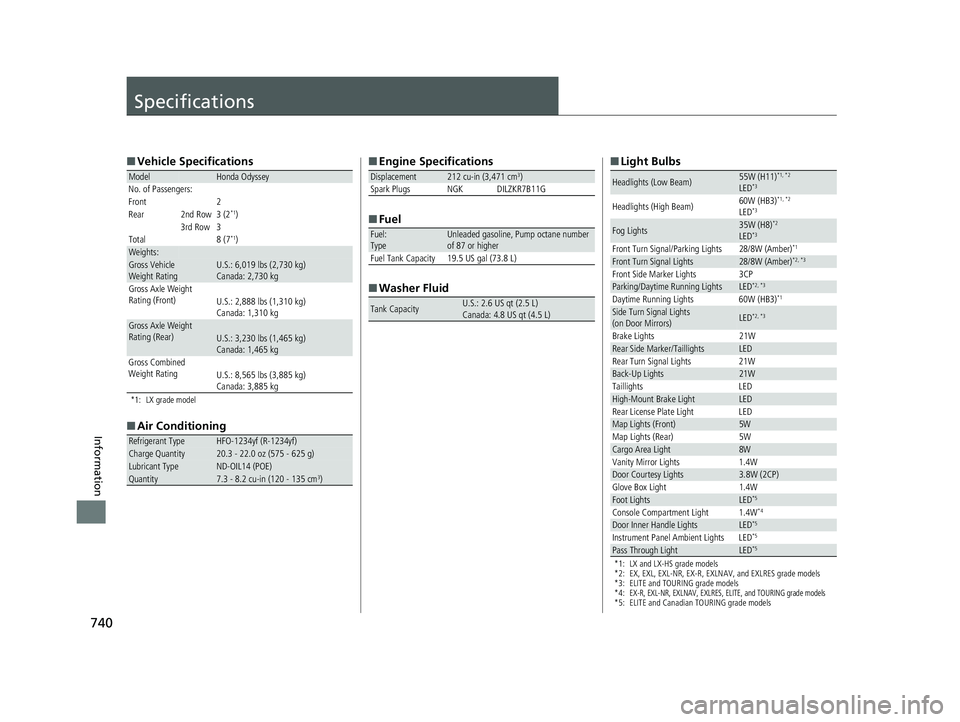
740
Information
Specifications
■Vehicle Specifications
*1: LX grade model
■Air Conditioning
ModelHonda Odyssey
No. of Passengers:
Front 2
Rear 2nd Row 3 (2
*1)
3rd Row 3
Total 8 (7
*1)Weights:Gross Vehicle
Weight Rating U.S.: 6,019 lbs (2,730 kg)
Canada: 2,730 kg
Gross Axle Weight
Rating (Front)U.S.: 2,888 lbs (1,310 kg)
Canada: 1,310 kg
Gross Axle Weight
Rating (Rear)U.S.: 3,230 lbs (1,465 kg)
Canada: 1,465 kg
Gross Combined
Weight Rating U.S.: 8,565 lbs (3,885 kg)
Canada: 3,885 kg
Refrigerant TypeHFO-1234yf (R-1234yf)Charge Quantity20.3 - 22.0 oz (575 - 625 g)Lubricant TypeND-OIL14 (POE)Quantity7.3 - 8.2 cu-in (120 - 135 cm3)
■Engine Specifications
■ Fuel
■ Washer Fluid
Displacement212 cu-in (3,471 cm3)
Spark Plugs NGK DILZKR7B11G
Fuel:
TypeUnleaded gasoline, Pump octane number
of 87 or higher
Fuel Tank Capacity 19.5 US gal (73.8 L)
Tank CapacityU.S.: 2.6 US qt (2.5 L)
Canada: 4.8 US qt (4.5 L)
■ Light Bulbs
*1: LX and LX-HS grade models
*2: EX, EXL, EXL-NR, EX-R, EXLNAV, and EXLRES grade models
*3: ELITE and TOURING grade models
*4:
EX-R, EXL-NR, EXLNAV, EXLRES, ELITE, and TOURING grade models*5: ELITE and Canadian TOURING grade models
Headlights (Low Beam)55W (H11)*1, *2
LED*3
Headlights (High Beam) 60W (HB3)*1, *2
LED*3
Fog Lights35W (H8)*2
LED*3
Front Turn Signal/Parking Lights 28/8W (Amber)*1
Front Turn Signal Lights28/8W (Amber)*2, *3
Front Side Marker Lights 3CPParking/Daytime Running LightsLED*2, *3
Daytime Running Lights 60W (HB3)*1
Side Turn Signal Lights
(on Door Mirrors)LED*2, *3
Brake Lights
21WRear Side Marker/TaillightsLED
Rear Turn Signal Lights 21W
Back-Up Lights21W
Taillights LED
High-Mount Brake LightLED
Rear License Plate Light LED
Map Lights (Front)5W
Map Lights (Rear) 5W
Cargo Area Light8W
Vanity Mirror Lights 1.4W
Door Courtesy Lights3.8W (2CP)
Glove Box Light 1.4W
Foot LightsLED*5
Console Compartment Light 1.4W*4
Door Inner Handle LightsLED*5
Instrument Panel Ambient Lights LED*5
Pass Through LightLED*5
19 ODYSSEY-31THR6120.book 740 ページ 2018年12月6日 木曜日 午後4時35分