android auto HONDA ODYSSEY 2019 Owner's Manual (in English)
[x] Cancel search | Manufacturer: HONDA, Model Year: 2019, Model line: ODYSSEY, Model: HONDA ODYSSEY 2019Pages: 767, PDF Size: 47.46 MB
Page 24 of 767
22
Quick Reference Guide
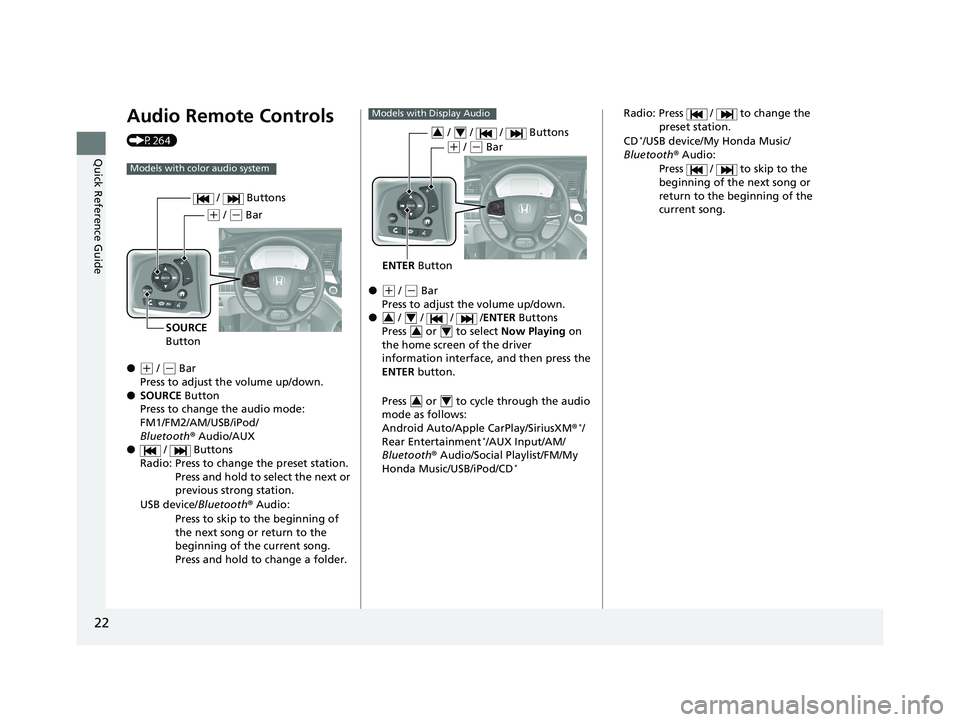
Audio Remote Controls
(P264)
●
(+ / ( - Bar
Press to adjust the volume up/down.
● SOURCE Button
Press to change the audio mode:
FM1/FM2/AM/USB/iPod/
Bluetooth ® Audio/AUX
● / Buttons
Radio: Press to change the preset station. Press and hold to select the next or
previous strong station.
USB device/ Bluetooth® Audio:
Press to skip to the beginning of
the next song or return to the
beginning of the current song.
Press and hold to change a folder.
Models with color audio system
( + / (- Bar
SOURCE
Button / Buttons
●(
+ / (- Bar
Press to adjust the volume up/down.
● / / / /ENTER Buttons
Press or to select Now Playing on
the home screen of the driver
information interface, and then press the
ENTER button.
Press or to cycle through the audio
mode as follows:
Android Auto/Apple CarPlay/SiriusXM ®
*/
Rear Entertainment*/AUX Input/AM/
Bluetooth ® Audio/Social Playlist/FM/My
Honda Music/USB/iPod/CD
*
Models with Display Audio
ENTER Button
/ / / Buttons34
(+ / (- Bar
34
34
34
Radio: Press / to change the
preset station.
CD
*/USB device/My Honda Music/
Bluetooth ® Audio:
Press / to skip to the
beginning of the next song or
return to the beginning of the
current song.
19 ODYSSEY-31THR6120.book 22 ページ 2018年12月6日 木曜日 午後4時35分
Page 128 of 767
uuGauges and Displays uDriver Information Interface
126
Instrument Panel
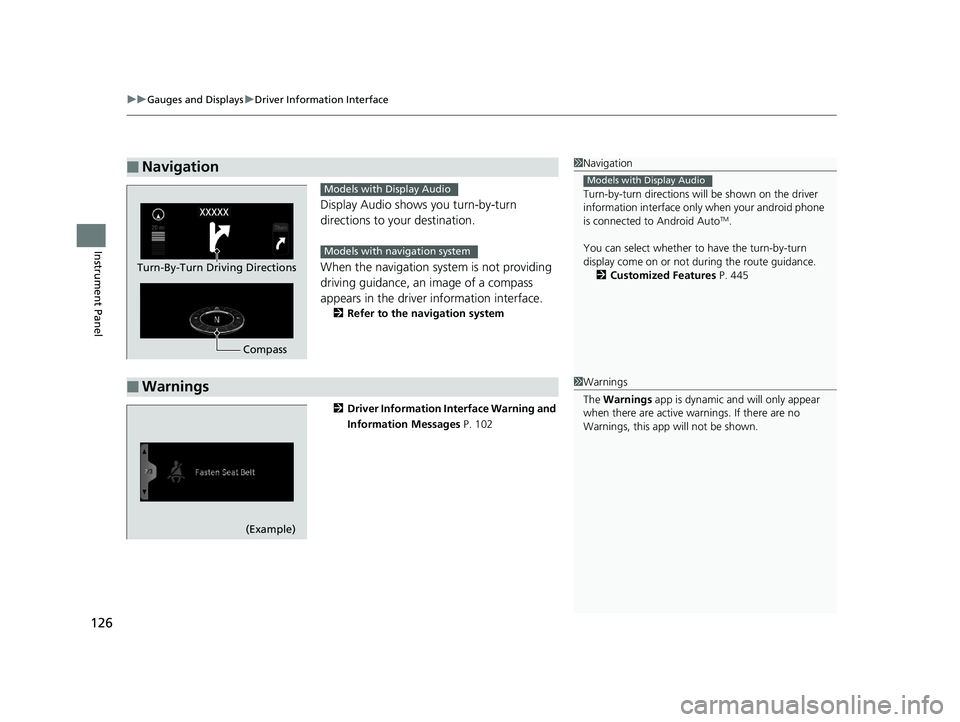
Display Audio shows you turn-by-turn
directions to your destination.
When the navigation system is not providing
driving guidance, an image of a compass
appears in the driver information interface.
2Refer to the navigation system
2 Driver Information Interface Warning and
Information Messages P. 102
■Navigation1Navigation
Turn-by-turn directions wi ll be shown on the driver
information interface only when your android phone
is connected to Android Auto
TM.
You can select whether to have the turn-by-turn
display come on or not dur ing the route guidance.
2 Customized Features P. 445
Models with Display Audio
Compass
Turn-By-Turn Driving Directions
Models with Display Audio
Models with navigation system
■Warnings1Warnings
The Warnings app is dynamic a nd will only appear
when there are active warnings. If there are no
Warnings, this app will not be shown.
(Example)
19 ODYSSEY-31THR6120.book 126 ページ 2018年12月6日 木曜日 午後4時35分
Page 132 of 767
uuGauges and Displays uDriver Information Interface
130
Instrument Panel
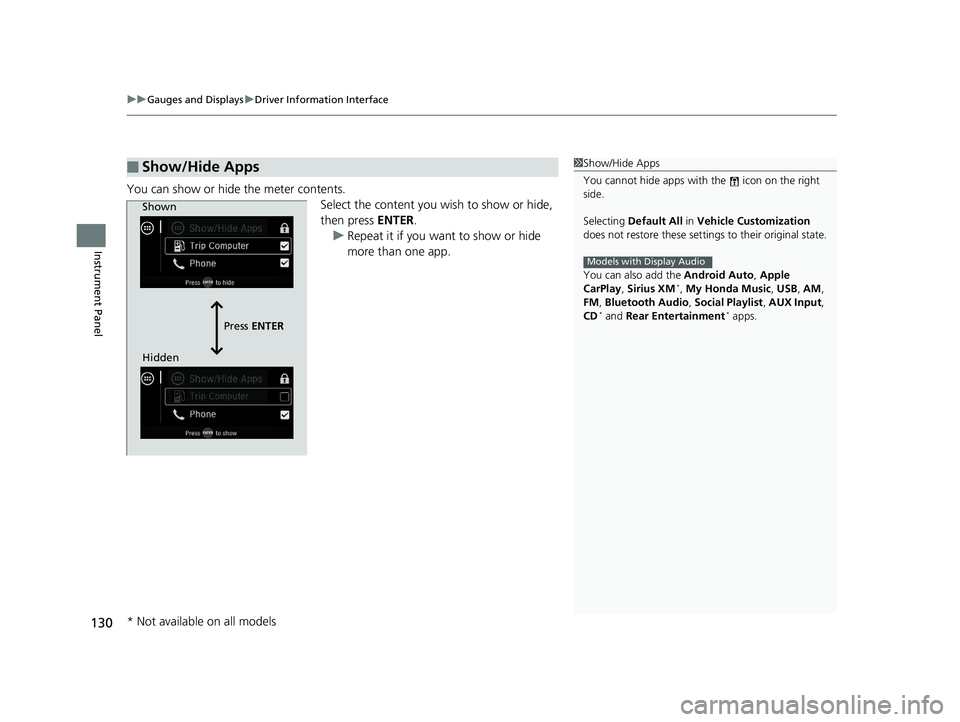
You can show or hide the meter contents.
Select the content you wish to show or hide,
then press ENTER.
u Repeat it if you want to show or hide
more than one app.
■Show/Hide Apps1Show/Hide Apps
You cannot hide apps with the icon on the right
side.
Selecting Default All in Vehicle Customization
does not restore these settings to their original state.
You can also add the Android Auto, Apple
CarPlay , Sirius XM
*, My Honda Music , USB , AM ,
FM , Bluetooth Audio , Social Playlist , AUX Input ,
CD
* and Rear Entertainment* apps.
Models with Display Audio
Shown
Press ENTER
Hidden
* Not available on all models
19 ODYSSEY-31THR6120.book 130 ページ 2018年12月6日 木曜日 午後4時35分
Page 261 of 767
259
Features
This chapter describes how to operate technology features.
Audio SystemAbout Your Audio System ................ 260
USB Ports ......................................... 261
Auxiliary Input Jack .......................... 262
Audio System Theft Protection ......... 263
Audio Remote Controls .................... 264
Audio System Basic Operation ........ 267
Audio/Information Screen ................ 268
Adjusting the Sound ........................ 272
Display Setup ................................... 273
Playing AM/FM Radio ....................... 274
Playing an iPod ................................ 276
Playing a USB Flash Drive ................. 279
Playing Bluetooth ® Audio ................. 282
Models with color audio system
Audio System Basic Operation ........ 285
Audio/Information Screen ................ 286
System Updates ............................... 300
File Manager .................................... 306
Adjusting the Sound ........................ 312
Display Setup ................................... 313
Voice Control Operation .................. 315
Playing AM/FM Radio ....................... 318
Playing SiriusXM ® Radio
*................. 322
Playing a CD*.................................. 332
Playing an iPod ................................ 335
Playing a USB Flash Drive ................. 338
Playing My Honda Music .................. 341
Playing Bluetooth ® Audio................. 345
Models with Display AudioPlaying Social Playlist........................ 347
HondaLink ®..................................... 349
Wi-Fi Connection ............................. 354
Near Field Communication (NFC)
*... 356
Siri Eyes Free .................................... 359
Apple CarPlay .................................. 360
Android Auto .................................. 363
Audio Error Messages ...................... 367
General Information on the Audio System..... 372Blu-ray/DVD Rear Entertainment System*...... 396Customized Features............................. 445
HomeLink ® Universal Transceiver*....... 470
Bluetooth ® HandsFreeLink ®.......... 473 , 498
CabinWatch
TM *....................................... 523
CabinTalkTM *........................................... 524
* Not available on all models
19 ODYSSEY-31THR6120.book 259 ページ 2018年12月6日 木曜日 午後4時35分
Page 263 of 767
261
uuAudio System uUSB Ports
Features
USB Ports
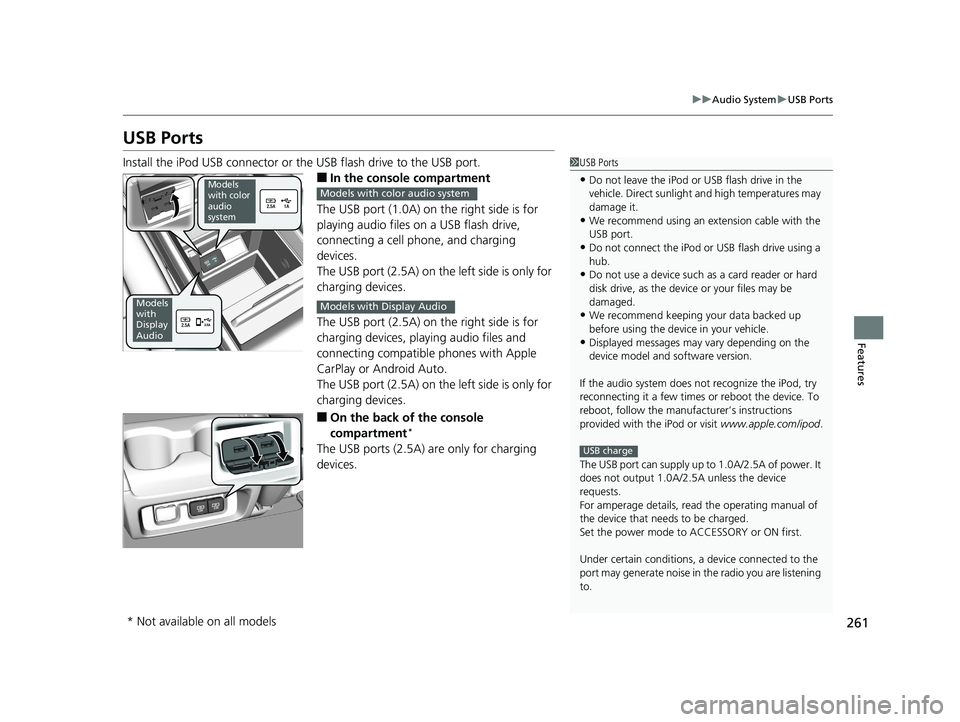
Install the iPod USB connector or the USB flash drive to the USB port.
■In the consol e compartment
The USB port (1.0A) on the right side is for
playing audio files on a USB flash drive,
connecting a cell phone, and charging
devices.
The USB port (2.5A) on the left side is only for
charging devices.
The USB port (2.5A) on the right side is for
charging devices, playing audio files and
connecting compatible phones with Apple
CarPlay or Android Auto.
The USB port (2.5A) on the left side is only for
charging devices.
■On the back of the console
compartment*
The USB ports (2.5A) are only for charging
devices.
1 USB Ports
•Do not leave the iPod or USB flash drive in the
vehicle. Direct sunlight and high temperatures may
damage it.
•We recommend using an ex tension cable with the
USB port.
•Do not connect the iPod or USB flash drive using a
hub.
•Do not use a device such as a card reader or hard
disk drive, as the device or your files may be
damaged.
•We recommend keeping y our data backed up
before using the device in your vehicle.
•Displayed messages may vary depending on the
device model and software version.
If the audio system does not recognize the iPod, try
reconnecting it a few times or reboot the device. To
reboot, follow the manufac turer’s instructions
provided with the iPod or visit www.apple.com/ipod.
The USB port can supply up to 1.0A/2.5A of power. It
does not output 1.0A/2.5A unless the device
requests.
For amperage details, read the operating manual of
the device that ne eds to be charged.
Set the power mode to ACCESSORY or ON first.
Under certain condi tions, a device connected to the
port may generate noise in the radio you are listening
to.
USB charge
Models
with color
audio
system
Models
with
Display
Audio
Models with color audio system
Models with Display Audio
* Not available on all models
19 ODYSSEY-31THR6120.book 261 ページ 2018年12月6日 木曜日 午後4時35分
Page 268 of 767
266
uuAudio System uAudio Remote Controls
Features
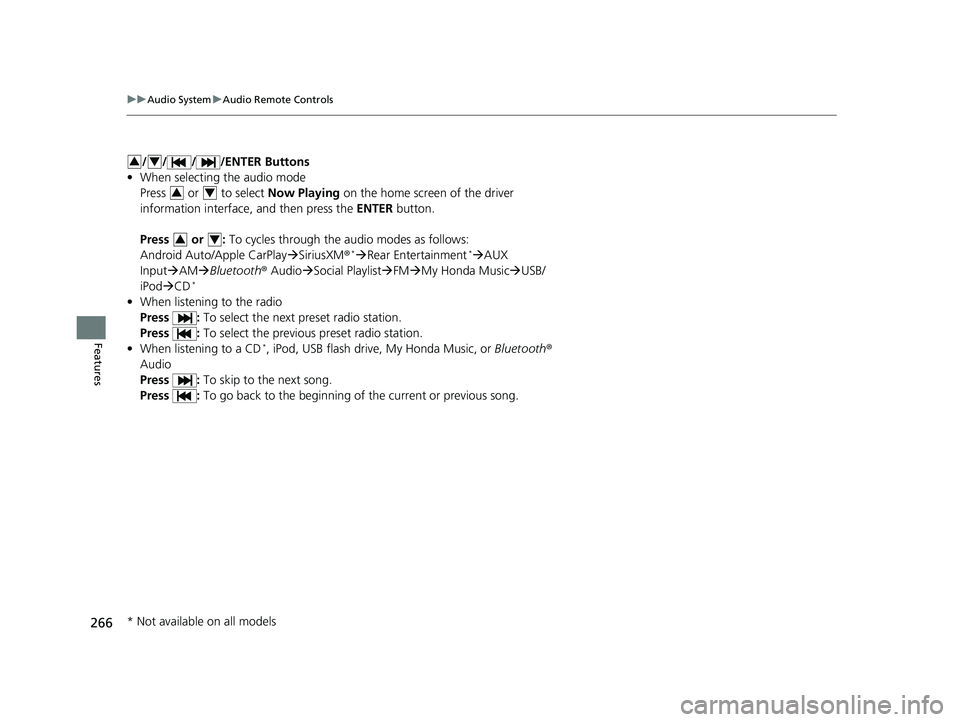
/ / / /ENTER Buttons
• When selecting the audio mode
Press or to select Now Playing on the home screen of the driver
information interface, and then press the ENTER button.
Press or : To cycles through the audio modes as follows:
Android Auto/Apple CarPlay SiriusXM ®
*Rear Entertainment*AUX
Input AM Bluetooth ® AudioSocial Playlist FM My Honda Music USB/
iPod CD
*
• When listening to the radio
Press : To select the next preset radio station.
Press : To select the previous preset radio station.
• When listening to a CD
*, iPod, USB flash drive, My Honda Music, or Bluetooth ®
Audio
Press : To skip to the next song.
Press : To go back to the beginning of the current or previous song.
34
34
34
* Not available on all models
19 ODYSSEY-31THR6120.book 266 ページ 2018年12月6日 木曜日 午後4時35分
Page 290 of 767
288
uuAudio System Basic Operation uAudio/Information Screen
Features
■Navigation*
Displays the navigation screen.
2 Refer to the Navigation System Manual
■HondaLink
Displays the HondaLink ® screen.
2 HondaLink ® P. 349
■Apple CarPlay/Android Auto
Displays the Apple CarPlay or Android Auto .
2Apple CarPlay P. 360
2 Android Auto P. 363
■Messages
Displays the text message screen.
2 Bluetooth ® HandsFreeLink ® P. 498
■CabinTalk*
Displays the CabinTalk screen.
2CabinTalkTM * P. 524
■CabinWatch*
Displays the CabinWatch screen.
2CabinWatchTM * P. 523
■Rear Entertainment*
Displays the rear audio screen.
2Blu-ray/DVD Rear Entertainment System* P. 396
* Not available on all models
19 ODYSSEY-31THR6120.book 288 ページ 2018年12月6日 木曜日 午後4時35分
Page 347 of 767
345
uuAudio System Basic Operation uPlaying Bluetooth ® Audio
Continued
Features
Playing Bluetooth ® Audio
Your audio system allows you to listen to music from your Bluetooth-compatible
phone.
This function is available when the phone is paired an d connected to the vehicle’s
Bluetooth ® HandsFreeLink ® (HFL) system.
2Phone Setup P. 503
*1:Depending on the Bluetooth® device you connect, th is function may not be
displayed.
1 Playing Bluetooth ® Audio
Not all Bluetooth -enabled phones with streaming
audio capabilities are compatible.
To check if your phone is compatible, visit
http://www.handsfr eelink.com/Honda/.
It may be illegal to pe rform some data device
functions while driving.
Only one phone can be used with HFL at a time.
When there are more than two paired phones in the
vehicle, the first paired phone the system finds is
automatically connected.
The connected phone for Bluetooth® Audio can be
different.
If more than one phone is paired to the HFL system,
there may be a delay before the system begins to
play.
In some cases, the name of the artist, album, or track
may not appear correctly.
Some functions may not be available on some
devices.
If a phone is currently conne cted via Apple CarPlay or
Android Auto, Bluetooth® Audio from that phone
will be unavailable. Howe ver, you can have a second
previously paired phone stream Bluetooth® Audio by
selecting from the Bluetooth® device list.
2 Phone Setup P. 503
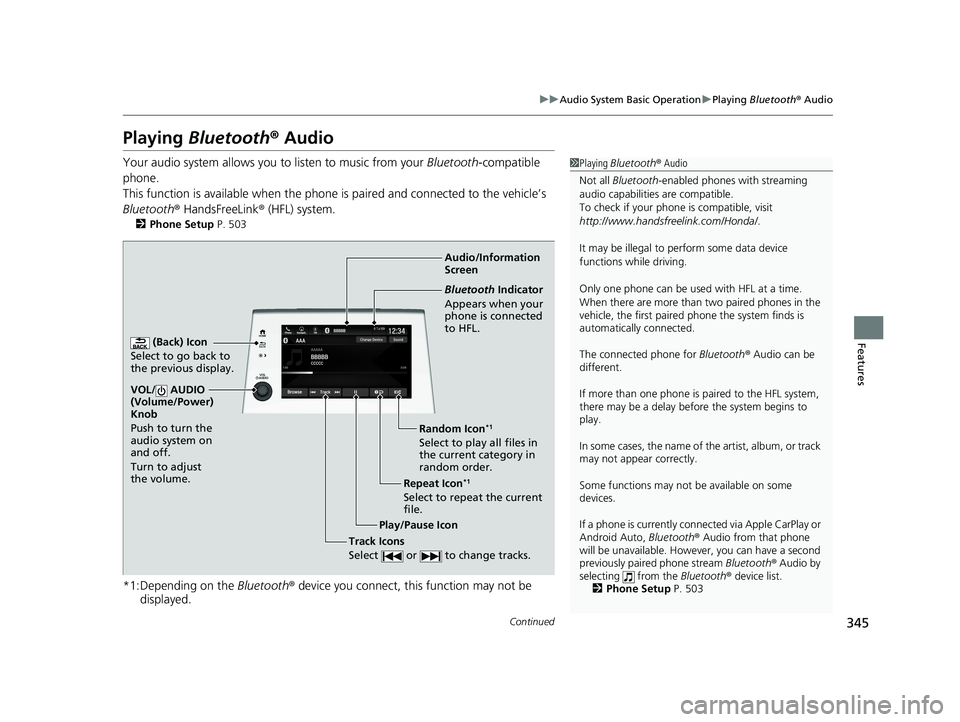
Audio/Information
Screen
(Back) Icon
Select to go back to
the previous display.
VOL/ AUDIO
(Volume/Power)
Knob
Push to turn the
audio system on
and off.
Turn to adjust
the volume.
Repeat Icon*1
Select to repeat the current
file. Random Icon
*1
Select to play all files in
the current category in
random order.
Play/Pause Icon
Bluetooth Indicator
Appears when your
phone is connected
to HFL.
Track Icons
Select or to change tracks.
19 ODYSSEY-31THR6120.book 345 ページ 2018年12月6日 木曜日 午後4時35分
Page 351 of 767
349
uuAudio System Basic Operation uHondaLink ®
Continued
Features
HondaLink ®
HondaLink® connects you to the latest info rmation from Honda. You can connect
your phone wirelessly through Wi-Fi or Bluetooth®.
2Wi-Fi Connection P. 354
2 Phone Setup P. 503
Use the following procedure to connect to HondaLink ® service.
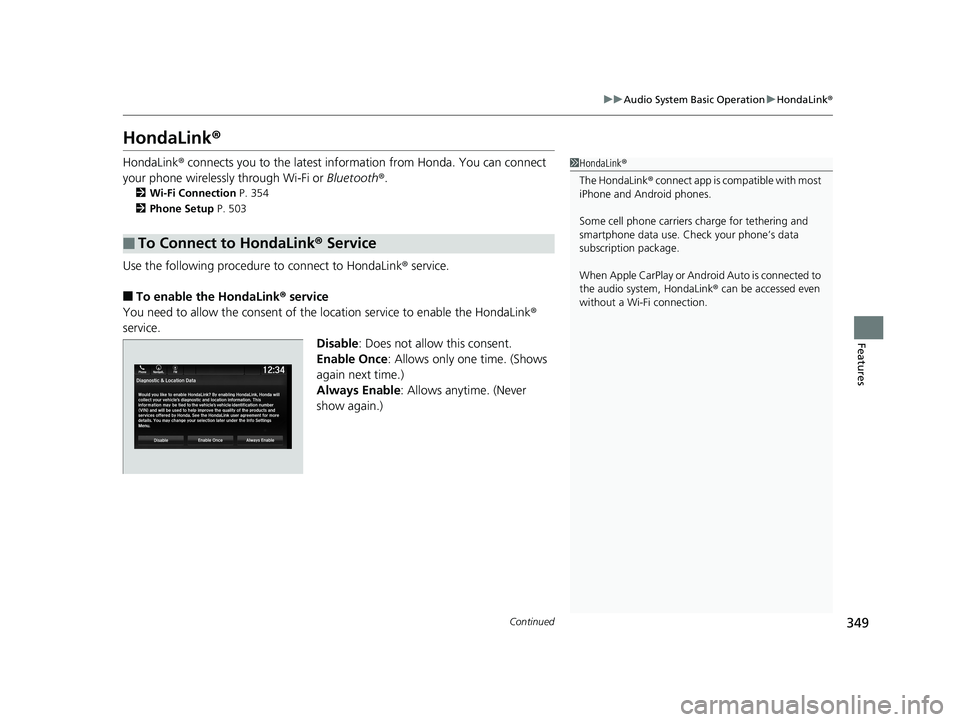
■To enable the HondaLink® service
You need to allow the consent of the location service to enable the HondaLink ®
service.
Disable: Does not allow this consent.
Enable Once : Allows only one time. (Shows
again next time.)
Always Enable: Allows anytime. (Never
show again.)
■To Connect to HondaLink® Service
1HondaLink ®
The HondaLink ® connect app is compatible with most
iPhone and Android phones.
Some cell phone carriers charge for tethering and
smartphone data use. Check your phone’s data
subscription package.
When Apple CarPlay or Android Auto is connected to
the audio system, HondaLink ® can be accessed even
without a Wi-Fi connection.
19 ODYSSEY-31THR6120.book 349 ページ 2018年12月6日 木曜日 午後4時35分
Page 365 of 767
363
uuAudio System Basic Operation uAndroid Auto
Continued
Features
Android Auto
When you connect an Android phone to the audio system via the front USB port,
Android Auto is automatically initiated. When connected via Android Auto, you can
use the audio/information screen to access the Phone, Google Maps (Navigation),
Google Play Music, and Google Now functions. When you first use Android Auto, a
tutorial will appear on the screen.
We recommend that you comple te this tutorial while safely parked before using
Android Auto.
2 USB Ports P. 261
2 Auto Pairing Connection P. 365
1Android Auto
To use Android Auto, you need to download the
Android Auto app from Google Play to your
smartphone.
Only Android 5.0 (Lollipop) or later versions are
compatible with Android Auto.
Bluetooth A2DP cannot be used with Android Auto
phone.
Park in a safe place befo re connecting your Android
phone to Android Auto and when launching any
compatible apps.
To use Android Auto, connect the USB cable to the
USB port located in the console compartment. The
USB ports located on the back of the console
compartment will not enable Android Auto
operation.
2 USB Ports P. 261
To directly access the Android Auto phone function,
press Phone on the home screen.
2 Auto Pairing Connection P. 365
When your Android phone is connected to Android
Auto, it is not possible to use the Bluetooth® Audio.
However, other previously paired phones can stream
audio via Bluetooth ® while Android Auto is
connected.
2 Phone Setup P. 503
19 ODYSSEY-31THR6120.book 363 ページ 2018年12月6日 木曜日 午後4時35分