change time HONDA ODYSSEY 2019 Owner's Manual (in English)
[x] Cancel search | Manufacturer: HONDA, Model Year: 2019, Model line: ODYSSEY, Model: HONDA ODYSSEY 2019Pages: 767, PDF Size: 47.46 MB
Page 4 of 767
Contents
This owner’s manual should be considered a permanent part of the
vehicle and should remain with the vehicle when it is sold.
This owner’s manual covers all models of your vehicle. You may find
descriptions of equipment and features that are not on your
particular model.
Images throughout this owner’s manu al (including the front cover)
represent features and equipment that are available on some, but
not all, models. Your particular mo del may not have some of these
features.
This owner’s manual is for vehicles sold in the United States and
Canada.
The information and specifications in cluded in this publication were
in effect at the time of approval for printing. Honda Motor Co., Ltd.
reserves the right, however, to discontinue or change specifications
or design at any time without notice and without incurring any
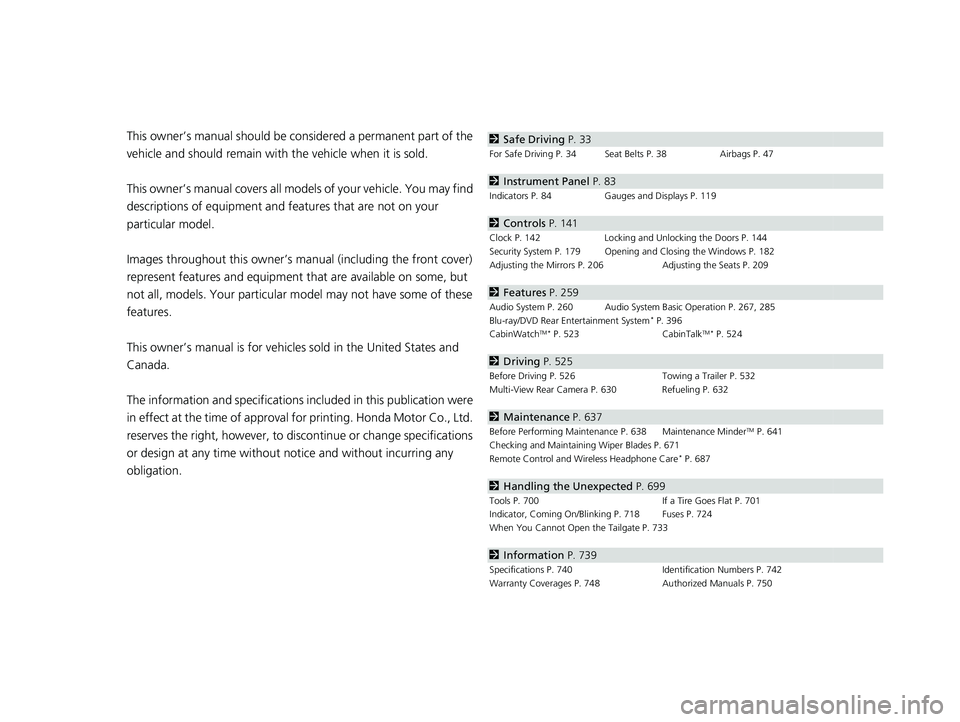
obligation.2 Safe Driving P. 33
For Safe Driving P. 34 Seat Belts P. 38 Airbags P. 47
2Instrument Panel P. 83
Indicators P. 84 Gauges and Displays P. 119
2Controls P. 141
Clock P. 142 Locking and Unlocking the Doors P. 144
Security System P. 179 Opening and Closing the Windows P. 182
Adjusting the Mirrors P. 206 Adjusting the Seats P. 209
2Features P. 259
Audio System P. 260 Audio System Basic Operation P. 267, 285
Blu-ray/DVD Rear Entertainment System* P. 396
CabinWatchTM * P. 523 CabinTalkTM* P. 524
2Driving P. 525
Before Driving P. 526 Towing a Trailer P. 532
Multi-View Rear Camera P. 630 Refueling P. 632
2 Maintenance P. 637
Before Performing Maintenance P. 638 Maintenance MinderTM P. 641
Checking and Maintaining Wiper Blades P. 671
Remote Control and Wireless Headphone Care
* P. 687
2 Handling the Unexpected P. 699
Tools P. 700 If a Tire Goes Flat P. 701
Indicator, Coming On/Blinking P. 718 Fuses P. 724
When You Cannot Open the Tailgate P. 733
2 Information P. 739
Specifications P. 740 Identification Numbers P. 742
Warranty Coverages P. 748 Authorized Manuals P. 750
19 ODYSSEY-31THR6120.book 2 ページ 2018年12月6日 木曜日 午後4時35分
Page 16 of 767
14
Quick Reference Guide
Controls (P141)
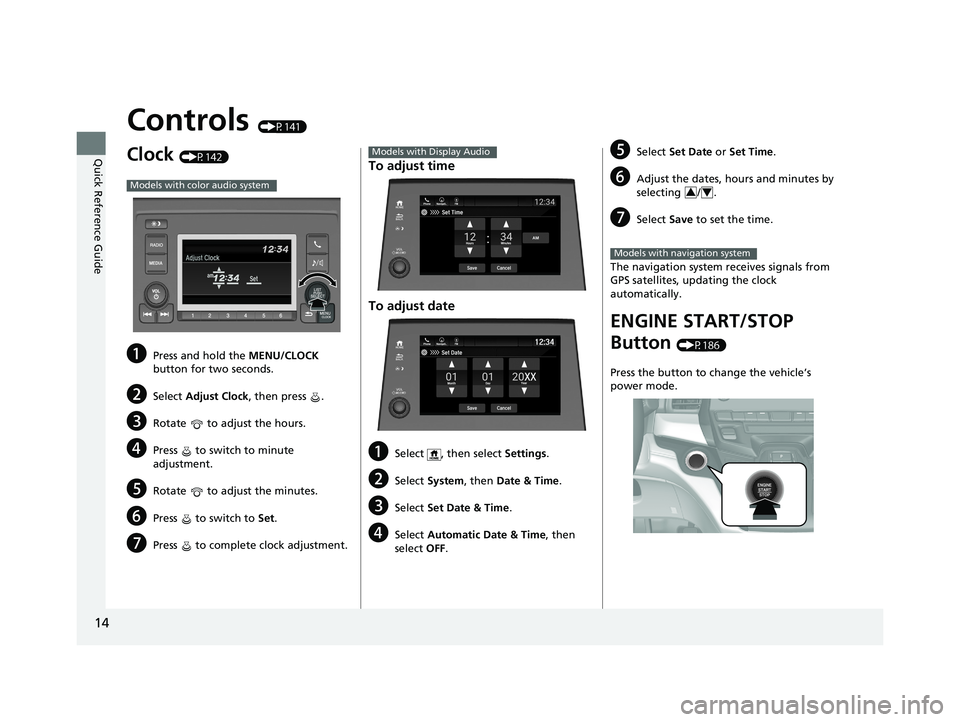
Clock (P142)
aPress and hold the MENU/CLOCK
button for two seconds.
bSelect Adjust Clock, then press .
cRotate to adjust the hours.
dPress to switch to minute
adjustment.
eRotate to adjust the minutes.
fPress to switch to Set.
gPress to complete clock adjustment.
Models with color audio system
To adjust time
To adjust date
aSelect , then select Settings .
bSelect System , then Date & Time .
cSelect Set Date & Time .
dSelect Automatic Date & Time , then
select OFF.
Models with Display Audio
Set DateBlu-Ray
Save
Month DayYearXX
Cancel
Phone Navigati.. FM12:34
eSelect
Set Date or Set Time .
fAdjust the dates, hours and minutes by
selecting / .
gSelect Save to set the time.
The navigation system receives signals from
GPS satellites, updating the clock
automatically.
ENGINE START/STOP
Button
(P186)
Press the button to change the vehicle’s
power mode.
34
Models with navigation system
19 ODYSSEY-31THR6120.book 14 ページ 2018年12月6日 木曜日 午後4時35分
Page 26 of 767
24
Quick Reference Guide
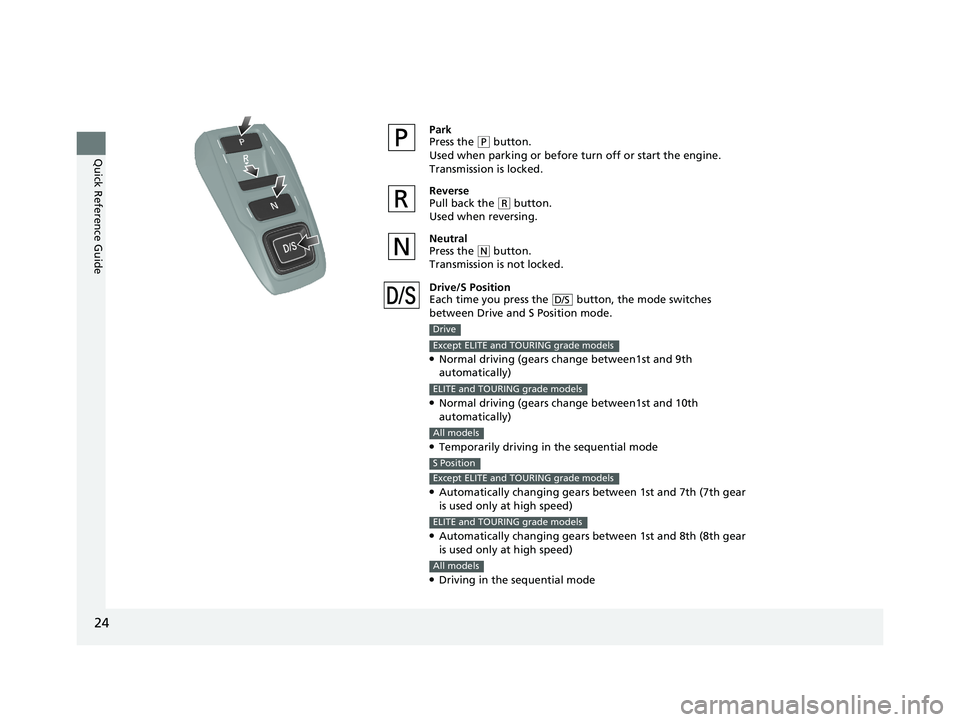
Park
Press the (P button.
Used when parking or before turn off or start the engine.
Transmission is locked.
Reverse
Pull back the
( R button.
Used when reversing.
Neutral
Press the
( N button.
Transmission is not locked.
Drive/S Position
Each time you press the button, the mode switches
between Drive and S Position mode.
●Normal driving (gears change between1st and 9th
automatically)
●Normal driving (gears change between1st and 10th
automatically)
●Temporarily driving in the sequential mode
●Automatically changing gears between 1st and 7th (7th gear
is used only at high speed)
●Automatically changing gears between 1st and 8th (8th gear
is used only at high speed)
●Driving in the sequential mode
D/S
Drive
Except ELITE and TOURING grade models
ELITE and TOURING grade models
All models
S Position
Except ELITE and TOURING grade models
ELITE and TOURING grade models
All models
19 ODYSSEY-31THR6120.book 24 ページ 2018年12月6日 木曜日 午後4時35分
Page 37 of 767
35
uuFor Safe Driving uImportant Safety Precautions
Safe Driving
■Pay appropriate attention to the task of driving safely
Engaging in cell phone conversation or other activities that keep you from paying
close attention to the road, other vehicles , and pedestrians could lead to a crash.
Remember, situations can change quickly, and only you can decide when it is safe to
divert some attention away from driving.
■Control your speed
Excessive speed is a major factor in crash injuries and deaths. Generally, the higher
the speed, the greater the risk, but serious injuries can also occur at lower speeds.
Never drive faster than is safe for current conditions, regardless of the maximum
speed posted.
■Keep your vehicle in safe condition
Having a tire blowout or a mechanical failure can be extremely hazardous.
To reduce the possibility of such problems, check your tire pressures and condition
frequently, and perform all re gularly scheduled maintenance.
■Do not leave children unattended in the vehicle
Children left unattended in the vehicle may be injured if they activate one or more
of the vehicle controls. They may also cause the vehicle to move, resulting in a crash
in which the children and/or another pers on(s) can be injured or killed. Also,
depending on the ambient temperature, th e temperature of the interior may reach
extreme levels, which can re sult in injury or death.
Even if the climate control system is on, never leave children in the vehicle
unattended as the climate control system can shut off at any time.
19 ODYSSEY-31THR6120.book 35 ページ 2018年12月6日 木曜日 午後4時35分
Page 109 of 767
107
uuIndicators uDriver Information Interface Wa rning and Information Messages
Continued
Instrument Panel
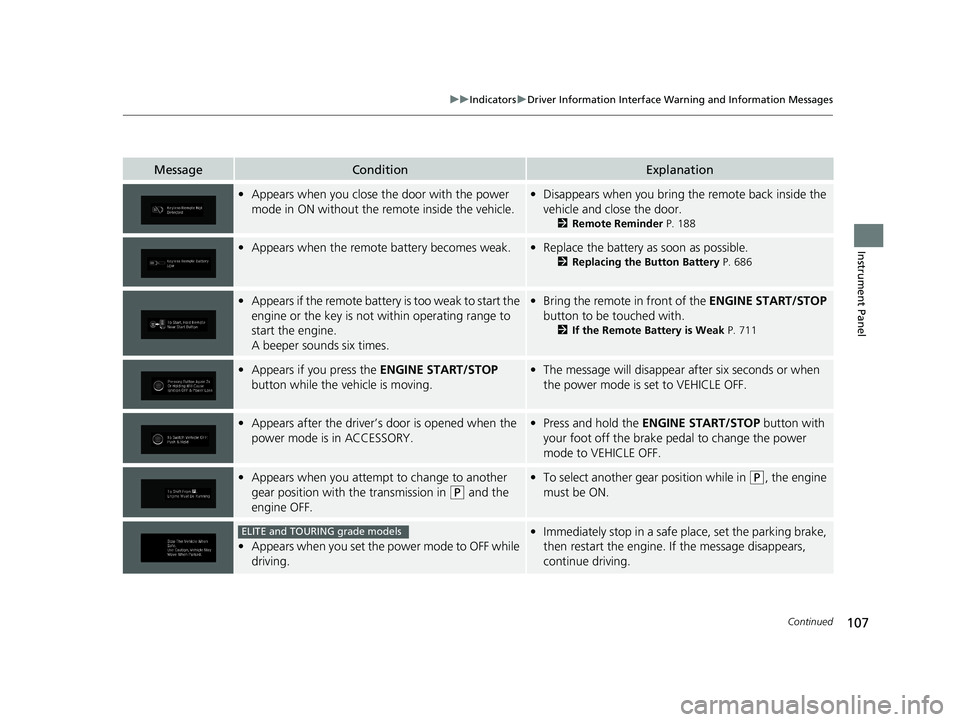
MessageConditionExplanation
•Appears when you close th e door with the power
mode in ON without the remote inside the vehicle.• Disappears when you bring the remote back inside the
vehicle and close the door.
2 Remote Reminder P. 188
•Appears when the remote battery becomes weak.•Replace the battery as soon as possible.
2 Replacing the Button Battery P. 686
•Appears if the remote battery is too weak to start the
engine or the key is not within operating range to
start the engine.
A beeper sounds six times.•Bring the remote in front of the ENGINE START/STOP
button to be touched with.
2 If the Remote Battery is Weak P. 711
•Appears if you press the ENGINE START/STOP
button while the vehicle is moving.• The message will disappear after six seconds or when
the power mode is set to VEHICLE OFF.
•Appears after the driver’s door is opened when the
power mode is in ACCESSORY.• Press and hold the ENGINE START/STOP button with
your foot off the brake pedal to change the power
mode to VEHICLE OFF.
• Appears when you attempt to change to another
gear position with the transmission in
(P and the
engine OFF.
• To select another gear position while in (P, the engine
must be ON.
• Appears when you set the power mode to OFF while
driving.
•Immediately stop in a safe place, set the parking brake,
then restart the engine. If the message disappears,
continue driving.ELITE and TOURING grade models
19 ODYSSEY-31THR6120.book 107 ページ 2018年12月6日 木曜日 午後4時35分
Page 130 of 767
128
uuGauges and Displays uDriver Information Interface
Instrument Panel
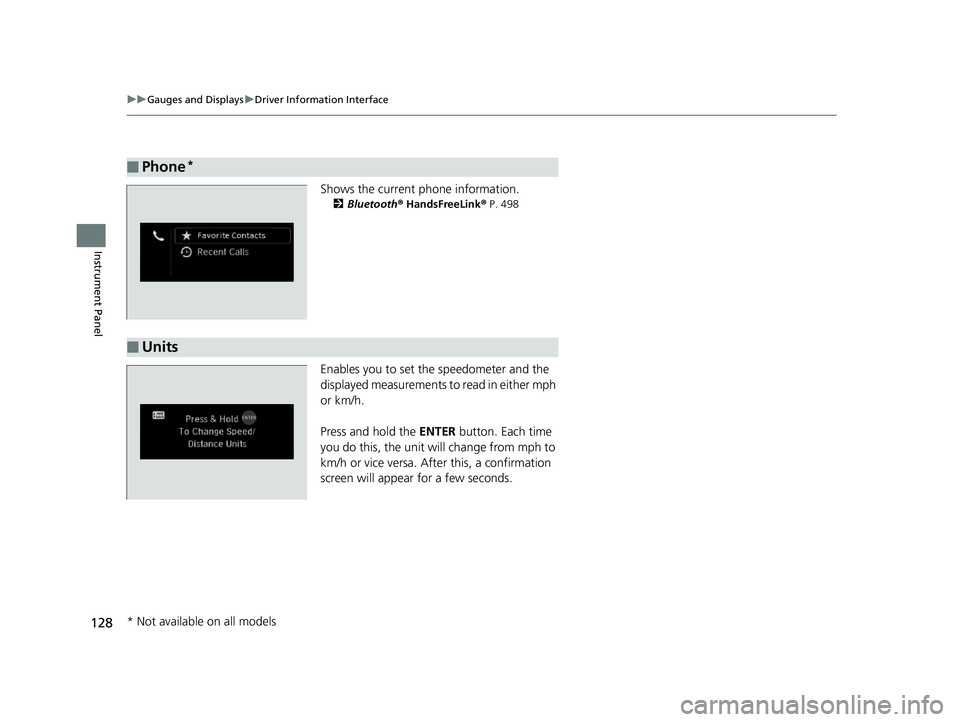
Shows the current phone information.
2 Bluetooth ® HandsFreeLink ® P. 498
Enables you to set the speedometer and the
displayed measurements to read in either mph
or km/h.
Press and hold the ENTER button. Each time
you do this, the unit will change from mph to
km/h or vice versa. A fter this, a confirmation
screen will appear for a few seconds.
■Phone*
■Units
* Not available on all models
19 ODYSSEY-31THR6120.book 128 ページ 2018年12月6日 木曜日 午後4時35分
Page 138 of 767
136
uuGauges and Displays uDriver Information Interface
Instrument Panel
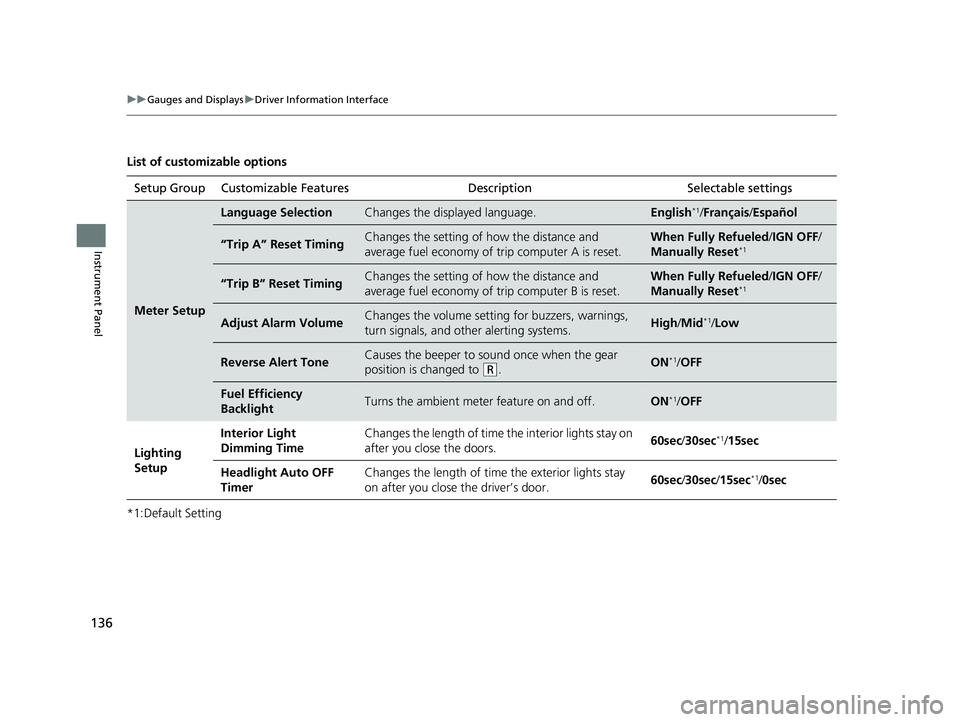
List of customizable options
*1:Default SettingSetup Group Customizable Features
Description Selectable settings
Meter Setup
Language SelectionChanges the displayed language.English*1/Français /Español
“Trip A” Reset TimingChanges the setting of how the distance and
average fuel economy of trip computer A is reset.When Fully Refueled /IGN OFF /
Manually Reset*1
“Trip B” Reset TimingChanges the setting of how the distance and
average fuel economy of trip computer B is reset.When Fully Refueled/IGN OFF /
Manually Reset*1
Adjust Alarm VolumeChanges the volume setting for buzzers, warnings,
turn signals, and other alerting systems.High /Mid*1/Low
Reverse Alert ToneCauses the beeper to s ound once when the gear
position is changed to
( R.ON*1/ OFF
Fuel Efficiency
BacklightTurns the ambient meter feature on and off.ON*1/OFF
Lighting
Setup Interior Light
Dimming Time
Changes the length of time the interior lights stay on
after you close the doors.
60sec
/30sec
*1/15sec
Headlight Auto OFF
Timer Changes the length of time the exterior lights stay
on after you close the driver’s door.
60sec
/30sec/ 15sec
*1/0sec
19 ODYSSEY-31THR6120.book 136 ページ 2018年12月6日 木曜日 午後4時35分
Page 139 of 767
137
uuGauges and Displays uDriver Information Interface
Continued
Instrument Panel
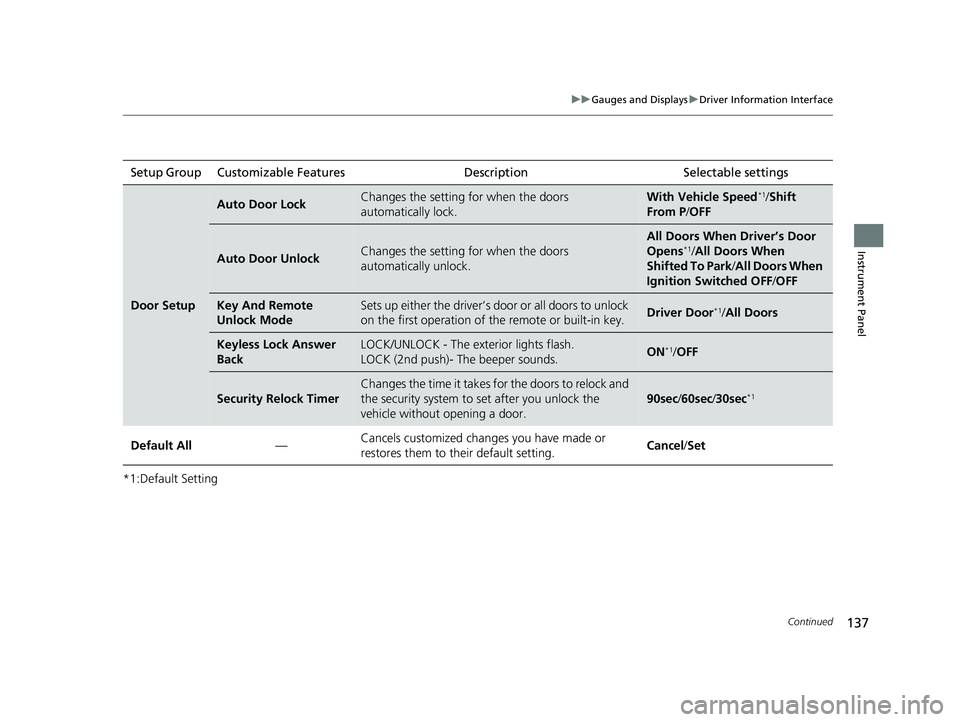
*1:Default SettingSetup Group Customizable Features
Description Selectable settings
Door Setup
Auto Door LockChanges the setting for when the doors
automatically lock.With Vehicle Speed*1/Shift
From P /OFF
Auto Door UnlockChanges the setting for when the doors
automatically unlock.
All Doors When Driver’s Door
Opens*1/All Doors When
Shifted To Park /All Doors When
Ignition Switched OFF /OFF
Key And Remote
Unlock ModeSets up either the driver’s do or or all doors to unlock
on the first operation of th e remote or built-in key.Driver Door*1/All Doors
Keyless Lock Answer
BackLOCK/UNLOCK - The exterior lights flash.
LOCK (2nd push)- The beeper sounds.ON*1/OFF
Security Relock Timer
Changes the time it takes fo r the doors to relock and
the security system to set after you unlock the
vehicle without opening a door.
90sec /60sec /30sec*1
Default All —Cancels customized changes you have made or
restores them to their default setting.
Cancel
/Set
19 ODYSSEY-31THR6120.book 137 ページ 2018年12月6日 木曜日 午後4時35分
Page 144 of 767
142
Controls
Clock
Adjusting the Clock
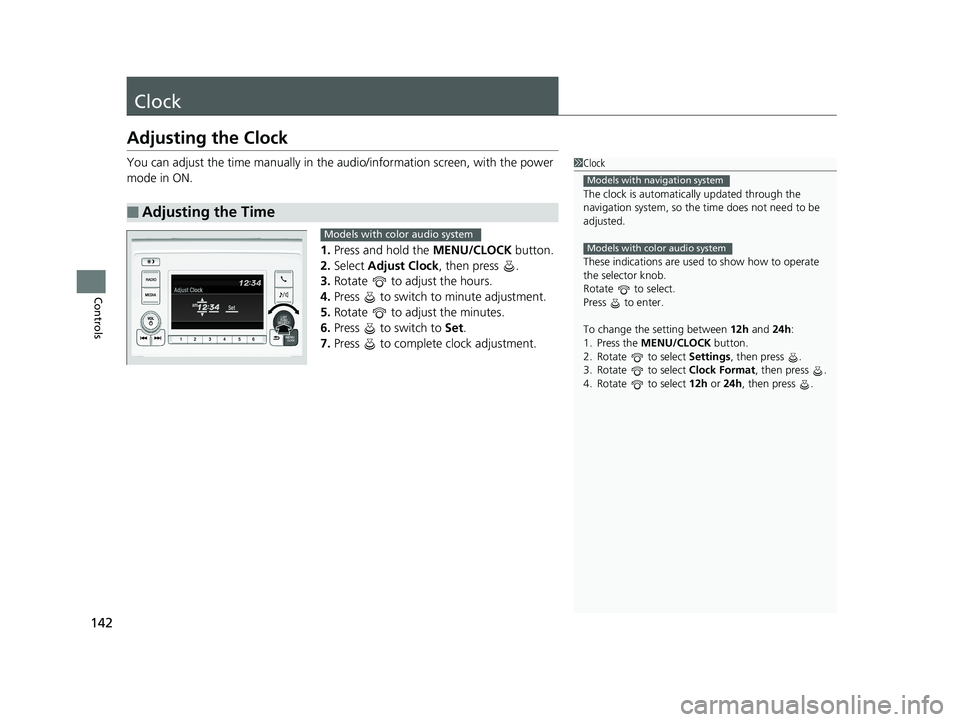
You can adjust the time manually in the audio/information screen, with the power
mode in ON.
1.Press and hold the MENU/CLOCK button.
2. Select Adjust Clock , then press .
3. Rotate to adjust the hours.
4. Press to switch to minute adjustment.
5. Rotate to adjust the minutes.
6. Press to switch to Set.
7. Press to complete clock adjustment.
■Adjusting the Time
1Clock
The clock is automatica lly updated through the
navigation system, so the ti me does not need to be
adjusted.
These indications are used to show how to operate
the selector knob.
Rotate to select.
Press to enter.
To change the setting between 12h and 24h:
1. Press the MENU/CLOCK button.
2. Rotate to select Settings, then press .
3. Rotate to select Clock Format, then press .
4. Rotate to select 12h or 24h , then press .
Models with navigation system
Models with color audio systemModels with color audio system
19 ODYSSEY-31THR6120.book 142 ページ 2018年12月6日 木曜日 午後4時35分
Page 153 of 767
Continued151
uuLocking and Unlocking the Doors uLocking/Unlocking the Doors from the Outside
Controls
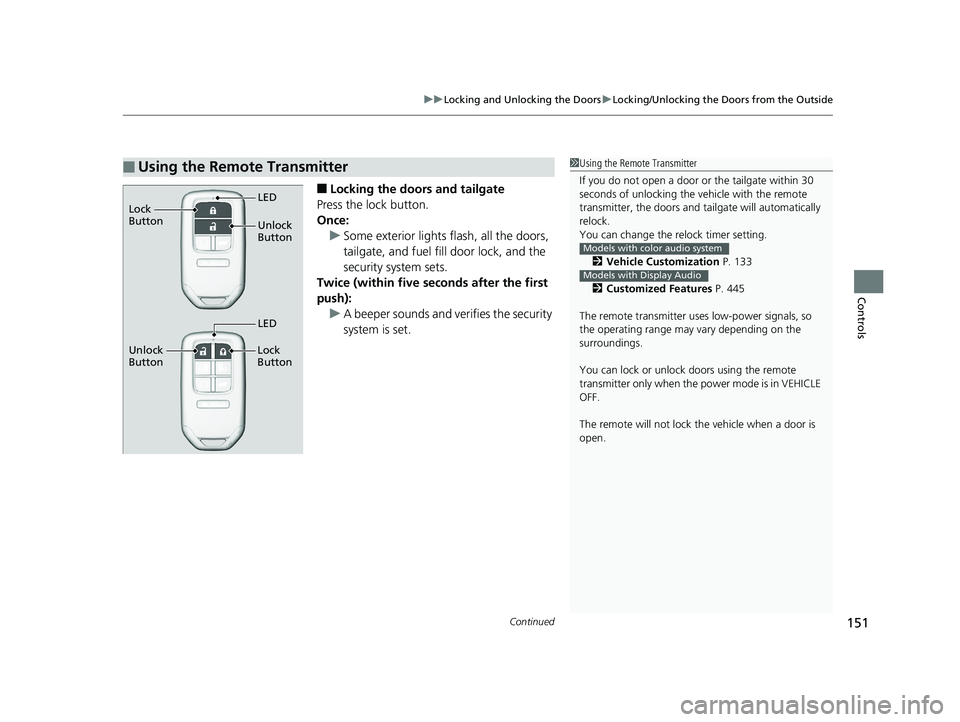
■Locking the doors and tailgate
Press the lock button.
Once: u Some exterior lights flash, all the doors,
tailgate, and fuel fill door lock, and the
security system sets.
Twice (within five se conds after the first
push):
u A beeper sounds and verifies the security
system is set.
■Using the Remote Transmitter1Using the Remote Transmitter
If you do not open a door or the tailgate within 30
seconds of unlocking the vehicle with the remote
transmitter, the doors and ta ilgate will automatically
relock.
You can change the relock timer setting.
2 Vehicle Customization P. 133
2 Customized Features P. 445
The remote transmitter us es low-power signals, so
the operating range may vary depending on the
surroundings.
You can lock or unlock doors using the remote
transmitter only when the power mode is in VEHICLE
OFF.
The remote will not lock th e vehicle when a door is
open.
Models with color audio system
Models with Display Audio
Unlock
Button LED
Lock
Button
Unlock
Button Lock
Button
LED
19 ODYSSEY-31THR6120.book 151 ページ 2018年12月6日 木曜日 午後4時35分