rear view mirror HONDA ODYSSEY 2019 Owner's Manual (in English)
[x] Cancel search | Manufacturer: HONDA, Model Year: 2019, Model line: ODYSSEY, Model: HONDA ODYSSEY 2019Pages: 767, PDF Size: 47.46 MB
Page 4 of 767
Contents
This owner’s manual should be considered a permanent part of the
vehicle and should remain with the vehicle when it is sold.
This owner’s manual covers all models of your vehicle. You may find
descriptions of equipment and features that are not on your
particular model.
Images throughout this owner’s manu al (including the front cover)
represent features and equipment that are available on some, but
not all, models. Your particular mo del may not have some of these
features.
This owner’s manual is for vehicles sold in the United States and
Canada.
The information and specifications in cluded in this publication were
in effect at the time of approval for printing. Honda Motor Co., Ltd.
reserves the right, however, to discontinue or change specifications
or design at any time without notice and without incurring any
obligation.2 Safe Driving P. 33
For Safe Driving P. 34 Seat Belts P. 38 Airbags P. 47
2Instrument Panel P. 83
Indicators P. 84 Gauges and Displays P. 119
2Controls P. 141
Clock P. 142 Locking and Unlocking the Doors P. 144
Security System P. 179 Opening and Closing the Windows P. 182
Adjusting the Mirrors P. 206 Adjusting the Seats P. 209
2Features P. 259
Audio System P. 260 Audio System Basic Operation P. 267, 285
Blu-ray/DVD Rear Entertainment System* P. 396
CabinWatchTM * P. 523 CabinTalkTM* P. 524
2Driving P. 525
Before Driving P. 526 Towing a Trailer P. 532
Multi-View Rear Camera P. 630 Refueling P. 632
2 Maintenance P. 637
Before Performing Maintenance P. 638 Maintenance MinderTM P. 641
Checking and Maintaining Wiper Blades P. 671
Remote Control and Wireless Headphone Care
* P. 687
2 Handling the Unexpected P. 699
Tools P. 700 If a Tire Goes Flat P. 701
Indicator, Coming On/Blinking P. 718 Fuses P. 724
When You Cannot Open the Tailgate P. 733
2 Information P. 739
Specifications P. 740 Identification Numbers P. 742
Warranty Coverages P. 748 Authorized Manuals P. 750
19 ODYSSEY-31THR6120.book 2 ページ 2018年12月6日 木曜日 午後4時35分
Page 8 of 767
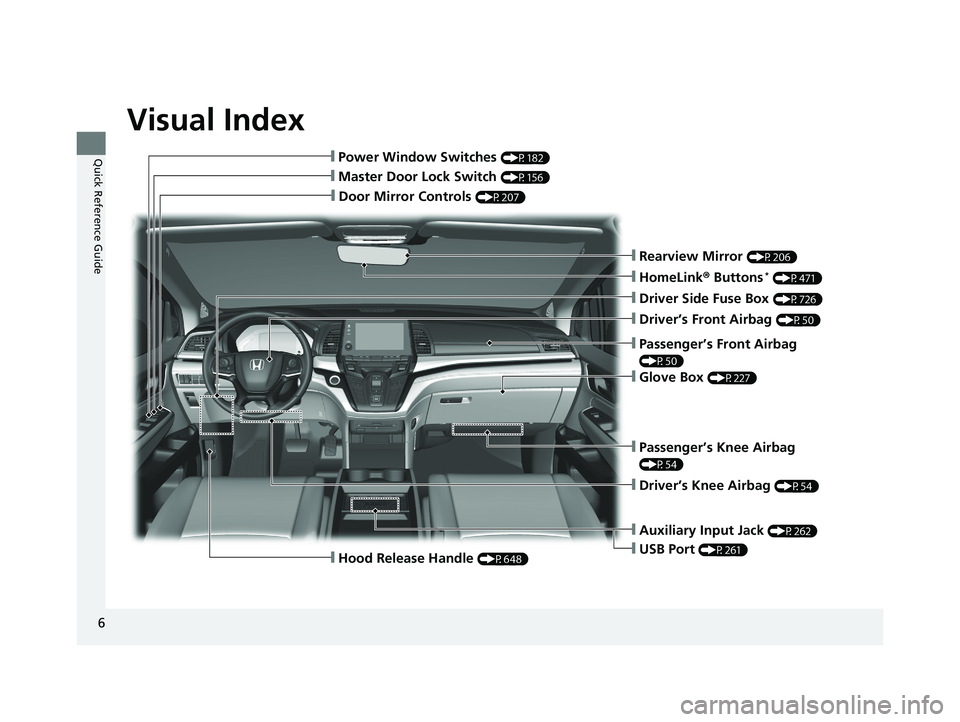
Visual Index
6
Quick Reference Guide
❙Door Mirror Controls (P207)
❙Master Door Lock Switch (P156)
❙Hood Release Handle (P648)
❙Power Window Switches (P182)
❙Rearview Mirror (P206)
❙Driver Side Fuse Box (P726)
❙Glove Box (P227)
❙Driver’s Front Airbag (P50)
❙Passenger’s Knee Airbag
(P54)
❙Driver’s Knee Airbag (P54)
❙Auxiliary Input Jack (P262)
❙USB Port (P261)
❙Passenger’s Front Airbag
(P50)
❙HomeLink® Buttons* (P471)
19 ODYSSEY-31THR6120.book 6 ページ 2018年12月6日 木曜日 午後4時35分
Page 11 of 767
9
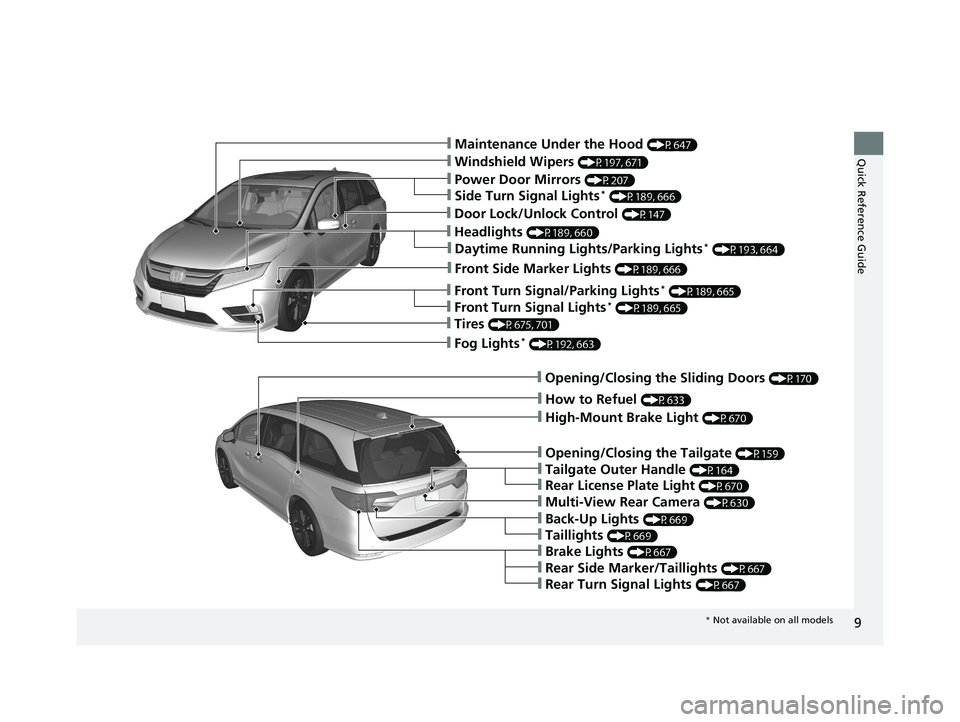
Quick Reference Guide❙Maintenance Under the Hood (P647)
❙Windshield Wipers (P197, 671)
❙Power Door Mirrors (P207)
❙Fog Lights* (P192, 663)
❙How to Refuel (P633)
❙Multi-View Rear Camera (P630)
❙Opening/Closing the Tailgate (P159)
❙Back-Up Lights (P669)
❙Opening/Closing the Sliding Doors (P170)
❙Taillights (P669)
❙Tailgate Outer Handle (P164)
❙Brake Lights (P667)
❙Rear Side Marker/Taillights (P667)
❙Rear Turn Signal Lights (P667)
❙High-Mount Brake Light (P670)
❙Headlights (P189, 660)
❙Front Side Marker Lights (P189, 666)
❙Front Turn Signal/Parking Lights* (P189, 665)
❙Tires (P675, 701)
❙Side Turn Signal Lights* (P189, 666)
❙Daytime Running Lights/Parking Lights* (P193, 664)
❙Front Turn Signal Lights* (P189, 665)
❙Rear License Plate Light (P670)
❙Door Lock/Unlock Control (P147)
* Not available on all models
19 ODYSSEY-31THR6120.book 9 ページ 2018年12月6日 木曜日 午後4時35分
Page 29 of 767
27
Quick Reference Guide
Honda Sensing®*
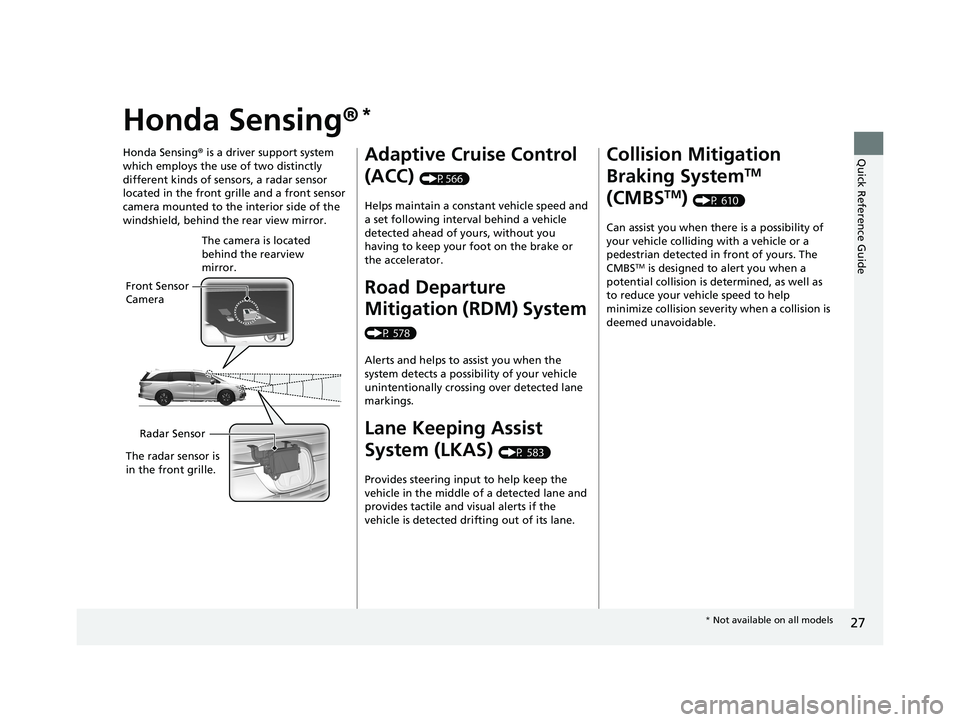
Honda Sensing® is a driver support system
which employs the use of two distinctly
different kinds of sensors, a radar sensor
located in the front grille and a front sensor
camera mounted to the interior side of the
windshield, behind the rear view mirror.
Front Sensor
Camera The camera is located
behind the rearview
mirror.
Radar Sensor
The radar sensor is
in the front grille.
Adaptive Cruise Control
(ACC)
(P566)
Helps maintain a constant vehicle speed and
a set following interval behind a vehicle
detected ahead of yours, without you
having to keep your foot on the brake or
the accelerator.
Road Departure
Mitigation (RDM) System
(P 578)
Alerts and helps to assist you when the
system detects a possibility of your vehicle
unintentionally crossing over detected lane
markings.
Lane Keeping Assist
System (LKAS)
(P 583)
Provides steering input to help keep the
vehicle in the middle of a detected lane and
provides tactile and visual alerts if the
vehicle is detected drifting out of its lane.
Collision Mitigation
Braking System
TM
(CMBS
TM) (P 610)
Can assist you when there is a possibility of
your vehicle colliding with a vehicle or a
pedestrian detected in front of yours. The
CMBS
TM is designed to alert you when a
potential collision is determined, as well as
to reduce your vehi cle speed to help
minimize collision severity when a collision is
deemed unavoidable.
* Not available on all models
19 ODYSSEY-31THR6120.book 27 ページ 2018年12月6日 木曜日 午後4時35分
Page 143 of 767
141
Controls
This chapter explains how to operate the various controls necessary for driving.
Clock.................................................. 142
Locking and Unlocking the Doors Key Types and Functions .................. 144
Low Remote Signal Strength ............ 146
Locking/Unlocking the Doors from the Outside .... 147
Locking/Unlocking the Doors from the Inside ...154
Childproof Door Locks ..................... 157
Auto Door Locking/Unlocking .......... 158
Opening and Closing the Tailgate ... 159
Opening and Closing the Sliding Doors..... 170Security System
Immobilizer System .......................... 179
Security System Alarm ...................... 179
Opening and Closing the Windows.... 182Opening and Closing the Moonroof*..... 185
Operating the Switches Around the Steering Wheel ENGINE START/STOP Button............. 186
Turn Signals ..................................... 189
Light Switches.................................. 189
Fog Lights
*...................................... 192
Daytime Running Lights ................... 193
Auto High-Beam
*............................ 194
Wipers and Washers ........................ 197
Brightness Control ........................... 200
Rear Defogger/Heated Door Mirror* Button...201
Heated Windshield Button ............... 202
Driving Position Memory System*.... 203
Adjusting the Steering Wheel........... 205
Canadian models
Adjusting the Mirrors ....................... 206
Interior Rearview Mirror ................... 206
Power Door Mirrors .............................. 207
Adjusting the Seats Front Seats ........................................... 209
Head Restraints .................................... 212
Maintain a Proper Sitting Position ......... 215
Interior Lights/Interior Convenience Items...... 225Interior Lights ....................................... 225
Interior Convenience Items ................... 227
Climate Control System
Using Automatic Climate Control ......... 248
Using Automatic Climate Control ......... 252
Automatic Climate Control Sensors ...... 257
Dual-zone climate control system
Tri-zone climate control system
* Not available on all models
19 ODYSSEY-31THR6120.book 141 ページ 2018年12月6日 木曜日 午後4時35分
Page 208 of 767
206
Controls
Adjusting the Mirrors
Interior Rearview Mirror
Adjust the angle of the rearview mirror when you are sitting in the correct driving
position.
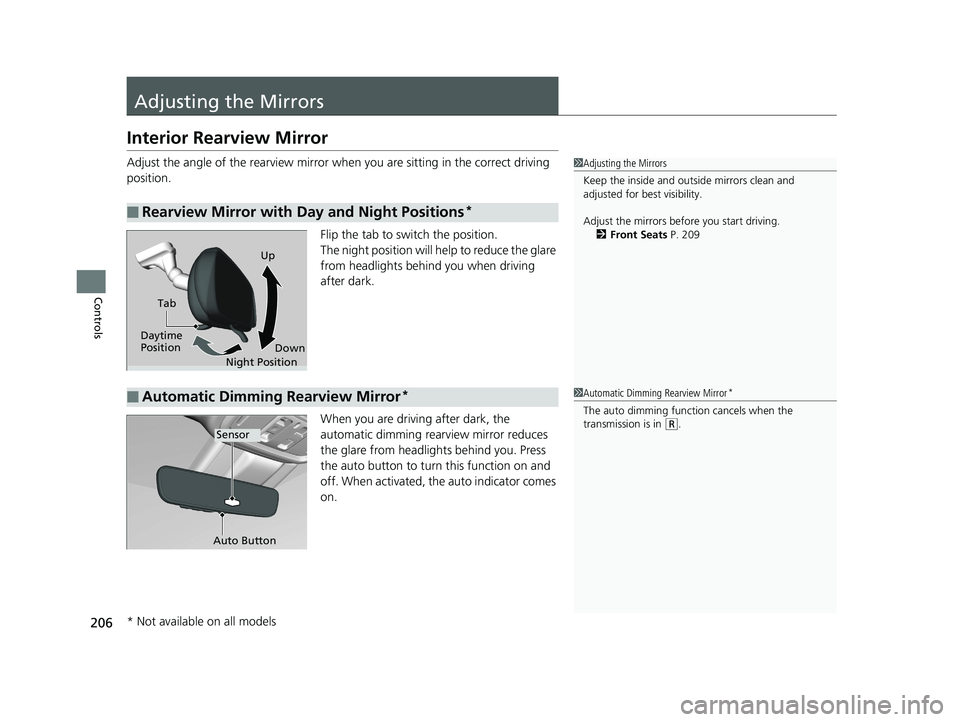
Flip the tab to switch the position.
The night position will help to reduce the glare
from headlights behind you when driving
after dark.
When you are driving after dark, the
automatic dimming rearview mirror reduces
the glare from headlights behind you. Press
the auto button to turn this function on and
off. When activated, the auto indicator comes
on.
■Rearview Mirror with Day and Night Positions*
1Adjusting the Mirrors
Keep the inside and out side mirrors clean and
adjusted for best visibility.
Adjust the mirrors befo re you start driving.
2 Front Seats P. 209
Tab
Daytime
Position Night PositionUp
Down
■Automatic Dimming Rearview Mirror*1Automatic Dimming Rearview Mirror*
The auto dimming function cancels when the
transmission is in
(R.Sensor
Auto Button
* Not available on all models
19 ODYSSEY-31THR6120.book 206 ページ 2018年12月6日 木曜日 午後4時35分
Page 242 of 767
uuInterior Lights/Interior Convenience Items uInterior Convenience Items
240
Controls
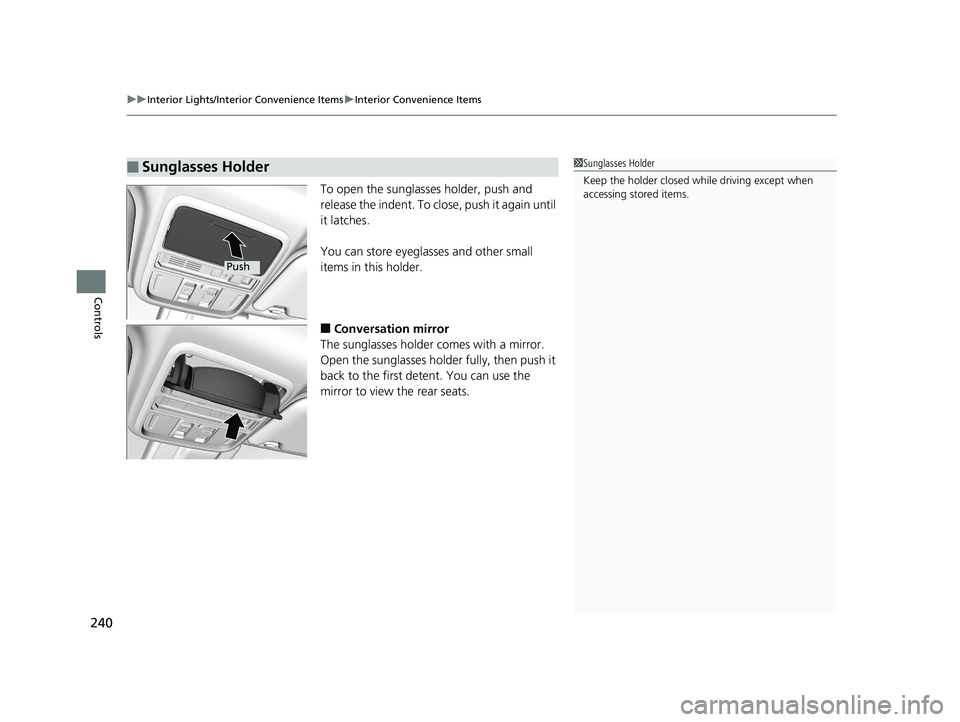
To open the sunglasses holder, push and
release the indent. To clos e, push it again until
it latches.
You can store eyeglasses and other small
items in this holder.
■Conversation mirror
The sunglasses holder comes with a mirror.
Open the sunglasses holder fully, then push it
back to the first detent. You can use the
mirror to view the rear seats.
■Sunglasses Holder1 Sunglasses Holder
Keep the holder closed wh ile driving except when
accessing stored items.
Push
19 ODYSSEY-31THR6120.book 240 ページ 2018年12月6日 木曜日 午後4時35分
Page 566 of 767
564
uuWhen Driving uFront Sensor Camera*
Driving
Front Sensor Camera*
The camera, used in systems such as LKAS, RDM, ACC, and CMBSTM, is designed to
detect an object that triggers any of the systems to operate its functions.
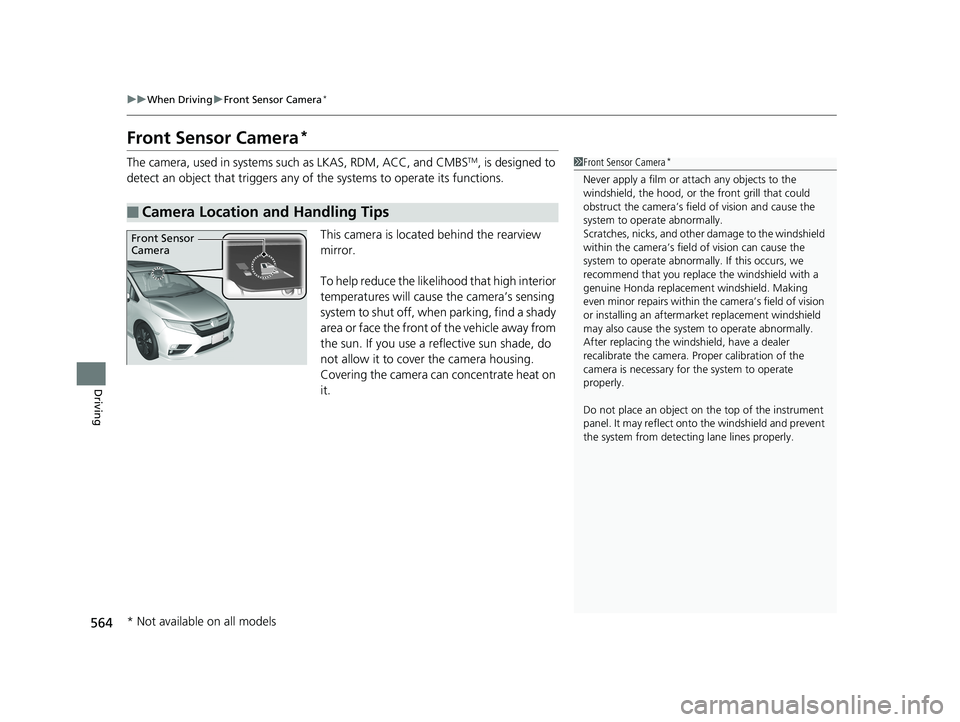
This camera is located behind the rearview
mirror.
To help reduce the likelihood that high interior
temperatures will cause the camera’s sensing
system to shut off, when parking, find a shady
area or face the front of the vehicle away from
the sun. If you use a re flective sun shade, do
not allow it to cove r the camera housing.
Covering the camera can concentrate heat on
it.
■Camera Location and Handling Tips
1 Front Sensor Camera*
Never apply a film or attach any objects to the
windshield, the hood, or the front grill that could
obstruct the camera’s fiel d of vision and cause the
system to operate abnormally.
Scratches, nicks, and othe r damage to the windshield
within the camera’s fiel d of vision can cause the
system to operate abnormall y. If this occurs, we
recommend that you replac e the windshield with a
genuine Honda replacem ent windshield. Making
even minor repairs within th e camera’s field of vision
or installing an aftermarket replacement windshield
may also cause the system to operate abnormally.
After replacing the winds hield, have a dealer
recalibrate the camera. Pr oper calibration of the
camera is necessary for the system to operate
properly.
Do not place an object on the top of the instrument
panel. It may reflect onto the windshield and prevent
the system from detecting lane lines properly.
Front Sensor
Camera
* Not available on all models
19 ODYSSEY-31THR6120.book 564 ページ 2018年12月6日 木曜日 午後4時35分
Page 568 of 767
566
uuWhen Driving uAdaptive Cruise Control (ACC)*
Driving
Adaptive Cruise Control (ACC)*
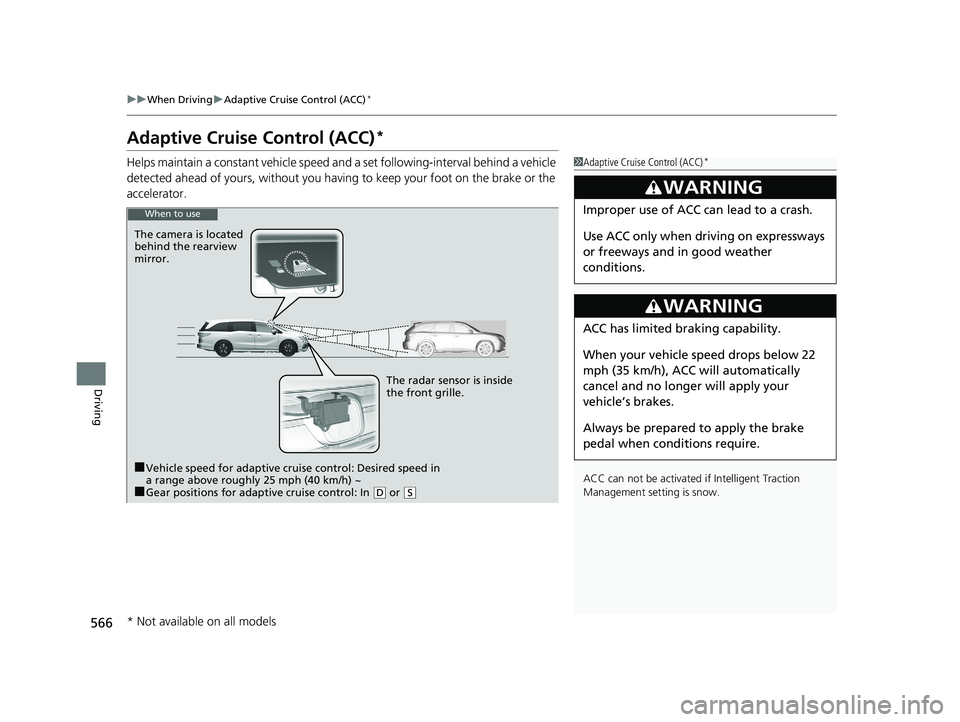
Helps maintain a constant vehicle speed an d a set following-interval behind a vehicle
detected ahead of yours, without you havi ng to keep your foot on the brake or the
accelerator.1 Adaptive Cruise Control (ACC)*
ACC can not be activated if Intelligent Traction
Management sett ing is snow.
3WARNING
Improper use of ACC can lead to a crash.
Use ACC only when driving on expressways
or freeways and in good weather
conditions.
3WARNING
ACC has limited braking capability.
When your vehicle speed drops below 22
mph (35 km/h), ACC will automatically
cancel and no longer will apply your
vehicle’s brakes.
Always be prepared to apply the brake
pedal when conditions require.
When to use
The camera is located
behind the rearview
mirror.
The radar sensor is inside
the front grille.
■Vehicle speed for adaptive cruise control: Desired speed in
a range above roughly 25 mph (40 km/h) ~
■Gear positions for adaptive cruise control: In ( D or (S
* Not available on all models
19 ODYSSEY-31THR6120.book 566 ページ 2018年12月6日 木曜日 午後4時35分
Page 577 of 767
Continued575
uuWhen Driving uAdaptive Cruise Control (ACC)*
Driving
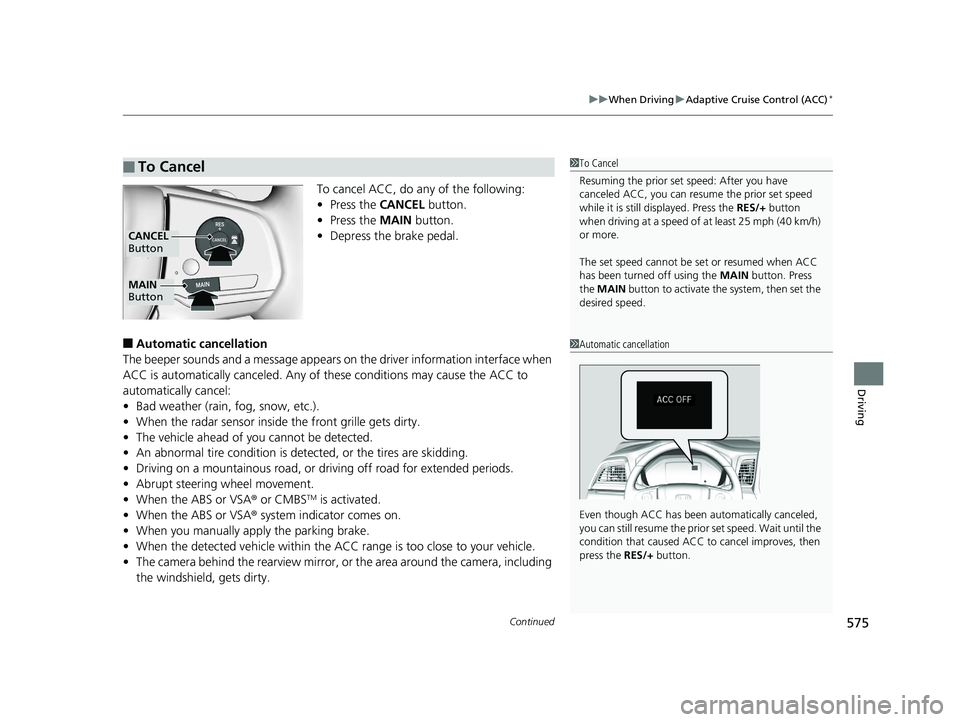
To cancel ACC, do any of the following:
• Press the CANCEL button.
• Press the MAIN button.
• Depress the brake pedal.
■Automatic ca ncellation
The beeper sounds and a message appears on the driver information interface when
ACC is automatically cancel ed. Any of these conditions may cause the ACC to
automatically cancel:
• Bad weather (rain, fog, snow, etc.).
• When the radar sensor inside the front grille gets dirty.
• The vehicle ahead of yo u cannot be detected.
• An abnormal tire condition is de tected, or the tires are skidding.
• Driving on a mountainous road, or driving off road for extended periods.
• Abrupt steering wheel movement.
• When the ABS or VSA ® or CMBS
TM is activated.
• When the ABS or VSA ® system indicator comes on.
• When you manually apply the parking brake.
• When the detected vehicle within the AC C range is too close to your vehicle.
• The camera behind the rearview mirror, or the area around the camera, including
the windshield, gets dirty.
■To Cancel1 To Cancel
Resuming the prior set speed: After you have
canceled ACC, you can resume the prior set speed
while it is still displayed. Press the RES/+ button
when driving at a speed of at least 25 mph (40 km/h)
or more.
The set speed cannot be set or resumed when ACC
has been turned off using the MAIN button. Press
the MAIN button to activate the system, then set the
desired speed.
MAIN
Button
CANCEL
Button
1 Automatic cancellation
Even though ACC has been automatically canceled,
you can still resume the prior set speed. Wait until the
condition that caused ACC to cancel improves, then
press the RES/+ button.
19 ODYSSEY-31THR6120.book 575 ページ 2018年12月6日 木曜日 午後4時35分