start stop button HONDA ODYSSEY 2022 User Guide
[x] Cancel search | Manufacturer: HONDA, Model Year: 2022, Model line: ODYSSEY, Model: HONDA ODYSSEY 2022Pages: 782, PDF Size: 27.17 MB
Page 185 of 782
184
uuSliding Doors uOpening/Closing the Power Sliding Doors*
Controls
Opening/Closing the Power Sliding Doors*
The power sliding doors can be operated by pressing the power sliding door button
on the keyless remote, pressing the power sliding door switches on the dashboard
or door pillars, or using the door handle.
The power sliding doors can be operated when:
• The sliding door main switch is in the ON position.
• The power sliding door is unlocked.
• The fuel fill door is closed (on the driver’s side sliding door only).
• The power mode is in VEHICLE OFF or the re mote engine start mode is active with
use of the keyless remote.
• The transmission is in
(P, the brake pedal is depressed, or the parking brake is
applied (with the power mode in ON) when using the power sliding door switches
on the dashboard.
1 Opening/Closing the Power Sliding Doors*
If the transmission is in a position other than (P, and
release the brake pedal and the parking brake:
While opening – The sliding door stops and is left
ajar.
While closing – The beeper sounds until the door
closes.
Check that passengers, es pecially children, do not
have their hands on the sliding doors or on the door
pillars before its operation. If someone is caught in
the opening or closing sliding door, it can cause
serious injury.
Before replacing a rear ti re, turn the power sliding
door main switch to OFF.
Operate the power slidi ng doors only when the
vehicle is at a complete stop. Make sure you apply the
brake when rear passengers are boarding or exiting.
* Not available on all models
22 US ODYSSEY-31THR6400.book 184 ページ 2020年11月16日 月曜日 午後1時41分
Page 192 of 782
191Continued
Controls
Security System
Immobilizer System
This system prevents a key that has not been pre-registered from starting the
engine.
Pay attention to the follo wing when pressing the ENGINE START/STOP button:
• Do not allow objects that emit strong radio waves near the ENGINE START/
STOP button.
• Make sure the key is not covered by or touching a metal object.
• Do not bring a key from another vehicle’s immobilizer system near the ENGINE
START/STOP button.
• Do not put the key near magnetic items. Electronic devices, such as televisions
and audio systems emit strong magnetic fields. Note that even a key chain can
become magnetic.
Security System Alarm
The security system alarm activates when the tailgate, hood, or doors are forcibly
opened.
The alarm does not activate if the tailgate or doors are opened with the key, remote
transmitter or keyle ss access system
*.
However, the alarm activates if a door is opened with the key, then the hood is
opened before the power mode is set to ON.
■When the security system alarm activates
The horn sounds intermittently, and some exterior lights flash.
1 Immobilizer System
NOTICE
Leaving the key in the vehicl e can result in theft or
accidental movement of the vehicle.
Always take the key with you whenever you leave the
vehicle unattended.
Do not alter the system or add other devices to it.
Doing so may damage the system and make your
vehicle inoperable.
Canadian models only: Apply and hold the brake
pedal before turning the vehicle on the first time after
the battery has been disconnected.
1 Security System Alarm
The security system alarm continues for a maximum
of two minutes until the security system alarm
deactivates.
* Not available on all models
22 US ODYSSEY-31THR6400.book 191 ページ 2020年11月16日 月曜日 午後1時41分
Page 199 of 782
198
Controls
Operating the Switches Around the Steering Wheel
ENGINE START/STOP Button
*1:Canadian models
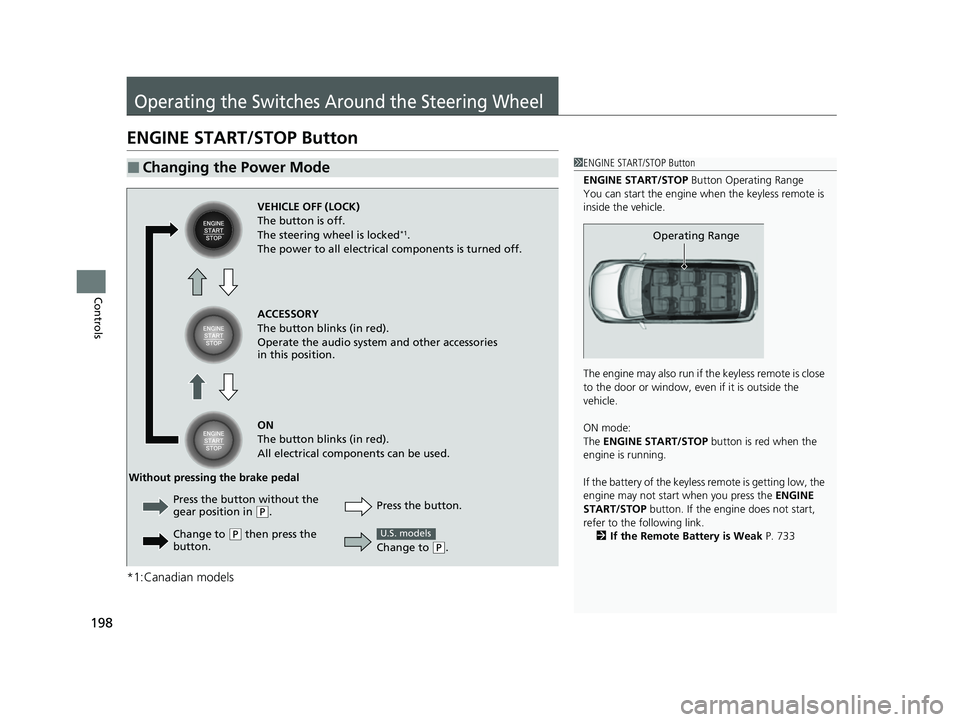
■Changing the Power Mode1ENGINE START/STOP Button
ENGINE START/STOP Button Operating Range
You can start the engine when the keyless remote is
inside the vehicle.
The engine may also run if the keyless remote is close
to the door or window, even if it is outside the
vehicle.
ON mode:
The ENGINE START/STOP button is red when the
engine is running.
If the battery of the keyless remote is getting low, the
engine may not start when you press the ENGINE
START/STOP button. If the engi ne does not start,
refer to the following link.
2 If the Remote Battery is Weak P. 733
Operating Range
VEHICLE OFF (LOCK)
The button is off.
The steering wheel is locked
*1.
The power to all electrical components is turned off.
ACCESSORY
The button blinks (in red).
Operate the audio system and other accessories
in this position.
ON
The button blinks (in red).
All electrical components can be used.
Press the button.
Without pressing the brake pedal
Change to
(P.
U.S. models
Press the button without the
gear position in (P.
Change to
( P then press the
button.
22 US ODYSSEY-31THR6400.book 198 ページ 2020年11月16日 月曜日 午後1時41分
Page 200 of 782
Continued199
uuOperating the Switches Around the Steering Wheel uENGINE START/STOP Button
Controls
If you leave the vehicle for 30 to 60 minutes with the transmission in (P and the
power mode in ACCESSORY, the vehicle automa tically goes into the mode similar to
VEHICLE OFF (LOCK) to avoid draining the battery.
When in this mode:
The steering wheel does not lock.
You cannot lock or unlock doors with the remote transmitter or the keyless access
system.
Press the ENGINE START/STOP button to switch the mode to VEHICLE OFF (LOCK).
■Automatic Power Off1ENGINE START/STOP Button
If the power mode does not change from VEHICLE
OFF to ACCESSORY, press the ENGINE START/STOP
button while moving the st eering wheel left and
right. The steering wheel will unlock, allowing the
mode to change.
Do not leave the power mode in ACCESSORY or ON
when you get out.
Canadian models
Canadian models
22 US ODYSSEY-31THR6400.book 199 ページ 2020年11月16日 月曜日 午後1時41分
Page 201 of 782
uuOperating the Switches Around the Steering Wheel uENGINE START/STOP Button
200
Controls
If you open the driver’s door when the power mode is set to ACCESSORY, a warning
beep sounds.
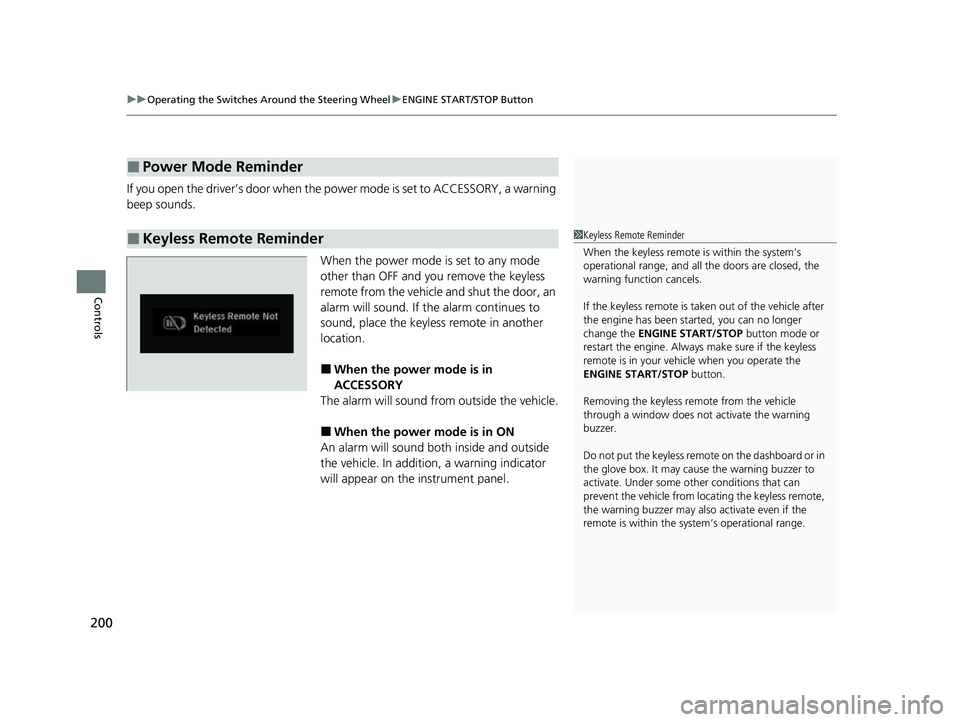
When the power mode is set to any mode
other than OFF and you remove the keyless
remote from the vehicle and shut the door, an
alarm will sound. If the alarm continues to
sound, place the keyless remote in another
location.
■When the power mode is in
ACCESSORY
The alarm will sound from outside the vehicle.
■When the power mode is in ON
An alarm will sound both inside and outside
the vehicle. In addition, a warning indicator
will appear on the instrument panel.
■Power Mode Reminder
■Keyless Remote Reminder1 Keyless Remote Reminder
When the keyless remote is within the system’s
operational range, and all the doors are closed, the
warning function cancels.
If the keyless remote is taken out of the vehicle after
the engine has been st arted, you can no longer
change the ENGINE START/STOP button mode or
restart the engine. Always make sure if the keyless
remote is in your vehi cle when you operate the
ENGINE START/STOP button.
Removing the keyless remote from the vehicle
through a window does not activate the warning
buzzer.
Do not put the keyless remo te on the dashboard or in
the glove box. It may cause the warning buzzer to
activate. Under some ot her conditions that can
prevent the vehicle from locating the keyless remote,
the warning buzzer may also activate even if the
remote is within the system’s operational range.
22 US ODYSSEY-31THR6400.book 200 ページ 2020年11月16日 月曜日 午後1時41分
Page 261 of 782
260
Controls
Climate Control System
Using Automatic Climate Control
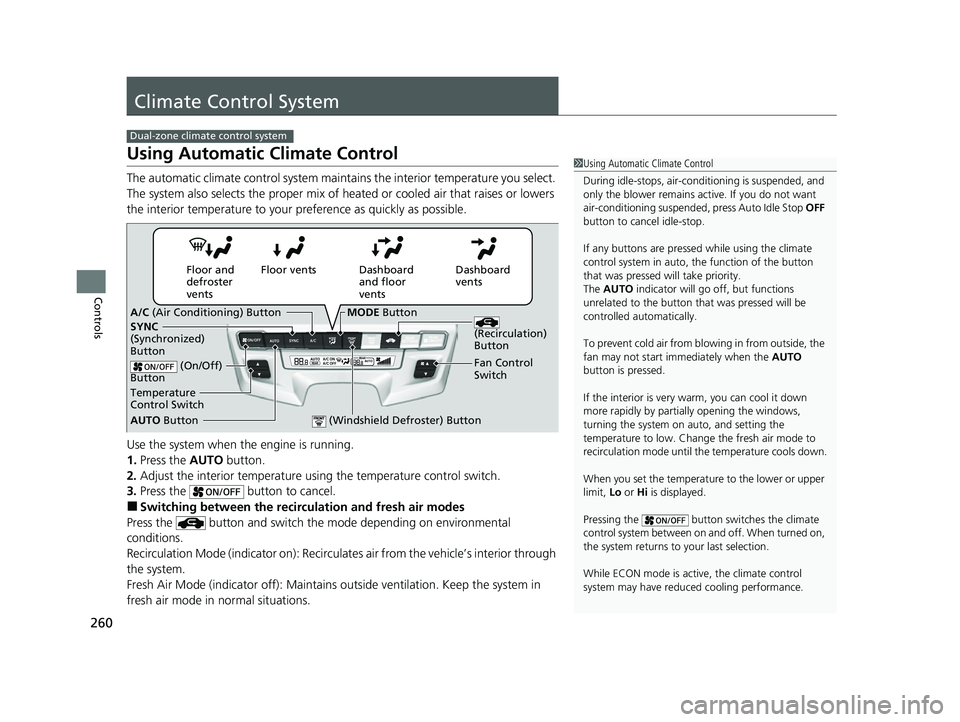
The automatic climate control system maintains the interior temperature you select.
The system also selects the proper mix of heated or cooled air that raises or lowers
the interior temperature to your preference as quickly as possible.
Use the system when the engine is running.
1. Press the AUTO button.
2. Adjust the interior temperature us ing the temperature control switch.
3. Press the button to cancel.
■Switching between the recirc ulation and fresh air modes
Press the button and switch the mode depending on environmental
conditions.
Recirculation Mode (indicator on): Recirculat es air from the vehicle’s interior through
the system.
Fresh Air Mode (indicator off): Maintains outside ventilation. Keep the system in
fresh air mode in normal situations.
Dual-zone climate control system
1 Using Automatic Climate Control
During idle-stops, air-conditioning is suspended, and
only the blower remains ac tive. If you do not want
air-conditioning suspended, press Auto Idle Stop OFF
button to cancel idle-stop.
If any buttons are presse d while using the climate
control system in auto, the function of the button
that was pressed will take priority.
The AUTO indicator will go off, but functions
unrelated to the button th at was pressed will be
controlled automatically.
To prevent cold air from bl owing in from outside, the
fan may not start i mmediately when the AUTO
button is pressed.
If the interior is very warm, you can cool it down
more rapidly by partial ly opening the windows,
turning the system on auto, and setting the
temperature to low. Change the fresh air mode to
recirculation mode until the temperature cools down.
When you set the temperat ure to the lower or upper
limit, Lo or Hi is displayed.
Pressing the button switches the climate
control system between on and off. When turned on,
the system returns to your last selection.
While ECON mode is active, the climate control
system may have reduced cooling performance.
Dashboard
vents
Dashboard
and floor
vents
Floor vents
Floor and
defroster
vents
AUTO Button
Temperature
Control Switch A/C
(Air Conditioning) Button
Fan Control
Switch
(Recirculation)
Button
(On/Off)
Button
SYNC
(Synchronized)
Button
(Windshield Defroster) Button
MODE Button
22 US ODYSSEY-31THR6400.book 260 ページ 2020年11月16日 月曜日 午後1時41分
Page 262 of 782
Continued261
uuClimate Control System uUsing Automatic Climate Control
Controls
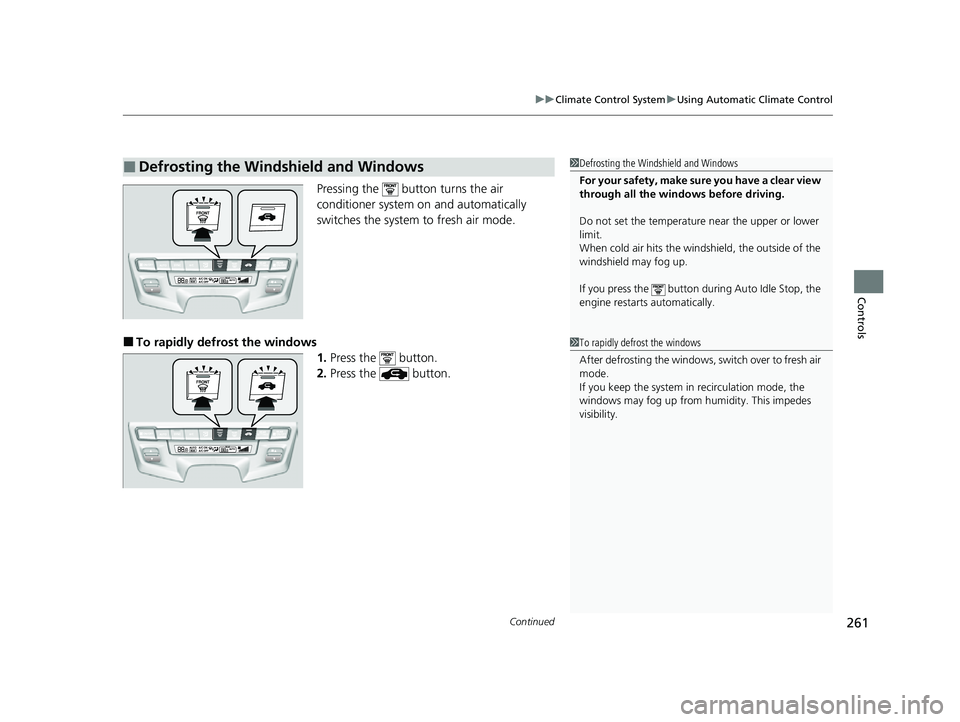
Pressing the button turns the air
conditioner system on and automatically
switches the system to fresh air mode.
■To rapidly defrost the windows
1.Press the button.
2. Press the button.
■Defrosting the Windshield and Windows1Defrosting the Windshield and Windows
For your safety, make sure you have a clear view
through all the windows before driving.
Do not set the temperatur e near the upper or lower
limit.
When cold air hits the windshield, the outside of the
windshield may fog up.
If you press the button dur ing Auto Idle Stop, the
engine restarts automatically.
1 To rapidly defrost the windows
After defrosting the windows, switch over to fresh air
mode.
If you keep the system in recirculation mode, the
windows may fog up from humidity. This impedes
visibility.
22 US ODYSSEY-31THR6400.book 261 ページ 2020年11月16日 月曜日 午後1時41分
Page 266 of 782
265Continued
Controls
Climate Control System
Using Automatic Climate Control
The automatic climate control system maintains the interior temperature you select.
The system also selects the proper mix of heat ed or cooled air that raises or lowers
the interior temperature to your pr eference as quickly as possible.
Tri-zone climate control system
1Using Automatic Climate Control
Press the FRONT CLIMATE button to display A/C,
MODE, and fan control information on the audio/
information screen for several seconds. Select icon to
turn on or off A/C, change the vent mode, or change
the fan speed.
During idle-stops, air-conditioning is suspended, and
only the blower remains ac tive. If you do not want
air-conditioning suspended, press Auto Idle Stop OFF
button to cancel idle-stop.
If any buttons are presse d while using the climate
control system in auto, the function of the button
that was pressed will take priority.
The AUTO indicator will go off, but functions
unrelated to the button that were pressed will be
controlled automatically.
To prevent cold air from bl owing in from outside, the
fan may not start i mmediately when the AUTO
button is pressed.
If the interior is very warm, you can cool it down
more rapidly by partial ly opening the windows,
turning the system on AUTO, and setting the
temperature to low. Change the fresh mode to
recirculation mode until the temperature cools down.
When you set the temperat ure to the lower or upper
limit, Lo or Hi is displayed.
22 US ODYSSEY-31THR6400.book 265 ページ 2020年11月16日 月曜日 午後1時41分
Page 268 of 782
Continued267
uuClimate Control System uUsing Automatic Climate Control
Controls
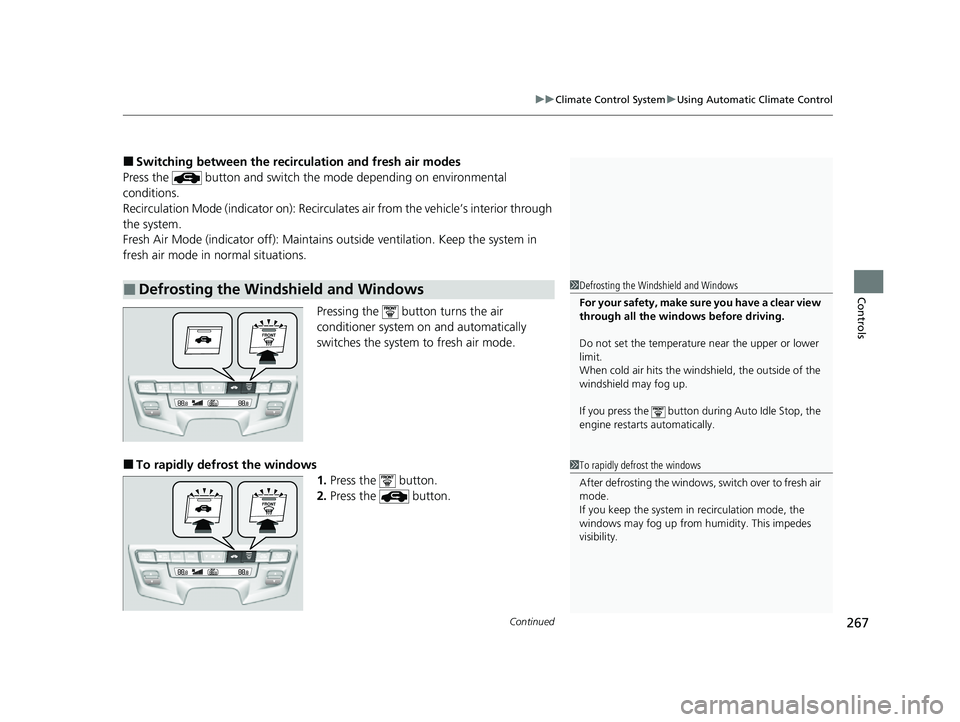
■Switching between the recirculation and fresh air modes
Press the button and switch the mode depending on environmental
conditions.
Recirculation Mode (indicator on): Recirculates air from the vehicle’s interior through
the system.
Fresh Air Mode (indicator off): Maintains outside ventilation. Keep the system in
fresh air mode in normal situations.
Pressing the button turns the air
conditioner system on and automatically
switches the system to fresh air mode.
■To rapidly defrost the windows1.Press the button.
2. Press the button.
■Defrosting the Windshield and Windows1Defrosting the Windshield and Windows
For your safety, make sure you have a clear view
through all the windows before driving.
Do not set the temperatur e near the upper or lower
limit.
When cold air hits the windshield, the outside of the
windshield may fog up.
If you press the button dur ing Auto Idle Stop, the
engine restarts automatically.
1 To rapidly defrost the windows
After defrosting the windows, switch over to fresh air
mode.
If you keep the system in recirculation mode, the
windows may fog up from humidity. This impedes
visibility.
22 US ODYSSEY-31THR6400.book 267 ページ 2020年11月16日 月曜日 午後1時41分
Page 417 of 782
416
uuBlu-ray/DVD Rear Entertainment System*uPlaying a DVD/Blu-rayTM
Features
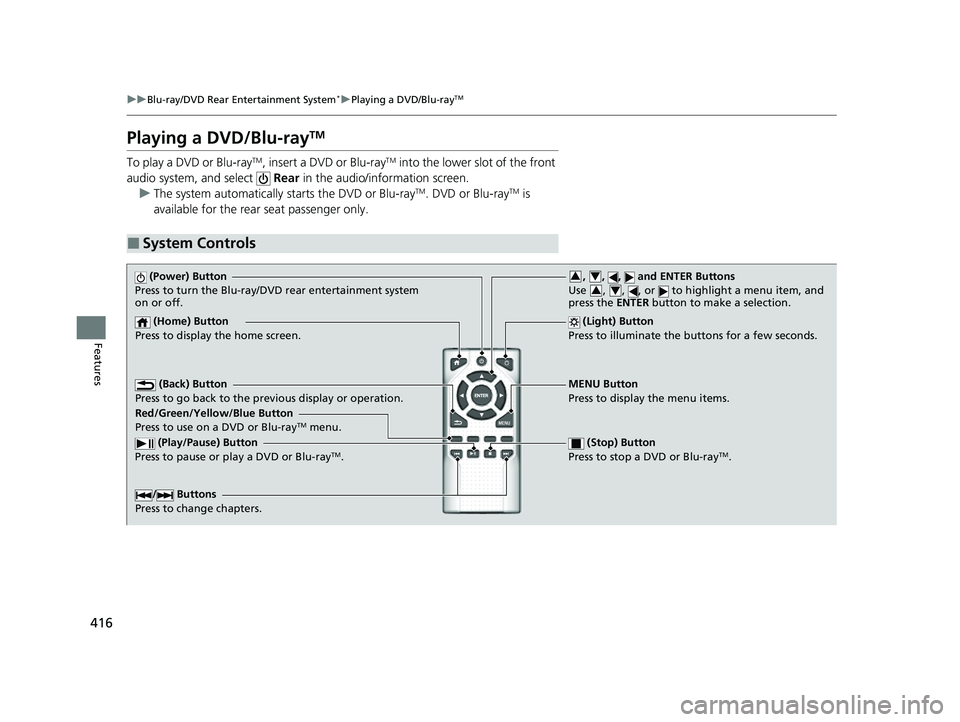
Playing a DVD/Blu-rayTM
To play a DVD or Blu-rayTM, insert a DVD or Blu-rayTM into the lower slot of the front
audio system, and select Rear in the audio/information screen.
u The system automatically starts the DVD or Blu-ray
TM. DVD or Blu-rayTM is
available for the rear seat passenger only.
■System Controls
(Power) Button
Press to turn the Blu-ray/DVD rear entertainment system
on or off.
(Home) Button
Press to display the home screen. (Light) Button
Press to illuminate the buttons for a few seconds.
/ Buttons
Press to change chapters.
(Play/Pause) Button
Press to pause or play a DVD or Blu-rayTM.
(Stop) Button
Press to stop a DVD or Blu-rayTM.
MENU Button
Press to display the menu items.
Red/Green/Yellow/Blue Button
Press to use on a DVD or Blu-ray
TM menu.
(Back) Button
Press to go back to the pr evious display or operation.
, , , and ENTER Buttons
Use , , , or to highlight a menu item, and
press the ENTER button to make a selection.34
34
22 US ODYSSEY-31THR6400.book 416 ページ 2020年11月16日 月曜日 午後1時41分