ECU HONDA ODYSSEY 2022 Owner's Guide
[x] Cancel search | Manufacturer: HONDA, Model Year: 2022, Model line: ODYSSEY, Model: HONDA ODYSSEY 2022Pages: 782, PDF Size: 27.17 MB
Page 219 of 782
218
uuOperating the Switches Around the Steering Wheel uAdjusting the Steering Wheel
Controls
Adjusting the Steering Wheel
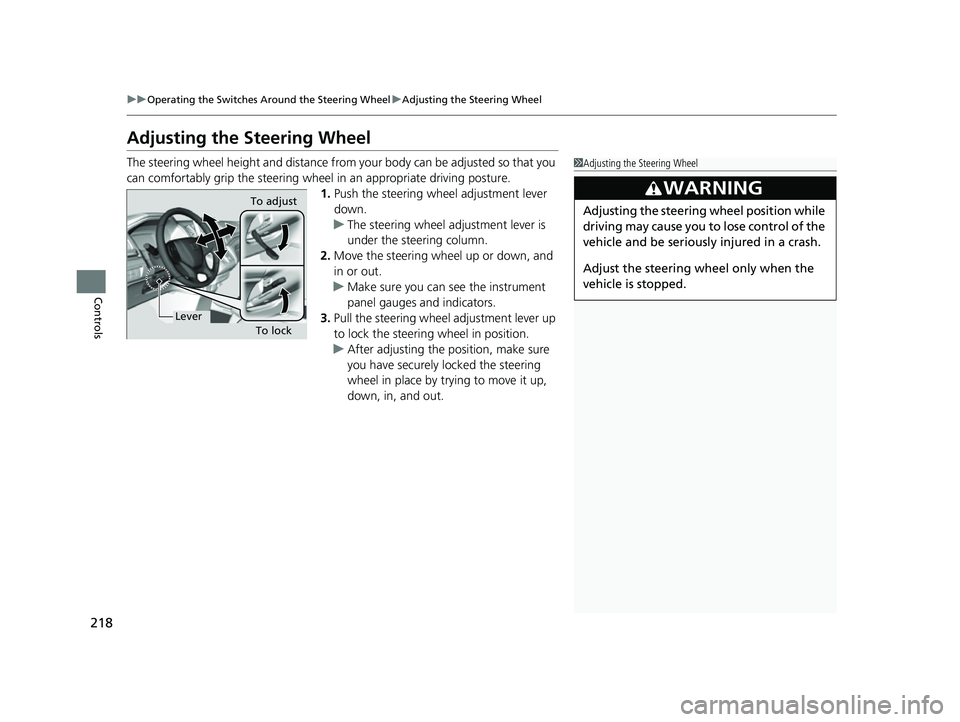
The steering wheel height and distance from your body can be adjusted so that you
can comfortably grip the steering wheel in an appropriate driving posture.
1.Push the steering wheel adjustment lever
down.
u The steering wheel adjustment lever is
under the steering column.
2. Move the steering wheel up or down, and
in or out.
u Make sure you can see the instrument
panel gauges and indicators.
3. Pull the steering wheel adjustment lever up
to lock the steerin g wheel in position.
u After adjusting the position, make sure
you have securely locked the steering
wheel in place by trying to move it up,
down, in, and out.1Adjusting the Steering Wheel
3WARNING
Adjusting the steering wheel position while
driving may cause you to lose control of the
vehicle and be seriously injured in a crash.
Adjust the steering wheel only when the
vehicle is stopped.To adjust
To lock
Lever
22 US ODYSSEY-31THR6400.book 218 ページ 2020年11月16日 月曜日 午後1時41分
Page 226 of 782
225
uuSeats uSecond Row Seats
Continued
Controls
Second Row Seats
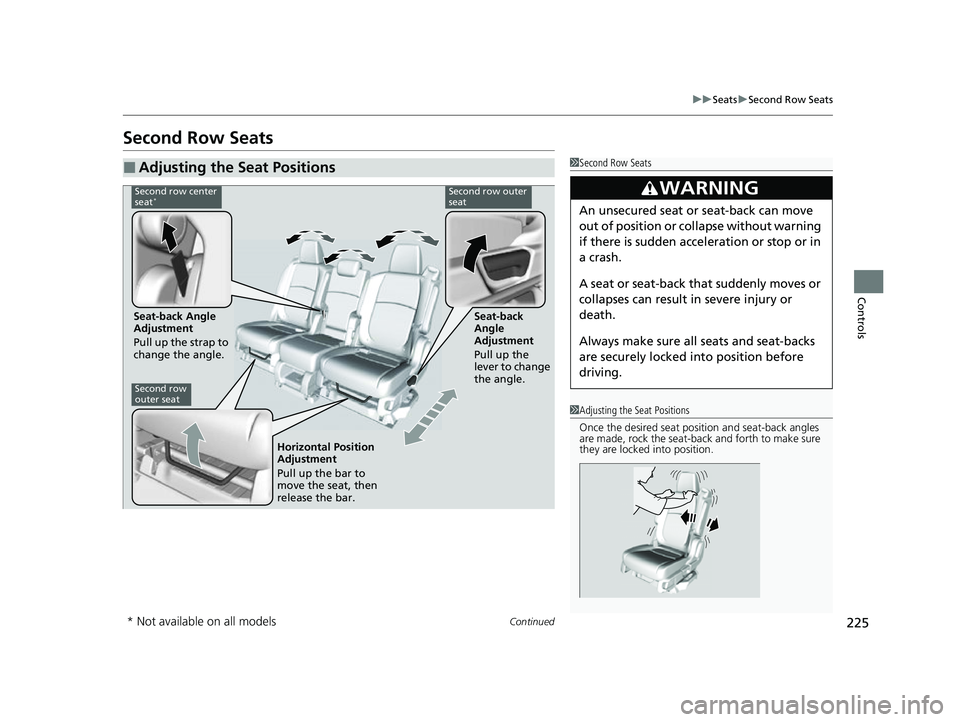
■Adjusting the Seat Positions1Second Row Seats
3WARNING
An unsecured seat or seat-back can move
out of position or collapse without warning
if there is sudden acce leration or stop or in
a crash.
A seat or seat-back that suddenly moves or
collapses can result in severe injury or
death.
Always make sure all seats and seat-backs
are securely locked in to position before
driving.
1 Adjusting the Seat Positions
Once the desired seat posit ion and seat-back angles
are made, rock the seat-back and forth to make sure
they are locked into position.
Second row center
seat*Second row outer
seat
Seat-back Angle
Adjustment
Pull up the strap to
change the angle. Seat-back
Angle
Adjustment
Pull up the
lever to change
the angle.
Second row
outer seat
Horizontal Position
Adjustment
Pull up the bar to
move the seat, then
release the bar.
* Not available on all models
22 US ODYSSEY-31THR6400.book 225 ページ 2020年11月16日 月曜日 午後1時41分
Page 227 of 782
uuSeats uSecond Row Seats
226
Controls
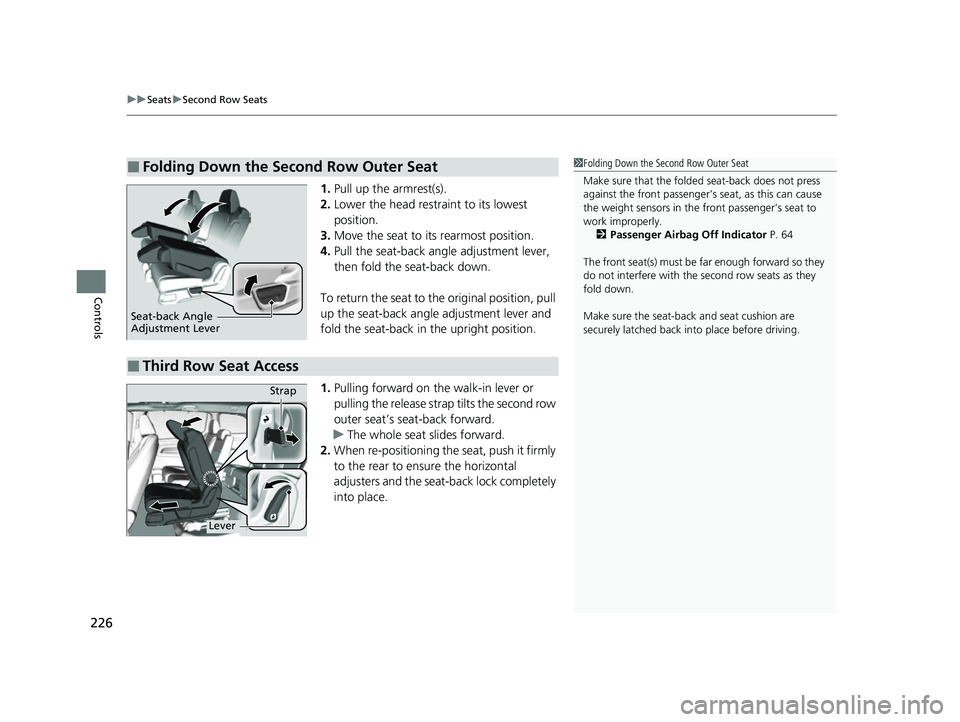
1. Pull up the armrest(s).
2. Lower the head restra int to its lowest
position.
3. Move the seat to it s rearmost position.
4. Pull the seat-back angle adjustment lever,
then fold the seat-back down.
To return the seat to th e original position, pull
up the seat-back angle adjustment lever and
fold the seat-back in the upright position.
1. Pulling forward on the walk-in lever or
pulling the release strap tilts the second row
outer seat’s seat-back forward.
u The whole seat slides forward.
2. When re-positioning th e seat, push it firmly
to the rear to ensure the horizontal
adjusters and the seat-back lock completely
into place.
■Folding Down the Second Row Outer Seat1 Folding Down the Second Row Outer Seat
Make sure that the folded seat-back does not press
against the front passenger’s seat, as this can cause
the weight sensors in the front passenger’s seat to
work improperly. 2 Passenger Airbag Off Indicator P. 64
The front seat(s) must be far enough forward so they
do not interfere with the second row seats as they
fold down.
Make sure the seat-back and seat cushion are
securely latched back in to place before driving.
Seat-back Angle
Adjustment Lever
■Third Row Seat Access
LeverStrap
22 US ODYSSEY-31THR6400.book 226 ページ 2020年11月16日 月曜日 午後1時41分
Page 228 of 782
Continued227
uuSeats uSecond Row Seats
Controls
Your vehicle’s multi-functional second row center seat is removable.
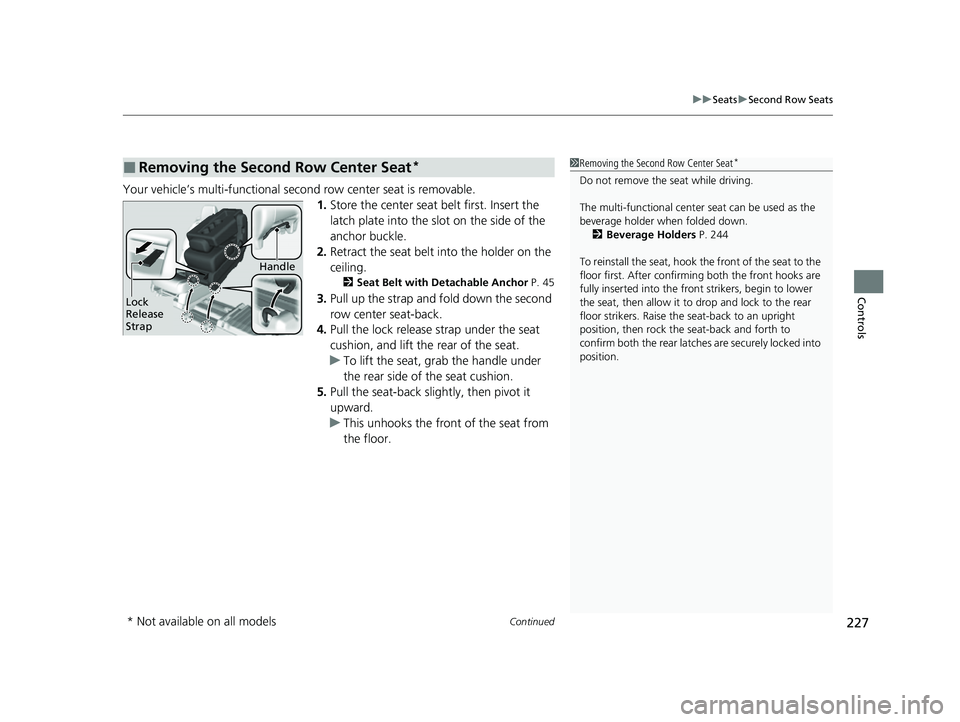
1.Store the center seat belt first. Insert the
latch plate into the slot on the side of the
anchor buckle.
2. Retract the seat belt into the holder on the
ceiling.
2 Seat Belt with Detachable Anchor P. 45
3.Pull up the strap and fold down the second
row center seat-back.
4. Pull the lock release strap under the seat
cushion, and lift the rear of the seat.
u To lift the seat, gr ab the handle under
the rear side of the seat cushion.
5. Pull the seat-back slightly, then pivot it
upward.
u This unhooks the front of the seat from
the floor.
■Removing the Second Row Center Seat*1Removing the Second Row Center Seat*
Do not remove the seat while driving.
The multi-functional center seat can be used as the
beverage holder when folded down. 2 Beverage Holders P. 244
To reinstall the seat, hook the front of the seat to the
floor first. Afte r confirming both the front hooks are
fully inserted into the front strikers, begin to lower
the seat, then allow it to drop and lock to the rear
floor strikers. Raise the seat-back to an upright
position, then rock the seat-back and forth to
confirm both the rear latches are securely locked into
position.
Lock
Release
Strap
Handle
* Not available on all models
22 US ODYSSEY-31THR6400.book 227 ページ 2020年11月16日 月曜日 午後1時41分
Page 229 of 782
uuSeats uSecond Row Seats
228
Controls
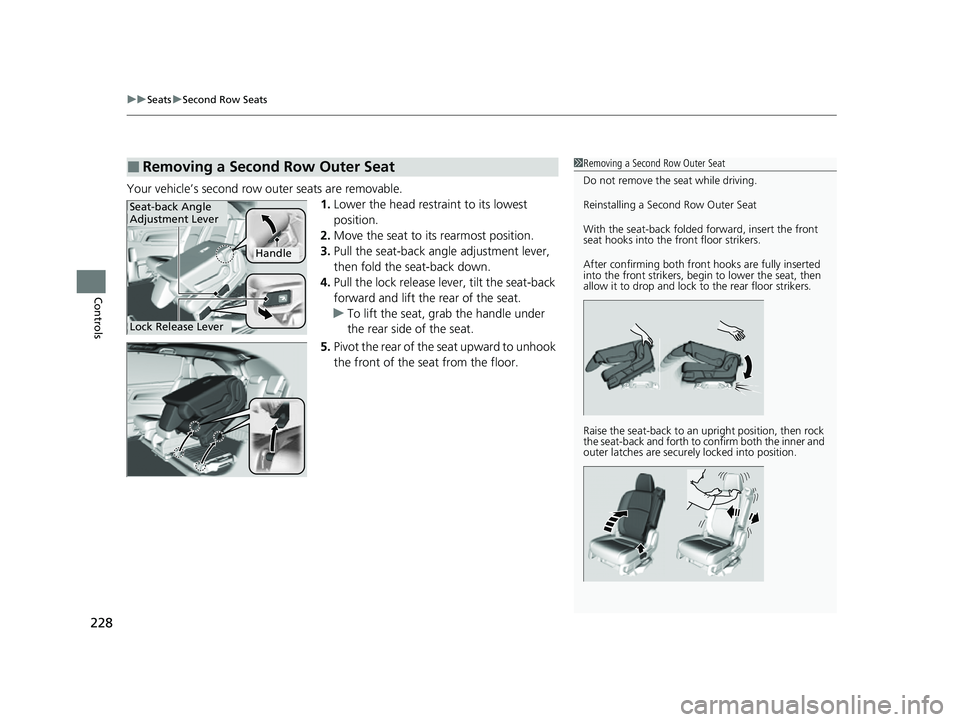
Your vehicle’s second row outer seats are removable.
1.Lower the head restra int to its lowest
position.
2. Move the seat to it s rearmost position.
3. Pull the seat-back angle adjustment lever,
then fold the seat-back down.
4. Pull the lock release lever, tilt the seat-back
forward and lift the rear of the seat.
u To lift the seat, grab the handle under
the rear side of the seat.
5. Pivot the rear of the seat upward to unhook
the front of the seat from the floor.
■Removing a Second Row Outer Seat1Removing a Second Row Outer Seat
Do not remove the seat while driving.
Reinstalling a Second Row Outer Seat
With the seat-back folded forward, insert the front
seat hooks into the front floor strikers.
After confirming both front hooks are fully inserted
into the front strikers, begin to lower the seat, then
allow it to drop and lock to the rear floor strikers.
Raise the seat-back to an upright position, then rock
the seat-back and forth to confirm both the inner and
outer latches are securely locked into position.
Handle
Seat-back Angle
Adjustment Lever
Lock Release Lever
22 US ODYSSEY-31THR6400.book 228 ページ 2020年11月16日 月曜日 午後1時41分
Page 232 of 782
Continued231
uuSeats uThird Row Seats
Controls
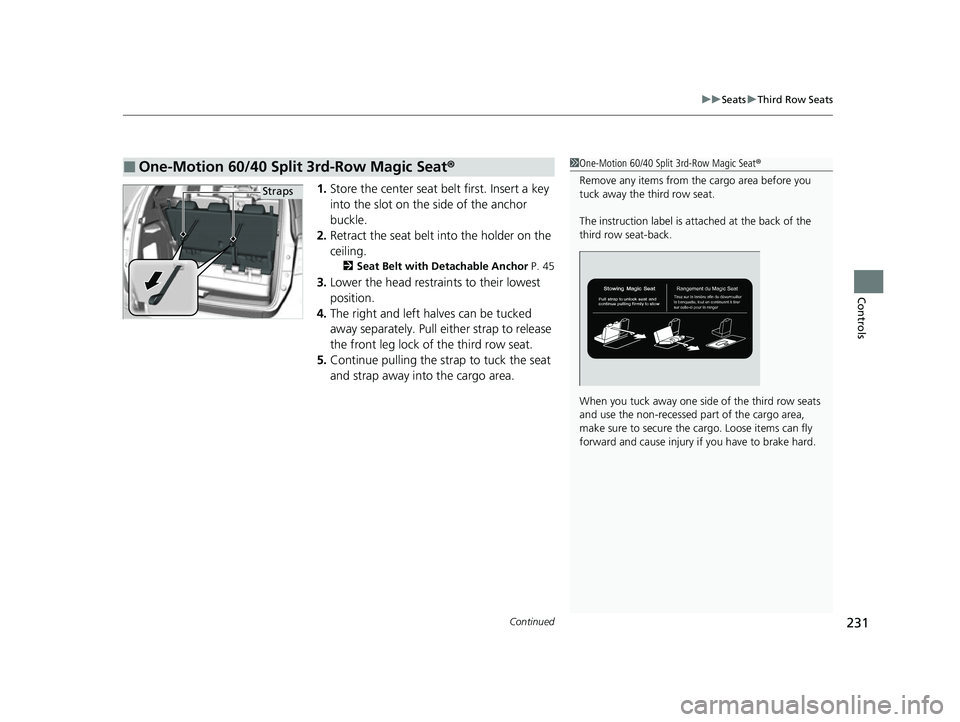
1. Store the center seat belt first. Insert a key
into the slot on the side of the anchor
buckle.
2. Retract the seat belt into the holder on the
ceiling.
2 Seat Belt with Detachable Anchor P. 45
3.Lower the head restrain ts to their lowest
position.
4. The right and left halves can be tucked
away separately. Pull either strap to release
the front leg lock of the third row seat.
5. Continue pulling the strap to tuck the seat
and strap away into the cargo area.
■One-Motion 60/40 Split 3rd-Row Magic Seat ®1One-Motion 60/40 Split 3rd-Row Magic Seat ®
Remove any items from the cargo area before you
tuck away the third row seat.
The instruction label is atta ched at the back of the
third row seat-back.
When you tuck away one si de of the third row seats
and use the non-recessed pa rt of the cargo area,
make sure to secure the cargo. Loose items can fly
forward and cause injury if you have to brake hard.
Straps
22 US ODYSSEY-31THR6400.book 231 ページ 2020年11月16日 月曜日 午後1時41分
Page 233 of 782
uuSeats uThird Row Seats
232
Controls
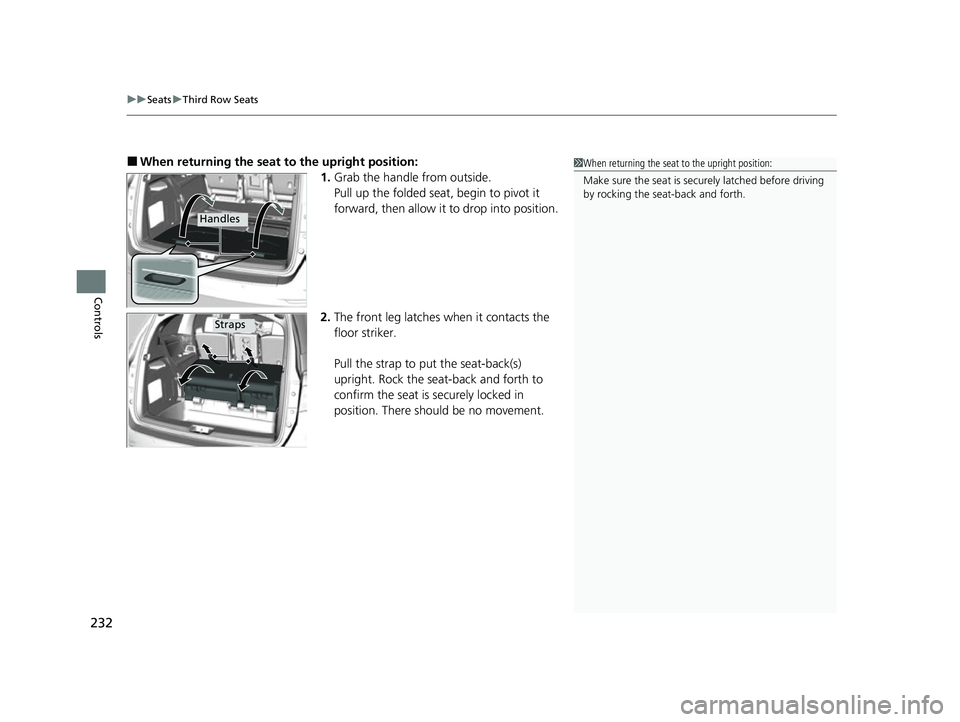
■When returning the seat to the upright position:
1. Grab the handle from outside.
Pull up the folded seat , begin to pivot it
forward, then allow it to drop into position.
2. The front leg latches when it contacts the
floor striker.
Pull the strap to put the seat-back(s)
upright. Rock the sea t-back and forth to
confirm the seat is securely locked in
position. There should be no movement.1 When returning the seat to the upright position:
Make sure the seat is securely latched before driving
by rocking the seat-back and forth.
Handles
Straps
22 US ODYSSEY-31THR6400.book 232 ページ 2020年11月16日 月曜日 午後1時41分
Page 248 of 782
247
uuInterior Convenience Items uStorage Items
Continued
Controls
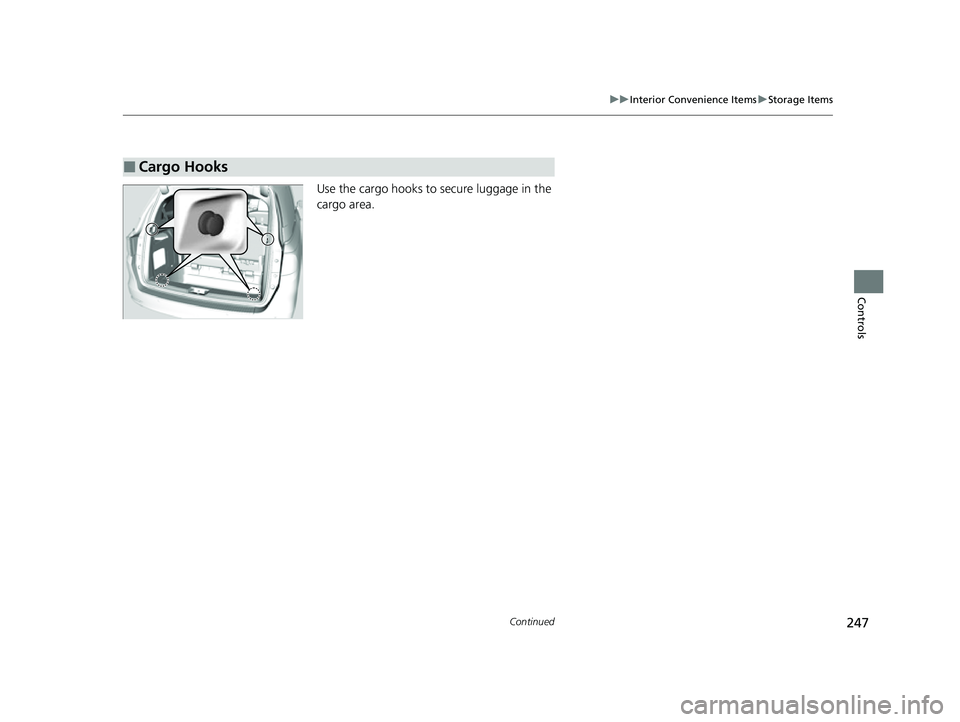
Use the cargo hooks to secure luggage in the
cargo area.
■Cargo Hooks
22 US ODYSSEY-31THR6400.book 247 ページ 2020年11月16日 月曜日 午後1時41分
Page 389 of 782
388
uuGeneral Information on the Audio System uCompatible iPod, iPad, iPhone, and USB Flash Drives
Features
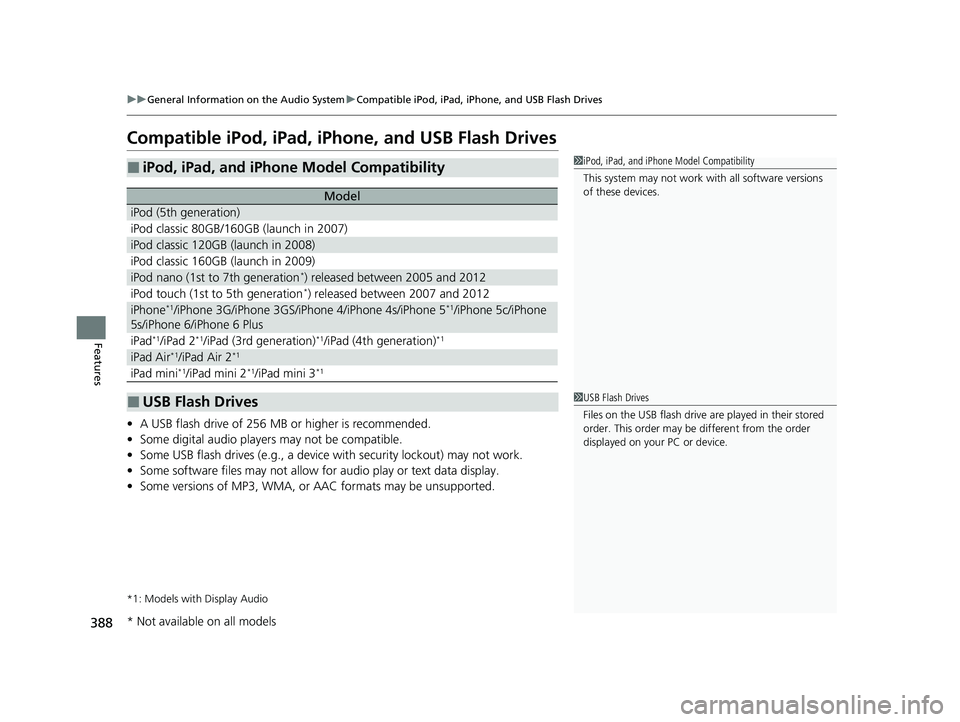
Compatible iPod, iPad, iPhone, and USB Flash Drives
• A USB flash drive of 256 MB or higher is recommended.
• Some digital audio players may not be compatible.
• Some USB flash drives (e.g., a device with security lockout) may not work.
• Some software files may not allow for audio play or text data display.
• Some versions of MP3, WMA, or AAC formats may be unsupported.
*1: Models with Display Audio
■iPod, iPad, and iPhone Model Compatibility
Model
iPod (5th generation)
iPod classic 80GB/160GB (launch in 2007)
iPod classic 120GB (launch in 2008)
iPod classic 160GB (launch in 2009)
iPod nano (1st to 7th generation*) released between 2005 and 2012
iPod touch (1st to 5th generation*) released between 2007 and 2012
iPhone*1/iPhone 3G/iPhone 3GS/iPhone 4/iPhone 4s/iPhone 5*1/iPhone 5c/iPhone
5s/iPhone 6/iPhone 6 Plus
iPad*1/iPad 2*1/iPad (3rd generation)*1/iPad (4th generation)*1
iPad Air*1/iPad Air 2*1
iPad mini*1/iPad mini 2*1/iPad mini 3*1
■USB Flash Drives
1 iPod, iPad, and iPhone Model Compatibility
This system may not work with all software versions
of these devices.
1 USB Flash Drives
Files on the USB flash drive are played in their stored
order. This order may be different from the order
displayed on your PC or device.
* Not available on all models
22 US ODYSSEY-31THR6400.book 388 ページ 2020年11月16日 月曜日 午後1時41分
Page 390 of 782
389
uuGeneral Information on the Audio System uHonda App License Agreement
Continued
Features
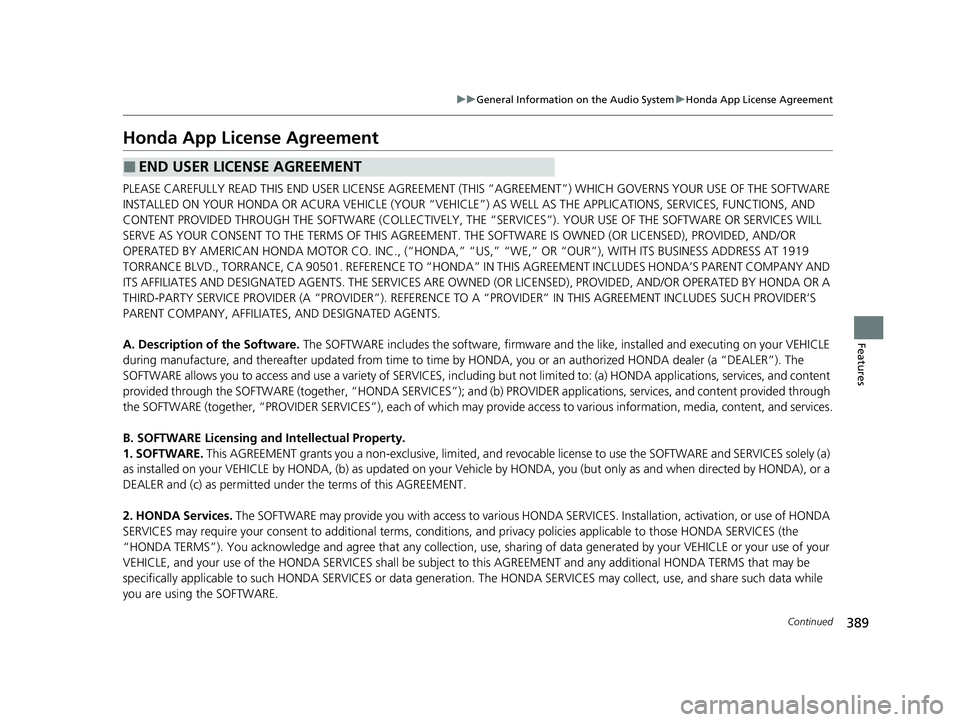
Honda App License Agreement
PLEASE CAREFULLY READ THIS END USER LICENSE AGREEMENT (THI S “AGREEMENT”) WHICH GOVERNS YOUR USE OF THE SOFTWARE
INSTALLED ON YOUR HONDA OR ACURA VEHICLE (YOUR “VEHICLE”) AS WELL AS THE APPLICATIONS, SERVICES, FUNCTIONS, AND
CONTENT PROVIDED THROUGH THE SOFTWARE (COLLECTIVELY, THE “SERVICES”). YOUR USE OF THE SOFTWARE OR SERVICES WILL
SERVE AS YOUR CONSENT TO THE TERMS OF THIS AGREEMENT. THE SOFTWARE IS OWNED (OR LICENSED), PROVIDED, AND/OR
OPERATED BY AMERICAN HONDA MOTOR CO . INC., (“HONDA,” “US,” “WE,” OR “OUR”), WITH ITS BUSINESS ADDRESS AT 1919
TORRANCE BLVD., TORRANCE, CA 90501. REFERENCE TO “HONDA” IN THIS AGREEMENT INCLUDES HONDA’S PARENT COMPANY AND
ITS AFFILIATES AND DESIGNATED AGENTS. THE SERVICES ARE OWNED (OR LICENSED), PR OVIDED, AND/OR OPERATED BY HONDA OR A
THIRD-PARTY SERVICE PROVIDER (A “PROVI DER”). REFERENCE TO A “PROVIDER” IN THIS AGREEMENT INCLUDES SUCH PROVIDER’S
PARENT COMPANY, AFFILIATES, AND DESIGNATED AGENTS.
A. Description of the Software. The SOFTWARE includes the software, firmware and the like, installed and executing on your VEHICLE
during manufacture, and thereafter updated from time to time by HONDA, you or an authorized HONDA dealer (a “DEALER”). The
SOFTWARE allows you to access and use a variety of SERVICES, including but not limited to: (a) HONDA applications, services, an d content
provided through the SOFTWARE (together, “H ONDA SERVICES”); and (b) PROVIDER applicatio ns, services, and content provided through
the SOFTWARE (together, “PROVIDER SERVICES” ), each of which may provide access to various information, media, content, and services.
B. SOFTWARE Licensing and Intellectual Property.
1. SOFTWARE. This AGREEMENT grants you a non-exclus ive, limited, and revocable license to use the SOFTWARE and SERVICES solely (a)
as installed on your VEHICLE by HONDA, (b) as updated on your Vehicle by HONDA, you (but only as and when directed by HONDA), or a
DEALER and (c) as permitted under the terms of this AGREEMENT.
2. HONDA Services. The SOFTWARE may provide you with access to various HONDA SERVICES. Inst allation, activation, or use of HONDA
SERVICES may require your consent to addi tional terms, conditions, and privacy policies applicable to those HONDA SERVICES (the
“HONDA TERMS”). You acknowledge and agree that any collection, use, sharing of data generated by yo ur VEHICLE or your use of your
VEHICLE, and your use of the HONDA SERVIC ES shall be subject to this AGREEMENT and any additional HONDA TERMS that may be
specifically applicable to such HONDA SERVICES or data generation. The HONDA SERVI CES may collect, use, and share such data while
you are using the SOFTWARE.
■END USER LICENSE AGREEMENT
22 US ODYSSEY-31THR6400.book 389 ページ 2020年11月16日 月曜日 午後1時41分