buttons HONDA ODYSSEY 2022 Owner's Guide
[x] Cancel search | Manufacturer: HONDA, Model Year: 2022, Model line: ODYSSEY, Model: HONDA ODYSSEY 2022Pages: 782, PDF Size: 27.17 MB
Page 511 of 782
510
Features
Bluetooth® HandsFreeLink ®
Bluetooth® HandsFreeLink ® (HFL) allows you to place and receive phone calls using
your vehicle’s audio system, without handling your cell phone.
Using HFL
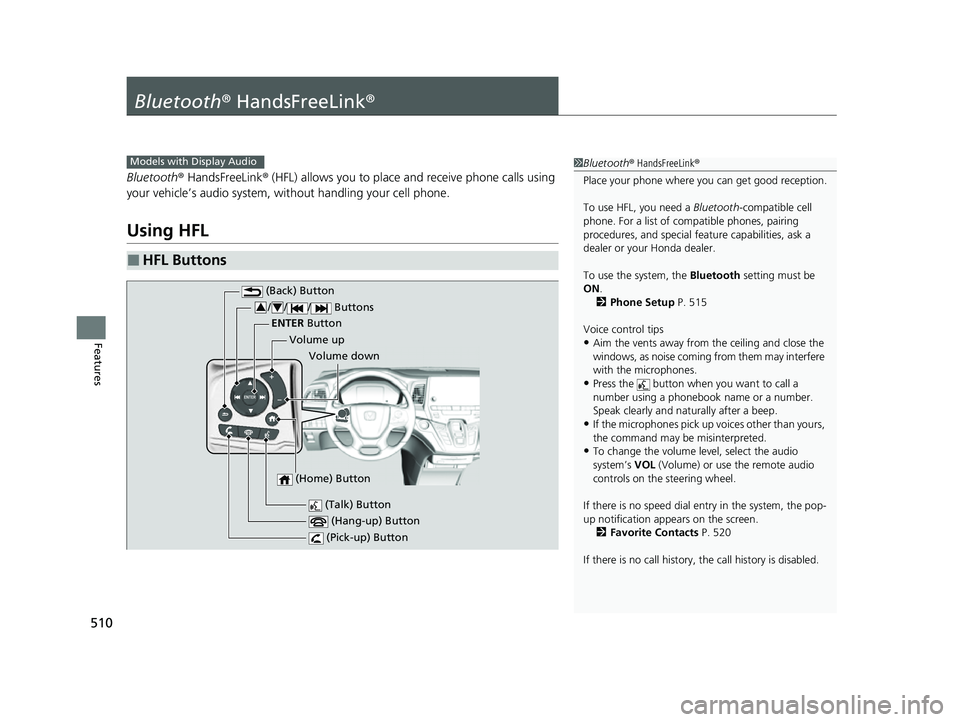
■HFL Buttons
1 Bluetooth ® HandsFreeLink ®
Place your phone where y ou can get good reception.
To use HFL, you need a Bluetooth-compatible cell
phone. For a list of compatible phones, pairing
procedures, and special fe ature capabilities, ask a
dealer or your Honda dealer.
To use the system, the Bluetooth setting must be
ON .
2 Phone Setup P. 515
Voice control tips
•Aim the vents away from the ceiling and close the
windows, as noise coming from them may interfere
with the microphones.
•Press the button when you want to call a
number using a phonebook name or a number.
Speak clearly and naturally after a beep.
•If the microphones pick up vo ices other than yours,
the command may be misinterpreted.
•To change the volume level, select the audio
system’s VOL (Volume) or use the remote audio
controls on the steering wheel.
If there is no speed dial entry in the system, the pop-
up notification appe ars on the screen.
2 Favorite Contacts P. 520
If there is no call history, the call history is disabled.
Models with Display Audio
(Talk) Button
Volume up
(Hang-up) Button
(Pick-up) Button
Volume down
ENTER
Button
(Bac
k) Bu
tton
/ / / Buttons34
(Home) Button
22 US ODYSSEY-31THR6400.book 510 ページ 2020年11月16日 月曜日 午後1時41分
Page 512 of 782
Continued511
uuBluetooth ® HandsFreeLink ®u Using HFL
Features
(Pick-up) button: Press to go directly to the phone screen of the driver
information interface, or to answer an incoming call.
(Hang-up) button: Press to end a call.
(Back) button: Press to go back to the previous screen, or cancel a command.
(Talk) button: Press to access Voice Portal.
/ / / buttons: Press to select an item displayed on the phone screen
of the driver information interface.
ENTER button: Press to call a number listed in the selected item on the phone
screen of the driver information interface.
(Home) button: Press to go back to the home sc reen of the driver information
interface.
To go to the phone screen of the driver information interface:
1. Press the (home) button on the steering wheel.
2. Select Phone .
u You can select Favorite Contacts or Recent Calls .1Bluetooth ® HandsFreeLink ®
Bluetooth ® Wireless Technology
The Bluetooth ® word mark and logos are registered
trademarks owned by Bluetooth SIG, Inc., and any
use of such marks by Honda Motor Co., Ltd., is under
license. Other trademarks and trade names are those
of their respective owners.
HFL Limitations
An incoming call on HFL will interrupt the audio
system when it is playing. It will resume when the call
is ended.
34
22 US ODYSSEY-31THR6400.book 511 ページ 2020年11月16日 月曜日 午後1時41分
Page 526 of 782
Continued525
uuBluetooth ® HandsFreeLink ®u HFL Menus
Features
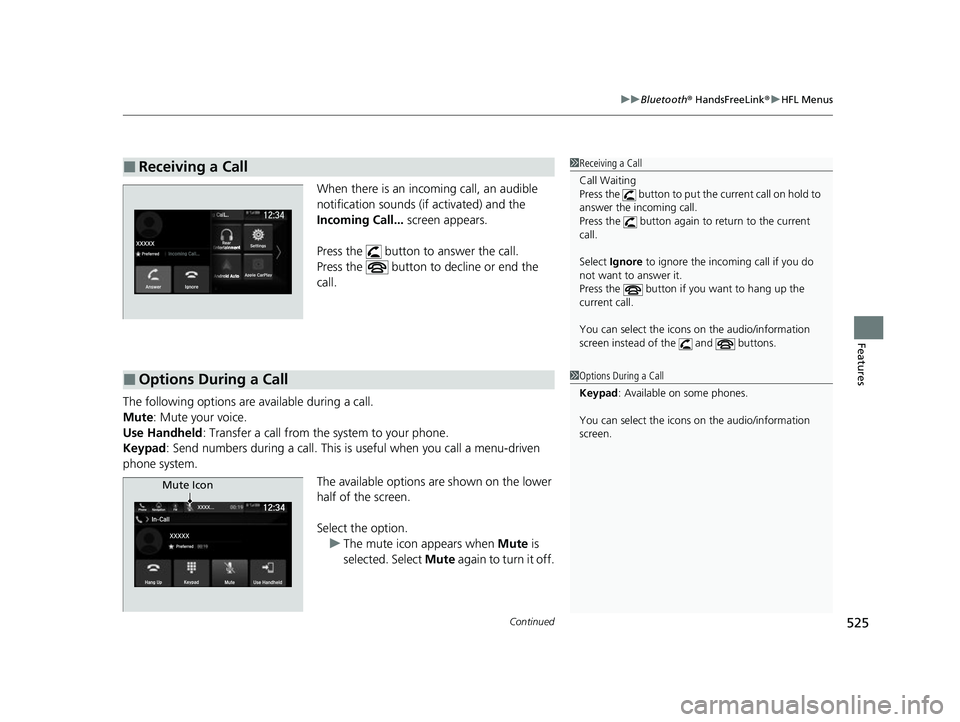
When there is an inco ming call, an audible
notification sounds (if activated) and the
Incoming Call... screen appears.
Press the button to answer the call.
Press the button to decline or end the
call.
The following options ar e available during a call.
Mute: Mute your voice.
Use Handheld : Transfer a call from the system to your phone.
Keypad : Send numbers during a call. This is useful when you call a menu-driven
phone system.
The available options are shown on the lower
half of the screen.
Select the option.u The mute icon appears when Mute is
selected. Select Mute again to turn it off.
■Receiving a Call1Receiving a Call
Call Waiting
Press the button to put th e current call on hold to
answer the incoming call.
Press the button again to return to the current
call.
Select Ignore to ignore the incoming call if you do
not want to answer it.
Press the button if you want to hang up the
current call.
You can select the icons on the audio/information
screen instead of the and buttons.
■Options During a Call1 Options During a Call
Keypad : Available on some phones.
You can select the icons on the audio/information
screen.
Phone FMIn-Call
PreferredXXXXX
XXXX . . .
Hang UpKeypad
MuteUse Handheld
12:34Navigation
Mute Icon
22 US ODYSSEY-31THR6400.book 525 ページ 2020年11月16日 月曜日 午後1時41分
Page 559 of 782
558
uuWhen Driving uShifting
Driving
Shifting
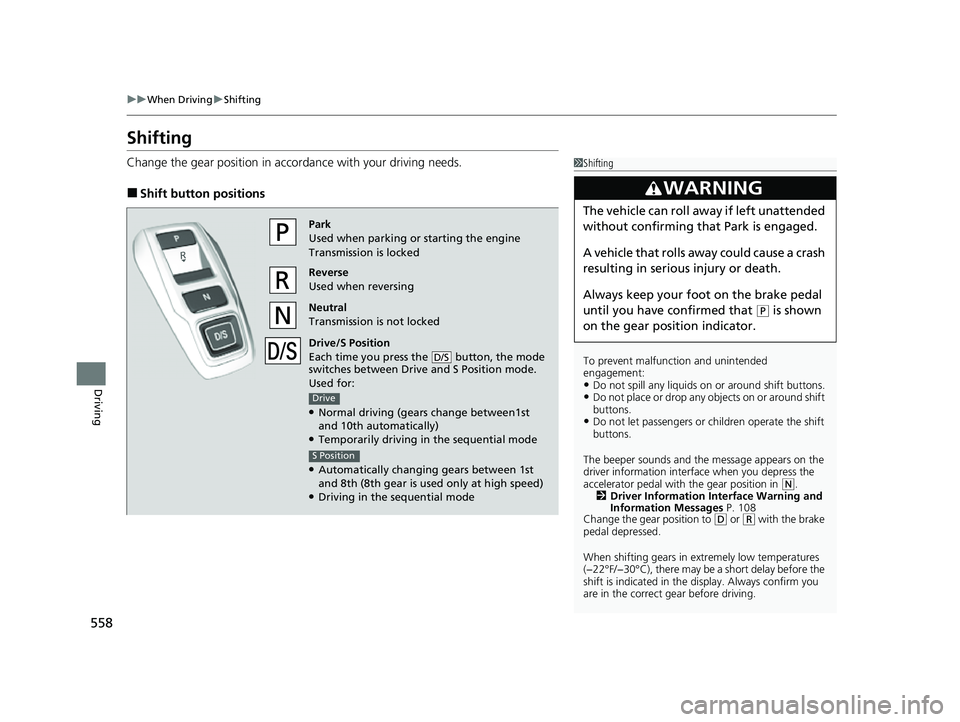
Change the gear position in acco rdance with your driving needs.
■Shift button positions
1Shifting
To prevent malfunc tion and unintended
engagement:
•Do not spill any liquids on or around shift buttons.•Do not place or drop any objects on or around shift
buttons.
•Do not let passengers or ch ildren operate the shift
buttons.
The beeper sounds and the message appears on the
driver information interf ace when you depress the
accelerator pedal with the gear position in
( N.
2 Driver Information Interface Warning and
Information Messages P. 108
Change the gear position to
( D or (R with the brake
pedal depressed.
When shifting gears in extremely low temperatures
(−22°F/−30°C), there may be a short delay before the
shift is indicated in the di splay. Always confirm you
are in the correct gear before driving.
3WARNING
The vehicle can roll aw ay if left unattended
without confirming that Park is engaged.
A vehicle that rolls away could cause a crash
resulting in seriou s injury or death.
Always keep your foot on the brake pedal
until you have confirmed that
( P is shown
on the gear position indicator.
Park
Used when parking or starting the engine
Transmission is locked
Reverse
Used when reversing
Neutral
Transmission is not locked
Drive/S Position
Each time you press the button, the mode
switches between Drive and S Position mode.
Used for:
●Normal driving (gears change between1st
and 10th automatically)
●Temporarily driving in the sequential mode
●Automatically changing gears between 1st
and 8th (8th gear is used only at high speed)
●Driving in the sequential mode
D/S
Drive
S Position
22 US ODYSSEY-31THR6400.book 558 ページ 2020年11月16日 月曜日 午後1時41分
Page 579 of 782
uuWhen Driving uTire Pressure Monitoring System (TPMS) with Tire Fill Assist
578
Driving
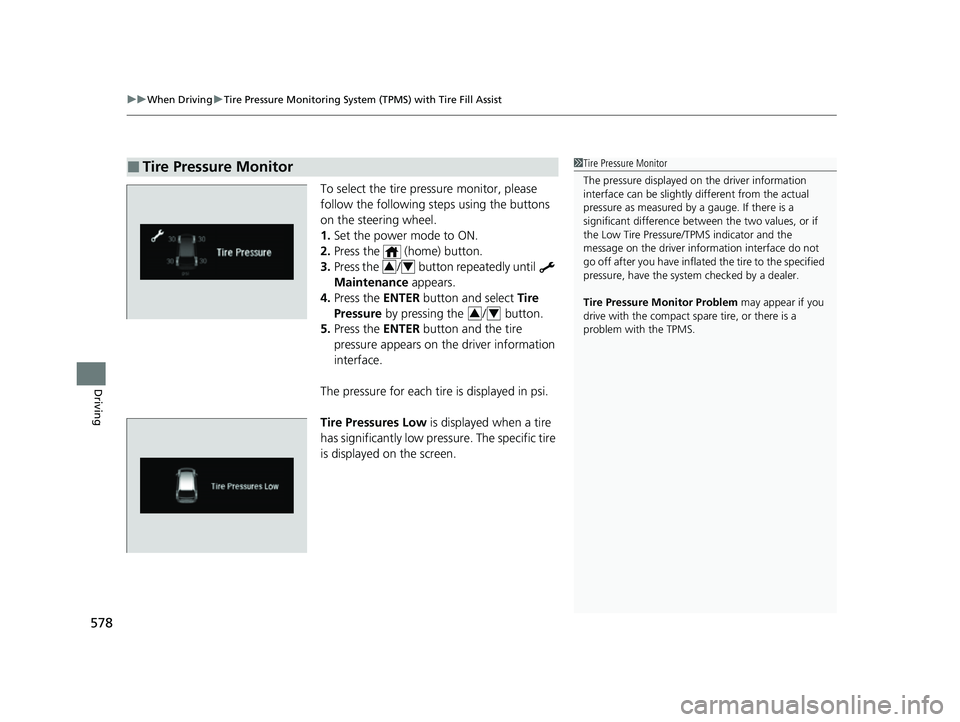
To select the tire pressure monitor, please
follow the following st eps using the buttons
on the steering wheel.
1. Set the power mode to ON.
2. Press the (home) button.
3. Press the / button repeatedly until
Maintenance appears.
4. Press the ENTER button and select Tire
Pressure by pressing the / button.
5. Press the ENTER button and the tire
pressure appears on the driver information
interface.
The pressure for each tire is displayed in psi.
Tire Pressures Low is displayed when a tire
has significantly low pressure. The specific tire
is displayed on the screen.
■Tire Pressure Monitor1 Tire Pressure Monitor
The pressure displayed on the driver information
interface can be slightly different from the actual
pressure as measured by a gauge. If there is a
significant di fference between the two values, or if
the Low Tire Pressure/TPMS indicator and the
message on the driver info rmation interface do not
go off after you have inflated the tire to the specified
pressure, have the system checked by a dealer.
Tire Pressure Monitor Problem may appear if you
drive with the compact spare tire, or there is a
problem with the TPMS.
34
34
22 US ODYSSEY-31THR6400.book 578 ページ 2020年11月16日 月曜日 午後1時41分
Page 588 of 782
587
uuHonda Sensing ®u
Continued
Driving
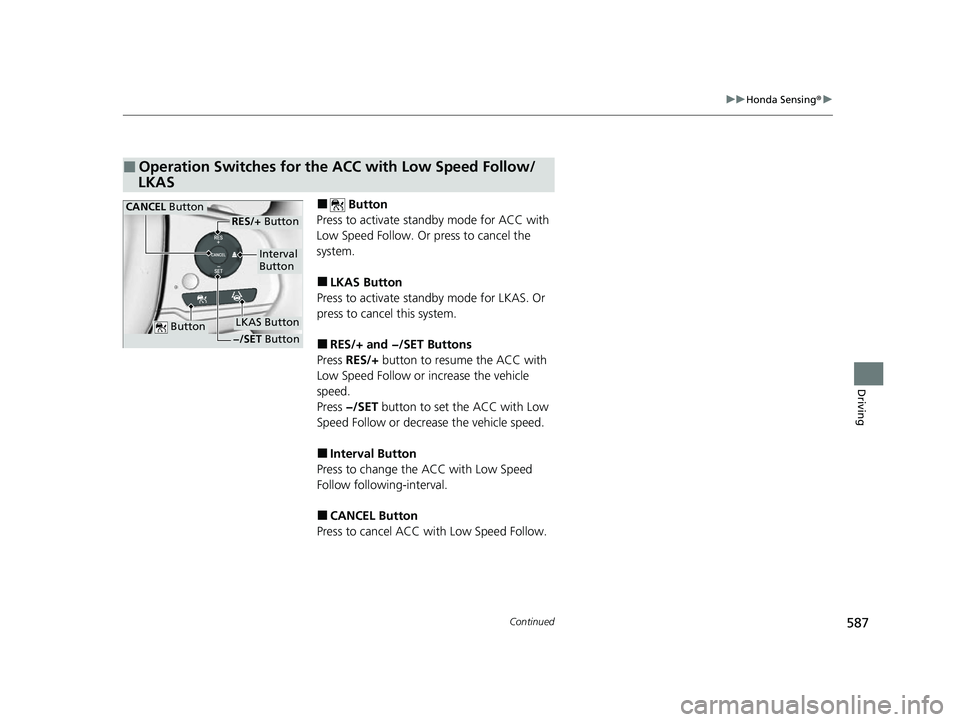
■ Button
Press to activate sta ndby mode for ACC with
Low Speed Follow. Or press to cancel the
system.
■LKAS Button
Press to activate standby mode for LKAS. Or
press to cancel this system.
■RES/+ and −/SET Buttons
Press RES/+ button to resume the ACC with
Low Speed Follow or increase the vehicle
speed.
Press −/SET button to set the ACC with Low
Speed Follow or decrea se the vehicle speed.
■Interval Button
Press to change the ACC with Low Speed
Follow following-interval.
■CANCEL Button
Press to cancel ACC wi th Low Speed Follow.
■Operation Switches for the ACC with Low Speed Follow/
LKAS
Button
Interval
Button
CANCEL Button
LKAS Button
RES/+ Button
−/SET Button
22 US ODYSSEY-31THR6400.book 587 ページ 2020年11月16日 月曜日 午後1時41分
Page 611 of 782
uuHonda Sensing ®u Adaptive Cruise Control (ACC) with Low Speed Follow
610
Driving
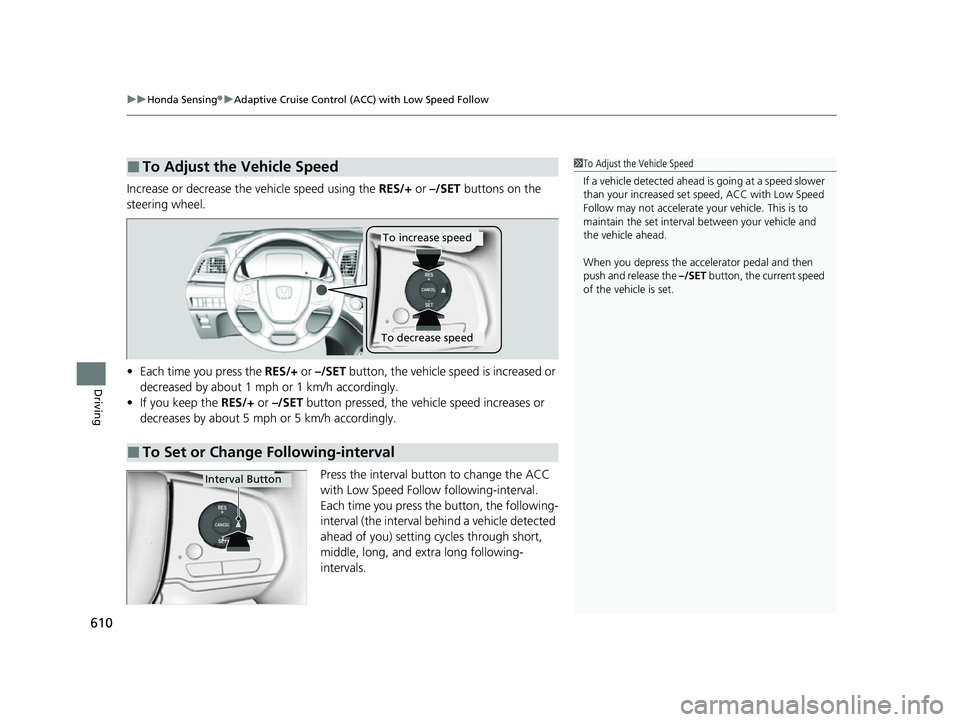
Increase or decrease the vehicle speed using the RES/+ or –/SET buttons on the
steering wheel.
• Each time you press the RES/+ or –/SET button, the vehicle speed is increased or
decreased by about 1 mph or 1 km/h accordingly.
• If you keep the RES/+ or –/SET button pressed, the vehicle speed increases or
decreases by about 5 mph or 5 km/h accordingly.
Press the interval button to change the ACC
with Low Speed Follow following-interval.
Each time you press the button, the following-
interval (the interval behind a vehicle detected
ahead of you) setting cycles through short,
middle, long, and extra long following-
intervals.
■To Adjust the Vehicle Speed1 To Adjust the Vehicle Speed
If a vehicle detected ahead is going at a speed slower
than your increased set speed, ACC with Low Speed
Follow may not accelerate y our vehicle. This is to
maintain the set interval between your vehicle and
the vehicle ahead.
When you depress the accelerator pedal and then
push and release the –/SET button, the current speed
of the vehicle is set.
■To Set or Change Following-interval
To increase speed
To decrease speed
Interval Button
22 US ODYSSEY-31THR6400.book 610 ページ 2020年11月16日 月曜日 午後1時41分
Page 709 of 782
708
Maintenance
Remote Transmitter Care
Replacing the Remote Battery
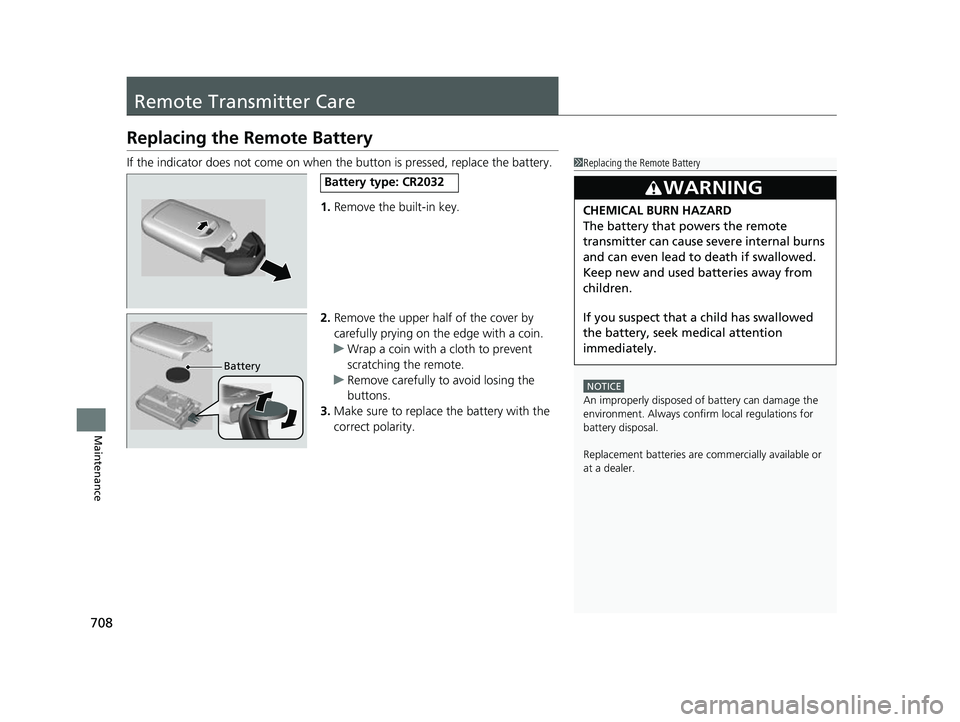
If the indicator does not come on when the button is pressed, replace the battery.1.Remove the built-in key.
2. Remove the upper half of the cover by
carefully prying on the edge with a coin.
u Wrap a coin with a cloth to prevent
scratching the remote.
u Remove carefully to avoid losing the
buttons.
3. Make sure to replace the battery with the
correct polarity.1 Replacing the Remote Battery
NOTICE
An improperly disposed of battery can damage the
environment. Always conf irm local regulations for
battery disposal.
Replacement batteries are commercially available or
at a dealer.
3WARNING
CHEMICAL BURN HAZARD
The battery that powers the remote
transmitter can cause severe internal burns
and can even lead to death if swallowed.
Keep new and used batteries away from
children.
If you suspect that a child has swallowed
the battery, seek medical attention
immediately.
Battery type: CR2032
Battery
22 US ODYSSEY-31THR6400.book 708 ページ 2020年11月16日 月曜日 午後1時41分
Page 710 of 782
709Continued
Maintenance
Remote Control and Wireless Headphone Care*
Replacing the Battery
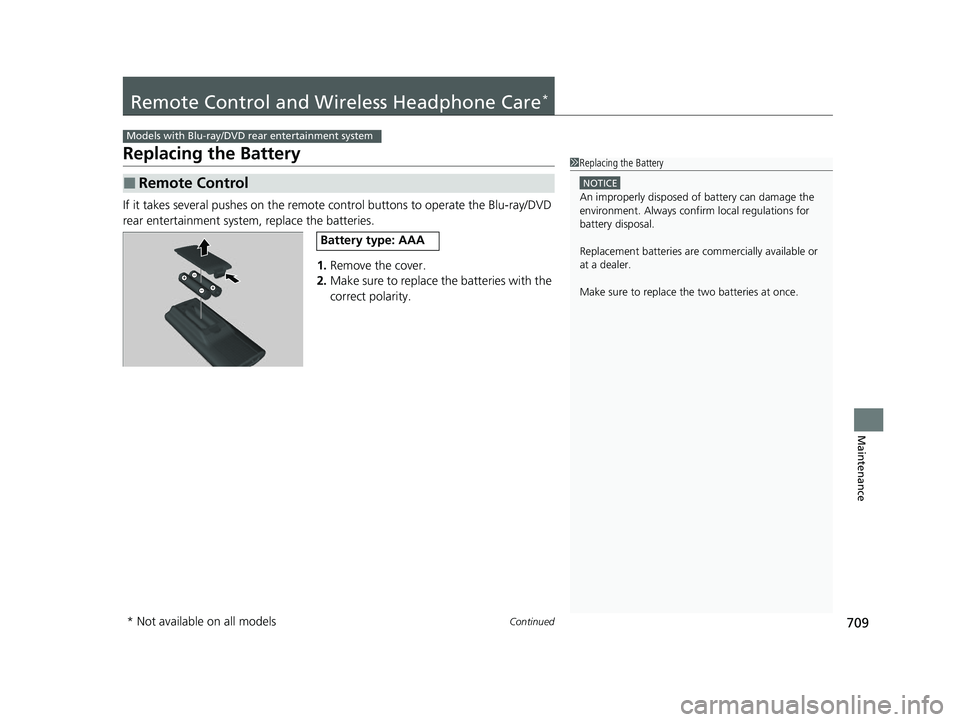
If it takes several pushes on the remote control buttons to operate the Blu-ray/DVD
rear entertainment system, replace the batteries.
1.Remove the cover.
2. Make sure to replace the batteries with the
correct polarity.
■Remote Control
Models with Blu-ray/DVD rear entertainment system
1Replacing the Battery
NOTICE
An improperly disposed of battery can damage the
environment. Always conf irm local regulations for
battery disposal.
Replacement batteries are commercially available or
at a dealer.
Make sure to replace the two batteries at once.
Battery type: AAA
* Not available on all models
22 US ODYSSEY-31THR6400.book 709 ページ 2020年11月16日 月曜日 午後1時41分
Page 734 of 782
733
uuEngine Does Not Start uIf the Remote Battery is Weak
Handling the Unexpected
If the Remote Battery is Weak
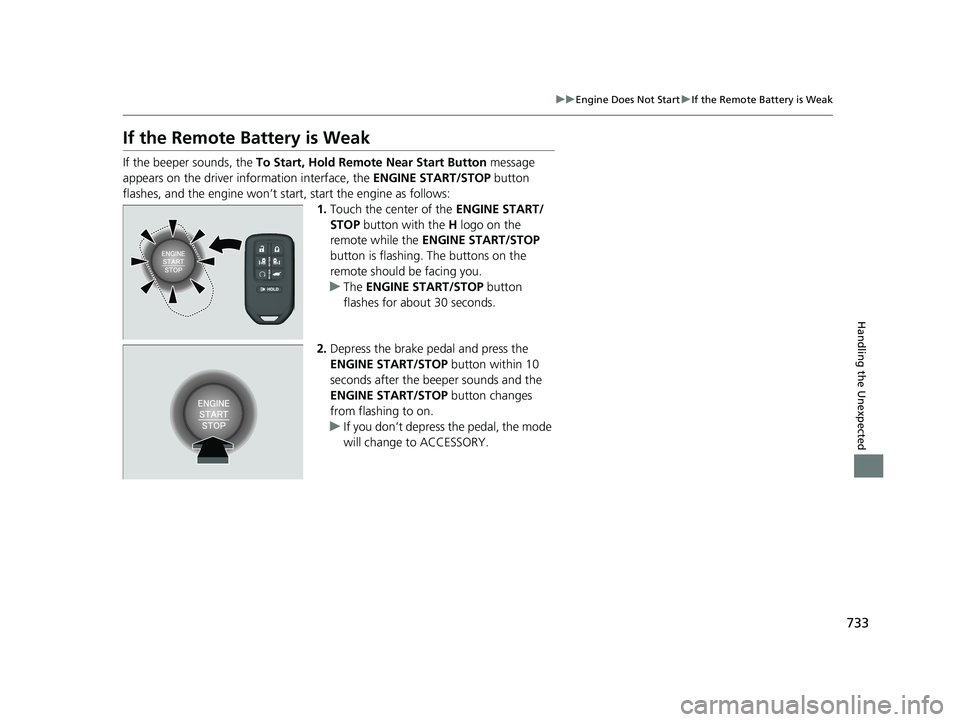
If the beeper sounds, the To Start, Hold Remote Near Start Button message
appears on the driver information interface, the ENGINE START/STOP button
flashes, and the engine won’t start, start the engine as follows:
1.Touch the center of the ENGINE START/
STOP button with the H logo on the
remote while the ENGINE START/STOP
button is flashing. The buttons on the
remote should be facing you.
u The ENGINE START/STOP button
flashes for about 30 seconds.
2. Depress the brake pedal and press the
ENGINE START/STOP button within 10
seconds after the beeper sounds and the
ENGINE START/STOP button changes
from flashing to on.
u If you don’t depress the pedal, the mode
will change to ACCESSORY.
22 US ODYSSEY-31THR6400.book 733 ページ 2020年11月16日 月曜日 午後1時41分