remote control HONDA ODYSSEY 2022 Service Manual
[x] Cancel search | Manufacturer: HONDA, Model Year: 2022, Model line: ODYSSEY, Model: HONDA ODYSSEY 2022Pages: 782, PDF Size: 27.17 MB
Page 283 of 782

282
Features
Audio System Basic Operation
To use the audio system, the power mode must be in ACCESSORY or ON.Use the selector knob or MENU/CLOCK
button to access some audio functions.
Selector knob: Rotate left or right to scroll
through the available choices. Press to set
your selection.
MENU/CLOCK button: Press to select any
mode.
The available modes include the wallpaper,
display, clock, langu age setup, and play
modes. Play modes can be also selected from
scan, random, repeat, and so on.
(Back) button: Press to go back to the previous display.
(Sound) button: Press to select the sound setting mode.
(Day/Night) button: Press to change the audio/information screen brightness.
Press , then adjust th e brightness using .
u Each time you press , the mode switches between the daytime mode,
nighttime mode and off mode.
Models with color audio system1Audio System Basic Operation
These indications are used to show how to operate
the selector knob.
Rotate to select.
Press to enter.
Menu Items
2 Adjusting the Clock P. 154
2 Wallpaper Setup P. 285
2 Display Setup P. 288
2 Scan P. 290, 296
2 Play Mode P. 293, 296
2 RDS Settings P. 290
2 Bluetooth P. 297
One of the operating system s used in this unit is
eCos.
For software license terms and condition, visit their
website (eCos license URL:
http://ecos.sourceware.org/license-overview.html )
For source code disclo sure and other details
regarding eCos, visit:
http://www.hondaopensource2.com
Press the SOURCE,
(+, (-, or button on
the steering wheel to change any audio setting.
2 Audio Remote Controls P. 279
(Back)
Button
Selector
Knob
MENU/
CLOCK
Button
(Day/Night)
Button
(Sound)
Button
Menu Display
22 US ODYSSEY-31THR6400.book 282 ページ 2020年11月16日 月曜日 午後1時41分
Page 291 of 782
uuAudio System Basic Operation uPlaying AM/FM Radio
290
Features
Provides text data information related to your selected RDS capable FM station.
■To find an RDS station from Station List
1. Press while listening to an FM station.
2. Rotate to select the station, then press .
■Update List
Updates your available station list at any time.
1. Press while listening to an FM station.
2. Rotate to select Update List, then press .
■Radio text
Displays the radio text informat ion of the selected RDS station.
1. Press the MENU/CLOCK button.
2. Rotate to select Settings, then press .
3. Rotate to select RDS Settings, then press .
4. Rotate to select Radio Text, then press .
■Scan
Samples each of the strongest stations on the selected band for 10 seconds.
1. Press the MENU/CLOCK button.
2. Rotate to select Scan, then press .
To turn off scan, press .
■Radio Data System (RDS)1 Playing AM/FM Radio
The ST indicator appears on the display indicating
stereo FM broadcasts.
Stereo reproduction in AM is not available.
You can store 6 AM stations and 12 FM stations into
reset button memory. FM1 and FM2 let you store 6
stations each.
Switching the Audio Mode
Press the SOURCE button on the steering wheel.
2 Audio Remote Controls P. 279
1Radio Data System (RDS)
When you select an RDS-capable FM station, the RDS
automatically turns on, and the frequency display
changes to the station name. However, when the
signals of that station become weak, the display
changes from the statio n name to the frequency.
22 US ODYSSEY-31THR6400.book 290 ページ 2020年11月16日 月曜日 午後1時41分
Page 335 of 782
uuAudio System Basic Operation uPlaying AM/FM Radio
334
Features
To store a station:
1. Tune to the selected station.
2. Select and hold the preset number fo r the station you want to store.
Lists the strongest stations on the selected band.
1. Select Station List to display a list.
2. Select the station.
■Manual update
Updates your available station list at any time.
1. Select Station List to display a list.
2. Select Refresh .
■Preset Memory
■Station List
1Preset Memory
The ST indicator appears on the display indicating
stereo FM broadcasts.
Stereo reproduction in AM is not available.
Switching the Audio Mode
Press the or button on the steering wheel or
select the audio source icon on the screen. 2 Audio Remote Controls P. 279
You can store 12 AM/FM st ations into preset
memory.
HD Radio Technology manufactured under license
from iBiquity Digi tal Corporation. U.S. and Foreign
Patents. HD Radio
TM and the HD, HD Radio, and
“Arc” logos are proprietary trademarks of iBiquity
Digital Corp.
34
Models with HD RadioTM feature
22 US ODYSSEY-31THR6400.book 334 ページ 2020年11月16日 月曜日 午後1時41分
Page 339 of 782
uuAudio System Basic Operation uPlaying SiriusXM ® Radio*
338
Features
1. Select Settings .
2. Select Tune Mode .
3. Select All Channels or Within Category .
■To Change the Tune Mode1Playing SiriusXM ® Radio*
In the channel mode, all available channels are
selectable. In the categor y mode, you can select a
channel within a ca tegory (Jazz, Rock, Classical, etc.).
There may be instances when SiriusXM ® Radio does
not broadcast all the data fi elds (artist name, title).
This does not indicate a problem with your audio
system.
SiriusXM ® Radio stations load in ascending order,
which can take about a minute. Once they have
loaded you will be able to scroll up or down to make
your selections.
Switching the Audio Mode
Press the or button on the steering wheel or
select the audio source icon on the screen.
2 Audio Remote Controls P. 279
Tune Start:
When you change to a preset channel, a song being
played on that channel restarts from the beginning
with this function. This can be turned on or off by the
following procedure.
1. Select Settings .
2. Select Tune Start .
3. Select ON or OFF .
To change a category, select Category icons, or
select More and then select Category List.
34
* Not available on all models
22 US ODYSSEY-31THR6400.book 338 ページ 2020年11月16日 月曜日 午後1時41分
Page 386 of 782
385
Features
General Information on the Audio System
SiriusXM® Radio Service*
1.You need your radio ID ready before regist ering for subscription. To see the ID in
the screen, select Channel to 0.
2. Have your radio ID ready, and either call or visit the SiriusXM® website to
subscribe.
Switch to the SiriusXM ® mode by using the audio remote controls on the steering
wheel, or through the audio/information screen, and stay in this mode for about 30
minutes until the service is activated. Make sure your vehicle is in an open area with
good reception.
Channel not subscribed. Call SiriusXM to subscribe.:
You are not subscribed to the channel selected.
Subscription updated:
SiriusXM ® radio is receiving informati on update from the network.
Channel Not Available:
No such channel exits, or the artist or title information is unavailable.
No Signal:
The signal is too weak in the current location.
Check Tuner:
There is a problem with the SiriusXM ® tuner. Contact a dealer.
Check Antenna:
There is a problem with the SiriusXM ® antenna. Contact a dealer.
■Subscribing to SiriusXM® Radio
■Receiving SiriusXM ® Radio
■SiriusXM ® Radio Display Messages
Models with Display Audio
1 Subscribing to SiriusXM ® Radio
Contact Information for SiriusXM ® Radio:
•US: SiriusXM ® Radio at www.siriusxm.com or 1-
800-852-9696
•Canada: SiriusXM ® Canada at www.siriusxm.ca , or
1-877-209-0079
1 Receiving SiriusXM ® Radio
The SiriusXM ® satellites are in orbit over the equator;
therefore, objects south of the vehicle may cause
satellite reception interruptions. Sa tellite signals are
more likely to be blocked by tall buildings and
mountains the farther north you travel from the
equator.
You may experience rece ption problems under the
following circumstances:
•In a location with an obstruction to the south of
your vehicle.
•In tunnels
•On the lower level of a multi-tiered road
•Large items carried on the roof rack
* Not available on all models
22 US ODYSSEY-31THR6400.book 385 ページ 2020年11月16日 月曜日 午後1時41分
Page 410 of 782
409
Features
Blu-ray/DVD Rear Entertainment System*
Rear seat passengers can enjoy a completely separate entertainment source than
front passengers, including movies, games, and other audio choices.1 Blu-ray/DVD Rear Entertainment System*
Blu-ray DiscTM, Blu-rayTM, and the logos are
trademarks of the Blu-ray Disc Association.
BD-XL, BD-Live, Blu-ray 3D , and Ultra HD Blu-ray are
not supported.
CAUTION: Radio Frequency Radiation Exposure The
Rear Entertainment System remote complies with
FCC radiation exposure lim its set forth for an
uncontrolled environment and meets the FCC radio
frequency (RF) Exposure Guidelines.
The Rear Entertainment Sy stem remote should be
kept at least 7.9 inch (20 cm) or more away from a
person’s body when operated.
* Not available on all models
22 US ODYSSEY-31THR6400.book 409 ページ 2020年11月16日 月曜日 午後1時41分
Page 423 of 782
422
uuBlu-ray/DVD Rear Entertainment System*uFront Control Panel Operation
Features
Front Control Panel Operation
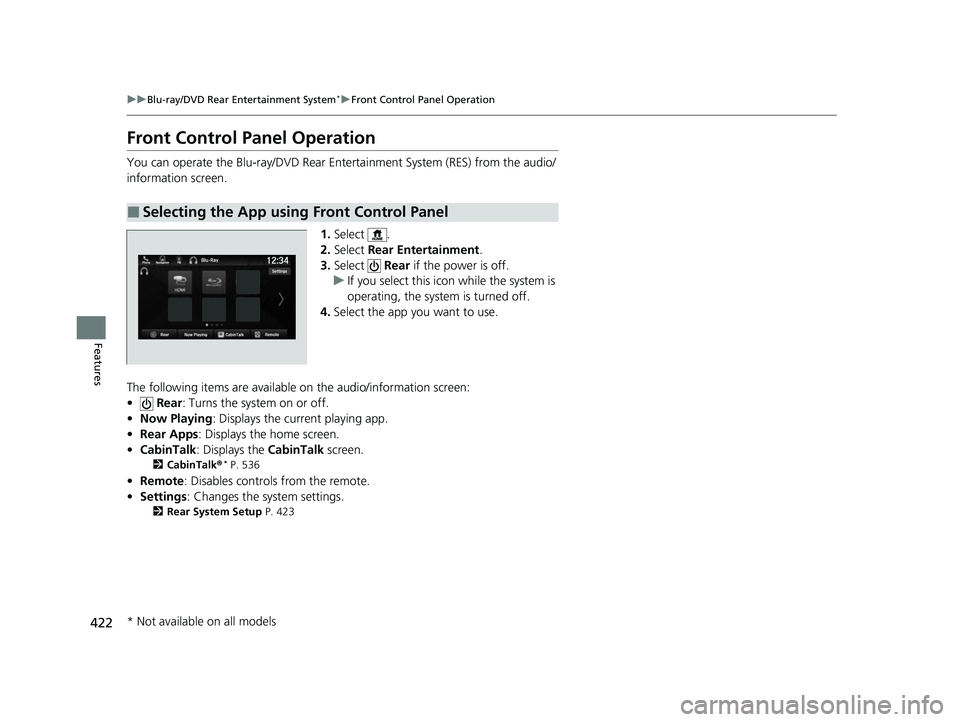
You can operate the Blu-ray/DVD Rear En tertainment System (RES) from the audio/
information screen.
1.Select .
2. Select Rear Entertainment .
3. Select Rear if the power is off.
u If you select this icon while the system is
operating, the system is turned off.
4. Select the app you want to use.
The following items are available on the audio/information screen:
• Rear : Turns the system on or off.
• Now Playing : Displays the current playing app.
• Rear Apps : Displays the home screen.
• CabinTalk : Displays the CabinTalk screen.
2CabinTalk ®* P. 536
•Remote: Disables controls from the remote.
• Settings : Changes the system settings.
2Rear System Setup P. 423
■Selecting the App using Front Control Panel
* Not available on all models
22 US ODYSSEY-31THR6400.book 422 ページ 2020年11月16日 月曜日 午後1時41分
Page 428 of 782
Continued427
uuBlu-ray/DVD Rear Entertainment System*uPlaying Apps
Features
To play a disc, press the (home) button on the remote, and then select the Blu-
ray Disc icon on th e overhead screen.
When you press the MENU button on the remote while the CD is playing, the audio
menu appears on the overhead screen.
The available options app ear on the overhead screen are repeat, random,
brightness, and contrast.
To play an iPod and a USB flash drive, press the (home) button on the remote,
and then select the USB icon on the overhead screen.
When you press the MENU button on the remote while the iPod or USB flash drive
is playing, the audio menu ap pears on the overhead screen.
The available options appear on the overhead screen are repeat, random, aspect
ratio, brightness, and contrast.
■Playing a Disc in the Rear
■Playing an iPod and a USB Flash Drive in the Rear
1 System Controls
You can also operate the Blu-ray/DVD rear
entertainment system on the audio/information
screen.
22 US ODYSSEY-31THR6400.book 427 ページ 2020年11月16日 月曜日 午後1時41分
Page 483 of 782
482
Features
HomeLink® Universal Transceiver*
The HomeLink ® Universal Transceiver can be pr ogrammed to operate up to three
remote controlled devices around your home , such as garage doors, lighting, or
home security systems.
Refer to the safety information that came wi th your garage door opener to test that
the safety features are functioning properly. If you do not have the safety
information, contac t the manufacturer.
Before programming HomeLink, make sure th at people and objects are out of the
way of the garage or gate to prevent potential injury or damage.
When programming a garage door opener, park just outside the garage door’s path.
■Important Safety Precautions
1HomeLink ® Universal Transceiver*
Before programming HomeLi nk to operate a garage
door opener, confirm that the opener has an external
entrapment protection system , such as an “electronic
eye,” or other safety and reverse stop features. If it
does not, HomeLink may not be able to operate it.
* Not available on all models
22 US ODYSSEY-31THR6400.book 482 ページ 2020年11月16日 月曜日 午後1時41分
Page 485 of 782
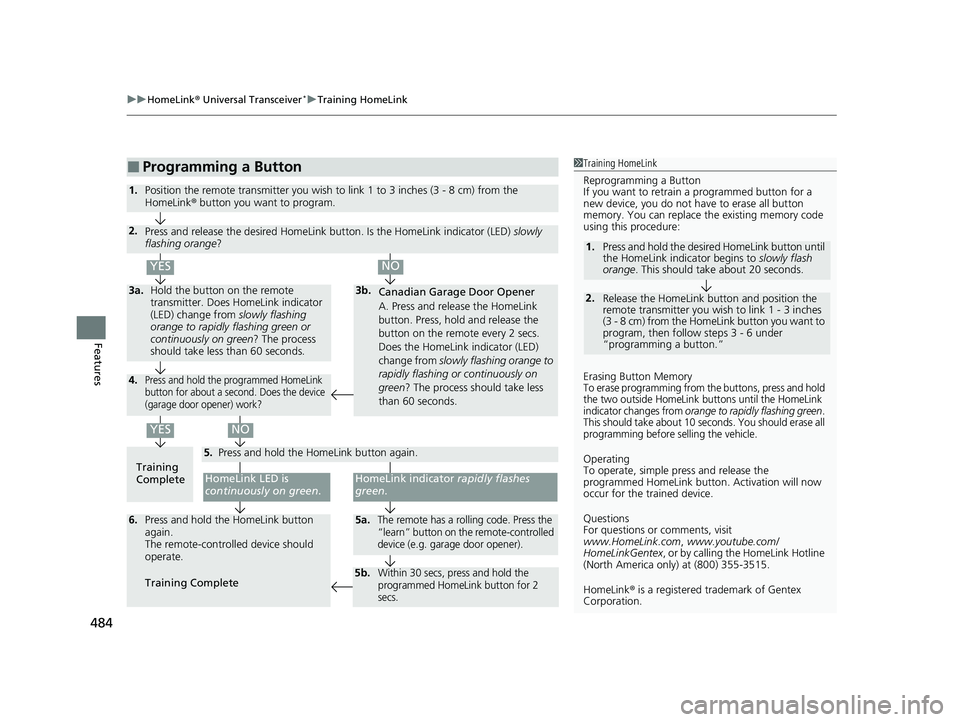
uuHomeLink ® Universal Transceiver*u Training HomeLink
484
Features
■Programming a Button1Training HomeLink
Reprogramming a Button
If you want to retrain a programmed button for a
new device, you do not ha ve to erase all button
memory. You can replace the existing memory code
using this procedure:
2.
1. Press and hold the desired HomeLink button until
the HomeLink indi
cator begins to slowly flash
orange . This should take about 20 seconds.
Release the HomeLink button and position the
remote transmitter you wish to link 1 - 3 inches
(3 - 8 cm) from the Home Link button you want to
program, then follow steps 3 - 6 under
“programming a button.”
Erasing Button MemoryTo erase programming from the buttons, press and hold
the two outside HomeLink buttons until the HomeLink
indicator changes from
orange to rapidly flashing green.
This should take about 10 seconds. You should erase all
programming before selling the vehicle.
Operating
To operate, simple pr ess and release the
programmed HomeLink butto n. Activation will now
occur for the trained device.
Questions
For questions or comments, visit
www.HomeLink.com , www.youtube.com/
HomeLinkGentex , or by calling the HomeLink Hotline
(North America only) at (800) 355-3515.
HomeLink® is a registered tra demark of Gentex
Corporation.Training
CompleteHomeLink LED is
continuously on green .
YES
YES
1.Position the remote transmitter you wish to link 1 to 3 inches (3 - 8 cm) from the
HomeLink® button you want to program.
3b.
Canadian Garage Door Opener
A. Press and release the HomeLink
button. Press, hold and release the
button on the remote every 2 secs.
Does the HomeLink indicator (LED)
change from slowly flashing orange to
rapidly flashing or continuously on
green ? The process should take less
than 60 seconds.
NO
2. Press and release the desired HomeLink but ton. Is the HomeLink indicator (LED) slowly
flashing orange ?
NO
3a.Hold the button on the remote
transmitter. Does HomeLink indicator
(LED) change from slowly flashing
orange to rapidly flashing green or
continuously on green? The process
should take less than 60 seconds.
5. Press and hold the HomeLink button again.
HomeLink indicator rapidly flashes
green .
5a.The remote has a rolling code. Press the
“learn” button on th e remote-controlled
device (e.g. garage door opener).6. Press and hold the HomeLink button
again.
The remote-controll ed device should
operate.
Training Complete
5b.Within 30 secs, press and hold the
programmed HomeLink button for 2
secs.
4.Press and hold the programmed HomeLink
button for about a second. Does the device
(garage door opener) work?
22 US ODYSSEY-31THR6400.book 484 ページ 2020年11月16日 月曜日 午後1時41分