wheel HONDA ODYSSEY 2022 Repair Manual
[x] Cancel search | Manufacturer: HONDA, Model Year: 2022, Model line: ODYSSEY, Model: HONDA ODYSSEY 2022Pages: 782, PDF Size: 27.17 MB
Page 579 of 782
uuWhen Driving uTire Pressure Monitoring System (TPMS) with Tire Fill Assist
578
Driving
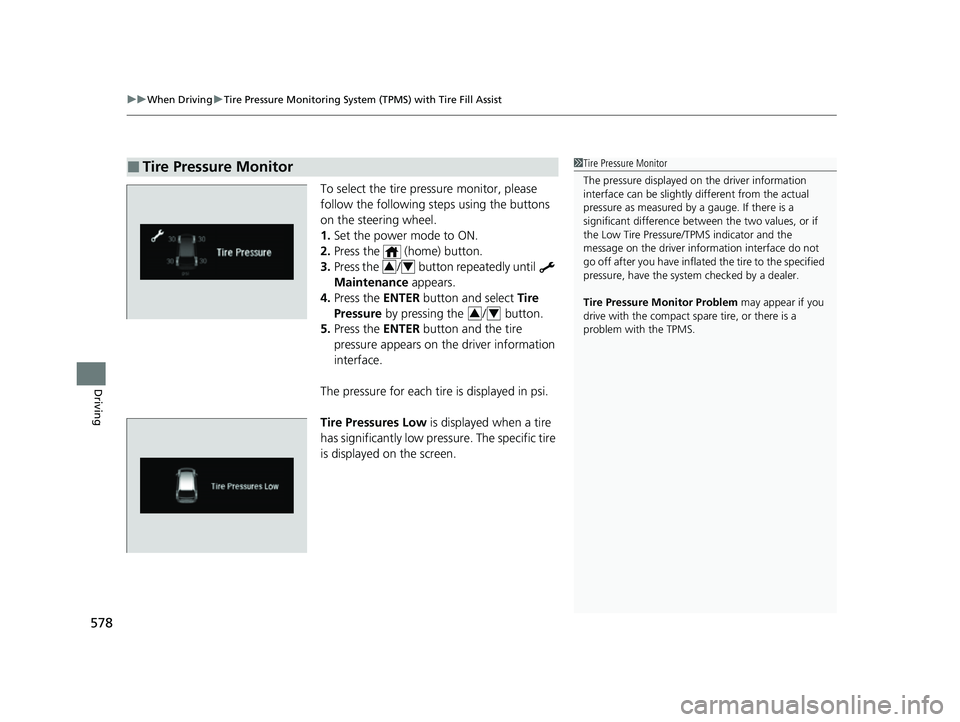
To select the tire pressure monitor, please
follow the following st eps using the buttons
on the steering wheel.
1. Set the power mode to ON.
2. Press the (home) button.
3. Press the / button repeatedly until
Maintenance appears.
4. Press the ENTER button and select Tire
Pressure by pressing the / button.
5. Press the ENTER button and the tire
pressure appears on the driver information
interface.
The pressure for each tire is displayed in psi.
Tire Pressures Low is displayed when a tire
has significantly low pressure. The specific tire
is displayed on the screen.
■Tire Pressure Monitor1 Tire Pressure Monitor
The pressure displayed on the driver information
interface can be slightly different from the actual
pressure as measured by a gauge. If there is a
significant di fference between the two values, or if
the Low Tire Pressure/TPMS indicator and the
message on the driver info rmation interface do not
go off after you have inflated the tire to the specified
pressure, have the system checked by a dealer.
Tire Pressure Monitor Problem may appear if you
drive with the compact spare tire, or there is a
problem with the TPMS.
34
34
22 US ODYSSEY-31THR6400.book 578 ページ 2020年11月16日 月曜日 午後1時41分
Page 581 of 782
580
uuWhen Driving uTire Pressure Monitoring System (TPMS) - Required Federal Explanation
Driving
Please note that the TPMS is not a substitute for proper tire
maintenance, and it is the driver ’s responsibility to maintain
correct tire pressure, even if un der-inflation has not reached the
level to trigger illumina tion of the TPMS low ti re pressure telltale.
Your vehicle has also been eq uipped with a TPMS malfunction
indicator to indicate when the sy stem is not operating properly.
The TPMS malfunction indicator is combined with the low tire
pressure telltale. When the system detects a malfunction, the
telltale will flash fo r approximately one minute and then remain
continuously illuminated. This sequence will continue upon
subsequent vehicle start-ups as long as the malfunction exists.
When the malfunction indicator is illuminated, the system may
not be able to detect or signal low tire pressure as intended.
TPMS malfunctions may occur for a variety of reasons, including
the installation of replacement or alternate tires or wheels on the
vehicle that prevent the TPMS from functioning properly.
Always check the TPMS malfunction telltale after replacing one or
more tires or wheels on your vehicle to ensure that the
replacement or alternate tires and wheels allow the TPMS to
continue to function properly.
22 US ODYSSEY-31THR6400.book 580 ページ 2020年11月16日 月曜日 午後1時41分
Page 585 of 782
584
uuWhen Driving uLaneWatchTM*
Driving
LaneWatchTM*
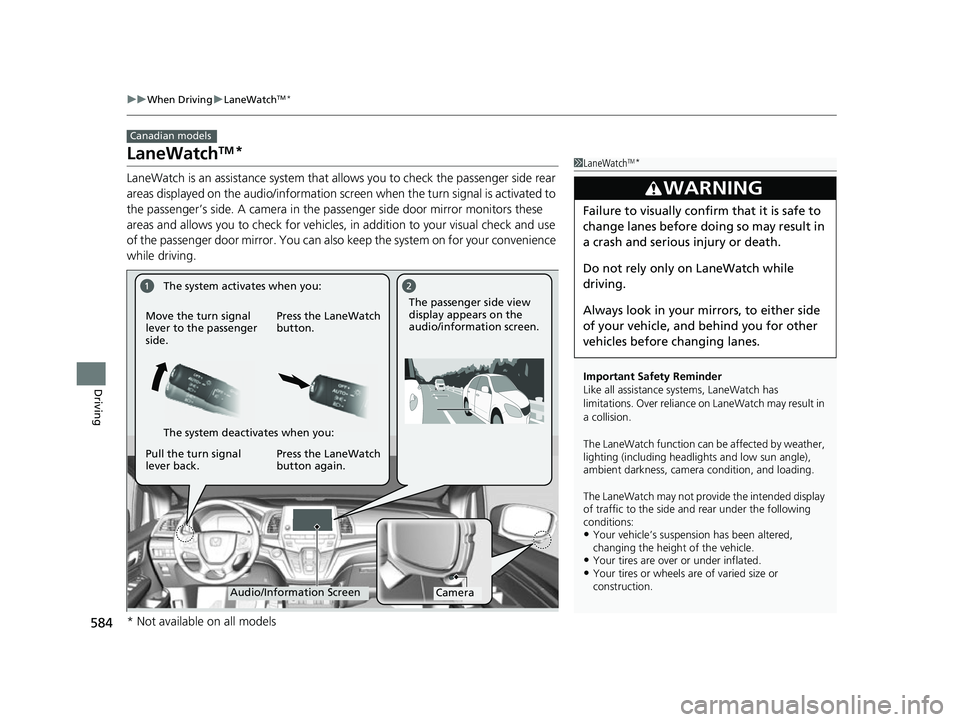
LaneWatch is an assistance system that allows you to check the passenger side rear
areas displayed on the audio/information screen when the turn signal is activated to
the passenger’s side. A camera in the pass enger side door mirror monitors these
areas and allows you to chec k for vehicles, in addition to your visual check and use
of the passenger door mirror. You can also keep the system on for your convenience
while driving.
Canadian models
1 LaneWatchTM*
Important Safety Reminder
Like all assistance systems, LaneWatch has
limitations. Over reliance on LaneWatch may result in
a collision.
The LaneWatch function can be affected by weather,
lighting (including headli ghts and low sun angle),
ambient darkness, camera condition, and loading.
The LaneWatch may not prov ide the intended display
of traffic to the side and rear under the following
conditions:
•Your vehicle’s suspensi on has been altered,
changing the height of the vehicle.
•Your tires are over or under inflated.•Your tires or wheels are of varied size or
construction.
3WARNING
Failure to visually confirm that it is safe to
change lanes before doing so may result in
a crash and serious injury or death.
Do not rely only on LaneWatch while
driving.
Always look in your mi rrors, to either side
of your vehicle, and behind you for other
vehicles before changing lanes.
CameraAudio/Information Screen
Move the turn signal
lever to the passenger
side.
Press the LaneWatch
button.
Pull the turn signal
lever back. Press the LaneWatch
button again. The passenger side view
display appears on the
audio/information screen.
The system activates when you:
The system deactivates when you:
* Not available on all models
22 US ODYSSEY-31THR6400.book 584 ページ 2020年11月16日 月曜日 午後1時41分
Page 590 of 782

589
uuHonda Sensing ®u Collision Mitigation Braking SystemTM (CMBSTM)
Continued
Driving
Collision Mitigation Braking SystemTM (CMBSTM)
The system can assist you when it determines there is a possibility of your vehicle
colliding with a vehicle or a pedestrian dete cted in front of your vehicle. The CMBSTM
is designed to alert you when the potential for a collision is determined, as well as to
reduce your vehicle speed to help minimize collision severity when a collision is
deemed unavoidable.
1 Collision Mitigation Braking SystemTM (CMBSTM)
For directions on the prop er handling of the radar
sensor, refer to the following page. 2 Radar Sensor P. 637
You can read about handling information for the
camera equipped with this system. 2 Front Sensor Camera P. 635
Important Safety Reminder
The CMBS
TM is designed to reduce the severity of an
unavoidable collision. It doe s not prevent a collisions
nor stop the vehicle automati cally. It is still your
responsibility to operate th e brake pedal and steering
wheel appropriately acco rding to the driving
conditions.
The CMBS
TM may not activate or may not detect a
vehicle in front of y our vehicle under certain
conditions: 2 CMBS
TM Conditions and Limitations P. 594
22 US ODYSSEY-31THR6400.book 589 ページ 2020年11月16日 月曜日 午後1時41分
Page 596 of 782
595
uuHonda Sensing ®u Collision Mitigation Braking SystemTM (CMBSTM)
Continued
Driving
■Vehicle conditions
• Headlight lenses are dirty or the h eadlights are not properly adjusted.
• The outside of the windshield is blocked by dirt, mud, leaves, wet snow, etc.
• The inside of the windshield is fogged.
• An abnormal tire or wheel condition (wrong size, varied size or construction,
improperly inflated, co mpact spare tire, etc.).
• When tire chains are installed.
• The vehicle is tilted due to a heavy load or suspension modifications.
• The camera temperature gets too high.
• Driving with the parking brake applied.
• When the radar sensor in the front grille gets dirty.
• The vehicle is towing a trailer.
• Driving at night or in a dark place (e.g., a tunnel) with the headlights off.
22 US ODYSSEY-31THR6400.book 595 ページ 2020年11月16日 月曜日 午後1時41分
Page 602 of 782
Continued601
uuHonda Sensing ®u Adaptive Cruise Control (ACC) with Low Speed Follow
Driving
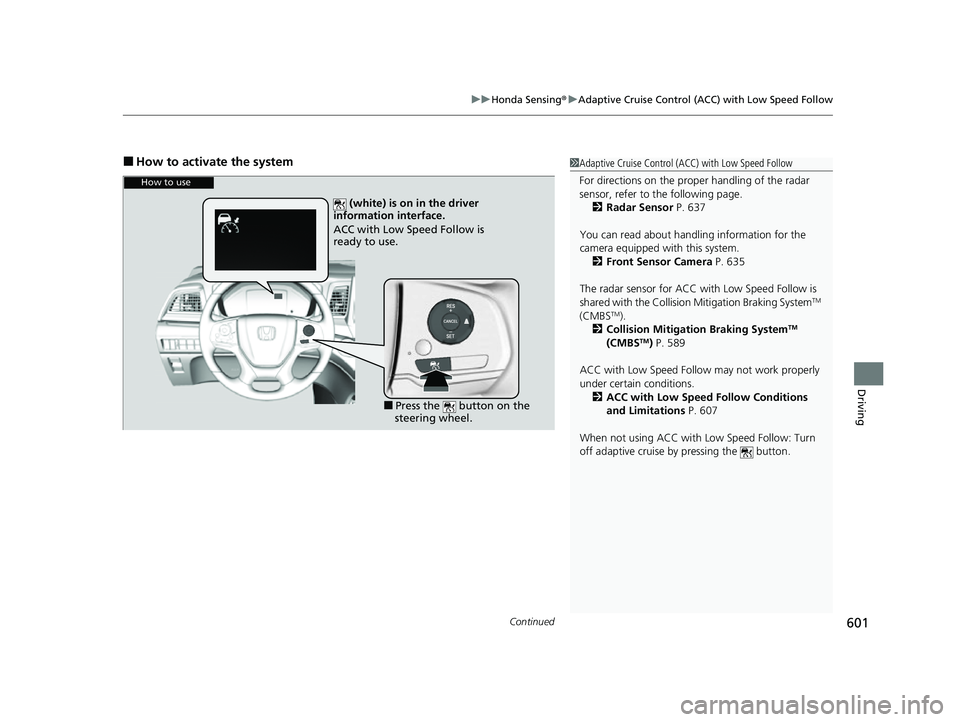
■How to activate the system1Adaptive Cruise Control (ACC) with Low Speed Follow
For directions on the prop er handling of the radar
sensor, refer to the following page.
2 Radar Sensor P. 637
You can read about handling information for the
camera equipped with this system. 2 Front Sensor Camera P. 635
The radar sensor for ACC with Low Speed Follow is
shared with the Collision Mitigation Braking System
TM
(CMBSTM).
2 Collision Mitigation Braking SystemTM
(CMBSTM) P. 589
ACC with Low Speed Follow may not work properly
under certain conditions.
2 ACC with Low Speed Follow Conditions
and Limitations P. 607
When not using ACC with Low Speed Follow: Turn
off adaptive cruise by pressing the button.
How to use
(white) is on in the driver
information interface.
ACC with Low Speed Follow is
ready to use.
■Press the button on the
steering wheel.
22 US ODYSSEY-31THR6400.book 601 ページ 2020年11月16日 月曜日 午後1時41分
Page 608 of 782
Continued607
uuHonda Sensing ®u Adaptive Cruise Control (ACC) with Low Speed Follow
Driving
The system may automatically shut off and the indicator will come on under
certain conditions. Some examples of these conditions are listed below. Other
conditions may reduce some of the ACC functions.
2 Front Sensor Camera P. 635
2 Radar Sensor P. 637
■Environmental conditions
Driving in bad weather (r ain, fog, snow, etc.).
■Roadway conditions
Driving on a snowy or wet roadway (obscured lane marking, vehicle tracks, reflected
lights, road spra y, high contrast).
■Vehicle conditions
• The outside of the windshield is blocked by dirt, mud, leaves, wet snow, etc.
• An abnormal tire or wheel condition (wrong size, varied size or construction,
improperly inflated, co mpact spare tire, etc.).
• The camera temperature gets too high.
• The parking brake is applied.
• The front grille is dirty.
• The vehicle is tilted due to a heavy load or suspension modifications.
• Tire chains are installed.
• The vehicle is towing a trailer.
■ACC with Low Speed Follow Conditions and Limitations1ACC with Low Speed Follow Conditions and Limitations
If you need the radar sensor to be repaired, or
removed, or the radar se nsor cover is strongly
impacted, turn off the system by pressing the
button and take your vehicle to a dealer.
Have your vehicle checked by a dealer if you find any
unusual behavior of the system (e.g., the warning
message appears too frequently).
22 US ODYSSEY-31THR6400.book 607 ページ 2020年11月16日 月曜日 午後1時41分
Page 611 of 782
uuHonda Sensing ®u Adaptive Cruise Control (ACC) with Low Speed Follow
610
Driving
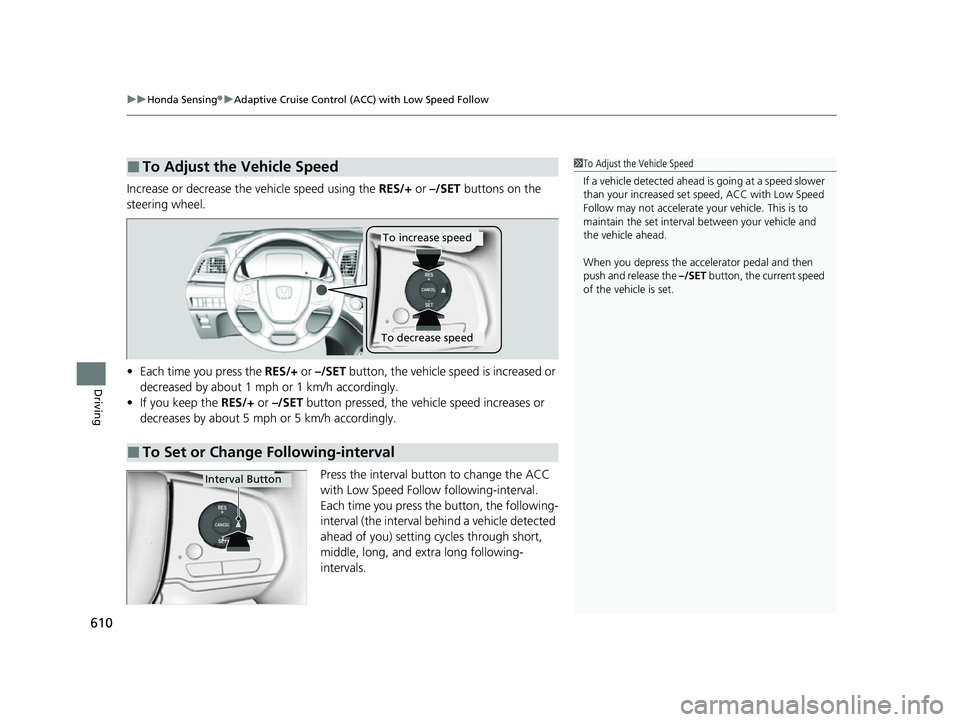
Increase or decrease the vehicle speed using the RES/+ or –/SET buttons on the
steering wheel.
• Each time you press the RES/+ or –/SET button, the vehicle speed is increased or
decreased by about 1 mph or 1 km/h accordingly.
• If you keep the RES/+ or –/SET button pressed, the vehicle speed increases or
decreases by about 5 mph or 5 km/h accordingly.
Press the interval button to change the ACC
with Low Speed Follow following-interval.
Each time you press the button, the following-
interval (the interval behind a vehicle detected
ahead of you) setting cycles through short,
middle, long, and extra long following-
intervals.
■To Adjust the Vehicle Speed1 To Adjust the Vehicle Speed
If a vehicle detected ahead is going at a speed slower
than your increased set speed, ACC with Low Speed
Follow may not accelerate y our vehicle. This is to
maintain the set interval between your vehicle and
the vehicle ahead.
When you depress the accelerator pedal and then
push and release the –/SET button, the current speed
of the vehicle is set.
■To Set or Change Following-interval
To increase speed
To decrease speed
Interval Button
22 US ODYSSEY-31THR6400.book 610 ページ 2020年11月16日 月曜日 午後1時41分
Page 614 of 782
Continued613
uuHonda Sensing ®u Adaptive Cruise Control (ACC) with Low Speed Follow
Driving
■Automatic cancellation
The beeper sounds and a message appears on the driver information interface when
ACC with Low Speed Follow is automatically canceled. Any of these conditions may
cause the ACC with Low Speed Fo llow to automatically cancel:
• Bad weather (rain, fog, snow, etc.).
• When the radar sensor inside the front grille gets dirty.
• The vehicle ahead of yo u cannot be detected.
• An abnormal tire condition is detected, or the tires are skidding.
• Driving on a mountainous road, or driving off road for extended periods.
• Abrupt steering wheel movement.
• When the ABS or VSA ® or CMBS
TM is activated.
• When the ABS or VSA ® system indicator comes on.
• When the vehicle is stopped on a very steep slope.
• When you manually apply the parking brake.
• When the detected vehicle within the AC C with Low Speed Follow range is too
close to your vehicle.
• The camera behind the rearview mirror, or the area around the camera, including
the windshield, gets dirty.
• When the Maximum Load Limit is exceeded.
• When passing through an enclosed space, such as tunnel.
The ACC with Low Speed Follow automatic ca ncellation can be also triggered by the
following causes. In these cases, the parking brake will be automatically applied.
• The driver’s seat belt is unfastene d when the vehicle is stationary.
• The vehicle stops for more than 10 minutes.
• The power system is turned off.
In the following cases, a bu zzer sounds, ACC with Low Speed Follow is deactivated,
and the Cruise Cancelled: System Not Available message appears in the driver
information interface.
• The vehicle has repeatedly applied the brakes to maintain the set speed (for
example, you are descending a long slope).
1 Automatic cancellation
Even though ACC with Low Speed Follow has been
automatically canceled, you can still resume the prior
set speed. Wait until the condition that caused ACC
with Low Speed Follow to cancel improves, then
press the RES/+ button.
22 US ODYSSEY-31THR6400.book 613 ページ 2020年11月16日 月曜日 午後1時41分
Page 617 of 782
616
uuHonda Sensing ®u Lane Keeping Assist System (LKAS)
Driving
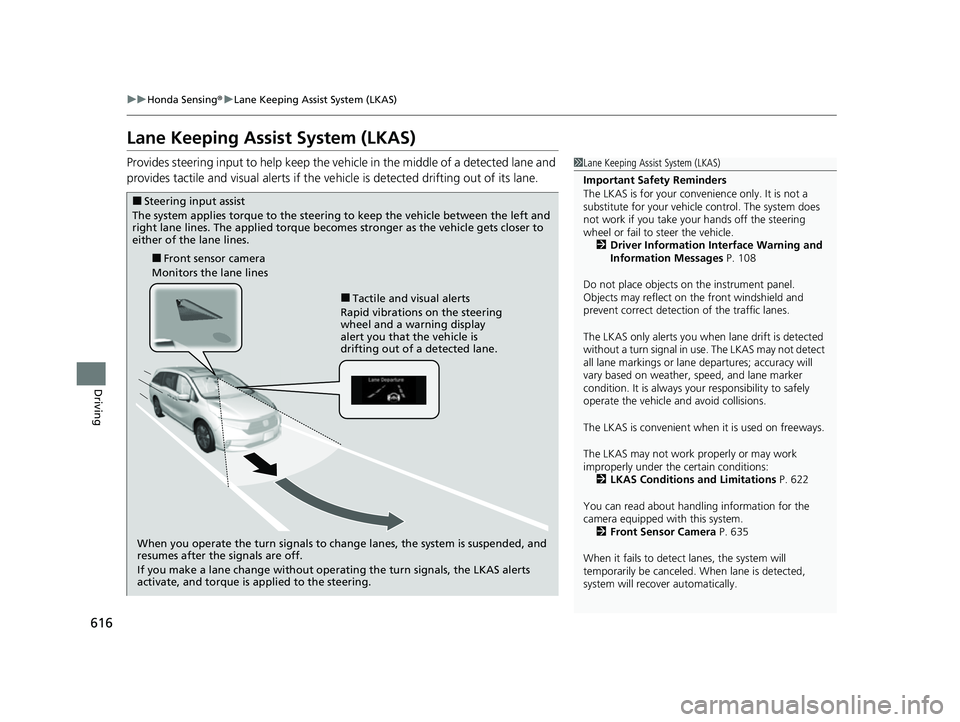
Lane Keeping Assist System (LKAS)
Provides steering input to help keep the vehicle in the middle of a detected lane and
provides tactile and visual alerts if the ve hicle is detected drifting out of its lane.1Lane Keeping Assist System (LKAS)
Important Safety Reminders
The LKAS is for your convenience only. It is not a
substitute for your vehicle control. The system does
not work if you take y our hands off the steering
wheel or fail to steer the vehicle. 2 Driver Information Interface Warning and
Information Messages P. 108
Do not place objects on the instrument panel.
Objects may reflect on th e front windshield and
prevent correct detectio n of the traffic lanes.
The LKAS only alerts you when lane drift is detected
without a turn signal in use. The LKAS may not detect
all lane markings or lane departures; accuracy will
vary based on weather, speed, and lane marker
condition. It is always your responsibility to safely
operate the vehicle an d avoid collisions.
The LKAS is convenient when it is used on freeways.
The LKAS may not work properly or may work
improperly under the certain conditions:
2 LKAS Conditions and Limitations P. 622
You can read about handling information for the
camera equipped with this system. 2 Front Sensor Camera P. 635
When it fails to detect lanes, the system will
temporarily be canceled. When lane is detected,
system will recover automatically.
■Tactile and visual alerts
Rapid vibrations on the steering
wheel and a warning display
alert you that the vehicle is
drifting out of a detected lane.
■Front sensor camera
Monitors the lane lines
■Steering input assist
The system applies torque to the steering to keep the vehicle between the left and
right lane lines. The applied torque becomes stronger as the vehicle gets closer to
either of the lane lines.
When you operate the turn signals to change lanes, the system is suspended, and
resumes after the signals are off.
If you make a lane change without operating the turn signals, the LKAS alerts
activate, and torque is applied to the steering.
22 US ODYSSEY-31THR6400.book 616 ページ 2020年11月16日 月曜日 午後1時41分