air conditioning HONDA ODYSSEY 2022 Owners Manual
[x] Cancel search | Manufacturer: HONDA, Model Year: 2022, Model line: ODYSSEY, Model: HONDA ODYSSEY 2022Pages: 782, PDF Size: 27.17 MB
Page 21 of 782
20
Quick Reference Guide
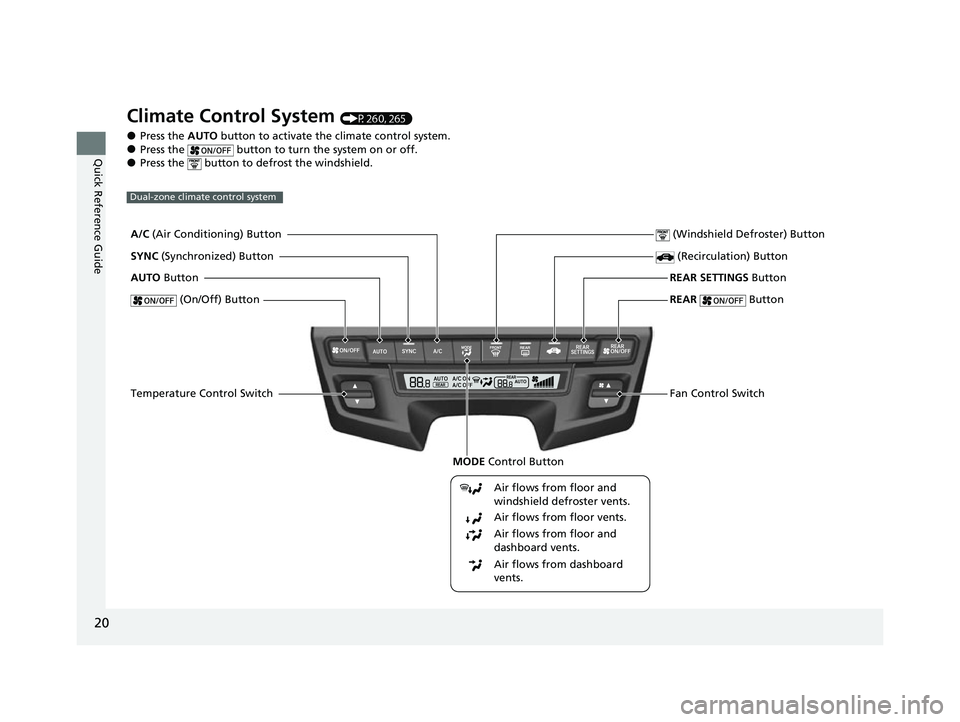
Climate Control System (P260, 265)
●Press the AUTO button to activate the climate control system.●Press the button to turn the system on or off.●Press the button to defrost the windshield.
Dual-zone climate control system
Air flows from floor and
windshield defroster vents.
Air flows from floor vents.
Air flows from floor and
dashboard vents.
Air flows from dashboard
vents.
A/C (Air Conditioning) Button
MODE Control Button
SYNC (Synchronized) Button
AUTO Button
(On/Off) Button
Temperature Control Switch (Windshield Defroster) Button
(Recirculation) Button
REAR SETTINGS Button
REAR
Button
Fan Control Switch
22 US ODYSSEY-31THR6400.book 20 ページ 2020年11月16日 月曜日 午後1時41分
Page 22 of 782
21
Quick Reference Guide
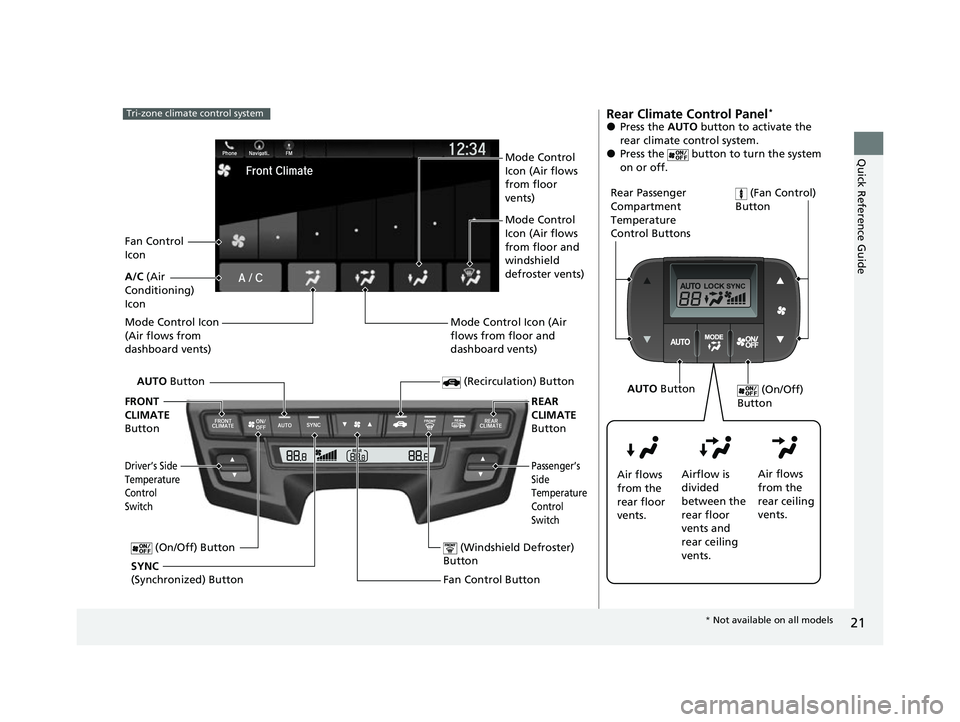
Tri-zone climate control system
Fan Control Button (Windshield Defroster)
Button
A/C (Air
Conditioning)
Icon
(Recirculation) Button
Passenger’s
Side
Temperature
Control
Switch
AUTO Button
Driver’s Side
Temperature
Control
Switch
Mode Control Icon
(Air flows from
dashboard vents)
SYNC
(Synchronized) Button (On/Off) Button
FRONT
CLIMATE
Button REAR
CLIMATE
Button
Fan Control
Icon Mode Control
Icon (Air flows
from floor
vents)
Mode Control
Icon (Air flows
from floor and
windshield
defroster vents)
Mode Control Icon (Air
flows from floor and
dashboard vents)
Rear Climate Control Panel*
●Press the AUTO button to activate the
rear climate control system.
●Press the button to turn the system
on or off.
Rear Passenger
Compartment
Temperature
Control Buttons (Fan Control)
Button
Air flows
from the
rear floor
vents. Airflow is
divided
between the
rear floor
vents and
rear ceiling
vents. Air flows
from the
rear ceiling
vents. (On/Off)
Button
AUTO Button
* Not available on all models
22 US ODYSSEY-31THR6400.book 21 ページ 2020年11月16日 月曜日 午後1時41分
Page 259 of 782
uuInterior Convenience Items uOther Interior Convenience Items
258
Controls
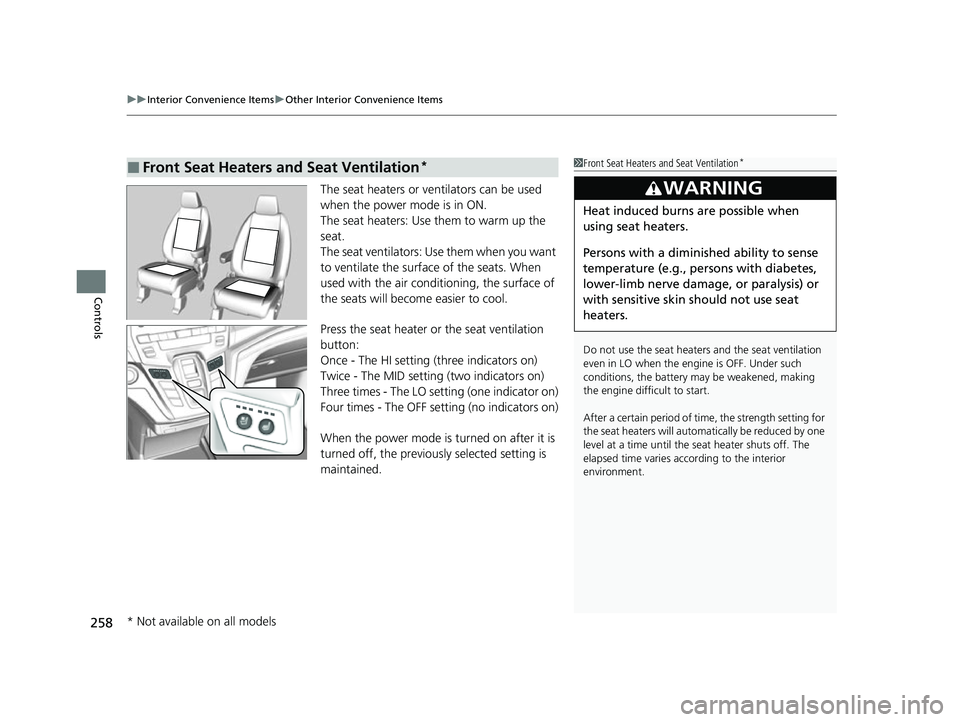
The seat heaters or ve ntilators can be used
when the power mode is in ON.
The seat heaters: Use them to warm up the
seat.
The seat ventilators: Use them when you want
to ventilate the surface of the seats. When
used with the air conditioning, the surface of
the seats will become easier to cool.
Press the seat heater or the seat ventilation
button:
Once - The HI setting (three indicators on)
Twice - The MID setting (two indicators on)
Three times - The LO setting (one indicator on)
Four times - The OFF se tting (no indicators on)
When the power mode is turned on after it is
turned off, the previous ly selected setting is
maintained.
■Front Seat Heaters and Seat Ventilation*1 Front Seat Heaters and Seat Ventilation*
Do not use the seat heater s and the seat ventilation
even in LO when the engine is OFF. Under such
conditions, the battery ma y be weakened, making
the engine difficult to start.
After a certain period of time, the strength setting for
the seat heaters will automatically be reduced by one
level at a time until the seat heater shuts off. The
elapsed time varies according to the interior
environment.
3WARNING
Heat induced burns are possible when
using seat heaters.
Persons with a diminished ability to sense
temperature (e.g., persons with diabetes,
lower-limb nerve damage, or paralysis) or
with sensitive skin should not use seat
heaters.
* Not available on all models
22 US ODYSSEY-31THR6400.book 258 ページ 2020年11月16日 月曜日 午後1時41分
Page 261 of 782
260
Controls
Climate Control System
Using Automatic Climate Control
The automatic climate control system maintains the interior temperature you select.
The system also selects the proper mix of heated or cooled air that raises or lowers
the interior temperature to your preference as quickly as possible.
Use the system when the engine is running.
1. Press the AUTO button.
2. Adjust the interior temperature us ing the temperature control switch.
3. Press the button to cancel.
■Switching between the recirc ulation and fresh air modes
Press the button and switch the mode depending on environmental
conditions.
Recirculation Mode (indicator on): Recirculat es air from the vehicle’s interior through
the system.
Fresh Air Mode (indicator off): Maintains outside ventilation. Keep the system in
fresh air mode in normal situations.
Dual-zone climate control system
1 Using Automatic Climate Control
During idle-stops, air-conditioning is suspended, and
only the blower remains ac tive. If you do not want
air-conditioning suspended, press Auto Idle Stop OFF
button to cancel idle-stop.
If any buttons are presse d while using the climate
control system in auto, the function of the button
that was pressed will take priority.
The AUTO indicator will go off, but functions
unrelated to the button th at was pressed will be
controlled automatically.
To prevent cold air from bl owing in from outside, the
fan may not start i mmediately when the AUTO
button is pressed.
If the interior is very warm, you can cool it down
more rapidly by partial ly opening the windows,
turning the system on auto, and setting the
temperature to low. Change the fresh air mode to
recirculation mode until the temperature cools down.
When you set the temperat ure to the lower or upper
limit, Lo or Hi is displayed.
Pressing the button switches the climate
control system between on and off. When turned on,
the system returns to your last selection.
While ECON mode is active, the climate control
system may have reduced cooling performance.
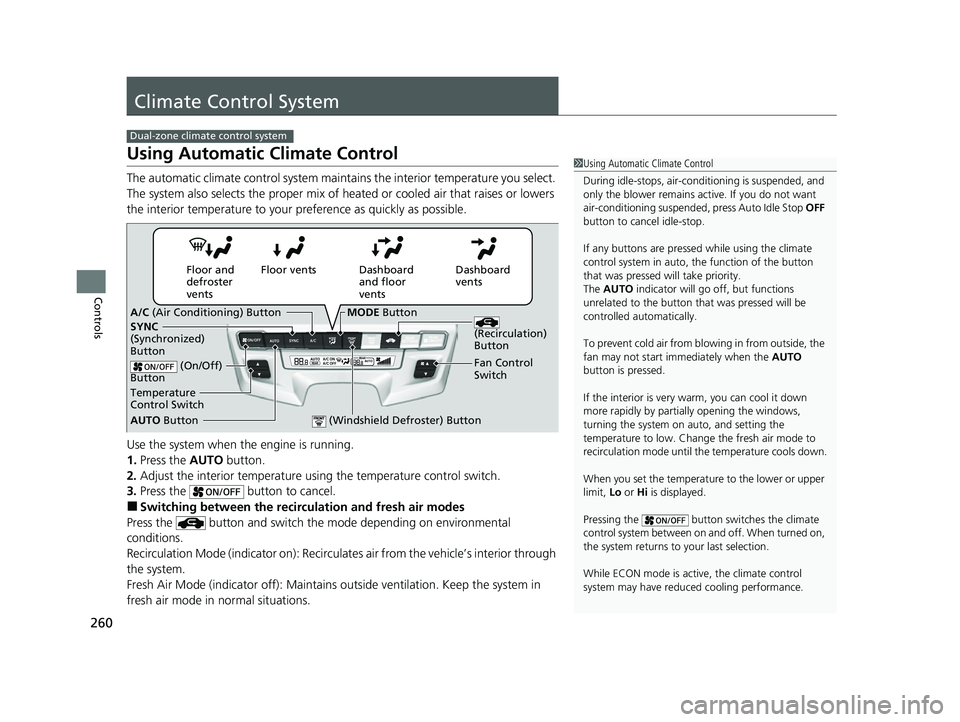
Dashboard
vents
Dashboard
and floor
vents
Floor vents
Floor and
defroster
vents
AUTO Button
Temperature
Control Switch A/C
(Air Conditioning) Button
Fan Control
Switch
(Recirculation)
Button
(On/Off)
Button
SYNC
(Synchronized)
Button
(Windshield Defroster) Button
MODE Button
22 US ODYSSEY-31THR6400.book 260 ページ 2020年11月16日 月曜日 午後1時41分
Page 266 of 782
265Continued
Controls
Climate Control System
Using Automatic Climate Control
The automatic climate control system maintains the interior temperature you select.
The system also selects the proper mix of heat ed or cooled air that raises or lowers
the interior temperature to your pr eference as quickly as possible.
Tri-zone climate control system
1Using Automatic Climate Control
Press the FRONT CLIMATE button to display A/C,
MODE, and fan control information on the audio/
information screen for several seconds. Select icon to
turn on or off A/C, change the vent mode, or change
the fan speed.
During idle-stops, air-conditioning is suspended, and
only the blower remains ac tive. If you do not want
air-conditioning suspended, press Auto Idle Stop OFF
button to cancel idle-stop.
If any buttons are presse d while using the climate
control system in auto, the function of the button
that was pressed will take priority.
The AUTO indicator will go off, but functions
unrelated to the button that were pressed will be
controlled automatically.
To prevent cold air from bl owing in from outside, the
fan may not start i mmediately when the AUTO
button is pressed.
If the interior is very warm, you can cool it down
more rapidly by partial ly opening the windows,
turning the system on AUTO, and setting the
temperature to low. Change the fresh mode to
recirculation mode until the temperature cools down.
When you set the temperat ure to the lower or upper
limit, Lo or Hi is displayed.
22 US ODYSSEY-31THR6400.book 265 ページ 2020年11月16日 月曜日 午後1時41分
Page 267 of 782
uuClimate Control System uUsing Automatic Climate Control
266
Controls
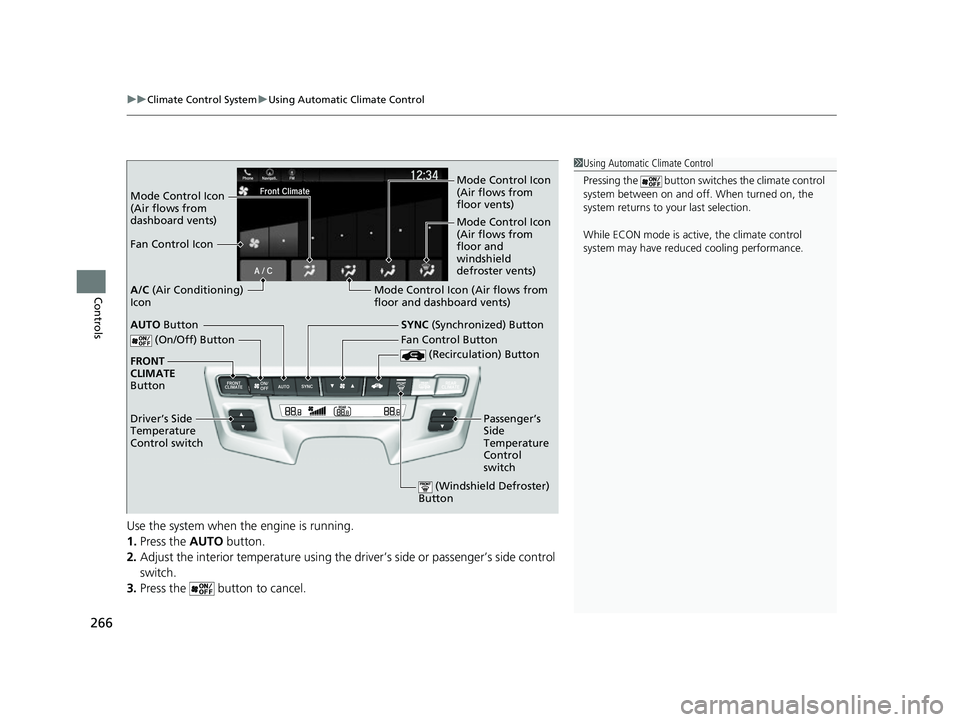
Use the system when the engine is running.
1. Press the AUTO button.
2. Adjust the interior temperature using the dr iver’s side or passenger’s side control
switch.
3. Press the butto n to cancel.
1Using Automatic Climate Control
Pressing the button switch es the climate control
system between on and off. When turned on, the
system returns to your last selection.
While ECON mode is active, the climate control
system may have reduced cooling performance.
Mode Control Icon
(Air flows from
dashboard vents) Mode Control Icon
(Air flows from
floor vents)
Mode Control Icon
(Air flows from
floor and
windshield
defroster vents)
Fan Control Icon
Mode Control Icon (Air flows from
floor and dashboard vents)
A/C
(Air Conditioning)
Icon
(On/Off) Button
(Recirculation) Button
SYNC (Synchronized) Button
FRONT
CLIMATE
Button
Driver’s Side
Temperature
Control switch Fan Control Button
Passenger’s
Side
Temperature
Control
switchAUTO Button
(Windshield Defroster)
Button
22 US ODYSSEY-31THR6400.book 266 ページ 2020年11月16日 月曜日 午後1時41分
Page 573 of 782
572
uuWhen Driving uECON Button
Driving
ECON Button
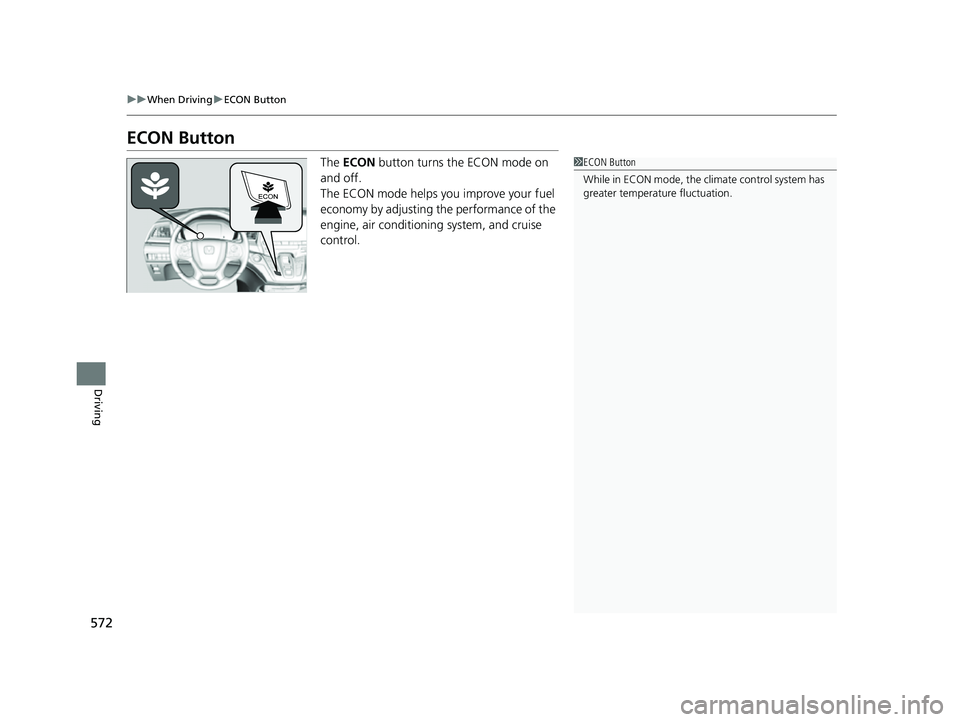
The ECON button turns the ECON mode on
and off.
The ECON mode helps you improve your fuel
economy by adjusting the performance of the
engine, air conditioning system, and cruise
control.1 ECON Button
While in ECON mode, the climate control system has
greater temperature fluctuation.
22 US ODYSSEY-31THR6400.book 572 ページ 2020年11月16日 月曜日 午後1時41分
Page 712 of 782
711
Maintenance
Climate Control System Maintenance
Air Conditioning
To ensure proper and safe operation, the Society of Automotive Engineers (SAE
J2845) recommends that the refrigerant system only be serviced by trained and
certified technicians.
Never repair or replace the air conditio ning evaporator (cooling coil) with one
removed from a used or salvaged vehicle.
New replacement mobile air conditioning evaporators must be certified (and
labeled) as meeting SAE Standard J2842.
Dust and Pollen Filter
The climate control system is equipped with a dust and pollen filter that collects
pollen, dust, and other debris in the air. The Maintenance MinderTM messages will let
you know when to replace the filter.
We recommend that you repl ace the dust and pollen filter sooner when using your
vehicle in areas with high concentrations of dust.
1 Air Conditioning
NOTICE
Vented refrigerant is harmful to the environment.
To avoid refrigerant from venting, never replace the
evaporator with one re moved from a used or
salvaged vehicle.
Refrigerant in your vehicle’ s air conditioning system is
flammable and can be igni ted during servicing if
proper procedures are not followed.
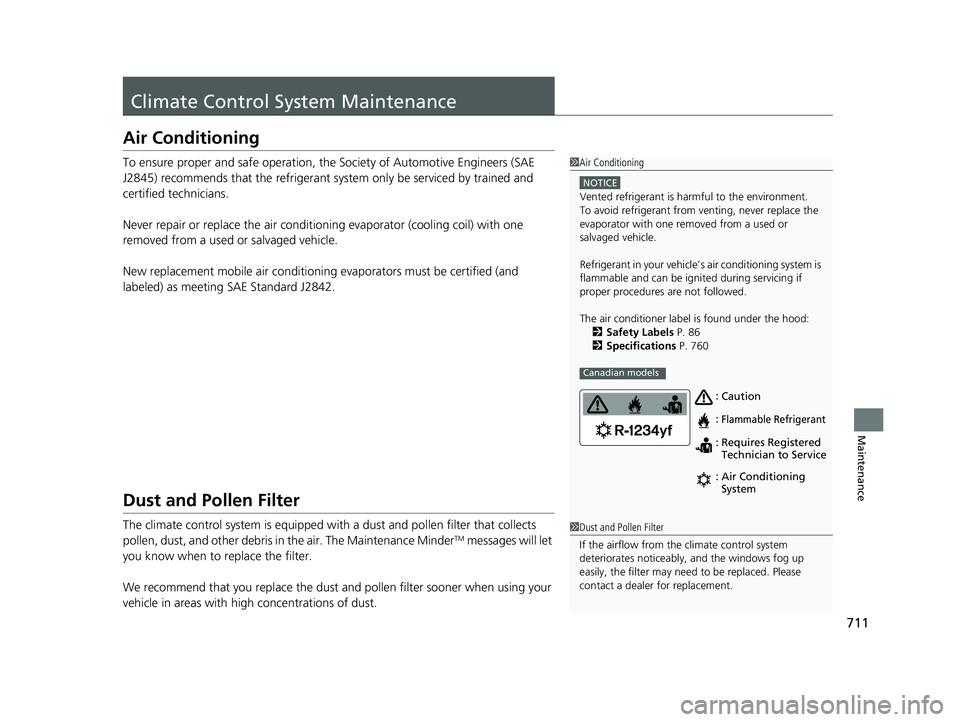
The air conditioner labe l is found under the hood:
2 Safety Labels P. 86
2 Specifications P. 760
Canadian models
Caution
Flammable Refrigerant
Requires Registered
Technician to Service
Air Conditioning
System
:
: : :
1
Dust and Pollen Filter
If the airflow from the climate control system
deteriorates noticeably, and the windows fog up
easily, the filter may need to be replaced. Please
contact a dealer for replacement.
22 US ODYSSEY-31THR6400.book 711 ページ 2020年11月16日 月曜日 午後1時41分
Page 761 of 782
760
Information
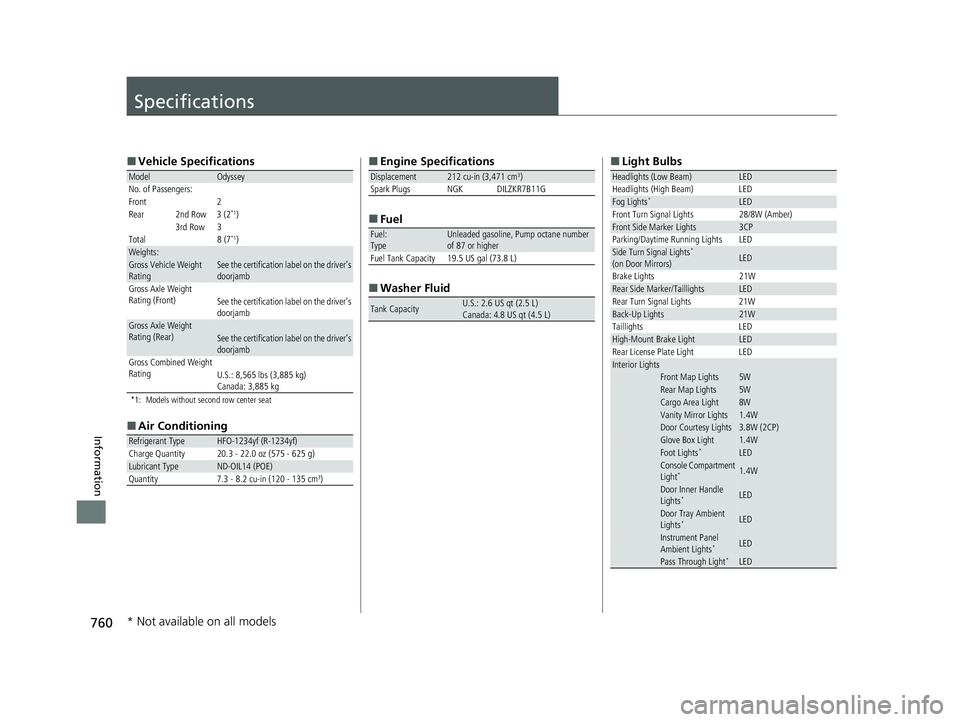
Specifications
■Vehicle Specifications
*1: Models without second row center seat
■Air Conditioning
ModelOdyssey
No. of Passengers:
Front 2
Rear 2nd Row 3 (2
*1)
3rd Row 3
Total 8 (7
*1)Weights:Gross Vehicle Weight
Rating See the certification label on the driver’s
doorjamb
Gross Axle Weight
Rating (Front)See the certification label on the driver’s
doorjamb
Gross Axle Weight
Rating (Rear)See the certification label on the driver’s
doorjamb
Gross Combined Weight
Rating U.S.: 8,565 lbs (3,885 kg)
Canada: 3,885 kg
Refrigerant TypeHFO-1234yf (R-1234yf)
Charge Quantity 20.3 - 22.0 oz (575 - 625 g)
Lubricant TypeND-OIL14 (POE)
Quantity 7.3 - 8.2 cu-in (120 - 135 cm3)
■ Engine Specifications
■ Fuel
■ Washer Fluid
Displacement212 cu-in (3,471 cm3)
Spark Plugs NGK DILZKR7B11G
Fuel:
TypeUnleaded gasoline, Pump octane number
of 87 or higher
Fuel Tank Capacity 19.5 US gal (73.8 L)
Tank CapacityU.S.: 2.6 US qt (2.5 L)
Canada: 4.8 US qt (4.5 L)
■ Light Bulbs
Headlights (Low Beam)LED
Headlights (High Beam) LED
Fog Lights*LED
Front Turn Signal Lights 28/8W (Amber)
Front Side Marker Lights3CP
Parking/Daytime Running Lights LED
Side Turn Signal Lights*
(on Door Mirrors)LED
Brake Lights 21W
Rear Side Marker/TaillightsLED
Rear Turn Signal Lights 21W
Back-Up Lights21W
Taillights LED
High-Mount Brake LightLED
Rear License Plate Light LED
Interior LightsFront Map Lights5WRear Map Lights5WCargo Area Light8WVanity Mirror Lights1.4WDoor Courtesy Lights3.8W (2CP)Glove Box Light1.4WFoot Lights*LEDConsole Compartment
Light*1.4W
Door Inner Handle
Lights*LED
Door Tray Ambient
Lights*LED
Instrument Panel
Ambient Lights*LED
Pass Through Light*LED
* Not available on all models
22 US ODYSSEY-31THR6400.book 760 ページ 2020年11月16日 月曜日 午後1時41分
Page 773 of 782
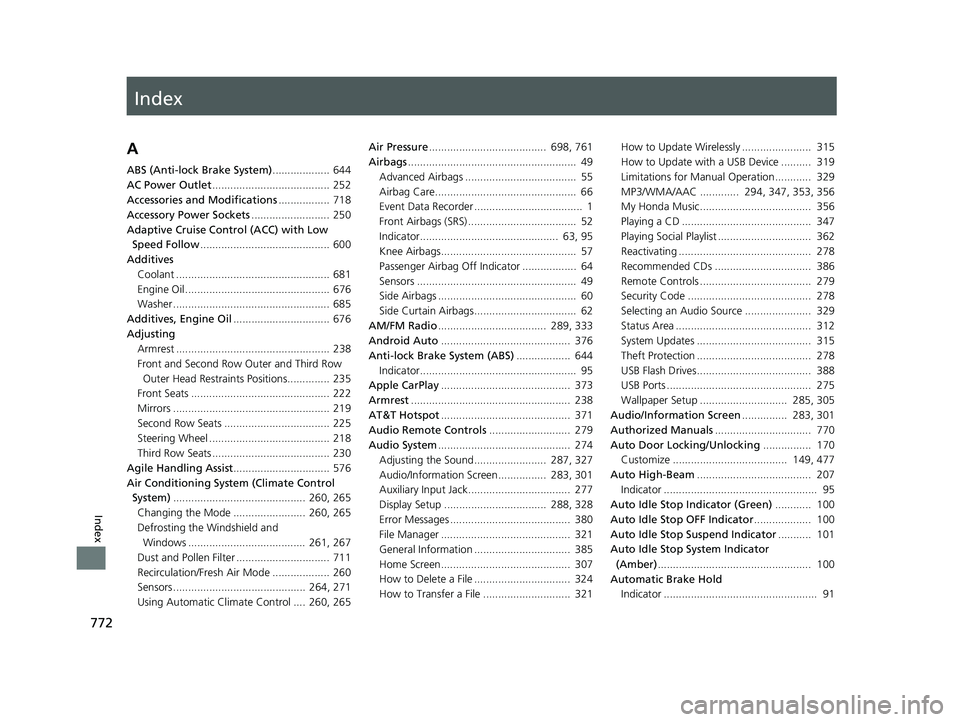
Index
772
Index
Index
A
ABS (Anti-lock Brake System)................... 644
AC Power Outlet ....................................... 252
Accessories and Modifications ................. 718
Accessory Power Sockets .......................... 250
Adaptive Cruise Control (ACC) with Low Speed Follow ........................................... 600
Additives
Coolant ................................................... 681
Engine Oil ................................................ 676
Washer .................................................... 685
Additives, Engine Oil ................................ 676
Adjusting Armrest ................................................... 238
Front and Second Row Outer and Third Row Outer Head Restraints Positions.............. 235
Front Seats .............................................. 222
Mirrors .................................................... 219
Second Row Seats ................................... 225
Steering Wheel ........................................ 218
Third Row Seats ....................................... 230
Agile Handling Assist ................................ 576
Air Conditioning System (Climate Control System) ............................................ 260, 265
Changing the Mode ........................ 260, 265
Defrosting the Windshield and Windows ....................................... 261, 267
Dust and Pollen Filter ............................... 711
Recirculation/Fresh Air Mode ................... 260
Sensors ............................................ 264, 271
Using Automatic Climate Control .... 260, 265 Air Pressure
....................................... 698, 761
Airbags ........................................................ 49
Advanced Airbags ..................................... 55
Airbag Care............................................... 66
Event Data Recorder .................................... 1
Front Airbags (SRS) .................................... 52
Indicator.............................................. 63, 95
Knee Airbags............................................. 57
Passenger Airbag Off Indicator .................. 64
Sensors ..................................................... 49
Side Airbags .............................................. 60
Side Curtain Airbags.................................. 62
AM/FM Radio .................................... 289, 333
Android Auto ........................................... 376
Anti-lock Brake System (ABS) .................. 644
Indicator.................................................... 95
Apple CarPlay ........................................... 373
Armrest ..................................................... 238
AT&T Hotspot ........................................... 371
Audio Remote Controls ........................... 279
Audio System ............................................ 274
Adjusting the Sound........................ 287, 327
Audio/Information Screen................ 283, 301
Auxiliary Input Jack.................................. 277
Display Setup .................................. 288, 328
Error Messages ........................................ 380
File Manager ........................................... 321
General Information ................................ 385
Home Screen........................................... 307
How to Delete a File ................................ 324
How to Transfer a File ............................. 321 How to Update Wirelessly ....................... 315
How to Update with a USB Device .......... 319
Limitations for Manual Operation ............ 329
MP3/WMA/AAC ............. 294, 347, 353, 356
My Honda Music..................................... 356
Playing a CD ........................................... 347
Playing Social Playlist ............................... 362
Reactivating ............................................ 278
Recommended CDs ................................ 386
Remote Controls ..................................... 279
Security Code ......................................... 278
Selecting an Audio Source ...................... 329
Status Area ............................................. 312
System Updates ...................................... 315
Theft Protection ...................................... 278
USB Flash Drives...................................... 388
USB Ports ................................................ 275
Wallpaper Setup ............................. 285, 305
Audio/Information Screen ............... 283, 301
Authorized Manuals ................................ 770
Auto Door Locking/Unlocking ................ 170
Customize ...................................... 149, 477
Auto High-Beam ...................................... 207
Indicator ................................................... 95
Auto Idle Stop Indicator (Green) ............ 100
Auto Idle Stop OFF Indicator ................... 100
Auto Idle Stop Suspend Indicator ........... 101
Auto Idle Stop System Indicator
(Amber) ...........
..................... ...................
100
Automatic Brake Hold Indicator ................................................... 91
22 US ODYSSEY-31THR6400.book 772 ページ 2020年11月16日 月曜日 午後1時41分