driver HONDA ODYSSEY 2022 Owners Manual
[x] Cancel search | Manufacturer: HONDA, Model Year: 2022, Model line: ODYSSEY, Model: HONDA ODYSSEY 2022Pages: 782, PDF Size: 27.17 MB
Page 2 of 782
Event Data Recorders
This vehicle is equipped with an event data recorder (EDR).
The main purpose of an EDR is to record, in certain crash or near
crash-like situations, such as an air bag deployment or hitting a
road obstacle, data that will assist in understanding how a vehicle’s
systems performed. The EDR is designed to record data related
to vehicle dynamics and safety systems for a short period of
time, typically 30 seconds or less. The EDR in this vehicle is
designed to record such data as:
• How various systems in your vehicle were operating;
• Whether or not the driver and passenger safety belts were
buckled/fastened;
• How far (if at all) the driver was depressing the accelerator
and/or brake pedal; and,
• How fast the vehicle was traveling.
These data can help provide a better understanding of the
circumstances in which crashes and injuries occur. NOTE: EDR data
are recorded by your vehicle only if a non-trivial crash situation
occurs; no data are recorded by the EDR under normal driving
conditions and no personal data (e.g., name, gender, age, and
crash location) are recorded. However, other parties, such as law
enforcement, could combine the EDR data with the type of
personally identifying data r outinely acquired during a crash
investigation.
To read data recorded by an ED R, special equipment is required,
and access to the vehicle or the ED R is needed. In addition to the
vehicle manufacturer, other parties, such as law enforcement, that
have the special equipment, can r ead the information if they have
access to the vehicle or the EDR.
22 US ODYSSEY-31THR6400.book 1 ページ 2020年11月16日 月曜日 午後1時41分
Page 5 of 782
Contents
This owner’s manual should be considered a permanent part of the
vehicle and should remain with the vehicle when it is sold.
The Navigation Manual is available online at owners.honda.com
(U.S.) or honda.ca (Canada). If you are the first registered owner
of your vehicle, you may request a complimentary printed
copy of the Navigation Manual within the first six months of
vehicle purchase. To request a copy, visit owners.honda.com. In
Canada, please request a copy from your Honda dealer.
This owner’s manual covers all models of your vehicle. You may find
descriptions of equipment and features that are not on your
particular model.
Images throughout this owner’s ma nual (including the front cover)
represent features and equipment that are available on some, but
not all, models. Your particular mo del may not have some of these
features.
This owner’s manual is for vehicles sold in the United States and
Canada.
The information and specifications in cluded in this publication were
in effect at the time of approval for printing. Honda Motor Co., Ltd.
reserves the right, however, to discontinue or change specifications
or design at any time without notice and without incurring any
obligation.2 Safe Driving P. 35
For Safe Driving P. 36 Seat Belts P. 40 Airbags P. 49
2Instrument Panel P. 87
Indicators P. 88 Gauges and Driver Information Interface P. 127
2Controls P. 153
Clock P. 154 Locking and Unlocking the Doors P. 156
Security System P. 191 Windows P. 194
Mirrors P. 219 Seats P. 222
2Features P. 273
Audio System P. 274 Audio System Basic Operation P. 282, 300
Blu-ray/DVD Rear Entertainment System* P. 409
CabinWatch ®* P. 535 CabinTalk®* P. 536
2Driving P. 537
Before Driving P. 538 Towing a Trailer P. 544
Parking Your Vehicle P. 646 Multi-View Rear Camera P. 657
2Maintenance P. 663
Before Performing Maintenance P. 664 Maintenance MinderTM P. 667
Checking and Maintaining Wiper Blades P. 693
Remote Control and Wireless Headphone Care
* P. 709
2 Handling the Unexpected P. 721
Tools P. 722 If a Tire Goes Flat P. 723
Indicator, Coming On/Blinking P. 739 Fuses P. 745
If You Cannot Open the Tailgate P. 754
2Information P. 759
Specifications P. 760 Identification Numbers P. 762
Warranty Coverages P. 767 Authorized Manuals P. 770
22 US ODYSSEY-31THR6400.book 4 ページ 2020年11月16日 月曜日 午後1時41分
Page 7 of 782
6
Quick Reference Guide
Quick Reference Guide
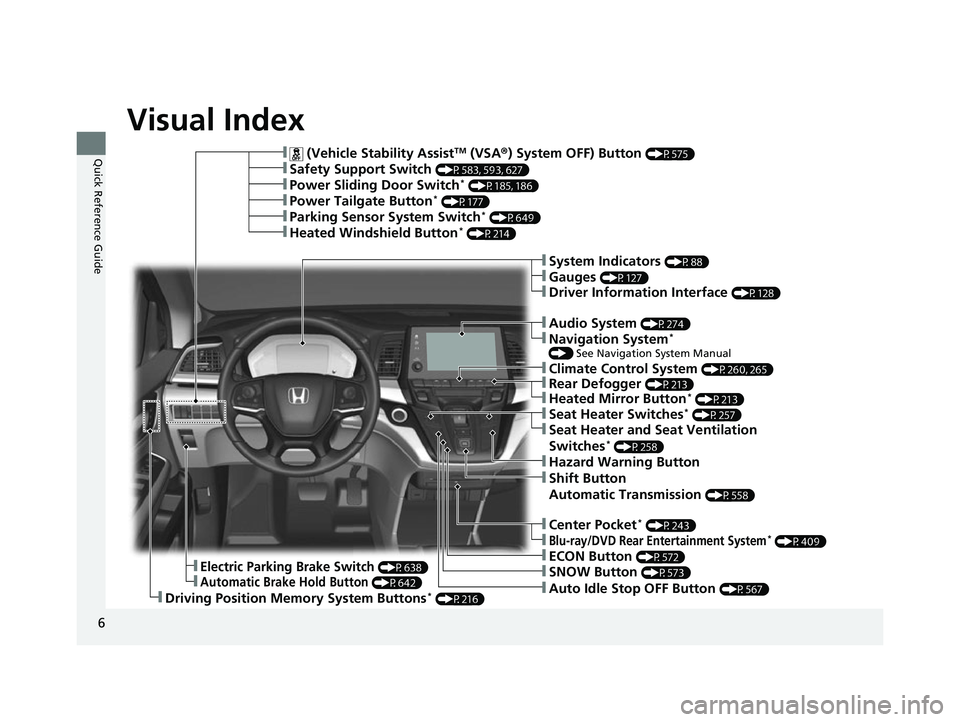
Visual Index
❚ (Vehicle Stability AssistTM (VSA®) System OFF) Button (P575)
❚Power Sliding Door Switch* (P185, 186)
❚Power Tailgate Button* (P177)
❚Climate Control System (P260, 265)
❚Driving Position Memory System Buttons* (P216)
❚Parking Sensor System Switch* (P649)
❚Heated Windshield Button* (P214)
❚Safety Support Switch (P583, 593, 627)
❚Electric Parking Brake Switch (P638)
❚Automatic Brake Hold Button (P642)
❚Shift Button
Automatic Transmission
(P558)
❚ECON Button (P572)
❚SNOW Button (P573)
❚Auto Idle Stop OFF Button (P567)
❚Hazard Warning Button
❚System Indicators (P88)
❚Gauges (P127)
❚Driver Information Interface (P128)
❚Audio System (P274)
❚Navigation System*
() See Navigation System Manual
❚Rear Defogger (P213)
❚Heated Mirror Button* (P213)
❚Seat Heater Switches* (P257)
❚Seat Heater and Seat Ventilation
Switches* (P258)
❚Center Pocket* (P243)
❚Blu-ray/DVD Rear Entertainment System* (P409)
22 US ODYSSEY-31THR6400.book 6 ページ 2020年11月16日 月曜日 午後1時41分
Page 9 of 782
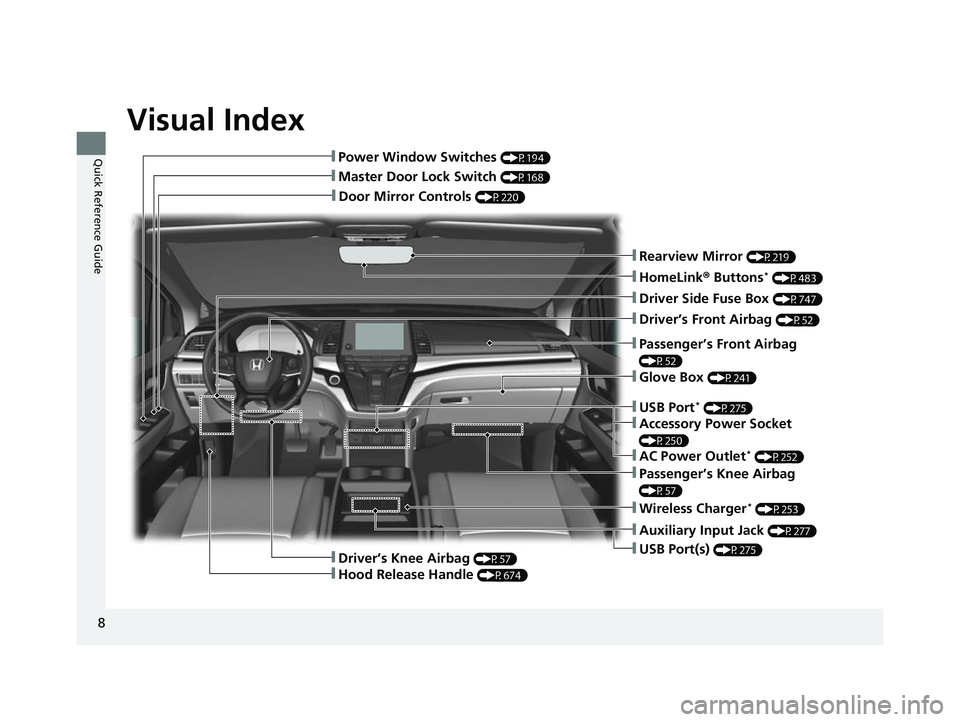
Visual Index
8
Quick Reference Guide
❚Door Mirror Controls (P220)
❚Master Door Lock Switch (P168)
❚Power Window Switches (P194)
❚Rearview Mirror (P219)
❚Driver Side Fuse Box (P747)
❚Glove Box (P241)
❚Driver’s Front Airbag (P52)
❚Passenger’s Knee Airbag
(P57)
❚Auxiliary Input Jack (P277)
❚USB Port(s) (P275)
❚Passenger’s Front Airbag
(P52)
❚HomeLink® Buttons* (P483)
❚Wireless Charger* (P253)
❚Driver’s Knee Airbag (P57)
❚Hood Release Handle (P674)
❚USB Port* (P275)
❚Accessory Power Socket
(P250)
❚AC Power Outlet* (P252)
22 US ODYSSEY-31THR6400.book 8 ページ 2020年11月16日 月曜日 午後1時41分
Page 16 of 782
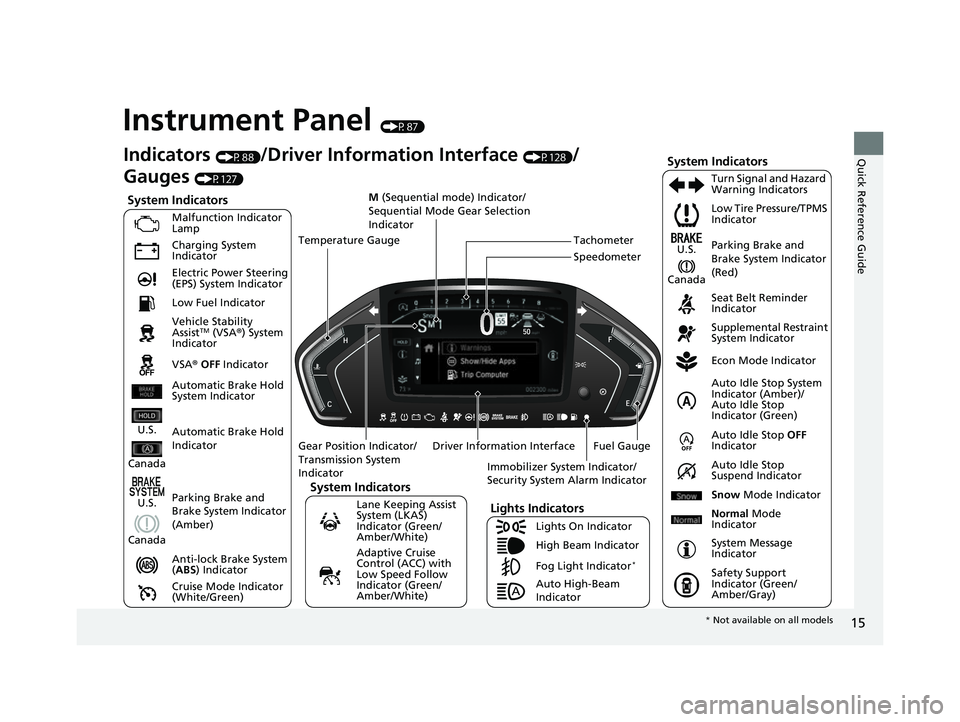
15
Quick Reference Guide
Instrument Panel (P87)
System Indicators
Malfunction Indicator
Lamp
Charging System
Indicator
Anti-lock Brake System
(ABS ) Indicator
Vehicle Stability
Assist
TM (VSA®
) System
Indicator
VSA ® OFF Indicator Low Tire Pressure/TPMS
Indicator
Immobilizer System Indicator/
Security System Alarm Indicator
Lights Indicators
Lights On Indicator
High Beam Indicator
Fog Light Indicator
*
Lane Keeping Assist
System (LKAS)
Indicator (Green/
Amber/White) Seat Belt Reminder
Indicator
System Indicators
Econ Mode Indicator
System Message
Indicator Parking Brake and
Brake System Indicator
(Red)
Supplemental Restraint
System Indicator
Driver Information Interface Auto Idle Stop
OFF
Indicator
Tachometer
M
(Sequential mode) Indicator/
Sequential Mode Gear Selection
Indicator
Speedometer
Fuel Gauge
Gear Position Indicator/
Transmission System
Indicator Auto Idle Stop System
Indicator (Amber)/
Auto Idle Stop
Indicator (Green)
Indicators (P88)/Driver Information Interface (P128)/
Gauges
(P127)
Automatic Brake Hold
Indicator Adaptive Cruise
Control (ACC) with
Low Speed Follow
Indicator (Green/
Amber/White) Turn Signal and Hazard
Warning Indicators
Electric Power Steering
(EPS) System Indicator
Cruise Mode Indicator
(White/Green) Auto Idle Stop
Suspend Indicator
Temperature Gauge
Parking Brake and
Brake System Indicator
(Amber)
U.S.
Canada
U.S.
Canada
System Indicators
U.S.
Canada
Low Fuel Indicator
Automatic Brake Hold
System Indicator
Auto High-Beam
Indicator Snow
Mode Indicator
Normal Mode
Indicator
Safety Support
Indicator (Green/
Amber/Gray)
* Not available on all models
22 US ODYSSEY-31THR6400.book 15 ページ 2020年11月16日 月曜日 午後1時41分
Page 22 of 782
21
Quick Reference Guide
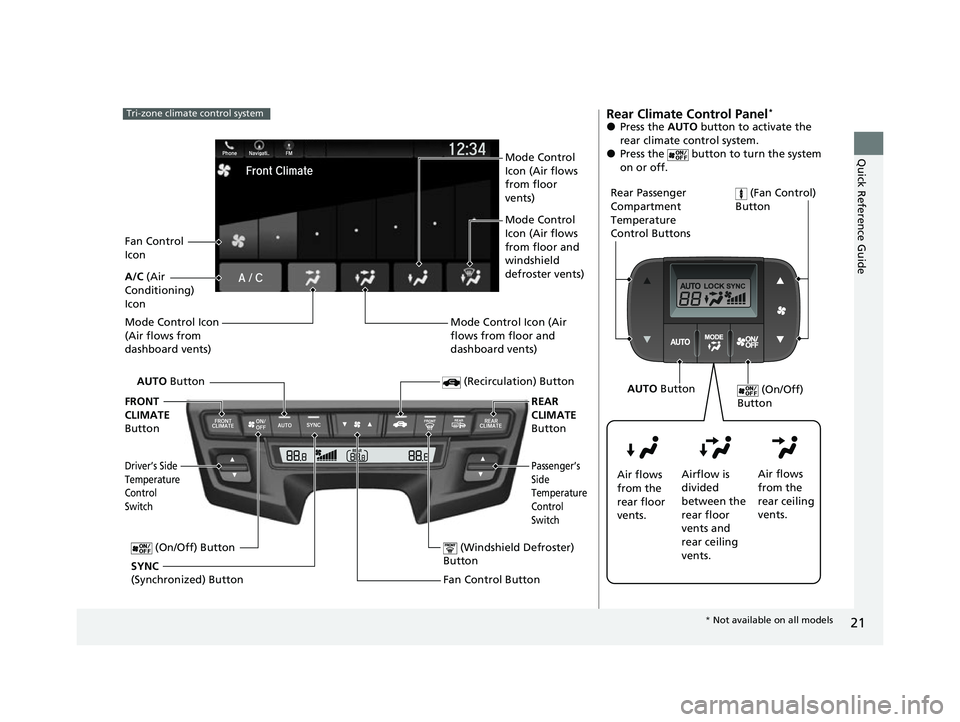
Tri-zone climate control system
Fan Control Button (Windshield Defroster)
Button
A/C (Air
Conditioning)
Icon
(Recirculation) Button
Passenger’s
Side
Temperature
Control
Switch
AUTO Button
Driver’s Side
Temperature
Control
Switch
Mode Control Icon
(Air flows from
dashboard vents)
SYNC
(Synchronized) Button (On/Off) Button
FRONT
CLIMATE
Button REAR
CLIMATE
Button
Fan Control
Icon Mode Control
Icon (Air flows
from floor
vents)
Mode Control
Icon (Air flows
from floor and
windshield
defroster vents)
Mode Control Icon (Air
flows from floor and
dashboard vents)
Rear Climate Control Panel*
●Press the AUTO button to activate the
rear climate control system.
●Press the button to turn the system
on or off.
Rear Passenger
Compartment
Temperature
Control Buttons (Fan Control)
Button
Air flows
from the
rear floor
vents. Airflow is
divided
between the
rear floor
vents and
rear ceiling
vents. Air flows
from the
rear ceiling
vents. (On/Off)
Button
AUTO Button
* Not available on all models
22 US ODYSSEY-31THR6400.book 21 ページ 2020年11月16日 月曜日 午後1時41分
Page 25 of 782
24
Quick Reference Guide
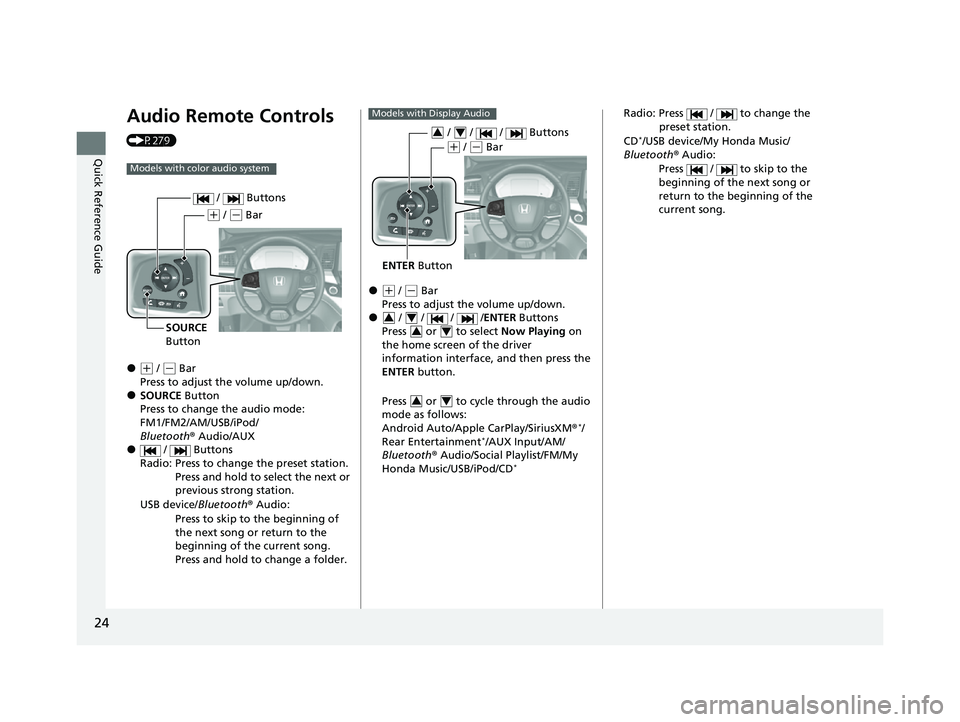
Audio Remote Controls
(P279)
●(+ / ( - Bar
Press to adjust the volume up/down.
●SOURCE Button
Press to change the audio mode:
FM1/FM2/AM/USB/iPod/
Bluetooth ® Audio/AUX
● / Buttons
Radio: Press to change the preset station. Press and hold to select the next or
previous strong station.
USB device/ Bluetooth® Audio:
Press to skip to the beginning of
the next song or return to the
beginning of the current song.
Press and hold to change a folder.
Models with color audio system
( + / (- Bar
SOURCE
Button / Buttons
●(
+ / (- Bar
Press to adjust the volume up/down.
● / / / / ENTER Buttons
Press or to select Now Playing on
the home screen of the driver
information interface, and then press the
ENTER button.
Press or to cycle through the audio
mode as follows:
Android Auto/Apple CarPlay/SiriusXM ®
*/
Rear Entertainment*/AUX Input/AM/
Bluetooth ® Audio/Social Playlist/FM/My
Honda Music/USB/iPod/CD
*
Models with Display Audio
ENTER Button
/ / / Buttons34
(+ / (- Bar
34
34
34
Radio: Press / to change the
preset station.
CD
*/USB device/My Honda Music/
Bluetooth ® Audio:
Press / to skip to the
beginning of the next song or
return to the beginning of the
current song.
22 US ODYSSEY-31THR6400.book 24 ページ 2020年11月16日 月曜日 午後1時41分
Page 29 of 782
28
Quick Reference Guide
VSA® On and Off (P575)
●The Vehicle Stability AssistTM (VSA® )
system helps stabilize the vehicle during
cornering, and helps maintain traction
while accelerating on loose or slippery
road surfaces.
●VSA ® comes on automatically every time
you start the engine.
●To partially disable or fully restore VSA ®
function, press and ho ld the button until
you hear a beep.
CMBSTM On and Off
(P 593)
●When a possible frontal collision is likely
unavoidable, the CMBSTM can help you to
reduce the vehicle sp eed and the severity
of the collision.
●The CMBSTM is turned on every time you
start the engine.
●To turn the CMBSTM on or off, use the
safety support switch.
Tire Pressure Monitoring System (TPMS) with Tire
Fill Assist
(P 577, 743)
●The TPMS monitors tire pressure.●TPMS is turned on automatically every time you start the engine.●TPMS fill assist provides audible and visual guidance during tire pressure adjustment.
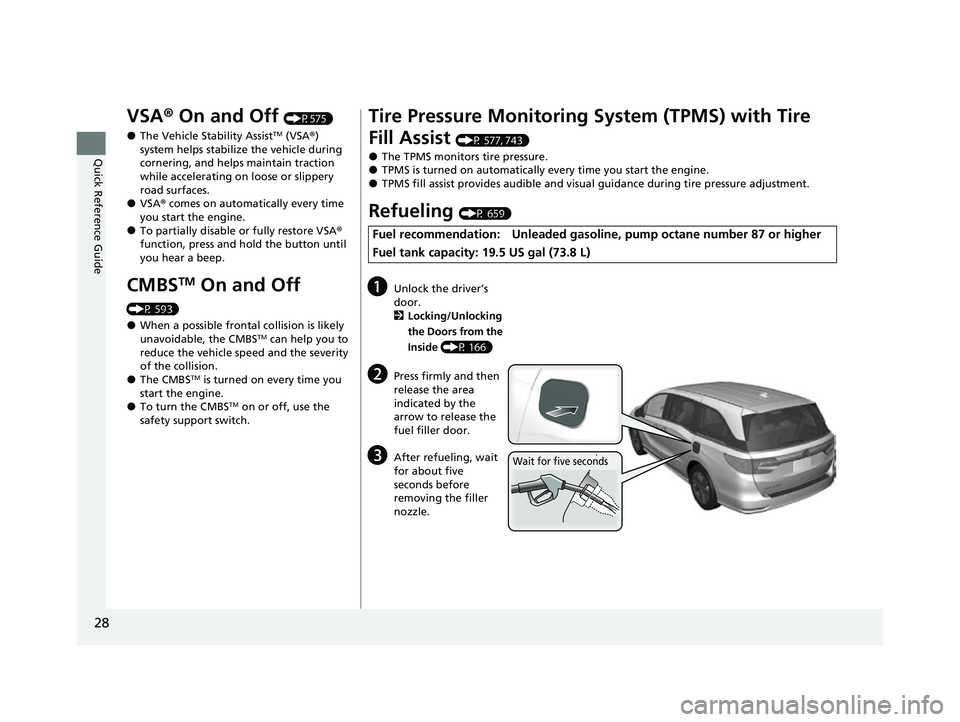
Refueling (P 659)
Fuel recommendation: Unleaded gasoline , pump octane number 87 or higher
Fuel tank capacity: 19.5 US gal (73.8 L)
aUnlock the driver’s
door.
2 Locking/Unlocking
the Doors from the
Inside (P 166)
bPress firmly and then
release the area
indicated by the
arrow to release the
fuel filler door.
cAfter refueling, wait
for about five
seconds before
removing the filler
nozzle.Wait for five seconds
22 US ODYSSEY-31THR6400.book 28 ページ 2020年11月16日 月曜日 午後1時41分
Page 30 of 782
29
Quick Reference Guide
Honda Sensing® (P586)
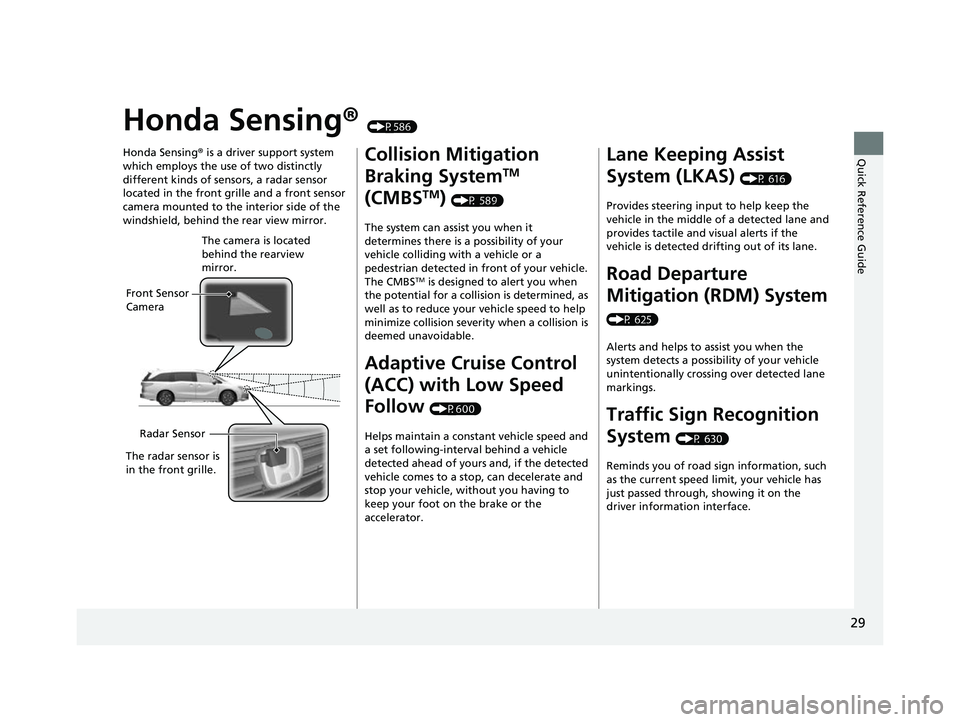
Honda Sensing ® is a driver support system
which employs the use of two distinctly
different kinds of sensors, a radar sensor
located in the front grille and a front sensor
camera mounted to the interior side of the
windshield, behind the rear view mirror.
Front Sensor
Camera The camera is located
behind the rearview
mirror.
Radar Sensor
The radar sensor is
in the front grille.
Collision Mitigation
Braking System
TM
(CMBS
TM) (P 589)
The system can assist you when it
determines there is a possibility of your
vehicle colliding with a vehicle or a
pedestrian detected in front of your vehicle.
The CMBS
TM is designed to alert you when
the potential for a collision is determined, as
well as to reduce your vehicle speed to help
minimize collision severity when a collision is
deemed unavoidable.
Adaptive Cruise Control
(ACC) with Low Speed
Follow
(P600)
Helps maintain a constant vehicle speed and
a set following-interval behind a vehicle
detected ahead of yours and, if the detected
vehicle comes to a stop, can decelerate and
stop your vehicle, without you having to
keep your foot on the brake or the
accelerator.
Lane Keeping Assist
System (LKAS)
(P 616)
Provides steering input to help keep the
vehicle in the middle of a detected lane and
provides tactile and visual alerts if the
vehicle is detected drifting out of its lane.
Road Departure
Mitigation (RDM) System
(P 625)
Alerts and helps to assist you when the
system detects a possibility of your vehicle
unintentionally crossing over detected lane
markings.
Traffic Sign Recognition
System
(P 630)
Reminds you of road sign information, such
as the current speed limit, your vehicle has
just passed through, showing it on the
driver information interface.
22 US ODYSSEY-31THR6400.book 29 ページ 2020年11月16日 月曜日 午後1時41分
Page 34 of 782
33
Quick Reference Guide
Why do the doors lock
after I unlocked the doors?If you do not open the doors within 30 seconds, the doors are
relocked automatically for security.
Why does the beeper
sound when I open the
driver’s door?The beeper sounds when:
•The power mode is in ACCESSORY.
•The exterior lights are left on.
•The Auto Idle Stop is in operation.
Why does a beeper sound
when I walk away from the
vehicle after I close the
door?
The buzzer sounds if you move outside the walk away auto
door lock operating range before the door completely closes.
2Locking the doors and tailgate (Walk away auto lock ®) (P161)
Why does the beeper
sound when I start driving?The beeper sounds when the driver and/or front passenger are
not wearing their seat belts.
Why do I hear a screeching
sound when I apply the
brake pedal?The brake pads may need to be replaced. Have your vehicle
inspected by a dealer.
Models with keyless access system
22 US ODYSSEY-31THR6400.book 33 ページ 2020年11月16日 月曜日 午後1時41分