buttons HONDA ODYSSEY 2023 Owner's Manual
[x] Cancel search | Manufacturer: HONDA, Model Year: 2023, Model line: ODYSSEY, Model: HONDA ODYSSEY 2023Pages: 707, PDF Size: 23.9 MB
Page 505 of 707
503
uuWhen Driving uTire Pressure Monitoring System (TPMS) with Tire Fill Assist
Driving
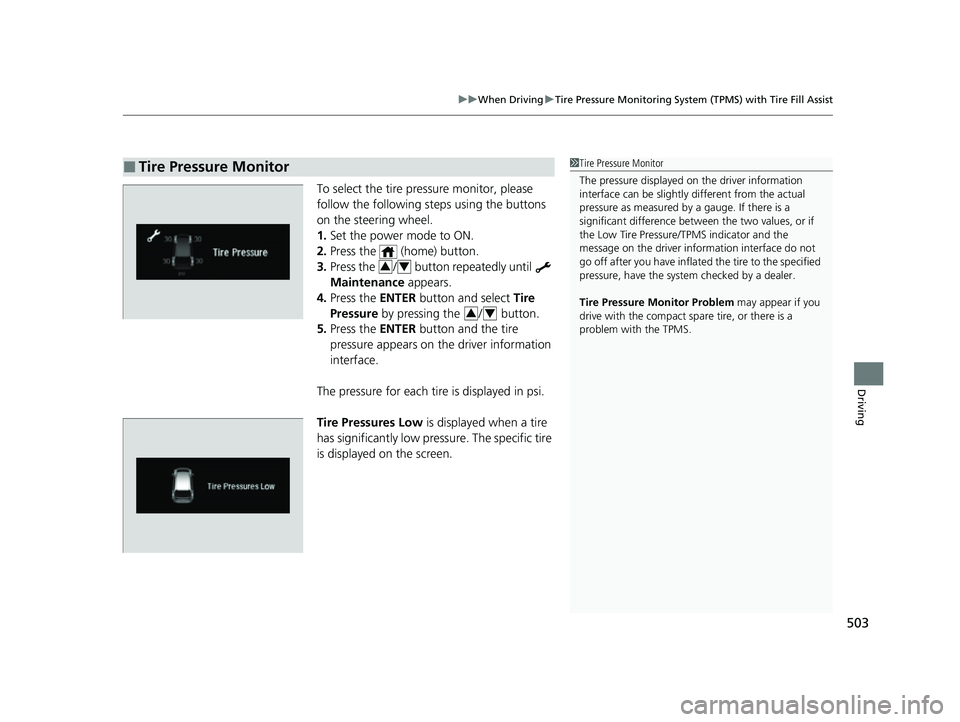
To select the tire pressure monitor, please
follow the following st eps using the buttons
on the steering wheel.
1. Set the power mode to ON.
2. Press the (home) button.
3. Press the / button repeatedly until
Maintenance appears.
4. Press the ENTER button and select Tire
Pressure by pressing the / button.
5. Press the ENTER button and the tire
pressure appears on th e driver information
interface.
The pressure for each tire is displayed in psi.
Tire Pressures Low is displayed when a tire
has significantly low pressure. The specific tire
is displayed on the screen.
■Tire Pressure Monitor1 Tire Pressure Monitor
The pressure displayed on the driver information
interface can be slightly different from the actual
pressure as measured by a gauge. If there is a
significant di fference between the two values, or if
the Low Tire Pressure/TPMS indicator and the
message on the driver info rmation interface do not
go off after you have inflated the tire to the specified
pressure, have the system checked by a dealer.
Tire Pressure Monitor Problem may appear if you
drive with the compact spare tire, or there is a
problem with the TPMS.
34
34
23 US ODYSSEY-31THR6500.book 503 ページ 2022年1月24日 月曜日 午前11時35分
Page 512 of 707
510
uuHonda Sensing ®u
Driving
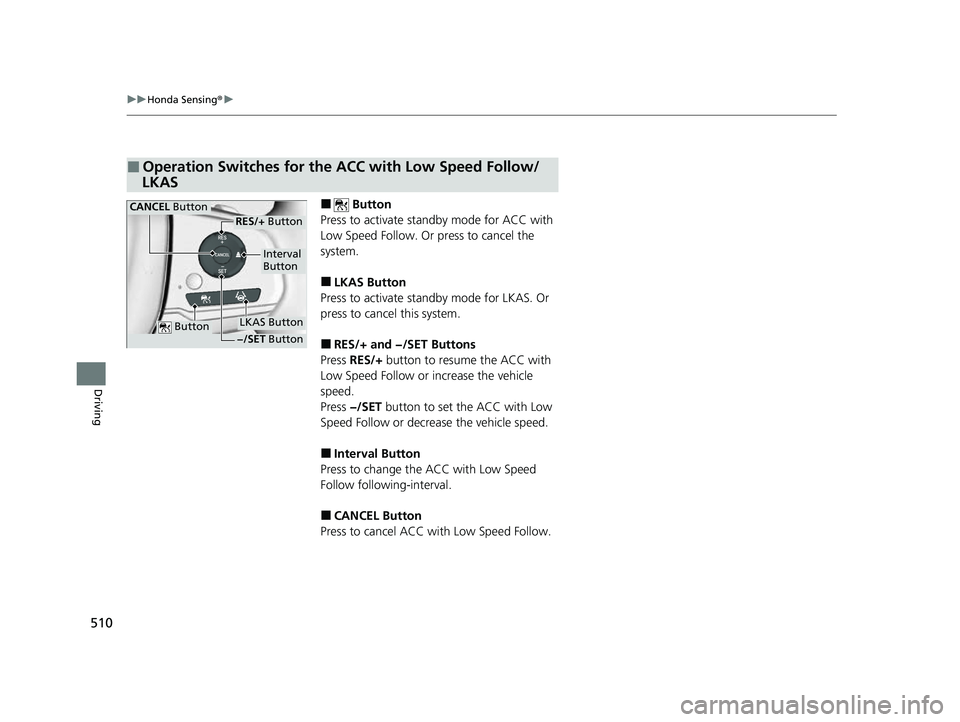
■ Button
Press to activate standby mode for ACC with
Low Speed Follow. Or press to cancel the
system.
■LKAS Button
Press to activate standby mode for LKAS. Or
press to cancel this system.
■RES/+ and −/SET Buttons
Press RES/+ button to resume the ACC with
Low Speed Follow or increase the vehicle
speed.
Press −/SET button to set the ACC with Low
Speed Follow or decrease the vehicle speed.
■Interval Button
Press to change the ACC with Low Speed
Follow following-interval.
■CANCEL Button
Press to cancel ACC with Low Speed Follow.
■Operation Switches for the ACC with Low Speed Follow/
LKAS
Button
Interval
Button
CANCEL Button
LKAS Button
RES/+ Button
−/SET Button
23 US ODYSSEY-31THR6500.book 510 ページ 2022年1月24日 月曜日 午前11時35分
Page 535 of 707
Continued533
uuHonda Sensing ®u Adaptive Cruise Control (ACC) with Low Speed Follow
Driving
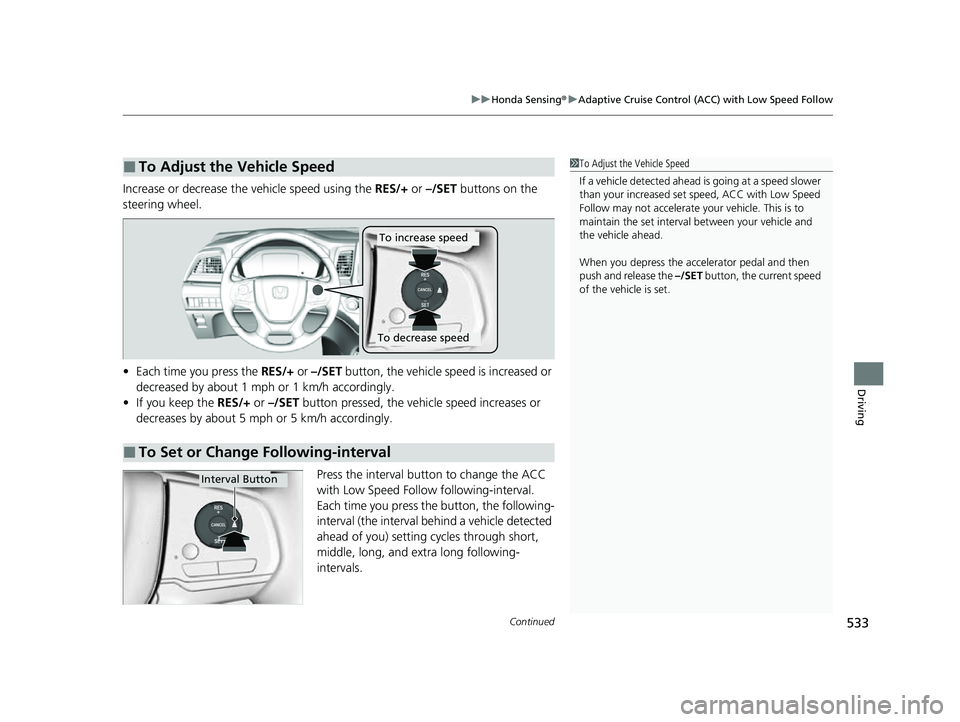
Increase or decrease the vehicle speed using the RES/+ or –/SET buttons on the
steering wheel.
• Each time you press the RES/+ or –/SET button, the vehicle speed is increased or
decreased by about 1 mph or 1 km/h accordingly.
• If you keep the RES/+ or –/SET button pressed, the vehi cle speed increases or
decreases by about 5 mph or 5 km/h accordingly.
Press the interval button to change the ACC
with Low Speed Follow following-interval.
Each time you press th e button, the following-
interval (the interval behind a vehicle detected
ahead of you) setting cycles through short,
middle, long, and extra long following-
intervals.
■To Adjust the Vehicle Speed1 To Adjust the Vehicle Speed
If a vehicle detected ahead is going at a speed slower
than your increased set speed, ACC with Low Speed
Follow may not accelerate y our vehicle. This is to
maintain the set interval between your vehicle and
the vehicle ahead.
When you depress the accelerator pedal and then
push and release the –/SET button, the current speed
of the vehicle is set.
■To Set or Change Following-interval
To increase speed
To decrease speed
Interval Button
23 US ODYSSEY-31THR6500.book 533 ページ 2022年1月24日 月曜日 午前11時35分
Page 634 of 707
632
Maintenance
Remote Transmitter Care
Replacing the Remote Battery
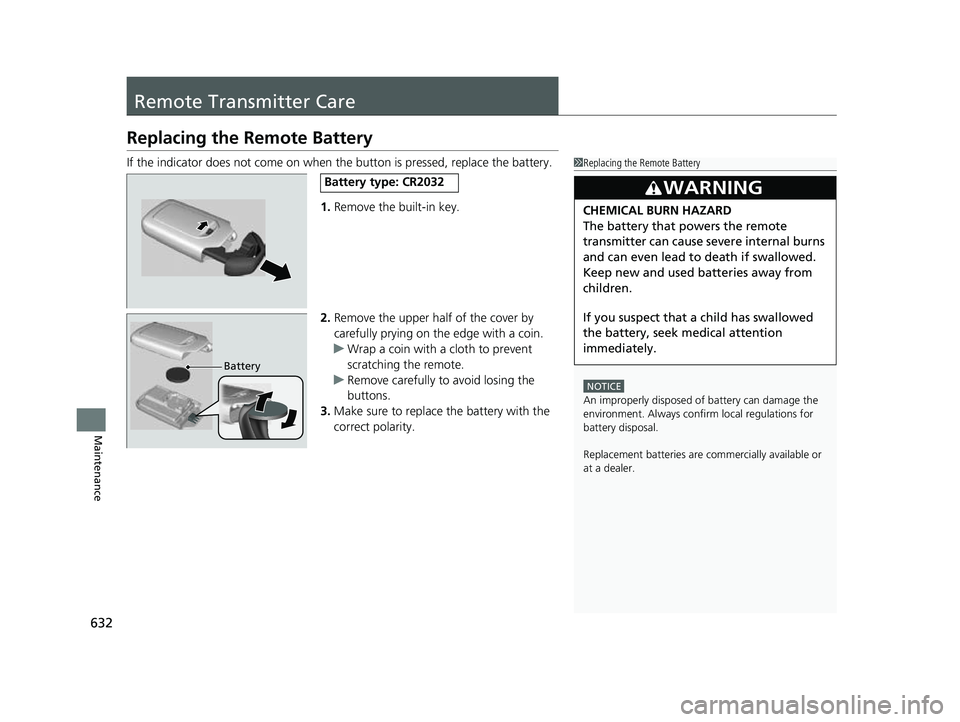
If the indicator does not come on when the button is pressed, replace the battery.1.Remove the built-in key.
2. Remove the upper half of the cover by
carefully prying on the edge with a coin.
u Wrap a coin with a cloth to prevent
scratching the remote.
u Remove carefully to avoid losing the
buttons.
3. Make sure to replace the battery with the
correct polarity.1 Replacing the Remote Battery
NOTICE
An improperly disposed of battery can damage the
environment. Always conf irm local regulations for
battery disposal.
Replacement batteries are commercially available or
at a dealer.
3WARNING
CHEMICAL BURN HAZARD
The battery that powers the remote
transmitter can cause severe internal burns
and can even lead to death if swallowed.
Keep new and used batteries away from
children.
If you suspect that a child has swallowed
the battery, seek medical attention
immediately.
Battery type: CR2032
Battery
23 US ODYSSEY-31THR6500.book 632 ページ 2022年1月24日 月曜日 午前11時35分
Page 635 of 707
633Continued
Maintenance
Remote Control and Wireless Headphone Care*
Replacing the Battery
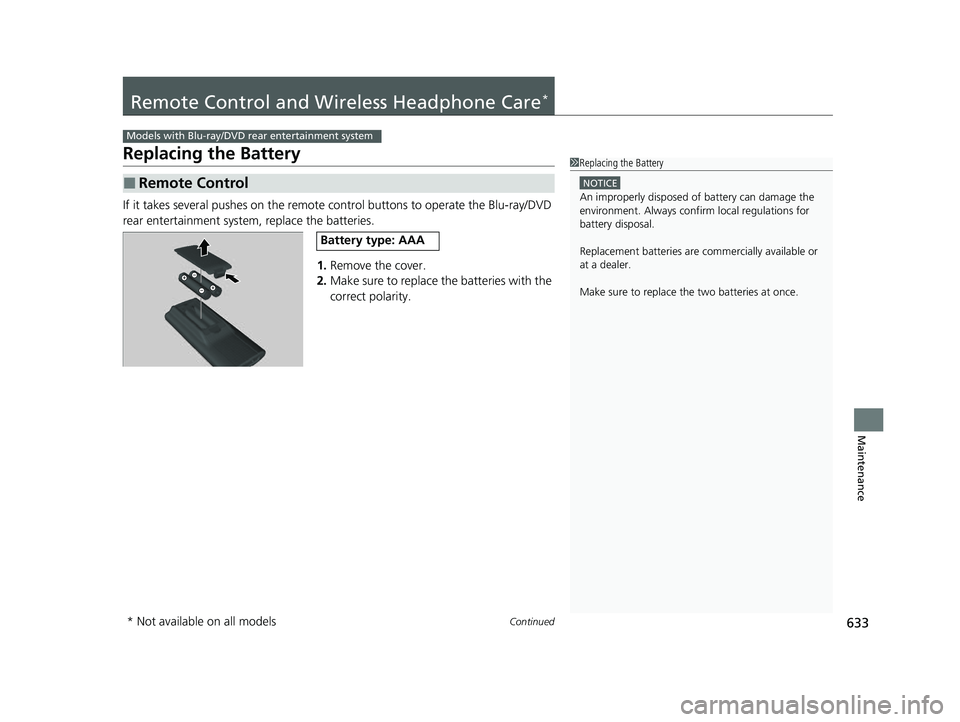
If it takes several pushes on the remote control buttons to operate the Blu-ray/DVD
rear entertainment system, replace the batteries.
1.Remove the cover.
2. Make sure to replace the batteries with the
correct polarity.
■Remote Control
Models with Blu-ray/DVD rear entertainment system
1Replacing the Battery
NOTICE
An improperly disposed of battery can damage the
environment. Always conf irm local regulations for
battery disposal.
Replacement batteries are commercially available or
at a dealer.
Make sure to replace the two batteries at once.
Battery type: AAA
* Not available on all models
23 US ODYSSEY-31THR6500.book 633 ページ 2022年1月24日 月曜日 午前11時35分
Page 659 of 707
657
uuEngine Does Not Start uIf the Remote Battery is Weak
Handling the Unexpected
If the Remote Battery is Weak
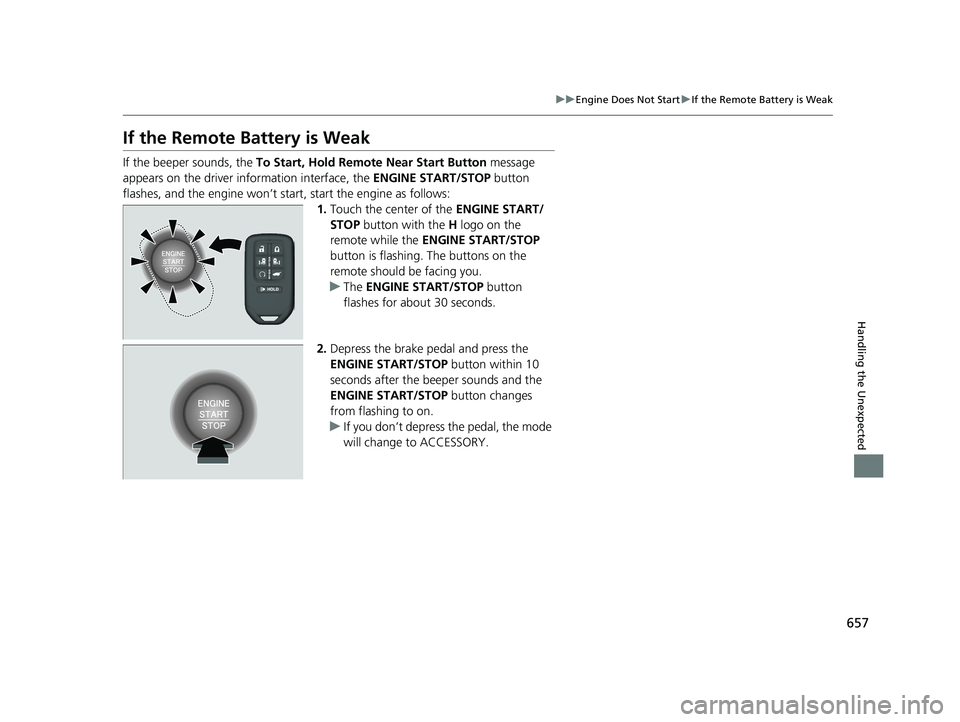
If the beeper sounds, the To Start, Hold Remote Near Start Button message
appears on the driver information interface, the ENGINE START/STOP button
flashes, and the engine won’t start, start the engine as follows:
1.Touch the center of the ENGINE START/
STOP button with the H logo on the
remote while the ENGINE START/STOP
button is flashing. The buttons on the
remote should be facing you.
u The ENGINE START/STOP button
flashes for about 30 seconds.
2. Depress the brake pedal and press the
ENGINE START/STOP button within 10
seconds after the beeper sounds and the
ENGINE START/STOP button changes
from flashing to on.
u If you don’t depress the pedal, the mode
will change to ACCESSORY.
23 US ODYSSEY-31THR6500.book 657 ページ 2022年1月24日 月曜日 午前11時35分
Page 701 of 707
699
Index
Adding to the Reserve Tank .................... 605
Overheating ............................................ 661
Temperature Gauge ................................ 127
Engine Oil ................................................. 600
Adding ................................................... 602
Checking ................................................ 601
Displaying Maintenance Minder Information ........................................... 592
Engine Oil Low Warning ......................... 663
Recommended Engine Oil ....................... 600
Engine Oil Low Warning ......................... 663
ENGINE START/STOP Button .................... 188
Exhaust Gas Hazard (Carbon Monoxide) .. 85
Exterior Care (Cleaning) .......................... 639
Exterior Mirrors ........................................ 210
F
Features.................................................... 257
File Manager ............................................ 285
Filters
Dust and Pollen....................................... 635
Oil .......................................................... 603
Flat Tire ..................................................... 647
Floor Mats ................................................ 637
Fluids Automatic Transmission .......................... 607
Brake ...................................................... 608
Engine Coolant ....................................... 605
Windshield Washer ................................. 609
FM/AM Radio ........................................... 297 Fog Light Indicator
..................................... 98
Folding Down the Rear Seats .......... 216, 221
Foot Brake ................................................. 564
Front Airbags (SRS) ..................................... 52
Front Seat Heaters .................................... 247
Front Seat Heaters and Seat Ventilation .............................................. 248
Front Seats ................................................ 212
Adjusting ................................................. 212
Fuel ...................................................... 27, 582
Economy ................................................. 585
Gauge ..................................................... 127
Instant Fuel Economy ............................... 133
Low Fuel Indicator ..................................... 94
Range ...................................................... 133
Recommendation .................................... 582
Refueling ................................................. 582
Fuel Economy ............................................ 585
Fuel Fill Door ....................................... 27, 583
Fuses .......................................................... 669
Inspecting and Changing ......................... 675
Locations ................................. 669, 671, 674
G
Gasoline (Fuel) Economy ................................................. 585
Gauge ..................................................... 127
Information ............................................. 582
Instant Fuel Economy ............................... 133
Low Fuel Indicator ..................................... 94 Refueling................................................. 582
Gauges ...................................................... 127
Gear Position Indicator .............................. 92
Glass (care) ........................................ 636, 641
Glove Box .................................................. 231
Grocery Bag Hooks ................................... 238
H
Handling the Unexpected ........................ 645
HandsFreeLink ® (HFL) ............................... 435
Automatic Import of Cellular Phonebook and Call History ..................................... 444
Automatic Transferring............................ 443
Displaying Messages................................ 454
Favorite Contacts .................................... 445
HFL Buttons............................................. 435
HFL Menus .............................................. 438
HFL Status Display ................................... 437
In Case of Emergency .............................. 458
Limitations for Manual Operation ............ 437
Making a Call .......................................... 447
Options During a Call .............................. 450
Phone Setup............................................ 440
Receiving a Call ....................................... 450
Receiving a Text Message ........................ 452
Ring Tone................................................ 443
Selecting a Phone .................................... 453
To Set Up a Text Message Options .......... 451
Hazard Warning Button .............................. 6
HD Radio
TM............................................... 299
23 US ODYSSEY-31THR6500.book 699 ページ 2022年1月24日 月曜日 午前11時35分
Page 705 of 707
703
Index
Seats.......................................................... 212
Adjusting ................................................ 212
Front Seats.............................................. 212
Seat Heaters ................................... 247, 248
Second Row Seats................................... 215
Third Row Seats ...................................... 220
Second Row Seats Adjusting ................................................ 215
Security System ........................................ 181
Immobilizer System Indicator..................... 98
Security System Alarm Indicator ................ 98
Select Buttons .................................... 24, 484
Operation ............................................... 486
Selecting a Child Seat ................................ 71
Settings Arrange Apps ......................................... 141
Show Tachometer ................................... 142
Shifting (Transmission) ............................ 484
Shoulder Anchor ........................................ 44
Show Tachometer .................................... 142
Show/Hide Apps ....................................... 140
Side Airbags ............................................... 60
Side Curtain Airbags .................................. 62
Siri Eyes Free ............................................. 331
SiriusXM ® Radio ....................................... 300
Sliding Doors ............................................ 172
Power Sliding Doors ................................ 174
Snow Mode Indicator ................................ 99
Snow Tires ................................................ 629
Social Playlist ............................................ 322
Spare Tire ......................................... 647, 685 Spark Plugs
................................................ 684
Specifications ............................................ 684
Specified Fuel .................................... 582, 684
Speedometer ............................................ 128
SRS Airbags (Airbags) ................................. 52
Starting the Engine .................................. 476
Does Not Start ......................................... 656
If the Battery Is Dead ............................... 659
Steering Wheel Adjusting ................................................. 208
Stopping .................................................... 569
Summer Tires ............................................ 629
Sunglasses Holder ..................................... 239
Supplemental Restraint System (SRS) ........ 52
Switches (Around the Steering Wheel) ............................................. 6, 7, 188
System Message Indicator .......................... 99
System Updates ........................................ 279
T
Tachometer............................................... 128
Tailgate ..................................................... 161
Unable to Open ....................................... 678
Temperature Gauge ..................................................... 127
Outside Temperature Display ................... 129
Temperature Gauge ................................. 127
Temperature Sensor ......................... 129, 256
Third Row Seat Access .............................. 216
Time (Adjusting) ....................................... 144 Tire Pressure
............................................. 137
Tire Pressure Monitoring System (TPMS)
Indicator............................................ 97, 667
Tires ........................................................... 621
Air Pressure ..................................... 622, 685
Checking and Maintaining ...................... 621
Inspection ............................................... 621
Labeling .................................................. 622
Puncture (Flat Tire) .................................. 647
Regulations ............................................. 624
Rotation .................................................. 628
Spare Tire ........................................ 647, 685
Summer .................................................. 629
Tire Chains .............................................. 629
Wear Indicators ....................................... 626
Winter..................................................... 629
Tools .......................................................... 646
Towing a Trailer ....................................... 470
Equipment and Accessories ..................... 471
Load Limits .............................................. 470
Towing Your Vehicle ................................ 475
Emergency .............................................. 676
TPMS (Tire Pressure Monitoring System) Indicator............................................ 97, 667
Traffic Sign Recognition System .............. 553
Transmission ............................................. 484
Automatic ............................................... 483
Fluid ........................................................ 607
Gear Position Indicator .............................. 92
Number................................................... 686
23 US ODYSSEY-31THR6500.book 703 ページ 2022年1月24日 月曜日 午前11時35分