change time HONDA ODYSSEY 2023 Owner's Manual
[x] Cancel search | Manufacturer: HONDA, Model Year: 2023, Model line: ODYSSEY, Model: HONDA ODYSSEY 2023Pages: 707, PDF Size: 23.9 MB
Page 373 of 707
371
uuBlu-ray/DVD Rear Entertainment System*uVideo Accessibility
Features
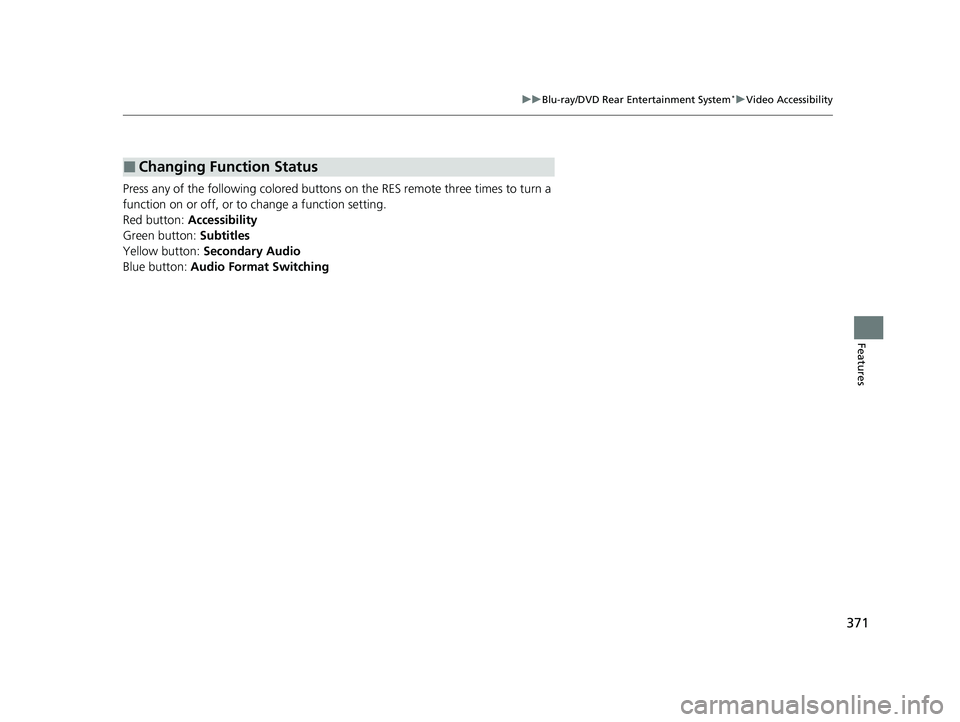
Press any of the following co lored buttons on the RES remote three times to turn a
function on or off, or to change a function setting.
Red button: Accessibility
Green button: Subtitles
Yellow button: Secondary Audio
Blue button: Audio Format Switching
■Changing Function Status
23 US ODYSSEY-31THR6500.book 371 ページ 2022年1月24日 月曜日 午前11時35分
Page 422 of 707
420
uuCustomized Features u
Features
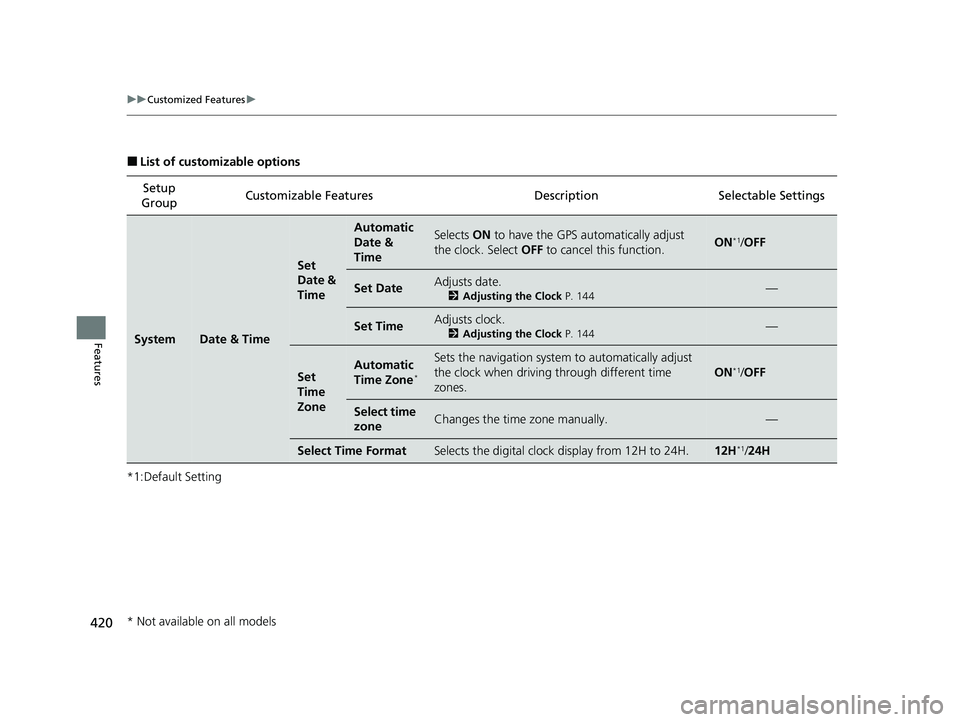
■List of customizable options
*1:Default Setting Setup
Group Customizable Features Description Selectable Settings
SystemDate & Time
Set
Date &
Time
Automatic
Date &
TimeSelects
ON to have the GPS automatically adjust
the clock. Select OFF to cancel this function.ON*1/OFF
Set DateAdjusts date.
2 Adjusting the Clock P. 144—
Set TimeAdjusts clock.
2Adjusting the Clock P. 144—
Set
Time
ZoneAutomatic
Time Zone*
Sets the navigation system to automatically adjust
the clock when driving through different time
zones.
ON*1/ OFF
Select time
zoneChanges the time zone manually.—
Select Time FormatSelects the digital clock display from 12H to 24H.12H*1/24H
* Not available on all models
23 US ODYSSEY-31THR6500.book 420 ページ 2022年1月24日 月曜日 午前11時35分
Page 427 of 707
425
uuCustomized Features u
Continued
Features
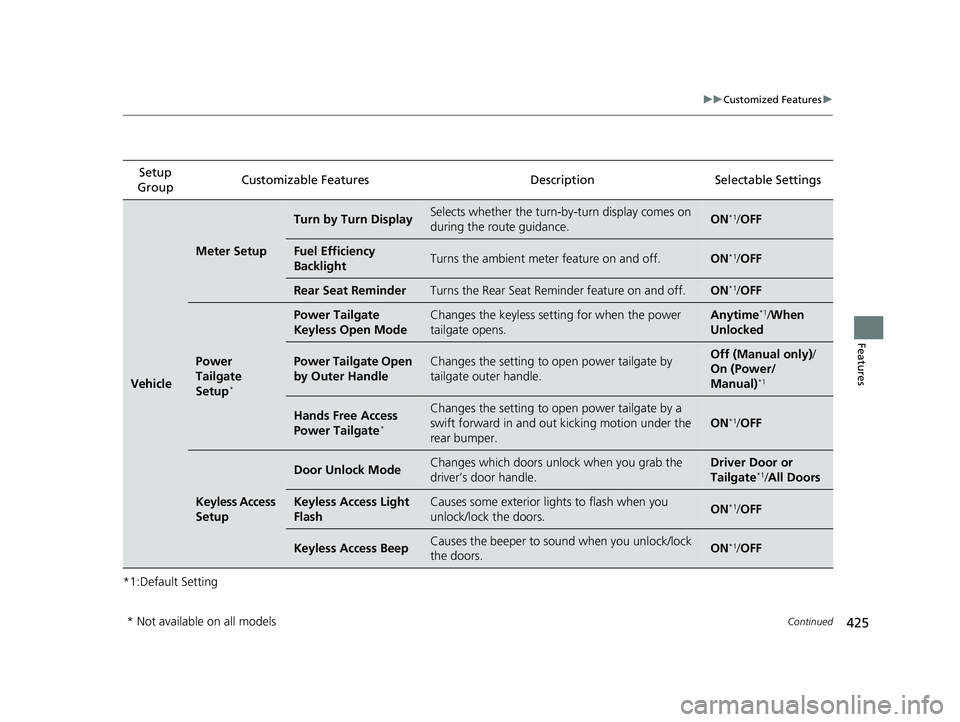
*1:Default SettingSetup
Group Customizable Features Description Selectable Settings
Vehicle
Meter Setup
Turn by Turn DisplaySelects whether the turn-b
y-turn display comes on
during the route guidance.ON*1/ OFF
Fuel Efficiency
BacklightTurns the ambient meter feature on and off.ON*1/OFF
Rear Seat ReminderTurns the Rear Seat Reminder feature on and off.ON*1/OFF
Power
Tailgate
Setup
*
Power Tailgate
Keyless Open ModeChanges the keyless setting for when the power
tailgate opens.Anytime*1/When
Unlocked
Power Tailgate Open
by Outer HandleChanges the setting to open power tailgate by
tailgate outer handle.Off (Manual only) /
On (Power/
Manual)
*1
Hands Free Access
Power Tailgate*
Changes the setting to open power tailgate by a
swift forward in and out kicking motion under the
rear bumper.
ON*1/ OFF
Keyless Access
Setup
Door Unlock ModeChanges which doors unlock when you grab the
driver’s door handle.Driver Door or
Tailgate*1/All Doors
Keyless Access Light
FlashCauses some exterior lights to flash when you
unlock/lock the doors.ON*1/OFF
Keyless Access BeepCauses the beeper to so und when you unlock/lock
the doors.ON*1/ OFF
* Not available on all models
23 US ODYSSEY-31THR6500.book 425 ページ 2022年1月24日 月曜日 午前11時35分
Page 429 of 707
427
uuCustomized Features u
Continued
Features
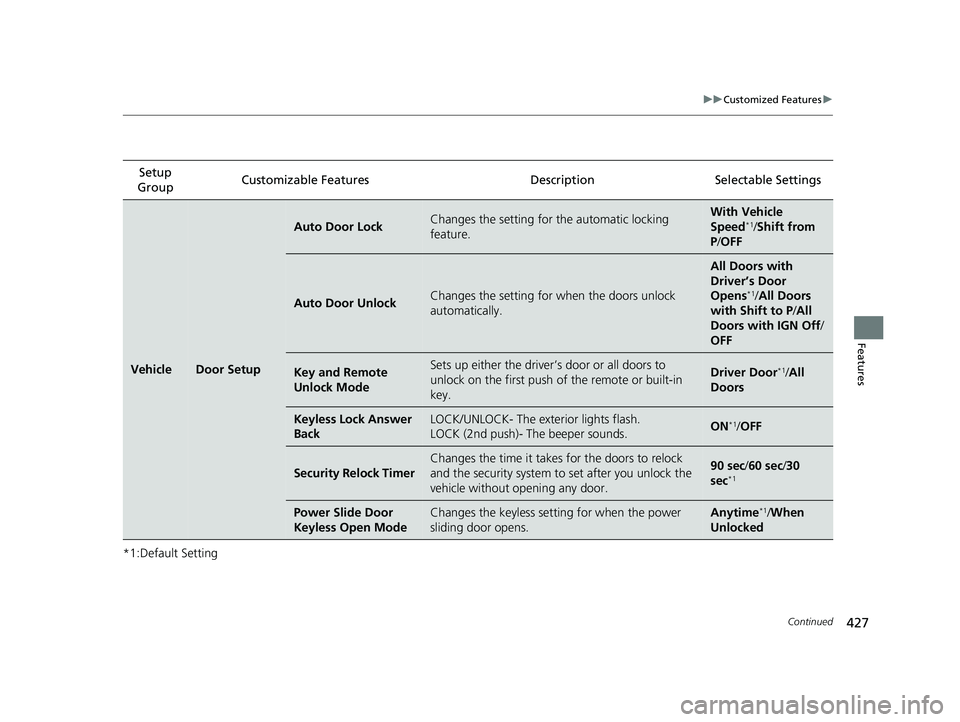
*1:Default SettingSetup
Group Customizable Features Description Selectable Settings
VehicleDoor Setup
Auto Door LockChanges the setting for
the automatic locking
feature.With Ve hicle
Speed*1/ Shift from
P /OFF
Auto Door UnlockChanges the setting for when the doors unlock
automatically.
All Doors with
Driver’s Door
Opens
*1/ All Doors
with Shift to P /All
Doors with IGN Off /
OFF
Key and Remote
Unlock ModeSets up either the driver’s door or all doors to
unlock on the first push of the remote or built-in
key.Driver Door*1/ All
Doors
Keyless Lock Answer
BackLOCK/UNLOCK- The exterior lights flash.
LOCK (2nd push)- The beeper sounds.ON*1/ OFF
Security Relock Timer
Changes the time it takes for the doors to relock
and the security system to set after you unlock the
vehicle without opening any door.90 sec/ 60 sec/30
sec*1
Power Slide Door
Keyless Open ModeChanges the keyless setting for when the power
sliding door opens.Anytime*1/ When
Unlocked
23 US ODYSSEY-31THR6500.book 427 ページ 2022年1月24日 月曜日 午前11時35分
Page 430 of 707
428
uuCustomized Features u
Features
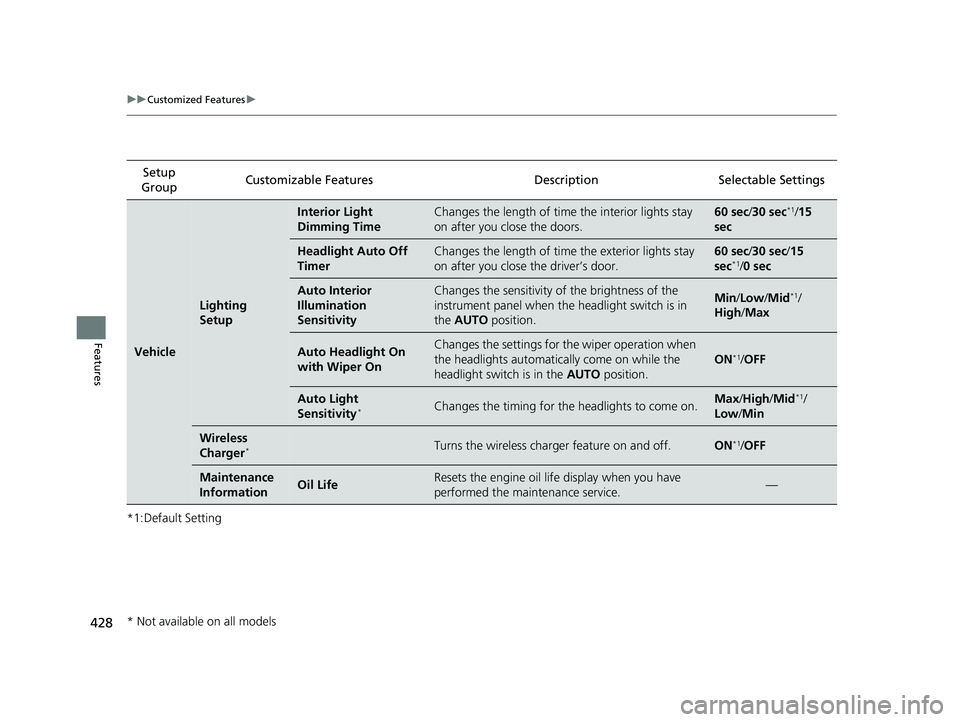
*1:Default SettingSetup
Group Customizable Features Description Selectable Settings
Vehicle
Lighting
Setup
Interior Light
Dimming TimeChanges the length of time the interior lights stay
on after you close the doors.60 sec/
30 sec*1/15
sec
Headlight Auto Off
TimerChanges the length of time the exterior lights stay
on after you close the driver’s door.60 sec/ 30 sec/ 15
sec*1/ 0 sec
Auto Interior
Illumination
SensitivityChanges the sensitivity of the brightness of the
instrument panel when the headlight switch is in
the AUTO position.Min/Low/Mid*1/
High /Max
Auto Headlight On
with Wiper OnChanges the settings for th e wiper operation when
the headlights automati cally come on while the
headlight switch is in the AUTO position.
ON*1/OFF
Auto Light
Sensitivity*Changes the timing for the headlights to come on.Max /High /Mid*1/
Low /Min
Wireless
Charger*Turns the wireless charger feature on and off.ON*1/OFF
Maintenance
InformationOil LifeResets the engine oil life display when you have
performed the maintenance service.—
* Not available on all models
23 US ODYSSEY-31THR6500.book 428 ページ 2022年1月24日 月曜日 午前11時35分
Page 455 of 707
Continued453
uuBluetooth ® HandsFreeLink ®u HFL Menus
Features
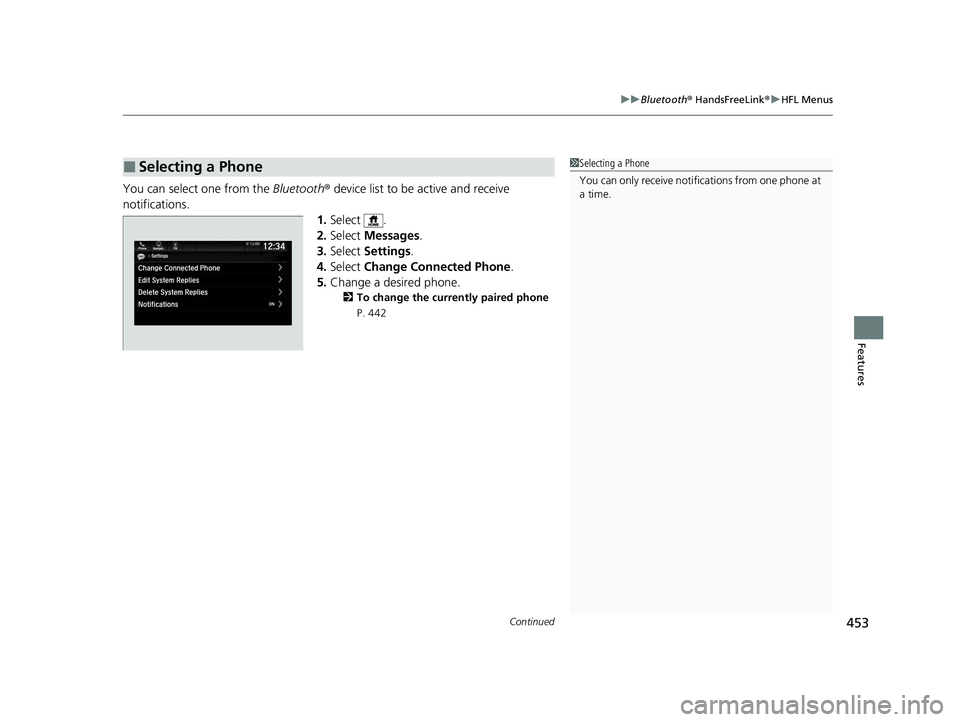
You can select one from the Bluetooth® device list to be active and receive
notifications. 1.Select .
2. Select Messages.
3. Select Settings .
4. Select Change Connected Phone .
5. Change a desired phone.
2 To change the currently paired phone
P. 442
■Selecting a Phone1 Selecting a Phone
You can only receive notifications from one phone at
a time.
23 US ODYSSEY-31THR6500.book 453 ページ 2022年1月24日 月曜日 午前11時35分
Page 460 of 707
uuBluetooth ® HandsFreeLink ®u HFL Menus
458
Features
■Automatic collision notification
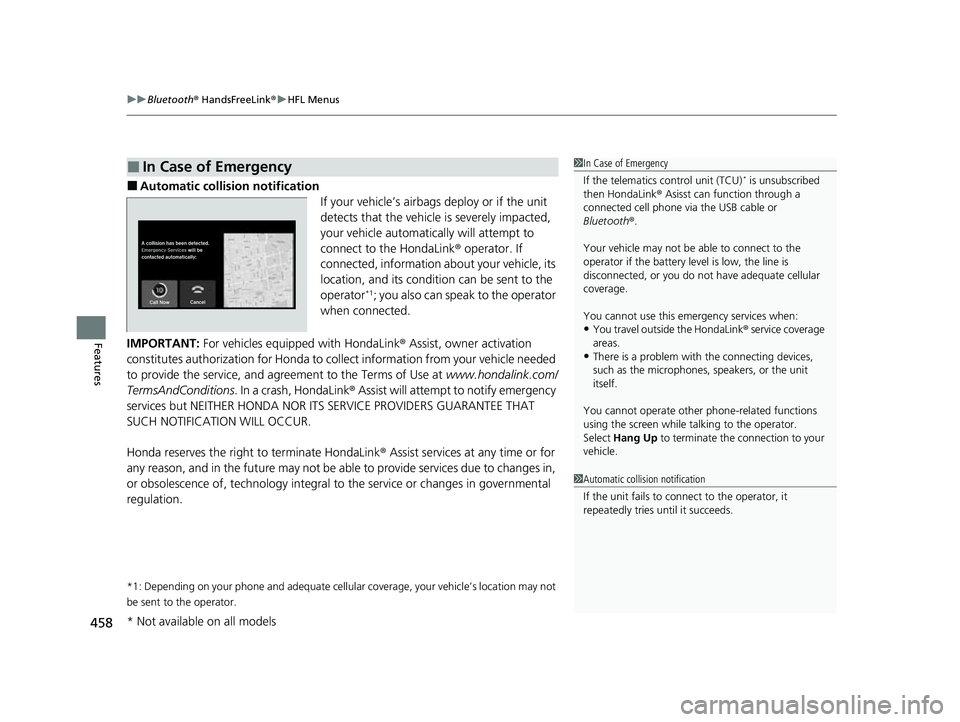
If your vehicle’s airbags deploy or if the unit
detects that the vehicle is severely impacted,
your vehicle automatically will attempt to
connect to the HondaLink® operator. If
connected, information about your vehicle, its
location, and its condition can be sent to the
operator
*1; you also can speak to the operator
when connected.
IMPORTANT: For vehicles equipp ed with HondaLink® Assist, owner activation
constitutes authorization for Honda to co llect information from your vehicle needed
to provide the service, and agr eement to the Terms of Use at www.hondalink.com/
TermsAndConditions . In a crash, HondaLink ® Assist will attempt to notify emergency
services but NEITHER HONDA NOR ITS SERVICE PROVIDERS GUARANTEE THAT
SUCH NOTIFICATION WILL OCCUR.
Honda reserves the right to terminate HondaLink ® Assist services at any time or for
any reason, and in the future may not be ab le to provide services due to changes in,
or obsolescence of, technology integral to the service or changes in governmental
regulation.
*1: Depending on your phone and ad equate cellular coverage, your vehicle’s location may not
be sent to the operator.
■In Case of Emergency1 In Case of Emergency
If the telematics control unit (TCU)
* is unsubscribed
then HondaLink ® Asisst can function through a
connected cell phone via the USB cable or
Bluetooth ®.
Your vehicle may not be able to connect to the
operator if the battery level is low, the line is
disconnected, or you do not have adequate cellular
coverage.
You cannot use this emergency services when:
•You travel outside the HondaLink ® service coverage
areas.
•There is a problem with the connecting devices,
such as the microphones, speakers, or the unit
itself.
You cannot operate othe r phone-related functions
using the screen while talking to the operator.
Select Hang Up to terminate the connection to your
vehicle.
1 Automatic collision notification
If the unit fails to connect to the operator, it
repeatedly tries until it succeeds.
* Not available on all models
23 US ODYSSEY-31THR6500.book 458 ページ 2022年1月24日 月曜日 午前11時35分
Page 462 of 707
460
Features
CabinWatch®*
Your audio system allows you to monitor a view of the second and third row seat’s
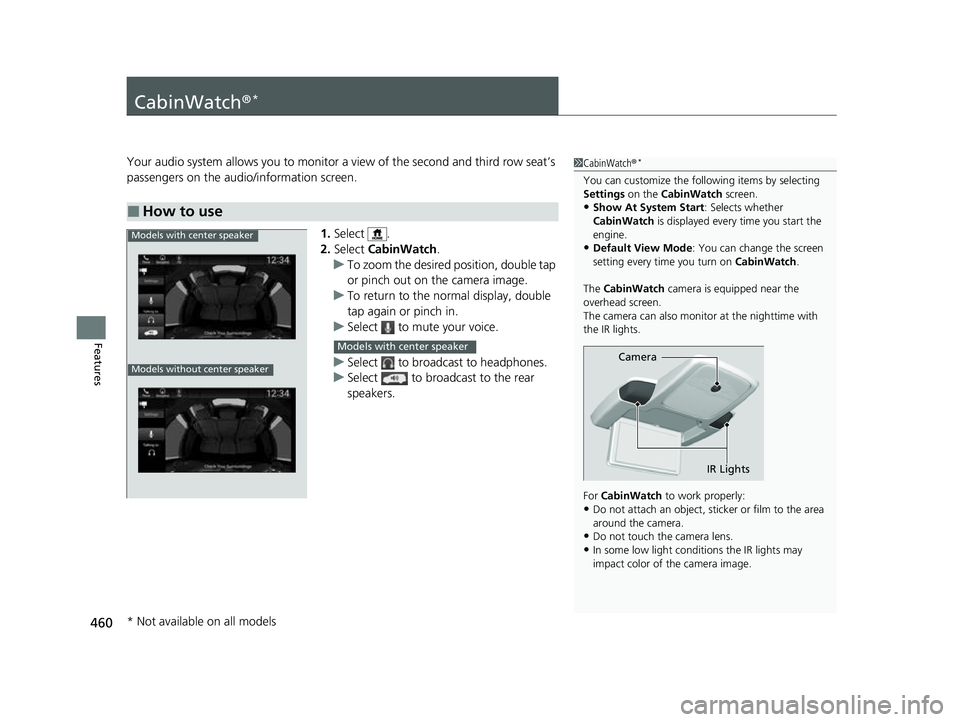
passengers on the audio/information screen.
1.Select .
2. Select CabinWatch .
u To zoom the desired position, double tap
or pinch out on the camera image.
u To return to the normal display, double
tap again or pinch in.
u Select to mute your voice.
u Select to broadcast to headphones.
u Select to broadcast to the rear
speakers.
■How to use
1CabinWatch ®*
You can customize the foll owing items by selecting
Settings on the CabinWatch screen.
•Show At System Start : Selects whether
CabinWatch is displayed every time you start the
engine.
•Default View Mode : You can change the screen
setting every time you turn on CabinWatch.
The CabinWatch camera is equipped near the
overhead screen.
The camera can also monitor at the nighttime with
the IR lights.
For CabinWatch to work properly:
•Do not attach an object, sticker or film to the area
around the camera.
•Do not touch the camera lens.
•In some low light conditions the IR lights may
impact color of the camera image.
Camera
IR Lights
Models with center speaker
Models without center speaker
Models with center speaker
* Not available on all models
23 US ODYSSEY-31THR6500.book 460 ページ 2022年1月24日 月曜日 午前11時35分
Page 486 of 707
484
uuWhen Driving uShifting
Driving
Shifting
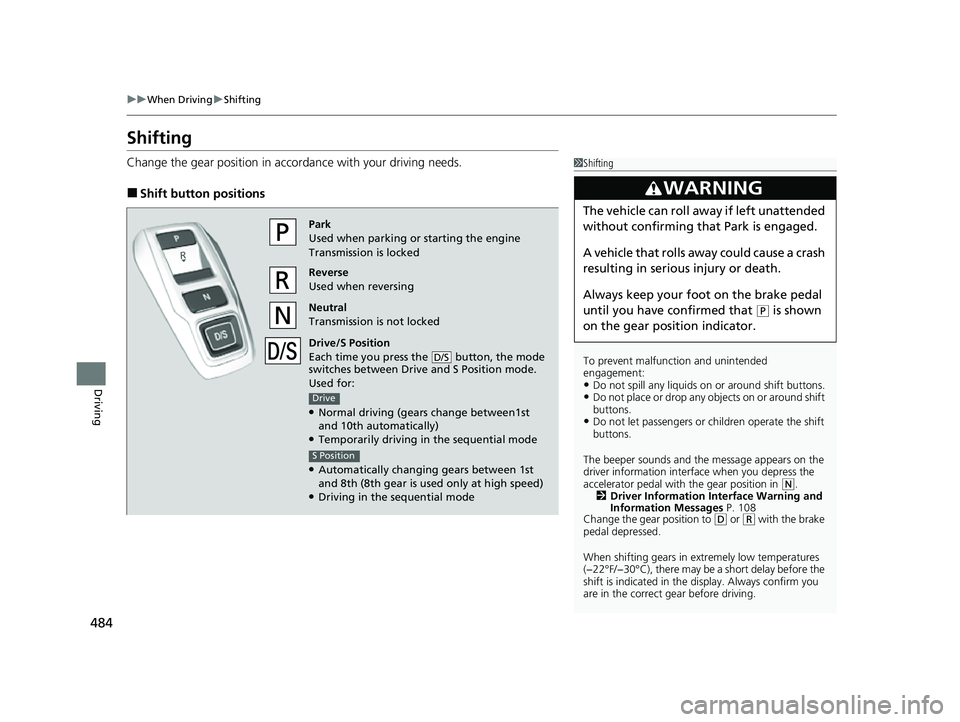
Change the gear position in acco rdance with your driving needs.
■Shift button positions
1Shifting
To prevent malfunc tion and unintended
engagement:
•Do not spill any liquids on or around shift buttons.•Do not place or drop any objects on or around shift
buttons.
•Do not let passengers or ch ildren operate the shift
buttons.
The beeper sounds and the message appears on the
driver information interf ace when you depress the
accelerator pedal with the gear position in
( N.
2 Driver Information Interface Warning and
Information Messages P. 108
Change the gear position to
( D or (R with the brake
pedal depressed.
When shifting gears in extremely low temperatures
(−22°F/−30°C), there may be a short delay before the
shift is indicated in the di splay. Always confirm you
are in the correct gear before driving.
3WARNING
The vehicle can roll aw ay if left unattended
without confirming that Park is engaged.
A vehicle that rolls away could cause a crash
resulting in seriou s injury or death.
Always keep your foot on the brake pedal
until you have confirmed that
( P is shown
on the gear position indicator.
Park
Used when parking or starting the engine
Transmission is locked
Reverse
Used when reversing
Neutral
Transmission is not locked
Drive/S Position
Each time you press the button, the mode
switches between Drive and S Position mode.
Used for:
●Normal driving (gears change between1st
and 10th automatically)
●Temporarily driving in the sequential mode
●Automatically changing gears between 1st
and 8th (8th gear is used only at high speed)
●Driving in the sequential mode
D/S
Drive
S Position
23 US ODYSSEY-31THR6500.book 484 ページ 2022年1月24日 月曜日 午前11時35分
Page 488 of 707
uuWhen Driving uShifting
486
Driving
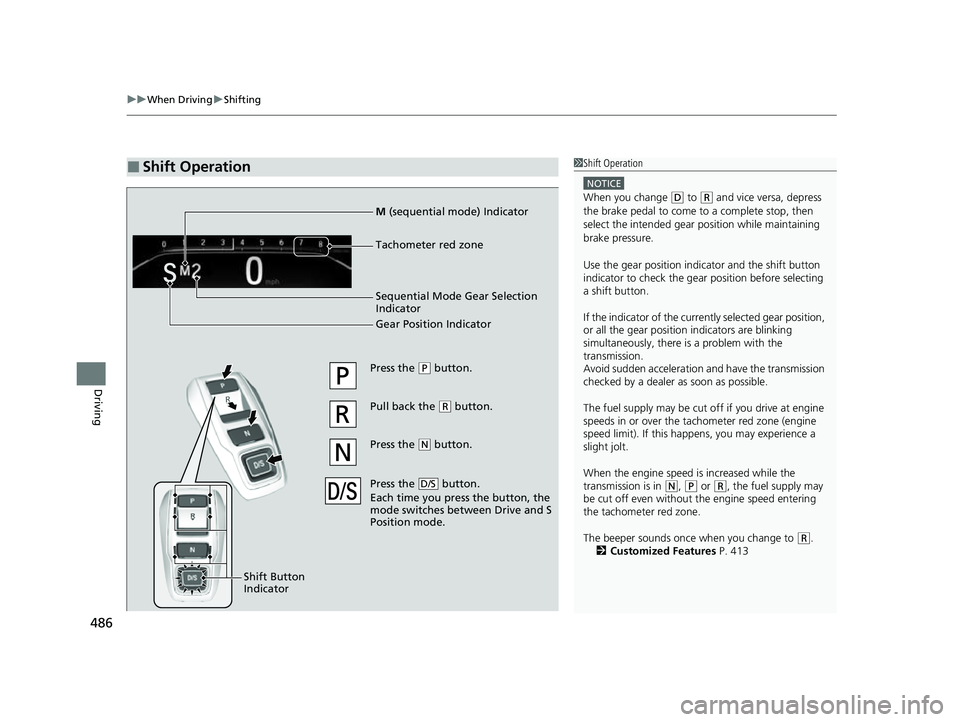
■Shift Operation1Shift Operation
NOTICE
When you change (D to (R and vice versa, depress
the brake pedal to come to a complete stop, then
select the intended gear position while maintaining
brake pressure.
Use the gear position indicator and the shift button
indicator to check the gear position before selecting
a shift button.
If the indicator of the currently selected gear position,
or all the gear position indicators are blinking
simultaneously, there is a problem with the
transmission.
Avoid sudden acceleration and have the transmission
checked by a dealer as soon as possible.
The fuel supply may be cut of f if you drive at engine
speeds in or over the ta chometer red zone (engine
speed limit). If this happe ns, you may experience a
slight jolt.
When the engine speed is increased while the
transmission is in
( N, (P or (R, the fuel supply may
be cut off even without the engine speed entering
the tachometer red zone.
The beeper sounds once when you change to
( R.
2 Customized Features P. 413
Press the (P button.
Pull back the
( R button.
Press the
( N button.
Press the button.
Each time you pre ss the button, the
mode switches between Drive and S
Position mode.
D/S
Shift Button
Indicator
M (sequential mode) Indicator
Tachometer red zone
Sequential Mode Gear Selection
Indicator
Gear Position Indicator
23 US ODYSSEY-31THR6500.book 486 ページ 2022年1月24日 月曜日 午前11時35分