flat tire HONDA ODYSSEY 2023 Owner's Manual
[x] Cancel search | Manufacturer: HONDA, Model Year: 2023, Model line: ODYSSEY, Model: HONDA ODYSSEY 2023Pages: 707, PDF Size: 23.9 MB
Page 650 of 707
648
uuIf a Tire Goes Flat uChanging a Flat Tire
Handling the Unexpected
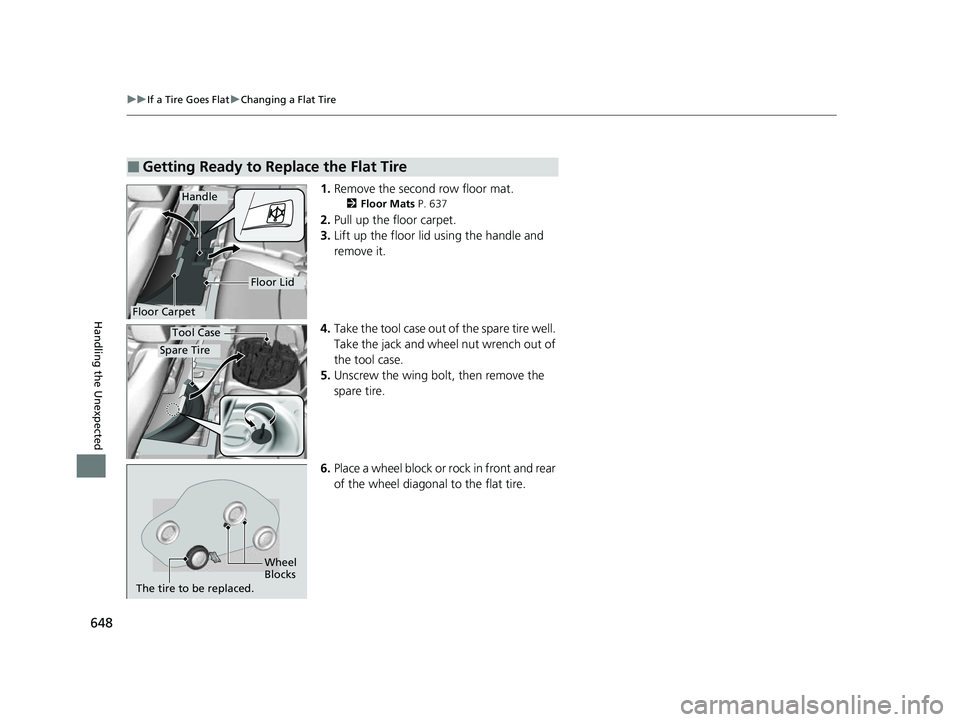
1. Remove the second row floor mat.
2 Floor Mats P. 637
2.Pull up the floor carpet.
3. Lift up the floor lid using the handle and
remove it.
4. Take the tool case out of the spare tire well.
Take the jack and wheel nut wrench out of
the tool case.
5. Unscrew the wing bolt, then remove the
spare tire.
6. Place a wheel block or rock in front and rear
of the wheel diagonal to the flat tire.
■Getting Ready to Replace the Flat Tire
Floor Carpet
Handle
Floor Lid
Spare Tire
Tool Case
Wheel
Blocks
The tire to be replaced.
23 US ODYSSEY-31THR6500.book 648 ページ 2022年1月24日 月曜日 午前11時35分
Page 651 of 707
649
uuIf a Tire Goes Flat uChanging a Flat Tire
Continued
Handling the Unexpected
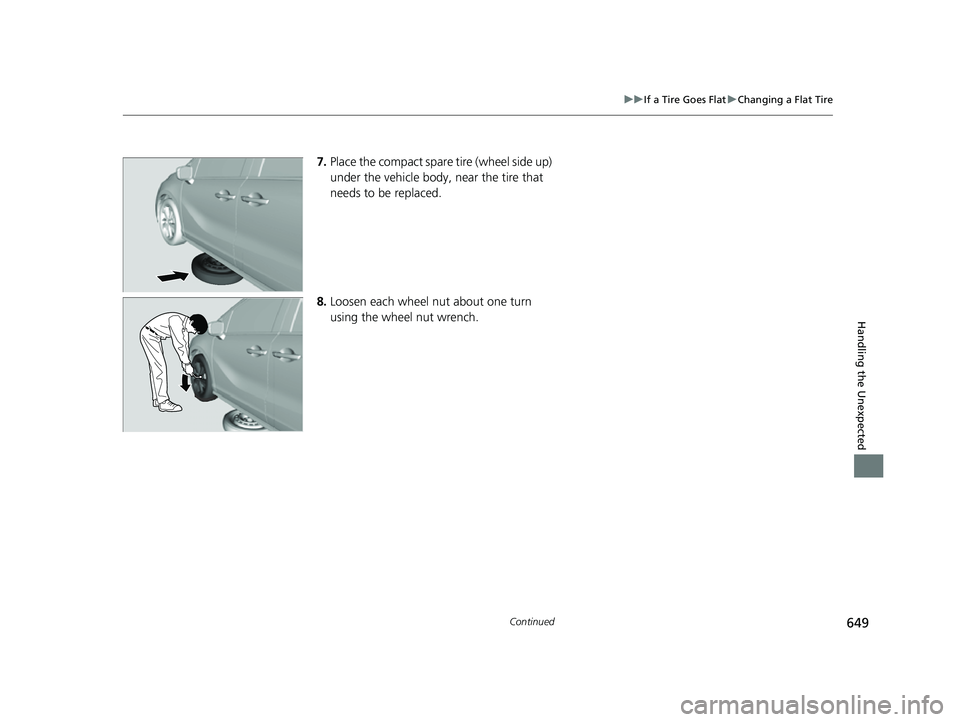
7. Place the compact spare tire (wheel side up)
under the vehicle body, near the tire that
needs to be replaced.
8. Loosen each wheel nut about one turn
using the wheel nut wrench.
23 US ODYSSEY-31THR6500.book 649 ページ 2022年1月24日 月曜日 午前11時35分
Page 652 of 707
uuIf a Tire Goes Flat uChanging a Flat Tire
650
Handling the Unexpected
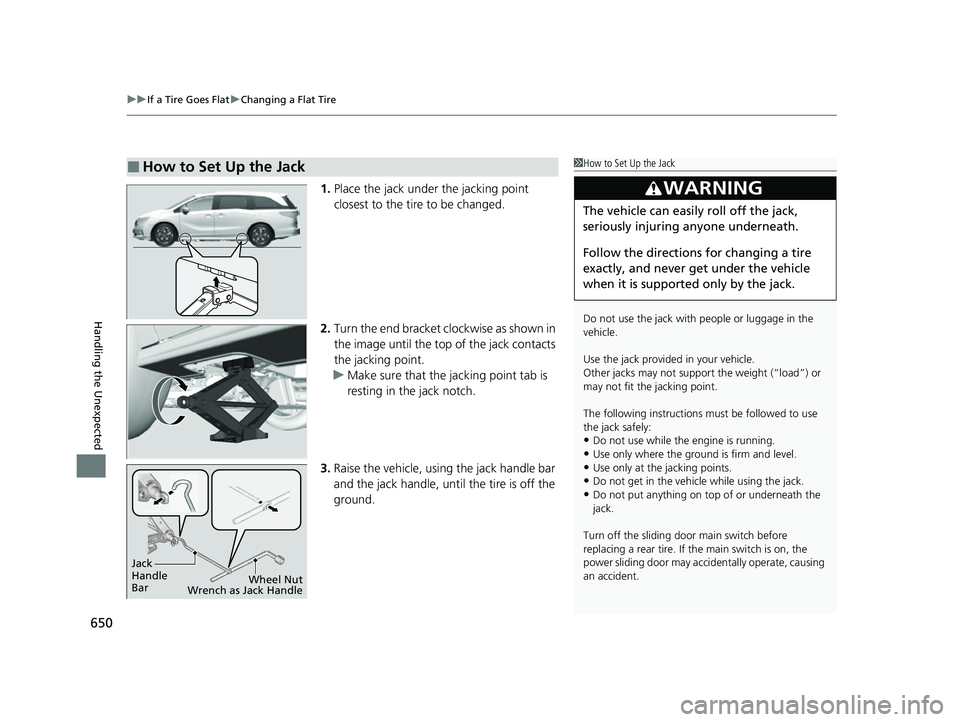
1. Place the jack under the jacking point
closest to the tire to be changed.
2. Turn the end bracket cl ockwise as shown in
the image until the top of the jack contacts
the jacking point.
u Make sure that the jacking point tab is
resting in the jack notch.
3. Raise the vehicle, using the jack handle bar
and the jack handle, until the tire is off the
ground.
■How to Set Up the Jack1How to Set Up the Jack
Do not use the jack with people or luggage in the
vehicle.
Use the jack provided in your vehicle.
Other jacks may not support the weight (“load”) or
may not fit the jacking point.
The following instructions must be followed to use
the jack safely:
•Do not use while the engine is running.
•Use only where the ground is firm and level.
•Use only at the jacking points.•Do not get in the vehicl e while using the jack.
•Do not put anything on top of or underneath the
jack.
Turn off the sliding door main switch before
replacing a rear tire. If the main switch is on, the
power sliding door may acci dentally operate, causing
an accident.
3WARNING
The vehicle can easily roll off the jack,
seriously injuring anyone underneath.
Follow the directions for changing a tire
exactly, and never get under the vehicle
when it is supported only by the jack.
Jack
Handle
Bar Wheel Nut
Wrench as Jack Handle
23 US ODYSSEY-31THR6500.book 650 ページ 2022年1月24日 月曜日 午前11時35分
Page 653 of 707
Continued651
uuIf a Tire Goes Flat uChanging a Flat Tire
Handling the Unexpected
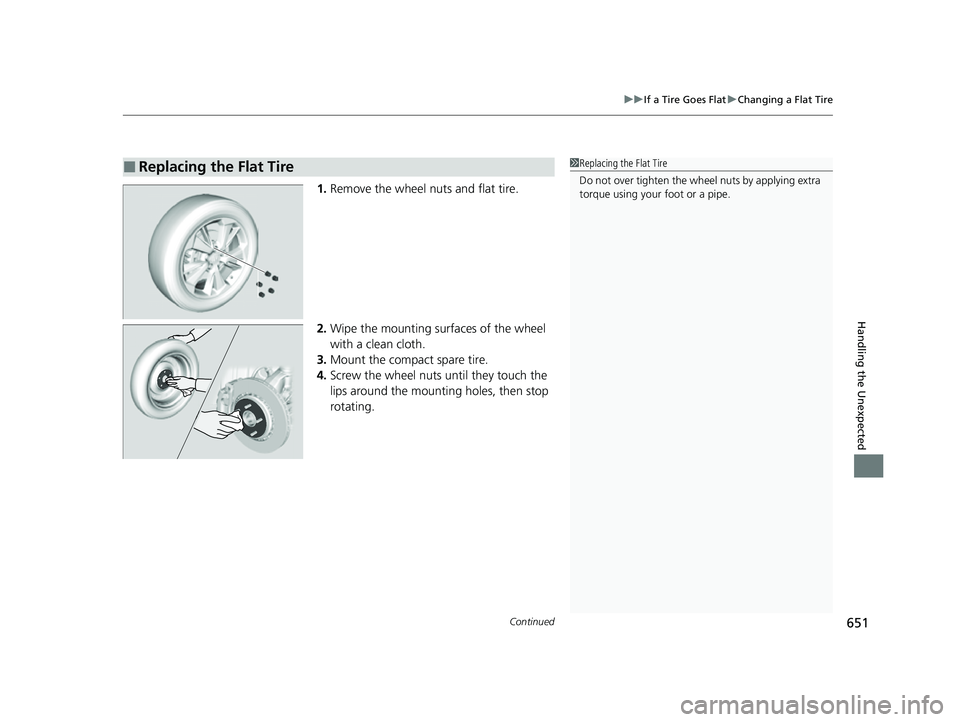
1. Remove the wheel nuts and flat tire.
2. Wipe the mounting surfaces of the wheel
with a clean cloth.
3. Mount the compact spare tire.
4. Screw the wheel nuts until they touch the
lips around the mounting holes, then stop
rotating.
■Replacing the Flat Tire1Replacing the Flat Tire
Do not over tighten the wheel nuts by applying extra
torque using your foot or a pipe.
23 US ODYSSEY-31THR6500.book 651 ページ 2022年1月24日 月曜日 午前11時35分
Page 654 of 707
uuIf a Tire Goes Flat uChanging a Flat Tire
652
Handling the Unexpected
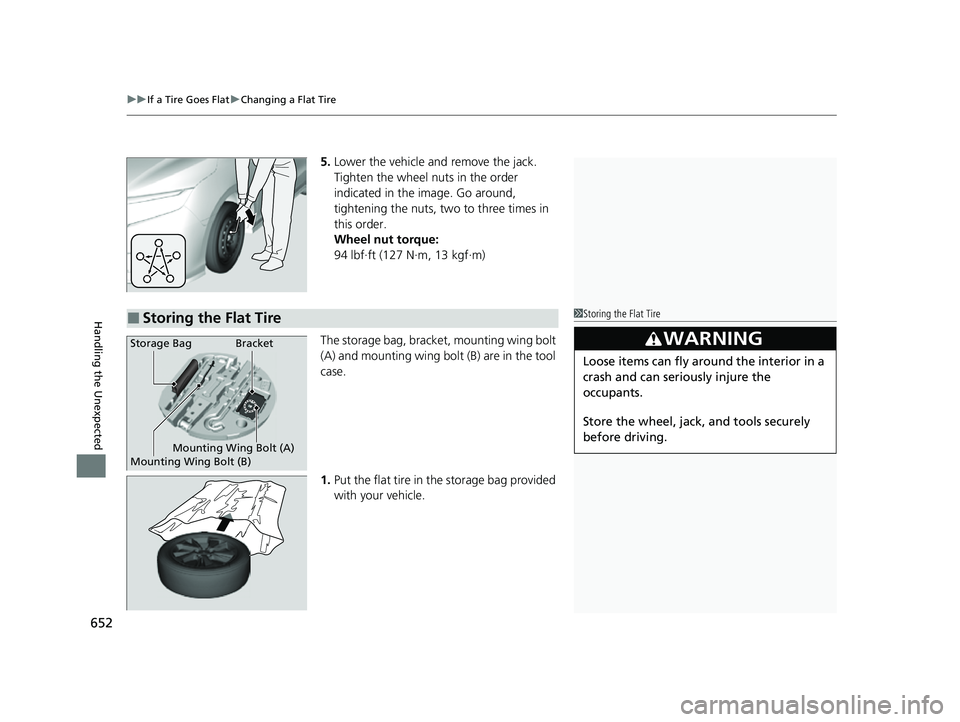
5. Lower the vehicle and remove the jack.
Tighten the wheel nuts in the order
indicated in the image. Go around,
tightening the nuts, two to three times in
this order.
Wheel nut torque:
94 lbf∙ft (127 N∙m, 13 kgf∙m)
The storage bag, bracket, mounting wing bolt
(A) and mounting wing bolt (B) are in the tool
case.
1. Put the flat tire in the storage bag provided
with your vehicle.
■Storing the Flat Tire1Storing the Flat Tire
3WARNING
Loose items can fly around the interior in a
crash and can seriously injure the
occupants.
Store the wheel, jack, and tools securely
before driving.
Bracket
Mounting Wing Bolt (A)
Mounting Wing Bolt (B)Storage Bag
23 US ODYSSEY-31THR6500.book 652 ページ 2022年1月24日 月曜日 午前11時35分
Page 655 of 707
653
uuIf a Tire Goes Flat uChanging a Flat Tire
Continued
Handling the Unexpected
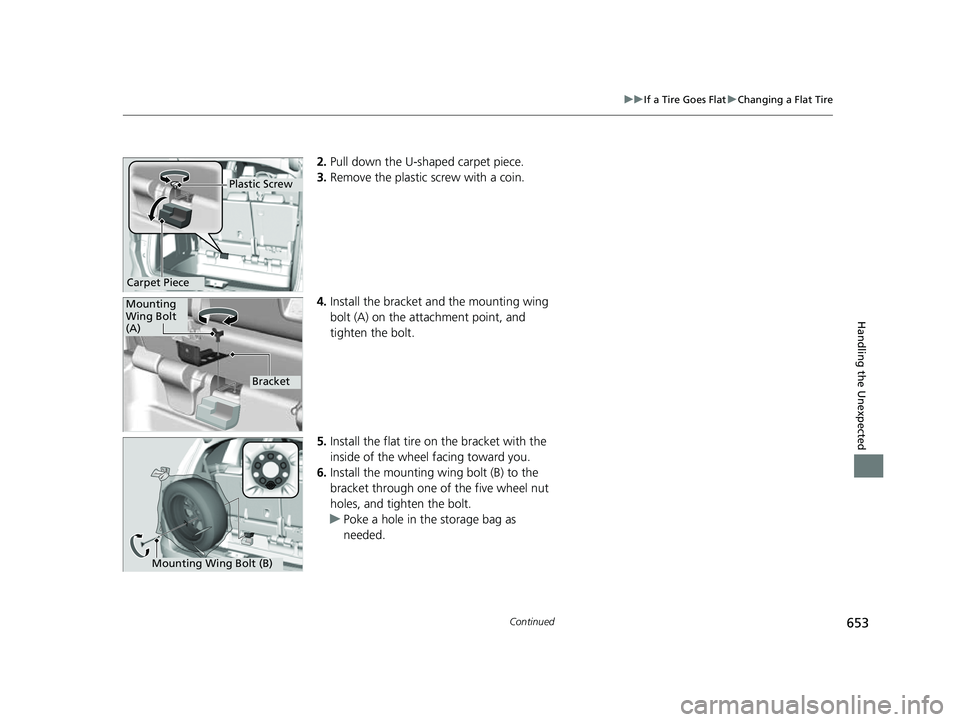
2. Pull down the U-sh aped carpet piece.
3. Remove the plastic screw with a coin.
4. Install the bracket an d the mounting wing
bolt (A) on the attachment point, and
tighten the bolt.
5. Install the flat tire on the bracket with the
inside of the wheel facing toward you.
6. Install the mounting wing bolt (B) to the
bracket through one of the five wheel nut
holes, and tighten the bolt.
u Poke a hole in the storage bag as
needed.
Plastic Screw
Carpet Piece
Mounting
Wing Bolt
(A)
Bracket
Mounting Wing Bolt (B)
23 US ODYSSEY-31THR6500.book 653 ページ 2022年1月24日 月曜日 午前11時35分
Page 656 of 707
654
uuIf a Tire Goes Flat uChanging a Flat Tire
Handling the Unexpected
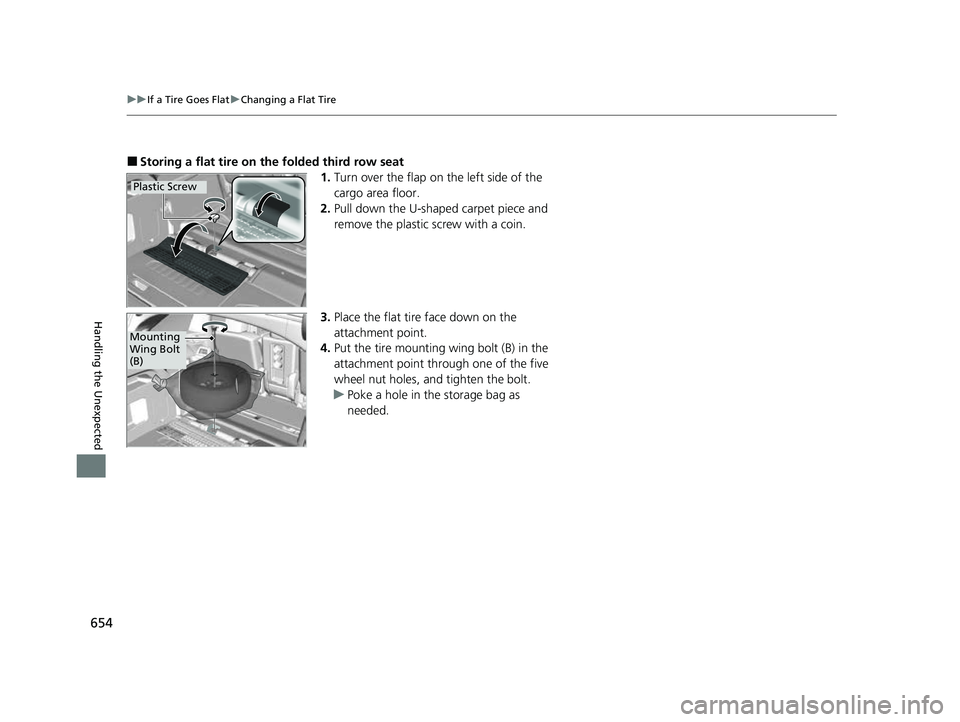
■Storing a flat tire on the folded third row seat
1.Turn over the flap on the left side of the
cargo area floor.
2. Pull down the U-shaped carpet piece and
remove the plastic screw with a coin.
3. Place the flat tire face down on the
attachment point.
4. Put the tire mounting wing bolt (B) in the
attachment point through one of the five
wheel nut holes, and tighten the bolt.
u Poke a hole in the storage bag as
needed.
Plastic Screw
Mounting
Wing Bolt
(B)
23 US ODYSSEY-31THR6500.book 654 ページ 2022年1月24日 月曜日 午前11時35分
Page 657 of 707
655
uuIf a Tire Goes Flat uChanging a Flat Tire
Handling the Unexpected
If you replace a flat tire with the spare tire, the low tire pressure/TPMS indicator
comes on while you are driving. After driving for a few miles (kilometers), Tire
Pressure Monitor Problem will appear on the driver information interface and the
indicator will start blinking fo r a short time and then stay on; however, this is normal
and is no cause for concern.
If you replace the tire with a full-size tire, the warning message on the driver
information interface and the low tire pre ssure/TPMS indicator will go off after a few
miles (kilometers).
■TPMS with Tire Fill Assist and the Compact Spare Tire1 TPMS with Tire Fill Assist and the Compact Spare Tire
The system cannot monitor th e pressure of the spare
tire. Manually check the spare tire pressure to be sure
that it is correct.
Use the TPMS specific wheels. Each is equipped with
a tire pressure sensor mount ed inside the tire behind
the valve stem.
23 US ODYSSEY-31THR6500.book 655 ページ 2022年1月24日 月曜日 午前11時35分
Page 669 of 707
667
uuIndicator, Coming On/Blinking uIf the Electric Power Steering (EPS) System Indicator Comes On
Handling the Unexpected
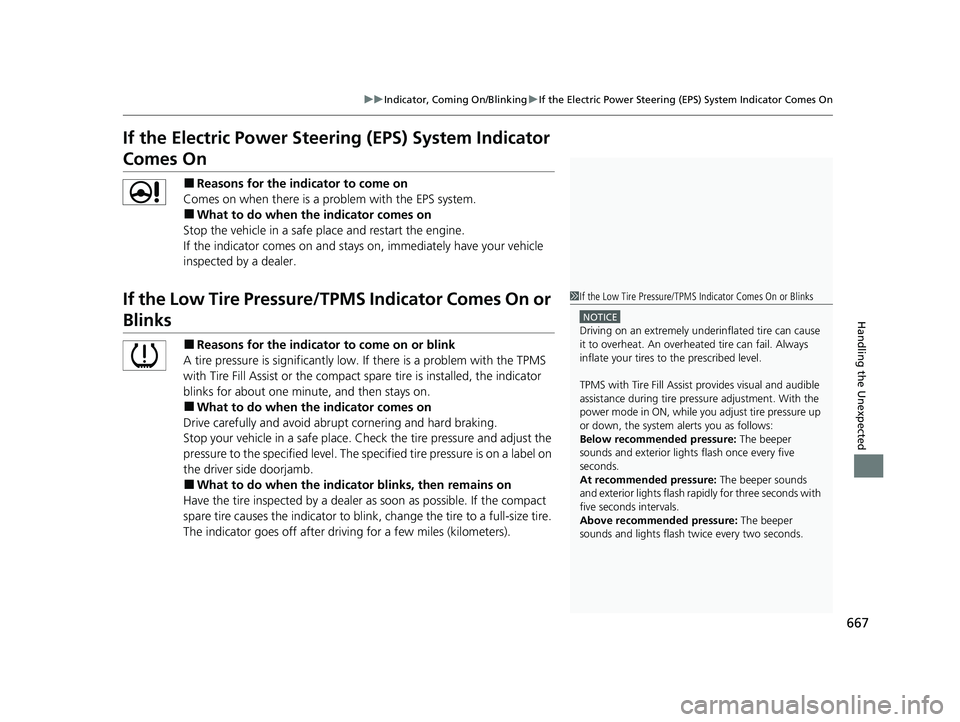
If the Electric Power Steeri ng (EPS) System Indicator
Comes On
■Reasons for the indicator to come on
Comes on when there is a pr oblem with the EPS system.
■What to do when the indicator comes on
Stop the vehicle in a safe place and restart the engine.
If the indicator comes on and stays on, immediately have your vehicle
inspected by a dealer.
If the Low Tire Pressure/TPMS Indicator Comes On or
Blinks
■Reasons for the indicator to come on or blink
A tire pressure is significantly low. If there is a problem with the TPMS
with Tire Fill Assist or the compact spare tire is installed, the indicator
blinks for about one minu te, and then stays on.
■What to do when the indicator comes on
Drive carefully and avoid abrupt cornering and hard braking.
Stop your vehicle in a safe place. Ch eck the tire pressure and adjust the
pressure to the specified level. The sp ecified tire pressure is on a label on
the driver side doorjamb.
■What to do when the indicator blinks, then remains on
Have the tire inspected by a dealer as soon as possible. If the compact
spare tire causes the indica tor to blink, change the tire to a full-size tire.
The indicator goes off after driving for a few miles (kilometers).
1 If the Low Tire Pressure/TPMS Indicator Comes On or Blinks
NOTICE
Driving on an extremely underinflated tire can cause
it to overheat. An overheated tire can fail. Always
inflate your tires to the prescribed level.
TPMS with Tire Fill Assist provides visual and audible
assistance during tire pre ssure adjustment. With the
power mode in ON, while y ou adjust tire pressure up
or down, the system alerts you as follows:
Below recommended pressure: The beeper
sounds and exterior lights flash once every five
seconds.
At recommended pressure: The beeper sounds
and exterior lights flash ra pidly for three seconds with
five seconds intervals.
Above recommended pressure: The beeper
sounds and lights flash tw ice every two seconds.
23 US ODYSSEY-31THR6500.book 667 ページ 2022年1月24日 月曜日 午前11時35分
Page 701 of 707
699
Index
Adding to the Reserve Tank .................... 605
Overheating ............................................ 661
Temperature Gauge ................................ 127
Engine Oil ................................................. 600
Adding ................................................... 602
Checking ................................................ 601
Displaying Maintenance Minder Information ........................................... 592
Engine Oil Low Warning ......................... 663
Recommended Engine Oil ....................... 600
Engine Oil Low Warning ......................... 663
ENGINE START/STOP Button .................... 188
Exhaust Gas Hazard (Carbon Monoxide) .. 85
Exterior Care (Cleaning) .......................... 639
Exterior Mirrors ........................................ 210
F
Features.................................................... 257
File Manager ............................................ 285
Filters
Dust and Pollen....................................... 635
Oil .......................................................... 603
Flat Tire ..................................................... 647
Floor Mats ................................................ 637
Fluids Automatic Transmission .......................... 607
Brake ...................................................... 608
Engine Coolant ....................................... 605
Windshield Washer ................................. 609
FM/AM Radio ........................................... 297 Fog Light Indicator
..................................... 98
Folding Down the Rear Seats .......... 216, 221
Foot Brake ................................................. 564
Front Airbags (SRS) ..................................... 52
Front Seat Heaters .................................... 247
Front Seat Heaters and Seat Ventilation .............................................. 248
Front Seats ................................................ 212
Adjusting ................................................. 212
Fuel ...................................................... 27, 582
Economy ................................................. 585
Gauge ..................................................... 127
Instant Fuel Economy ............................... 133
Low Fuel Indicator ..................................... 94
Range ...................................................... 133
Recommendation .................................... 582
Refueling ................................................. 582
Fuel Economy ............................................ 585
Fuel Fill Door ....................................... 27, 583
Fuses .......................................................... 669
Inspecting and Changing ......................... 675
Locations ................................. 669, 671, 674
G
Gasoline (Fuel) Economy ................................................. 585
Gauge ..................................................... 127
Information ............................................. 582
Instant Fuel Economy ............................... 133
Low Fuel Indicator ..................................... 94 Refueling................................................. 582
Gauges ...................................................... 127
Gear Position Indicator .............................. 92
Glass (care) ........................................ 636, 641
Glove Box .................................................. 231
Grocery Bag Hooks ................................... 238
H
Handling the Unexpected ........................ 645
HandsFreeLink ® (HFL) ............................... 435
Automatic Import of Cellular Phonebook and Call History ..................................... 444
Automatic Transferring............................ 443
Displaying Messages................................ 454
Favorite Contacts .................................... 445
HFL Buttons............................................. 435
HFL Menus .............................................. 438
HFL Status Display ................................... 437
In Case of Emergency .............................. 458
Limitations for Manual Operation ............ 437
Making a Call .......................................... 447
Options During a Call .............................. 450
Phone Setup............................................ 440
Receiving a Call ....................................... 450
Receiving a Text Message ........................ 452
Ring Tone................................................ 443
Selecting a Phone .................................... 453
To Set Up a Text Message Options .......... 451
Hazard Warning Button .............................. 6
HD Radio
TM............................................... 299
23 US ODYSSEY-31THR6500.book 699 ページ 2022年1月24日 月曜日 午前11時35分