radio controls HONDA ODYSSEY 2023 Owners Manual
[x] Cancel search | Manufacturer: HONDA, Model Year: 2023, Model line: ODYSSEY, Model: HONDA ODYSSEY 2023Pages: 707, PDF Size: 23.9 MB
Page 7 of 707
Contents
Child Safety P. 67Exhaust Gas Hazard P. 85Safety Labels P. 86
Tailgate P. 161 Sliding Doors P. 172
Moonroof* P. 187 Operating the Switches Around the Steering Wheel P. 188
Interior Convenience Items P. 229 Climate Control System P. 250
Audio Error Messages P. 339General Information on the Audio System P. 341
Customized Features P. 413 HomeLink® Universal Transceiver* P. 432 Bluetooth ® HandsFreeLink ® P. 435
When Driving P. 476 Honda Sensing® P. 509 Braking P. 561
Refueling P. 582 Fuel Economy and CO
2 Emissions P. 585
Maintenance Under the Hood P. 597 Replacing Light Bulbs P. 610
Checking and Maintaining Tires P. 621 Battery P. 630 Remote Transmitter Care P. 632
Climate Control System Maintenance P. 635 Clea ning P. 636 Accessories and Modifications P. 642
Engine Does Not Start P. 656If the Battery Is Dead P. 659Overheating P. 661
Emergency Towing P. 676 If You Cannot Unlock the Fuel Fill Door P. 677
When You Cannot Close the Power S liding Doors P. 680 Refueling P. 681
Devices that Emit Radio Waves P. 687 Reporting Safety Defects P. 688 Emissions Testing P. 689
Customer Service Information P. 695
Quick Reference GuideP. 6
Safe DrivingP. 35
Instrument PanelP. 87
ControlsP. 143
FeaturesP. 257
DrivingP. 463
MaintenanceP. 587
Handling the UnexpectedP. 645
InformationP. 683
IndexP. 696
23 US ODYSSEY-31THR6500.book 5 ページ 2022年1月24日 月曜日 午前11時35分
Page 25 of 707
23
Quick Reference Guide
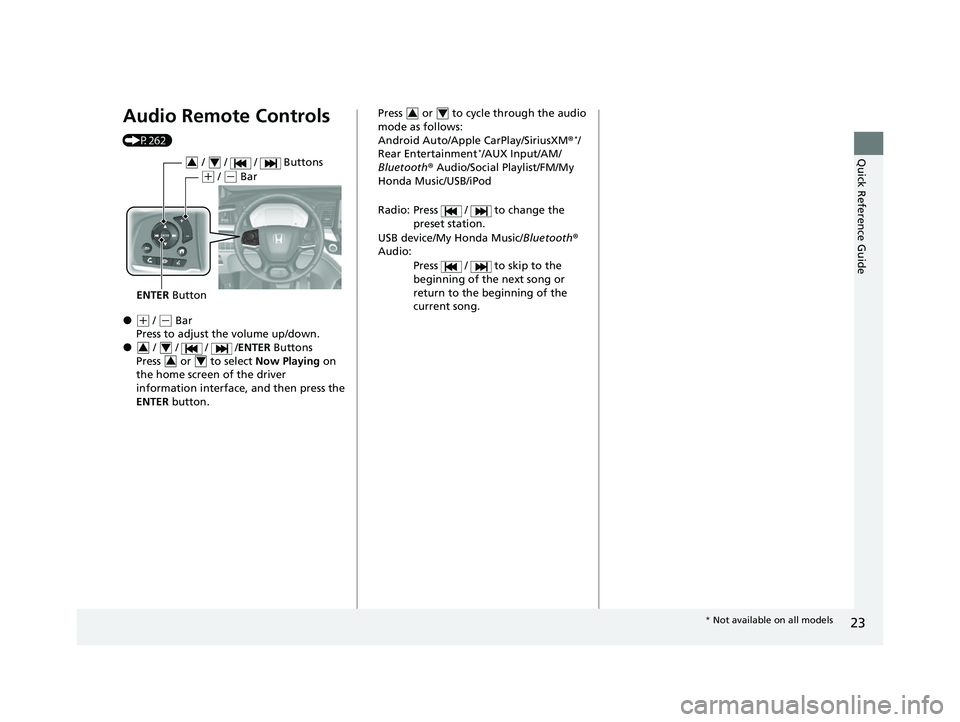
Audio Remote Controls
(P262)
●(+ / (- Bar
Press to adjust the volume up/down.
● / / / /ENTER Buttons
Press or to select Now Playing on
the home screen of the driver
information interface, and then press the
ENTER button.
ENTER Button
/ / / Buttons34
(+ / (- Bar
3434
Press or to cycle through the audio
mode as follows:
Android Auto/Apple CarPlay/SiriusXM ®
*/
Rear Entertainment*/AUX Input/AM/
Bluetooth ® Audio/Social Playlist/FM/My
Honda Music/USB/iPod
Radio: Press / to change the preset station.
USB device/My Honda Music/ Bluetooth®
Audio:
Press / to skip to the
beginning of the next song or
return to the beginning of the
current song.
34
* Not available on all models
23 US ODYSSEY-31THR6500.book 23 ページ 2022年1月24日 月曜日 午前11時35分
Page 150 of 707
148
uuLocking and Unlocking the Doors uLow Keyless Remote Signal Strength
Controls
Low Keyless Remote Signal Strength
The vehicle transmits radio waves to locate the keyless remote to start the engine,
lock and unlock the all the doors and fuel fill door, tailgate, opening the power
sliding door, and the power tailgate
*.
In the following cases, starting the engine , locking/unlocking the doors/fuel fill door,
or opening the tailgate, power sliding door, and the power tailgate
* may be
inhibited or operation may be unstable:
• Strong radio waves are being tra nsmitted by nearby equipment.
• You are carrying the keyless remote together with telecommunications
equipment, laptop computers, ce ll phones, or wireless devices.
• A metallic object is touching or covering the keyless remote.
1Low Keyless Remote Signal Strength
Communication between the keyless remote and the
vehicle consumes the ke yless remote’s battery.
Battery life is about two years, but this varies
depending on re gularity of use.
The battery is consumed whenever the keyless
remote is receivi ng strong radio wave s. Avoid placing
it near electrical appliances such as televisions and
personal computers.
* Not available on all models
23 US ODYSSEY-31THR6500.book 148 ページ 2022年1月24日 月曜日 午前11時35分
Page 183 of 707
181Continued
Controls
Security System
Immobilizer System
This system prevents a key that has not been pre-registered from starting the
engine.
Pay attention to the follo wing when pressing the ENGINE START/STOP button:
• Do not allow objects that emit strong radio waves near the ENGINE START/
STOP button.
• Make sure the key is not covered by or touching a metal object.
• Do not bring a key from another vehicle’s immobilizer system near the ENGINE
START/STOP button.
• Do not put the key near magnetic items. Electronic devices, such as televisions
and audio systems emit strong magnetic fields. Note that even a key chain can
become magnetic.
Security System Alarm
The security system alarm activates when the tailgate, hood, or doors are forcibly
opened.
The alarm does not activate if the tailgate or doors are opened with the key, remote
transmitter or keyle ss access system.
However, the alarm activates if a door is opened with the key, then the hood is
opened before the power mode is set to ON.
■When the security system alarm activates
The horn sounds intermittently, and some exterior lights flash.
1 Immobilizer System
NOTICE
Leaving the key in the vehicl e can result in theft or
accidental movement of the vehicle.
Always take the key with you whenever you leave the
vehicle unattended.
Do not alter the system or add other devices to it.
Doing so may damage the system and make your
vehicle inoperable.
Canadian models only: Apply and hold the brake
pedal before turning the vehicle on the first time after
the battery has been disconnected.
1 Security System Alarm
The security system alarm continues for a maximum
of two minutes until the security system alarm
deactivates.
23 US ODYSSEY-31THR6500.book 181 ページ 2022年1月24日 月曜日 午前11時35分
Page 245 of 707
Continued243
uuInterior Convenience Items uOther Interior Convenience Items
Controls
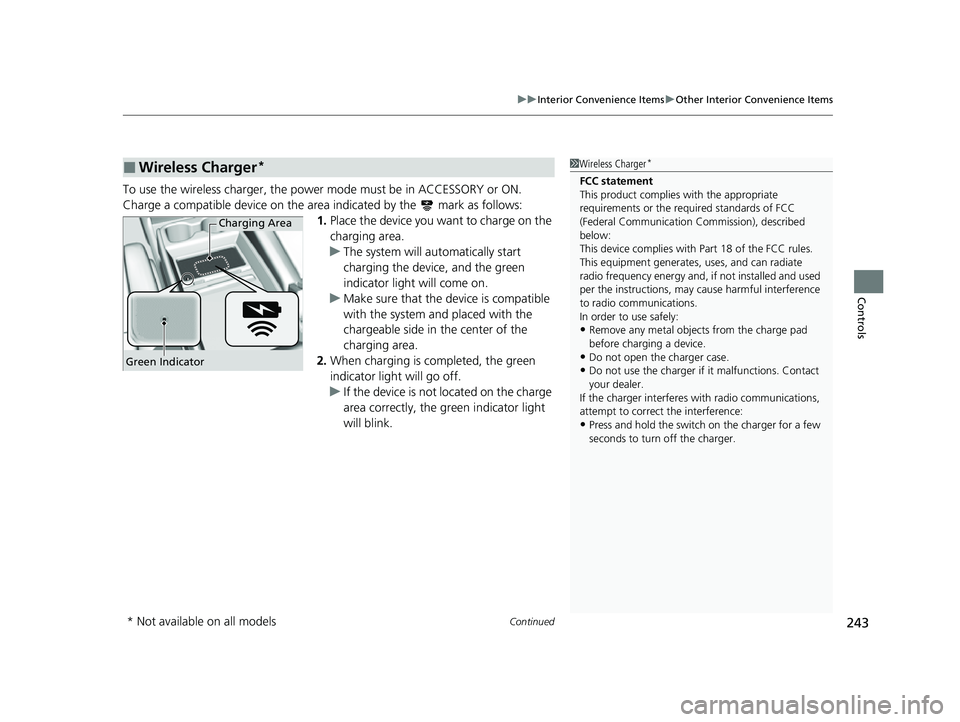
To use the wireless charger, the power mode must be in ACCESSORY or ON.
Charge a compatible device on the ar ea indicated by the mark as follows:
1. Place the device you want to charge on the
charging area.
u The system will au tomatically start
charging the device, and the green
indicator light will come on.
u Make sure that the device is compatible
with the system and placed with the
chargeable side in the center of the
charging area.
2. When charging is completed, the green
indicator light will go off.
u If the device is not located on the charge
area correctly, the green indicator light
will blink.
■Wireless Charger*1Wireless Charger*
FCC statement
This product complies with the appropriate
requirements or the requ ired standards of FCC
(Federal Communication Commission), described
below:
This device complies with Part 18 of the FCC rules.
This equipment generates, uses, and can radiate
radio frequency energy and, if not installed and used
per the instructions, may cause harmful interference
to radio communications.
In order to use safely:
•Remove any metal objects from the charge pad
before charging a device.
•Do not open the charger case.•Do not use the charger if it malfunctions. Contact
your dealer.
If the charger interferes with radio communications,
attempt to correct the interference:
•Press and hold the switch on the charger for a few
seconds to turn off the charger.
Green Indicator
Charging Area
* Not available on all models
23 US ODYSSEY-31THR6500.book 243 ページ 2022年1月24日 月曜日 午前11時35分
Page 259 of 707
257
Features
This chapter describes how to operate technology features.
Audio System
About Your Audio System ................ 258
USB Ports ......................................... 259
Auxiliary Input Jack .......................... 261
Audio System Theft Protection ......... 261
Audio Remote Controls .................... 262
Audio System Basic Operation ........ 264
Audio/Information Screen ................ 265
System Updates ............................... 279
File Manager .................................... 285
Adjusting the Sound ........................ 291
Display Setup ................................... 292
Voice Control Operation .................. 294 Playing AM/FM Radio ....................... 297
Playing SiriusXM
® Radio*................. 300
Playing an iPod ................................ 310
Playing a USB Flash Drive ................. 313
Playing My Honda Music .................. 316
Playing Bluetooth ® Audio................. 320
Playing Social Playlist ........................ 322
HondaLink ®..................................... 324
Wi-Fi Connection ............................. 329
AT&T Hotspot
*................................ 330
Siri Eyes Free .................................... 331
Apple CarPlay .................................. 332
Android Auto
TM................................ 335 Audio Error Messages
...................... 339
General Information on the Audio System.. 341Blu-ray/DVD Rear Entertainment System*... 365Customized Features........................ 413
HomeLink ® Universal Transceiver*.. 432
Bluetooth® HandsFreeLink® ............. 435
CabinWatch ®
*................................... 460
CabinTalk ®*....................................... 461
* Not available on all models
23 US ODYSSEY-31THR6500.book 257 ページ 2022年1月24日 月曜日 午前11時35分
Page 260 of 707
258
Features
Audio System
About Your Audio System
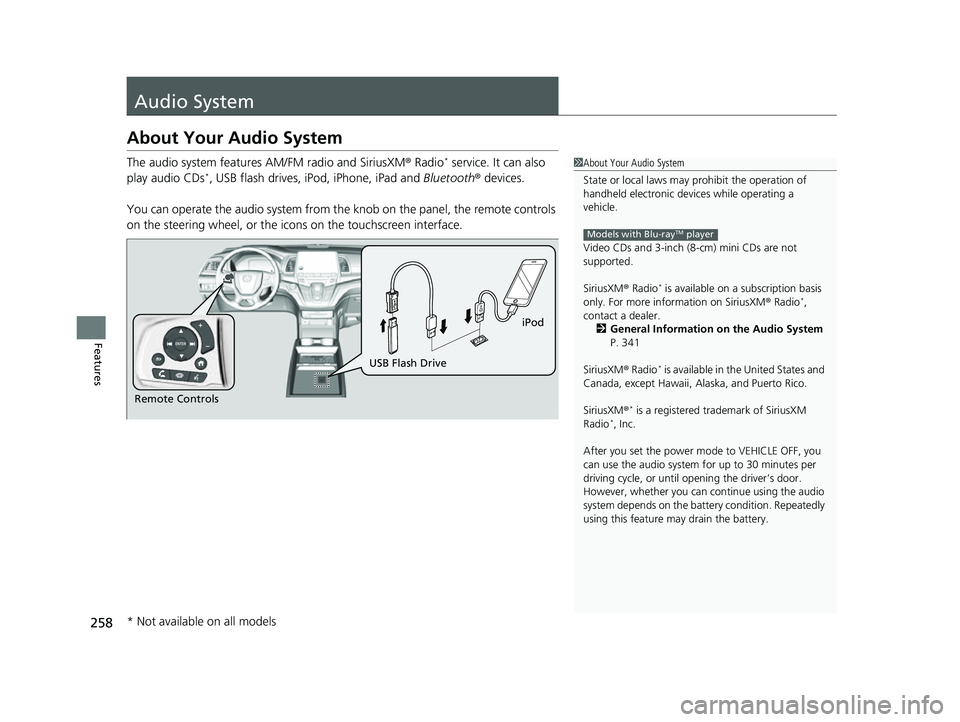
The audio system features AM/FM radio and SiriusXM® Radio* service. It can also
play audio CDs*, USB flash drives, iPod, iPhone, iPad and Bluetooth® devices.
You can operate the audio system from th e knob on the panel, the remote controls
on the steering wheel, or the icons on the touchscreen interface.
1About Your Audio System
State or local laws may pr ohibit the operation of
handheld electronic devices while operating a
vehicle.
Video CDs and 3-inch (8 -cm) mini CDs are not
supported.
SiriusXM ® Radio
* is available on a subscription basis
only. For more information on SiriusXM ® Radio*,
contact a dealer. 2 General Information on the Audio System
P. 341
SiriusXM ® Radio
* is available in the United States and
Canada, except Ha waii, Alaska, and Puerto Rico.
SiriusXM ®
* is a registered tra demark of SiriusXM
Radio*, Inc.
After you set the power m ode to VEHICLE OFF, you
can use the audio system for up to 30 minutes per
driving cycle, or until opening the driver’s door.
However, whether you can continue using the audio
system depends on the batter y condition. Repeatedly
using this feature ma y drain the battery.
Models with Blu-rayTM player
Remote Controls iPod
USB Flash Drive
* Not available on all models
23 US ODYSSEY-31THR6500.book 258 ページ 2022年1月24日 月曜日 午前11時35分
Page 265 of 707
263
uuAudio System uAudio Remote Controls
Features
/ / / /ENTER Buttons
• When selecting the audio mode
Press or to select Now Playing on the home screen of the driver
information interface, and then press the ENTER button.
Press or : To cycles through the audio modes as follows:
Android Auto/Apple CarPlay SiriusXM ®
*Rear Entertainment* AUX
Input AM Bluetooth ® AudioSocial Playlist FMMy Honda Music USB/
iPod
• When listening to the radio
Press : To select the next preset radio station.
Press : To select the previous preset radio station.
Press and hold : To select the next strong station.
Press and hold : To select the previous strong station.
• When listening to an iPod, USB flash drive, My Honda Music, or Bluetooth® Audio
Press : To skip to the next song.
Press : To go back to the beginning of the current or previous song.
• When listening to an iPod, USB flash drive, My Honda Music, Bluetooth® Audio,
or Apple CarPlay
Press and hold / : To move rapidly within a song.
34
34
34
* Not available on all models
23 US ODYSSEY-31THR6500.book 263 ページ 2022年1月24日 月曜日 午前11時35分
Page 300 of 707
uuAudio System Basic Operation uPlaying AM/FM Radio
298
Features
To store a station:
1. Tune to the selected station.
2. Select and hold the preset number fo r the station you want to store.
Lists the strongest stations on the selected band.
1. Select Station List to display a list.
2. Select the station.
■Manual update
Updates your available station list at any time.
1. Select Station List to display a list.
2. Select Refresh .
■Preset Memory
■Station List
1Preset Memory
The ST indicator appears on the display indicating
stereo FM broadcasts.
Stereo reproduction in AM is not available.
Switching the Audio Mode
Press the or button on the steering wheel or
select the audio source icon on the screen. 2 Audio Remote Controls P. 262
You can store 12 AM/FM st ations into preset
memory.
HD Radio Technology manufactured under license
from iBiquity Digi tal Corporation. U.S. and Foreign
Patents. HD Radio
TM and the HD, HD Radio, and
“Arc” logos are proprietary trademarks of iBiquity
Digital Corp.
34
Models with HD RadioTM feature
23 US ODYSSEY-31THR6500.book 298 ページ 2022年1月24日 月曜日 午前11時35分
Page 303 of 707
Continued301
uuAudio System Basic Operation uPlaying SiriusXM ® Radio*
Features
1. Select Settings .
2. Select Tune Mode .
3. Select All Channels or Within Category .
■To Change the Tune Mode1Playing SiriusXM ® Radio*
In the channel mode, all available channels are
selectable. In the categor y mode, you can select a
channel within a ca tegory (Jazz, Rock, Classical, etc.).
There may be instances when SiriusXM ® Radio does
not broadcast all the data fi elds (artist name, title).
This does not indicate a problem with your audio
system.
SiriusXM ® Radio stations load in ascending order,
which can take about a minute. Once they have
loaded you will be able to scroll up or down to make
your selections.
Switching the Audio Mode
Press the or button on the steering wheel or
select the audio source icon on the screen.
2 Audio Remote Controls P. 262
Tune Start:
When you change to a preset channel, a song being
played on that channel restarts from the beginning
with this function. This can be turned on or off by the
following procedure.
1. Select Settings .
2. Select Tune Start .
3. Select ON or OFF .
To change a category, select Category icons, or
select More and then select Category List.
34
* Not available on all models
23 US ODYSSEY-31THR6500.book 301 ページ 2022年1月24日 月曜日 午前11時35分