wiper HONDA PASSPORT 2021 Owner's Manual (in English)
[x] Cancel search | Manufacturer: HONDA, Model Year: 2021, Model line: PASSPORT, Model: HONDA PASSPORT 2021Pages: 607, PDF Size: 36.04 MB
Page 6 of 607
Contents
This owner’s manual should be considered a permanent part of the
vehicle and should remain with the vehicle when it is sold.
This owner’s manual covers all models of your vehicle. You may find
descriptions of equipment and features that are not on your
particular model.
Images throughout this owner’s manual (including the front cover)
represent features and equipment that are available on some, but
not all, models. Your particular mo del may not have some of these
features.
This owner’s manual is for vehicles sold in the United States and
Canada.
The information and specifications in cluded in this publication were
in effect at the time of approval for printing. Honda Motor Co., Ltd.
reserves the right, however, to discontinue or change specifications
or design at any time without notice and without incurring any
obligation.2 Safe Driving P. 31
For Safe Driving P. 32 Seat Belts P. 37 Airbags P. 45
2Instrument Panel P. 77
Indicators P. 78 Gauges and Displays P. 106
2Controls P. 121
Clock P. 122 Locking and Unlocking the Doors P. 124
Opening and Closing the Windows P. 152 Moonroof* P. 155
Adjusting the Seats P. 179 Interior Lights/Interior Convenience Items P. 189
2 Features P. 217
Audio System P. 218
General Information on the Audio System P. 302
Bluetooth® HandsFreeLink ® P. 346
2 Driving P. 373
Before Driving P. 374 Towing a Trailer P. 380
Parking Your Vehicle P. 480Multi-View Rear Camera P. 491
2Maintenance P. 497
Before Performing Maintenance P. 498 Maintenance MinderTM P. 501
Checking and Maintaining Wiper Blades P. 524
Remote Transmitter Care P. 539
Accessories and Modifications P. 547
2 Handling the Unexpected P. 549
Tools P. 550 If a Tire Goes Flat P. 551
Indicator, Coming On/Blinking P. 567 Fuses P. 572
Refueling P. 579 If You Cannot Open the Tailgate P. 580
2Information P. 581
Specifications P. 582 Identification Numbers P. 584
Emissions Testing P. 587 Warranty Coverages P. 589
21 PASSPORT-31TGS6200.book 4 ページ 2020年9月4日 金曜日 午後2時35分
Page 9 of 607
7
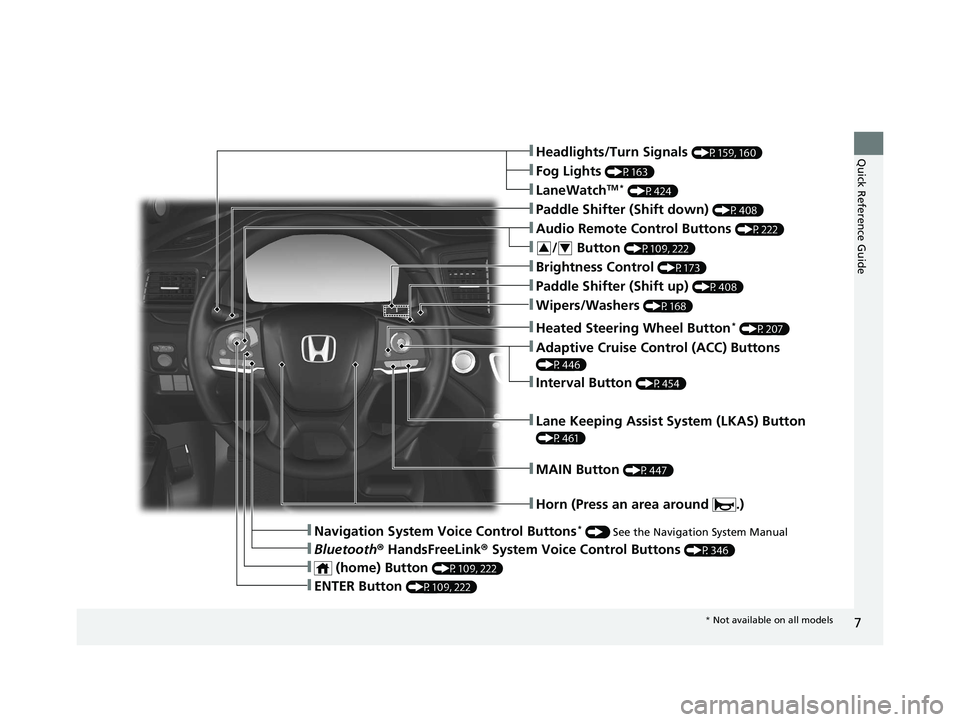
Quick Reference Guide❚Headlights/Turn Signals (P159, 160)
❚Fog Lights (P163)
❚LaneWatchTM * (P424)
❚Paddle Shifter (Shift down) (P408)
❚Audio Remote Control Buttons (P222)
❚Wipers/Washers (P168)
❚Paddle Shifter (Shift up) (P408)
❚Brightness Control (P173)
❚Lane Keeping Assist System (LKAS) Button
(P461)
❚Horn (Press an area around .)
❚Navigation System Voice Control Buttons* () See the Navigation System Manual
❚Bluetooth ® HandsFreeLink ® System Voice Control Buttons (P346)
❚Heated Steering Wheel Button* (P207)
❚ENTER Button (P109, 222)
❚Interval Button (P454)
❚Adaptive Cruise Control (ACC) Buttons
(P446)
❚ (home) Button (P109, 222)
❚/ Button (P109, 222)34
❚MAIN Button (P447)
* Not available on all models
21 PASSPORT-31TGS6200.book 7 ページ 2020年9月4日 金曜日 午後2時35分
Page 12 of 607
Visual Index
10
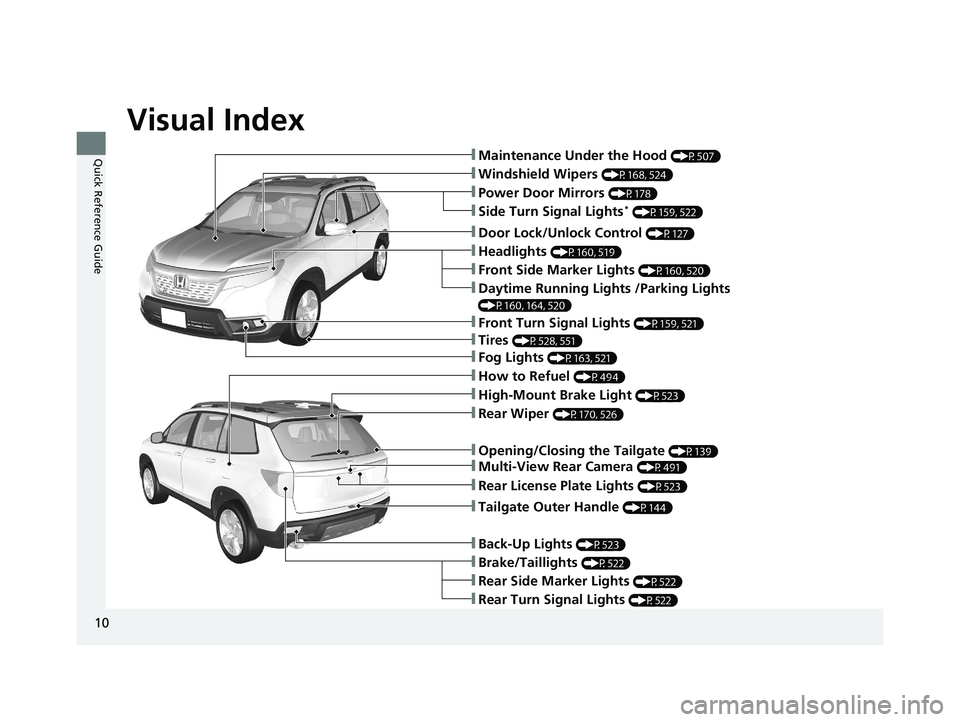
Quick Reference Guide❚Maintenance Under the Hood (P507)
❚Windshield Wipers (P168, 524)
❚Tires (P528, 551)
❚Power Door Mirrors (P178)
❚Headlights (P160, 519)
❚Front Side Marker Lights (P160, 520)
❚Side Turn Signal Lights* (P159, 522)
❚Daytime Running Lights /Parking Lights
(P160, 164, 520)
❚How to Refuel (P494)
❚High-Mount Brake Light (P523)
❚Rear Wiper (P170, 526)
❚Rear Side Marker Lights (P522)
❚Rear Turn Signal Lights (P522)
❚Brake/Taillights (P522)
❚Opening/Closing the Tailgate (P139)
❚Door Lock/Unlock Control (P127)
❚Fog Lights (P163, 521)
❚Front Turn Signal Lights (P159, 521)
❚Back-Up Lights (P523)
❚Tailgate Outer Handle (P144)
❚Multi-View Rear Camera (P491)
❚Rear License Plate Lights (P523)
21 PASSPORT-31TGS6200.book 10 ページ 2020年9月4日 金曜日 午後2時35分
Page 18 of 607
16
Quick Reference Guide
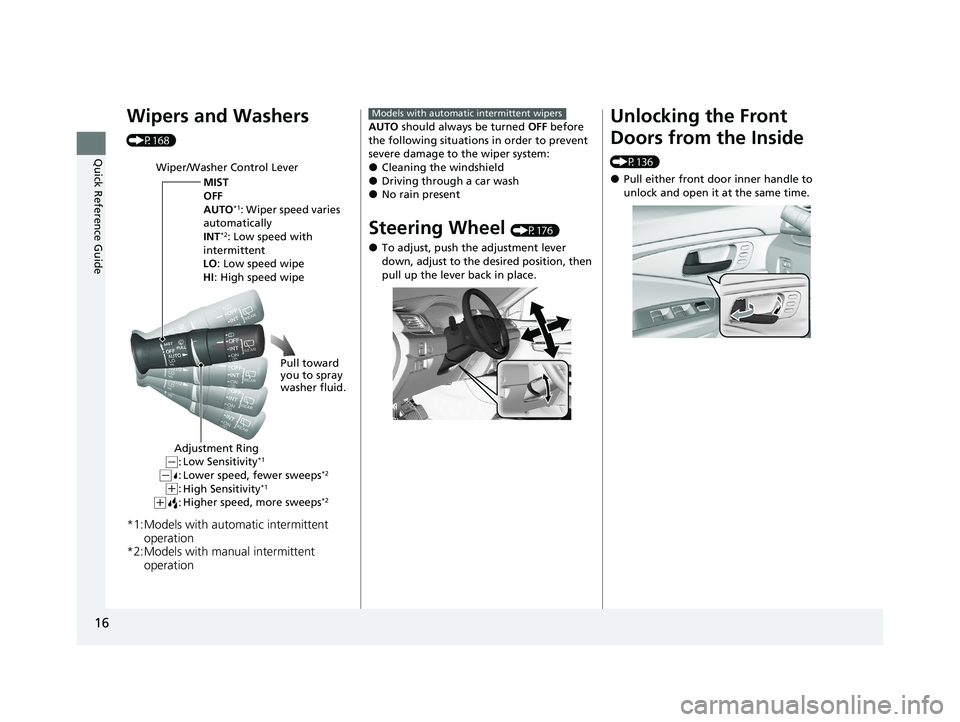
Wipers and Washers
(P168)
*1:Models with automatic intermittent operation
*2:Models with manual intermittent operation
Wiper/Washer Control Lever
MIST
OFF
AUTO
*1: Wiper speed varies
automatically
INT
*2: Low speed with
intermittent
LO: Low speed wipe
HI : High speed wipe
Pull toward
you to spray
washer fluid.
Adjustment Ring
Low Sensitivity*1
Lower speed, fewer sweeps*2
High Sensitivity*1
Higher speed, more sweeps*2(+:
( +:(-:(-:
AUTO should always be turned OFF before
the following situations in order to prevent
severe damage to the wiper system:
●Cleaning the windshield●Driving through a car wash●No rain present
Steering Wheel (P176)
●To adjust, push the adjustment lever
down, adjust to the desired position, then
pull up the lever back in place.
Models with automatic intermittent wipersUnlocking the Front
Doors from the Inside
(P136)
●Pull either front door inner handle to
unlock and open it at the same time.
21 PASSPORT-31TGS6200.book 16 ページ 2020年9月4日 金曜日 午後2時35分
Page 28 of 607
26
Quick Reference Guide
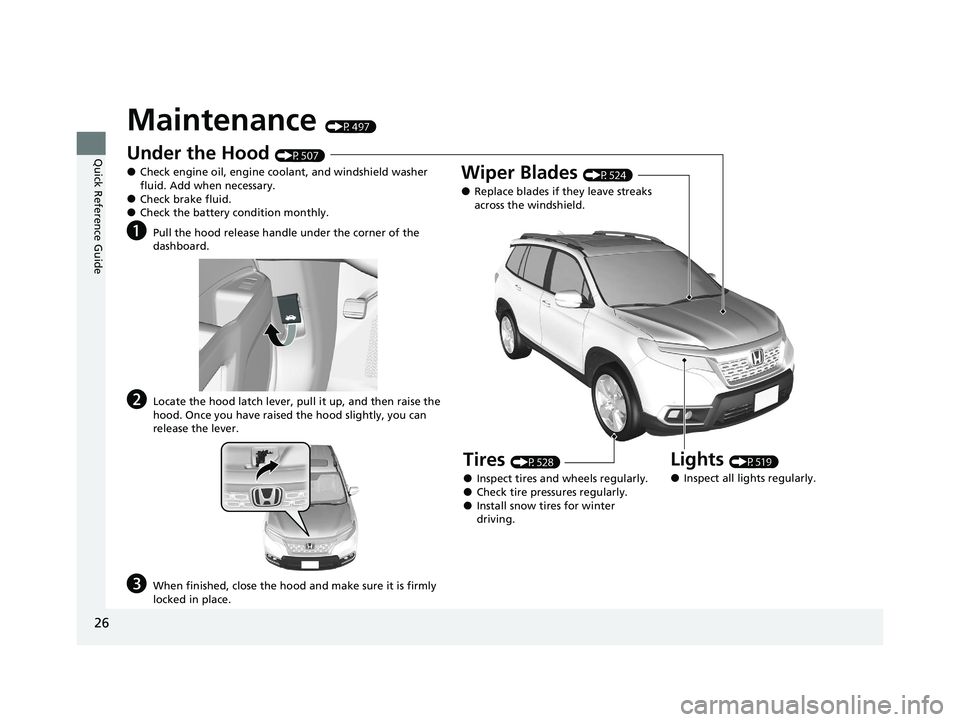
Maintenance (P497)
Under the Hood (P507)
●Check engine oil, engine coolant, and windshield washer
fluid. Add when necessary.
●Check brake fluid.●Check the battery condition monthly.
aPull the hood release handle under the corner of the
dashboard.
bLocate the hood latch lever, pull it up, and then raise the
hood. Once you have raised the hood slightly, you can
release the lever.
cWhen finished, close the hood and make sure it is firmly
locked in place.
Lights (P519)
●Inspect all lights regularly.
Wiper Blades (P524)
●Replace blades if they leave streaks
across the windshield.
Tires (P528)
●Inspect tires and wheels regularly.●Check tire pressures regularly.●Install snow tires for winter
driving.
21 PASSPORT-31TGS6200.book 26 ページ 2020年9月4日 金曜日 午後2時35分
Page 123 of 607
121
Controls
This chapter explains how to operate the various controls necessary for driving.
Clock.................................................. 122
Locking and Unlocking the Doors Key Types and Functions .................. 124
Low Smart Entry Remote Signal Strength ..... 126Locking/Unlocking the Doors from the Outside .......................................... 127
Locking/Unlocking the Doors from the Inside ............................................. 135
Childproof Door Locks ..................... 137
Auto Door Locking/Unlocking .......... 138
Opening and Closing the Tailgate ... 139
Security System ................................ 149
Opening and Closing the Windows ..... 152
Moonroof*........................................ 155
Operating the Switches Around the Steering Wheel ENGINE START/STOP Button............. 156
Turn Signals ..................................... 159
Light Switches.................................. 160
Fog Lights ........................................ 163
Daytime Running Lights ................... 164
Auto High-Beam .............................. 165
Wipers and Washers ........................ 168
Rear Defogger/Heat ed Door Mirror
*
Button ........................................... 171
Brightness Control ........................... 173
Driving Position Memory System
*.... 174 Adjusting the Steering Wheel .......... 176
Adjusting the Mirrors Interior Rearview Mirror ................... 177
Power Door Mirrors ......................... 178
Adjusting the Seats
Front Seats ...................................... 179
Rear Seats........................................ 183
Armrest ........................................... 188
Interior Lights/Interior Convenience
ItemsInterior Lights .................................. 189
Interior Convenience Items .............. 192
Climate Control System ................... 210
* Not available on all models
21 PASSPORT-31TGS6200.book 121 ページ 2020年9月4日 金曜日 午後2時35分
Page 163 of 607
Continued161
uuOperating the Switches Around the Steering Wheel uLight Switches
Controls
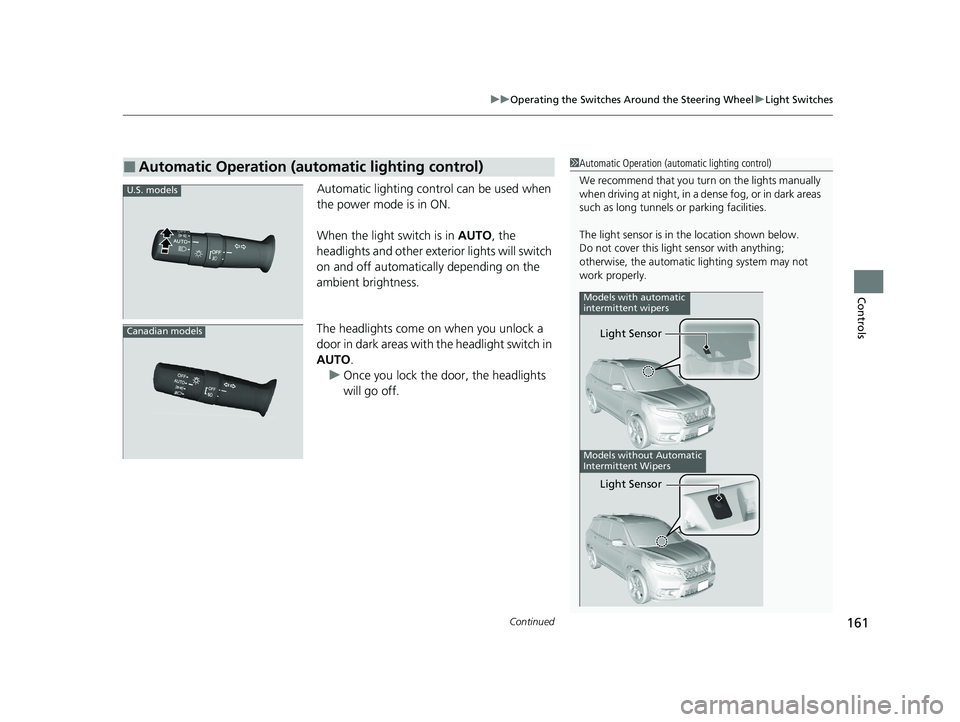
Automatic lighting control can be used when
the power mode is in ON.
When the light switch is in AUTO, the
headlights and other exterior lights will switch
on and off automatically depending on the
ambient brightness.
The headlights come on when you unlock a
door in dark areas with the headlight switch in
AUTO .
u Once you lock the door, the headlights
will go off.
■Automatic Operation (automatic lighting control)1Automatic Operation (aut omatic lighting control)
We recommend that you tu rn on the lights manually
when driving at night, in a de nse fog, or in dark areas
such as long tunnels or parking facilities.
The light sensor is in the location shown below.
Do not cover this light sensor with anything;
otherwise, the automatic lighting system may not
work properly.
Models without Automatic
Intermittent Wipers
Models with automatic
intermittent wipers
Light Sensor
Light Sensor
U.S. models
Canadian models
21 PASSPORT-31TGS6200.book 161 ページ 2020年9月4日 金曜日 午後2時35分
Page 164 of 607
uuOperating the Switches Around the Steering Wheel uLight Switches
162
Controls
The headlights automatically come on when the wipers are used several times within
a certain number of intervals wi th the headlight switch in AUTO.
The headlights automatically go off a few minutes later if the wipers are stopped.
The headlights, all other exterior lights, an d the instrument panel lights turn off 15
seconds after you set the power mode to VE HICLE OFF (LOCK), take the remote with
you, and close the driver’s door.
If you set the power mode to VEHICLE OFF (LOCK) with the headlight switch on, but
do not open the door, the lights turn o ff after 10 minutes (three minutes, if the
switch is in the AUTO position).
The lights turn on again when you unlock or open the driver’s door. If you unlock
the door, but do not open it within 15 seconds, the lights go off. If you open the
driver’s door, you will hear a reminder chime alerting you that the lights are on.
■Headlight Integration with Wipers
■Automatic Lighting Off Feature
1Automatic Operation (aut omatic lighting control)
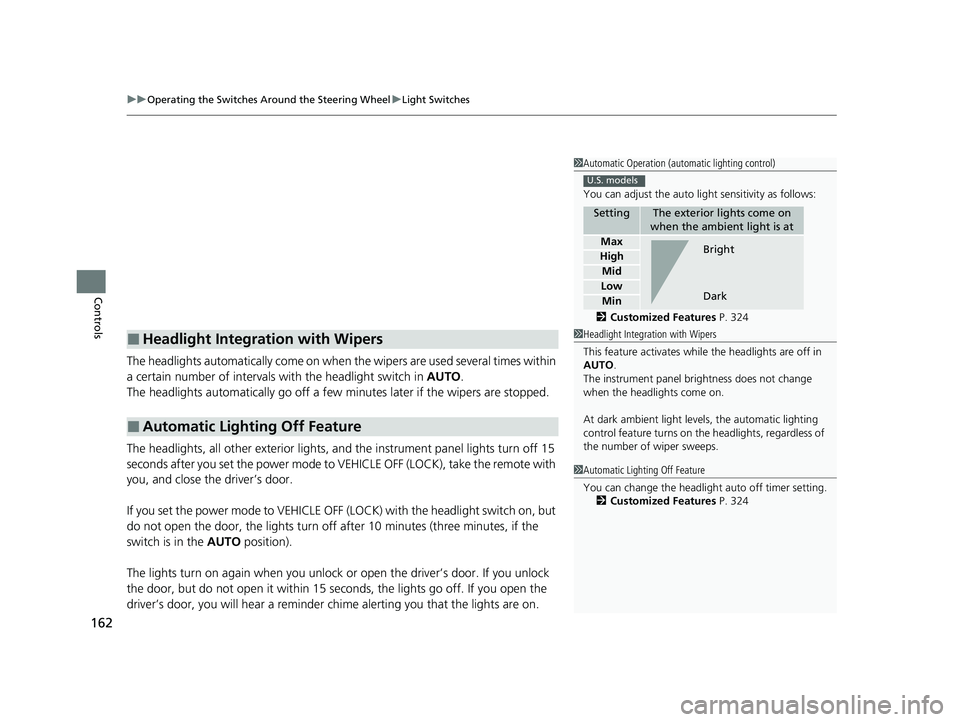
You can adjust the auto li ght sensitivity as follows:
2 Customized Features P. 324
SettingThe exterior lights come on
when the ambient light is at
Max
High
Mid
Low
Min
U.S. models
Bright
Dark
1 Headlight Integration with Wipers
This feature activates while the headlights are off in
AUTO .
The instrument panel br ightness does not change
when the headlights come on.
At dark ambient light leve ls, the automatic lighting
control feature turns on the headlights, regardless of
the number of wiper sweeps.
1 Automatic Lighting Off Feature
You can change the headlight auto off timer setting.
2 Customized Features P. 324
21 PASSPORT-31TGS6200.book 162 ページ 2020年9月4日 金曜日 午後2時35分
Page 168 of 607
uuOperating the Switches Around the Steering Wheel uAuto High-Beam
166
Controls
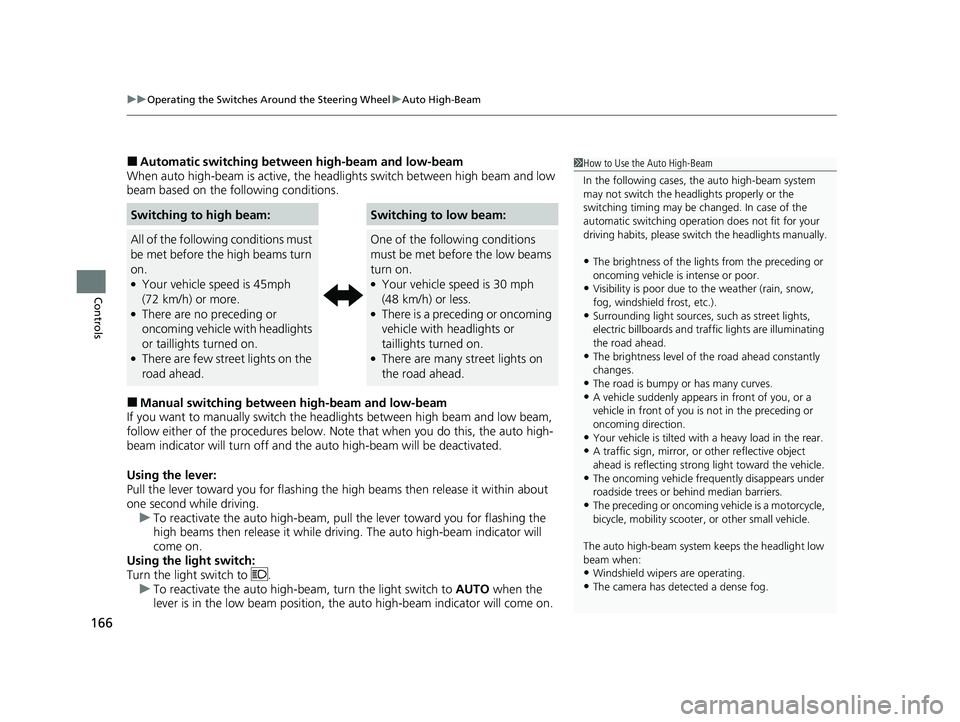
■Automatic switching between high-beam and low-beam
When auto high-beam is ac tive, the headlights switch between high beam and low
beam based on the following conditions.
■Manual switching between high-beam and low-beam
If you want to manually switch the headlights between high beam and low beam,
follow either of the proced ures below. Note that when you do this, the auto high-
beam indicator will turn off and the auto high-beam will be deactivated.
Using the lever:
Pull the lever toward you fo r flashing the high beams then release it within about
one second while driving. u To reactivate the auto high-beam, pull the lever toward you for flashing the
high beams then release it while driving. The auto high-beam indicator will
come on.
Using the light switch:
Turn the light switch to . u To reactivate the auto high-be am, turn the light switch to AUTO when the
lever is in the low beam position, the auto high-beam indicator will come on.
Switching to high beam:Switching to low beam:
All of the following conditions must
be met before the high beams turn
on.
●Your vehicle speed is 45mph
(72 km/h) or more.
●There are no preceding or
oncoming vehicle with headlights
or taillights turned on.
●There are few street lights on the
road ahead.
One of the following conditions
must be met before the low beams
turn on.
●Your vehicle speed is 30 mph
(48 km/h) or less.
●There is a preceding or oncoming
vehicle with headlights or
taillights turned on.
●There are many street lights on
the road ahead.
1 How to Use the Auto High-Beam
In the following cases, th e auto high-beam system
may not switch the head lights properly or the
switching timing may be ch anged. In case of the
automatic switching operati on does not fit for your
driving habits, please swit ch the headlights manually.
•The brightness of the lights from the preceding or
oncoming vehicle is intense or poor.
•Visibility is poor due to the weather (rain, snow,
fog, windshield frost, etc.).
•Surrounding light sources, such as street lights,
electric billboards and traf fic lights are illuminating
the road ahead.
•The brightness level of th e road ahead constantly
changes.
•The road is bumpy or has many curves.•A vehicle suddenly appears in front of you, or a
vehicle in front of you is not in the preceding or
oncoming direction.
•Your vehicle is tilted with a heavy load in the rear.•A traffic sign, mirror, or other reflective object
ahead is reflecting strong light toward the vehicle.
•The oncoming vehicle freq uently disappears under
roadside trees or be hind median barriers.
•The preceding or oncoming vehicle is a motorcycle,
bicycle, mobility scooter, or other small vehicle.
The auto high-beam system keeps the headlight low
beam when:
•Windshield wipers are operating.
•The camera has dete cted a dense fog.
21 PASSPORT-31TGS6200.book 166 ページ 2020年9月4日 金曜日 午後2時35分
Page 170 of 607
168
uuOperating the Switches Around the Steering Wheel uWipers and Washers
Controls
Wipers and Washers
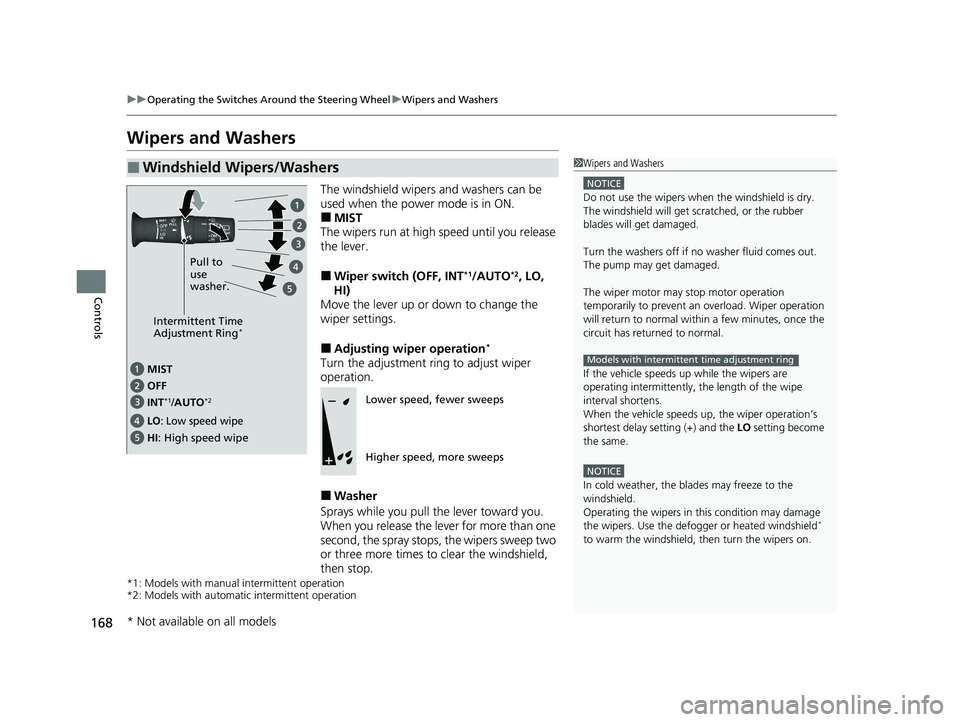
The windshield wipers and washers can be
used when the power mode is in ON.
■MIST
The wipers run at high speed until you release
the lever.
■Wiper switch (OFF, INT*1/AUTO*2, LO,
HI)
Move the lever up or down to change the
wiper settings.
■Adjusting wiper operation*
Turn the adjustment ri ng to adjust wiper
operation.
■Washer
Sprays while you pull the lever toward you.
When you release the lever for more than one
second, the spray stops, the wipers sweep two
or three more times to clear the windshield,
then stop.
*1: Models with manual intermittent operation
*2: Models with automati c intermittent operation
■Windshield Wipers/Washers1Wipers and Washers
NOTICE
Do not use the wipers when the windshield is dry.
The windshield will get sc ratched, or the rubber
blades will get damaged.
Turn the washers off if no washer fluid comes out.
The pump may get damaged.
The wiper motor may stop motor operation
temporarily to prevent an overload. Wiper operation
will return to normal within a few minutes, once the
circuit has returned to normal.
If the vehicle speeds up while the wipers are
operating intermittently, the length of the wipe
interval shortens.
When the vehicle speeds up, the wiper operation’s
shortest delay se tting (+) and the LO setting become
the same.
NOTICE
In cold weather, the blades may freeze to the
windshield.
Operating the wipers in th is condition may damage
the wipers. Use the defogge r or heated windshield
*
to warm the windshield, then turn the wipers on.
Models with intermittent time adjustment ring
Intermittent Time
Adjustment Ring*
MIST
INT
*1/AUTO*2OFF
LO: Low speed wipe
HI: High speed wipe Pull to
use
washer.
Lower speed, fewer sweeps
Higher speed, more sweeps
* Not available on all models
21 PASSPORT-31TGS6200.book 168 ページ 2020年9月4日 金曜日 午後2時35分