change time HONDA PASSPORT 2022 Owner's Guide
[x] Cancel search | Manufacturer: HONDA, Model Year: 2022, Model line: PASSPORT, Model: HONDA PASSPORT 2022Pages: 607, PDF Size: 20.86 MB
Page 456 of 607
uuHonda Sensing ®u Adaptive Cruise Control (ACC)
454
Driving
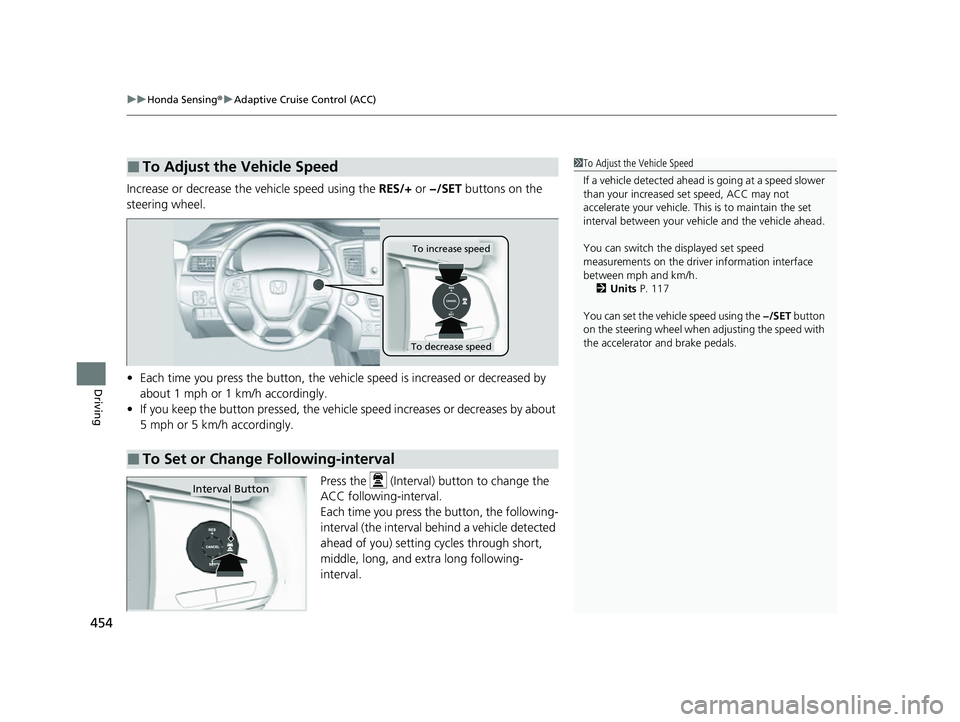
Increase or decrease the vehicle speed using the RES/+ or −/SET buttons on the
steering wheel.
• Each time you press the button, the vehicl e speed is increased or decreased by
about 1 mph or 1 km/h accordingly.
• If you keep the button pressed, the vehicl e speed increases or decreases by about
5 mph or 5 km/h accordingly.
Press the (Interval) button to change the
ACC following-interval.
Each time you press the button, the following-
interval (the interval behind a vehicle detected
ahead of you) setting cycles through short,
middle, long, and extra long following-
interval.
■To Adjust the Vehicle Speed1 To Adjust the Vehicle Speed
If a vehicle detected ahead is going at a speed slower
than your increased set speed, ACC may not
accelerate your vehicle. This is to maintain the set
interval between your vehi cle and the vehicle ahead.
You can switch the displayed set speed
measurements on the driver information interface
between mph and km/h.
2 Units P. 117
You can set the vehicle speed using the −/SET button
on the steering wheel when adjusting the speed with
the accelerator and brake pedals.
■To Set or Change Following-interval
To increase speed
To decrease speed
Interval Button
22 PASSPORT-31TGS6300.book 454 ページ 2021年10月6日 水曜日 午前10時2分
Page 464 of 607

uuHonda Sensing ®u Lane Keeping Assist System (LKAS)
462
Driving
3. Keep your vehicle near the center of the
lane while driving.
u The lane outlines change to solid ones
once the system starts operating after
detecting the left and right lane
markings.
Press the MAIN or LKAS button.
The LKAS is turned off every time you stop the
engine, even if you turned it on the last time
you drove the vehicle.
■To Cancel1 To Cancel
Pressing the MAIN button also turns ACC on and off.
MAIN ButtonLKAS Button
22 PASSPORT-31TGS6300.book 462 ページ 2021年10月6日 水曜日 午前10時2分
Page 494 of 607

uuMulti-View Rear Camera uAbout Your Multi-View Rear Camera
492
Driving
You can view three different camera mo des on the audio/information screen.
Select the appropriate ic on to switch the angle.
: Wide view mode
: Normal view mode
: Top down view mode
• If you were last using Wide view mode or Normal view mode, the same view
mode will be activated the next time you put the transmission into
(R.
• If you were using Top down view mode before you turned off the power system,
Wide view mode will be activated the ne xt time you set the power mode to ON
and put the transmission into
(R.
• If you were using Top down view mode and 10 seconds elapsed after you took
the transmission out of
(R, Wide view mode will be activated the next time you
put the transmission into
(R.
1 About Your Multi-View Rear Camera
You can change the Last Used, Normal View and
Wide View settings.
2 Customized Features P. 327
22 PASSPORT-31TGS6300.book 492 ページ 2021年10月6日 水曜日 午前10時2分
Page 503 of 607
501
Maintenance
Maintenance MinderTM
If the engine oil life is less than 15%, you will see the Maintenance Minder messages
appear on the driver inform ation interface every time you set the power mode to
ON. The messages notify you when to change the engine oil, or when to bring your
vehicle to a dealer for indicated maintenance services.
22 PASSPORT-31TGS6300.book 501 ページ 2021年10月6日 水曜日 午前10時2分
Page 563 of 607
561
uuEngine Does Not Start uEmergency Engine Stop
Handling the Unexpected
Emergency Engine Stop
The ENGINE START/STOP button may be used to stop the engine due to an
emergency situation even while driving. If you must stop the engine, do either of the
following operations:
• Press and hold the ENGINE START/STOP button for about two seconds.
• Firmly press the ENGINE START/STOP button three times.
The steering wheel will not lock. However, because turning off the engine disables
the power assist the engine provides to the steering and braking systems, it will
require significantly more physical effort an d time to steer and slow the vehicle. Use
both feet on the brake pedal to slow down the vehicle and stop immediately in a
safe place.
The gear position automatically changes to
(P after the vehicle comes to a complete
stop. Then, the power mode changes to VEHICLE OFF.
The gear position automatically changes to
(P after the vehicle comes to a complete
stop. Then, press the ENGINE START/STOP button twice without depressing the
brake pedal to change the mode VEHICLE OFF.
1 Emergency Engine Stop
Do not press the ENGINE START/STOP button while
driving unless it is absolute ly necessary for the engine
to be turned off.
If you press the ENGINE START/STOP button while
driving, the beeper sounds.
U.S. models
Canadian models
22 PASSPORT-31TGS6300.book 561 ページ 2021年10月6日 水曜日 午前10時2分