ECU HONDA PASSPORT 2022 Service Manual
[x] Cancel search | Manufacturer: HONDA, Model Year: 2022, Model line: PASSPORT, Model: HONDA PASSPORT 2022Pages: 607, PDF Size: 20.86 MB
Page 399 of 607
Continued397
uuWhen Driving uStarting the Engine
Driving
To extend the run time for another 10 mi nutes during the first run, press the
button, then press an d hold the button.
u Some exterior lights flash six times if a 10-minute extension request was
transmitted successfully.
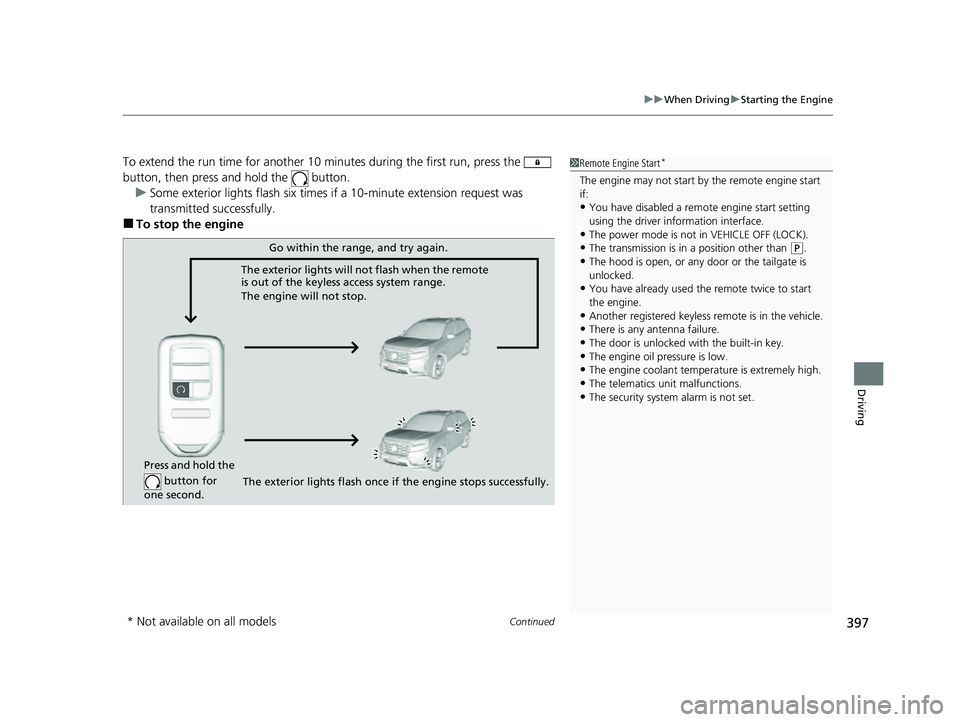
■To stop the engine
1 Remote Engine Start*
The engine may not start by the remote engine start
if:
•You have disabled a remo te engine start setting
using the driver information interface.
•The power mode is not in VEHICLE OFF (LOCK).
•The transmission is in a position other than ( P.
•The hood is open, or any door or the tailgate is
unlocked.
•You have already used the remote twice to start
the engine.
•Another registered keyless remote is in the vehicle.
•There is any antenna failure.
•The door is unlocked with the built-in key.•The engine oil pressure is low.
•The engine coolant temper ature is extremely high.
•The telematics unit malfunctions.•The security system alarm is not set.
Press and hold the
button for
one second.
Go within the range, and try again.
The exterior lights will not flash when the remote
is out of the keyless access system range.
The engine will not stop.
The exterior lights flash once if the engine stops successfully.
* Not available on all models
22 PASSPORT-31TGS6300.book 397 ページ 2021年10月6日 水曜日 午前10時2分
Page 400 of 607
uuWhen Driving uStarting the Engine
398
Driving
1Remote Engine Start*
The engine may stop whil e it is running if:•You do not start the vehicl e within 10 minutes of
starting the engine with the keyless remote.
•The engine is stopped by using the keyless remote.•There is any antenna failure.
•The security system alarm is not set.
•The door is unlocked with the built-in key.•The hood is open, or any door, or the tailgate is
unlocked.
•Any door is open.•The telematics unit* malfunction.
•The engine coolant temper ature is extremely high.
•The battery is low.•The engine oil pressure is low.
•The Malfunction Indicator Lamp comes on if there
is a problem with the emissions control systems.
•The transmission is in a position other than (P.
* Not available on all models
22 PASSPORT-31TGS6300.book 398 ページ 2021年10月6日 水曜日 午前10時2分
Page 510 of 607
508
uuMaintenance Under the Hood uOpening the Hood
Maintenance
Opening the Hood
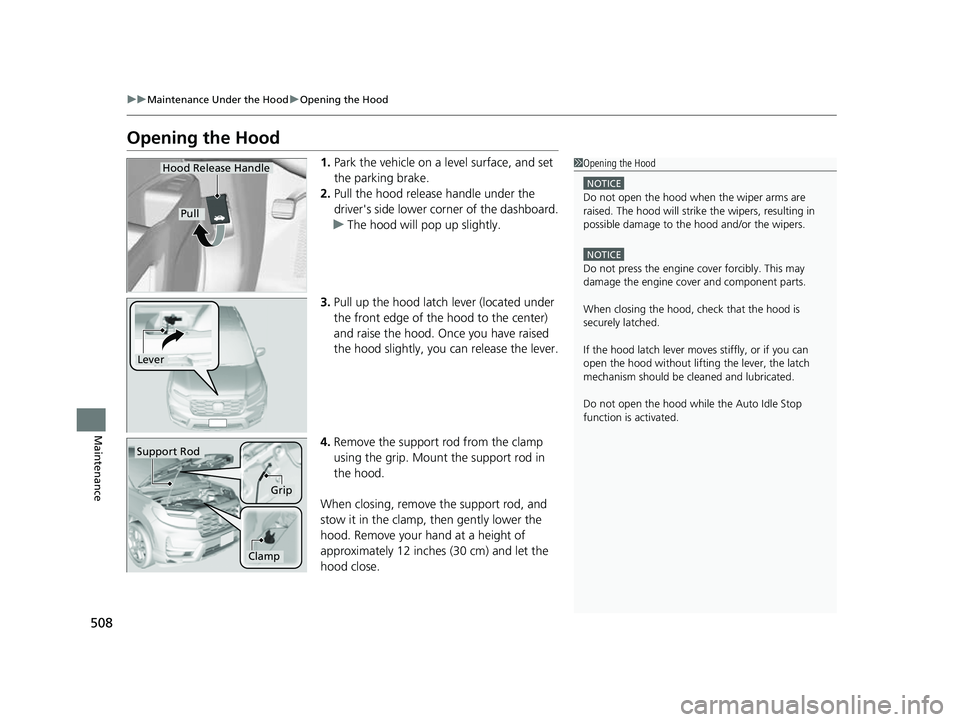
1. Park the vehicle on a level surface, and set
the parking brake.
2. Pull the hood release handle under the
driver's side lower co rner of the dashboard.
u The hood will pop up slightly.
3. Pull up the hood latch lever (located under
the front edge of the hood to the center)
and raise the hood. On ce you have raised
the hood slightly, you can release the lever.
4. Remove the support rod from the clamp
using the grip. Mount the support rod in
the hood.
When closing, remove the support rod, and
stow it in the clamp, then gently lower the
hood. Remove your hand at a height of
approximately 12 inches (30 cm) and let the
hood close.1 Opening the Hood
NOTICE
Do not open the hood when the wiper arms are
raised. The hood will strike the wipers, resulting in
possible damage to the hood and/or the wipers.
NOTICE
Do not press the engine cover forcibly. This may
damage the engine cover and component parts.
When closing the hood, check that the hood is
securely latched.
If the hood latch lever moves stiffly, or if you can
open the hood without lifti ng the lever, the latch
mechanism should be cl eaned and lubricated.
Do not open the hood while the Auto Idle Stop
function is activated.
Hood Release Handle
Pull
Lever
Support Rod
Grip
Clamp
22 PASSPORT-31TGS6300.book 508 ページ 2021年10月6日 水曜日 午前10時2分
Page 514 of 607
512
uuMaintenance Under the Hood uAdding Engine Oil
Maintenance
Adding Engine Oil
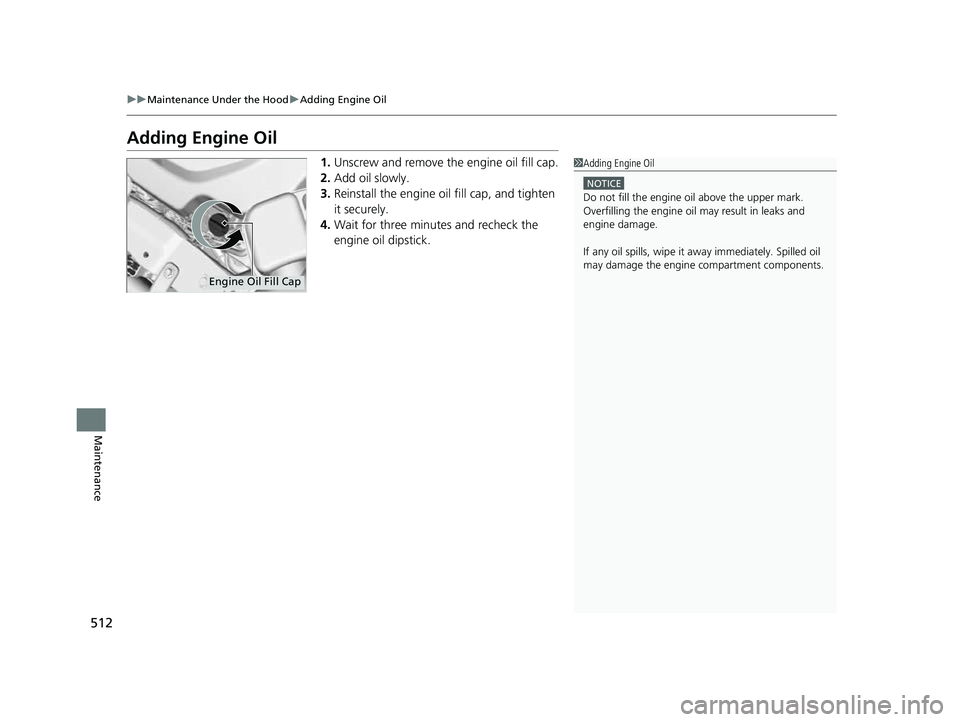
1. Unscrew and remove the engine oil fill cap.
2. Add oil slowly.
3. Reinstall the engine oil fill cap, and tighten
it securely.
4. Wait for three minutes and recheck the
engine oil dipstick.1Adding Engine Oil
NOTICE
Do not fill the engine oil above the upper mark.
Overfilling the engine oil may result in leaks and
engine damage.
If any oil spills, wipe it away immediately. Spilled oil
may damage the engine compartment components.
Engine Oil Fill Cap
22 PASSPORT-31TGS6300.book 512 ページ 2021年10月6日 水曜日 午前10時2分
Page 516 of 607
uuMaintenance Under the Hood uChanging the Engine Oil and Oil Filter
514
Maintenance
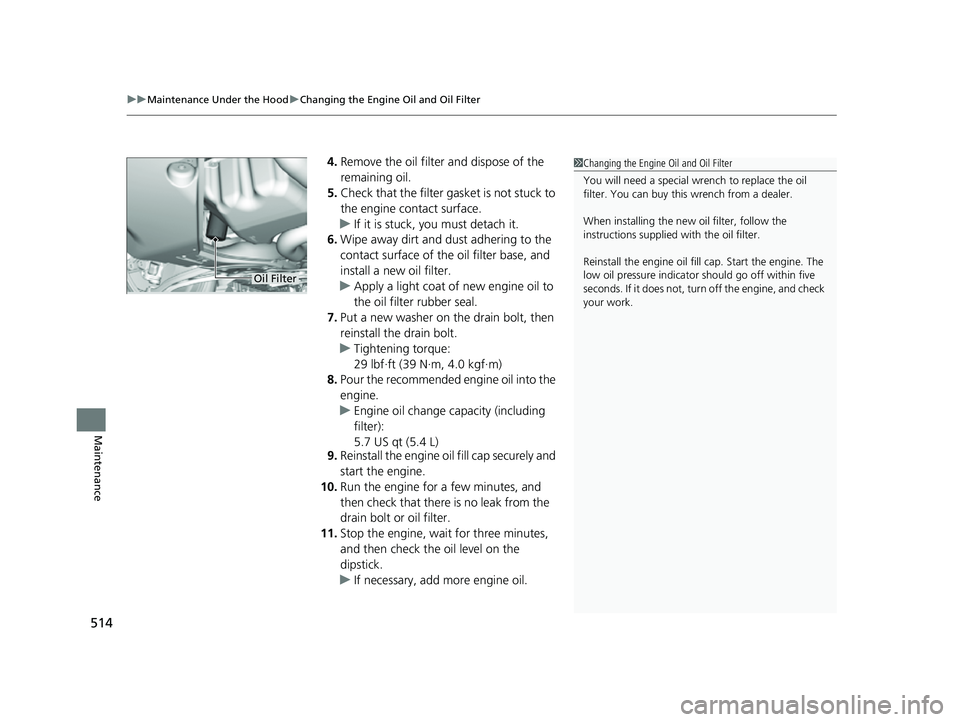
4. Remove the oil filter and dispose of the
remaining oil.
5. Check that the filter ga sket is not stuck to
the engine contact surface.
u If it is stuck, you must detach it.
6. Wipe away dirt and dust adhering to the
contact surface of the oil filter base, and
install a new oil filter.
u Apply a light coat of new engine oil to
the oil filter rubber seal.
7. Put a new washer on the drain bolt, then
reinstall the drain bolt.
u Tightening torque:
29 lbf∙ft (39 N∙m, 4.0 kgf∙m)
8. Pour the recommended engine oil into the
engine.
u Engine oil change capacity (including
filter):
5.7 US qt (5.4 L)
9. Reinstall the engine oi l fill cap securely and
start the engine.
10. Run the engine for a few minutes, and
then check that there is no leak from the
drain bolt or oil filter.
11. Stop the engine, wait for three minutes,
and then check the oil level on the
dipstick.
u If necessary, add more engine oil.1Changing the Engine Oil and Oil Filter
You will need a special wrench to replace the oil
filter. You can buy this wrench from a dealer.
When installing the new oil filter, follow the
instructions supplied with the oil filter.
Reinstall the engine oil fill cap. Start the engine. The
low oil pressure indicator should go off within five
seconds. If it does not, turn off the engine, and check
your work.
Oil Filter
22 PASSPORT-31TGS6300.book 514 ページ 2021年10月6日 水曜日 午前10時2分
Page 545 of 607
543
uuCleaning uInterior Care
Maintenance
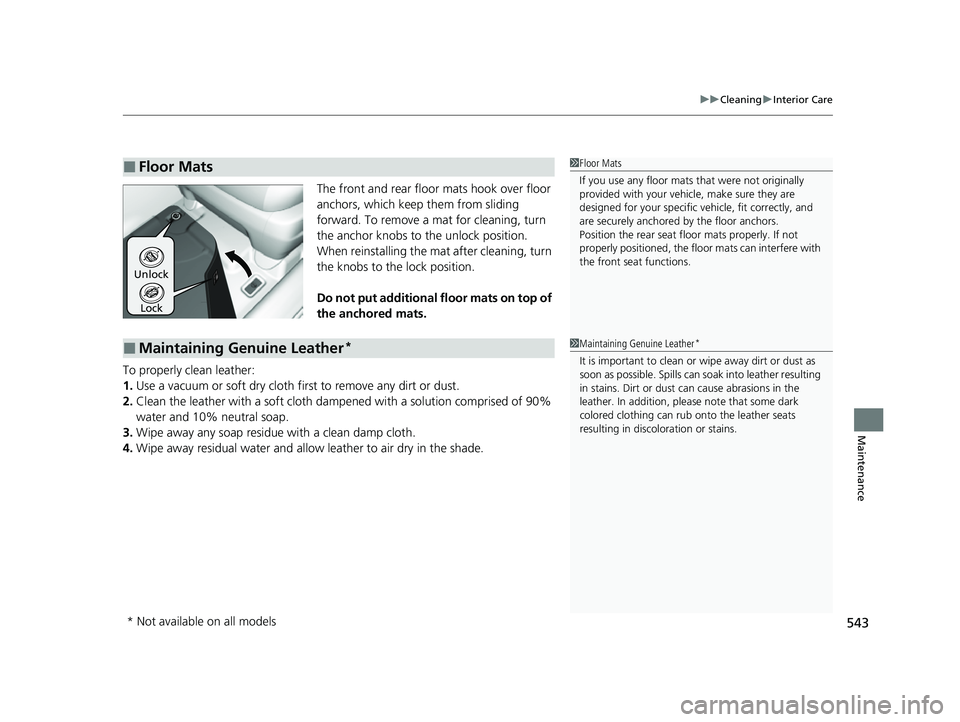
The front and rear floor mats hook over floor
anchors, which keep them from sliding
forward. To remove a mat for cleaning, turn
the anchor knobs to the unlock position.
When reinstalling the mat after cleaning, turn
the knobs to the lock position.
Do not put additional floor mats on top of
the anchored mats.
To properly clean leather:
1. Use a vacuum or soft dry cloth first to remove any dirt or dust.
2. Clean the leather with a soft cloth dampen ed with a solution comprised of 90%
water and 10% neutral soap.
3. Wipe away any soap residu e with a clean damp cloth.
4. Wipe away residual water and allo w leather to air dry in the shade.
■Floor Mats1Floor Mats
If you use any floor mats that were not originally
provided with your vehicle, make sure they are
designed for your specific ve hicle, fit correctly, and
are securely anchored by the floor anchors.
Position the rear seat floor mats properly. If not
properly positioned, the floor mats can interfere with
the front seat functions.
Lock
Unlock
■Maintaining Genuine Leather*1
Maintaining Genuine Leather*
It is important to clean or wipe away dirt or dust as
soon as possible. Spills can soak into leather resulting
in stains. Dirt or dust ca n cause abrasions in the
leather. In addition, pl ease note that some dark
colored clothing can rub onto the leather seats
resulting in discol oration or stains.
* Not available on all models
22 PASSPORT-31TGS6300.book 543 ページ 2021年10月6日 水曜日 午前10時2分
Page 559 of 607
Continued557
uuIf a Tire Goes Flat uChanging a Flat Tire
Handling the Unexpected
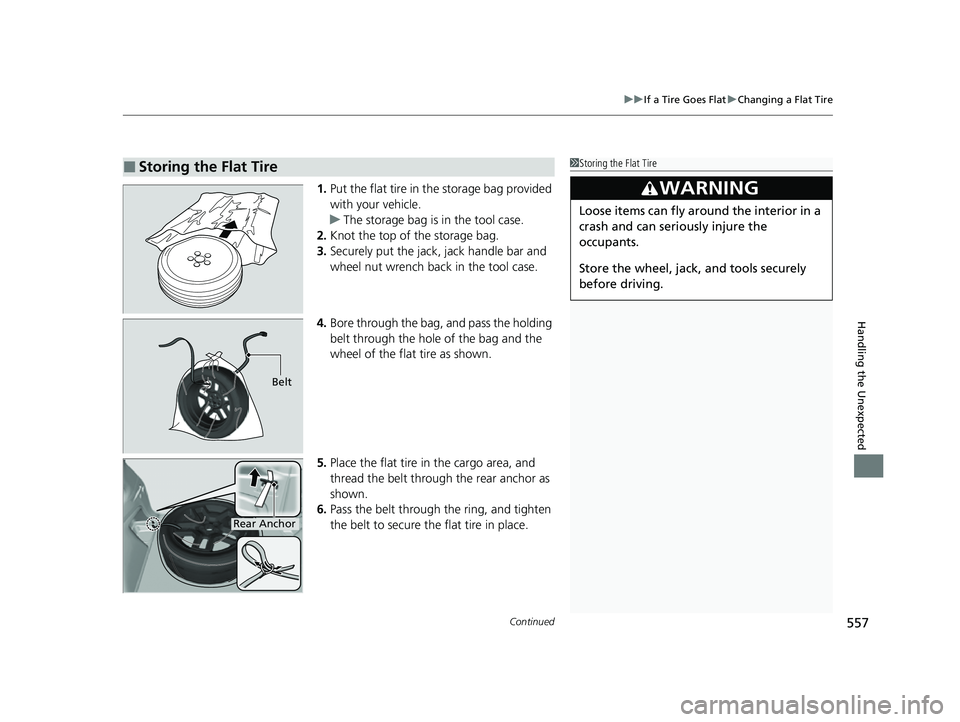
1. Put the flat tire in the storage bag provided
with your vehicle.
u The storage bag is in the tool case.
2. Knot the top of the storage bag.
3. Securely put the jack, jack handle bar and
wheel nut wrench back in the tool case.
4. Bore through the bag, and pass the holding
belt through the hole of the bag and the
wheel of the flat tire as shown.
5. Place the flat tire in the cargo area, and
thread the belt through the rear anchor as
shown.
6. Pass the belt through the ring, and tighten
the belt to secure the flat tire in place.
■Storing the Flat Tire1Storing the Flat Tire
3WARNING
Loose items can fly around the interior in a
crash and can seriously injure the
occupants.
Store the wheel, jack, and tools securely
before driving.
Belt
Rear Anchor
22 PASSPORT-31TGS6300.book 557 ページ 2021年10月6日 水曜日 午前10時2分
Page 564 of 607
562
Handling the Unexpected
If the Battery Is Dead
Turn off the power to electric devices, such as audio and lights. Turn off the engine,
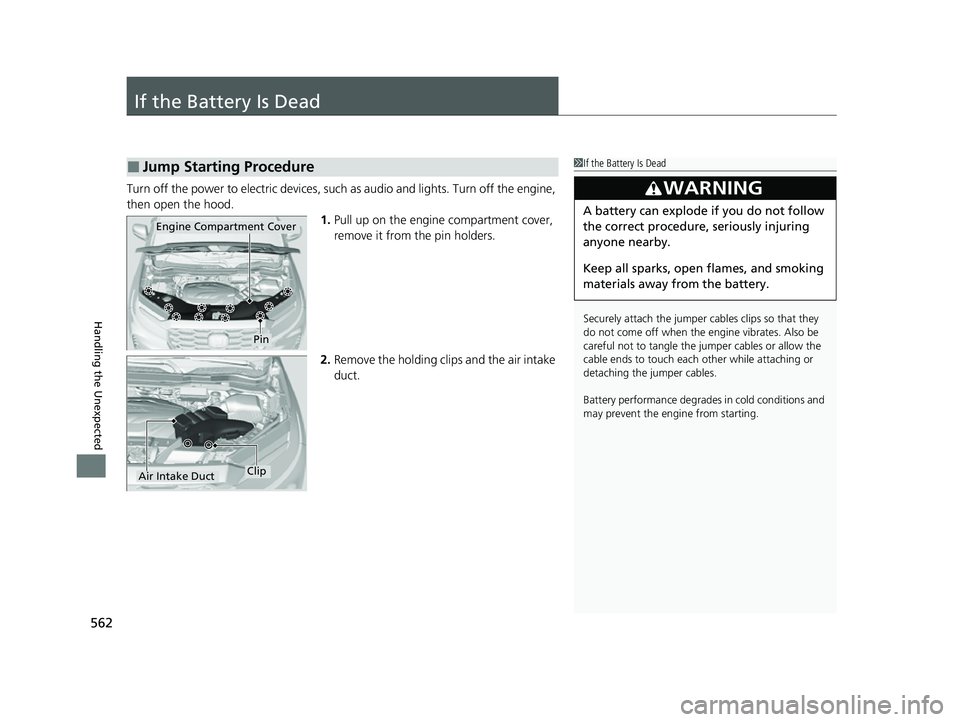
then open the hood. 1.Pull up on the engine compartment cover,
remove it from the pin holders.
2. Remove the holding clips and the air intake
duct.
■Jump Starting Procedure1If the Battery Is Dead
Securely attach the jumper cables clips so that they
do not come off when the e ngine vibrates. Also be
careful not to tangle the ju mper cables or allow the
cable ends to touch each other while attaching or
detaching the jumper cables.
Battery performance degrades in cold conditions and
may prevent the engi ne from starting.
3WARNING
A battery can explode if you do not follow
the correct procedure, seriously injuring
anyone nearby.
Keep all sparks, open flames, and smoking
materials away from the battery.
Pin
Engine Compartment Cover
Air Intake DuctClip
22 PASSPORT-31TGS6300.book 562 ページ 2021年10月6日 水曜日 午前10時2分
Page 593 of 607
591
uuWarranty Coverages u
Information
Under federal law, a manufacturer may de ny warranty coverage and charge for
repairs to a vehicle if it is discovered that an aftermarket or recycled part installed on
the vehicle is defective or was installed incorrectly and caused damage to another
part of the vehicle otherwise covered under warranty. The Federal Trade
Commission requires that a manufacturer demonstrate that an aftermarket or
recycled part or service performed by a person other than an authorized service
provider caused damage to another part of the vehicle otherwise covered under
warranty before denying warranty coverage. Additionally, federal law allows a
manufacturer to void a motor vehicle warr anty or deny warranty coverage if the
manufacturer provides the article or service to consumers free of charge under the
warranty or the manufacturer has secured a waiver from the Federal Trade
Commission.
■Canadian Owners
Please refer to the warranty manual that came with your vehicle.
■EPA Contact Information
An owner may obtain further in formation concerning emission warranties or report
violations of the terms of the emission warranties by contacting:
Director,
Light-Duty Vehicle Center,
U.S. Environmental Protection Agency,
Attention: Warranty Claim
2000 Traverwood Drive,
Ann Arbor, MI 48105;
[email protected]
22 PASSPORT-31TGS6300.book 591 ページ 2021年10月6日 水曜日 午前10時2分
Page 597 of 607
Index
595
Index
Index
A
AAC................................................... 276, 279
ABS (Anti-lock Brake System) .................. 478
AC Power Outlet ...................................... 200
Accessories and Modifications ................ 547
Accessory Power Sockets ......................... 199
Adaptive Cruise Control (ACC) ................ 446
Adaptive Cruise Control (ACC) Indicator
(Amber) ..................................................... 93
Adaptive Cruise Control (ACC) Indicator (Green) ...................................................... 93
Additives Coolant .................................................. 515
Engine Oil ............................................... 510
Washer ................................................... 518
Additives, Engine Oil ............................... 510
Adjusting
Armrest .................................................. 191
Front Seats.............................................. 181
Head Restraints ............................... 188, 189
Mirrors.................................................... 179
Rear Seats ............................................... 185
Steering Wheel ....................................... 178
Agile Handling Assist ............................... 422
Air Conditioning System
(Climate Control System) ....................... 213
Changing the Mode................................ 213
Defrosting the Windshield and
Windows .............................................. 214
Dust and Pollen Filter .............................. 541
Recirculation/Fresh Air Mode................... 214 Sensor ..................................................... 219
Synchronization Mode ............................. 216
Using Automatic Climate Control ............ 213
Air Pressure ....................................... 529, 583
Airbags ........................................................ 47
Advanced Airbags ..................................... 53
After a Collision ......................................... 51
Airbag Care ............................................... 61
Event Data Recorder .................................... 0
Front Airbags (SRS) .................................... 50
Indicator .............................................. 58, 84
Passenger Airbag Off Indicator .................. 59
Sensors ...................................................... 47
Side Airbags .............................................. 55
Side Curtain Airbags .................................. 57
All-wheel drive (AWD) Indicator ............... 91
AM/FM Radio ............................................ 260
Android Auto ............................................ 298
Anti-lock Brake System (ABS) .................. 478
Indicator .................................................... 83
Apple CarPlay ........................................... 295
Armrest ..................................................... 191
AT&T Hotspot ........................................... 293
Audio Remote Controls ............................ 226
Audio System .................................... 222, 228
Adjusting the Sound ................................ 254
AM/FM Radio .......................................... 260
Android Auto .......................................... 298
Apple CarPlay .......................................... 295
AT&T Hotspot .......................................... 293
Audio/Information Screen ........................ 229 Auxiliary Input Jack.................................. 224
Changing the Screen Brightness .............. 255
Display Setup .......................................... 255
Error Messages ........................................ 302
File Manager ........................................... 248
General Information ................................ 305
HD Subchannel ....................................... 262
Home Screen........................................... 234
HondaLink
®........................................... 287
How to Delete a File ................................ 251
How to Transfer a File ............................. 248
How to Update Wirelessly ....................... 242
How to Update with a USB Device........... 246
iPod ........................................................ 273
Limitations for Manual Operation ............ 256
MP3/WMA/AAC .............................. 276, 279
My Honda Music ..................................... 279
Playing AM/FM Radio .............................. 260
Playing Bluetooth ® Audio ........................ 283
Playing SiriusXM ® Radio .......................... 263
Playing Social Playlist ............................... 285
Reactivating ............................................ 225
Remote Controls ..................................... 226
Security Code .......................................... 225
Selecting an Audio Source ....................... 256
Siri Eyes Free ........................................... 294
Status Area ............................................. 239
System Updates....................................... 242
Thef t Prot ect
ion ...................................... 225
Updating Apps ........................................ 240
USB Flash Drives .............................. 276, 306
22 PASSPORT-31TGS6300.book 595 ページ 2021年10月6日 水曜日 午前10時2分