acc HONDA PASSPORT 2022 Manual Online
[x] Cancel search | Manufacturer: HONDA, Model Year: 2022, Model line: PASSPORT, Model: HONDA PASSPORT 2022Pages: 607, PDF Size: 20.86 MB
Page 333 of 607
331
uuCustomized Features u
Continued
Features
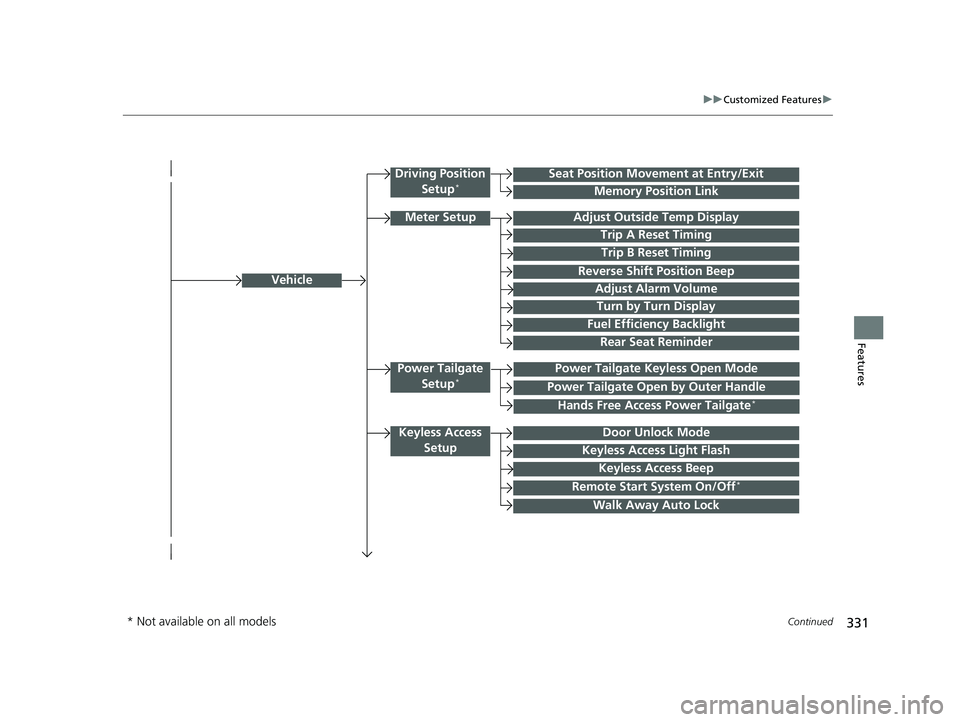
Vehicle
Driving Position
Setup*Seat Position Movement at Entry/Exit
Memory Position Link
Meter SetupAdjust Outside Temp Display
Trip A Reset Timing
Trip B Reset Timing
Reverse Shift Position Beep
Adjust Alarm Volume
Turn by Turn Display
Power Tailgate
Setup*Power Tailgate Keyless Open Mode
Power Tailgate Open by Outer Handle
Keyless Access SetupDoor Unlock Mode
Keyless Access Light Flash
Keyless Access Beep
Remote Start System On/Off*
Walk Away Auto Lock
Fuel Efficiency Backlight
Hands Free Access Power Tailgate*
Rear Seat Reminder
* Not available on all models
22 PASSPORT-31TGS6300.book 331 ページ 2021年10月6日 水曜日 午前10時2分
Page 334 of 607
332
uuCustomized Features u
Features
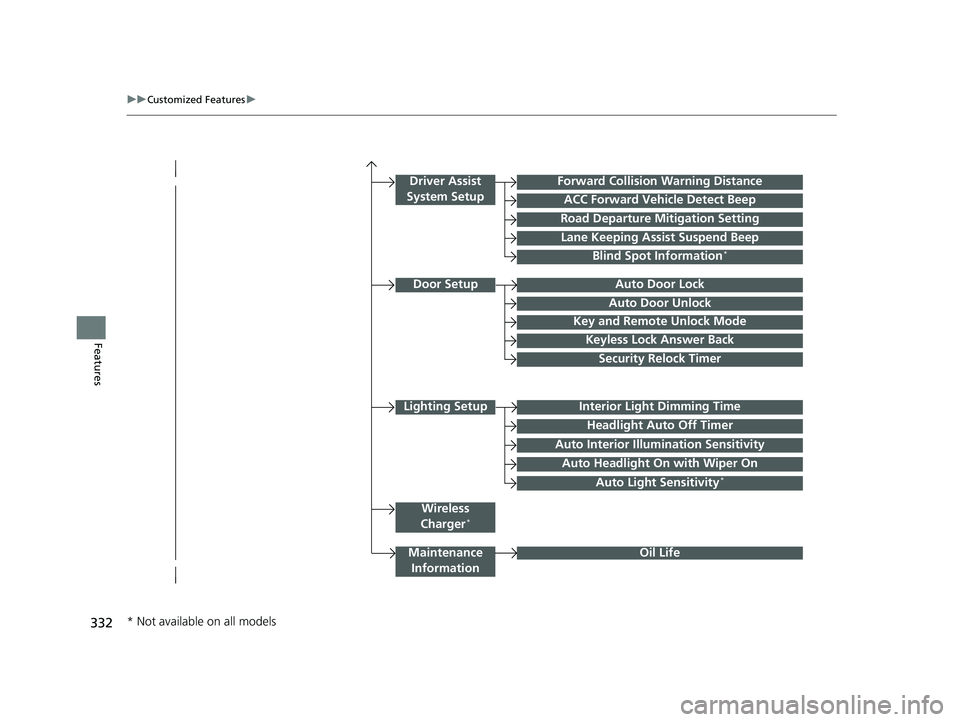
Lighting SetupInterior Light Dimming Time
Headlight Auto Off Timer
Forward Collision Warning Distance
ACC Forward Vehicle Detect Beep
Auto Interior Illumi nation Sensitivity
Door SetupAuto Door Lock
Auto Door Unlock
Key and Remote Unlock Mode
Keyless Lock Answer Back
Security Relock Timer
Maintenance
Information
Driver Assist
System Setup
Oil Life
Road Departure Mitigation Setting
Lane Keeping Assist Suspend Beep
Blind Spot Information*
Wireless
Charger*
Auto Headlight On with Wiper On
Auto Light Sensitivity*
* Not available on all models
22 PASSPORT-31TGS6300.book 332 ページ 2021年10月6日 水曜日 午前10時2分
Page 338 of 607
336
uuCustomized Features u
Features
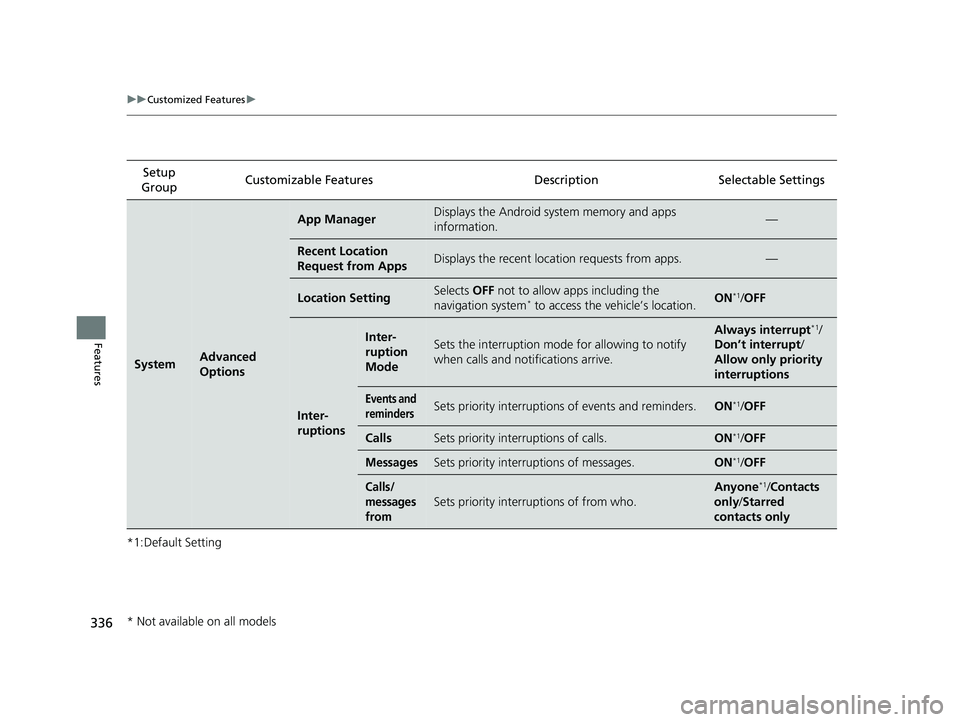
*1:Default SettingSetup
Group Customizable Features Description Selectable Settings
SystemAdvanced
Options
App ManagerDisplays the Android sy
stem memory and apps
information.—
Recent Location
Request from AppsDisplays the recent loca tion requests from apps.—
Location SettingSelects OFF not to allow apps including the
navigation system* to access the vehicle’s location.ON*1/ OFF
Inter-
ruptions
Inter-
ruption
ModeSets the interruption mode for allowing to notify
when calls and notifications arrive.
Always interrupt*1/
Don’t interrupt /
Allow only priority
interruptions
Events and
remindersSets priority interruptions of events and reminders.ON*1/OFF
CallsSets priority interruptions of calls.ON*1/OFF
MessagesSets priority interruptions of messages.ON*1/OFF
Calls/
messages
from
Sets priority interruptions of from who.
Anyone*1/ Contacts
only /Starred
contacts only
* Not available on all models
22 PASSPORT-31TGS6300.book 336 ページ 2021年10月6日 水曜日 午前10時2分
Page 341 of 607
339
uuCustomized Features u
Continued
Features
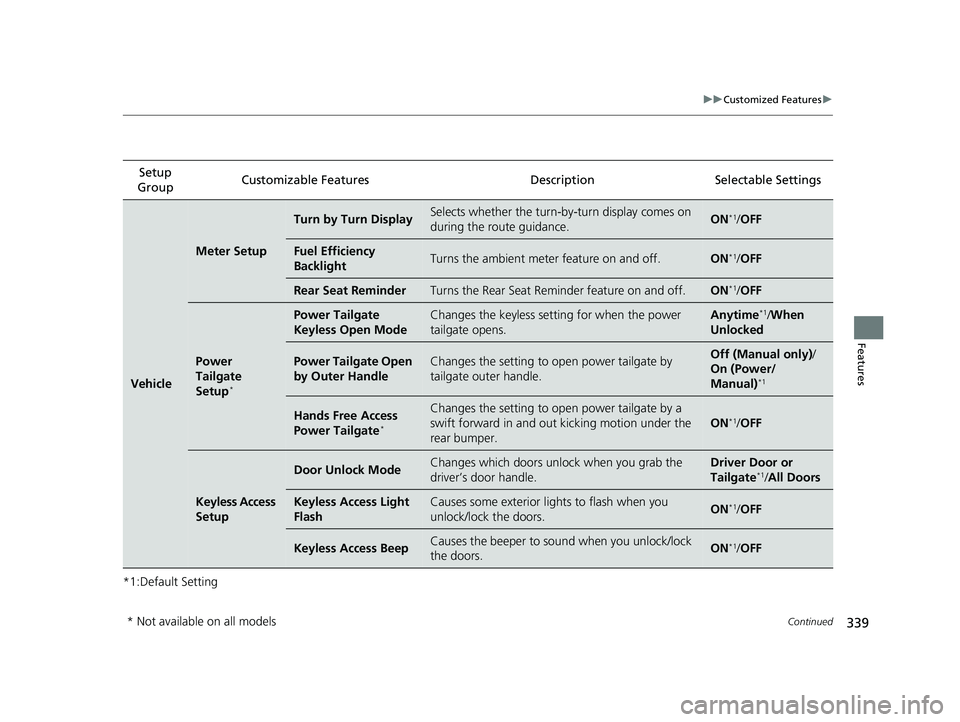
*1:Default SettingSetup
Group Customizable Features
DescriptionSelectable Settings
Vehicle
Meter Setup
Turn by Turn DisplaySelects whether the turn-by-turn display comes on
during the route guidance.ON*1/OFF
Fuel Efficiency
BacklightTurns the ambient meter feature on and off.ON*1/OFF
Rear Seat ReminderTurns the Rear Seat Reminder feature on and off.ON*1/OFF
Power
Tailgate
Setup
*
Power Tailgate
Keyless Open ModeChanges the keyless setting for when the power
tailgate opens.Anytime*1/When
Unlocked
Power Tailgate Open
by Outer HandleChanges the setting to open power tailgate by
tailgate outer handle.Off (Manual only) /
On (Power/
Manual)
*1
Hands Free Access
Power Tailgate*
Changes the setting to open power tailgate by a
swift forward in and out kicking motion under the
rear bumper.
ON*1/ OFF
Keyless Access
Setup
Door Unlock ModeChanges which doors unlo ck when you grab the
driver’s door handle.Driver Door or
Tailgate*1/ All Doors
Keyless Access Light
FlashCauses some exterior lights to flash when you
unlock/lock the doors.ON*1/OFF
Keyless Access BeepCauses the beeper to so und when you unlock/lock
the doors.ON*1/ OFF
* Not available on all models
22 PASSPORT-31TGS6300.book 339 ページ 2021年10月6日 水曜日 午前10時2分
Page 342 of 607
340
uuCustomized Features u
Features
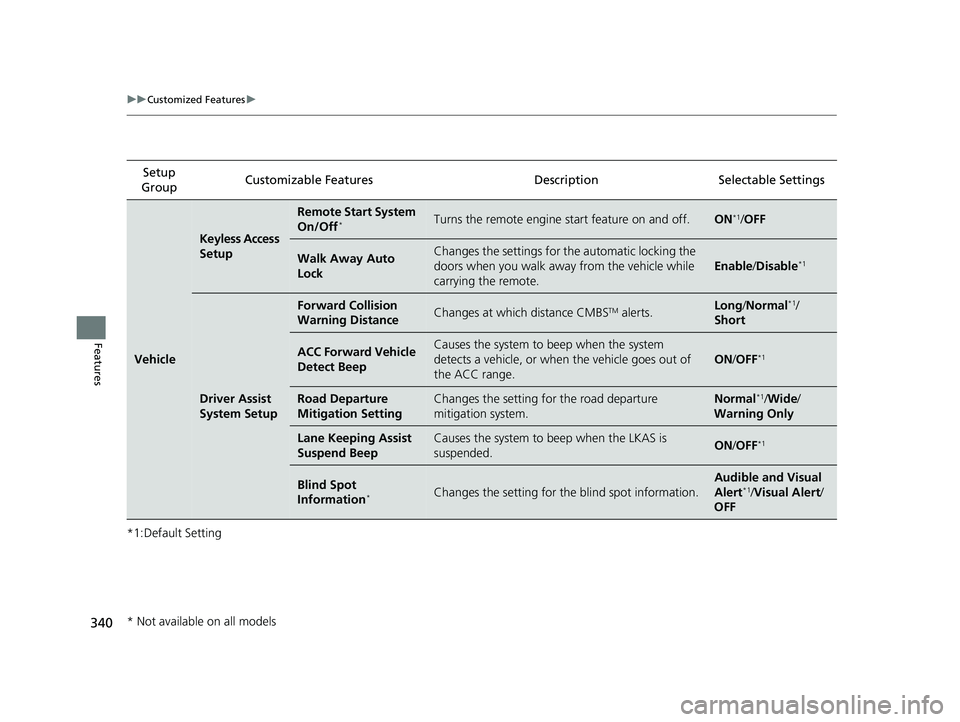
*1:Default SettingSetup
Group Customizable Features Description Selectable Settings
Vehicle
Keyless Access
Setup
Remote Start System
On/Off*Turns the remote engine start feature on and off.ON*1/
OFF
Walk Away Auto
LockChanges the settings for the automatic locking the
doors when you walk away from the vehicle while
carrying the remote.
Enable /Disable*1
Driver Assist
System Setup
Forward Collision
Warning DistanceChanges at which distance CMBSTM alerts.Long /Normal*1/
Short
ACC Forward Vehicle
Detect BeepCauses the system to beep when the system
detects a vehicle, or when the vehicle goes out of
the ACC range.
ON /OFF*1
Road Departure
Mitigation SettingChanges the setting for the road departure
mitigation system.Normal*1/ Wide /
Warning Only
Lane Keeping Assist
Suspend BeepCauses the system to b eep when the LKAS is
suspended.ON /OFF*1
Blind Spot
Information*Changes the setting for th e blind spot information.
Audible and Visual
Alert*1/Visual Alert /
OFF
* Not available on all models
22 PASSPORT-31TGS6300.book 340 ページ 2021年10月6日 水曜日 午前10時2分
Page 352 of 607
uuBluetooth ® HandsFreeLink ®u Using HFL
350
Features
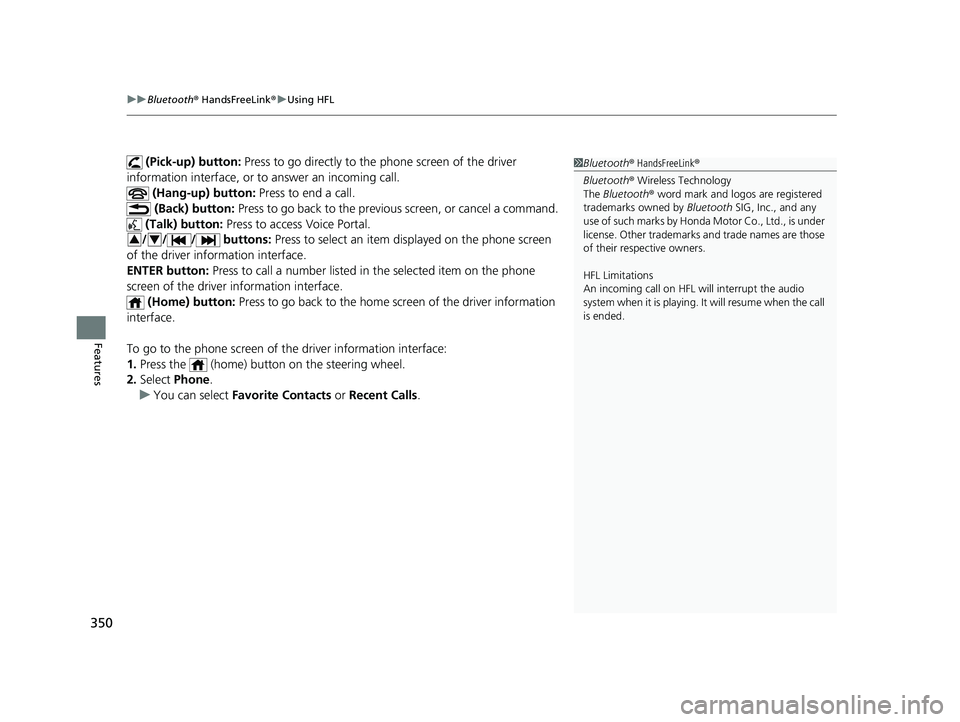
(Pick-up) button: Press to go directly to the phone screen of the driver
information interface, or to answer an incoming call.
(Hang-up) button: Press to end a call.
(Back) button: Press to go back to the previo us screen, or cancel a command.
(Talk) button: Press to access Voice Portal.
// / buttons: Press to select an item displayed on the phone screen
of the driver information interface.
ENTER button: Press to call a number listed in the selected item on the phone
screen of the driver information interface.
(Home) button: Press to go back to the home sc reen of the driver information
interface.
To go to the phone screen of the driver information interface:
1. Press the (home) button on the steering wheel.
2. Select Phone .
u You can select Favorite Contacts or Recent Calls .1Bluetooth ® HandsFreeLink ®
Bluetooth ® Wireless Technology
The Bluetooth ® word mark and logos are registered
trademarks owned by Bluetooth SIG, Inc., and any
use of such marks by Honda Motor Co., Ltd., is under
license. Other trademarks and trade names are those
of their respective owners.
HFL Limitations
An incoming call on HFL will interrupt the audio
s y s t e m wh e n it is p la y i n g . It wi ll r e s u m e w h en t h e c a l l
is ended.
34
22 PASSPORT-31TGS6300.book 350 ページ 2021年10月6日 水曜日 午前10時2分
Page 354 of 607
352
uuBluetooth ® HandsFreeLink ®u HFL Menus
Features
HFL Menus
The power mode must be in ACCESSORY or ON to use the system.
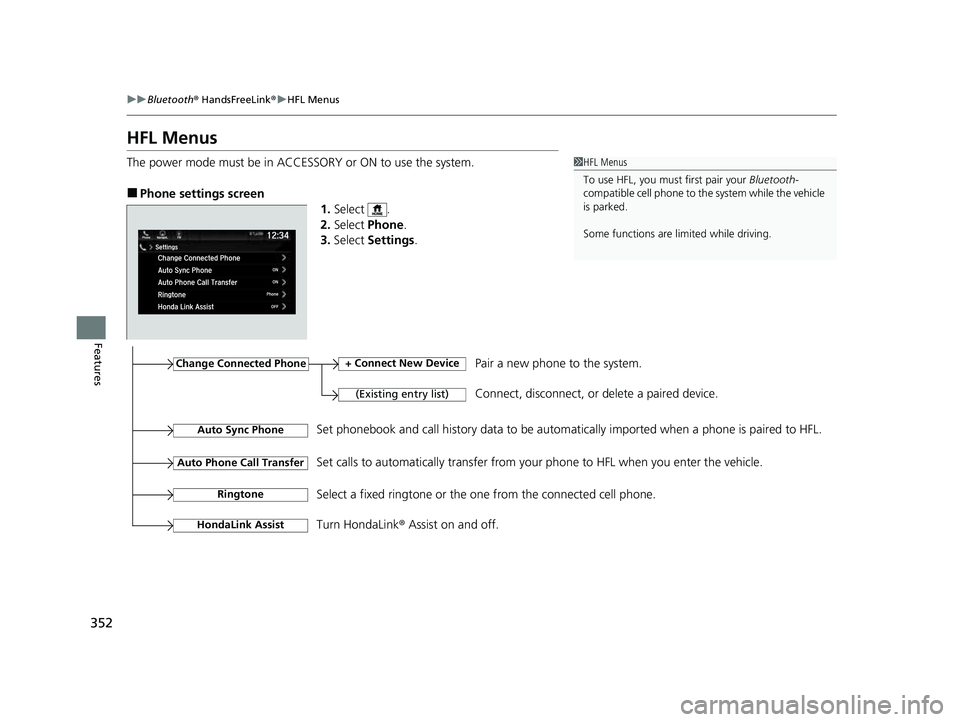
■Phone settings screen
1.Select .
2. Select Phone .
3. Select Settings .
1HFL Menus
To use HFL, you must first pair your Bluetooth-
compatible cell phone to th e system while the vehicle
is parked.
Some functions are li mited while driving.
Change Connected Phone
(Existing entry list)
+ Connect New DevicePair a new phone to the system.
Connect, disconnect, or delete a paired device.
RingtoneSelect a fixed ringtone or the on e from the connected cell phone.
Auto Sync PhoneSet phonebook and call history data to be automa tically imported when a phone is paired to HFL.
Turn HondaLink® Assist on and off.
HondaLink Assist
Auto Phone Call TransferSet calls to automatically transfer from your phone to HFL when you enter the vehicle.
22 PASSPORT-31TGS6300.book 352 ページ 2021年10月6日 水曜日 午前10時2分
Page 376 of 607
uuBluetooth ® HandsFreeLink ®u HFL Menus
374
Features
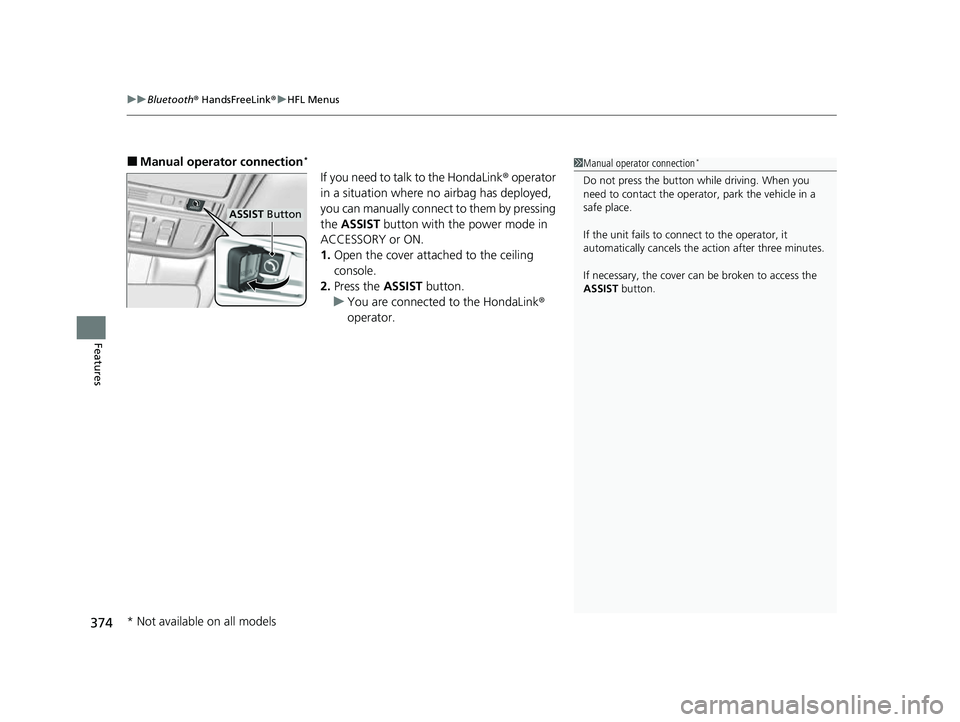
■Manual operator connection*
If you need to talk to the HondaLink ® operator
in a situation where no airbag has deployed,
you can manually connect to them by pressing
the ASSIST button with the power mode in
ACCESSORY or ON.
1. Open the cover attached to the ceiling
console.
2. Press the ASSIST button.
u You are connected to the HondaLink ®
operator.
1 Manual operator connection*
Do not press the button while driving. When you
need to contact the operato r, park the vehicle in a
safe place.
If the unit fails to connect to the operator, it
automatically cancels the action after three minutes.
If necessary, the cover can be broken to access the
ASSIST button.
ASSIST Button
* Not available on all models
22 PASSPORT-31TGS6300.book 374 ページ 2021年10月6日 水曜日 午前10時2分
Page 377 of 607
375
Driving
This chapter discusses driving and refueling.
Before Driving................................... 376
Towing a Trailer ................................ 382
Off-Highway Driving Guidelines ..... 392
When Driving Starting the Engine .......................... 394
Automatic Transmission ................... 402
Shifting ............................................ 403
Auto Idle Stop .................................. 411
ECON Mode .................................... 417
Intelligent Traction Management...... 418
Vehicle Stability AssistTM (VSA®), aka Electronic
Stability Control (ESC), System ............... 420
Agile Handling Assist ....................... 422
Blind spot information System*........ 423 Intelligent Variable To
rque Management (i-
VTM4
TM) AWD System*.................. 426
Tire Pressure Monitoring System (TPMS) with Tire Fill Assist .......................... 427
Tire Pressure Monitoring System (TPMS) -
Required Federal Explanation ......... 429
Honda Sensing ®................................ 431
Collision Mitigati on Braking System
TM
(CMBSTM) ....................................... 434
Adaptive Cruise Control (ACC)......... 446
Lane Keeping Assist System (LKAS) .. 459
Road Departure Mitigation (RDM)
System ....................................... 468
Front Sensor Camera ....................... 473
Radar Sensor.................................... 475 Braking
Brake System ................................... 476
Anti-lock Brake System (ABS) ........... 478
Brake Assist System ......................... 479
Parking Your Vehicle
When Stopped ................................ 480
Parking Sensor System
*................... 482
Cross Traffic Monitor*..................... 487
Multi-View Rear Camera .................. 491
Refueling Fuel Information .............................. 493
How to Refuel ................................. 494
Fuel Economy and CO
2 Emissions
Improving Fuel Economy and Reducing CO
2 Emissions ................................ 496
* Not available on all models
22 PASSPORT-31TGS6300.book 375 ページ 2021年10月6日 水曜日 午前10時2分
Page 379 of 607
Continued377
uuBefore Driving uDriving Preparation
Driving
• Store or secure all items on board properly.
u Carrying too much cargo, or improperly storing it, can affect your vehicle’s
handling, stability, sto pping distance, and tires, and make it unsafe.
2Maximum Load Limit P. 379
•Do not pile items higher than the seat height.
u They can block your view and may be thrown forward in the event of sudden
braking.
• Do not place anything in the front seat footwells. Make sure to secure the floor
mat.
u An object or unsecured floor mat can in terfere with your brake and accelerator
pedal operation while driving.
• If you have any animals on board, do not let them move around in the vehicle.
u They may interfere with driv ing and a crash could occur.
• Securely close and lock al l doors and the tailgate.
2Locking/Unlocking the Doors from the Inside P. 137
•Adjust your seating position properly.
u Adjust the head restraint, too.
2Adjusting the Seats P. 181
2 Adjusting the Front and Rear Oute r Seat Head Restraint Positions P. 188
•Adjust the mirrors and steering wheel properly.
u Adjust them while sitting in the proper driving position.
2 Adjusting the Steering Wheel P. 178
2 Adjusting the Mirrors P. 179
■Interior Checks1Interior Checks
The headlight aim is set by the factory, and does not
need to be adjusted. Howeve r, if you regularly carry
heavy items in the cargo area or tow a trailer, have
the aiming readjusted at a dealer or by a qualified
technician.
22 PASSPORT-31TGS6300.book 377 ページ 2021年10月6日 水曜日 午前10時2分