change wheel HONDA PASSPORT 2023 User Guide
[x] Cancel search | Manufacturer: HONDA, Model Year: 2023, Model line: PASSPORT, Model: HONDA PASSPORT 2023Pages: 610, PDF Size: 20.93 MB
Page 173 of 610
172
uuOperating the Switches Around the Steering Wheel uWipers and Washers
Controls
Wipers and Washers
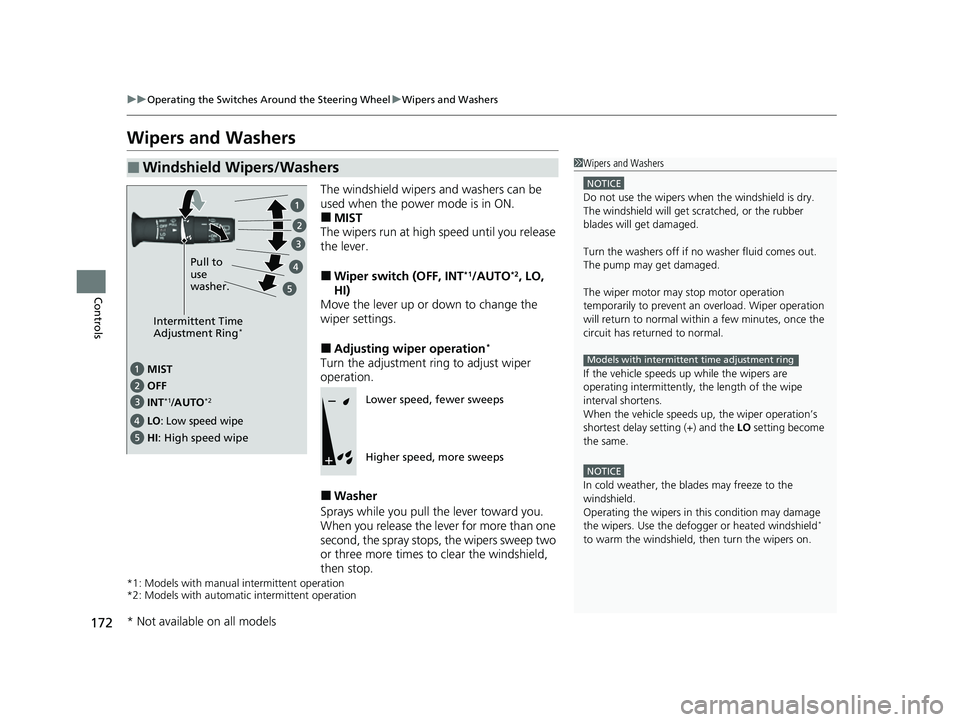
The windshield wipers and washers can be
used when the power mode is in ON.
■MIST
The wipers run at high speed until you release
the lever.
■Wiper switch (OFF, INT*1/AUTO*2, LO,
HI)
Move the lever up or down to change the
wiper settings.
■Adjusting wiper operation*
Turn the adjustment ri ng to adjust wiper
operation.
■Washer
Sprays while you pull the lever toward you.
When you release the lever for more than one
second, the spray stops, the wipers sweep two
or three more times to clear the windshield,
then stop.
*1: Models with manual intermittent operation
*2: Models with automati c intermittent operation
■Windshield Wipers/Washers1Wipers and Washers
NOTICE
Do not use the wipers when the windshield is dry.
The windshield will get sc ratched, or the rubber
blades will get damaged.
Turn the washers off if no washer fluid comes out.
The pump may get damaged.
The wiper motor may stop motor operation
temporarily to prevent an overload. Wiper operation
will return to normal within a few minutes, once the
circuit has returned to normal.
If the vehicle speeds up while the wipers are
operating intermittently, the length of the wipe
interval shortens.
When the vehicle speeds up, the wiper operation’s
shortest delay se tting (+) and the LO setting become
the same.
NOTICE
In cold weather, the blades may freeze to the
windshield.
Operating the wipers in th is condition may damage
the wipers. Use the defogge r or heated windshield
*
to warm the windshield, then turn the wipers on.
Models with intermittent time adjustment ring
Intermittent Time
Adjustment Ring*
MIST
INT
*1/AUTO*2OFF
LO: Low speed wipe
HI: High speed wipe Pull to
use
washer.
Lower speed, fewer sweeps
Higher speed, more sweeps
* Not available on all models
23 PASSPORT-31TGS6400.book 172 ページ 2022年8月5日 金曜日 午後9時2分
Page 175 of 610
174
uuOperating the Switches Around the Steering Wheel uWipers and Washers
Controls
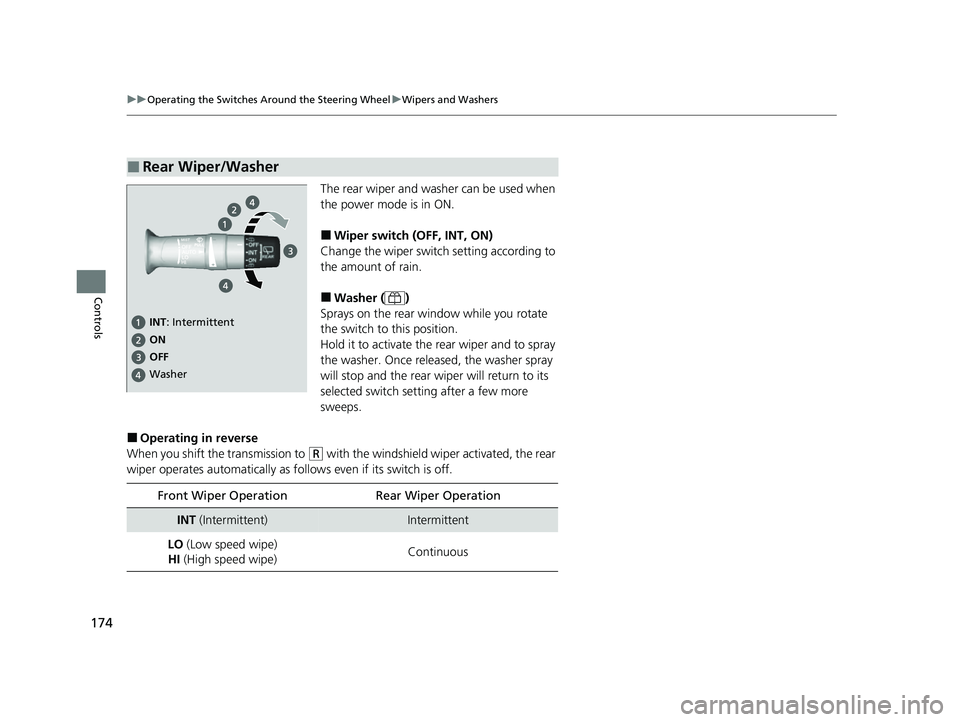
The rear wiper and washer can be used when
the power mode is in ON.
■Wiper switch (OFF, INT, ON)
Change the wiper switch setting according to
the amount of rain.
■Washer ( )
Sprays on the rear wi ndow while you rotate
the switch to this position.
Hold it to activate the rear wiper and to spray
the washer. Once released, the washer spray
will stop and the rear wi per will return to its
selected switch setting after a few more
sweeps.
■Operating in reverse
When you shift the transmission to
(R with the windshield wiper activated, the rear
wiper operates automatically as fo llows even if its switch is off.
■Rear Wiper/Washer
INT: Intermittent
OFF ON
Washer
Front Wiper Op eration Rear Wiper Operation
INT (Intermittent)Intermittent
LO (Low speed wipe)
HI (High speed wipe) Continuous
23 PASSPORT-31TGS6400.book 174 ページ 2022年8月5日 金曜日 午後9時2分
Page 178 of 610
177
uuOperating the Switches Around the Steering Wheel uBrightness Control
Controls
Brightness Control
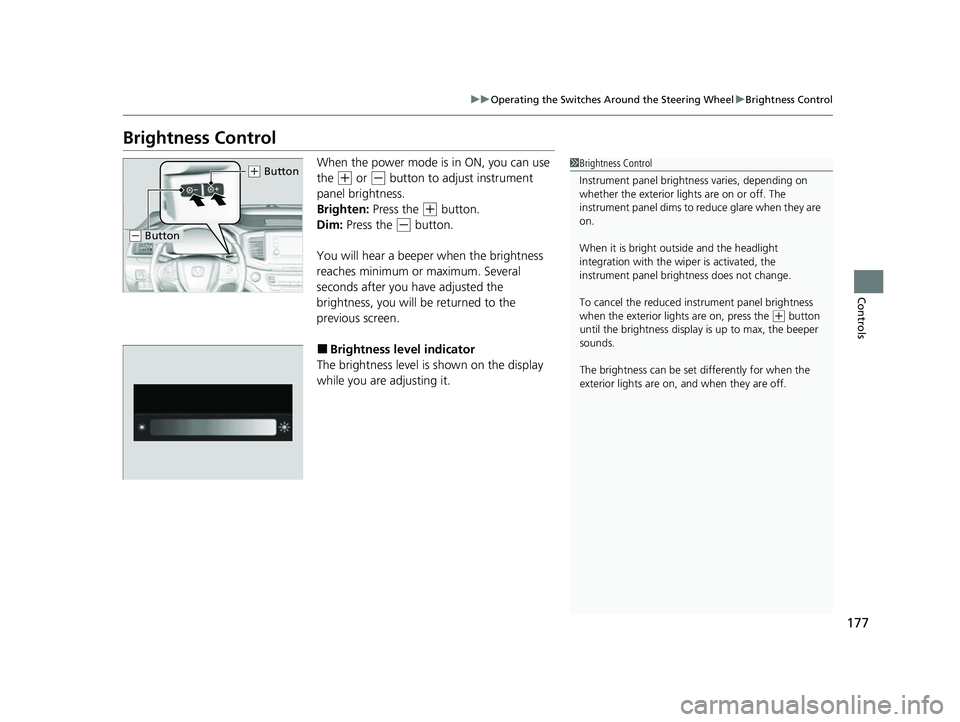
When the power mode is in ON, you can use
the
(+ or (- button to adjust instrument
panel brightness.
Brighten: Press the
(+ button.
Dim: Press the
(- button.
You will hear a beeper when the brightness
reaches minimum or maximum. Several
seconds after you have adjusted the
brightness, you will be returned to the
previous screen.
■Brightness level indicator
The brightness level is shown on the display
while you are adjusting it.
1 Brightness Control
Instrument panel brightne ss varies, depending on
whether the exterior lights are on or off. The
instrument panel dims to reduce glare when they are
on.
When it is bright out side and the headlight
integration with the wi per is activated, the
instrument panel bri ghtness does not change.
To cancel the reduced in strument panel brightness
when the exterior lights are on, press the
( + button
until the brightness display is up to max, the beeper
sounds.
The brightness can be set differently for when the
exterior lights are on, and when they are off.
( + Button
(- Button
23 PASSPORT-31TGS6400.book 177 ページ 2022年8月5日 金曜日 午後9時2分
Page 267 of 610
uuAudio System Basic Operation uPlaying SiriusXM ® Radio*
266
Features
1. Select Settings .
2. Select Tune Mode .
3. Select All Channels or Within Category .
■To Change the Tune Mode1Playing SiriusXM ® Radio*
In the channel mode, all available channels are
selectable. In the category mode, you can select a
channel within a ca tegory (Jazz, Rock, Classical, etc.).
There may be instances when SiriusXM ® Radio does
not broadcast all the data fi elds (artist name, title).
This does not indicate a problem with your audio
system.
SiriusXM ® Radio stations load in ascending order,
which can take about a minute. Once they have
loaded you will be able to scroll up or down to make
your selections.
Switching the Audio Mode
Press the or button on the steering wheel or
select the audio source icon on the screen.
2 Audio Remote Controls P. 228
Tune Start:
When you change to a preset channel, a song being
played on that channel restarts from the beginning
with this function. This can be turned on or off by the
following procedure.
1. Select Settings.
2. Select Tune Start .
3. Select ON or OFF .
To change a category, select Category icons, or
select More and then select Category List.
34
* Not available on all models
23 PASSPORT-31TGS6400.book 266 ページ 2022年8月5日 金曜日 午後9時2分
Page 297 of 610
296
uuAudio System Basic Operation uSiri Eyes Free
Features
Siri Eyes Free
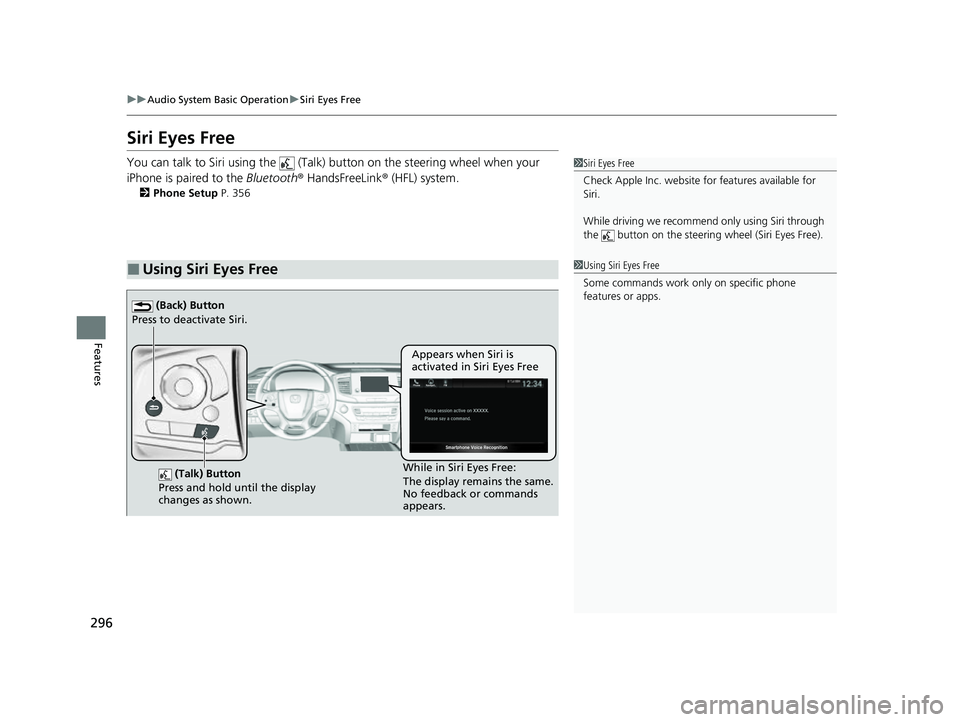
You can talk to Siri using the (Talk) button on the steering wheel when your
iPhone is paired to the Bluetooth® HandsFreeLink ® (HFL) system.
2Phone Setup P. 356
■Using Siri Eyes Free
1Siri Eyes Free
Check Apple Inc. website for features available for
Siri.
While driving we recomme nd only using Siri through
the button on the steering wheel (Siri Eyes Free).
1Using Siri Eyes Free
Some commands work only on specific phone
features or apps.
(Talk) Button
Press and hold until the display
changes as shown.
(Back) Button
Press to deactivate Siri.
While in Siri Eyes Free:
The display remains the same.
No feedback or commands
appears. Appears when Siri is
activated in Siri Eyes Free
23 PASSPORT-31TGS6400.book 296 ページ 2022年8月5日 金曜日 午後9時2分
Page 352 of 610
351Continued
Features
Bluetooth® HandsFreeLink ®
Bluetooth® HandsFreeLink ® (HFL) allows you to place and receive phone calls using
your vehicle’s audio system, without handling your cell phone.
Using HFL
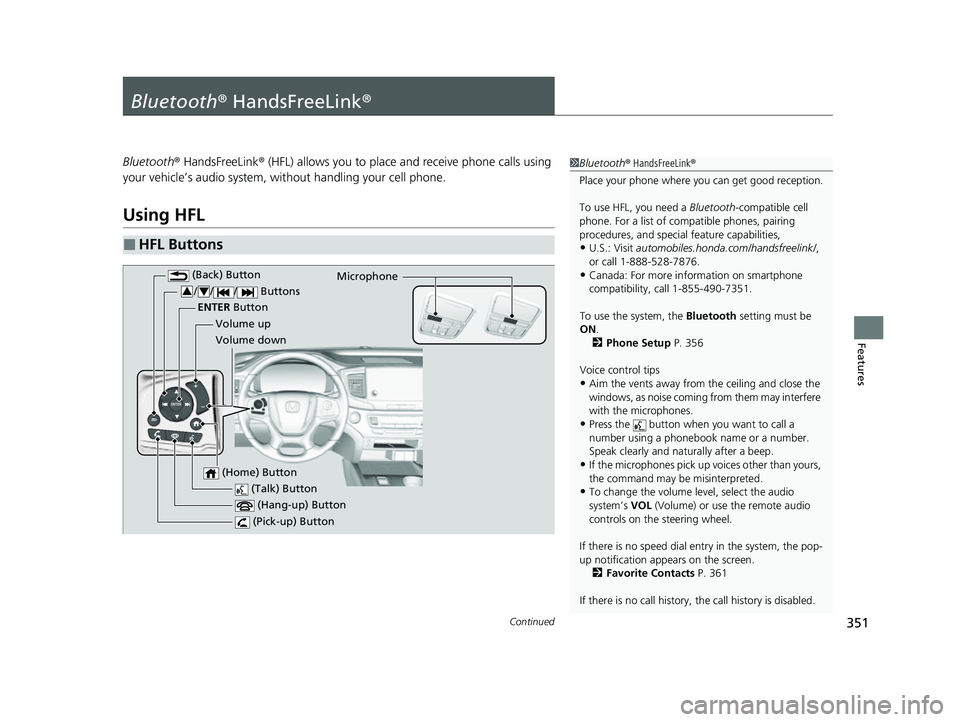
■HFL Buttons
1 Bluetooth ® HandsFreeLink ®
Place your phone where y ou can get good reception.
To use HFL, you need a Bluetooth-compatible cell
phone. For a list of compatible phones, pairing
procedures, and special feature capabilities,
•U.S.: Visit automobiles.honda.com /handsfreelink/,
or call 1-888-528-7876.
•Canada: For more info rmation on smartphone
compatibility, call 1-855-490-7351.
To use the system, the Bluetooth setting must be
ON .
2 Phone Setup P. 356
Voice control tips
•Aim the vents away from the ceiling and close the
windows, as noise coming from them may interfere
with the microphones.
•Press the button when you want to call a
number using a phonebook name or a number.
Speak clearly and naturally after a beep.
•If the microphones pick up vo ices other than yours,
the command may be misinterpreted.
•To change the volume level, select the audio
system’s VOL (Volume) or use the remote audio
controls on the steering wheel.
If there is no speed dial entry in the system, the pop-
up notification appe ars on the screen.
2 Favorite Contacts P. 361
If there is no call history, the call history is disabled. (Talk) Button
Volume up Microphone
(Hang-up) Button
(Pick-up) Button
Volume down
ENTER
Button
(Back) Button
/// Buttons34
(Home) Button
23 PASSPORT-31TGS6400.book 351 ページ 2022年8月5日 金曜日 午後9時2分
Page 404 of 610
403
uuWhen Driving uPrecautions While Driving
Driving
Precautions While Driving
Utility vehicles have a significantly higher rollover rate than other types of vehicles.
To prevent rollovers or loss of control:
• Take corners at slower speeds than yo u would with a passenger vehicle.
• Avoid sharp turns and abrupt maneuvers whenever possible.
• Do not modify your vehicle in any way th at you would raise the center of gravity.
• Do not carry heavy cargo on the roof.
Never carry more than 165 lbs (75 kg) of ca rgo on the roof rack (Honda accessory).
Avoid driving in deep water and on flooded roads. This can damage the engine,
driveline, or cause electrical component failure.
If there is a strong impact with something under the vehicle, stop in a safe location.
Check the underside of the vehicle for damage or any fluid leaks.
■Driving Guidelines for Your Utility Vehicle
■In Rain
■Other Precautions
1 Precautions While Driving
NOTICE
Do not change the gear position while pressing the
accelerator pedal. You could damage the
transmission.
NOTICE
If you repeatedly turn the steering wheel at an
extremely low speed, or hold the steering wheel in
the full left or right position for a while, the electric
power steering (EPS) system heats up. The system
goes into a protective mode, and limits its
performance. The steering wheel becomes harder
and harder to operate. Once the system cools down,
the EPS system is restor ed. Repeated operation under
these conditions can eventually damage the system.
If the power mode is set to ACCESSORY while
driving, the engine will shut down and all steering
and brake power assist functi ons will stop, making it
difficult to control the vehicle.
Do not select
( N while driving as you will lose engine
braking (and accelera tion) performance.
During the first 600 miles (1,000 km) of operation,
avoid sudden acceleration or full throttle operation so
as not to damage the engine or powertrain.
Avoid hard braking for the first 200 miles (300 km)
after purchasing your new vehicle or replacing the
brake pads or rotors, to allow for proper break-in.
23 PASSPORT-31TGS6400.book 403 ページ 2022年8月5日 金曜日 午後9時2分
Page 412 of 610
411
uuWhen Driving uShifting
Continued
Driving
Use the paddle shifters to change betwee n 1st and 9th gears without removing your
hands from the steering wheel. The transmission will switch to the sequential mode.
■When the transmi ssion is in (D:
The vehicle will go into th e sequential mode momentarily , and the sequential mode
gear selection indicator will come on.
Once you start traveling at a constant speed, the sequential mode will automatically
switch off, and the sequential mode gear selection indicator will go off.
Hold the
(+ paddle shifter for two seconds or push button to return to normal
drive.
■When the transmi ssion is in (S
The vehicle will go into th e sequential mode, and the M (sequential mode) indicator
and sequential mode gear selection indicator will come on.
If the vehicle speed increases and the engi ne speed reaches near the tachometer red
zone, the transmission automatically shifts up to the next gear.
You can cancel this mode by holding the
(+ paddle shifter for two seconds or push
button. When the sequential mode is canceled, the sequential mode indicator
and sequential mode gear selection indicator go off.
■Sequential Mode
D/S
D/S
23 PASSPORT-31TGS6400.book 411 ページ 2022年8月5日 金曜日 午後9時2分
Page 423 of 610
uuWhen Driving uVehicle Stability AssistTM (VSA ®), aka Electronic Stability Control (ESC), System
422
Driving
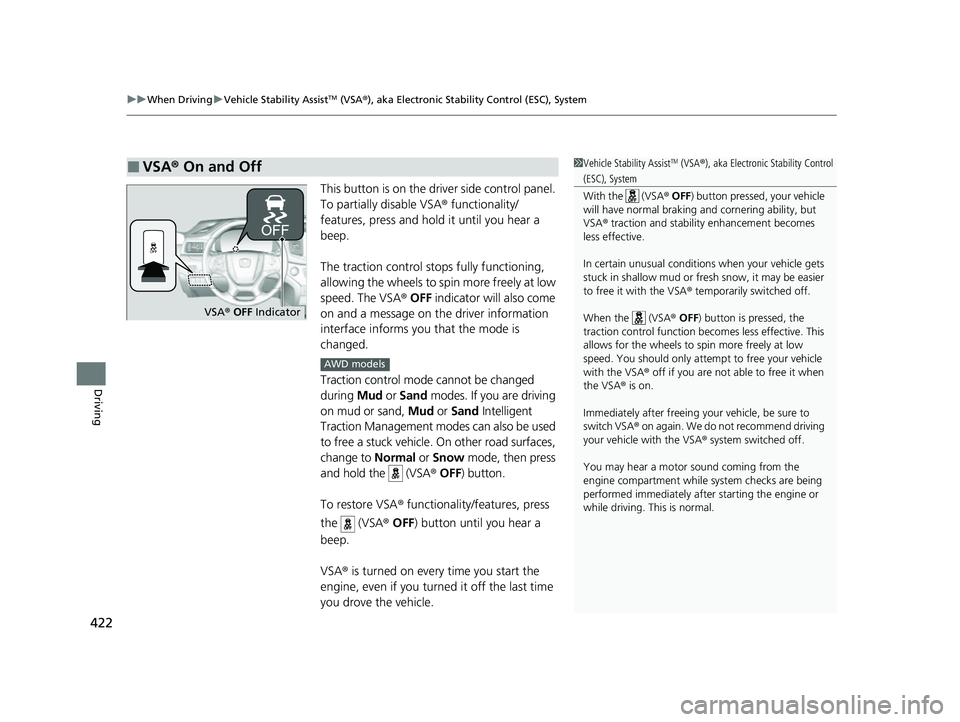
This button is on the driv er side control panel.
To partially disable VSA ® functionality/
features, press and hold it until you hear a
beep.
The traction control stops fully functioning,
allowing the wheels to sp in more freely at low
speed. The VSA ® OFF indicator will also come
on and a message on the driver information
interface informs you that the mode is
changed.
Traction control mode cannot be changed
during Mud or Sand modes. If you are driving
on mud or sand, Mud or Sand Intelligent
Traction Management mode s can also be used
to free a stuck vehicle. On other road surfaces,
change to Normal or Snow mode, then press
and hold the (VSA ® OFF ) button.
To restore VSA ® functionality/features, press
the (VSA ® OFF ) button until you hear a
beep.
VSA ® is turned on every time you start the
engine, even if you turned it off the last time
you drove the vehicle.
■VSA ® On and Off1 Vehicle Stability AssistTM (VSA ®), aka Electronic Stability Control
(ESC), System
With the (VSA ® OFF ) button pressed, your vehicle
will have normal braking and cornering ability, but
VSA ® traction and stabilit y enhancement becomes
less effective.
In certain unusual conditions when your vehicle gets
stuck in shallow mud or fr esh snow, it may be easier
to free it with the VSA ® temporarily switched off.
When the (VSA ® OFF) button is pressed, the
traction control function be comes less effective. This
allows for the wheels to spin more freely at low
speed. You should only attemp t to free your vehicle
with the VSA ® off if you are not able to free it when
the VSA ® is on.
Immediately after freeing your vehicle, be sure to
switch VSA ® on again. We do not recommend driving
your vehicle with the VSA ® system switched off.
You may hear a motor sound coming from the
engine compartment while system checks are being
performed immediately after starting the engine or
while driving. This is normal.
VSA ® OFF Indicator
AWD models
23 PASSPORT-31TGS6400.book 422 ページ 2022年8月5日 金曜日 午後9時2分
Page 437 of 610
uuHonda Sensing ®u Collision Mitigation Braking SystemTM (CMBSTM)
436
Driving
■When the system activates
You can change the distance ( Long/Normal /Short ) between vehicles at which the
system's earliest collision alert will co me on through audio/information screen
setting options.
2 Customized Features P. 329
■Vibration alert on the steering wheel
When a potential collision to an oncoming detected vehicle is determined, the
system alerts you with rapid vibration on the steering wheel, in addition to visual and
audible alerts. u Take appropriate action to prevent a co llision (apply the brakes, operate the
steering wheel, etc.).
1 When the system activates
The camera in the CMBS
TM is also designed to detect
pedestrians.
However, this pedestrian detection feature may not
activate or may not detect a pedestrian in front of
your vehicle under certain conditions.
Refer to the ones indicating the pedestrian detection
limitations from the list. 2 CMBS
TM Conditions and Limitations P. 439
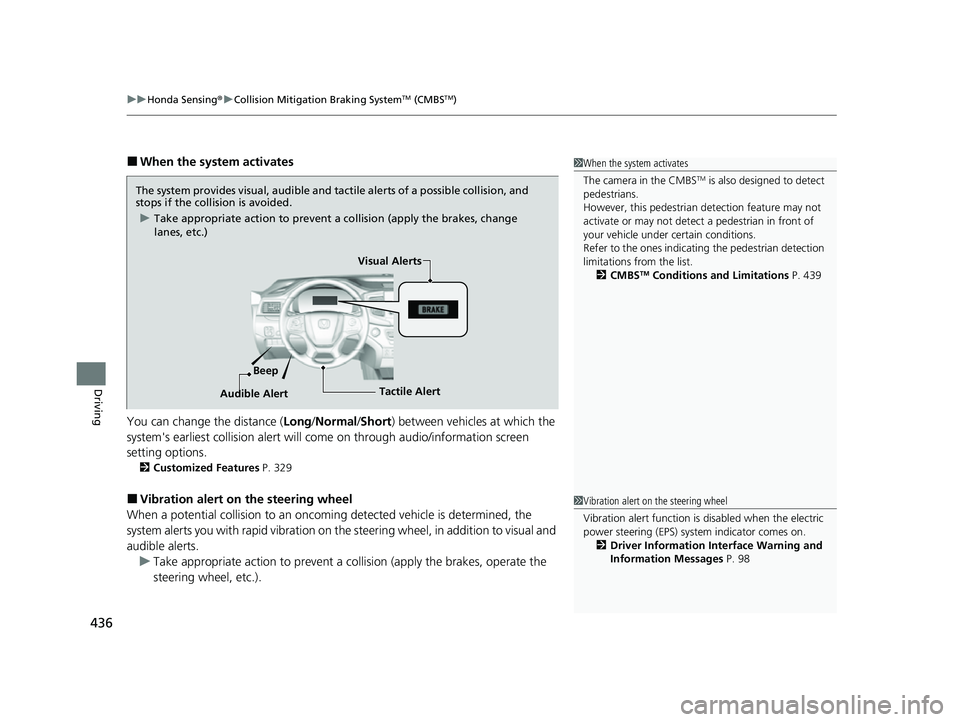
The system provides visual, audible and tactile alerts of a possible collision, and
stops if the collision is avoided.
u Take appropriate action to prevent a collision (apply the brakes, change
lanes, etc.)
Beep Visual Alerts
Audible Alert
Tactile Alert
1 Vibration alert on the steering wheel
Vibration alert function is disabled when the electric
power steering (EPS) system indicator comes on. 2 Driver Information Interface Warning and
Information Messages P. 98
23 PASSPORT-31TGS6400.book 436 ページ 2022年8月5日 金曜日 午後9時2分