sport mode HONDA PASSPORT 2023 User Guide
[x] Cancel search | Manufacturer: HONDA, Model Year: 2023, Model line: PASSPORT, Model: HONDA PASSPORT 2023Pages: 610, PDF Size: 20.93 MB
Page 19 of 610
18
Quick Reference Guide
Wipers and Washers
(P172)
*1:Models with automatic intermittent operation
*2:Models with manual intermittent operation
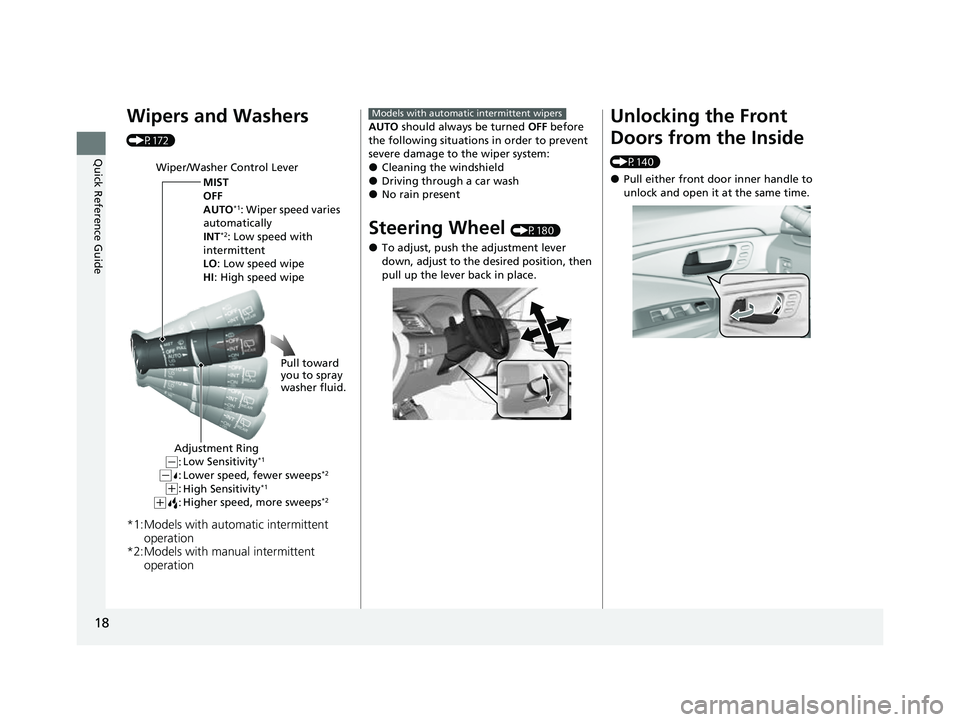
Wiper/Washer Control Lever
MIST
OFF
AUTO
*1: Wiper speed varies
automatically
INT
*2: Low speed with
intermittent
LO: Low speed wipe
HI : High speed wipe
Pull toward
you to spray
washer fluid.
Adjustment Ring
Low Sensitivity*1
Lower speed, fewer sweeps*2
High Sensitivity*1
Higher speed, more sweeps*2(+:
( +:(-:(-:
AUTO should always be turned OFF before
the following situations in order to prevent
severe damage to the wiper system:
●Cleaning the windshield●Driving through a car wash●No rain present
Steering Wheel (P180)
●To adjust, push the adjustment lever
down, adjust to the desired position, then
pull up the lever back in place.
Models with automatic intermittent wipersUnlocking the Front
Doors from the Inside
(P140)
●Pull either front door inner handle to
unlock and open it at the same time.
23 PASSPORT-31TGS6400.book 18 ページ 2022年8月5日 金曜日 午後9時2分
Page 20 of 610
19
Quick Reference Guide
Tailgate (P143)
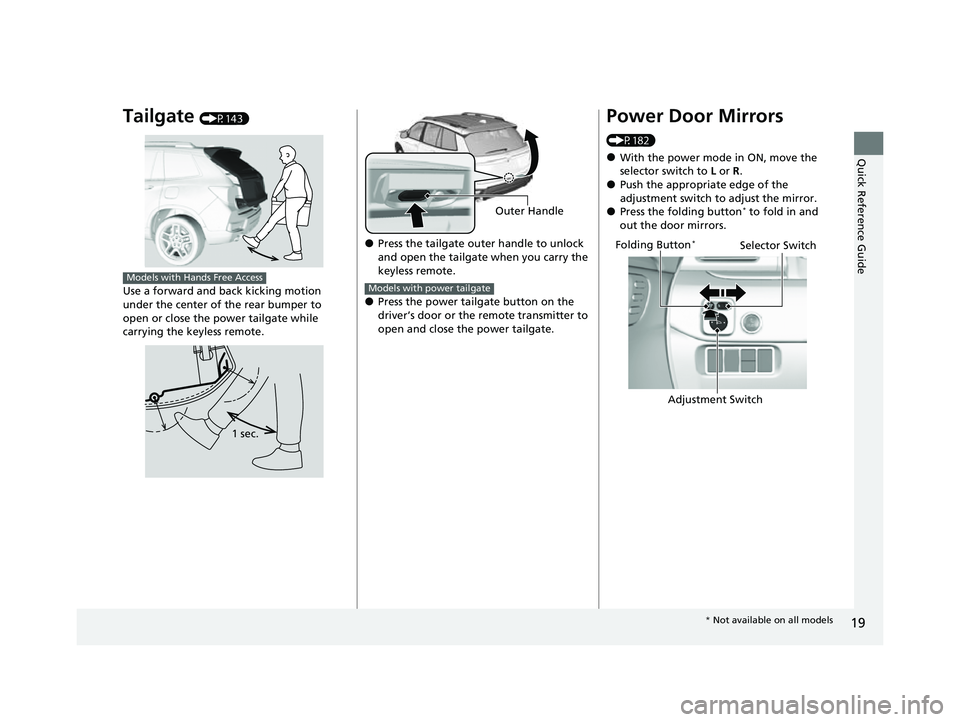
Use a forward and back kicking motion
under the center of the rear bumper to
open or close the power tailgate while
carrying the keyless remote.
Models with Hands Free Access
1 sec.
●Press the tailgate outer handle to unlock
and open the tailgate when you carry the
keyless remote.
●Press the power tailgate button on the
driver’s door or the remote transmitter to
open and close the power tailgate.
Outer Handle
Models with power tailgate
Power Door Mirrors
(P182)
●With the power mode in ON, move the
selector switch to L or R .
●Push the appropriate edge of the
adjustment switch to adjust the mirror.
●Press the folding button* to fold in and
out the door mirrors.
Selector Switch
Adjustment Switch
Folding Button*
*
Not available on all models
23 PASSPORT-31TGS6400.book 19 ページ 2022年8月5日 金曜日 午後9時2分
Page 21 of 610
20
Quick Reference Guide
Power Windows (P156)
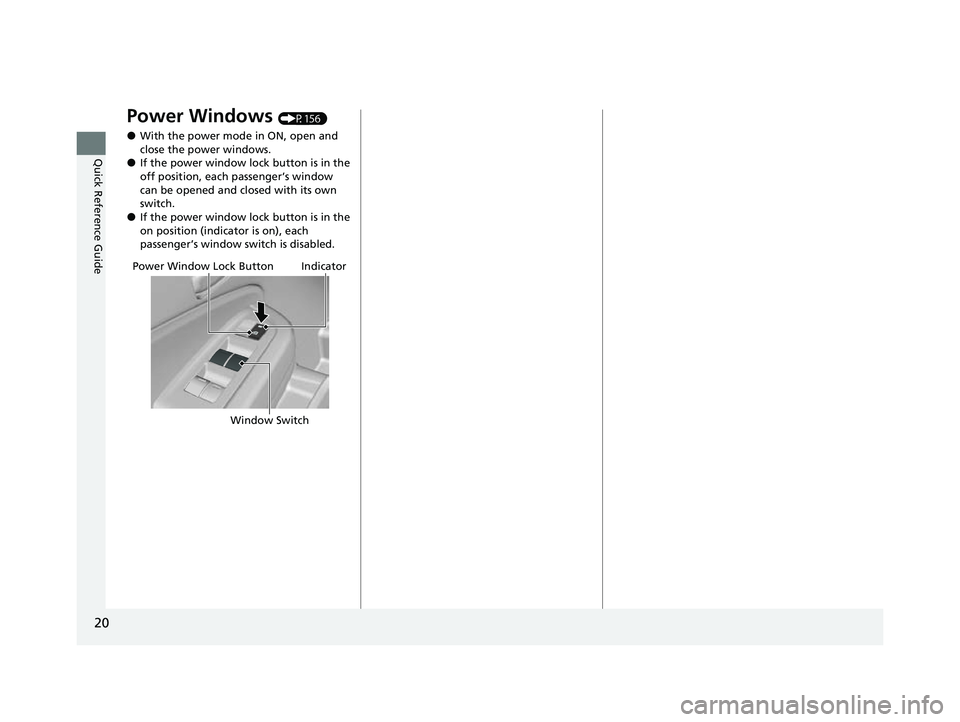
●With the power mode in ON, open and
close the power windows.
●If the power window lock button is in the
off position, each passenger’s window
can be opened and closed with its own
switch.
●If the power window lock button is in the
on position (indicator is on), each
passenger’s window switch is disabled.
Power Window Lock ButtonIndicator
Window Switch
23 PASSPORT-31TGS6400.book 20 ページ 2022年8月5日 金曜日 午後9時2分
Page 22 of 610
21
Quick Reference Guide
Climate Control System (P215)
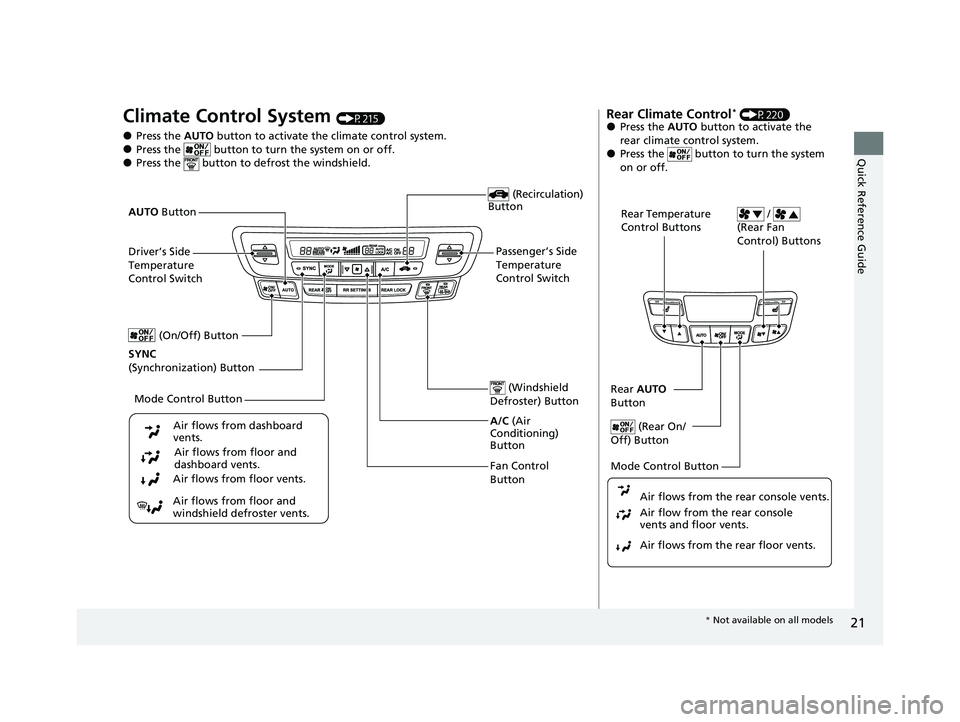
●Press the AUTO button to activate th e climate control system.●Press the button to turn the system on or off.●Press the button to de frost the windshield.
Fan Control
Button (Windshield
Defroster) Button
A/C (Air
Conditioning)
Button
Air flows from floor and
windshield defroster vents. Air flows from floor vents. Air flows from floor and
dashboard vents.
Air flows from dashboard
vents.
(Recirculation)
Button
Passenger’s Side
Temperature
Control Switch
AUTO
Button
Driver’s Side
Temperature
Control Switch
Mode Control Button
SYNC
(Synchronization) Button (On/Off) Button
Rear Climate Control* (P220)●Press the
AUTO button to activate the
rear climate control system.
●Press the button to turn the system
on or off.
Rear Temperature
Control Buttons /
(Rear Fan
Control) Buttons
Rear AUTO
Button
(Rear On/
Off) Button
Mode Control Button
Air flows from the rear floor vents. Air flow from the rear console
vents and floor vents. Air flows from the rear console vents.
* Not available on all models
23 PASSPORT-31TGS6400.book 21 ページ 2022年8月5日 金曜日 午後9時2分
Page 24 of 610
23
Quick Reference Guide
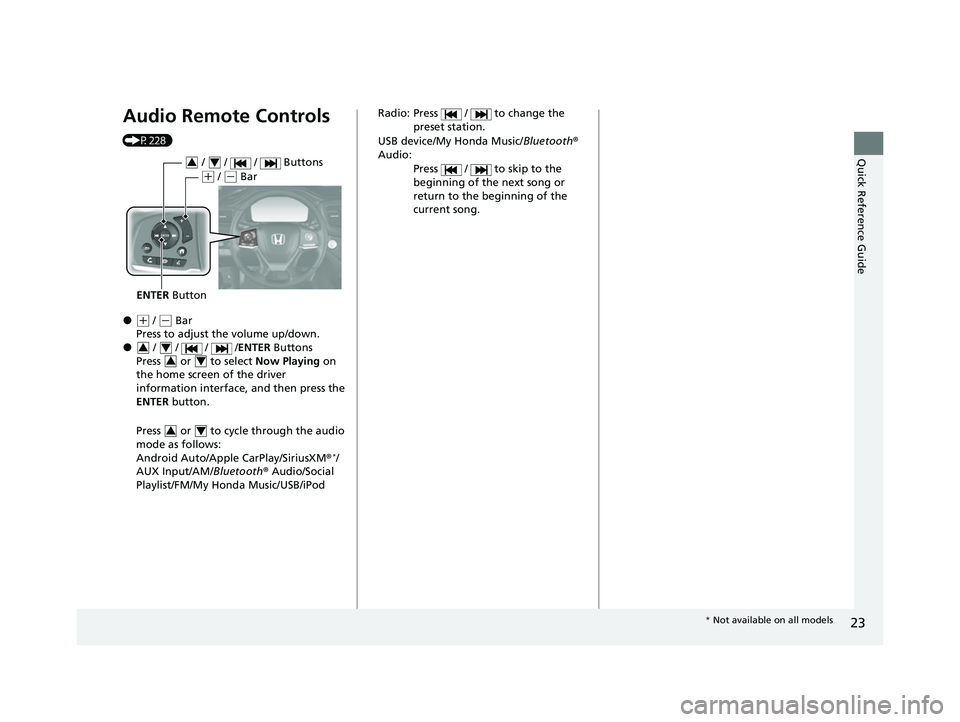
Audio Remote Controls
(P228)
●(+ / (- Bar
Press to adjust the volume up/down.
● / / / /ENTER Buttons
Press or to select Now Playing on
the home screen of the driver
information interface, and then press the
ENTER button.
Press or to cycl e through the audio
mode as follows:
Android Auto/Apple CarPlay/SiriusXM ®
*/
AUX Input/AM/ Bluetooth® Audio/Social
Playlist/FM/My Honda Music/USB/iPod
ENTER Button
/ / / Buttons34
(+ / (- Bar
34
34
34
Radio: Press / to change the
preset station.
USB device/My Honda Music/ Bluetooth®
Audio:
Press / to skip to the
beginning of the next song or
return to the beginning of the
current song.
* Not available on all models
23 PASSPORT-31TGS6400.book 23 ページ 2022年8月5日 金曜日 午後9時2分
Page 25 of 610
24
Quick Reference Guide
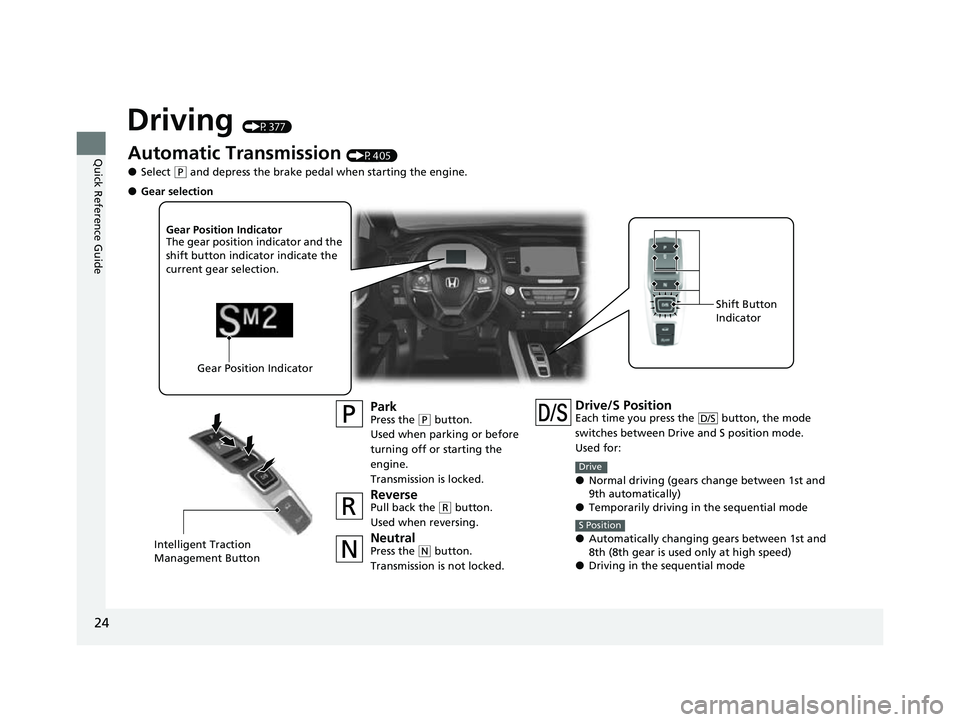
Driving (P377)
Automatic Transmission (P405)
●Select (P and depress the brake pedal when starting the engine.
ParkPress the (P button.
Used when parking or before
turning off or starting the
engine.
Transmission is locked.
ReversePull back the ( R button.
Used when reversing.
NeutralPress the ( N button.
Transmission is not locked.
Gear Position Indicator
The gear position indicator and the
shift button indicator indicate the
current gear selection.
Gear Position Indicator Shift Button
Indicator
●Gear selection
Intelligent Traction
Management Button
Drive/S PositionEach time you press th
e button, the mode
switches between Drive and S position mode.
Used for:
●Normal driving (gears change between 1st and
9th automatically)
●Temporarily driving in the sequential mode
●Automatically changing gears between 1st and
8th (8th gear is used only at high speed)
●Driving in the sequential mode
D/S
Drive
S Position
23 PASSPORT-31TGS6400.book 24 ページ 2022年8月5日 金曜日 午後9時2分
Page 26 of 610
25
Quick Reference Guide
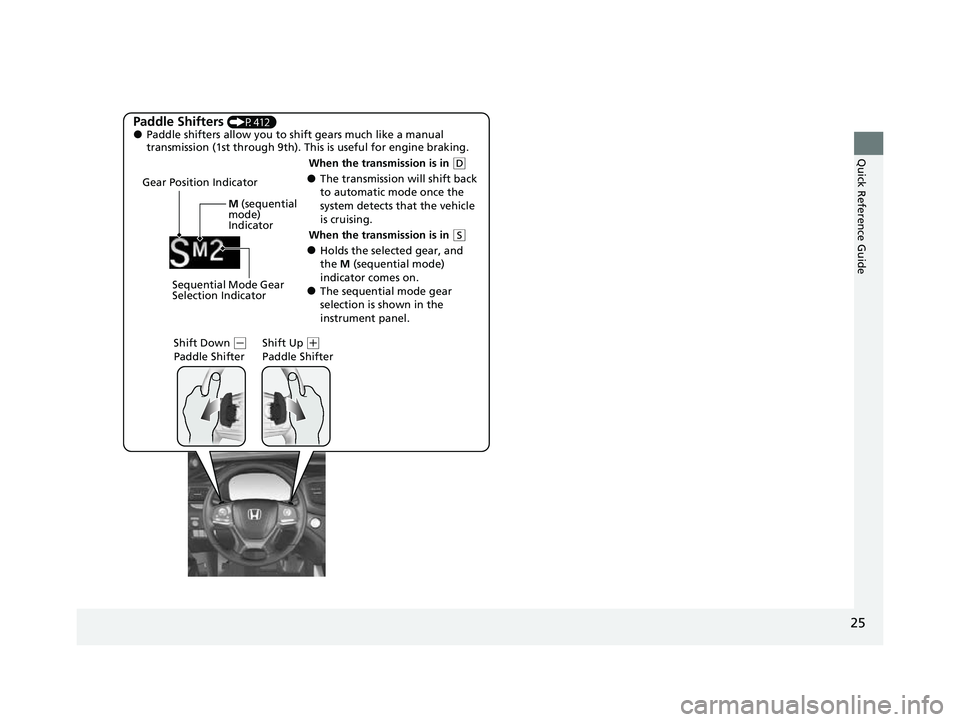
Paddle Shifters (P412)●Paddle shifters allow you to shift gears much like a manual
transmission (1st through 9th). This is useful for engine braking.
●The transmission will shift back
to automatic mode once the
system detects that the vehicle
is cruising.
Gear Position Indicator
Shift Down
(-
Paddle Shifter Shift Up (
+
Paddle Shifter
Sequential Mode Gear
Selection Indicator M
(sequential
mode)
Indicator
When the transmission is in ( D
●Holds the selected gear, and
the M (sequential mode)
indicator comes on.
●The sequential mode gear
selection is shown in the
instrument panel.
When the transmission is in
(
S
23 PASSPORT-31TGS6400.book 25 ページ 2022年8月5日 金曜日 午後9時2分
Page 31 of 610

30
Quick Reference Guide
What to Do If
The power mode does not
change from VEHICLE OFF
(LOCK) to ACCESSORY.
Why?
●The steering wheel may be locked.
●Move the steering wheel left and right
after pressing the ENGINE START/STOP
button.
Why does the brake pedal
pulsate slightly when
applying the brakes?This can occur when the ABS activates and does not indicate a
problem. Apply firm, steady pressure on the brake pedal. Never
pump the brake pedal. u Anti-lock Brake System (ABS)
(P479)
The rear door cannot be
opened from inside the
vehicle. Why?Check if the childproof lock is in
the lock position. If so, open the
rear door with the outside door
handle.
To cancel this function, slide the
lever up to the unlock position.
Canadian models
23 PASSPORT-31TGS6400.book 30 ページ 2022年8月5日 金曜日 午後9時2分
Page 32 of 610

31
Quick Reference Guide
Why do the doors lock
after I unlocked the doors?If you do not open the doors within 30 seconds, the doors are
relocked automatically for security.
Why does the beeper
sound when I open the
driver’s door?The beeper sounds when:
●The power mode is in ACCESSORY.
●The exterior lights are left on.
●The Auto Idle Stop is in operation.
Why does a beeper sound
when I walk away from the
vehicle after I close the
door?The beeper sounds if you move outside the walk away auto lock
operating range before the door completely closes.
u Locking the doors and tailgate (Walk away auto lock® )
(P134)
Why does the beeper
sound when I start driving?The beeper sounds when:
●Driver and/or front passenger are not wearing their seat belts.
●The parking brake pedal is not fully released.
Why do I hear a screeching
sound when I apply the
brake pedal?The brake pads may need to be replaced. Have your vehicle
inspected by a dealer.
23 PASSPORT-31TGS6400.book 31 ページ 2022年8月5日 金曜日 午後9時2分
Page 42 of 610
Continued41
uuSeat Belts uAbout Your Seat Belts
Safe Driving■Front seats
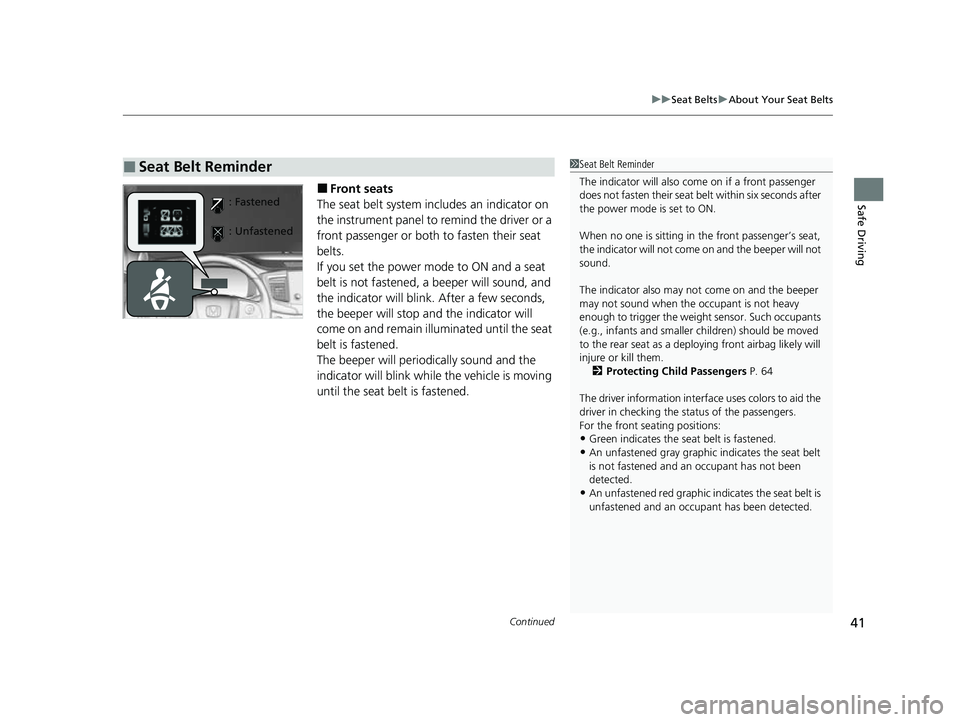
The seat belt system includes an indicator on
the instrument panel to remind the driver or a
front passenger or both to fasten their seat
belts.
If you set the power mode to ON and a seat
belt is not fastened, a beeper will sound, and
the indicator will blink. After a few seconds,
the beeper will stop and the indicator will
come on and remain illuminated until the seat
belt is fastened.
The beeper will periodically sound and the
indicator will blink while the vehicle is moving
until the seat belt is fastened.
■Seat Belt Reminder1 Seat Belt Reminder
The indicator will also co me on if a front passenger
does not fasten their seat belt within six seconds after
the power mode is set to ON.
When no one is sitting in th e front passenger’s seat,
the indicator will not come on and the beeper will not
sound.
The indicator also may no t come on and the beeper
may not sound when the occupant is not heavy
enough to trigger the weight sensor. Such occupants
(e.g., infants and smaller children) should be moved
to the rear seat as a deploying front airbag likely will
injure or kill them. 2 Protecting Child Passengers P. 64
The driver information interface uses colors to aid the
driver in checking the st atus of the passengers.
For the front seating positions:
•Green indicates the seat belt is fastened.•An unfastened gray graphic indicates the seat belt
is not fastened and an occupant has not been
detected.
•An unfastened red graphic i ndicates the seat belt is
unfastened and an occupa nt has been detected.
: Fastened
: Unfastened
23 PASSPORT-31TGS6400.book 41 ページ 2022年8月5日 金曜日 午後9時2分