sport mode HONDA PASSPORT 2023 Owners Manual
[x] Cancel search | Manufacturer: HONDA, Model Year: 2023, Model line: PASSPORT, Model: HONDA PASSPORT 2023Pages: 610, PDF Size: 20.93 MB
Page 484 of 610
483
uuParking Your Vehicle uParking Sensor System*
Continued
Driving
Parking Sensor System*
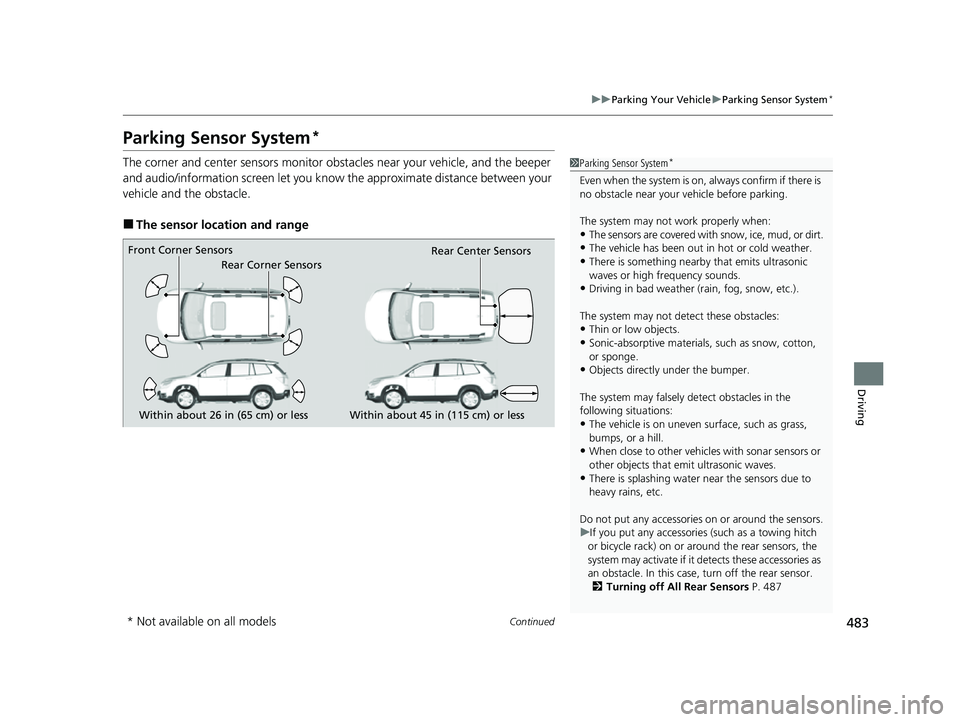
The corner and center sensors monitor obst acles near your vehicle, and the beeper
and audio/information screen let you know the approximate distance between your
vehicle and the obstacle.
■The sensor location and range
1 Parking Sensor System*
Even when the system is on, always confirm if there is
no obstacle near your ve hicle before parking.
The system may not work properly when:
•The sensors are covered with snow, ice, mud, or dirt.
•The vehicle has been out in hot or cold weather.
•There is something nearby that emits ultrasonic
waves or high frequency sounds.
•Driving in bad weather (rain, fog, snow, etc.).
The system may not de tect these obstacles:
•Thin or low objects.
•Sonic-absorptive materials, such as snow, cotton,
or sponge.
•Objects directly under the bumper.
The system may falsely de tect obstacles in the
following situations:
•The vehicle is on uneven su rface, such as grass,
bumps, or a hill.
•When close to other vehicl es with sonar sensors or
other objects that em it ultrasonic waves.
•There is splashing water near the sensors due to
heavy rains, etc.
Do not put any accessories on or around the sensors.
u If you put any accessorie s (such as a towing hitch
or bicycle rack) on or around the rear sensors, the
system may activate if it detects these accessories as
an obstacle. In this case, turn off the rear sensor. 2 Turning off All Rear Sensors P. 487
Within about 26 in (65 cm) or less
Front Corner Sensors
Rear Corner Sensors
Rear Center Sensors
Within about 45 in (115 cm) or less
* Not available on all models
23 PASSPORT-31TGS6400.book 483 ページ 2022年8月5日 金曜日 午後9時2分
Page 485 of 610
484
uuParking Your Vehicle uParking Sensor System*
Driving
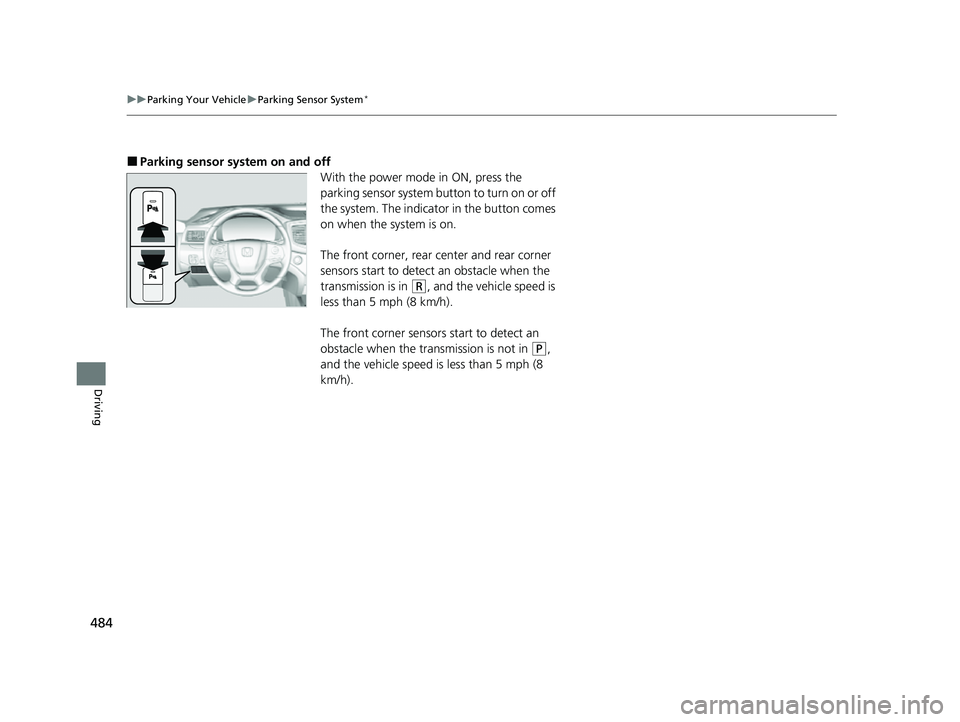
■Parking sensor system on and off
With the power mode in ON, press the
parking sensor system button to turn on or off
the system. The indicator in the button comes
on when the system is on.
The front corner, rear center and rear corner
sensors start to detect an obstacle when the
transmission is in
(R, and the vehicle speed is
less than 5 mph (8 km/h).
The front corner sensors start to detect an
obstacle when the transmission is not in
(P,
and the vehicle speed is less than 5 mph (8
km/h).
23 PASSPORT-31TGS6400.book 484 ページ 2022年8月5日 金曜日 午後9時2分
Page 486 of 610
Continued485
uuParking Your Vehicle uParking Sensor System*
Driving
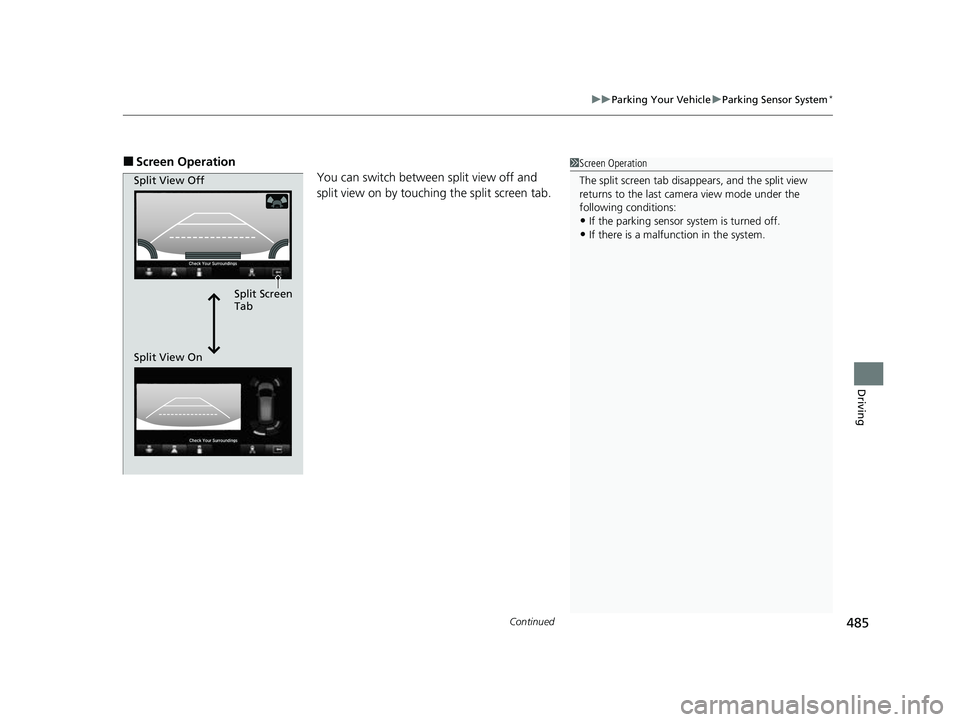
■Screen Operation
You can switch between split view off and
split view on by touching the split screen tab.1Screen Operation
The split screen tab disappears, and the split view
returns to the last camera view mode under the
following conditions:
•If the parking sensor system is turned off.•If there is a malfunction in the system.
Split Screen
Tab
Split View Off
Split View On
23 PASSPORT-31TGS6400.book 485 ページ 2022年8月5日 金曜日 午後9時2分
Page 487 of 610
486
uuParking Your Vehicle uParking Sensor System*
Driving
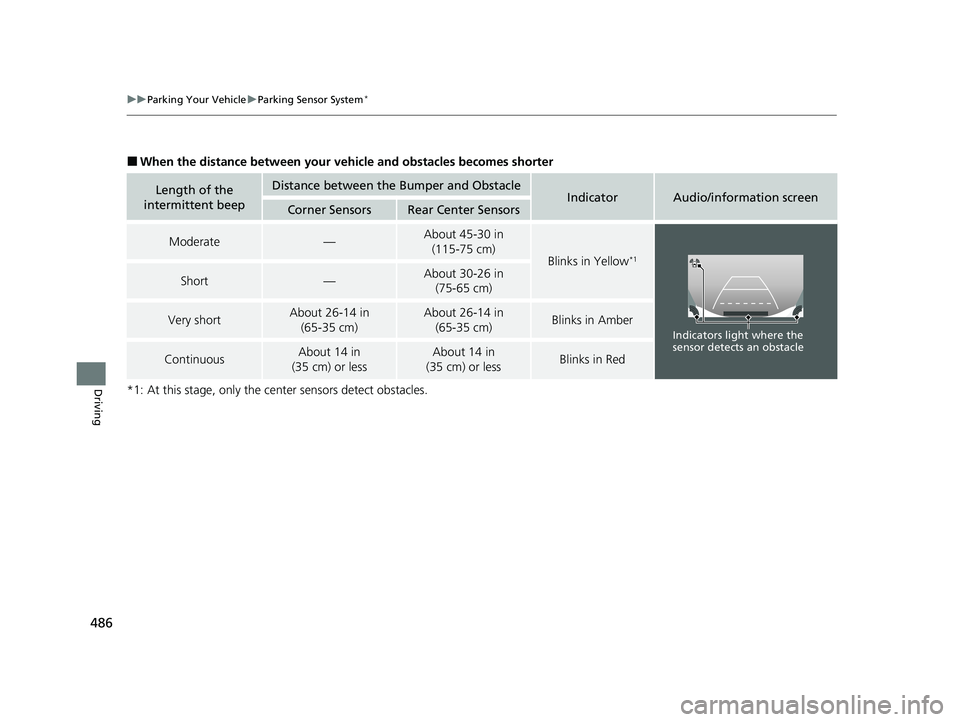
■When the distance between your ve hicle and obstacles becomes shorter
*1: At this stage, only the ce nter sensors detect obstacles.
Length of the
intermittent beepDistance between the Bumper and ObstacleIndicatorAudio/information screenCorner SensorsRear Center Sensors
Moderate—About 45-30 in (115-75 cm)
Blinks in Yellow*1
Short—About 30-26 in (75-65 cm)
Very shortAbout 26-14 in
(65-35 cm)About 26-14 in (65-35 cm)Blinks in Amber
ContinuousAbout 14 in
(35 cm) or lessAbout 14 in
(35 cm) or lessBlinks in Red
Indicators light where the
sensor detects an obstacle
23 PASSPORT-31TGS6400.book 486 ページ 2022年8月5日 金曜日 午後9時2分
Page 488 of 610
487
uuParking Your Vehicle uParking Sensor System*
Driving
To deactivate the rear sensors, please take the following steps:
1. Make sure that the parking sensor system is not activated.
u The indicator in the button turns off.
2. Set the power mode to VEHICLE OFF.
3. Press and hold the parking sensor system button, and set the power mode to ON.
4. Keep pressing the button for 10 seconds. Release the button when the indicator
in the button flashes.
u The beeper sounds once.
5. While the indicator is flashing, press the button again. The indicator in the button
turns off.
u The beeper sounds twice. The rear sensor s are now turned off. They will remain
turned off until manually turned back on again. To turn the rear sensors on
again, follow the above pr ocedure. The beeper sounds three times when the
rear sensors come back on.
■Turning off All Rear Sensors1 Turning off All Rear Sensors
When you set the gear position to
(R, the indicator
in the parking sensor system button blinks as a
reminder that the rear sens ors have been turned off.
23 PASSPORT-31TGS6400.book 487 ページ 2022年8月5日 金曜日 午後9時2分
Page 489 of 610
488
uuParking Your Vehicle uCross Traffic Monitor*
Driving
Cross Traffic Monitor*
Monitors the rear corner areas using the radar sensors when reversing, and alerts
you if a vehicle approaching fro m a rear corner is detected.
The system is convenient when you are backing out of a parking space.1 Cross Traffic Monitor*
3CAUTION
Cross Traffic Monitor cannot detect all
approaching vehicles and may not detect
an approaching vehicle at all.
Failure to visually confirm that it is safe to
back up the vehicle before doing so may
result in a collision.
Do not solely rely on the system when
reversing; always also use your mirrors, and
look behind and to the sides of your vehicle
before reversing.
* Not available on all models
23 PASSPORT-31TGS6400.book 488 ページ 2022年8月5日 金曜日 午後9時2分
Page 490 of 610
Continued489
uuParking Your Vehicle uCross Traffic Monitor*
Driving
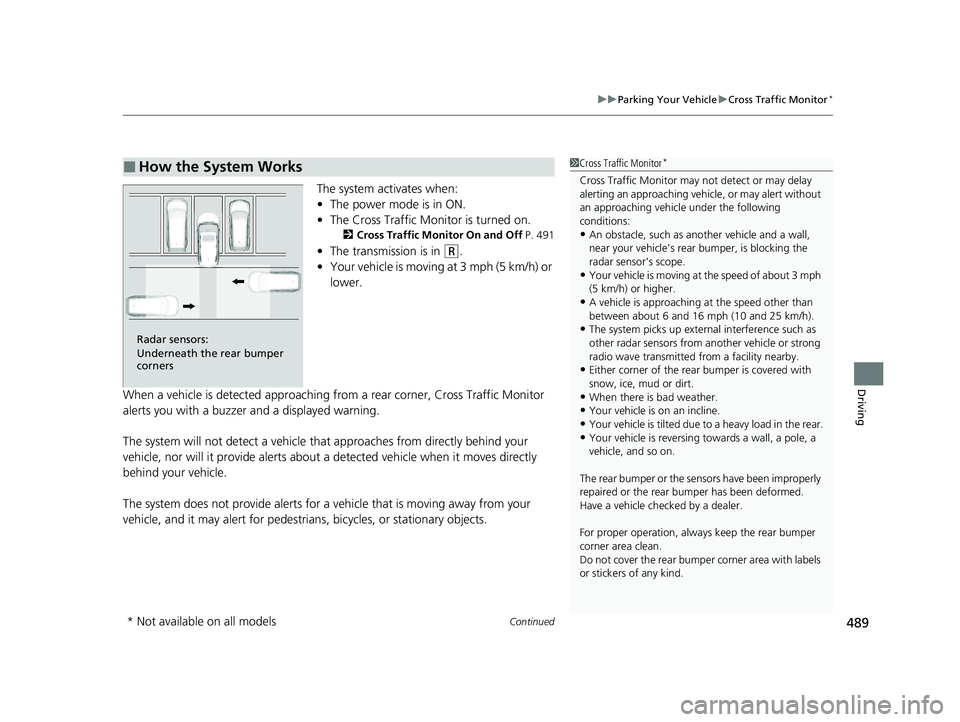
The system activates when:
• The power mode is in ON.
• The Cross Traffic Monitor is turned on.
2 Cross Traffic Monitor On and Off P. 491
•The transmission is in (R.
• Your vehicle is moving at 3 mph (5 km/h) or
lower.
When a vehicle is detected approaching from a rear corner, Cross Traffic Monitor
alerts you with a buzzer and a displayed warning.
The system will not detect a vehicle that approaches from directly behind your
vehicle, nor will it provide alerts about a detected vehicle when it moves directly
behind your vehicle.
The system does not provide alerts for a vehicle that is moving away from your
vehicle, and it may alert for pedestrians, bicycles, or stationary objects.
■How the System Works1 Cross Traffic Monitor*
Cross Traffic Monitor may not detect or may delay
alerting an approaching vehi cle, or may alert without
an approaching vehicle under the following
conditions:
•An obstacle, such as a nother vehicle and a wall,
near your vehicle's rear bumper, is blocking the
radar sensor's scope.
•Your vehicle is moving at the speed of about 3 mph
(5 km/h) or higher.
•A vehicle is approaching at the speed other than
between about 6 and 16 mph (10 and 25 km/h).
•The system picks up external interference such as
other radar sensors from an other vehicle or strong
radio wave transmitted fr om a facility nearby.
•Either corner of the rear bumper is covered with
snow, ice, mud or dirt.
•When there is bad weather.
•Your vehicle is on an incline.
•Your vehicle is tilted due to a heavy load in the rear.
•Your vehicle is reversing towards a wall, a pole, a
vehicle, and so on.
The rear bumper or the sens ors have been improperly
repaired or the rear bum per has been deformed.
Have a vehicle checked by a dealer.
For proper operation, always keep the rear bumper
corner area clean.
Do not cover the rear bumper corner area with labels
or stickers of any kind.
Radar sensors:
Underneath the rear bumper
corners
* Not available on all models
23 PASSPORT-31TGS6400.book 489 ページ 2022年8月5日 金曜日 午後9時2分
Page 493 of 610
492
Driving
Multi-View Rear Camera
About Your Multi-View Rear Camera
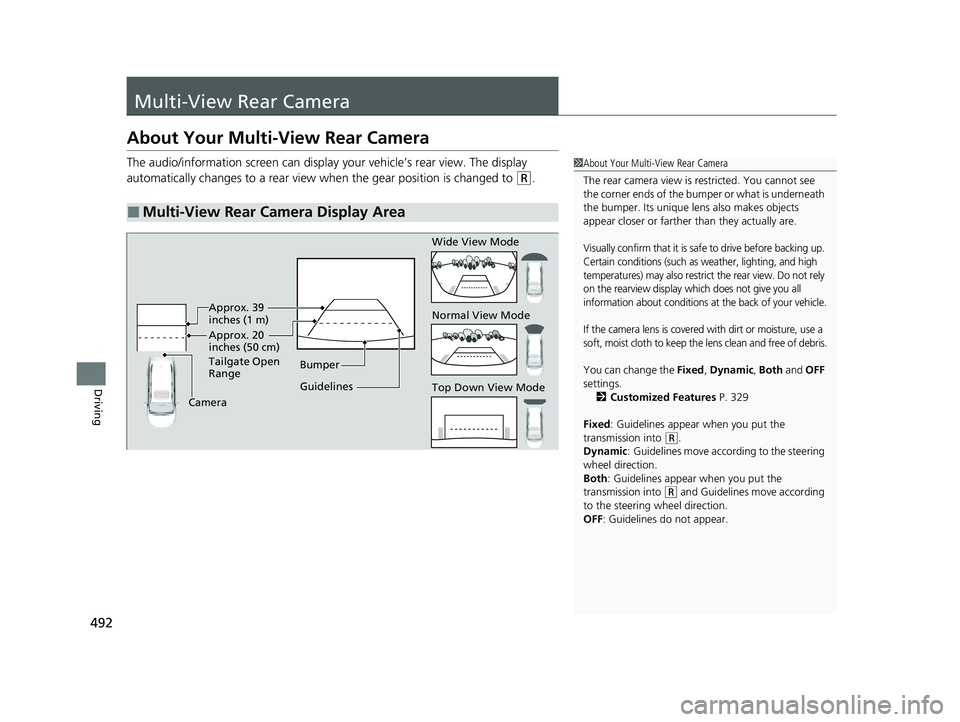
The audio/information screen can display your vehicle’s rear view. The display
automatically changes to a rear view when the gear position is changed to
(R.
■Multi-View Rear Camera Display Area
1About Your Multi-View Rear Camera
The rear camera view is restricted. You cannot see
the corner ends of the bumper or what is underneath
the bumper. Its unique le ns also makes objects
appear closer or farther than they actually are.
Visually confirm that it is safe to drive before backing up.
Certain conditions (such as weather, lighting, and high
temperatures) may also restrict the rear view. Do not rely
on the rearview display which does not give you all
information about conditions at the back of your vehicle.
If the camera lens is covered with dirt or moisture, use a
soft, moist cloth to keep the lens clean and free of debris.
You can change the Fixed, Dynamic , Both and OFF
settings. 2 Customized Features P. 329
Fixed: Guidelines appear when you put the
transmission into
( R.
Dynamic : Guidelines move according to the steering
wheel direction.
Both : Guidelines appear when you put the
transmission into
( R and Guidelines move according
to the steering wheel direction.
OFF: Guidelines do not appear.
Guidelines Bumper
Camera Approx. 20
inches (50 cm)
Tailgate Open
Range Approx. 39
inches (1 m) Wide View Mode
Normal View Mode
Top Down View Mode
23 PASSPORT-31TGS6400.book 492 ページ 2022年8月5日 金曜日 午後9時2分
Page 494 of 610
493
uuMulti-View Rear Camera uAbout Your Multi-View Rear Camera
Driving
You can view three different camera mo des on the audio/information screen.
Select the appropriate icon to switch the angle. : Wide view mode
: Normal view mode
: Top down view mode
• If you were last using Wide view mode or Normal view mode, the same view
mode will be activated the next ti me you put the transmission into
(R.
• If you were using Top down view mode before you turned off the power system,
Wide view mode will be activated the ne xt time you set the power mode to ON
and put the trans mission into
(R.
• If you were using Top down view mode and 10 seconds elapsed after you took
the transmission out of
(R, Wide view mode will be activated the next time you
put the transmission into
(R.
1 About Your Multi-View Rear Camera
You can change the Last Used , Normal View and
Wide View settings.
2 Customized Features P. 329
23 PASSPORT-31TGS6400.book 493 ページ 2022年8月5日 金曜日 午後9時2分
Page 501 of 610
500
Maintenance
Before Performing Maintenance
Inspection and Maintenance
For your safety, perform all listed inspections and maintenance to keep your vehicle
in good condition. If you become aware of an y abnormality (noise, smell, insufficient
brake fluid, oil residue on the ground, etc.), have your vehicle inspected by a dealer.
(Note, however, that service at a dealer is not mandatory to keep your warranties in
effect.)
■Routine inspections
Perform inspections before long distance trips, when washing the vehicle, or when
refueling.
2 Maintenance P. 28
■Periodic inspections
• Check the brake fluid level monthly.
2 Checking the Brake Fluid P. 520
•Check the tire pressure monthly. Examin e the tread for wear and foreign objects.
2Checking and Maintaining Tires P. 530
•Check the operation of the exterior lights monthly.
2 Replacing Light Bulbs P. 521
•Check the condition of the wiper bl ades at least every six months.
2Checking and Maintaining Wiper Blades P. 526
■Types of Inspection and Maintenance
1Inspection and Maintenance
Maintenance, replacement, or repair of
emissions control devices and systems may be
done by any automotive repair establishment or
individuals using parts that are “certified” to
EPA standards.
According to state and fede ral regulations, failure to
perform maintenance on the maintenance main
items marked with # will not void your emissions
warranties. However, all ma intenance services should
be performed in accordan ce with the intervals
indicated by the driver information interface.
2 Maintenance Service Items P. 506
If you want to perform complex maintenance tasks
that require more skills a nd tools, you can purchase a
subscription to the Service Express website at
www.techinfo.honda.com .
2 Authorized Manuals P. 596
If you want to perform ma intenance yourself, make
sure that you have the necessary tools and skills first.
After performing maintenanc e, update the records in
the separate maintenance booklet.
U.S. models
23 PASSPORT-31TGS6400.book 500 ページ 2022年8月5日 金曜日 午後9時2分