ESP HONDA PASSPORT 2023 Owner's Manual
[x] Cancel search | Manufacturer: HONDA, Model Year: 2023, Model line: PASSPORT, Model: HONDA PASSPORT 2023Pages: 610, PDF Size: 20.93 MB
Page 323 of 610
322
uuGeneral Information on the Audio System uLegal Information on Apple CarPlay/Android Auto
Features
YOU EXPRESSLY ACKNOWLEDGE AND AGREE THAT USE OF APPLE CARPLAY OR ANDROID AUTO (“THE APPLICATIONS”) IS AT YOUR
SOLE RISK AND THAT THE ENTIRE RISK AS TO SATISFACTORY QUALITY, PERFORMANCE, ACCURACY AND EFFORT IS WITH YOU TO THE
MAXIMUM EXTENT PERMITTED BY APPLICABLE LAW, AND THAT TH E APPLICATIONS AND INFORMATION ON THE APPLICATIONS IS
PROVIDED “AS IS” AND “AS AVAILABLE,” WITH ALL FAULTS AND WITHOUT WARRANTY OF ANY KIND, AND HONDA HEREBY
DISCLAIMS ALL WARRANTIES AND CONDITIONS WITH RESPECT TO TH E APPLICATIONS AND INFORMATION ON THE APPLICATIONS,
EITHER EXPRESS, IMPLIED OR STATUTORY, INCLUDING, BUT NOT LIMITED TO, TH E IMPLIED WARRANTIES AND/OR CONDITIONS OF
MERCHANTABILITY, SATISFACTORY QUALITY, FITNESS FOR A PART ICULAR PURPOSE, ACCURACY, QUIET ENJOYMENT, AND NON-
INFRINGEMENT OF THIRD PARTY RIGHTS. NO ORAL OR WRI TTEN INFORMATION OR ADVICE GIVEN BY HONDA OR AN AUTHORIZED
REPRESENTATIVE SHALL CREATE A WARRANT Y. AS EXAMPLES, AND WITHOUT LIMITATION, HONDA DISCLAIMS ANY WARRANTY
REGARDING THE ACCURACY OF DATA PROVIDED BY THE APPL ICATIONS, SUCH AS THE ACCURACY OF DIRECTIONS, ESTIMATED
TRAVEL TIME, SPEED LIMITS, ROAD CONDITIONS, NEWS, WEATHER, TRAFFIC, OR OTHER CONTENT PROVIDED BY APPLE, GOOGLE, THEIR
AFFILIATES, OR THIRD PARTY PROVIDERS; HONDA DOES NOT GUARANTEE AGAINST LOSS OF APPLICATION DATA, WHICH MAY BE LOST
AT ANY TIME; HONDA DOES NOT GUARANTEE THAT THE APPLICATION S OR ANY SERVICES PROVIDED THROUGH THEM WILL BE
PROVIDED AT ALL TIMES OR THAT ANY OR ALL SERVICES WILL BE AVAILABLE AT ANY PA RTICULAR TIME OR LOCATION. FOR EXAMPLE,
SERVICES MAY BE SUSPENDED OR INTERRUPTED WITHOUT NOTICE FOR REPAIR, MAINTENANCE, SECURITY FIXES, UPDATES, ETC.,
SERVICES MAY BE UNAVAILABLE IN YOUR AREA OR LOCATION, ETC. IN ADDITION, YOU UNDERSTAND THAT CHANGES IN THIRD PARTY
TECHNOLOGY OR GOVERNMENT REGULATION MAY RENDER THE SERVICES AND/OR APPLICATIONS OBSOLETE AND/OR UNUSABLE.
TO THE EXTENT NOT PROHIBITED BY LAW, IN NO EVENT SHALL HONDA OR ITS AFFILIATES BE LIABLE FOR PERSONAL INJURY, OR ANY
INCIDENTAL, SPECIAL, INDIRECT OR CONSEQUENTIAL DAMAG ES WHATSOEVER, INCLUDING, WITHOUT LIMITATION, DAMAGES FOR
LOSS OF PROFITS, CORRUPTION OR LOSS OF DATA, FAILURE TO TRANSMIT OR RECEIV E ANY DATA, BUSINESS INTERRUPTION OR ANY
OTHER COMMERCIAL DAMAGES OR LOSSES, ARISING OUT OF OR RELATE D TO THE APPLICATIONS OR YOUR USE OF OR INABILITY TO
USE THE APPLICATIONS OR INFORMATION ON THE APPLICATIONS, HOWEVER CAUSED, REGARDLESS OF THE THEORY OF LIABILITY
(CONTRACT, TORT OR OTHERWISE) AND EVEN IF HONDA WERE AD VISED OF THE POSSIBILITY OF SUCH DAMAGES. SOME STATES AND
JURISDICTIONS DISALLOW THE EXCLUSION OR LIMITATION OF LI ABILITY FOR DAMAGES, SO THESE LIMITATIONS AND EXCLUSIONS MAY
NOT APPLY TO YOU. IN NO EVENT SHALL HONDA’S TOTAL LIABILIT Y TO YOU FOR ALL DAMAGES (OTHER THAN AS MAY BE REQUIRED
BY APPLICABLE LAW IN CASES INVOLVING PERSONAL INJURY) EXC EED THE AMOUNT OF FIVE DOLLARS ($5.00). THE FOREGOING
LIMITATIONS WILL APPLY EVEN IF THE ABOVE STA TED REMEDY FAILS OF ITS ESSENTIAL PURPOSE.
■DISCLAIMER OF WARRANTIES; LIMITATION ON LIABILITY
23 PASSPORT-31TGS6400.book 322 ページ 2022年8月5日 金曜日 午後9時2分
Page 326 of 610
325
uuGeneral Information on the Audio System uLicense Information
Continued
Features
The Bluetooth® word mark and logos are register ed trademarks owned by Bluetooth
SIG, Inc. and any use of such marks by DENSO CORPORATION is under license.
Other trademarks and trade names are those of their respective owners.
This product is protected by certain intellectual property rights of Microsoft. Use or
distribution of such technology outside of this product is prohibited without a
license from Microsoft.
■Bluetooth
■Windows Media
23 PASSPORT-31TGS6400.book 325 ページ 2022年8月5日 金曜日 午後9時2分
Page 327 of 610
326
uuGeneral Information on the Audio System uLicense Information
Features
“Made for iPod,” “Made for iPhone,” and “Made for iPad” mean that an electronic
accessory has been designed to connect specifically to iPod, iPhone, or iPad,
respectively, and has been certified by the developer to meet Apple performance
standards. Apple is not responsible for the operation of this device or its compliance
with safety and regulatory standards. Please note that the use of this accessory with
iPod, iPhone, or iPad may affect wireless performance.
Apple, the Apple Logo, iPad, iPhone, iPod, iPod classic, iPod nano, and iPod touch
are trademarks of Apple Inc., registered in the U.S. and other countries. iPad Air,
iPad mini, iPad Pro, Apple CarPlay, iPod , iPhone, iTunes, Siri and Lightning are
trademarks of Apple Inc. App Store is a service mark of Apple Inc.
■Apple
23 PASSPORT-31TGS6400.book 326 ページ 2022年8月5日 金曜日 午後9時2分
Page 353 of 610
uuBluetooth ® HandsFreeLink ®u Using HFL
352
Features
(Pick-up) button: Press to go directly to the phone screen of the driver
information interface, or to answer an incoming call.
(Hang-up) button: Press to end a call.
(Back) button: Press to go back to the previo us screen, or cancel a command.
(Talk) button: Press to access Voice Portal.
// / buttons: Press to select an item displayed on the phone screen
of the driver information interface.
ENTER button: Press to call a number listed in the selected item on the phone
screen of the driver information interface.
(Home) button: Press to go back to the home sc reen of the driver information
interface.
To go to the phone screen of the driver information interface:
1. Press the (home) button on the steering wheel.
2. Select Phone .
u You can select Favorite Contacts or Recent Calls .1Bluetooth ® HandsFreeLink ®
Bluetooth ® Wireless Technology
The Bluetooth ® word mark and logos are registered
trademarks owned by Bluetooth SIG, Inc., and any
use of such marks by Honda Motor Co., Ltd., is under
license. Other trademarks and trade names are those
of their respective owners.
HFL Limitations
An incoming call on HFL will interrupt the audio
s y s t e m wh e n it is p la y i n g . It wi ll r e s u m e w h en t h e c a l l
is ended.
34
23 PASSPORT-31TGS6400.book 352 ページ 2022年8月5日 金曜日 午後9時2分
Page 405 of 610
404
uuWhen Driving uAutomatic Transmission
Driving
Automatic Transmission
When the engine runs at higher idle speeds, the creeping force increases.
Keep the brake pedal firmly depressed when stopped.
Quickly depressing the accelerator pedal while driving uphill may cause the
transmission to drop to a lower gear, unexpectedly increasing vehicle speed. Depress
the accelerator pedal carefully, especi ally on slippery roads and curves.
■Creeping
■Kickdown
1Driving Guidelines for Your Utility Vehicle
Failure to operate your vehi cle correctly might result
in a crash or a rollover. 2 Important Handling Information P. 36
2 Precautions While Driving P. 403
23 PASSPORT-31TGS6400.book 404 ページ 2022年8月5日 金曜日 午後9時2分
Page 409 of 610
uuWhen Driving uShifting
408
Driving
In freezing or sub-freezing conditions, the electronic gear selector response may be
slow.
Always depress the brake pedal before changing the gear position to
(P, and
confirm that
(P is shown on the gear position in dicator before releasing the brake.
■When opening the driver’s door
If you open the driver’s door under the following conditions, the gear position
automatically changes to
(P.
• The vehicle is stationary with the engine running, or moving at 1 mph (2 km/h) or
slower.
• The transmission is in other than
(P.
• You have unfastened the driver side seat belt.
u If you manually change the gear position from
(P with the brake pedal
depressed, the gear position will automatically return to
(P once you release
the brake pedal.
■When turning o ff the power mode
If you turn the engine off wh ile the vehicle is stationary, and the transmission is in
other than
(P, the gear position automatically changes to (P.
1 Shift Operation
From the audio/information screen, you can choose
to have the system activate a beeper when you
change to
(R.
2 Customized Features P. 329
1When opening the driver’s door
You should always select
(P before opening the
driver’s door.
Make sure to park the vehicle in a safe place. 2 When Stopped P. 481
If you want to drive the ve hicle after the gear position
has automatically changed to
( P under the described
conditions, close the door, fasten the seat belt,
depress the brake pedal, then change the gear
position.
If you leave the vehicle, tu rn off the engine and lock
the doors.
23 PASSPORT-31TGS6400.book 408 ページ 2022年8月5日 金曜日 午後9時2分
Page 422 of 610
421
uuWhen Driving uVehicle Stability AssistTM (VSA ®), aka Electronic Stability Control (ESC), System
Continued
Driving
Vehicle Stability AssistTM (VSA ®), aka Electronic
Stability Control (ESC), System
VSA ® helps to stabilize the vehicle during corn ering if the vehicle turns more or less
than what was intended. It also assists in maintaining traction on slippery surfaces.
It does so by regulating engine outp ut and selectively applying the brakes.
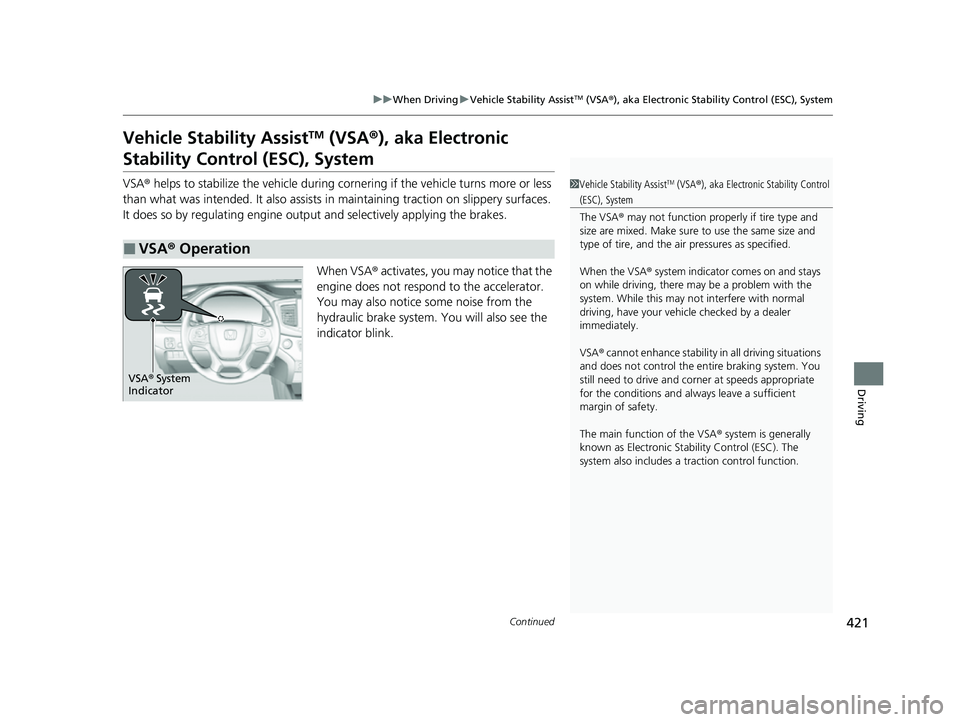
When VSA ® activates, you may notice that the
engine does not respond to the accelerator.
You may also notice some noise from the
hydraulic brake system. You will also see the
indicator blink.
■VSA ® Operation
1 Vehicle Stability AssistTM (VSA® ), aka Electronic Stability Control
(ESC), System
The VSA ® may not function properl y if tire type and
size are mixed. Make sure to use the same size and
type of tire, and the air pressures as specified.
When the VSA ® system indicator comes on and stays
on while driving, there may be a problem with the
system. While this may not interfere with normal
driving, have your vehi cle checked by a dealer
immediately.
VSA ® cannot enhance stability in all driving situations
and does not control the entire braking system. You
still need to drive and corner at speeds appropriate
for the conditions and alwa ys leave a sufficient
margin of safety.
The main function of the VSA ® system is generally
known as Electronic Stability Control (ESC). The
system also includes a traction control function.
VSA® System
Indicator
23 PASSPORT-31TGS6400.book 421 ページ 2022年8月5日 金曜日 午後9時2分
Page 432 of 610
431
uuWhen Driving uTire Pressure Monitoring System (TPMS) - Required Federal Explanation
Driving
Please note that the TPMS is not a substitute for proper tire
maintenance, and it is the driver ’s responsibility to maintain
correct tire pressure, even if un der-inflation has not reached the
level to trigger illumination of th e TPMS low tire pressure telltale.
Your vehicle has also been equi pped with a TPMS malfunction
indicator to indicate when the system is not operating properly.
The TPMS malfunction indicator is combined with the low tire
pressure telltale. When the syst em detects a malfunction, the
telltale will flash fo r approximately one minute and then remain
continuously illumina ted. This sequence will continue upon
subsequent vehicle start-ups as long as the malfunction exists.
When the malfunction indicator is illuminated, the system may
not be able to detect or signal low tire pressure as intended.
TPMS malfunctions may occur for a variety of reasons, including
the installation of replacement or alternate tires or wheels on the
vehicle that prevent the TPMS from functioning properly.
Always check the TPMS malfunction telltale after replacing one or
more tires or wheels on your vehicle to ensure that the
replacement or alternate tires and wheels allow the TPMS to
continue to function properly.
23 PASSPORT-31TGS6400.book 431 ページ 2022年8月5日 金曜日 午後9時2分
Page 436 of 610
435
uuHonda Sensing ®u Collision Mitigation Braking SystemTM (CMBSTM)
Continued
Driving
Collision Mitigation Braking SystemTM (CMBSTM)
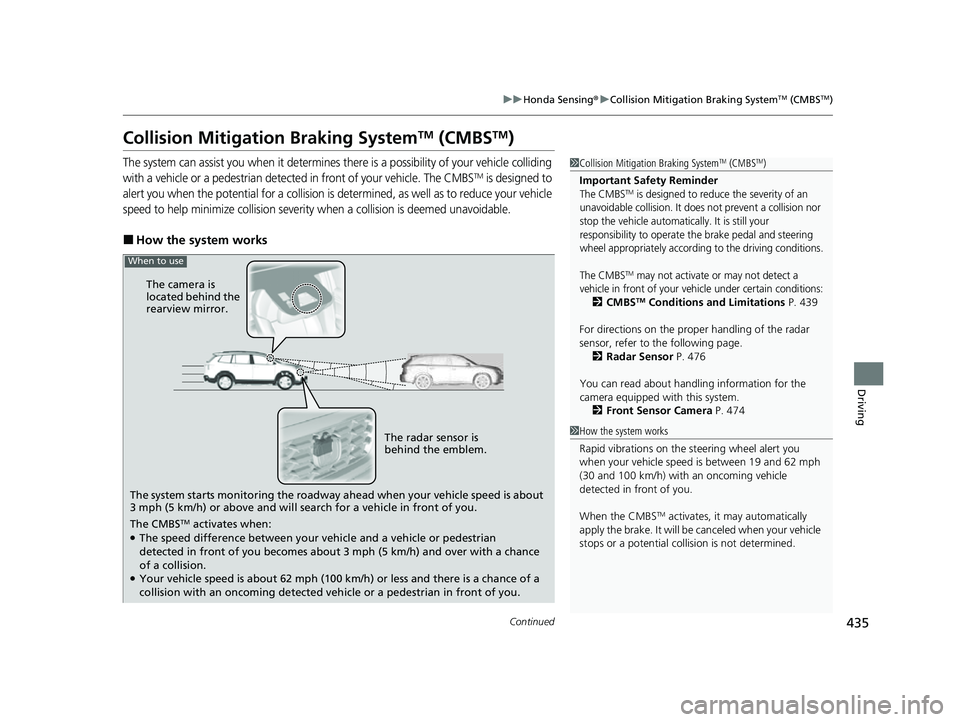
The system can assist you when it determines there is a possibility of your vehicle colliding
with a vehicle or a pedestrian detected in front of your vehicle. The CMBSTM is designed to
alert you when the potential for a collision is determined, as well as to reduce your vehicle
speed to help minimize collision severity when a collision is deemed unavoidable.
■How the system works
1 Collision Mitigation Braking SystemTM (CMBSTM)
Important Safety Reminder
The CMBSTM is designed to reduce the severity of an
unavoidable collision. It do es not prevent a collision nor
stop the vehicle automati cally. It is still your
responsibility to operate th e brake pedal and steering
wheel appropriately according to the driving conditions.
The CMBS
TM may not activate or may not detect a
vehicle in front of your vehicle under certain conditions:
2 CMBSTM Conditions and Limitations P. 439
For directions on the prop er handling of the radar
sensor, refer to the following page. 2 Radar Sensor P. 476
You can read about handling information for the
camera equipped with this system. 2 Front Sensor Camera P. 474
1How the system works
Rapid vibrations on the st eering wheel alert you
when your vehicle speed is between 19 and 62 mph
(30 and 100 km/h) with an oncoming vehicle
detected in front of you.
When the CMBS
TM activates, it may automatically
apply the brake. It will be canceled when your vehicle
stops or a potential colli sion is not determined.
The system starts monitoring the roadway ah ead when your vehicle speed is about
3 mph (5 km/h) or above and will search for a vehicle in front of you. The radar sensor is
behind the emblem.
The CMBS
TM activates when:●The speed difference between your vehicle and a vehicle or pedestrian
detected in front of you becomes about 3 mph (5 km/h) and over with a chance
of a collision.
●Your vehicle speed is about 62 mph (100 km /h) or less and there is a chance of a
collision with an oncoming detected vehicle or a pedestrian in front of you. The camera is
located behind the
rearview mirror.
When to use
23 PASSPORT-31TGS6400.book 435 ページ 2022年8月5日 金曜日 午後9時2分
Page 438 of 610
437
uuHonda Sensing ®u Collision Mitigation Braking SystemTM (CMBSTM)
Continued
Driving
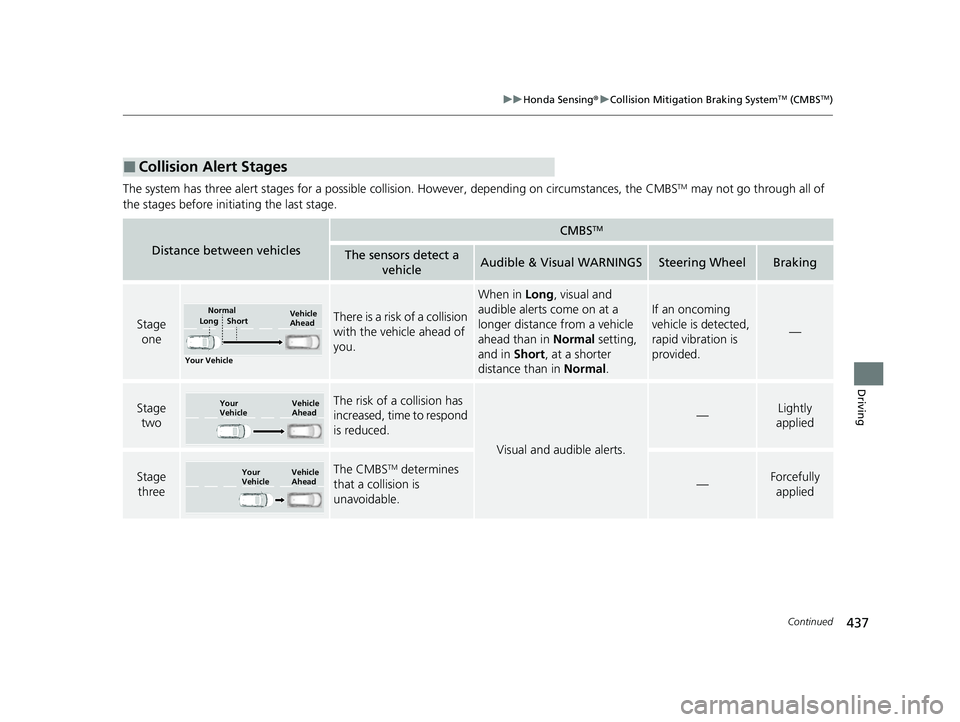
The system has three alert stages for a possible collis ion. However, depending on circumstances, the CMBSTM may not go through all of
the stages before initiating the last stage.
■Collision Alert Stages
Distance between vehicles
CMBSTM
The sensors detect a vehicleAudible & Visual WARNINGSSteering WheelBraking
Stage oneThere is a risk of a collision
with the vehicle ahead of
you.
When in Long, visual and
audible alerts come on at a
longer distance from a vehicle
ahead than in Normal setting,
and in Short , at a shorter
distance than in Normal.
If an oncoming
vehicle is detected,
rapid vibration is
provided.
—
Stage
twoThe risk of a collision has
increased, time to respond
is reduced.
Visual and audible alerts.
—Lightly
applied
Stage three The CMBSTM determines
that a collision is
unavoidable.
—Forcefully applied
Your Vehicle Vehicle
Ahead
Normal
Short
Long
Your
Vehicle Vehicle
Ahead
Your
VehicleVehicle
Ahead
23 PASSPORT-31TGS6400.book 437 ページ 2022年8月5日 金曜日 午後9時2分