steering wheel HONDA PASSPORT 2023 Repair Manual
[x] Cancel search | Manufacturer: HONDA, Model Year: 2023, Model line: PASSPORT, Model: HONDA PASSPORT 2023Pages: 610, PDF Size: 20.93 MB
Page 456 of 610
Continued455
uuHonda Sensing ®u Adaptive Cruise Control (ACC)
Driving
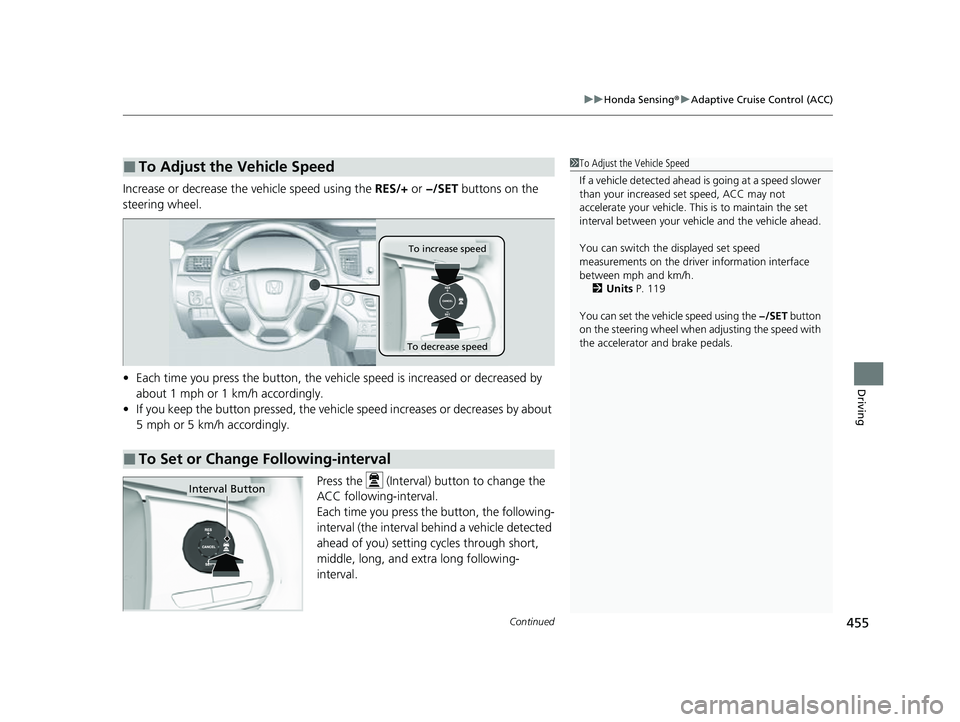
Increase or decrease the vehicle speed using the RES/+ or −/SET buttons on the
steering wheel.
• Each time you press the button, the vehicl e speed is increased or decreased by
about 1 mph or 1 km/h accordingly.
• If you keep the button pressed, the vehicle speed increases or decreases by about
5 mph or 5 km/h accordingly.
Press the (Interval) button to change the
ACC following-interval.
Each time you press th e button, the following-
interval (the interval behind a vehicle detected
ahead of you) setting cycles through short,
middle, long, and extra long following-
interval.
■To Adjust the Vehicle Speed1 To Adjust the Vehicle Speed
If a vehicle detected ahead is going at a speed slower
than your increased set speed, ACC may not
accelerate your vehicle. This is to maintain the set
interval between your vehi cle and the vehicle ahead.
You can switch the displayed set speed
measurements on the driver information interface
between mph and km/h.
2 Units P. 119
You can set the vehicle speed using the −/SET button
on the steering wheel when adjusting the speed with
the accelerator and brake pedals.
■To Set or Change Following-interval
To increase speed
To decrease speed
Interval Button
23 PASSPORT-31TGS6400.book 455 ページ 2022年8月5日 金曜日 午後9時2分
Page 458 of 610
Continued457
uuHonda Sensing ®u Adaptive Cruise Control (ACC)
Driving
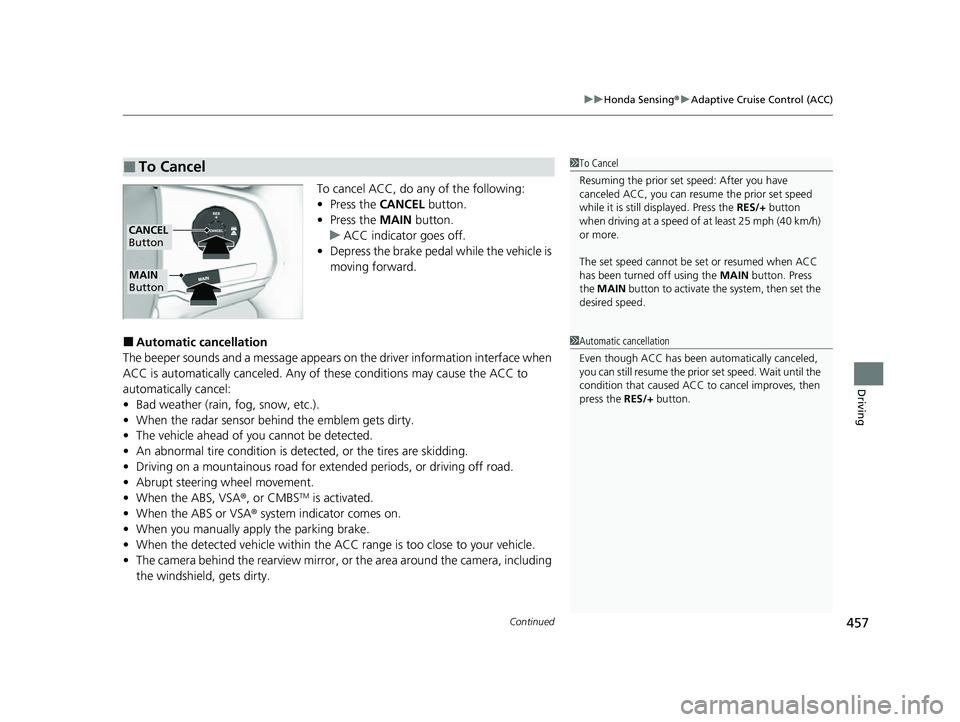
To cancel ACC, do any of the following:
• Press the CANCEL button.
• Press the MAIN button.
u ACC indicator goes off.
• Depress the brake pedal while the vehicle is
moving forward.
■Automatic cancellation
The beeper sounds and a message appears on the driver information interface when
ACC is automatically cancel ed. Any of these conditions may cause the ACC to
automatically cancel:
• Bad weather (rain, fog, snow, etc.).
• When the radar sensor behind the emblem gets dirty.
• The vehicle ahead of yo u cannot be detected.
• An abnormal tire condition is de tected, or the tires are skidding.
• Driving on a mountainous road for extended periods, or driving off road.
• Abrupt steering wheel movement.
• When the ABS, VSA ®, or CMBS
TM is activated.
• When the ABS or VSA ® system indicator comes on.
• When you manually apply the parking brake.
• When the detected vehicle within the AC C range is too close to your vehicle.
• The camera behind the rearview mirror, or the area around the camera, including
the windshield, gets dirty.
■To Cancel1 To Cancel
Resuming the prior set speed: After you have
canceled ACC, you can resume the prior set speed
while it is still displayed. Press the RES/+ button
when driving at a speed of at least 25 mph (40 km/h)
or more.
The set speed cannot be set or resumed when ACC
has been turned off using the MAIN button. Press
the MAIN button to activate the system, then set the
desired speed.
CANCEL
Button
MAIN
Button
1 Automatic cancellation
Even though ACC has been automatically canceled,
you can still resume the prior set speed. Wait until the
condition that caused ACC to cancel improves, then
press the RES/+ button.
23 PASSPORT-31TGS6400.book 457 ページ 2022年8月5日 金曜日 午後9時2分
Page 461 of 610
460
uuHonda Sensing ®u Lane Keeping Assist System (LKAS)
Driving
Lane Keeping Assist System (LKAS)
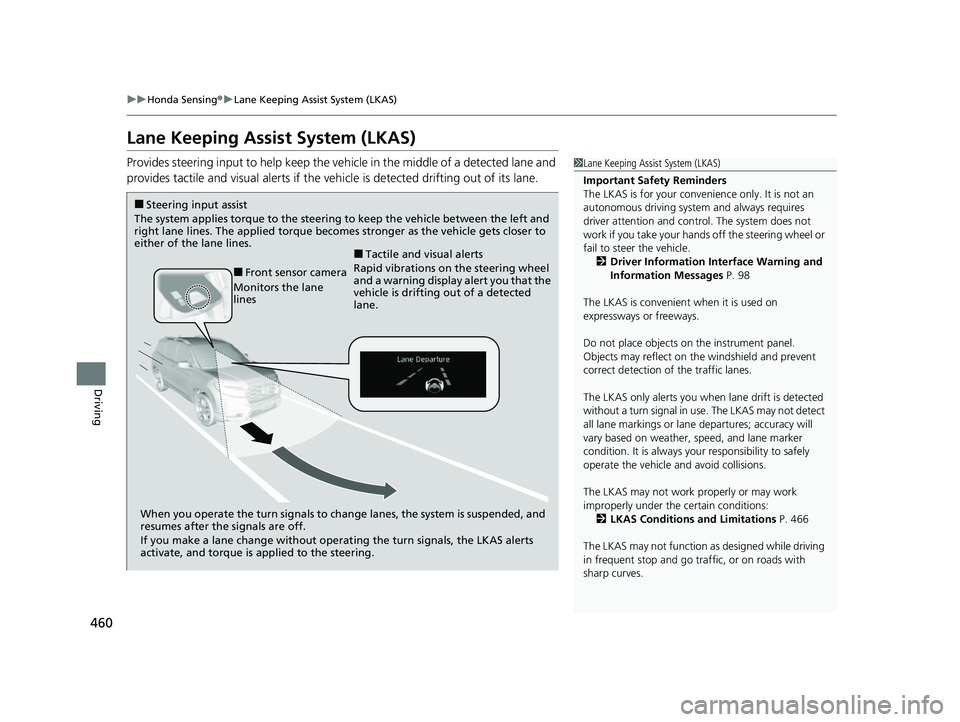
Provides steering input to help keep the vehicle in the middle of a detected lane and
provides tactile and visual alerts if the ve hicle is detected drifting out of its lane.1Lane Keeping Assist System (LKAS)
Important Safety Reminders
The LKAS is for your convenience only. It is not an
autonomous driving system and always requires
driver attention and control. The system does not
work if you take your hands off the steering wheel or
fail to steer the vehicle. 2 Driver Information Interface Warning and
Information Messages P. 98
The LKAS is convenient when it is used on
expressways or freeways.
Do not place objects on the instrument panel.
Objects may reflect on th e windshield and prevent
correct detection of the traffic lanes.
The LKAS only alerts you when lane drift is detected
without a turn signal in use. The LKAS may not detect
all lane markings or lane departures; accuracy will
vary based on weather, speed, and lane marker
condition. It is always your responsibility to safely
operate the vehicle an d avoid collisions.
The LKAS may not work properly or may work
improperly under the certain conditions: 2 LKAS Conditions and Limitations P. 466
The LKAS may not function as designed while driving
in frequent stop and go traf fic, or on roads with
sharp curves.
When you operate the turn signals to chan ge lanes, the system is suspended, and
resumes after the signals are off.
If you make a lane change without operat ing the turn signals, the LKAS alerts
activate, and torque is applied to the steering.
■Front sensor camera
Monitors the lane
lines
■Tactile and visual alerts
Rapid vibrations on the steering wheel
and a warning display alert you that the
vehicle is drifting out of a detected
lane.
■Steering input assist
The system applies torque to the steering to keep the vehicle between the left and
right lane lines. The applied torque becomes stronger as the vehicle gets closer to
either of the lane lines.
23 PASSPORT-31TGS6400.book 460 ページ 2022年8月5日 金曜日 午後9時2分
Page 462 of 610
Continued461
uuHonda Sensing ®u Lane Keeping Assist System (LKAS)
Driving
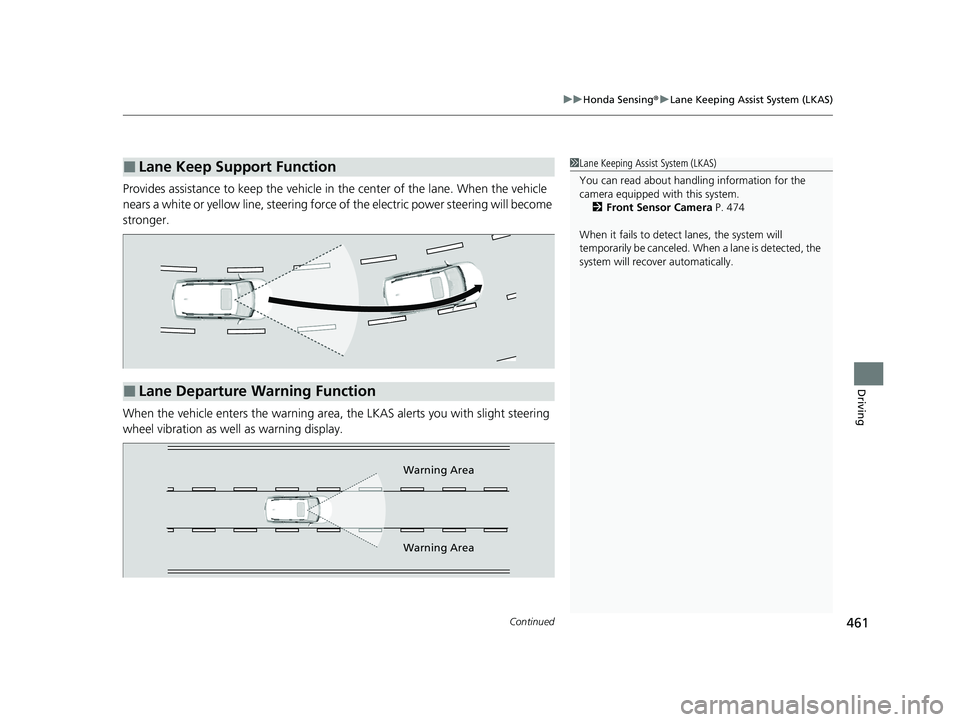
Provides assistance to keep the vehicle in the center of the lane. When the vehicle
nears a white or yellow line, steering force of the electric power steering will become
stronger.
When the vehicle enters the warning area, the LKAS alerts you with slight steering
wheel vibration as well as warning display.
■Lane Keep Support Function1 Lane Keeping Assist System (LKAS)
You can read about handling information for the
camera equipped with this system.
2 Front Sensor Camera P. 474
When it fails to detect lanes, the system will
temporarily be canceled. When a lane is detected, the
system will recover automatically.
■Lane Departure Warning Function
Warning Area
Warning Area
23 PASSPORT-31TGS6400.book 461 ページ 2022年8月5日 金曜日 午後9時2分
Page 466 of 610
465
uuHonda Sensing ®u Lane Keeping Assist System (LKAS)
Continued
Driving
■The LKAS may be automatically suspended when:
• The system fails to detect lane lines.
• The steering wheel is quickly turned.
• You fail to steer the vehicle.
• Driving through a sharp curve.
• Driving at a speed in excess of approximately 90 mph (145 km/h).
Once these conditions no longer exist, the LKAS automatically resumes.
■The LKAS may be automatically canceled when:
• The camera temperature gets extremely high or low.
• The camera behind the rearview mirror, or the area around the camera, including
the windshield, gets dirty.
• The ABS or VSA ® system engages.
The beeper sounds if the LKAS is automatically canceled.
23 PASSPORT-31TGS6400.book 465 ページ 2022年8月5日 金曜日 午後9時2分
Page 470 of 610
469
uuHonda Sensing ®u Road Departure Mitigation (RDM) System
Continued
Driving
Road Departure Mitigation (RDM) System
Alerts and helps to assist you when the system detects a possibility of your vehicle
unintentionally crossing over detected lane markings and/or leaving the roadway
altogether.
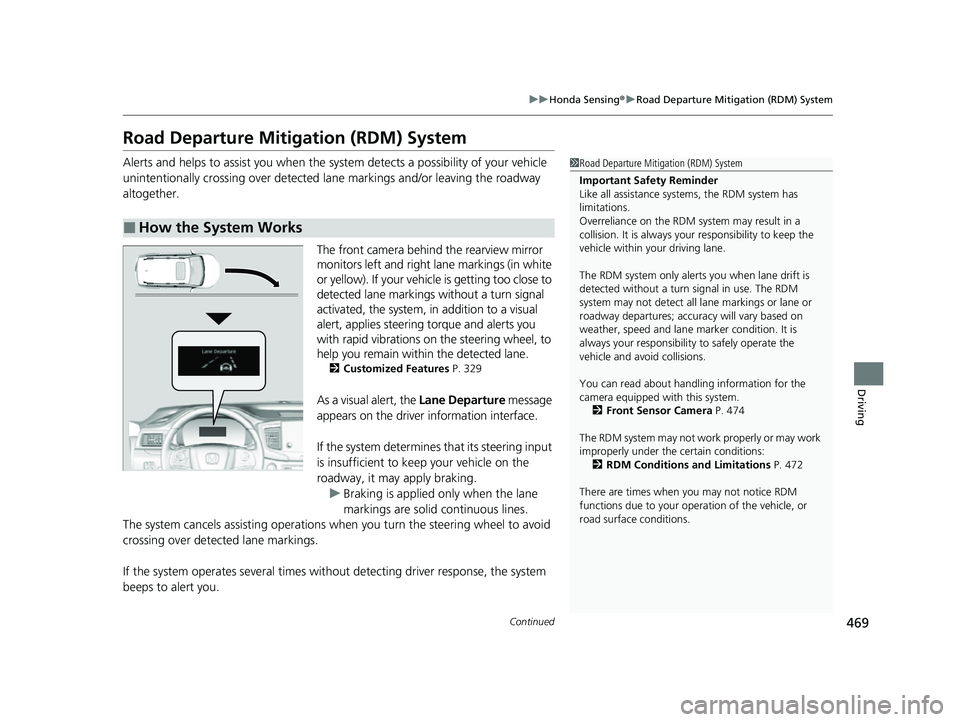
The front camera behind the rearview mirror
monitors left and right lane markings (in white
or yellow). If your vehicl e is getting too close to
detected lane markings without a turn signal
activated, the system, in addition to a visual
alert, applies steering torque and alerts you
with rapid vibrations on the steering wheel, to
help you remain within the detected lane.
2 Customized Features P. 329
As a visual alert, the Lane Departure message
appears on the driver information interface.
If the system determines that its steering input
is insufficient to keep your vehicle on the
roadway, it may apply braking. u Braking is applied only when the lane
markings are solid continuous lines.
The system cancels assisting operations wh en you turn the steering wheel to avoid
crossing over detected lane markings.
If the system operates several times with out detecting driver response, the system
beeps to alert you.
■How the System Works
1 Road Departure Mitigation (RDM) System
Important Safety Reminder
Like all assistance systems, the RDM system has
limitations.
Overreliance on the RDM system may result in a
collision. It is always your responsibility to keep the
vehicle within your driving lane.
The RDM system only alerts you when lane drift is
detected without a turn signal in use. The RDM
system may not detect all la ne markings or lane or
roadway departures; accu racy will vary based on
weather, speed and lane marker condition. It is
always your responsibilit y to safely operate the
vehicle and avoid collisions.
You can read about handling information for the
camera equipped with this system.
2 Front Sensor Camera P. 474
The RDM system may not wo rk properly or may work
improperly under the certain conditions: 2 RDM Conditions and Limitations P. 472
There are times when you may not notice RDM
functions due to your opera tion of the vehicle, or
road surface conditions.
23 PASSPORT-31TGS6400.book 469 ページ 2022年8月5日 金曜日 午後9時2分
Page 472 of 610
Continued471
uuHonda Sensing ®u Road Departure Mitigation (RDM) System
Driving
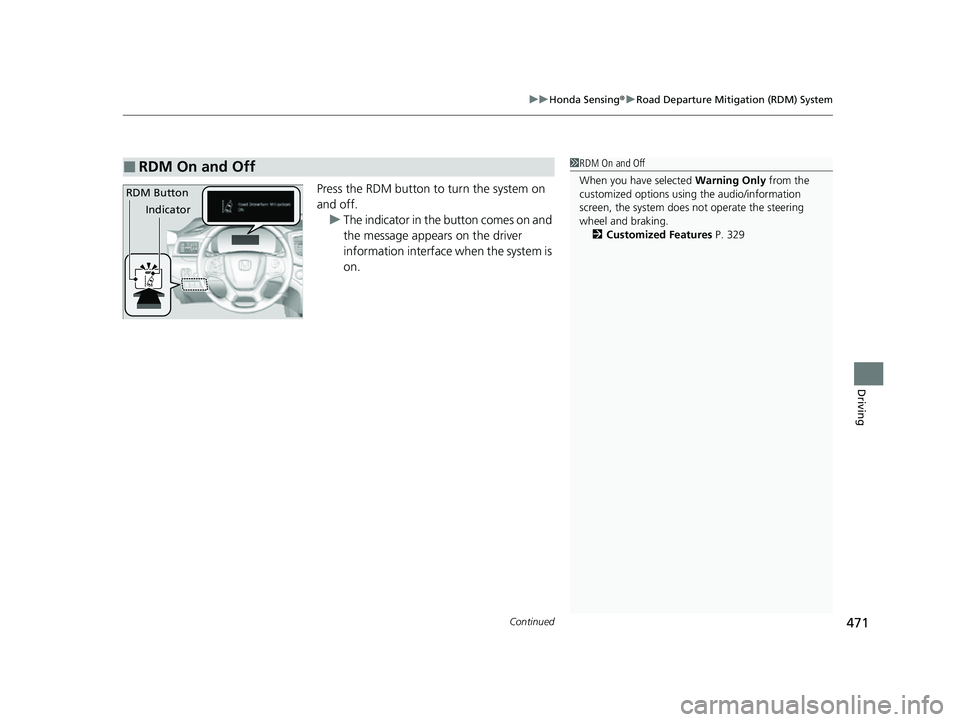
Press the RDM button to turn the system on
and off.
u The indicator in the button comes on and
the message appears on the driver
information interface when the system is
on.
■RDM On and Off1RDM On and Off
When you have selected Warning Only from the
customized options using the audio/information
screen, the system does not operate the steering
wheel and braking. 2 Customized Features P. 329
RDM Button
Indicator
23 PASSPORT-31TGS6400.book 471 ページ 2022年8月5日 金曜日 午後9時2分
Page 479 of 610
uuBraking uBrake System
478
Driving
Your vehicle is equipped with disc brakes at all four wheels. A vacuum power assist
helps reduce the effort needed on the brake pedal. The brake assist system increases
the stopping force when you depress th e brake pedal hard in an emergency
situation. The anti-lock brake system (ABS ) helps you retain steering control when
braking very hard.
2 Brake Assist System P. 480
2 Anti-lock Brake System (ABS) P. 479
■Foot Brake1Foot Brake
Check the brakes after driving through deep water,
or if there is a buildup of road surface water. If
necessary, dry the brakes by lightly depressing the
pedal several times.
If you hear a continuous me tallic friction sound when
applying the brakes, this is caused by the brake wear
indicator rubbing on the brake rotor and indicates
that the brake pads need to be replaced. Have the
vehicle checked by a deal er. If you hear only an
occasional squeak or squeal when you initially apply
the brake pedal, this may be normal and caused by
high frequency vibration of the brake pads against
the rotating brake disc.
Constantly using the brake pedal while going down a
long hill builds up heat, which reduces the brake
effectiveness. Apply engine braking by taking your
foot off the accelerator pe dal and downshifting to a
lower gear.
Do not rest your foot on the brake pedal while
driving, as it will lightly apply the brakes and cause
them to lose effectiveness over time and reduce pad
life. It will also conf use drivers behind you.
23 PASSPORT-31TGS6400.book 478 ページ 2022年8月5日 金曜日 午後9時2分
Page 480 of 610
479
uuBraking uAnti-lock Brake System (ABS)
Driving
Anti-lock Brake System (ABS)
Helps prevent the wheels from locking up, and helps you retain steering control by
pumping the brakes rapidly, much faster than you can.
The electronic brake distribu tion (EBD) system, which is part of the ABS, also
balances the front-to-rear braking distribution according to vehicle loading.
You should never pu mp the brake pedal. Let the ABS work for you by always
keeping firm, steady pressure on the brake pe dal. This is sometimes referred to as
“stomp and steer.”
■ABS operation
The brake pedal may pulsate slightly when the ABS is working. Depress the brake
pedal and keep holding the pedal firmly do wn. On dry pavement, you will need to
press on the brake pedal very hard before th e ABS activates. However, you may feel
the ABS activate immediately if you are trying to stop on snow or ice.
ABS may activate when you depres s the brake pedal when driving on:
• Wet or snow covered roads.
• Roads paved with stone.
• Roads with uneven surf aces, such as potholes, cracks, manholes, etc.
When the vehicle speed goes unde r 6 mph (10 km/h), the ABS stops.
■ABS1Anti-lock Brake System (ABS)
NOTICE
The ABS may not function correctly if you use a tire of
the incorrect size or type.
If the ABS indicator comes on while driving, there
may be a problem with the system.
While normal braking will not be affected, there is a
possibility that the ABS wi ll not be operating. Have
your vehicle checked by a dealer immediately.
The ABS is not designed for the purpose of reducing
the time or distance it takes for a vehicle to stop: It is
designed to limit brake lockup which can lead to
skidding and loss of steering control.
In the following cases, yo ur vehicle may need more
distance to stop than a vehicle without the ABS:
•You are driving on rough or uneven road surfaces,
such as gravel or snow.
•The tires are equipped with snow chains.
The following may be observed with the ABS system:
•Motor sounds coming from the engine
compartment when the brakes are applied, or when
system checks are being performed after the engine
has been started and while the vehicle accelerates.
•Brake pedal and/or the vehicle body vibration when
ABS activates.
These vibrations and sou nds are normal to ABS
systems and are no cause for concern.
23 PASSPORT-31TGS6400.book 479 ページ 2022年8月5日 金曜日 午後9時2分
Page 493 of 610
492
Driving
Multi-View Rear Camera
About Your Multi-View Rear Camera
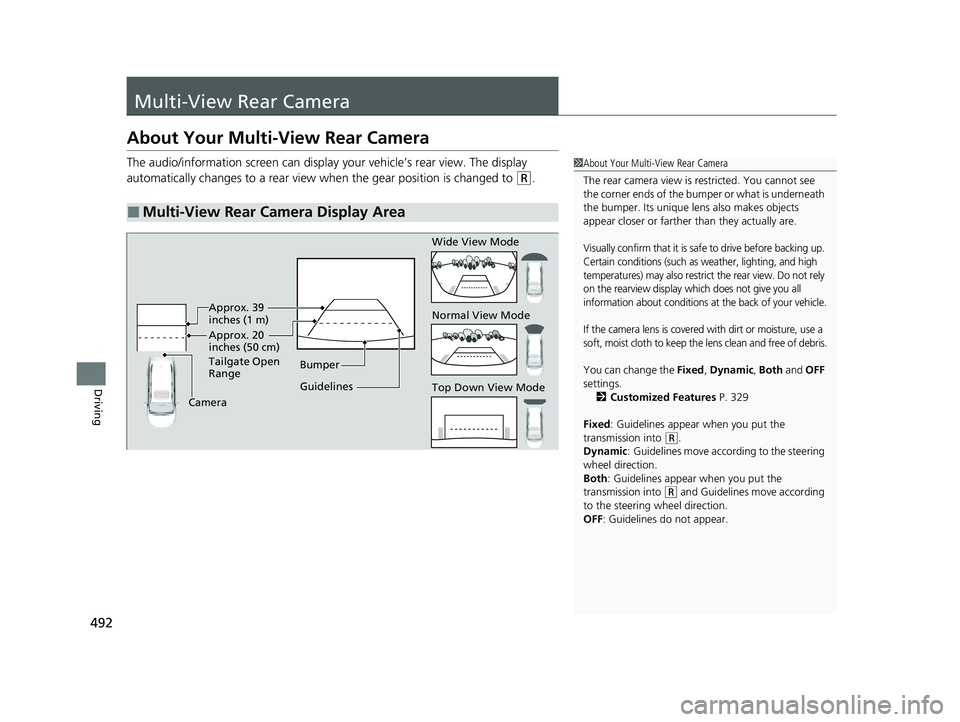
The audio/information screen can display your vehicle’s rear view. The display
automatically changes to a rear view when the gear position is changed to
(R.
■Multi-View Rear Camera Display Area
1About Your Multi-View Rear Camera
The rear camera view is restricted. You cannot see
the corner ends of the bumper or what is underneath
the bumper. Its unique le ns also makes objects
appear closer or farther than they actually are.
Visually confirm that it is safe to drive before backing up.
Certain conditions (such as weather, lighting, and high
temperatures) may also restrict the rear view. Do not rely
on the rearview display which does not give you all
information about conditions at the back of your vehicle.
If the camera lens is covered with dirt or moisture, use a
soft, moist cloth to keep the lens clean and free of debris.
You can change the Fixed, Dynamic , Both and OFF
settings. 2 Customized Features P. 329
Fixed: Guidelines appear when you put the
transmission into
( R.
Dynamic : Guidelines move according to the steering
wheel direction.
Both : Guidelines appear when you put the
transmission into
( R and Guidelines move according
to the steering wheel direction.
OFF: Guidelines do not appear.
Guidelines Bumper
Camera Approx. 20
inches (50 cm)
Tailgate Open
Range Approx. 39
inches (1 m) Wide View Mode
Normal View Mode
Top Down View Mode
23 PASSPORT-31TGS6400.book 492 ページ 2022年8月5日 金曜日 午後9時2分