ad blue HONDA PILOT 2008 1.G Navigation Manual
[x] Cancel search | Manufacturer: HONDA, Model Year: 2008, Model line: PILOT, Model: HONDA PILOT 2008 1.GPages: 137, PDF Size: 8.33 MB
Page 84 of 137
84Navigation System
System Set-up
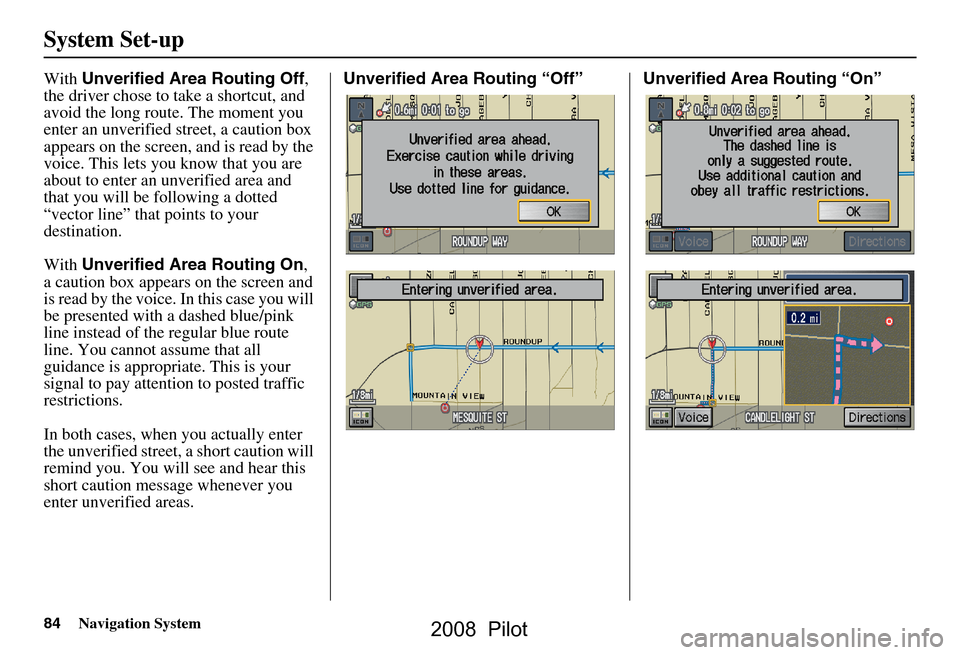
With Unverified Area Routing Off ,
the driver chose to take a shortcut, and
avoid the long route. The moment you
enter an unverified street, a caution box
appears on the screen, and is read by the
voice. This lets you know that you are
about to enter an unverified area and
that you will be following a dotted
“vector line” that points to your
destination.
With Unverified Area Routing On ,
a caution box appear s on the screen and
is read by the voice. In this case you will
be presented with a dashed blue/pink
line instead of the regular blue route
line. You cannot assume that all
guidance is appropriate. This is your
signal to pay attention to posted traffic
restrictions.
In both cases, when you actually enter
the unverified street, a short caution will
remind you. You will see and hear this
short caution message whenever you
enter unverified areas. Unverified Area Routing “Off” Unverified Area Routing “On”
2008 Pilot
Page 85 of 137
Navigation System85
System Set-up
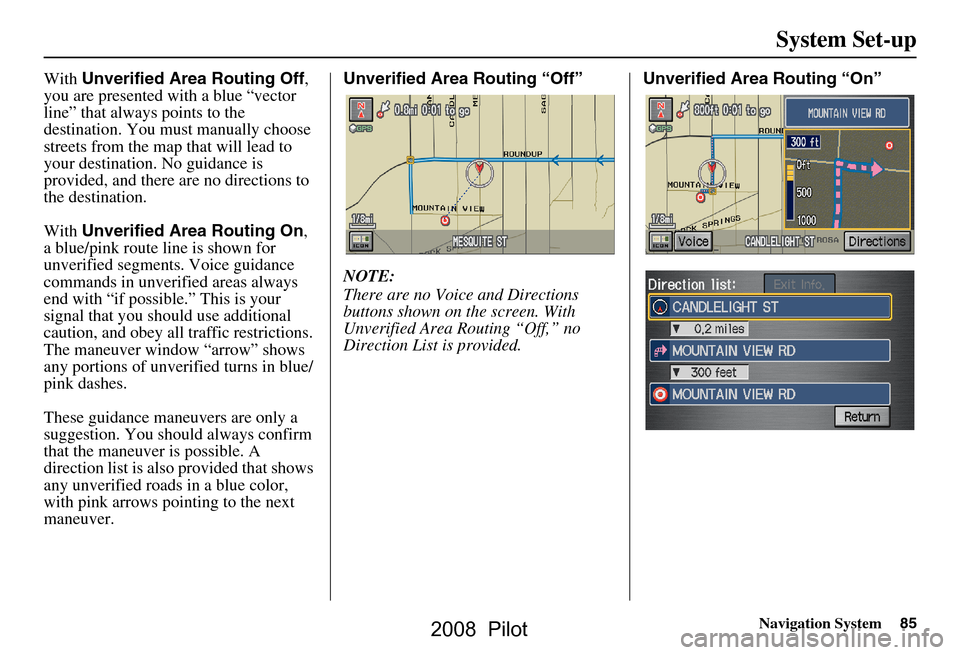
With Unverified Area Routing Off ,
you are presented with a blue “vector
line” that always points to the
destination. You must manually choose
streets from the map that will lead to
your destination. No guidance is
provided, and there ar e no directions to
the destination.
With Unverified Area Routing On ,
a blue/pink route line is shown for
unverified segmen ts. Voice guidance
commands in unverified areas always
end with “if possible.” This is your
signal that you should use additional
caution, and obey all traffic restrictions.
The maneuver window “arrow” shows
any portions of unverified turns in blue/
pink dashes.
These guidance maneuvers are only a
suggestion. You should always confirm
that the maneuver is possible. A
direction list is also provided that shows
any unverified roads in a blue color,
with pink arrows pointing to the next
maneuver. Unverified Area Routing “Off”
NOTE:
There are no Voice and Directions
buttons shown on the screen. With
Unverified Area Routing “Off,” no
Direction List is provided.
Unverified Area Routing “On”
2008 Pilot
Page 109 of 137
Navigation System109
Coverage Areas
Canada Detailed Coverage Areas
NOTE:
The blue colored city names are not
included in the USA South DVD. To
obtain coverage for cities listed in blue,
you may purchase the gray Canada
DVD (see Obtaining a Navigation
Update DVD on page103). DVDs are
not available at your dealer.
ALBERTA
Alberta
Airdrie
Banff
Canmore
Calgary
Cochrane
Crossfield
Chestermere
Edmonton
Lethbridge
Medicine Hat Langley
Langley Twp
Lions Bay
Maple Ridge
New Westminster
North Vancouver
North Vancouver District
Pitt Meadows
Port Coquitlam
Port Moody
Richmond
Surrey
Squamish
Vancouver
West Vancouver
White Rock
Whatcom, WA Point Roberts (Community) also
listed in USA Washington St Cities
Fraser Valley Abbottsford
Chilliwack
Mission
BRITISH COLUMBIA
Greater VancouverAnmore
Belcarra
Bowen Island
Burnaby
Coquitlam
Delta
Victoria
CapitalCentral Saanich
Colwood
Esquimalt
Highlands
Langford
Metchosin
North Saanich
Oak Bay
Saanich
Sidney
Sooke
Victoria
View Royal
Squamish-Lillooet Whistler
Kamloops
MANITOBA
East St Paul
Headingley
West St Paul
Winnipeg
NOVA SCOTIA
Halifax (partial)
ONTARIO
Barrie
Kingston
Ottawa-Gatineau
Stratford
Dufferin Orangeville
2008 Pilot
Page 116 of 137
116Navigation System
Frequently Asked Questions
Guidance, Routing
Problem Solution
The navi does not route me the same way I would go, or the
way some other mapping progr am displays. Why is this? The navigation system attempts to
generate the optimum route. See
Changing the Routing Method on page44.
Why is the street I’m on not s hown on the map? It has been
here for more than a year. The mapping database is
constantly undergoing revision. See page113 for
ways to obtain the latest de tailed coverage information.
The vehicle position icon is not following the road and the
“GPS icon” text in the upper left hand corner of the screen is
white or missing. The GPS antenna (located
under the center of the dash) may be blocked by
personal items. For best reception, remove items from the dash, such as
radar detectors, cell phone s, or loose articles.
Metallic tinting or other after-marke t devices can interfere with the GPS
reception. Please see your dealer. Also see System Limitations on page98.
I entered a destination, but th e blue highlighted route and
voice guidance stopped, or turned into a blue/purple dashed
line before I got to my destination. Why is this? Your route has entered
an unverified area. See Unverified Area Routing on
page82.
The map rotates while I make a turns, Ho w can I stop this? Select the “North-up” ma p orientation by voice, or by touching the map
orientation icon on the map screen. See Map Orientation on page53.
Sometimes I can not select between the North-up, and
Heading-up map orientations, why is this? The “Heading-up” map orientation can
only be shown in the lower scales
(1/20 - 1 mile scales). See Map Scale on page52.
While driving to my destinati on, the “time to go” display
sometimes increases even though I am getting closer. The “Time to go” is based on actual
road speeds. However if your speed
slows down when you encounter slower traffic, the system updates the
“Time to go” based of your actual spee d to give you a better estimate of
arrival time.
The vehicle position icon on the map “lags” a short distance
behind especially when I arrive at an intersection. Is there
anything wrong? No, when at an intersection, the syst
em is unaware of the width of the
intersecting road. Large differences is vehicle position can indicate a
temporary loss of the GPS signal. See GPS Reception Issues on page98.
2008 Pilot