change time HONDA PILOT 2013 2.G Navigation Manual
[x] Cancel search | Manufacturer: HONDA, Model Year: 2013, Model line: PILOT, Model: HONDA PILOT 2013 2.GPages: 178, PDF Size: 5.64 MB
Page 111 of 178
Navigation System111
System Setup
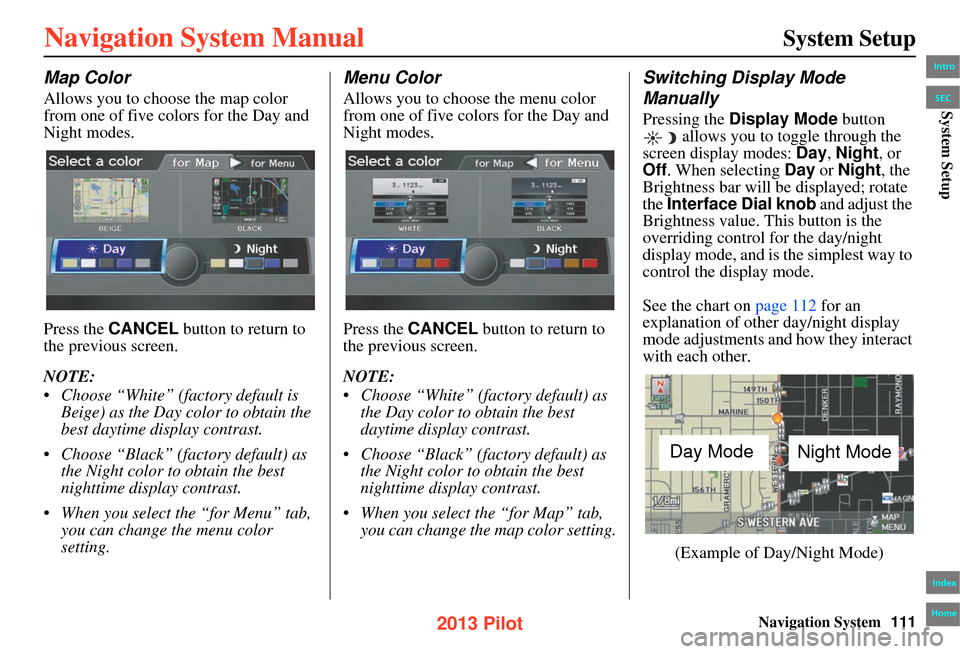
Map Color
Allows you to choose the map color
from one of five colors for the Day and
Night modes.
Press the CANCEL button to return to
the previous screen.
NOTE:
• Choose “White” (fac tory default is
Beige) as the Day color to obtain the
best daytime display contrast.
• Choose “Black” (factory default) as the Night color to obtain the best
nighttime display contrast.
• When you select the “for Menu” tab, you can change the menu color
setting.
Menu Color
Allows you to choose the menu color
from one of five colors for the Day and
Night modes.
Press the CANCEL button to return to
the previous screen.
NOTE:
• Choose “White” (factory default) as the Day color to obtain the best
daytime display contrast.
• Choose “Black” (factory default) as the Night color to obtain the best
nighttime display contrast.
• When you select the “for Map” tab, you can change the map color setting.
Switching Display Mode
Manually
Pressing the Display Mode button
allows you to toggle through the
screen display modes: Day, Night , or
Off . When selecting Day or Night , the
Brightness bar will be displayed; rotate
the Interface Dial knob and adjust the
Brightness value. This button is the
overriding control for the day/night
display mode, and is the simplest way to
control the display mode.
See the chart on page 112 for an
explanation of other day/night display
mode adjustments and how they interact
with each other.
(Example of Day/Night Mode)
Day Mode Night Mode
Intro
Index
Home
SECSystem Setup
2013 Pilot
Page 114 of 178
114Navigation System
System Setup
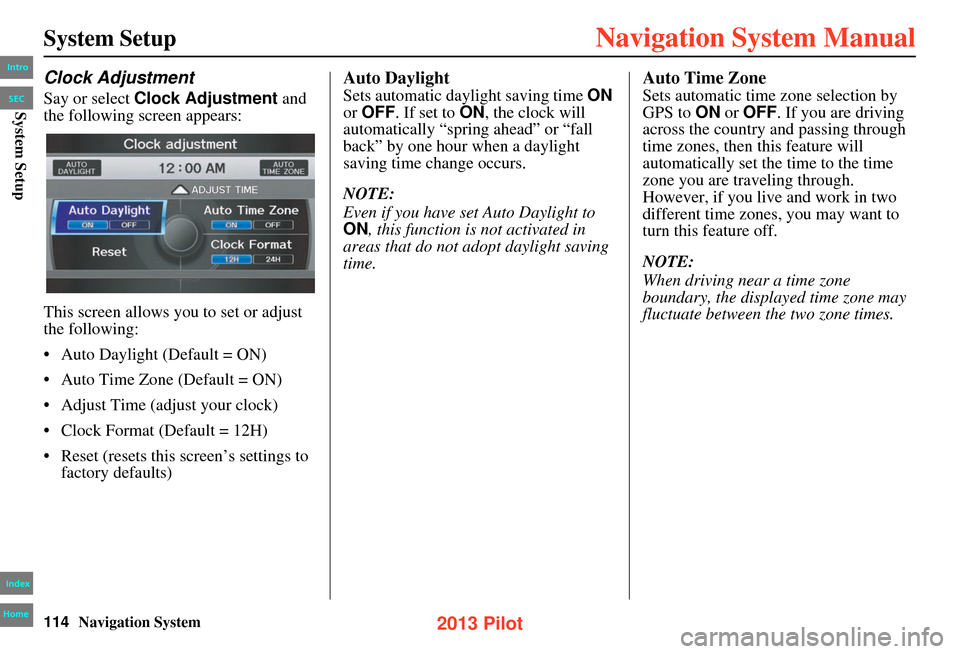
Clock Adjustment
Say or select Clock Adjustment and
the following screen appears:
This screen allows you to set or adjust
the following:
• Auto Daylight (Default = ON)
• Auto Time Zone (Default = ON)
• Adjust Time (adjust your clock)
• Clock Format (Default = 12H)
• Reset (resets this screen’s settings to factory defaults)
Auto Daylight
Sets automatic daylight saving time ON
or OFF . If set to ON , the clock will
automatically “spring ahead” or “fall
back” by one hour when a daylight
saving time change occurs.
NOTE:
Even if you have set Auto Daylight to
ON , this function is not activated in
areas that do not adopt daylight saving
time.
Auto Time Zone
Sets automatic time zone selection by
GPS to ON or OFF . If you are driving
across the country and passing through
time zones, then this feature will
automatically set the time to the time
zone you are traveling through.
However, if you live and work in two
different time zones, you may want to
turn this feature off.
NOTE:
When driving near a time zone
boundary, the displayed time zone may
fluctuate between the two zone times.
Intro
Index
Home
SECSystem Setup
2013 Pilot
Page 115 of 178
Navigation System115
System Setup
Time Adjustment
Adjusts the current time in hours and
minutes. Select ADJUST TIME by
moving the Interface Dial up, and then
switch HOUR and MINUTE by moving
the Interface Dial to the left and right
and changing the value by rotating the
Interface Dial knob . Selecting OK
returns you to the previous screen.
Clock Format
Sets clock format selection 12H or 24H .
Resetting the Clock Settings
Selecting Reset clears any changes you
made to “Auto Daylight,” “Auto Time
Zone” settings, time adjustment, or
“Clock Format”. Depending on your
location, you may need to adjust these
settings.
Clock Type
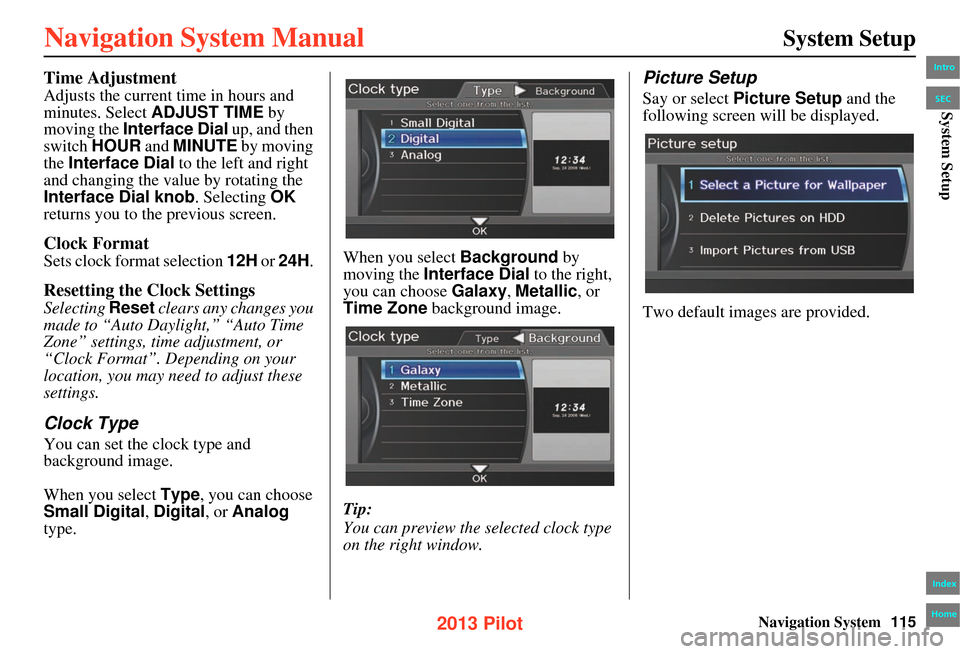
You can set the clock type and
background image.
When you select Type, you can choose
Small Digital, Digital , or Analog
type. When you select
Background by
moving the Interface Dial to the right,
you can choose Galaxy, Metallic , or
Time Zone background image.
Tip:
You can preview the selected clock type
on the right window.
Picture Setup
Say or select Picture Setup and the
following screen w ill be displayed.
Two default images are provided.
Intro
Index
Home
SECSystem Setup
2013 Pilot
Page 124 of 178
124Navigation System
Database Limitations
You will find that some points of
interest (POI) may be missing when you
search the database. This can be caused
if at the time the database was gathered,
the name was misspelled, the place was
improperly categorized, or the POI
change is not yet in the database. This
means you may not find places listed
that you know exist. This is also true for
police agencies and hospitals. In
outlying areas, facilities listed may not
be the closest. Always check with local
information sources if you need law
enforcement or hospital services.
Every effort has been made to verify
that the system’s database was accurate
at the time it was created. However,
businesses do close or relocate, and new
businesses start in the old locations.
For this reason, you may occasionally
find inaccurate in formation when you
select and drive to a point of interest (for
example, a restaurant is now a jewelry
store). The number of these inaccuracies
increases the longer you go without an
update. The digitized map database reflects
conditions as they existed at various
points in time before production.
Accordingly, your database may contain
inaccurate or incomplete data or
information due to
the passage of time,
road construction, changing conditions,
or other causes.
Due to ongoing software and database
improvements, navigation software and
mapping versions may change in the
middle of a production year. The
version shipped with your vehicle was
the most recent available at the time of
production and is considered standard
equipment for that vehicle. There is no
free program to retrofit early production
vehicles with the latest software and
mapping versions. For update ordering
information, see page 127. In addition, this database does not
include, analyze, process, consider, or
reflect any of the following categories
of information:
• Neighborhood quality or safety
• Population density
• Availability or proximity of law
enforcement
• Emergency, rescue, medical, or other assistance
• Construction work, zones, or hazards
• Road and lane closures
• Legal restrictions (such as vehicular type, weight, load, height, and speed
restrictions)
• Road slope or grade
• Bridge height, width, weight, or other limitsIntro
Index
Home
SECDatabase Limitations
2013 Pilot
Page 147 of 178
Navigation System147
Frequently Asked Questions
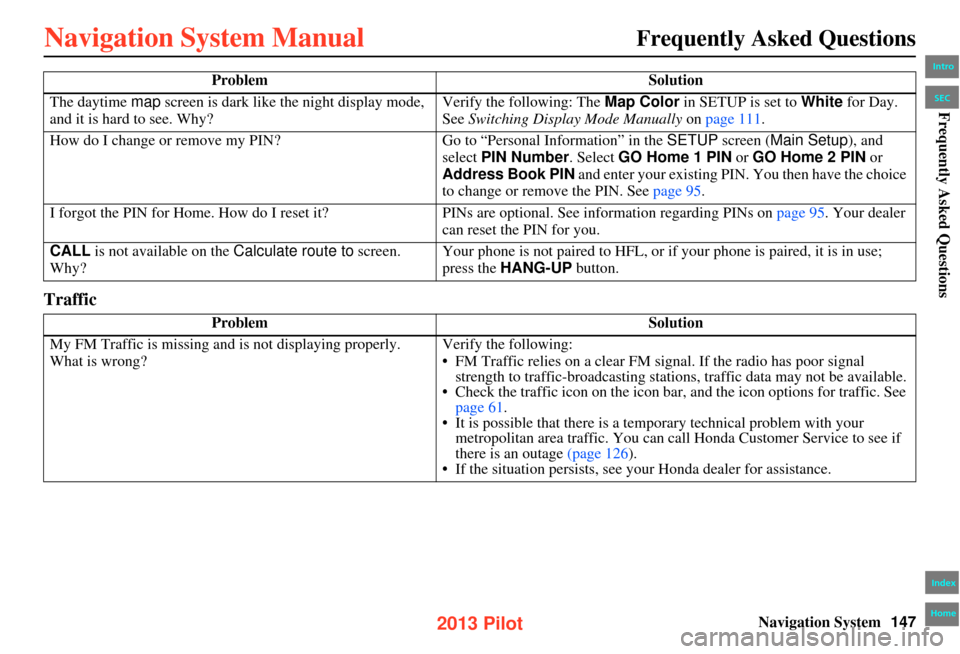
Traffic
The daytime map screen is dark like the night display mode,
and it is hard to see. Why? Verify the following: The
Map Color in SETUP is set to White for Day.
See Switching Display Mode Manually on page 111 .
How do I change or remove my PIN? Go to “Personal Info rmation” in the SETUP screen ( Main Setup), and
select PIN Number . Select GO Home 1 PIN or GO Home 2 PIN or
Address Book PIN and enter your existing PIN. You then have the choice
to change or remove the PIN. See page 95.
I forgot the PIN for Home. How do I reset it? PINs are optional. See information regarding PINs on page 95. Your dealer
can reset the PIN for you.
CALL is not available on the Calculate route to screen.
Why? Your phone is not paired to HFL, or if your phone is paired, it is in use;
press the
HANG-UP button.
Problem Solution
My FM Traffic is missing and is not displaying properly.
What is wrong? Verify the following:
• FM Traffic relies on a clear FM sign
al. If the radio has poor signal
strength to traffic-broadcasting statio ns, traffic data may not be available.
• Check the traffic icon on the icon bar, and the icon options for traffic. See
page 61.
• It is possible that there is a temporary technical problem with your metropolitan area traffic. You can cal l Honda Customer Service to see if
there is an outage (page 126).
• If the situation persists, see y our Honda dealer for assistance.
Problem
Solution
Intro
Index
Home
SECFrequently Asked Questions
2013 Pilot
Page 151 of 178
Navigation System151
Frequently Asked Questions
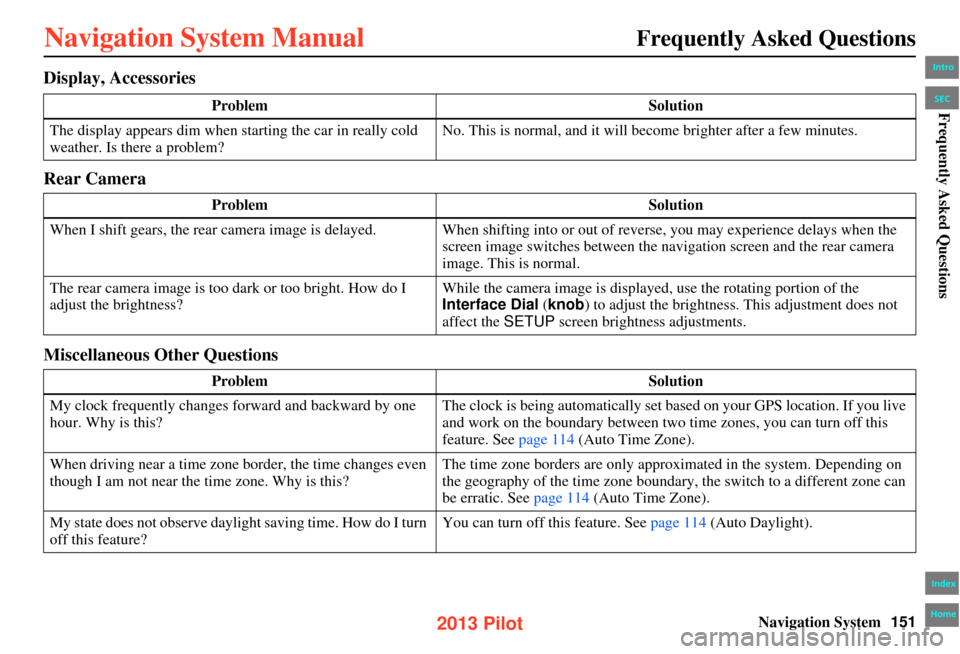
Display, Accessories
Rear Camera
Miscellaneous Other Questions
Problem Solution
The display appears dim when st arting the car in really cold
weather. Is there a problem? No. This is normal, and it will become brighter after a few minutes.
Problem Solution
When I shift gears, the rear camera image is delayed. When shifti ng into or out of reverse, you may experience delays when the
screen image switches between the na vigation screen and the rear camera
image. This is normal.
The rear camera image is too da rk or too bright. How do I
adjust the brightness? While the camera image is displayed, use the rotating portion of the
Interface Dial
(knob) to adjust the brightness. This adjustment does not
affect the SETUP screen brightness adjustments.
Problem Solution
My clock frequently changes forward and backward by one
hour. Why is this? The clock is being automatically set based on your GPS location. If you live
and work on the boundary between two time zones, you can turn off this
feature. See page 114 (Auto Time Zone).
When driving near a time zone border, the time changes even
though I am not near the time zone. Why is this? The time zone borders are only approximated in the system. Depending on
the geography of the time zone boundary, the switch to a different zone can
be erratic. See page 114 (Auto Time Zone).
My state does not observe daylight saving time. How do I turn
off this feature? You can turn off this feature. See page 114
(Auto Daylight).
Intro
Index
Home
SECFrequently Asked Questions
2013 Pilot
Page 152 of 178
152Navigation System
Frequently Asked Questions
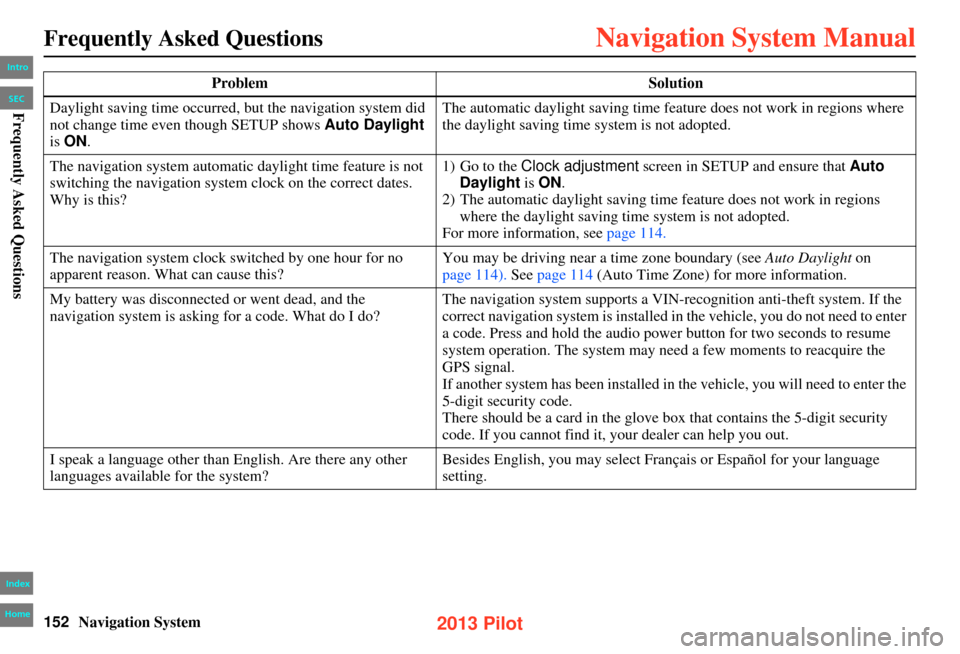
Daylight saving time occurred, but the navigation system did
not change time even though SETUP shows Auto Daylight
is ON . The automatic daylight saving time feature does not work in regions where
the daylight saving time system is not adopted.
The navigation system automatic daylight time feature is not
switching the navigation system clock on the correct dates.
Why is this? 1) Go to the Clock adjustment
screen in SETUP and ensure that Auto
Daylight is ON .
2) The automatic daylight saving time feature does not work in regions
where the daylight saving time system is not adopted.
For more information, see page 114.
The navigation system clock switched by one hour for no
apparent reason. What can cause this? You may be driving near a time zone boundary (see
Auto Daylight on
page 114). See page 114 (Auto Time Zone) for more information.
My battery was disconnected or went dead, and the
navigation system is asking for a code. What do I do? The navigation system supports a VIN-recognition anti-theft system. If the
correct navigation system is installed in the vehicle, you do not need to enter
a code. Press and hold the audio power button for two seconds to resume
system operation. The system may n
eed a few moments to reacquire the
GPS signal.
If another system has been installed in the vehicle, you will need to enter the
5-digit security code.
There should be a card in the glove bo x that contains the 5-digit security
code. If you cannot find it, your dealer can help you out.
I speak a language other than English. Are there any other
languages available for the system? Besides English, you may select Français or Español for your language
setting.
Problem
Solution
Intro
Index
Home
SECFrequently Asked Questions
2013 Pilot
Page 172 of 178

172Navigation System
Index
A
Add to Address Book
...................... 52
Add to Dest. List............................. 52
Adding Waypoint............................75
Address.............................. 28, 29, 92
Address Book.....................28, 34, 90
Address Book PIN.......................... 95
Advanced....................................... 39
AUDIO button................................11
Auto Daylight...............................114
Auto Service................................... 39
Auto Time Zone............................114
AUX Commands..........................164
Avoid Streets.................................. 74
B
BACK button
.................................. 13
Banking.......................................... 39
Basic Settings.................................99
Black Level.................................... 89
Bluetooth® Audio Commands.......164
Bluetooth® HandsFreeLink®.......... 19
Breadcrumbs....................... 20, 56, 70
Brightness...................................... 89
By Address.....................................29
By Address Book............................34
By Coordinate................................. 44
By Go Home 1 or 2........................51
By Intersection............................... 46
By Map Input................................. 46
By Place Category..........................37
By Place Name.............................. 36
By Place Phone Number.................43
By Previous Destination.................35
By ZAGAT® 2012........................ 43
C
Calculator
...................................... 85
Calendar..................................19, 81
Call......................................... 19, 52
CANCEL button............................11
Cancel Route...........................58, 74
Category............................ 28, 37, 93
Change Route Preference..........53, 74
Change State............................ 29, 46
Changing the Route........................73
Changing Your Destination.............77
City......................................... 30, 48
City Vicinity..................................41
Clear Personal Data......................118
Climate Control Commands..........160
Clock Adjustment........................ 114
Clock Format............................... 115
Clock Type.................................. 115
Color........................................... 110
Community....................................39
Continental USA............................50
Contrast......................................... 89
Convert (Unit)................................85
Correct Vehicle Position...............109
Coverage Areas............................ 128
Current Location......................21, 64
Current Position....................... 47, 92
Current Street................................... 6
Customer Assistance....................126
D
Database Limitations
.................... 124
Delete Previous Destinations...........96
Delete Waypoints........................... 76
DEST/ROUTE button.....................10
Destination........................ 28, 52, 77
Destination Icon............................. 67
Destination List.............................. 76
Destination Map.............................54
Detailed Coverage Areas......128, 134
Detour........................................... 74
Directions......................................59
Disc Commands...........................162
Display Mode button......................11
Driving to Your Destination............52
Intro
Index
Home
A B C D E F G H I J K L M N O P Q R S T U V W X Y Z
2013 Pilot