climate control HONDA PILOT 2013 2.G User Guide
[x] Cancel search | Manufacturer: HONDA, Model Year: 2013, Model line: PILOT, Model: HONDA PILOT 2013 2.GPages: 488, PDF Size: 10.18 MB
Page 170 of 488
169
uuClimate Control SystemuRear Climate Control System
Controls
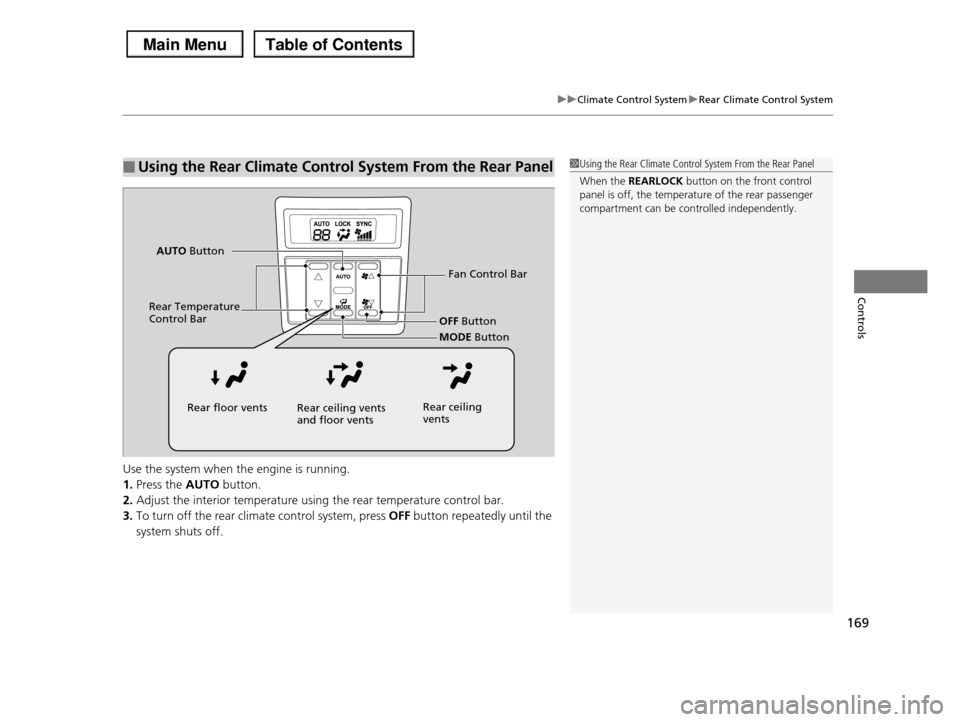
Use the system when the engine is running.
1.Press the AUTO button.
2.Adjust the interior temperature using the rear temperature control bar.
3.To turn off the rear climate control system, press OFF button repeatedly until the
system shuts off.
■Using the Rear Climate Control System From the Rear Panel1Using the Rear Climate Control System From the Rear Panel
When the REARLOCK button on the front control
panel is off, the temperature of the rear passenger
compartment can be controlled independently.
Fan Control Bar
Rear Temperature Control BarOFF Button
MODE Button
AUTO Button
Rear floor ventsRear ceiling vents and floor ventsRear ceiling vents
Page 171 of 488
170
uuClimate Control SystemuAutomatic Climate Control Sensors
Controls
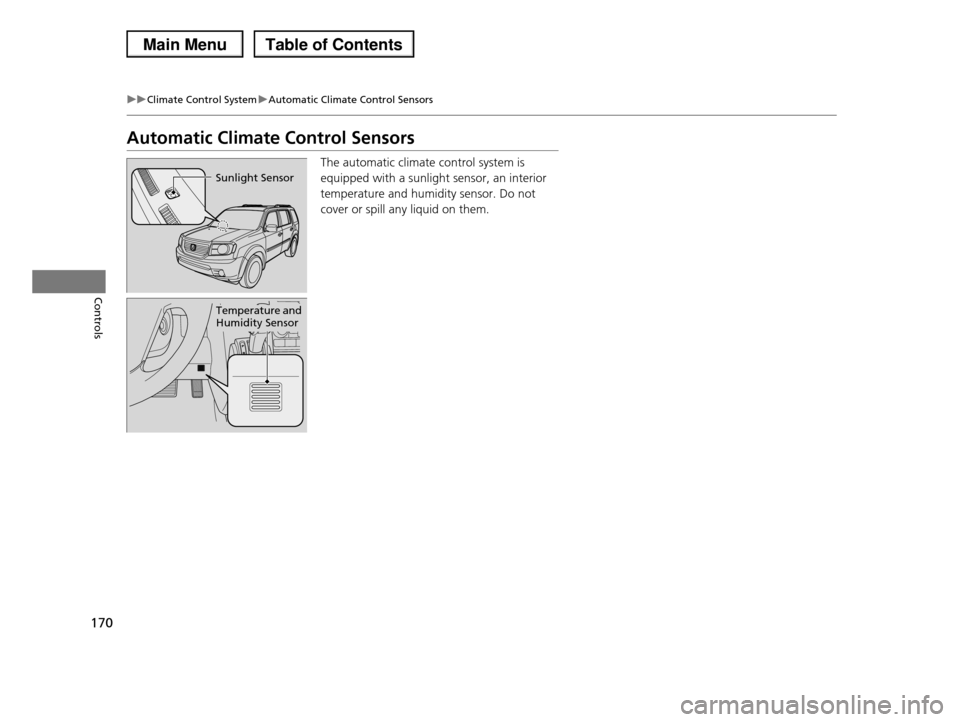
Automatic Climate Control Sensors
The automatic climate control system is
equipped with a sunlight sensor, an interior
temperature and humidity sensor. Do not
cover or spill any liquid on them.
Sunlight Sensor
Temperature and Humidity Sensor
Page 340 of 488
339
uuTowing a TraileruTowing Your Vehicle
Driving
•Monitor your temperature gauge. If it nears the red (Hot) mark, turn off the
climate control system and reduce speed. Pull to the side of the road safely to cool
down the engine if necessary.
•Shift to the (d position if the transmission shifts frequently.
If the tires slip when retrieving a boat from the water, shift to (1, and turn on VTM-
4r lock. Disengage VTM-4r lock as soon as the boat is out of the water to prevent
damage to the VTM-4r system.
Towing Your Vehicle
Your vehicle is not designed to be towed behind a motor home. If your vehicle needs
to be towed in an emergency, refer to the emergency towing information.
2Emergency Towing P. 459
■Driving in Hilly Terrain
■Retrieving a Boat
Page 343 of 488
342
Driving
When Driving
Starting the Engine
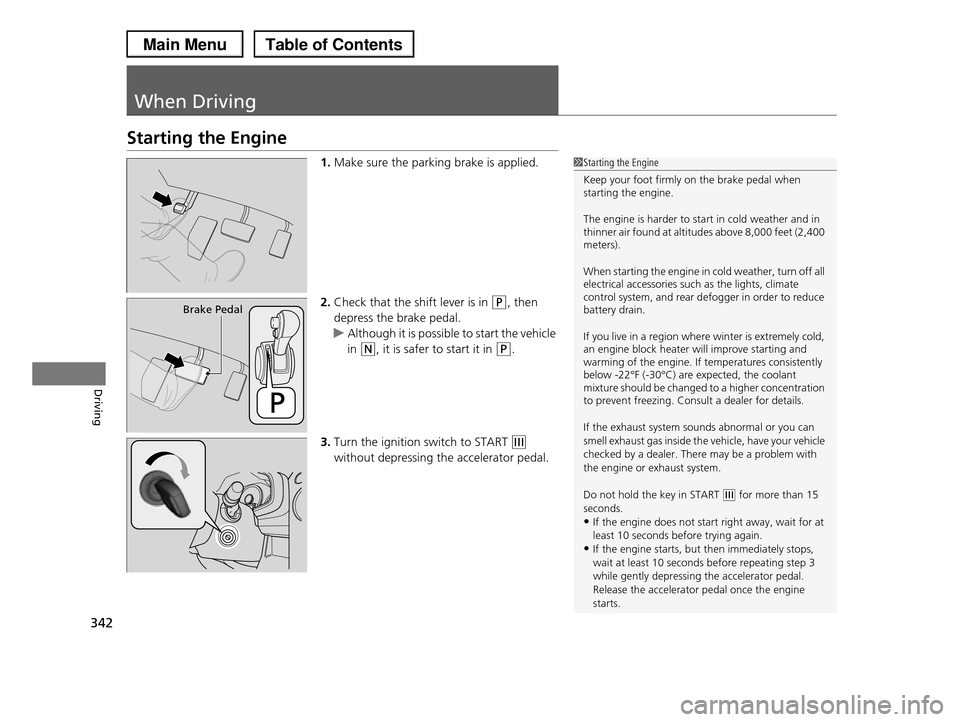
1.Make sure the parking brake is applied.
2.Check that the shift lever is in (P, then
depress the brake pedal.
uAlthough it is possible to start the vehicle
in (N, it is safer to start it in (P.
3.Turn the ignition switch to START (e
without depressing the accelerator pedal.
1Starting the Engine
Keep your foot firmly on the brake pedal when starting the engine.
The engine is harder to start in cold weather and in thinner air found at altitudes above 8,000 feet (2,400 meters).
When starting the engine in cold weather, turn off all electrical accessories such as the lights, climate control system, and rear defogger in order to reduce battery drain.
If you live in a region where winter is extremely cold, an engine block heater will improve starting and warming of the engine. If temperatures consistently below -22°F (-30°C) are expected, the coolant mixture should be changed to a higher concentration to prevent freezing. Consult a dealer for details.
If the exhaust system sounds abnormal or you can
smell exhaust gas inside the vehicle, have your vehicle
checked by a dealer. There may be a problem with the engine or exhaust system.
Do not hold the key in START (e for more than 15 seconds.
•If the engine does not start right away, wait for at
least 10 seconds before trying again.•If the engine starts, but then immediately stops,
wait at least 10 seconds before repeating step 3
while gently depressing the accelerator pedal.Release the accelerator pedal once the engine
starts.
Brake Pedal
Page 346 of 488
345
uuWhen DrivinguAutomatic Transmission
Driving
Automatic Transmission
The following conditions cause the engine to run at high revolutions, and increase
creeping:
•Immediately after the engine starts.
•When the climate control system is in use.
Keep the brake pedal firmly depressed when stopped.
Quickly depressing the accelerator pedal while driving uphill may cause the
transmission to drop to a lower gear, unexpectedly increasing vehicle speed. Depress
the accelerator pedal carefully, especially on slippery roads and curves.
■Creeping
■Kickdown
Page 378 of 488
377
Maintenance
This chapter discusses basic maintenance.
Before Performing MaintenanceInspection and Maintenance ............ 378Safety When Performing Maintenance..... 379Parts and Fluids Used in Maintenance Service ........................................... 380Maintenance Minder™.................... 381Maintenance Under the HoodMaintenance Items Under the Hood ..... 389Opening the Hood ........................... 390 Recommended Engine Oil ................ 392 Oil Check ......................................... 393Adding Engine Oil ............................ 394Changing the Engine Oil and Oil Filter ..... 395
Engine Coolant ................................ 397Transmission Fluid ............................ 399Brake Fluid ....................................... 400 Power Steering Fluid ........................ 400 Refilling Window Washer Fluid......... 401Replacing Light Bulbs....................... 402Checking and Maintaining Wiper Blades.... 410Checking and Maintaining TiresChecking Tires ................................. 414Tire and Loading Information Label ...... 415Tire Labeling .................................... 415DOT Tire Quality Grading (U.S. Vehicles)....... 417Wear Indicators................................ 419
Tire Service Life ................................ 419Tire and Wheel Replacement ........... 420Tire Rotation .................................... 421 Winter Tires ..................................... 422Battery............................................... 423Remote Transmitter CareReplacing the Button Battery ........... 424Remote Control and Wireless Headphone Care*........................... 425Climate Control System Maintenance..... 427Cleaning
Interior Care .................................... 428 Exterior Care.................................... 430
* Not available on all models
Page 418 of 488
417
uuChecking and Maintaining TiresuDOT Tire Quality Grading (U.S. Vehicles)
Continued
Maintenance
DOT Tire Quality Grading (U.S. Vehicles)
The tires on your vehicle meet all U.S. Federal Safety
Requirements. All tires are also graded for treadwear, traction,
and temperature performance according to Department of
Transportation (DOT) standards. The following explains these
gradings.
Quality grades can be found where applicable on the tire sidewall
between tread shoulder and maximum section width.
The treadwear grade is a comparative rating based on the wear
rate of the tire when tested under controlled conditions on a
specified government test course. For example, a tire graded 150
would wear one and one-half (1 1/2) times as well on the
government course as a tire graded 100. The relative performance
of tires depends upon the actual conditions of their use, however,
and may depart significantly from the norm due to variations in
driving habits, service practices and differences in road
characteristics and climate.
■Uniform Tire Quality Grading
■Treadwear
1Uniform Tire Quality Grading
For example:
Treadwear 200
Traction AA
Temperature A
All passenger car tires must conform
to Federal Safety Requirements in
addition to these grades.
Page 428 of 488
427
Maintenance
Climate Control System Maintenance
Dust and Pollen Filter
The climate control system is equipped with a dust and pollen filter that collects
pollen, dust, and other debris in the air. The Maintenance MinderTM messages will let
you know when to replace the filter.
We recommend that you replace the dust and pollen filter sooner when using your
vehicle in areas with high concentrations of dust.
1Dust and Pollen Filter
If the airflow from the climate control system
deteriorates noticeably, and the windows fog up easily, the filter may need to be replaced. Please
contact a dealer for replacement.
Page 451 of 488
450
Handling the Unexpected
Indicator, Coming On/Blinking
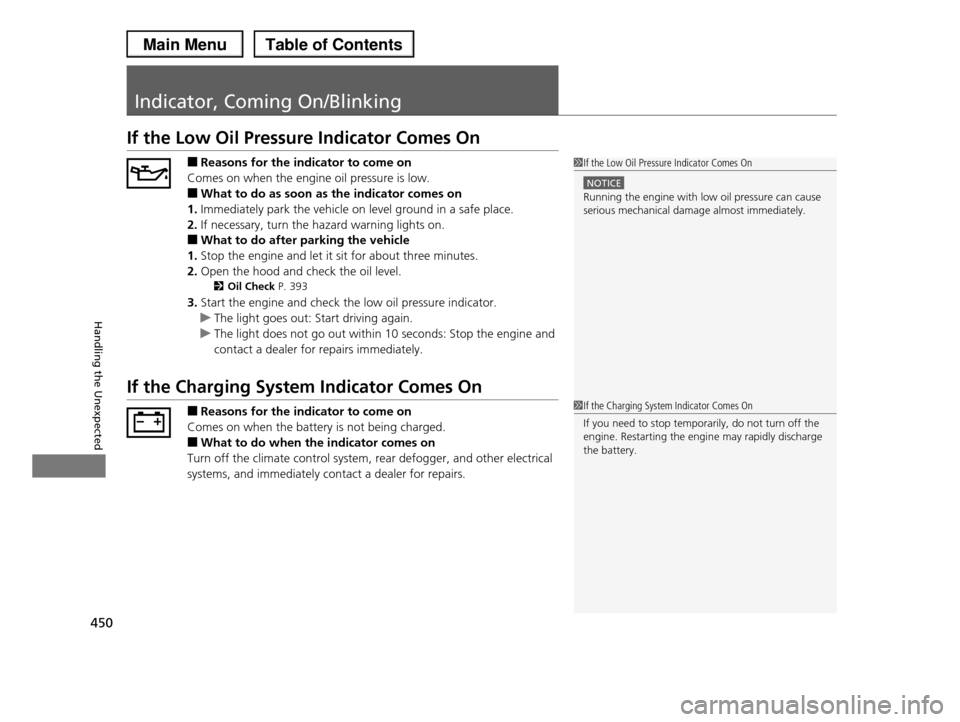
If the Low Oil Pressure Indicator Comes On
■Reasons for the indicator to come on
Comes on when the engine oil pressure is low.
■What to do as soon as the indicator comes on
1.Immediately park the vehicle on level ground in a safe place.
2.If necessary, turn the hazard warning lights on.
■What to do after parking the vehicle
1.Stop the engine and let it sit for about three minutes.
2.Open the hood and check the oil level.
2Oil Check P. 393
3.Start the engine and check the low oil pressure indicator.
uThe light goes out: Start driving again.
uThe light does not go out within 10 seconds: Stop the engine and
contact a dealer for repairs immediately.
If the Charging System Indicator Comes On
■Reasons for the indicator to come on
Comes on when the battery is not being charged.
■What to do when the indicator comes on
Turn off the climate control system, rear defogger, and other electrical
systems, and immediately contact a dealer for repairs.
1If the Low Oil Pressure Indicator Comes On
NOTICE
Running the engine with low oil pressure can cause serious mechanical damage almost immediately.
1If the Charging System Indicator Comes On
If you need to stop temporarily, do not turn off the
engine. Restarting the engine may rapidly discharge the battery.
Page 479 of 488
Index
478
Index
Index
A
ABS (Anti-lock Brake System)................... 362
AC Power Outlet....................................... 158
Accessories and Modifications................. 375
Accessory Power Sockets.......................... 156
Additives
Coolant ................................................... 397
Engine Oil ................................................ 392
Washer .................................................... 401
Additives, Engine Oil................................ 392
Adjusting
Armrest ................................................... 149
Front Seats .............................................. 137
Head Restraints........................................ 141
Mirrors .................................................... 135
Rear Seats................................................ 146
Steering Wheel ........................................ 134
Temperature .............................................. 87
Air Conditioning System (Climate Control
System).................................................... 165
Changing the Mode ................................ 165
Defrosting the Windshield and Windows . 166
Dust and Pollen Filter ............................... 427
Recirculation/Fresh Air Mode ................... 165
Sensors .................................................... 170
Synchronized Mode ................................. 167
Using Automatic Climate Control ............ 165
Air Pressure....................................... 415, 465
Airbags........................................................ 37
Advanced Airbags...................................... 43
After a Collision ......................................... 41
Airbag Care............................................... 51
Event Data Recorder .................................. 20
Front Airbags (SRS) .................................... 40
Indicator........................................ 48, 71, 75
Passenger Airbag Off Indicator .................. 49
Sensors ..................................................... 37
Side Airbag Cutoff System......................... 46
Side Airbag Off Indicator ........................... 50
Side Airbags .............................................. 44
Side Curtain Airbags.................................. 47
AM/FM Radio.................................... 186, 219
Anti-lock Brake System (ABS).................. 362
Indicator.................................................... 71
Armrest..................................................... 149
Audio Remote Controls................... 184, 217
Audio System............................................ 172
Adjusting the Sound........................ 185, 218
Auxiliary Input Jack.................................. 173
Error Messages ........................................ 266
General Information ................................ 272
iPod®....................................................... 240
MP3/WMA/AAC .............................. 207, 244
Reactivating ............................................ 174
Recommended CDs ................................. 273
Recommended Devices............................ 275
Remote Controls ............................. 184, 217
Security Code .......................................... 174
Theft Protection ...................................... 174
USB Adapter Cable.................................. 173
USB Flash Drives ...................................... 275
Audio/Information Display...................... 176
Authorized Manuals................................ 474
Auto Door Locking/Unlocking................ 105
Customize ........................................ 93, 106
Automatic Lighting.................................. 126
Automatic Transmission.......................... 345
Creeping................................................. 345
Fluid ....................................................... 399
Kickdown ............................................... 345
Operating the Shift Lever .................. 14, 347
Shift Lever Does Not Move ...................... 447
Shifting ................................................... 346
Auxiliary Input Jack................................. 173
Average Fuel Economy........................ 82, 88
Average Speed................................... 88, 177
B
Battery...................................................... 423
Charging System Indicator ................ 69, 450
Jump Starting ......................................... 445
Maintenance (Checking the Battery) ....... 423
Maintenance (Replacing) ......................... 424
Belts (Seat).................................................. 29
Beverage Holders..................................... 154
Bluetooth® Audio............................. 211, 248
Bluetooth® HandsFreeLink®............. 278, 301
Booster Seats (For Children)...................... 64
Brake System............................................ 360
Anti-lock Brake System (ABS) .................. 362
Brake Assist System................................. 363
Fluid ....................................................... 400