fuel HONDA PILOT 2013 2.G User Guide
[x] Cancel search | Manufacturer: HONDA, Model Year: 2013, Model line: PILOT, Model: HONDA PILOT 2013 2.GPages: 488, PDF Size: 10.18 MB
Page 83 of 488
uuGauges and DisplaysuInformation Display*
82
Instrument Panel
Shows the total number of miles or kilometers driven since the last reset. Meters A
and B can be used to measure two separate trips.
■Resetting a trip meter
To reset a trip meter, display it, then press and hold the knob. The trip meter is
reset to 0.0.
Shows the instant fuel economy as a bar graph in mpg or l/100 km.
Shows the estimated average fuel economy of each trip meter in mpg (U.S.) or l/100
km (Canada). The display is updated at set intervals. When a trip meter is reset, the
average fuel economy is also reset.
Shows the remaining oil life and Maintenance MinderTM.
2Maintenance Minder™ P. 381
Shows the estimated distance you can travel on the remaining fuel. This distance is
estimated from the fuel economy of your trips in the past.
■Trip Meter
■Instant Fuel Economy
■Average Fuel Economy
■Engine Oil Life
■Range
1Trip Meter
Switch between trip meter A and trip meter B by pressing the knob.
Page 84 of 488
83
uuGauges and DisplaysuInformation Display*
Continued
Instrument Panel
Appears when the fuel fill cap is loose or is not installed.
2Check/Tighten Fuel Cap Message P. 451
Shows each tire’s pressure.
2TPMS (Tire Pressure Monitoring System) P. 355
■Check Fuel Cap
■Tire Pressure Monitor
Page 87 of 488
86
uuGauges and DisplaysuMulti-Information Display*
Instrument Panel
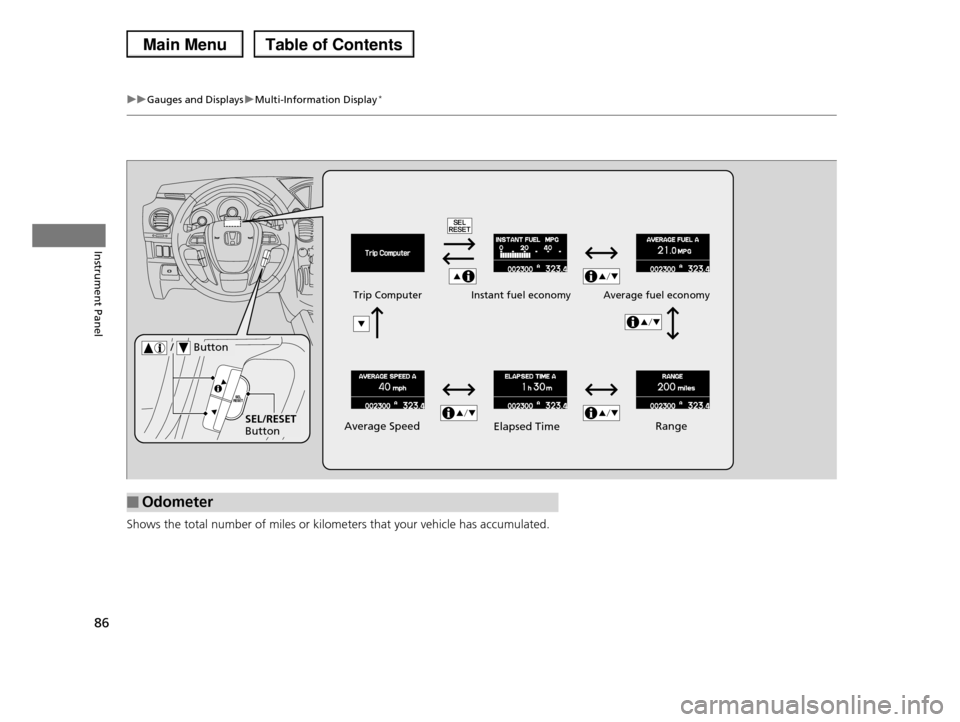
Shows the total number of miles or kilometers that your vehicle has accumulated.
■Odometer
Average Speed
Average fuel economyTrip ComputerInstant fuel economy
SEL/RESET Button
/ Button
RangeElapsed Time
Page 89 of 488
uuGauges and DisplaysuMulti-Information Display*
88
Instrument Panel
Shows the instant fuel economy, average fuel economy, range, elapsed time, and
average speed.
■Instant Fuel Economy
Shows the instant fuel economy as a bar graph in mpg (U.S.) or l/100 km (Canada).
■Average Fuel Economy
Shows the estimated average fuel economy of each trip meter in mpg (U.S.) or l/100
km (Canada). The display is updated at set intervals. When a trip meter is reset, the
average fuel economy is also reset.
■Range
Shows the estimated distance you can travel on the remaining fuel. This distance is
estimated from the fuel economy of your trips in the past.
■Elapsed Time
Shows the time elapsed since the last time Trip A or Trip B was reset.
■Average Speed
Shows the average speed in mph or km/h since the last time Trip A or Trip B was
reset.
Shows each tire's pressure.
2TPMS (Tire Pressure Monitoring System) P. 355
■Trip Computer
■Tire Pressure Monitor
1Average Fuel Economy
You can change when to reset the average fuel economy.
2Customized Features P. 90
1Elapsed Time
You can change when to reset the elapsed time.
2Customized Features P. 90
1Average Speed
You can change when to reset the average speed.
2Customized Features P. 90
Page 93 of 488
92
uuGauges and DisplaysuMulti-Information Display*
Instrument Panel
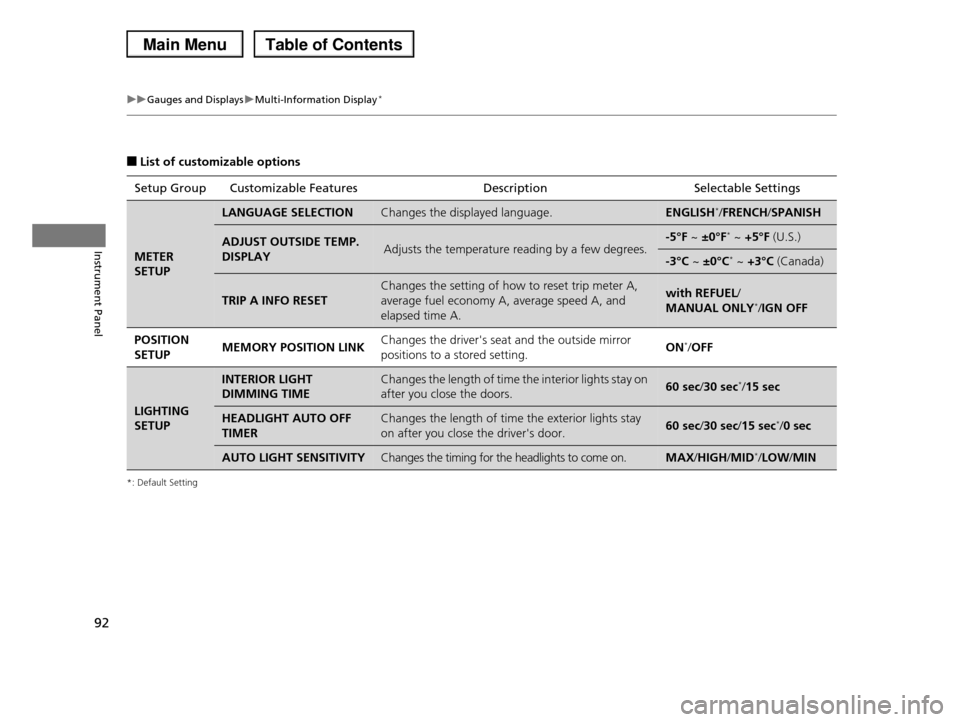
■List of customizable options
*: Default Setting
Setup Group Customizable FeaturesDescriptionSelectable Settings
METER
SETUP
LANGUAGE SELECTIONChanges the displayed language.ENGLISH*/FRENCH/SPANISH
ADJUST OUTSIDE TEMP.
DISPLAYAdjusts the temperature reading by a few degrees.-5°F ~ ±0°F* ~ +5°F (U.S.)
-3°C ~ ±0°C* ~ +3°C (Canada)
TRIP A INFO RESET
Changes the setting of how to reset trip meter A,
average fuel economy A, average speed A, and
elapsed time A.
with REFUEL/
MANUAL ONLY*/IGN OFF
POSITION
SETUPMEMORY POSITION LINKChanges the driver's seat and the outside mirror
positions to a stored setting.ON*/OFF
LIGHTING
SETUP
INTERIOR LIGHT
DIMMING TIME
Changes the length of time the interior lights stay on
after you close the doors.60 sec/30 sec*/15 sec
HEADLIGHT AUTO OFF
TIMER
Changes the length of time the exterior lights stay
on after you close the driver's door.60 sec/30 sec/15 sec*/0 sec
AUTO LIGHT SENSITIVITYChanges the timing for the headlights to come on.MAX/HIGH/MID*/LOW/MIN
Page 95 of 488
94
uuGauges and DisplaysuMulti-Information Display*
Instrument Panel
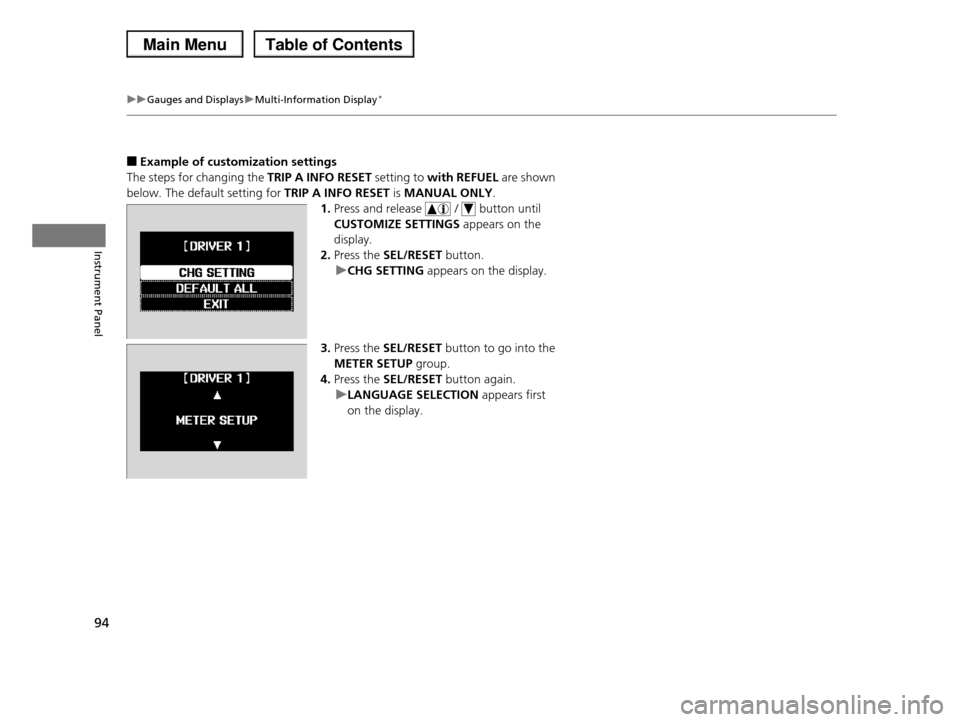
■Example of customization settings
The steps for changing the TRIP A INFO RESET setting to with REFUEL are shown
below. The default setting for TRIP A INFO RESET is MANUAL ONLY.
1.Press and release / button until
CUSTOMIZE SETTINGS appears on the
display.
2.Press the SEL/RESET button.
uCHG SETTING appears on the display.
3.Press the SEL/RESET button to go into the
METER SETUP group.
4.Press the SEL/RESET button again.
uLANGUAGE SELECTION appears first
on the display.
Page 96 of 488
95
uuGauges and DisplaysuMulti-Information Display*
Instrument Panel
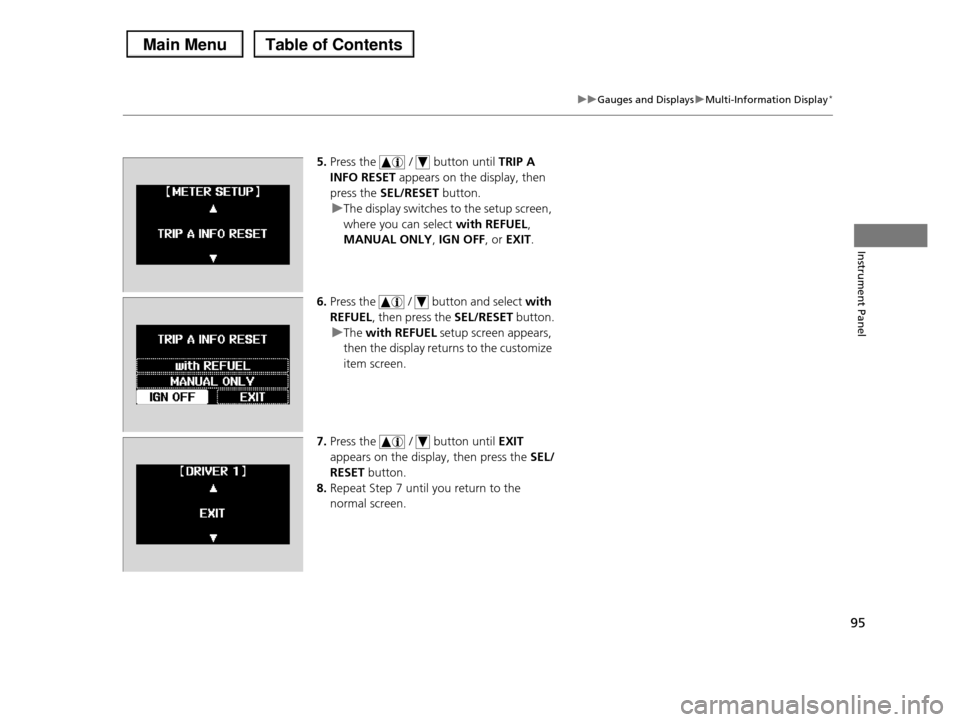
5.Press the / button until TRIP A
INFO RESET appears on the display, then
press the SEL/RESET button.
uThe display switches to the setup screen,
where you can select with REFUEL,
MANUAL ONLY, IGN OFF, or EXIT.
6.Press the / button and select with
REFUEL, then press the SEL/RESET button.
uThe with REFUEL setup screen appears,
then the display returns to the customize
item screen.
7.Press the / button until EXIT
appears on the display, then press the SEL/
RESET button.
8.Repeat Step 7 until you return to the
normal screen.
Page 178 of 488
Continued177
uuAudio System Basic OperationuAudio/Information Screen*
Features
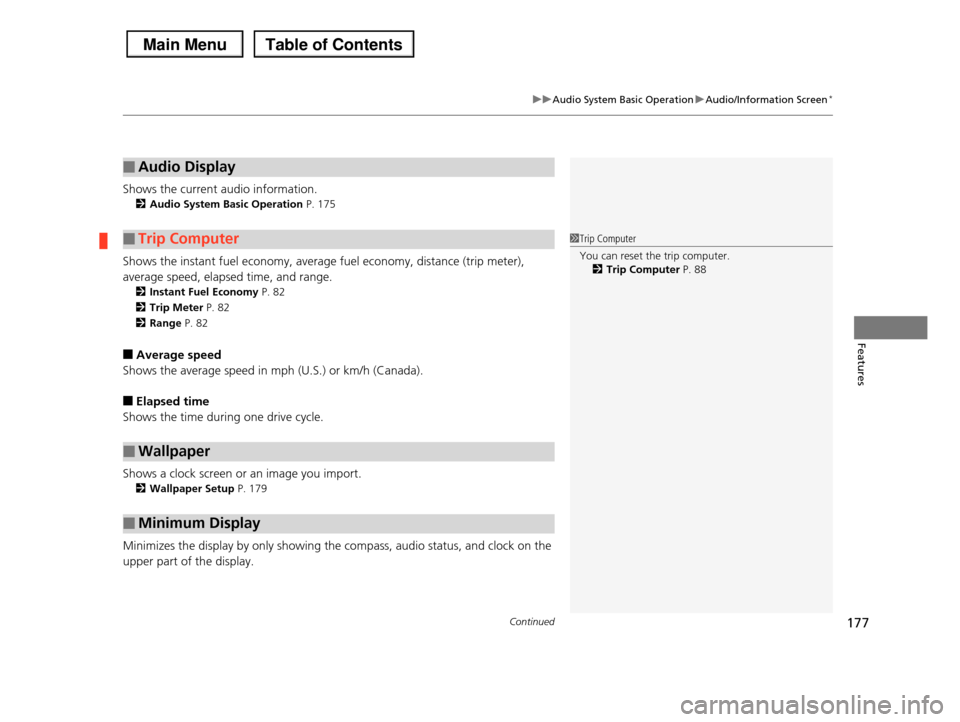
Shows the current audio information.
2Audio System Basic Operation P. 175
Shows the instant fuel economy, average fuel economy, distance (trip meter),
average speed, elapsed time, and range.
2Instant Fuel Economy P. 82
2Trip Meter P. 82
2Range P. 82
■Average speed
Shows the average speed in mph (U.S.) or km/h (Canada).
■Elapsed time
Shows the time during one drive cycle.
Shows a clock screen or an image you import.
2Wallpaper Setup P. 179
Minimizes the display by only showing the compass, audio status, and clock on the
upper part of the display.
■Audio Display
■Trip Computer
■Wallpaper
■Minimum Display
1Trip Computer
You can reset the trip computer.
2Trip Computer P. 88
Page 324 of 488
323
Driving
This chapter discusses driving, refueling, and information on items such as accessories.
Before DrivingDriving Preparation .......................... 324 Maximum Load Limit........................ 327Towing a TrailerTowing Preparation .......................... 329Driving Safely with a Trailer .............. 338Towing Your Vehicle ........................ 339Off-Highway Driving GuidelinesGeneral Information ......................... 340Important Safety Precautions............ 340Avoiding Trouble ............................. 341When DrivingStarting the Engine .......................... 342Precautions While Driving................. 344
Automatic Transmission ................... 345Shifting ............................................ 346Cruise Control ................................. 348VSA® (Vehicle Stability Assist), aka ESC (Electronic Stability Control), System ...... 352VTM (Variable Torque Management)-4r System*............................................. 354TPMS (Tire Pressure Monitoring System) ... 355Tire Pressure Monitoring System (TPMS) - Required Federal Explanation ......... 357BrakingBrake System ................................... 360ABS (Anti-lock Brake System) ........... 362
Brake Assist System ......................... 363Parking Your VehicleWhen Stopped ................................ 364Parking Sensor System*................... 365Rearview Camera*............................ 369Multi-View Rear Camera*................ 370Refueling
Fuel Information .............................. 371
How to Refuel ................................. 372
Fuel Economy.................................... 374
Accessories and Modifications
Accessories ...................................... 375
Modifications................................... 375
* Not available on all models
Page 344 of 488
343
uuWhen DrivinguStarting the Engine
Driving
1.Keeping your right foot on the brake pedal, release the parking brake. Check that
the parking brake indicator has gone off.
2Parking Brake P. 360
2.Put the shift lever in (D. Select (R when reversing.
3.Gradually release the brake pedal and gently depress the accelerator pedal to pull
away.
■Hill start assist system
Hill start assist keeps the brake engaged briefly to help prevent the vehicle from
rolling on inclines as you move your foot from the brake pedal to the accelerator.
Move the shift lever to (D or (d when facing uphill, or (R when facing downhill,
then release the brake pedal.
■Starting to Drive1Starting the Engine
The immobilizer system protects your vehicle from theft. If an improperly coded key (or other device) is
used, the engine's fuel system is disabled.
2Immobilizer System P. 118
1Hill start assist system
Hill start assist may not prevent the vehicle from
rolling downhill on a very steep or slippery slope, and does not operate on small inclines.
Hill start assist is not a replacement for the parking brake.
Hill start assist will operate even when VSA® is switched off.