key HONDA PILOT 2013 2.G Owner's Manual
[x] Cancel search | Manufacturer: HONDA, Model Year: 2013, Model line: PILOT, Model: HONDA PILOT 2013 2.GPages: 488, PDF Size: 10.18 MB
Page 151 of 488
150
Controls
Interior Lights/Interior Convenience Items
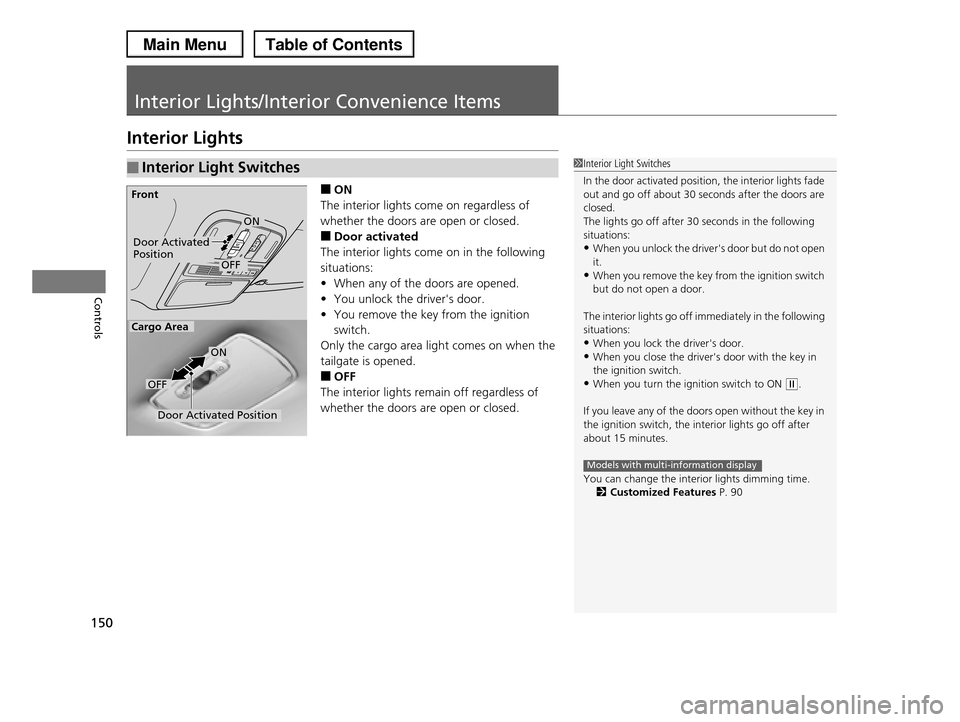
Interior Lights
■ON
The interior lights come on regardless of
whether the doors are open or closed.
■Door activated
The interior lights come on in the following
situations:
•When any of the doors are opened.
•You unlock the driver's door.
•You remove the key from the ignition
switch.
Only the cargo area light comes on when the
tailgate is opened.
■OFF
The interior lights remain off regardless of
whether the doors are open or closed.
■Interior Light Switches1Interior Light Switches
In the door activated position, the interior lights fade out and go off about 30 seconds after the doors are
closed.
The lights go off after 30 seconds in the following
situations:•When you unlock the driver's door but do not open
it.
•When you remove the key from the ignition switch but do not open a door.
The interior lights go off immediately in the following situations:
•When you lock the driver's door.
•When you close the driver's door with the key in the ignition switch.
•When you turn the ignition switch to ON (w.
If you leave any of the doors open without the key in
the ignition switch, the interior lights go off after
about 15 minutes.
You can change the interior lights dimming time.2Customized Features P. 90
Models with multi-information display
Door Activated PositionOFF
Front
Door Activated Position
ON
OFF
Cargo Area
ON
Page 153 of 488
152
uuInterior Lights/Interior Convenience ItemsuInterior Convenience Items
Controls
Interior Convenience Items
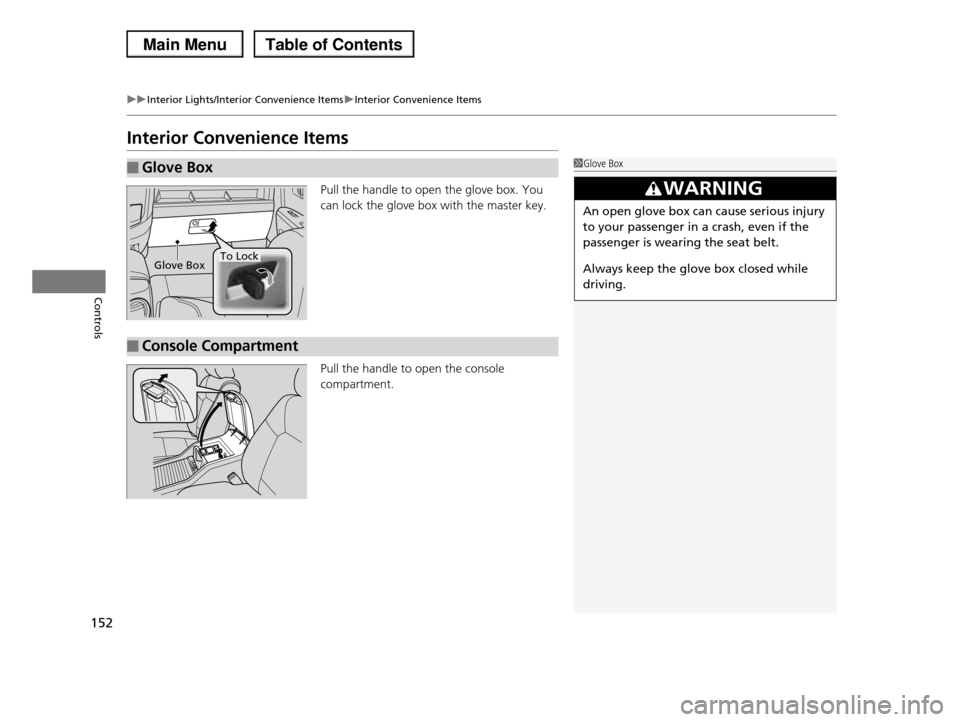
Pull the handle to open the glove box. You
can lock the glove box with the master key.
Pull the handle to open the console
compartment.
■Glove Box1Glove Box
3WARNING
An open glove box can cause serious injury
to your passenger in a crash, even if the
passenger is wearing the seat belt.
Always keep the glove box closed while
driving.
Glove BoxTo Lock
■Console Compartment
Page 304 of 488
303
uuBluetooth® HandsFreeLink®uHFL Menus
Continued
Features
HFL Menus
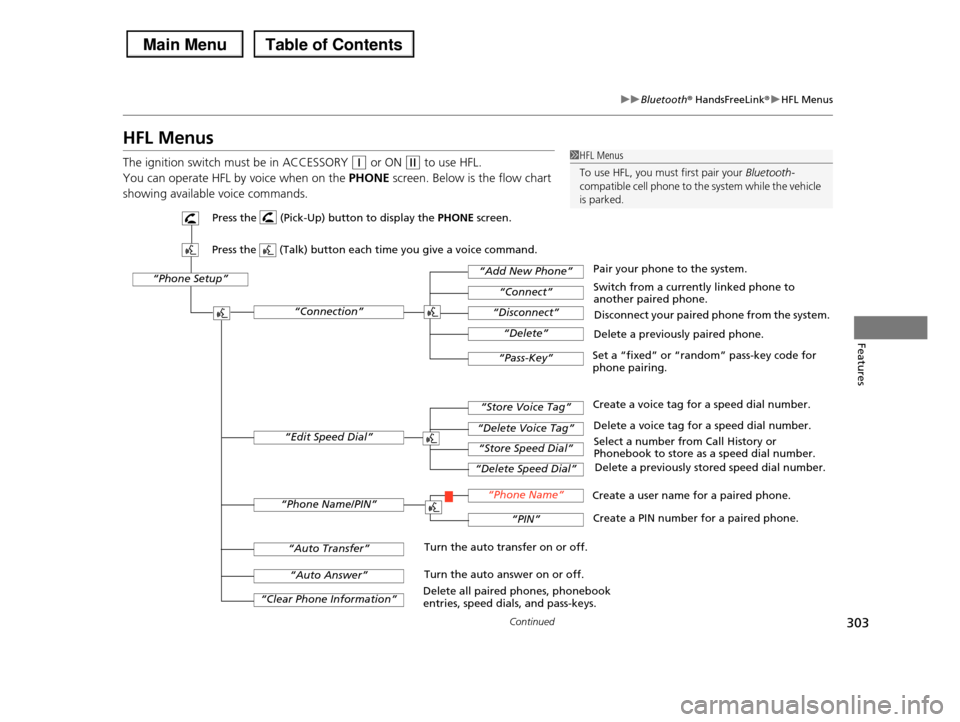
The ignition switch must be in ACCESSORY (q or ON (w to use HFL.
You can operate HFL by voice when on the PHONE screen. Below is the flow chart
showing available voice commands.
1HFL Menus
To use HFL, you must first pair your Bluetooth-
compatible cell phone to the system while the vehicle is parked.
“Phone Setup”
Delete a previously paired phone.
Switch from a currently linked phone to another paired phone.
Pair your phone to the system.
Disconnect your paired phone from the system.
Set a “fixed” or “random” pass-key code for phone pairing.
“Connection”
“Add New Phone”
“Connect”
“Disconnect”
“Delete”
“Pass-Key”
Delete a voice tag for a speed dial number.
Create a voice tag for a speed dial number.
Select a number from Call History or Phonebook to store as a speed dial number.
Delete a previously stored speed dial number.
“Edit Speed Dial”
“Store Voice Tag”
“Delete Voice Tag”
“Store Speed Dial”
“Delete Speed Dial”
Create a PIN number for a paired phone.
Create a user name for a paired phone.“Phone Name/PIN”“Phone Name”
“PIN”
“Clear Phone Information”
“Auto Answer”
“Auto Transfer”Turn the auto transfer on or off.
Turn the auto answer on or off.
Delete all paired phones, phonebook entries, speed dials, and pass-keys.
Press the (Pick-Up) button to display the PHONE screen.
Press the (Talk) button each time you give a voice command.
Page 306 of 488
Continued305
uuBluetooth® HandsFreeLink®uHFL Menus
Features
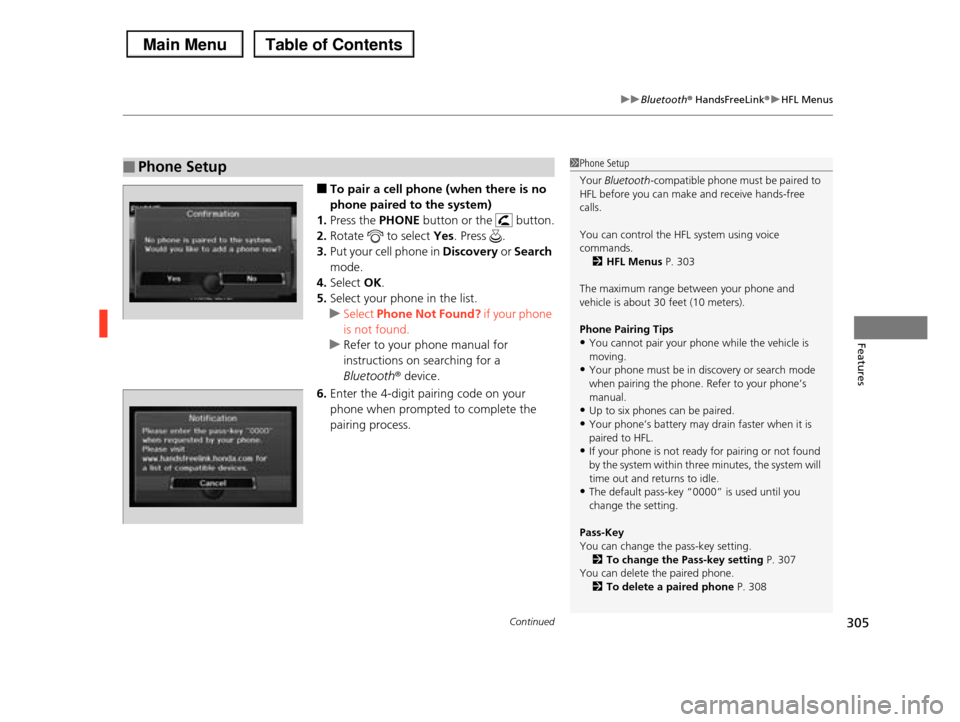
■To pair a cell phone (when there is no
phone paired to the system)
1.Press the PHONE button or the button.
2.Rotate to select Yes. Press .
3.Put your cell phone in Discovery or Search
mode.
4.Select OK.
5.Select your phone in the list.
uSelect Phone Not Found? if your phone
is not found.
uRefer to your phone manual for
instructions on searching for a
Bluetoothr device.
6.Enter the 4-digit pairing code on your
phone when prompted to complete the
pairing process.
■Phone Setup1Phone Setup
Your Bluetooth-compatible phone must be paired to HFL before you can make and receive hands-free
calls.
You can control the HFL system using voice
commands.
2HFL Menus P. 303
The maximum range between your phone and
vehicle is about 30 feet (10 meters).
Phone Pairing Tips
•You cannot pair your phone while the vehicle is moving.
•Your phone must be in discovery or search mode
when pairing the phone. Refer to your phone’s manual.
•Up to six phones can be paired.
•Your phone’s battery may drain faster when it is
paired to HFL.•If your phone is not ready for pairing or not found
by the system within three minutes, the system will
time out and returns to idle.•The default pass-key “0000” is used until you
change the setting.
Pass-Key
You can change the pass-key setting.
2To change the Pass-key setting P. 307You can delete the paired phone.
2To delete a paired phone P. 308
Page 308 of 488
307
uuBluetooth® HandsFreeLink®uHFL Menus
Continued
Features
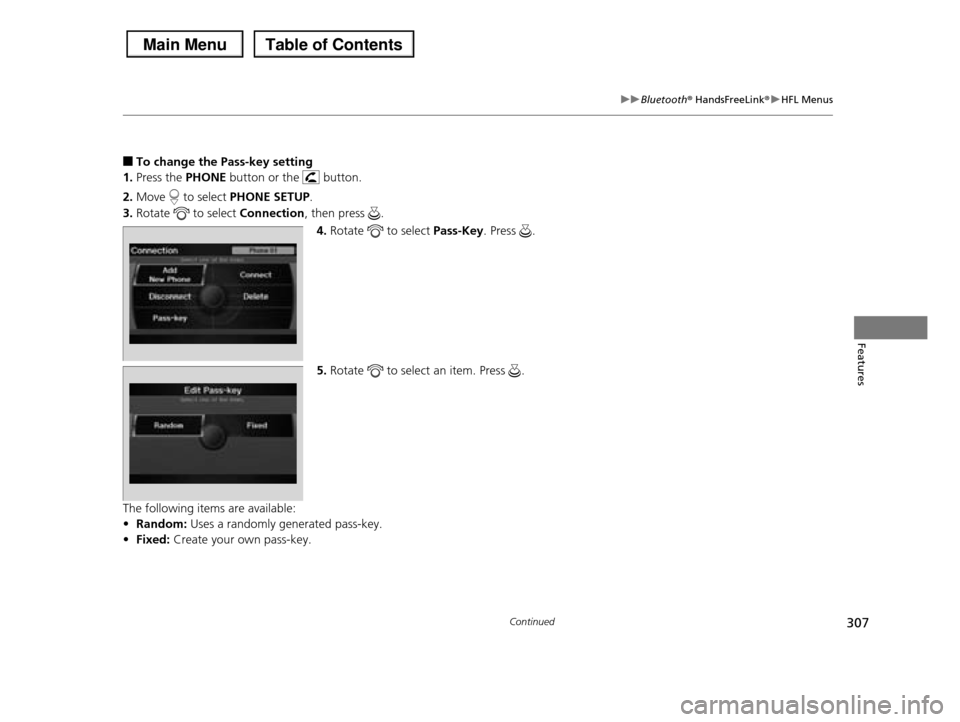
■To change the Pass-key setting
1.Press the PHONE button or the button.
2.Move to select PHONE SETUP.
3.Rotate to select Connection, then press .
4.Rotate to select Pass-Key. Press .
5.Rotate to select an item. Press .
The following items are available:
•Random: Uses a randomly generated pass-key.
•Fixed: Create your own pass-key.
Page 309 of 488
308
uuBluetooth® HandsFreeLink®uHFL Menus
Features
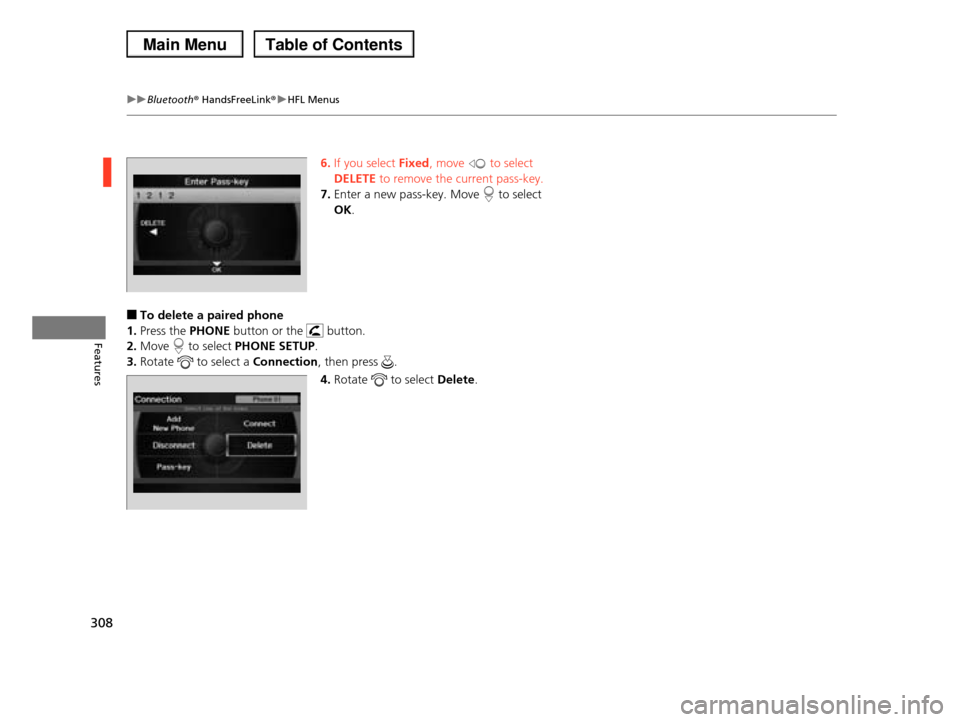
6.If you select Fixed, move to select
DELETE to remove the current pass-key.
7.Enter a new pass-key. Move to select
OK.
■To delete a paired phone
1.Press the PHONE button or the button.
2.Move to select PHONE SETUP.
3.Rotate to select a Connection, then press .
4.Rotate to select Delete.
Page 313 of 488
uuBluetooth® HandsFreeLink®uHFL Menus
312
Features
All paired phones, phonebook entries, speed dials, and pass-keys are erased.
1.Press the PHONE button or the button.
2.Move to select PHONE SETUP.
3.Rotate to select Clear Phone Information, then press .
u If more than one phone is paired to the system, select the phone you want to
clear. The Bluetooth icon indicates the currently linked phone. Move to
select OK.
4.Rotate to select Yes, then press .
5.You will receive a notification message on the screen. Rotate to select Yes,
then press .
6.You will receive a notification message on the screen. Rotate to finish.
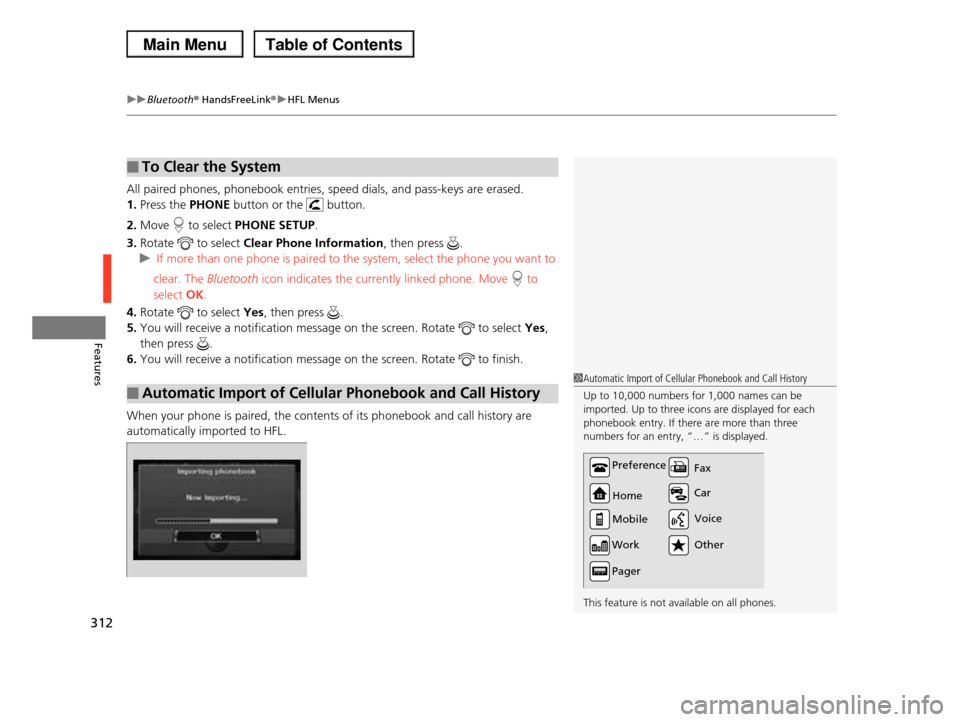
When your phone is paired, the contents of its phonebook and call history are
automatically imported to HFL.
■To Clear the System
■Automatic Import of Cellular Phonebook and Call History
1Automatic Import of Cellular Phonebook and Call History
Up to 10,000 numbers for 1,000 names can be
imported. Up to three icons are displayed for each phonebook entry. If there are more than three
numbers for an entry, “…” is displayed.
This feature is not available on all phones.
Preference
Home
Mobile
Work
Pager
Car
Fax
Other
Voice
Page 325 of 488
324
Driving
Before Driving
Driving Preparation
Check the following items before you start driving.
•Make sure there are no obstructions on the windows, door mirrors, exterior
lights, or other parts of the vehicle.
uRemove any frost, snow, or ice.
uRemove any snow on the roof, as this can slip down and obstruct your field of
vision while driving. If frozen solid, remove ice once it has softened.
uWhen removing ice from around the wheels, be sure not to damage the wheel
or wheel components.
•Make sure the hood is securely closed.
uIf the hood opens while driving, your front view will be blocked.
•Make sure the tires are in good condition.
uCheck air pressures, and check for damage and excessive wear.
2Checking and Maintaining Tires P. 414
•Make sure there are no people or objects behind or around the vehicle.
uThere are blind spots from the inside.
■Exterior Checks1Exterior Checks
NOTICE
When doors are frozen shut, use warm water around
the door edges to melt any ice. Do not try to force
them open, as this can damage the rubber trim around the doors. When done, wipe dry to avoid
further freezing.
Do not pour warm water into the key cylinder.
You will be unable to insert key if the water freezes in
the hole.
Heat from the engine and exhaust can ignite
flammable materials left under the hood, causing a fire. If you've parked your vehicle for an extended
period, inspect and remove any debris that may have
collected, such as dried grass and leaves that have fallen or have been carried in for use as a nest by a
small animal. Also check under the hood for leftover
flammable materials after you or someone else has performed maintenance on your vehicle.
Page 343 of 488
342
Driving
When Driving
Starting the Engine
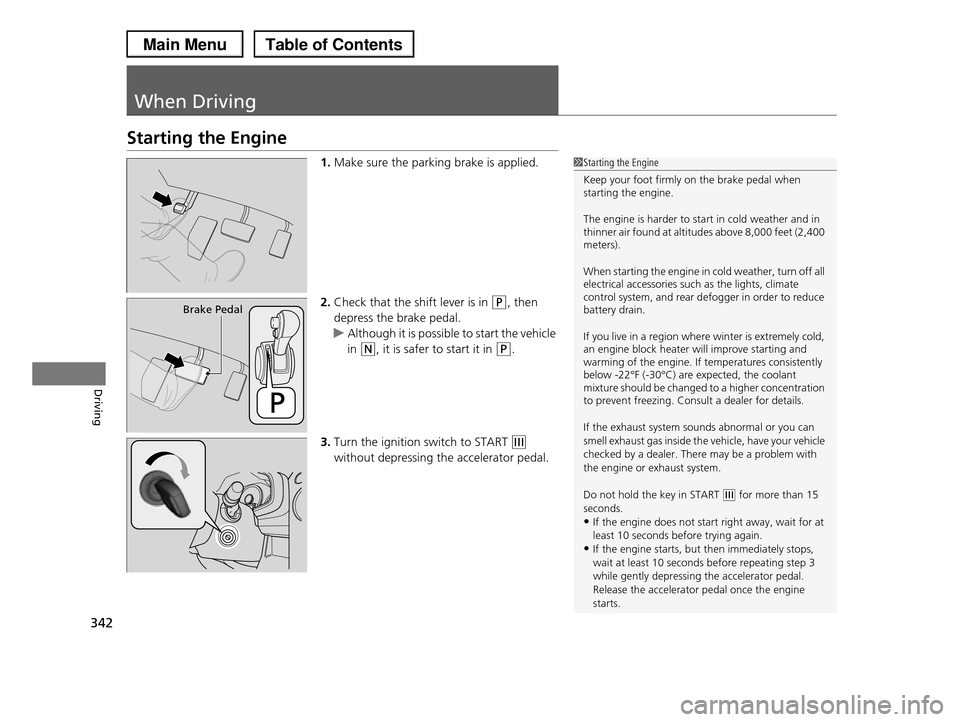
1.Make sure the parking brake is applied.
2.Check that the shift lever is in (P, then
depress the brake pedal.
uAlthough it is possible to start the vehicle
in (N, it is safer to start it in (P.
3.Turn the ignition switch to START (e
without depressing the accelerator pedal.
1Starting the Engine
Keep your foot firmly on the brake pedal when starting the engine.
The engine is harder to start in cold weather and in thinner air found at altitudes above 8,000 feet (2,400 meters).
When starting the engine in cold weather, turn off all electrical accessories such as the lights, climate control system, and rear defogger in order to reduce battery drain.
If you live in a region where winter is extremely cold, an engine block heater will improve starting and warming of the engine. If temperatures consistently below -22°F (-30°C) are expected, the coolant mixture should be changed to a higher concentration to prevent freezing. Consult a dealer for details.
If the exhaust system sounds abnormal or you can
smell exhaust gas inside the vehicle, have your vehicle
checked by a dealer. There may be a problem with the engine or exhaust system.
Do not hold the key in START (e for more than 15 seconds.
•If the engine does not start right away, wait for at
least 10 seconds before trying again.•If the engine starts, but then immediately stops,
wait at least 10 seconds before repeating step 3
while gently depressing the accelerator pedal.Release the accelerator pedal once the engine
starts.
Brake Pedal
Page 344 of 488
343
uuWhen DrivinguStarting the Engine
Driving
1.Keeping your right foot on the brake pedal, release the parking brake. Check that
the parking brake indicator has gone off.
2Parking Brake P. 360
2.Put the shift lever in (D. Select (R when reversing.
3.Gradually release the brake pedal and gently depress the accelerator pedal to pull
away.
■Hill start assist system
Hill start assist keeps the brake engaged briefly to help prevent the vehicle from
rolling on inclines as you move your foot from the brake pedal to the accelerator.
Move the shift lever to (D or (d when facing uphill, or (R when facing downhill,
then release the brake pedal.
■Starting to Drive1Starting the Engine
The immobilizer system protects your vehicle from theft. If an improperly coded key (or other device) is
used, the engine's fuel system is disabled.
2Immobilizer System P. 118
1Hill start assist system
Hill start assist may not prevent the vehicle from
rolling downhill on a very steep or slippery slope, and does not operate on small inclines.
Hill start assist is not a replacement for the parking brake.
Hill start assist will operate even when VSA® is switched off.